INTRANET BASED E-LEARNING USING REAL TIME
TRANSMISSION PROTOCOL
Hemant Rajput
1, Shekhar Sharma
2, Amit Mistry
3,
Sagar Soni
4,
Mrs. Suvarna Jadhav
51,2,3,4
B.E.INFT Student, Atharva College of Engineering, Malad, Mumbai, (India)
5
Project Guide, Department of Information Technology,
Atharva College of Engineering, Malad, Mumbai, (India)
ABSTRACT
Due to increase in use of computers in educational organization there has aroused the need to come up with
software which provides communication with machines over Intranet. A LAN based Audio/Video based
conferencing system designed for use by individual participants in a conference. In one embodiment
one participant in the system is designated as an Instructor. Rest o f the participants will be Students. Our
proposed idea includes Audio/Video conferencing for a virtual classroom scenario that is E-Learning, Group
Chat session between Instructor and all the Participants, Resource Sharing between only Instructor and
Participant that is only One to One Sharing for sharing study material and a Questionnaire which is useful for
doubt solving or any questions when either Instructor or any Participant is Offline or Unavailable at the
moment. Our main focus is to implement Real Time-Transmission Protocol for Broadcasting Audio/Video
Conferencing.
Keywords: Audio/Video Conferencing; E-Learning; Rtp; Real Time Transmission Protocol;
Virtual Classrooms
I. INTRODUCTION
II. POPULAR IMPLEMENTATION MODEL
Success of Instructor Led Online training using web conferencing setup depends on how well it is architecture, designed and deployed in an enterprise[5].There are various approaches towards implementing a web conferencing solution in an enterprise, [5,6] which depends on the need of having the same. These requirements range from using the web conferencing implementation to conduct formal and informal meeting or important training programs. Primarily enterprise can choose between or on-premise setup
2.1. Hosted Setup with Limited Or Enterprise License
In case of hosted setup, enterprise connects to services that are configured and hosted at vendor’s environment. Typically every organization which takes such a service from the vendor, gets a clearly defined storage space, work space and web portal to organize, schedule, plan and record the training programs. Enterprises receives two types of accesses on their respective environments, administrator and user management. User management ensures administrator role can create more administrators and end-users in the environment and add users of the organization to provide them appropriate access to participate in various events, programs, and sessions.[2] A lot depends on the enterprise-dedicated infrastructure from the Internet Service Provider as hosted implementation uses internet backbone to participate in the events. Since participants are geographically dispersed, the bandwidth requirement drastically reduces and does not become a reason of contention at any specific location. However, if participants are not equally dispersed and are located at specific places in larger numbers for example offshore offices, then the quality of event and training program will depend on how good the internet bandwidth is from localized places. Another important aspect is to ensure there are appropriate proxy configurations to ensure smooth sail for event connections across offshore locations. If participants are joining from outside-office location, then a lot will depend on what connection bandwidth an individual has to join the event. [2]
III. PROPOSED SYSTEM
model and extend the architecture to have web conferencing servers also on premise to consolidate a large pool of available servers both at intranet and at internet. For new candidates, and others who may be intimidated by benefits choices, the E-Learning course will provide an overview to bring all candidates up to a baseline level of Knowledge. Crew members will be guided through the course by an high end GUI and humor will be used, as appropriate, to engage learners. Where appropriate, visuals (e.g., tables, graphs, flow charts) and specific examples will be used to illustrate concepts to Crew members with a variety of learning styles. Throughout the course, links to benefits information on the resource hub will provide another layer of information— more detailed than what is in the course. This will enable learners to get more information on topics that are particularly relevant to them. Once Crew members are ready to make their benefits decisions, we will make it as easy as possible for them to access the specific information they need on the server, thus encouraging them to act as benefits consumers, researching the options and making the decisions that work best for them. All the virtual class would be recorded so as to enable the absentees.
IV. CONFERENCING ARCHITECHTURE
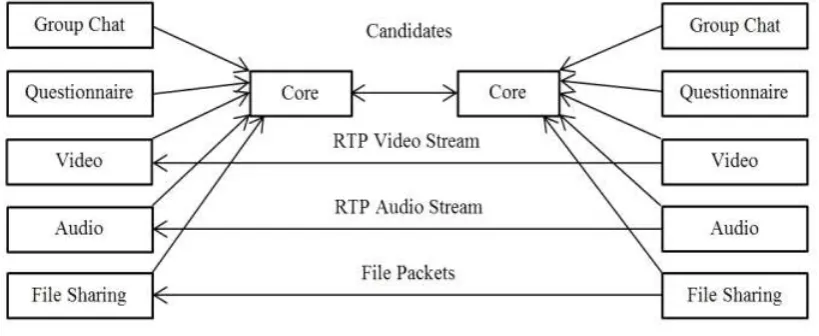
The conferencing architecture gives us the overview of how the system works. Each core in the diagram represents the workstation. Two video and audio conferencing modules will communicate with each other using Real Time Transmission Protocol. Before using these various functionalities shown in the diagram it is essential to set up communication between two PCs i.e. workstations.[1]
Fig. 1 Architecture
4.1
RTP
4.2 RTP Header
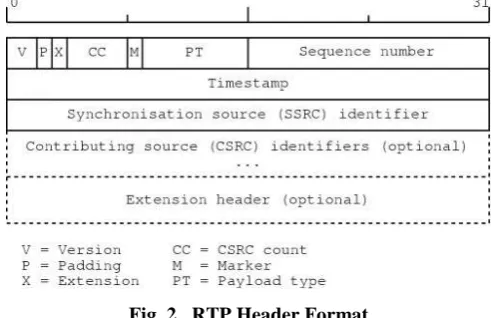
The RTP header provides the timing information necessary to synchronize and display audio and video data and to determine whether packets have been lost or arrive out of order. In addition, the header specifies the payload type, thus allowing multiple data and compression types. This is a key advantage over most proprietary solutions, which specify a particular type of compression and thus limit users' choice of compression schemes.
Fig. 2. RTP Header Format
The RTP header has a minimum size of 12 bytes. After the header, optional header extensions may be present. This is followed by the RTP payload, the format of which is determined by the particular class of application. The fields in the header are as follows:
•Version: (2 bits) Indicates the version of the protocol. Current version is 2.
•P(Padding):(1 bit) Used to indicate if there are extra padding bytes at the end of the RTP packet. Padding might be used to fill up a block of certain size, for example as required by an encryption algorithm. The last byte of the padding contains the number of padding bytes that were added (including itself).
•X(Extension):(1bit)Indicates presence of an Extension header between standard header and payload data. This is application or profile specific.
•CC(CSRC Count):(4 bits) Contains the number of CSRC identifiers (defined below) that follow the fixed header.
•M (Marker):(1 bit) Used at the application level and defined by a profile. If it is set, it means that the current data has some special relevance for the application.
•PT(Payload Type):(7 bits) Indicates the format of the payload and determines its interpretation by the application. This is specified by an RTP profile. For example, see RTP Profile for audio and video conferences with minimal control.
•Sequence Number :(16 bits) The sequence number is incremented by one for each RTP data packet sent and is to be used by the receiver to detect packet loss and to restore packet sequence. The RTP does not specify any action on packet loss; it is left to the application to take appropriate action. For example, video applications may play the last known frame in place of the missing frame. The initial value of the sequence number should be random to make known-plaintext attacks on encryption more difficult. RTP provides no guarantee of delivery, but the presence of sequence numbers makes it possible to detect missing packets.
use that value as its clock resolution. The clock granularity is one of the details that is specified in the RTP profile for an application.
•SSRC: (32 bits) Synchronization source identifier uniquely identifies the source of a stream. The synchronization sources within the same RTP session will be unique.
•CSRC :(32 bits each) Contributing source IDs enumerate contributing sources to a stream which has been generated from multiple sources.
•Extension header: (optional) The first 32-bit word contains a profile-specific identifier (16 bits) and a length specify
V. SYSTEM BLOCK DIAGRAM
Fig.3 Block Diagram
VI. PROPOSED SYSTEM
Interaction between teacher and students wherein students who are registered in the system can discuss among themselves the topic in consideration and even then if they have any doubts they can consult the teacher available at that time. i.e. there is be ONE TO MANY interaction where one teacher interacts with more than one student discussing the topic at that time and solves their doubts
VII. PROJECT SCREENSHOT
7.1 Parent Form
Fig.4 Parent
7.2 Login Form
Teacher and Student both have to enter their username and password to Start or to Join the session, the username and pass will get checked with database
Fig.5 Login window
7.3 Selection and Resource
Student can select various subjects from the list who’s lecture s/he wish to join. Also from ―Get All Resource‖ student can download all the necessary notes , assignments or any important information uploaded by teacher/ who started the session.
7.4 Other features Are
Discussion Forum: It is a forum for all learners and teachers to exchange knowledge with all other users who are registered with e-Learning. This is also meant for learners to interact with teacher to exchange their thoughts on topics taught. One can View other queries replies
I. Post a query. II. Reply a query.
o Learning is self-directed, allowing students to choose content and tools appropriate to their differing interests, needs, and skill levels
o Accommodates multiple learning styles using a variety of delivery methods geared to different learners; more effective for certain learners
o Designed around the learner
o Geographical barriers are eliminated, opening up broader education options
o 24/7 accessibility makes scheduling easy and allows a greater number of people to attend classes
o On-demand access means learning can happen precisely when needed
o Travel time and associated costs (parking, fuel, vehicle maintenance) are reduced or eliminated
o Potentially lower costs for companies needing training, and for the providers
o Fosters greater student interaction and collaboration
o Fosters greater student/instructor contact
o Enhances computer and Internet skills
o Has the attention of every major university in the world, most with their own online degrees, certificates, and individual courses
VIII. FUTURE ENHANCEMENTS & CONCLUSION
The key applications makes course is suitable for new and established computer users, individually or in groups, at home or in the organization. Meeting the highest e-learning instructional design standards, In future projects providing a group discussion among the various students who are registered with the application can be created. Enhanced application may allow the students to share resources among themselves. Flash Animations, Real time videos can be used as teaching aids, in order, to increase the interest of students. Online examinations can be conducted in order to obtain the overall idea of how well students have understood.
REFERENCES
[1] Kedar Jedhe, Suraj Gosavi, Swapnil Kharche, Rahul Bagul, Prof. S. M. Sangave, ―Intranet Conferencing Solution‖ International Journal of Emerging Technology and Advanced Engineering Website: www.ijetae.com (ISSN 2250-2459,Volume 2, Issue 4, April 2012)
[2] Alok Tiwari, Amit Tiwary, Yogesh Bhatt, ―A Distributed Web Conferencing Architecture to Meet Inorganic Training Needs of an Enterprise‖ International Conference on Education and ManagementTechnology (ICEMT 2010)
[4] Bernard, R. M., Abrami, P.C., Lou, Y., Borokhovski, E.,Wade, A., Wozney, L., Wallet, P.A., Fiset, M., and Huang, B.2004. How Does Distance Education Compare With Classroom Instruction? A Meta-Analysis of the Empirical Literature. Review of Educational Research, 74, 3 (Fall 2004),379-439.
[5] Sue Spielman and Liz Winfeld, The Web Conferencing Book: Understand the technology, choose the right vendors.AMACOM, 2003.