Android Architecture and Related Security Risks
Jamil Khan, Sara Shahzad
Department of Computer Science, University of Peshawar, Pakistan
Email: {jamilkhan, sara}@upesh.edu.pk
Abstract— Android operating system is a fascinating
operat-ing system developed for mobile devices. It is beoperat-ing used in a comparatively large number of embedded & mobile plat-forms. This paper presents a brief introduction to Android operating system, and some discussion about its version his-tory. Furthermore, the discussion goes through architecture of the operating system, difference between Android modi-fied kernel and Linux kernel, new Android Runtime envi-ronment ART, security and privacy risks, and at the end, a simple basic solution is suggested to prevent from those risks.
Keywords
–
Android, Linux, Architecture, ART, DVM, APII. INTRODUCTION
Smart phones, tablets, and other handheld devices are used surprisingly by a large number of users in last few years, so the operating systems for these devices become more important. Android operating system is designed for low powered devices, with integrated hardware like cam-eras, Wi-Fi, Bluetooth, a touch screen, and GPS. Android supports applications to use hardware features through abstraction and provides environment for applications [2].
Andy Rubin laid the foundation of Android Inc. in Oc-tober 2003, with its co-founders Rich Miner, Nick Sear, and Chris White. Later on in August 2005, Android Inc. was bought by Google. It is an open source operating sys-tem, which is free to use and modify. For the first time, its beta version was released on November 12, 2007.Android 1.0, September 2008, was its first commercial version, updated to Android 1.1 in February 2009 for T-Mobile G1. HTC Dream was the first commercially available Android device [3].The operating system is now adopted by a large number of manufacturers for their handheld devices including Samsung, Sony Ericsson, Motorola, Huawei, and QMobiles, and about 80% of smartphones run on it.
Android OS is supported by a modified version of Linux 2.6 kernel [1] [3] [6], which is updated from time to time with different versions of Android. Google published its complete source code under an Apache License, which permits vendors to add proprietary extensions that might not be submitted back to the open source community.
II. HARDWARE
Android OS supports ARM architecture, with x86 and MIPS architecture. Minimum hardware requirements have been changed gradually during different releases. Mini-mum requirements for its first release were 32 MB of RAM (128 MB was recommended), 32 MB of Flash memory, and a 200 MHz processor based on ARM
archi-tecture (ARMv5). Using official Android emulator or any third-party emulator, Android can be run directly on x86-based architecture.
Android can be used on other devices like laptops, netbooks, smartbooks, and smart TVs [12]. To control household devices (i.e. light switches, thermostats, and power sockets), an automation system for home, “Android @Home” was introduced in 2011[10].
According to Andy Rubin, Google was thinking to present its services as cloud service provider for bringing Google products into consumers’ homes [11].
III.VERSION HISTORY
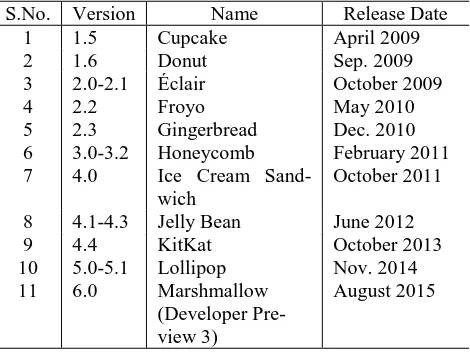
Different versions of Android operating system are available since its first release, where bugs in previous versions are fixed and also new features are added to the operating system. All the versions are named alphabetical-ly. Table 1 shows a complete version history of Android Operating System.
S.No. Version Name Release Date 1 1.5 Cupcake April 2009
2 1.6 Donut Sep. 2009
3 2.0-2.1 Éclair October 2009
4 2.2 Froyo May 2010
5 2.3 Gingerbread Dec. 2010 6 3.0-3.2 Honeycomb February 2011 7 4.0 Ice Cream
Sand-wich
October 2011
8 4.1-4.3 Jelly Bean June 2012
9 4.4 KitKat October 2013
10 5.0-5.1 Lollipop Nov. 2014 11 6.0 Marshmallow
(Developer Pre-view 3)
August 2015
Table 1 Android Operating System Version History
The development and maintenance of Android is cur-rently controlled by the Android Open Source Project (AOSP). Major improvements in each version [1] are shortly described below:
Cupcake – New features like system-wide refine-ments of all core User Interface elerefine-ments, window transitions animation (off by default), in-call expe-rience, browsers, gmail, camera & gallery, im-proved performance via faster start-up and image capturing capability of camera, faster GPS location acquirement, page scrolling smoothening, on-screen keyboard (portrait and landscape), support for installing third-party keyboards, and user dic-tionary for custom words, kernel version 2.6.27;
search across multiple sources effectively and con-sistently. An updated user interface for camera, camcorder, and gallery, new virtual private net-work VPN, 802.1x, battery usage indicator, an up-graded Linux kernel from 2.6.27 to 2.6.29;
Eclair – Multi-account support for email and con-tact synchronization, search functionality for all saved SMS and MMS messages, improved layout of virtual keyboard, Bluetooth 2.1 support, and several new developer APIs, kernel version 2.6.29;
Froyo – Widget for home screen tips, dedicated shortcuts for phone, app launcher, browser, im-proved security via numeric pin and alpha-numeric passwords, WiFi-hotspot for up to 8 devices, mul-tiple keyboard languages, enhanced browser per-formance using V8 engine for faster loading of Ja-vaScript-heavy pages, new media framework (Stagefright), application error reports, upgraded Linux kernel version 2.6.32;
Gingerbread – UI refinements for simplicity and speed, one-touch word selection, improved power management, NFC reader application, large screen resolution support, enhancements for gaming, up-graded Linux kernel 2.6.35;
Honeycomb – Screens support APIs, support for USB connectivity, new screen density for 720p televisions and similar devices, upgraded kernel version 2.6.36;
Ice Cream Sandwich – Refined and evolved UI for users, multitasking, resizable widgets, enhanced text input and enriched spell-checking, advanced gallery app, Wi-Fi P2P and Bluetooth HDP, en-hanced accessibility APIs, security for apps and contents, kernel version 3.0.1;
Jelly Bean – Restricted profiles for tablets, Blue-tooth smart support, dial pad autocomplete, im-proved support of Hebrew and Arabic, kernel ver-sion 3.0.31-3.4.0;
KitKat – Android ART with Ahead-of-time (AOT) instead Dalvik with just-in-time (JIT) compilation, Improved memory management, smoother and faster multi-tasking, improved Google Now, print documents over WiFi or Bluetooth, built-in sensors, NFC host card emulation, upgraded Linux kernel version 3.10.17;
Lollipop – Android ART with Ahead-of-time (AOT) instead Dalvik with just-in-time (JIT) com-pilation, improved performance up to 4x by intro-ducing ART (new Android runtime), support for 64 bit devices, bolder graphics, improved audio and video support, OpenGL ES 3.1 support, easy access to information and performing task through OK Google, 15 new languages added, kernel ver-sion 3.10.54;
Marshmallow – New boot animation, system UI tuner, support of porting or developing apps for Marshmallow i.e. API level 23, users ability to toggle individual permissions per app, Android 6.0 SDK, new performance monitor, light and dark setting themes, quick settings optimization;
According to Google updates regarding Android OS
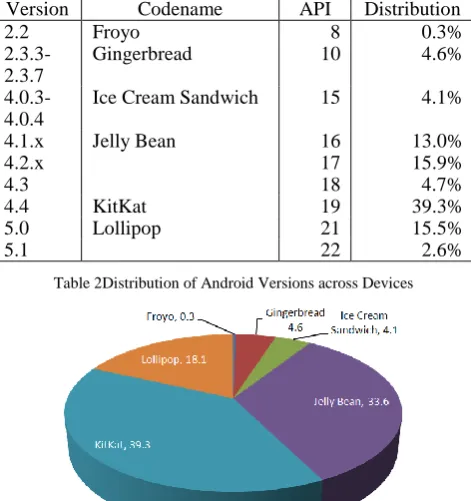
distribution of all devices which have been accessed Google Play, Lollipop jumps from 15.5% to 18% of the distribution. Table 2 and Figure 1 show the percentage of active Android devices.
Version Codename API Distribution
2.2 Froyo 8 0.3%
2.3.3- 2.3.7
Gingerbread 10 4.6%
4.0.3- 4.0.4
Ice Cream Sandwich 15 4.1%
4.1.x Jelly Bean 16 13.0%
4.2.x 17 15.9%
4.3 18 4.7%
4.4 KitKat 19 39.3%
5.0 Lollipop 21 15.5%
5.1 22 2.6%
Table 2Distribution of Android Versions across Devices
Figure 1Distribution of Android Versions across Devices
The data were collected within a 7-day period ending on August 2015.
IV.ARCHITECTURE
From architecture point of view, Android operating system is divided into four layers: the kernel layer, librar-ies and runtime layer, applications framework layer, and applications layer [7]. Android kernel is a modified ver-sion of Linux2.6 kernel, which is updated from time to time with different versions of Android. The libraries pro-vide support for graphics, media capabilities, and data storage. Android runtime, embedded in libraries layer, contains the Dalvik virtual machine to power the applica-tions [7].As a replacement of Dalvik, Android introduced its new Android RunTime (ART) with ahead-of-time (AOT) compilation, which improves performance. All applications use the applications framework API for ac-cessing the lowest level of the architecture.
Figure 2Architecture of Android Operating System
the layers consist of multiple program modules such that the operating system, middle-ware and other central ap-plications. Each upper layer avails the services of its low-er laylow-er.
A.
The Kernel Layer
The kernel used by Android Operating System is a modified version of Linux Kernel to carry out some spe-cial requirements of the platform. Linux was chosen since it is open source, and has verified pathway evidence. Drivers are needed to be rewritten in various cases. Linux kernel provides mechanism for networking, drivers, virtu-al memory management and power management [8].
It works at ease with hardware and also holds all the necessary hardware drivers. Drivers control and be in touch with hardware. For example, all devices contain Bluetooth hardware [8], so the kernel must also provide a Bluetooth driver for Bluetooth hardware to communicate with. Linux kernel is used for process management, memory management, networking, security settings etc. Android can be ported to a number of hardware, which is a comparatively easy and effortless task.
B.
Native Libraries Layer
Native libraries layer is second layer of Android oper-ating system architecture, which supports device for han-dling various types of data. These libraries are written in C/C++. Some of these important libraries are:
Surface Manager – used for window manager off-screen buffering, means a user cannot draw into the screen directly, but drawing goes to off-screen buffer, where it is joint through other drawings, making the final screen presented to the user.
Media framework – consists of different types of media codec which support different media for-mats to be recorded and played.
SQLite – Android uses SQLite as database engine for the purpose of storing data.
WebKit – used for displaying HTML contents.
OpenGL – used to display 2D and 3D graphics content on screen.
Runtime layer is positioned at the same level with li-braries layer, which contains DVM (Dalvik Virtual Ma-chine) and core libraries written in java. These libraries are responsible for providing various core classes, availa-ble in a JVM. Dalvik Virtual machine, used as runtime, is now replaced by Android new runtime ART. The DVM runs special types of files (.dex) as a substitute of .class files [7] [9]. The .class files are converted to .dex files during compilation, and are capable of providing higher efficiency in low resource environments.
C.
Applications Framework Layer
User applications interact directly with applications framework layer, which manages basic functionalities of phone, such as managing resources, and voice calls. The applications framework layer provides APIs, which are used by applications for sharing of data sharing, accessing of telephony system, and getting notifications. Applica-tion framework consists of:
Activity Manager: manages activity life cycle of
apps.
Content Providers: manage sharing data between apps.
Telephony Manager: manage and access voice calls within application.
Location Manager: uses GPS or cell tower for Lo-cation management.
Resource Manager: Manage resources of different used in our apps.
D.
Applications Layer
Applications are written in Java, which are then inter-preted by Dalvik virtual machine, which is now replaced by Android RunTime (ART). Even the most primary fea-tures like phone and contacts application do exist in this layer. This layer consists of apps written by Android team, and some third-party software, installed on device. User interface can be redeveloped reasonably easily and effort-lessly by allowing access of third-party developers to this layer. A number of standard applications are pre-installed with all devices, such as: Dialer app, Contact manager app, SMS client app, and a Web browser app.
New apps can be written which may replace existing system apps. It means that developers are given oppor-tunity to access any particular feature, and whatever they want to do with the Android. Thus Android provides end-less opportunities to its developers.
V. ANDROID RUNTIME (ART)
A new Android Runtime, ART, is introduced along-side DVM, as a part of Android 4.4 KitKat [13], for boosting up the performance of Android devices. Dalvik uses JIT (just-in-time) compilation [13] [15], each time an app is launched; some part of the source code needed for its execution is converted to machine code.
In contrast to Just-in-Time (JIT) compilation, ART compiles code Ahead-of-Time (AOT) i.e. an app is pre-compiled only once during its installation, which elimi-nates delay caused by JIT compilation, and the app is exe-cuted comparatively much faster. A benefit of AOT is that apps are executed with less CPU usage, which results in low battery wastage. Although, this type of native transla-tion of the apps takes more space, but as a result of large available physical storage on today’s devices, ART is considered a best possible replacement of Dalvik in An-droid devices [14].
According to Marko Vitas, ART has the some benefits over Dalvik like Speed of CPU floating operations, RAM, and storage operations is increased by approximately 20%, and 10% respectively[13].
Some apps like Whatsapp and Titanium Backup are currently reported not compatible with ART, but this problem will hopefully be resolved soon. From developers’ perspective, testing apps with ART takes more time and causes substantial delay in deployment process (from 28.33% to 41.67%), because ART uses ahead of time (AOT) compilation i.e. the whole code is translated to machine code during installation.
VI.MEMORY MANAGEMENT
operating system is, therefore, designed in such a way to manage memory (RAM), which maintains power use at a minimum. For example, an app is not in use anymore, will automatically be suspended in memory by the system – which is still technically in “running” state. Power is not wasted unnecessarily by the background apps so there is no need to close them and reopen again next time required. Some of the apps are suspended and need not to use any of the resources like processing or battery power, are kept as idle.
If memory becomes low, inactive processes and apps are killed by the system for efficient and automatic memory management. This process is invisible to the user.
VII. SECURITY AND PRIVACY
Android applications execute in a sandbox [7]. Sand-boxing is a technique where applications cannot access other system resources without explicit access permis-sions granted by user during installation. During app in-stallation, user is prompted with all the required permis-sions of using system resources to that app.
For example, a gaming app may only need to enable vibration mode or store data on SD card. It does not need to access messages or phonebook, so it should not request for such permissions [18]. User can select to accept or refuse after reviewing those permissions.
The sandboxing mechanism and permissions system diminishes the impact of risks and bugs in apps. Antivirus software are released for Android devices by a number of security firms, including Lookout Mobile Security, AVG Technologies, and McAfee.
Application sandboxing is debatable because of its complexity, which may lead to more security issues than the sandboxing mechanism was initially considered to prevent. The sandbox consists of all the essential files required for execution of an application, which can also generate issues in those applications that need to com-municate with one another. An application, for example, is needed to access contacts list, sandboxing would cause that app to lose its important functionality [16].
Android’s permission security mechanism allows us-ers to decide whether an app should be installed or not, by showing authority information by the system during in-stallation. However, users generally do not care about permissions during installation, and average users think they are safe when they are not [4] [5]. Some apps can exploit the services of other apps without prior permission request.
Google launched Bouncer as Android security feature in February 2012 [17], for watching over and scanning Google Play Store for malicious apps before they access Android devices. But this approach doesn’t sound as good. According to Tommy Armendaris, while Bouncer is run-ning, an attacker can disguise an application from being malicious, and install the malware on a device [18].
The Open Source is accessible to both developers and hackers. Thus the framework cannot be trusted for devel-oping critical systems. Any app can access device data such as GSM and SIM marketer IDs without making any request for user permission [4].
Android platform provides numerous security features,
but the risk will always be there and the user will install suspicious apps or allow critical permissions to an app without paying attention [4].
Android smartphones provides a facility for reporting location and building databases of a large number of Wi-Fi access points, as users move from one place to another. Users are also provided with an online facility; called An-droid Device Manager; to secure, track, and locate their Android devices (smartphones) remotely. ADM was re-leased in December 2013 on Play store as an application for Froyo (version 2.2) and upper versions [11].
VIII. HOW TO STAY SAFE
This paper suggests the following basic security solu-tion for Android system to prevent from installing infect-ed apps:
A user should download [17] applications from a trusted app market only like Google Play or Ama-zon Appstore.
Users should thoroughly check all permissions during an app installation.
There must be option for user to tick on or off permissions, for example, user can select if an app X may be allowed to access to user location or not.
Pay attention to app reviews as users all around rate infected poorly and warn other users to be prevented through app reviews [17].
Users are discouraged to download apps from un-official market [17], installing apps from un-official app store is more secure and will reduce security risks.
Users are suggested to use antivirus applications.
IX.CONCLUSION
Due to a rapid increase of smartphones and other smart devices, Android became the most fascinating oper-ating system among a range of smart phone companies. It is based on a modified version of Linux kernel 2.6 with some further architectural changes. Architecture for An-droid operating system is divided into four layers and each lower layer provides services to its upper layer. DVM is now replaced by new Android Runtime ART for perfor-mance enhancement. Android released a number of ver-sions of the operating system where flaws and bugs in previous versions are fixed and some new features are added. These versions are named in alphabetic order.
Although security mechanisms like sandboxing, bouncer, built in malware scanner, and permissions sys-tem reduces security risks, but still there is no proper solu-tion for preventing from malicious apps and attackers.
REFERENCES
[1] Android Developers webpage, http://developer.android.com/index.html [access: 08.2015] [2] Brahler Stefan, Analysis of the Android Architecture, KIT –
Uni-versität des Landes Baden-Wurttemberg und nationales For-schungszentrum in der Helmholtz-Gemeinschaft, 2010
[3] Leader, Michael Wei Team. "Comprehensive Analysis of SmartPhone OS Capabilities and Performance", 2009
[5] Park, Jae-Kyung, and Sang-Yong Choi. “Studying Security Weaknesses of Android System”, International Journal of Securi-ty & Its Applications 9.3 (2015)
[6] Al-Rayes, Hadeel Tariq. “Studying Main Differences between Android & Linux Operating Systems”, International Journal of Electrical & Computer Sciences IJECS-IJENS 12.05 (2012) [7] F Gilski, Przemyslaw, and Jacek Stefanski, Android OS: A
Re-view, TEM Journal – vol. 4, pp. 116-120, 2015
[8] Stefan Brahler, “Analysis of the Android Architecture – KIT”, KIT, 2 Jun. 2010 – 6 Oct. 2010
[9] Enck, William, et al. “A Study of Android Application Security”, USENIX security symposium. Vol. 2.
[10] Nilay Patel, “Home in the clouds: Google's home automation platform to have major services integration”, http://www.theverge.com/2012/2/27/2827615/android-home-automation-cloud-services-andy-rubin
[11] Android, http://en.wikipedia.org/wiki/Android_(operating_system) [12] Android Architecture – The Key Concepts of Android OS,
http://www.android-app-market.com/android-architecture.html [13] Vitas Marko, “ART vs Dalvik – introducing the new android
runtime in kitkat”, https://infinum.co/the-capsized- eight/articles/art-vs-dalvik-introducing-the-new-android-runtime-in-kit-kat
[14] ART and Dalvik, https://source.android.com/devices/tech/dalvik/ [15] Frumusanu Andrei, “A Closer Look at Android RunTime (ART)
in Android L”, http://www.anandtech.com/show/8231/a-closer-look-at-android-runtime-art-in-android-l
[16] R. Margaret, J. Margaret “application sandboxing definition”, http://searchmobilecomputing.techtarget.com/definition/applicatio n-sandboxing
[17] Armendariz Tommy, “Is Google Play Safe?”, http://antivirus.about.com/od/wirelessthreats/a/Is-Google-Play-Safe.htm [access: September 2015]