interface (API) methods to provide customized acces-sibility services in their own applications. However, the accessibility service has access to critical sensitive information, including information about applications that are currently running and account information. Attackers could utilize such a vulnerability to conduct various types of attacks.
To prove the concept, we develop a malicious applica-tion which exploits this vulnerability. The installation, activation, and the payload of our malicious application are described as follows. First, to install our malicious application onto user devices, our malicious application may appear as a legitimate accessibility service applica-tion and provide some accessibility functionality. The installation of our malicious application requests the BIND_ACCESSIBILITY_SERVICE permission. Of course, other permissions are required if the malicious payload requires such permissions. The malicious application is triggered once an AccessibilityEvent object is dis-patched. There are twenty-two AccessibilityEvent types, and each type of AccessibilityEvent exposes
On Malware Leveraging the Android Accessibility
Framework
Joshua Kraunelis
1, Yinjie Chen
1, Zhen Ling
2,*, Xinwen Fu
1, Wei Zhao
31Computer Science Department, University of Massachusetts Lowell, One University Avenue, Lowell, MA 01854, 2School of Computer Science and Engineering, Southeast University, Nanjing, China,
Abstract
1. Introduction
The number of mobile malware samples has increased enormously over the past two years while mobile devices have becomeaubiquitoustool indailylife.InMarch2013, Juniper Networks [18] reported their Mobile Threat Center had discovered over276 thousand malware samples, a 614 percent increase over 2012. With 92 percent of mobile malware being Androidmalware,analyzing andcategorizing these malware are important steps toward predicting new attacks. Many malware samples share similar characteristics and are slight variants of one another[33]. Some malicious applications attempt to trick the user by masquerading as a benign application, but surreptitiously use paid services or steal userdata. Alongside analyzing andcategorizing known malware samples, it is also important to identify and fix vulnerabilities in the Android platform that may beused by creatorsof malicious applications.
In this paper, we explore a security and privacy risk hidden within the Android accessibility framework. The Android accessibility framework is developed to assist physically impaired users. Android develop-ers can utilize accessibility applications programming
___________________________
The number of Android malware has been increasing dramatically in recent years. Android malware can violate users’ security, privacy and damage their economic situation. Study of new malware will allow us to better understand the threat and design effective anti-malware strategies. In this paper, we introduce a new type of malware exploiting Android’s accessibility framework and describe a condition which allows malicious payloads to usurp control of the screen, steal user credentials and compromise user privacy and security. We implement a proof of concept malware to demonstrate such vulnerabilities and present experimental findings on the success rates of this attack. We show that 100% of application launches can be detected using this malware, and 100% of the time a malicious Activity can gain control of the screen. Our major contribution is two-fold. First, we are the first to discover the category of new Android malware manipulating Android’s accessibility framework. Second, our study finds new types of attacks and complements the categorization of Android malware by Zhou and Jiang [32]. This prompts the community to re-think categorization of malware for categorizing existing attacks as well as predicting new attacks.
Keywords: Android, Malware, Attack
Received on 1 April 2014 accepted on 23 February 2015, published on 26 May 2015.
Copyright © 2015 Z. Ling et al., licensed to ICST. This is an open access article distributed under the terms of the Creative Commons Attribution licence (http://creativecommons.org/licenses/by/3.0/), which permits unlimited use, distribution and reproduction in any medium so long as the original work is properly cited.
doi: 10.4108/ue.1.4.e1
types in section 2. Our malicious application supports various malicious payloads. In this paper, we imple-ment one payload which launches a masquerade attack to collect user’s email login credentials.
Our major contributions are summarized below:
• We are the first to identify malware leveraging Android’s accessibility framework. The impact of this attack is severe, given that it can be used to activate various malicious payloads. For example, the payload can be various masquerade attacks, emulating Email, Facebook and other popular apps to steal user
credentials and cause other damage. We test our proof-of-concept malware against multiple anti-malware applications and none are able to detect it.
• We identify a potential logic error in the way the Android user interface framework manages the order of application launches. When two applications are launched nearly simultaneously, both launch requests consider the first request to be processed as the next application to be launched, preventing the second launch from occurring. This can lead to a variety of attacks, such as denial of service and masquerade attacks, as we discuss in Section 3.3.
• Our study complements the categorization of Android malware by Zhou and Jiang [33], who present a systematic characterization of existing Android malware by their strategies of installation, activation, payload and permission use. We identify new events for activation and our attack shows that the payload can be other attacks, such as the masquerade attack demonstrated in this paper. • We also discuss possible countermeasures against the
security risk from the Android accessibility framework.
The rest of the paper is organized into six sections. Section 2 introduces Android accessibility service. Section 3 introduces our attack. We evaluate our proposed attack in Section 4, and discuss countermeasures in Section 5. Section 6 introduces other related work, and Section 7 concludes this paper.
2. Background
In this section, we introduce the Android accessibility service and masquerade attack. The malicious payload of the new malware can be a set of attacks, depending on which app a victim user launches. The malware detects the app launch via the Android accessibility service, displays a corresponding user interface imper-sonating the app, and performs credential collection or other malicious behavior.
2.1. Android Accessibility Service
An Android application must contain one or more of the following four components: Activity, Service, Broadcast Receiver, and Content Provider [15]. Activities repre-sent tasks involving user interaction and can display drawable components, such as widgets, to the screen. The operating system ensures that only a single Activ-ity for any application is displayed at once, i.e. only one application may be in the foreground at one time. Services are used for long running tasks that do not require a user interface. Unlike Activities, Services may run in the background and therefore multiple Services from different applications may run simultaneously. Broadcast Receivers receive messages, in the form of data constructs called Intents, from the Android system or user applications. An application must register for those Intents which it is interested in receiving. The registration of certain Intents may require permission to be granted by the user at install time. Content Providers enable data sharing between applications. The exploit presented in this paper will focus on Activities and Services.
The Android operating system contains an accessibil-ity framework [9] for enhancing the experience of users who have visual or other impairments. Typical acces-sibility enhancements include enlargement and text-to-speech conversion of on-screen elements, high con-trast color schemes, and haptic feedback. Android pro-vides a Java API to its accessibility framework so that developers can integrate accessibility functionality into their applications. All drawable elements derive from a common ancestor, the View class, which contains built-in calls to Accessibility API methods. Thus, most user interface widgets in the Android framework make their accessibility information available by default, though developers are encouraged to provide additional infor-mation in the android:contentDescription XML lay-out attribute. Accessibility information such as the UI event type, class name of the object in which the event occurred or originated, and string value repre-senting some associated data can be populated into an AccessibilityEvent object and dispatched to enabled AccessibilityServices via the appropriate method call [19]. There are twenty two AccessibilityEvent types: TYPE_ANNOUNCEMENT,TYPE_GESTURE_D
ETECTION_END,TYPE_GESTURE_DETECTION_STA RT,TYPE_NOTIFICATION_STATE_CHANGED,TYPE _TOUCH_EXPLORATION_GESTURE_END,TYPE_TO UCH_EXPLORATION_GESTURE_START,TYPE_TOU CH_INTERACTION_END,TYPE_TOUCH_INTERACT ION_START,TYPE_VIEW_ACCESSIBILITY_FOCUSE D,TYPE_VIEW_ACCESSIBILITY_FOCUS_CLEARED, TYPE_VIEW_CLICKED,TYPE_VIEW_FOCUSED,TYP E_VIEW_HOVER_ENTER,TYPE_VIEW_HOVER_EXI T,TYPE_VIEW_LONG_CLICKED,TYPE_VIEW_SCRO
2 different information which can be utilized by our malicious application to activate different malicious payloads. We will introduce these AccessibilityEvent
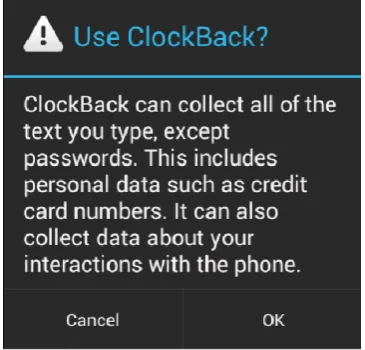
Figure 1. Accessibility Service Warning Dialog
LLED,TYPE_VIEW_SELECTED,TYPE_VIEW_TEXT_C HANGED,TYPE_VIEW_TEXT_SELECTION_CHANG ED,TYPE_VIEW_TEXT_TRAVERSED_AT_MOVEME NT_GRANULARITY,TYPE_WINDOW_CONTENT_C HANGED,TYPE_WINDOW_STATE_CHANGED [10].
Additionally, as of Android 1.6, developers may create custom accessibility services by extending the AccessibilityService class [11]. Descendants of AccessibilityService must override the onAccessibilityEvent method, which gets called each time an Accessibility Event occurs and is passed the populated AccessibilityEvent object. A custom AccessibilityService may then use the information contained in the AccessibilityEvent or optionally query the window content for the contextual data needed to perform its function. Naturally, the receipt of an event and its associated data and the ability to query window content present a security risk. For example, every time a user inputs text into anEditText widget, a custom AccessibilityService will receive an AccessibilityEvent with type TYPE_VIEW_TEXT_ CHANGED that contains the text that the user input. To mitigate this risk, the Android system requires that AccessibilityServices be enabled manually by the user and displays a dialog window alerting the user to the risk.
The alert in Figure 1 states that the service can collect all of the text a user types, except for passwords. Passwords are prevented from being collected if the android:password XML attribute of the EditText object is true, causing the typed characters to display as asterisks and the AccessibilityEvent not to be populated with the EditText content. We describe a technique in Section3that does allow passwords to be collected.
2.2. Masquerade Attack
We formally define masquerade attacks as attacks impersonating existing apps such as those found on Google Play and other Android markets. Masquerade attacks can use the same names, icons and/or interfaces as those legitimate apps to masquerade. The “or" is used here since it can be enough for a fake app using the same name or icon to attract users to download and commit damage. Of course malware with the same name, icon and interface and functionality similar to the legitimate app is more attractive and more likely to be downloaded and installed.
Many fake applications masquerade as popular games, which include Angry Birds Space [8], Fruit Ninja, Temple Run and Talking Tom Cat. Other popular applications such as Opera Mini [7] are also frequently utilized to launch masquerade attacks. One malware example is Fake Netflix [4] which disguises as Netflix. To analyze its behaviour, we use apktool [2] and JD [5] to disassemble the apk file. We find that when the application is launched, a login interface will show and prompt the user to input account information. After the user input account name and password, the application creates a new HttpClient and Post Header, and send these account information to a remote site http:// erofolio.no-ip.biz/login.php via an HTTP POST request. After that, a dialog pops up and presents a message “Your Android TV is not supported". When the user pushes the button on the dialog, the application creates an intent to uninstall itself. Another example is Fake Media Player [1]; we also decompile its apk file to analyze its behaviour. From its AndroidManifest.xml file, we find that this application requests a permission to send SMS messages during installation. From its MoviePlayer.class and DataHelper.class files, we find that the application performs several steps. First, it creates a database. Then, it sends out SMS messages. After that, this application inserts an entry into the database with value ‘was’. The next time the application is launched, it will check if such entry exists. If the entry does not exist, it will send out SMS messages.
Repackaged applications that contain malicious functions are more difficult for users to notice, because they perform all functions that the legitimate applications perform. When a user is using these fake applications, the malicious function is running in the background. One example is a group of wallpaper-related applications. These applications upload user information to a remote server or run searching operations in the background to improve the ranking of certain websites [6].
3. Malware Exploiting Accessibility Service
then address major challenges for such malware to work, including detection of the launch of a victim app and race condition between the victim app and malware.
3.1. Overview
We now introduce the novel malware’s installation, activation, malicious payloads and permission uses.
Installation:The new Android malware can provide regular accessibility service as it claims and conduct attacks silently. Therefore, impaired users and users who prefer large font text may be interested in such malware and install it onto their device. It is also rea-sonable to assume that the malicious application could be marketed under a category other than accessibility services. For instance, malware authors could market a "driving mode" app which leverages the system’s acces-sibility features in order to provide better hands-free operation while driving an automobile. This installation strategy isinstallation.others.3rdgroupin [33], referring to apps that intentionally include malicious functional-ity. For brevity, we denote installation.others.3rdgroup astrojan, “a program made to appear benign that serves some malicious purpose" according to the taxonomy in [27], although this definition of trojan may be contro-versial.
Permission Uses: During installation, the malware requests the BIND_ACCESSIBILITY_SERVICE permis-sion. After installation, users must enable the Acces-sibilityService in Android’s Accessibility Settings menu. Since a legitimate accessibility service also requests such permission and requires enabling, users may not suspect the motivation of our malware. Of course, other permissions are required if the malicious payload requires them. However, Felt et al. [3] show that only 17 percent of Android users actually pay attention to application permissions at the time an app is installed. Furthermore, only 56.7 percent of participants in the study claimed they had canceled an app installation because of issues with its permis-sions. Given these startling statistics, the installation of a malicious app requiring theBIND_ACCESSIBILITY_ SERVICE permission and its required payload per-missions could realistically be performed by typical Android users.
Activation: After the installation, our malware can derive a list of all installed applications in that device. This can be achieved via many sources, such as the Package Manager. Based on which applications are installed, our malicious application could download various payloads and use them to launch different attacks. Each time a user launches an application from the home screen or the application drawer, our malicious accessibility service is activated, and a
malicious payload which targets that application is also activated.
Here, we make one complement to the events which could be used by Android malware, introduced in [33]. As we introduced in Section 2, the Accessibil-ityEvent is one critical event, which carries sufficient information. There are twenty-two types of Accessi-bilityEvent, and these types of events can trigger various types of malicious payloads.
Malicious Payload:Since we know what applications are installed, we can use different malicious payloads to launch different attacks. For example, the default Email application source code is freely available from the Android Open Source Project [13]. In this case, our malicious payload could masquerade as the Email application. Therefore, when a user launches the Email application, a fake login window will display and prompt the user to input account name and password. Such account information is then collected and sent over an encrypted channel to a remote server (requires additionalINTERNETpermission).
To implement the masquerade attack in this example, we extract theAccount SetupBasics Activityand its corresponding resources from the Email application, modify it, and package it into a fake application as a malicious payload. AccountSetupBasics is displayed when the Email application is launched and no previous email account has been setup. It was chosen because of its simple design, the popularity of the Email application, and having the fields required to demonstrate the attack. The AccountSetupBasics layout consists of twoEditText widgets for username and password input, and two Buttons: one for activating the Manual Setup feature and the other for navigating to the next step in the setup process. The counterfeitAccountSetupBasics Activityincluded in our AccessibilityService application duplicates all of the graphical user interface elements of the victim Activity, but the email account setup functionality of the victim Activity has been removed. Though we have chosen to imitate the Email application’s AccountSetupBasics Activity for this experiment, any Activity may be used in the attack. In this example, our AccessibilityService provides no additional accessibility features, but attackers could easily provide such features to increase the guile of this attack. For our malware to work, there are two more details we have to address:
• How can the malware detect the victim app launch? Although the malicious accessibility service is able to receive events related to Activity launch, it still needs to distinguish which app is generating these events so that it can launch the corresponding fake app and perform the masquerade attack.
4
• How can the malware display itself to the user while the victim app is hidden in the background? When the user touches an app, this app will be launched. Which app, our impostor or the victim app, will be displayed? How can our impostor win the race condition?
We address these two issues below.
3.2. Detecting Application Launch
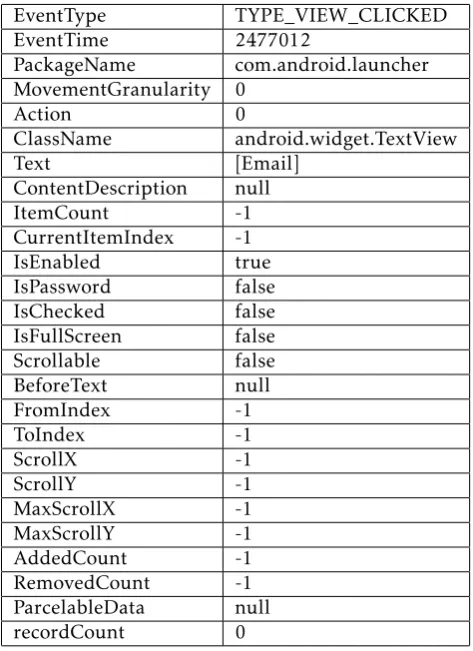
A crucial piece of our masquerade attack is the ability to detect the launch of a victim application. There is no public API to allow a user application to be notified when another application is launched. An application could poll theActivityManagerfor changes in the run-ning task list, but this solution could impact CPU and battery performance, and some delay between launch and the detection could occur. Another technique used by malware authors involves using theREAD_LOGS per-mission to parse the system-level debug logs in hopes of obtaining information about the state of the system, such as what applications were being launched. To thwart this attack vector, as of Android API version 16 (Jelly Bean), the Android development team has made the READ_LOGS permission unavailable to non-system applications. We demonstrate that the Acces-sibility API provides a subtle method for detecting when an application is launched from the home screen or the app drawer. By registering to receive Acces-sibilityEvent callbacks in the application manifest, our customAccessibilityServiceis guaranteed to be notified when an application is launched by the user. The notification comes in the form of an Accessibil-ity-Event object that is delivered as an argument to our AccessibilityService’s onAccessibilityEvent method. The Launcher application, which is respon-sible for displaying icons and widgets on the home screen and maintaining the app drawer, populates the AccessibilityEventwhen the Email application icon is clicked by the user. Please refer to Table1for infor-mation contained inAccessibilityEvent.
From the information in the AccessibilityEvent, we can determine that the user clicked an icon in the Launcher, because the event type is TYPE_ VIEW_CLICKED and the originating package name is com.android.launcher. We’re able to identify which icon was clicked based on the Text field of the Accessibility-Event. In the case of attacking Email, the Text field is a single element list containing the string “Email". Once the app launched by the user has been detected, the next step in the attack is to launch the malicious Activity instead of the user desired Activity. To do this, an Intent that specifies the malicious Activity to be launched is created and passed to the startActivity method of our AccessibilityService.
Table 1. Information inAccessibilityEvent
EventType TYPE_VIEW_CLICKED EventTime 2477012
PackageName com.android.launcher MovementGranularity 0
Action 0
ClassName android.widget.TextView
Text [Email]
ContentDescription null
ItemCount -1
CurrentItemIndex -1
IsEnabled true
IsPassword false IsChecked false IsFullScreen false Scrollable false BeforeText null
FromIndex -1
ToIndex -1
ScrollX -1
ScrollY -1
MaxScrollX -1
MaxScrollY -1
AddedCount -1
RemovedCount -1 ParcelableData null recordCount 0
3.3. Racing to the Top
The launch of the malicious Activity from our AccessibilityServicedoes not prevent the Launcher app from also calling startActivity to start the legitimate Activity. Both Activities are created and dispatched to the Activity-Manager to be displayed. As previously mentioned, only a singleActivity may be displayed in the foreground at one time. This is a source of contention for our maliciousActivity, which we want to be displayed instead of the victimActivity and without any suspicious screen flicker or transition animation that may alert the user to the presence of malware. Since the malicious AccessibilityService receives AccessibilityEvent and is able to detect launch of victim app, it has a chance to launch the malicious Activity before the victim Activity is launched.
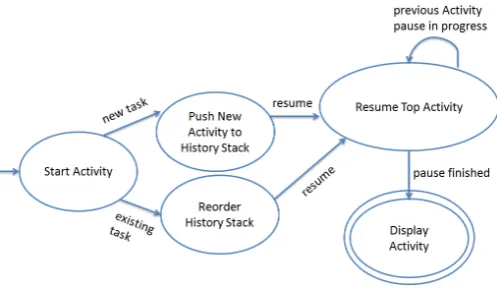
Figure 2. Activity Launch State Transition Diagram
record is moved to the top of the stack. The component which requests the Activityto be started can supply additional flags to thestartActivityIntent that may alter this behavior, but we focus on the default behavior. Once the stack manipulation is complete, the system attempts to display/resume the topActivity. However, to comply with Android’sActivitylifecycle model, the current Activity must first be paused. This ensures that the current Activity has a chance to save its state before being put into the background. To protect consistency, no Activity is allowed to be displayed until the currentActivityhas finished pausing. When the pause is complete, the system will attempt to display/resume theActivity at the top of the history stack.
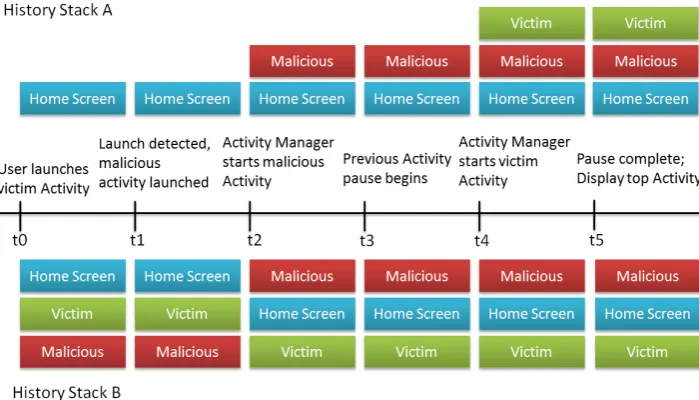
Our malware exploits this logic by launching the malicious Activity as soon as the victim Activity launch has been detected. In the case where both the malicious and victim Activities belong to tasks on the history stack, the malicious Activity will always be displayed over the victim. This is because the launch detection reacts to the AccessibilityEvent that is dispatched when the user clicks the Email application icon, which occurs before the Launcher application dispatches its start request. Therefore, the malicious request is received at theActivityManagerbefore the victim request, thus its history record is moved to the top of the stack. Because the two requests are received nearly simultaneously, the victim request is skipped due to the logic in theActivityStackclass. This is the fundamental property which makes this attack work when both the victim and malicious Activities are already on the history stack. However, when neither the malicious or victim Activitiesare on the history stack, the victim Activity is pushed onto the stack after the maliciousActivity, making it next in line to be displayed. Figure3shows a timeline of when these events occur, illustrating the state of the history stack for each case over time.
Table 2. List of Device Screen Statuses
With flash Without flash Victim interface shows up Ω1 Ω2
Fake interface shows up Ω4 Ω3
In Section 3.4 we show that by adding some delay to the maliciousActivitylaunch, we can increase the chance that the maliciousActivitywill be pushed onto the stack after the victim.
3.4. Optimal Delay
There exists a source of contention for our malicious Activity. An attacker wants the malicious Activity to be displayed instead of the victimActivitywithout any suspicious screen flash, flicker, or transition animation that may alert the user to the presence of malware. To achieve this goal, the timing of launching malicious Activity should be carefully adjusted so that the malicious Activity is processed soon after the victimActivity. Therefore, the problem is how to derive an optimal delay for the maliciousActivity. We present our analysis below.
We find that different delay of the malicious Activity produces four different statuses of the device screen. Before introduce the four statuses, please note that when the malicious Activity is processed, a fake interface is created and displayed. Please also note that when the victim Activity is processed, a victim interface is created and displayed. Depending on the timing of processing each activity, there are four scenarios. (I) The malicious Activity is processed before the victim Activity. The fake interface will be displayed first, and then replaced by the victim interface. In this scenario, we can observe the victim interface showing up with a flash, and the status of device screen is defined to be Ω1. (II) The malicious Activity is processed before the victim Activity, but these two activities are processed nearly simultaneously. In this scenario, only the victim interface is displayed without a flash. The status of device screen is defined to be Ω2. (III) The malicious Activity is processed after the victim Activity, but these two activities are processed nearly simultaneously. In this scenario, only the fake interface is displayed without a flash. The status of device screen is defined to be Ω3. (IV) The malicious Activity is processed after the victim Activity. The victim interface will be displayed first, and then replaced by the fake interface. In this scenario, we can observe the fake interface showing up with a flash, and the status of device screen is defined to beΩ4. These statuses are listed in Table2.
It is obvious that an attacker will want the device screen status to be Ω3. Therefore, we need to derive an optimal delay time for the malicious Activity.
6
EAI Endorsed Transactions on Ubiquitous Environments 26-052015| Volume 1| Issue 4| e1
EAI Endorsed Transactions on Ubiquitous Environments 26-052015| Volume 1| Issue 4| e1 EAI Endorsed Transactions on
Figure 3. Activity History Stack Timeline
However, for every victim app, the optimal delay time is different. To derive the optimal delay for a specific app, we can enumerate possible delaydto start the malicious Activitywith delayd. The delay values producing the highest probability that statusΩ3occur are the optimal ones.
First, we select a set of different delays, which are denoted as d1, d2, d3,...,dn. Next, we select delay d1 and start the malicious Activity with delay d1. We repeatedly launch the victim app a number of times and record the number of occurrences of each status during these tests. We then select the next delay and repeat the second step until all reasonable delays are tested. Finally, we select a range of delay times within which the number of occurrences of statusΩ3becomes maximal, and correspondingly, the delays within this range are the optimal delays. We evaluate this strategy in Section4.
Using the strategy above, a malware author can derive an optimal delay for every victim app running on different device models with different Android versions, and keep a record of these optimal delays in a remote server which provides all the malicious payloads we developed. When our malicious service tries to download a malicious payload from that server, the malicious service also sends a request to get an optimal delay to trigger that payload. Therefore, every time a victim app is launched, a fake interface is always shown without a flash.
4. Evaluation
To prove malware exploiting Android’s accessibility framework is a new breed, we test our proof-of-concept implementation against four free Android mobile security applications from the Google Play Market:
AVG AntiVirus, Norton Mobile Security, Lookout Mobile Security, and Trend Micro Mobile Security. None of the four detected any suspicious behavior or raised a flag during virus scanning while the AccessibilityServicewas enabled.
In the following, we provide the experimental results for detecting application launch and winning the race condition. The malicious AccessibilityService was tested on an Android emulator running Android 4.2, an HTC Nexus One running Android 2.3.6, and a Samsung Galaxy S2 running CyanogenMod 9.
4.1. Detecting Application Launch
click does contain the title, however this is not the case in CyanogenMod 9.
We tested the launch detection capability on the HTC Nexus One for the following six Android applications: Messaging, Email, LinkedIn, Facebook, Bank of America, and Browser. For each application, a shortcut icon was created on the home screen. The launch detection was successful for all six applications.
4.2. Winning Race Condition
During the launch detection testing, we noticed that the malicious Activity was not displayed instead of the victimActivity100% of the time, especially when the victim application was being launched for the first time since system boot. To test this, we performed two separate experiments. In the first experiment, we ensured the application we were launching was not running by pressing the Force Stop and Clear Data
buttons under the corresponding Settings -> Manage Applications -> All menu for that application. These two operations effectively force the application to be reloaded from its initial state, as if the system had just booted. We then returned to the home screen, launched the application normally, and recorded which Activity, malicious or victim, was displayed. In the second experiment, we followed the same procedure, but instead of force stopping and clearing the data, we made sure that the victim application had previously been launched before relaunching from the home screen.
The two experiments were performed repeatedly for each of the aforementioned applications, and we observed the impact of the race condition discussed in Section3.3. However, by delaying the launch of the maliciousActivityfor a specific time period before it is started, we can guarantee that the maliciousActivity displays without a flash.
Initially, the two experiments were performed 50 times on each of the aforementioned applications, and we observed the impact of the race condition. In each instance of the first experiment, the victim Activity was displayed due to the latency between the launch of the malicious Activity and the victim Activity as depicted in Figure 3. In the second experiment, the maliciousActivitywas displayed for each launch in 4 of the 5 tested applications. For the Browser application, the maliciousActivity only displayed 11 of the 50 times. This result could not be duplicated on the Galaxy S2 or the Android emulator. The exact cause of this discrepancy is unknown, though device load, device speed, and other factors may have an effect. For instance, custom services provided by HTC’s Android build or HTC’s implementation of the Browser application may introduce some delay into the ActivityManager’s launch pipeline such that malicious
Table 3. Evaluation of Race Condition
Application Win rate without reloading
Win rate with
reloading
Messaging 100% 100%
Email 100% 100%
LinkedIn 100% 100%
Facebook 100% 100%
Bank of America 100% 100%
Browser 100% 100%
Activity is not displayed. An application may define flags in its manifest file that modify the behavior of its main Activity launch. It is possible that the combination of flags supplied in the Browser’s manifest has some effect on the outcome.
We also observed that the first time an application we are triggering the malicious payload on is launched after the device boots, the maliciousActivitymay be displayed. The difference between this scenario and the first experiment is that the malicious Activity has not previously been loaded. Therefore, there is some nondeterministic time for both the malicious and victim Activities and their resources to be loaded, while in the first experiment the maliciousActivityhas already been loaded but the victimActivityhas not.
In order to guarantee that the malicious Activity always display, we set the maliciousActivityto sleep for 50 milliseconds before it is started. Then we repeat our experiments by testing each application for 50 times with reloading and another 50 times without reloading. We observed that the malicious Activity was displayed instead of the victim Activity 100% of the time. We also observed that the first time an application we are triggering the malicious payload on is launched after the device boots, the malicious Activity is always displayed. These results show that our strategy of delaying the malicious Activity can guarantee that the maliciousActivity gain control of the screen. Table3presents the results of experiments conducted on HTC Nexus One.
4.3. Optimizing Delay
Now we evaluate our strategy of optimizing delay as discussed in Section 3.3. We choose Browser app and conduct two groups of tests on the HTC Nexus One running Android 2.3.6.
In the first group of tests, we test the Browser app with reloading. The procedure for our test is as follows. (I) We select a set of different delays, and choose each of these delays to launch our maliciousActivity. (II) We press the Force StopandClear Data buttons under the corresponding Settings -> Manage Applications ->
8
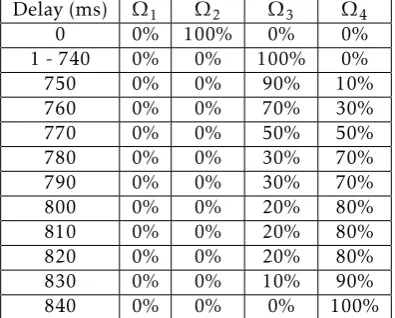
Table 4. Status with Reloading (HTC Nexus One running Android 2.3.6)
Delay (ms) Ω1 Ω2 Ω3 Ω4
0 0% 100% 0% 0%
1 - 740 0% 0% 100% 0%
750 0% 0% 90% 10%
760 0% 0% 70% 30%
770 0% 0% 50% 50%
780 0% 0% 30% 70%
790 0% 0% 30% 70%
800 0% 0% 20% 80%
810 0% 0% 20% 80%
820 0% 0% 20% 80%
830 0% 0% 10% 90%
840 0% 0% 0% 100%
Table 5. Status without Reloading (HTC Nexus One running Android 2.3.6)
Delay (ms) Ω1 Ω2 Ω3 Ω4
0 0% 20% 80% 0%
1-60 0% 0% 100% 0%
70 0% 0% 90% 10%
80 0% 0% 100% 0%
85 0% 0% 80% 20%
90 0% 0% 90% 10%
95 0% 0% 80% 20%
100 0% 0% 80% 20%
105 0% 0% 90% 10%
110 0% 0% 50% 50%
115 0% 0% 10% 90%
120 0% 0% 20% 80%
125 0% 0% 10% 90%
130 0% 0% 20% 80%
135 - 145 0% 0% 0% 100%
All menu for the Browser app. These two operations effectively force the application to be reloaded from its initial state when it is launched. (III) We launch the Browser app from home screen, and count the number of screen statuses we observe. (IV) For each delay, we repeat step (II) and (III) many times and calculate the rates of occurrences of those four statuses defined in Table2. We present our experimental results in Table
4.
From Table 4, we make the following observations. (I) When delay is 0ms, the victim interface shows up without a flash (StatusΩ2) 100% of the time. (II) When delay increases from 1ms to 740ms, the fake interface shows up without a flash (StatusΩ3) 100% of the time. (III) When delay increases from 750ms to 840ms, the rate of (Status Ω3) decreases to 0%, while the rate of fake interface showing up with a flash (Status Ω4)
Table 6. Status with Reloading (Samsung S4 running Android 4.4.4)
Delay (ms) Ω1 Ω2 Ω3 Ω4
0 0% 100% 0% 0%
1-10 0% 97.5% 0.025% 0%
15 0% 50% 50% 0%
20 0% 10% 90% 0%
25-115 0% 0% 100% 0%
120 0% 0% 80% 20%
140 0% 0% 20% 80%
150-500 0% 0% 0% 100%
increases to 100%. Therefore, the optimal range of delay is between 1ms and 740ms.
In the second group of tests, we test the Browser app without reloading. The procedure for our test is as follows. (I) We set the delay of our maliciousActivity to different values. (II) We launch the Browser app from the home screen, and record the status of the screen we observe. (III) For every setting of delay, we repeat step (II) a number of times, and calculate the rates of those four statuses defined in Table 2. We present our experimental results in Table5.
From Table5, we make the following observations. (I) When delay is 0ms, 20% of the time the victim interface shows up without a flash (StatusΩ2). 80% of the time the fake interface shows up without a flash (Status Ω3). (II) When delay increases from 1ms to 60ms, the fake interface shows up 100% of the time without a flash. (III) When delay increases from 70ms to 105ms, the fake interface shows up 80% to 90% of the time without a flash, and the fake interface shows up 10% to 20% of the time with a flash (StatusΩ4). (IV) When delay increases from 110ms to 145ms, the probability of StatusΩ3 decreases to 0%, while the probability of Status Ω4 increases to 100%. Therefore, we derive a range of optimal delay, which is between 1ms and 60ms. In the first group of experiments, the range of optimal delay is between 1ms and 740ms. In the second group of experiments, the range of optimal delay is between 1ms and 60ms. Combining the experimental results from these two groups, the optimal delay for the malicious Activityis between 1ms and 60ms.
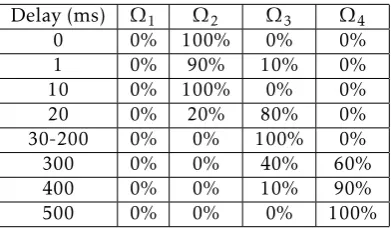
Table 7. Status without Reloading (Samsung S4 running Android 4.4.4)
Delay (ms) Ω1 Ω2 Ω3 Ω4
0 0% 100% 0% 0%
1 0% 90% 10% 0%
10 0% 100% 0% 0%
20 0% 20% 80% 0%
30-200 0% 0% 100% 0%
300 0% 0% 40% 60%
400 0% 0% 10% 90%
500 0% 0% 0% 100%
particularly for small delay values. Considering the results from all four tables, the optimal delay for the malicious Activity is between 30ms and 60ms. To avoid suspicion in the event that the improved performance of an OS upgrade alters the optimal delay, a malware author could restrict the payload activation to only those versions which have a known optimal delay.
5. Discussion
In this section, we discuss various ways that the malware discussed in this paper can be enhanced and become much more sophisticated. Given the threat from this new malware, we also discuss possible countermeasures.
5.1. Extension of the Malware
We have shown that malware activation (the application launch detection) rate is 100%, and any variety of malicious payloads may be triggered this way. This opens the door for attacks with an increased amount of sophistication, an alarming thought given Zhou and Jiang’s [33] evaluation of various state of the art mobile anti-virus applications.
The proof of concept malware described in this article can be improved in a number of ways. For example, our current Activity does nothing to hide itself from the Recent Tasks list, the window which displays a list of the most recently used applications. To become much harder to detect, a hacker could supply the FLAG_ACTIVITY_EXCLUDE_FROM_RECENTS flag in the application manifest to exclude the malicious Activity from the Recent Tasks list. Another area of improvement is the type of events we are processing. Our example focuses onAccessibilityEvents of type TYPE_VIEW_CLICKED, however there are 22 other types that could potentially be used to activate malicious payloads with 100% success rate. We could improve the likelihood of activation by matching on more application launches. In fact, our technique could be used to gather information about packages installed
on the device without the need to request permission from the Package Manager. It could do so by harvesting data from the package, class, and text fields of the AccessibilityEvents it receives. Simply collecting the text field of theAccessibilityEvent, as we do during launch detection, will provide information about which apps are installed on the device. Combined with the remote payload update technique, this malware could be dynamically extended to provide a malicious payload for every app installed on the device. Finally, this attack could be used for denial of service or ransomware. An attacker could detect the launch of the Settings application and display a blank Activity, making the user unable to change any device settings. Moreover, an attacker could detect the launch of any application (even the Launcher itself) and display their own ransom Activity, effectively rendering the device useless until the attacker is paid some amount of money.
5.2. Countermeasures
The attacks mentioned above are not foolproof. There are certain safeguards built into Android devices to thwart a full device takeover by a malicious user. Recovery Mode is one such safeguard that allows the user to install a clean OS, wiping any malicious apps from the data partition in the process. An experienced user could use the Android Debug Bridge (ADB) to obtain a command shell into the device and launch applications from the command line
am tool or even locate and uninstall the malicious applications. Applications launched from the am tool do not invoke the Launcher application, therefore our technique is unable to detect this. If malicious application developers were to become aware of theam
countermeasure, the maliciousAccessibilityService could be rewritten to trigger on a non-Launcher event. For example, anyActivitycontaining a button widget that launches a new Activity could be targeted if the malware is modified to trigger on the button click AccessibilityEvent rather than the Launcher event. However, doing so may limit the generic nature of this attack.
As a countermeasure to the malicious Activity payload, the logic which reorders theActivityhistory stack and determines the nextActivityto be displayed should be analyzed and corrected. The two main Android files containing said logic are frameworks/b ase/services/java/com/android/server/am/ActivityMa nagerService.java and frameworks/base/services/java/ com/android/server/am/ActivityStack.java. Ensuring that the next Activity to be displayed is indeed the Activity that was requested bystartActivitycould prevent the malicious Activity from being displayed instead of the legitimate Activity. However, this fix does not hinder launch detection and the attacker could
10
simply delay the start of the malicious Activity for some short time, ensuring that the maliciousActivity is displayed after all. The difference here is that there may be some obvious transition animation, if the developer of the legitimate app has not disabled it, from the legitimateActivityto the maliciousActivity.
6. Related Work
In 2009, Schmidt et al. [31] made a survey of mobile malware and found that most malware targets Symbian OS. They reported F-Secure Research in Helsinki counted 418 malware samples, some of which were not public, while they collected information of 288 public malware. 278 of these 288 public malware targeted Symbian OS. A note is On February 11 2011, Nokia announced to adopt Microsoft’s Windows Phone OS as its primary smartphone platform, and Symbian has faded out since then. Since Android OS was getting attention at that point and the authors investigated possibilities of malware on Android, they explored “social engineering"-based Android malware, where the malicious functionality is hidden in a seemingly benign host app. They demonstrated such functionality can be binary code. android.os.Exec can be used to finally execute such binary code. The binary code is the payload of the malware. The authors show the payload can be crafted to bypass the Android permission system such as accessing /proc and /sys/, deplete the device’s battery by using energy consuming FPU (Floating Point Unit) operations, and run arbitrary ARM instructions on a rooted G1 Android smartphone. Felt et al. [26] classify threats from third-party smartphone applications into malware, grayware, and
personal spyware. Malware intends to damage finance or property of the smartphone owner. An “attacker" such as a spouse who has physical access to a smartphone can install personal spyware on the victim smartphone and gather information about the smartphone owner, for example, tracking the victim. Grayware is often commercial applications with real functionality while stealing user information. The distributor may have a privacy policy with varying degree of clarity. The authors conduct a survey of 46 pieces of smartphone malware and their incentives and conclude that Apple’s mechanisms of application permission and review process can avoid approving malware. Becher et al. [22] examine mechanisms securing sophisticated mobile devices in 2011. Although no major incidents of attacking smartphones have happened, small-scale attacks have been emerging. Threats were classified into four classes: hardware centric, device independent,
software centric, anduser layer attacksfor the purpose of eavesdropping, availability attacks, privacy attacks and impersonation attacks. Existing security mechanisms are enumerated for various attacks.
Enck et al. [25] implementedded, a Dalvik decom-piler.dedtransfers.dexfile into Java source code. It was then used for analyzing security of 1,100 popular free Android applications. The following major observations were made: misuse of privacy sensitive information including phone identifiers such as IMEI, IMSI, and ICC-ID and geographic location; “no evidence of tele-phony misuse, background recording of audio or video, abusive connections, or harvesting lists of installed applications"; wide use of ad and analytic network libraries by 51% of the applications; no exploitable vulnerabilities leading to control of the phone. Zheng
et al. [32] developed ADAM, an automated system for evaluating the detection of Android malware. ADAM uses repackaging and code obfuscation to generate different variants of a malware. They collected 222 malware samples and used ADAM to generate vari-ants of those malware. Those varivari-ants were fed into VirusTotal [21], “a free service that analyzes suspicious files and URLs and facilitates the quick detection of viruses, worms, trojans, and all kinds of malware". They have observed that commercial anti-virus showed different detection rate for different variants. New anti-virus software such as Antiy [14] shows better perfor-mance than older anti-virus software. Rastogi, Chen and Jiang [30] made similar effort to test
state-of-the-art Andoroid commercial mobile anti-malware prod-ucts for detecting transformed malware. Such trans-formation techniques include polymorphism (where transformed code is still similar to the original code) and metamorphism (where transformed code is totally different from the original code, but with similar mal-ware functionality). Zhouet al.[34] developed a system called DroidRanger, evaluating the health of Android markets, including the official Android Market, eoe-Market [16], alcatelclub [12], gfan [17], and mmoovv [20]1. To detect known Android malware, DroidRanger
uses permission-based filtering to detect malware using suspicious permissions and behavioral footprint match-ing to detect malware performmatch-ing suspicious behav-ior such as listening to system-wide broadcast mes-sages and sending and monitoring SMS mesmes-sages. To detect unknown Android malware, DroidRanger uses two steps: heuristics based filtering and dynamic exe-cution monitoring. The heuristics based filtering can utilize Android features misused to load new code, either Java binary code from a remote server or native machine code. Dynamic execution monitoring checks what APIs an app is using. DroidRanger was able to find 211 malicious or infected apps out 204,040 apps from the five studied marketplaces, including two zero-day malware. Zhou and Jiang [33] made a one year effort and analyzed more than 1,200 malware samples,
which covered a majority of state-of-the-art Android malware. They obtained those samples by manually or automatically crawling various Android markets. They characterize Android malware by their installation, activation, payload and permission use. Installation of malware on a victim device uses three main social engi-neering based approaches, repackaging, update attack, and drive-by download. In repackaging, a benign app is downloaded, piggybacked with malicious code and uploaded onto a market again. In update attack, a malware author put code into an app, and the rest of the malicious code will be downloaded when the malware is running. In drive-by download, ad is used in a malware to attract the victim to download more spyware and other malware. Other attacks also exist: spyware, fake apps masquerading as other legitimate apps, apps with malicious functionality such as sending unauthorized SMS messages, apps exploiting root priv-ilege. Malicious apps can be activated by various sys-tem events includingBOOT_COMPLETED,SMS_RECEIVED, and UI interaction events. Malware can have a vari-ety of payloads, targeting privilege escalation, remote control, financial charges, and personal information stealing. Malware without root exploits often uti-lizes INTERNET, READ_PHONE_STATE, ACCESS_NETWORK_ STATE, andWRITE_EXTERNAL_STORAGEpermissions. The authors have found that malware have been evolving to avoid detection and have more sophisticated function-ality such as making the device part of a botnet. Current anti-virus software downloadable from Google market, AVG Antivirus Free, Lookout Security & Antivirus, Norton Mobile Security Lite, and Trend Micro Mobile Security Personal Edition, do not perform well in detecting malware the authors collected. Bugiel et al.
[24] studied ways to defend against privilege-escalation attacks on Android. Such privilege-escalation attacks include confused deputy attacks and colluding attacks. Confused deputy attacks exploit unprotected interfaces of a benign application. Colluding attacks involve mul-tiple apps. For example, one app can record audio and another one has the Internet permission. In this way, the second app can send the overheard credit numbers out. The authors designed and implemented a security framework to detect and prevent confused deputy and collusion attacks.
There are other survey works on mobile security and malware. Becheret al. [23] performs a comprehensive survey of mobile security from hardware to software. It is a comprehensive enumeration of existing wireless technologies and possible attacks against those tech-nologies and devices. La Pollaet al. [29] surveys mobile device security and complements the work in [23]. Peng
et al. [28] performs a survey of malware on platforms such as Android, Windows Mobile and Symbian. The categorization of malware follows traditional jargons such as worms, viruses and trojans. They also survey
malware propagation strategies. For our future work, we hope to have a system of categorization that sys-tematically characterizes the underlying techniques of mobile malware.
7. Conclusion
This paper introduces a new type of malware that leverages Android’s accessibility framework to activate its malicious payloads. We detail the implementation of an example malicious application that uses the Accessibility APIs to masquerade as a legitimate application. We describe results from the experiments we performed to quantify both the success of application launch detection and exploiting the logic error in the ActivityStack class. We show that, by adding a delay to the launch of the maliciousActivity, we can guarantee 100% that the malicious Activity will be displayed. We also discuss possible strategies to mitigate this type of malware.
Acknowledgments
This work was supported in part by Macau FDCT project 009/2010/A1 and University of Macau MYRG112, US NSF grant 1116644, by National Natural Science Foundation of China under grants 61272054 and 61402104, Jiangsu Provincial Key Laboratory of Network and Information Security under grants BM2003201, and Key Laboratory of Computer Network and Information Integration of Ministry of Education of China under grants 93K-9. Any opinions, findings, conclusions, and recommendations in this paper are those of the authors and do not necessarily reflect the views of the funding agencies.
References
[1] New version of sms trojan hits android phones. https://blog.lookout.com/blog/2010/09/14/ new-version-of-sms-trojan-hits-android-phones/, 2010.
[2] Android-apktool. https://code.google.com/p/ android-apktool/, 2012.
[3] Android permissions: User attention, comprehension, and behavior. http://www.eecs.berkeley.edu/Pubs/ TechRpts/2012/EECS-2012-26.pdf, 2012.
[4] Fake netflix android app steals your data. http://www. pcmag.com/article2/0,2817,2394621,00.asp/, 2012. [5] Jd-gui. http://java.decompiler.free.fr/?q=jdgui,
2012.
[6] Trojan:android/adrd.a. http://www.f-secure.com/ weblog/archives/00002100.html/, 2012.
[7] ANDROIDOS_FAKEBROWS.A. http://about-threats. trendmicro.com/us/malware/ANDROIDOS_FAKEBROWS. A/, 2012.
[8] ANDROIDOS_SMSBOXER.A. http://about-threats. trendmicro.com/us/malware/ANDROIDOS_SMSBOXER. A/, 2012.
12
[9] Accessibility. http://developer.android.com/guide/ topics/ui/accessibility/index.html, 2013.
[10] Accessibility events. http://developer.android. com/reference/android/view/accessibility/ AccessibilityEvent.html, 2013.
[11] Accessibility services. http://developer.android. com/guide/topics/ui/accessibility/services. html, 2013.
[12] Alcatelclub.http://www.alcatelclub.com/, 2013. [13] Android open source project.http://source.android.
com/, 2013.
[14] antiy.http://www.antiy.net/, 2013.
[15] Application fundamentals. http://developer. android.com/guide/components/fundamentals.html, 2013.
[16] eoemarket.http://www.eoemarket.com/, 2013. [17] Gfan.http://www.gfan.com/, 2013.
[18] Juniper networks third annual mobile threats report. http://www.juniper.net/ us/en/local/pdf/additional-resources/
3rd-jnpr-mobile-threats-report-exec-summary. pdf, 2013.
[19] Making applications accessible. http://developer. android.com/guide/topics/ui/accessibility/ apps.html, 2013.
[20] Mmoovv. http://android.mmoovv.com/web/index. html, 2013.
[21] virustotal.https://www.virustotal.com/en/, 2013. [22] M. Becher, F. C. Freiling, J. Hoffmann, T. Holz,
S. Uellenbeck, and C. Wolf. Mobile security catching up? revealing the nuts and bolts of the security of mobile devices. InProceedings of IEEE Symposium on Security and Privacy, 2011.
[23] M. Becher, F. C. Freiling, J. Hoffmann, T. Holz, S. Uellenbeck, and C. Wolf. Mobile security catching up? revealing the nuts and bolts of the security of mobile devices. InProceedings of the 2011 IEEE Symposium on Security and Privacy, pages 96–111, 2011.
[24] S. Bugiel, L. Davi, A. Dmitrienko, T. Fischer, A.-R. Sadeghi, and B. Shastry. Towards taming privilege-escalation attacks on android. In Proceedings of the 19th Network and Distributed System Security Symposium
(NDSS), 2012.
[25] W. Enck, D. Octeau, P. McDaniel, and S. Chaudhuri. A study of android application security. InProceedings of the 20th USENIX conference on Security, 2011.
[26] A. P. Felt, M. Finifter, E. Chin, S. Hanna, and D. Wagner. A survey of mobile malware in the wild. InProceedings of the 1st ACM workshop on Security and privacy in smartphones and mobile devices (SPSM), 2011.
[27] R. Hunt and S. Hansman. A taxonomy of network and computer attack methodologies. Computers & Networks, Elsevier, 24(1), February 2005.
[28] S. Peng, S. Yu, and A. Yang. Smartphone malware and its propagation modeling: A survey. Communications Surveys Tutorials, IEEE, PP(99):1 – 17, July 2013. [29] M. L. Polla, F. Martinelli, and D. Sgandurra. A survey
on security for mobile devices. Communications Surveys Tutorials, IEEE, 15(1):446 –471, February 2013.
[30] V. Rastogi, Y. Chen, and X. Jiang. Droidchameleon: Evaluating android anti-malware against transformation attacks. InShort Paper, Proceedings of the 8th ACM Sym-posium on Information, Computer and Communications Security (ASIACCS), 2013.
[31] A.-D. Schmidt, H.-G. Schmidt, L. Batyuk, J. H. Clausen, S. A. Camtepe, S. Albayrak, and C. Yildizli. Smartphone malware evolution revisited: Android next target? In
Proceedings of the 4th IEEE International Conference on Malicious and Unwanted Software (Malware 2009), pages 1–7. IEEE, 2009.
[32] M. Zheng, P. P. C. Lee, and J. C. S. Lui. ADAM: An automatic and extensible platform to stress test android anti-virus systems. InProceedings of the 9th Conference on Detection of Intrusions and Malware & Vulnerability Assessment (DIMVA), 2012.
[33] Y. Zhou and X. Jiang. Dissecting android malware: Characterization and evolution. InProceedings of IEEE Symposium on Security and Privacy (SP), 2012.