Multimedia Image Compression
(Algorithms and Techniques to its related terms)
R.Mahalakshmi1, S.K.Mahendran 2
1Department of Compter Science,Madurai Kamaraj University College, India
2
Department of Computer Applications, SVS Institute of Computer Applications, Coimbatore, India [email protected]
ABSTRACT
In this paper we have discussed the fundamentals of image compression and related responsibility factors. Compression is a process that creates a compact data representation for storage and transmission purposes. Image compression methods rely upon the removal of information within images to reduce the amount of data necessary to represent them. The information to be removed is usually characterized as one of two classes: statistically redundant or visually irrelevant. The following section gives the related information about the compression.
Key words: image compression, frame details, resolution, algorithms and ratio.
1.
INTRODUCTION
Multimedia computing has emerged in the last few years as a major area of research. Multimedia computer systems have opened the wide range of potential applications by combining a variety of information sources, such as voice, graphics, animation, images, audio and full-motion video. Multimedia compression is employing tools and techniques in order to reduce the file size of various media formats. With the development of World Wide Web the importance of compress algorithm was highlighted because it performs faster in networks due to its highly reduced file size.
Uncompressed graphics, audio, and video data require substantial storage capacity, which is not possible in the case of uncompressed video data, even given today’s CD and DVD technology. The same is true for multimedia communications. Data transfer of uncompressed video data over digital networks requires that very high bandwidth be provided for a single point-to-point communication.
To be cost-effective and feasible, multimedia systems must use compressed video and audio streams. The most important compression techniques in use today are JPEG for single pictures, H.263 for video, and MPEG for video and audio.
Currently the digital video interface (DVI), Joint Photographic Experts Group (JPEG), and Motion Pictures Experts Group (MPEG) are the three compression techniques that are widely used. Many of these algorithms employ the discrete cosine transform (DCT) because of its excellent energy compaction to achieve data compression. Even with the amount of intensive computations used with the DCT algorithm, grayscale images still require millions of computations. Extending this to color images or moving images, require billions of computations. Data compression techniques for multimedia systems is a step towards reducing the intensity of computations employing fast transform algorithms
There are three main reasons the present multimedia systems require data to be compresses. These reasons are related to
a. Large storage requirements of multimedia data
b. Relatively slow storage devices which does not allow playing multimedia data in real time
c. Present network’s band width , which do not allow real time video data transmission
2.
LOSSLESS COMPRESSION
ALGORITHMS
Lossless compression refers to compression methods for which the original uncompressed data set can be recovered exactly from the compressed stream. The need for lossless compression arises from the fact that many applications, such as the compression of digitized medical data, require that no loss be introduced from the compression method. In recent years, several compression standards have been developed for the lossless compression of such images. In general, even when lossy compression is allowed, the overall compression scheme may be a combination of a lossy compression process followed by a lossless compression process.
3.
LOSSY COMPRESSION
ALGORITHMS
Lossy compression differs from its counterpart, lossless compression, as its name implies some amount of data may be lost in the process. Thus, after a compression/decompression cycle, the data set will be modified from the uncompressed original and information may be lost. Lossy compression techniques attempt to eliminate unnecessary or redundant information, focusing more on saving space over preserving the accuracy of the data. Ideally, the loss is either minimal or undetectable by human observations. Lossy compression techniques are used for pictures and music files that can be trimmed at the edges. Unlike text files and processing files, pictures and music do not require reconstruction to be identical to the original, especially if the data dropped is insignificant or undetectable. Lossy compression is achieved by combining standard compression techniques plus simplifications to the image that reduce the amount of data required to store it. A very popular image format, jpeg, is also lossy. The goal in lossy compression is to reduce the file size further than is possible with lossless compression but to keep the appearance of the image as intact as possible while making the simplifications.
4.
COMPRESSION RESOURCES
AND ITS EPRESENTATION
Compression denotes compact representation of data. Examples for the kind of data typically want to compress are e.g.
• Text • Source-code • Arbitrary files • Images • Video • Audio data • Speech
The sources of images and videos are required more storage space than text. When exporting a movie, codec to compress the information for storage and transfer (such as on a DVD), and to decompress the information so it can be viewed again. The name “codec” comes from an abbreviation of its function of compression and decompression. During compression, repetitive and unnecessary information in the original file is discarded, causing the original file to lose information. For this reason, most codecs are considered lossy to allow the file to retain a high level of quality. The DV and MPEG codecs are especially good at maintaining excellent quality. Compressing video reduces its file size and data transfer rate, facilitating smooth playback and reducing storage requirements.
Codec denotes a complete system capable of encoding and decoding data which consists of an Encoder and a Decoder, transcoding is a conversion from one encoded digital representation into another one. A wide range of codecs is available, no single codec is best for all situations. For example, the best codec for compressing cartoon animation is generally not efficient for compressing live-action video.
Video files are collections of images, audio and other data. The attributes of the video signal include the pixel dimensions, frame rate, audio channels, and more. In addition, there are many different ways to encode and save video data.
A digital image represents a two-dimensional array of samples, where each sample is called a pixel. Precision determines how many levels of intensity can be represented and is expressed as the number of bits/sample. According to precision, the images can be classified into
1. Binary images 2. Grayscale images 3. Color images 4. Computer graphics
These images are represented by some storage space of data size as in bits, the images are
1. Binary images represented by 1 bit/sample. 2. Grayscale images represented by 8
bit/sample.
3. Color images represented by 16, 24 or more bits/sample.
4. Computer graphics represented by a lower – precision as 4 bits/sample.
Images to be represented as two-dimensional arrays which contain intensity / luminance values as their respective array elements. In case of grayscale images having n bit of accuracy per pixel, we are able to encode 2n different grayscales. A binary image therefore requires only 1 bpp (bpp = bit per pixel). Colour images are represented in different ways. The most classical way is the RGB representation where each colour channel (red, green, blue) is encoded in a separate array containing the respective colour intensity values. The human eye is not equally sensitive to all three colours – to perceive green is best, followed by red, blue is perceived worst.
One of the hottest topics in image compression technology today is JPEG. The acronym JPEG stands for the Joint Photographic Experts Group, a
standards committee that had its origins within the International Standard Organization (ISO). In 1982, the ISO formed the Photographic Experts Group (PEG) to research methods of transmitting video, still images, and text over ISDN (Integrated Services Digital Network) lines. PEG's goal was to produce a set of industry standards for the transmission of graphics and image data over digital communications networks. The JPEG image file format has become popular for offering an amazingly effective compression method for color images.
5.
COMPRESSION TERMINOLOGY
Terminologies are the resources of compressed data to find out the perfect data size .The following section to discusses some of the basic compression terminology,
Temporal compression and spatial compression
The two general categories of compression for video and audio data are spatial and temporal.
Spatial compression is applied to a single frame of data, independent of any surrounding frames. Spatial compression is often called intraframe compression.
Temporal compression identifies the differences between frames and stores only those differences, so that frames are described based on their difference from the preceding frame. Unchanged areas are repeated from the previous frames. Temporal compression is often called interframe compression.
Bitrate
larger frame size, higher frame rate, less compression per frame, more audio data, or some combination of each of these characteristics.
Higher bit rates can provide more information to describe the visual or audio data. Cameras typically record at a higher bit rate than can be optimized for delivery files to the Internet or optical disc. On the other hand, some video workflows transcode compressed video files to a new file format, which actually increases the bit rate.
Bit rate (also known as data rate) controls the visual quality of the video and its file size. The rate is most often measured in kilobits per seconds (kbit/s). If your video editing software gives you the option, choose a “variable” bit rate and set the target to at least 2,000 kbit/s for standard definition (SD) video; 5,000 kbit/s for 720p HD video; or 10,000 kbit/s for 1080p HD video.
Compression Ratio
A compression ratio is the average number of bits per pixel (bpp) before compression divided by the number of bits per pixel after compression. For example, if an 8 bit image is compressed and each pixel is then represented by 1 bit per pixel, the compression ratio = 8/1 = 8. Or equivalently for a 24 bit image, if the compression ratio = 18, the compressed image will have 24/18 = 1.33 bpp. Data compression ratio is defined as the ratio between the uncompressed size and compressed size.
Compression ratio = Uncompressed Size Compressed Size
Thus a representation that compresses a 10MB file to 2MB has a compression ratio of 10/2 = 5, often notated as an explicit ratio, 5:1 (read "five" to "one"), or as an implicit ratio, 5/1. Note that this formulation applies equally for compression, where the uncompressed size is that of the original; and for decompression, where the uncompressed size is that of the reproduction.
The term compression ratio is used to refer to the ratio of uncompressed data to compressed data. Thus, a 10:1 compression ratio is considered five times more efficient than 2:1. Of course, data compressed using an algorithm yielding 10:1 compression is five times smaller than the same data compressed using an algorithm yielding 2:1 compression. In practice, because only image data is normally compressed, analysis of compression ratios provided by various algorithms must take into account the absolute sizes of the files tested.
Bandwidth
Bandwidth is the speed at which data is transmitted, like 10 MBPS, 100 MBPS etc. Data compression is used to transmit more data with the given bandwidth. Bandwidth is the range within a band of frequencies or wavelengths and the amount of data that can be transmitted in a fixed amount of time. For digital devices, the bandwidth is usually expressed in bits per second (bps) or bytes per second. For analog devices, the bandwidth is
expressed in cycles per second, or Hertz (Hz) Compression saves bandwidth by reducing the amount of data to be transmitted, allowing other applications to use it. This also helps in reducing the cost of providing network bandwidth.
Pixels
The number of dots, or points of color, that are the unit of measurement for video. For example, a video clip can be 240 x 180, 360 x 240, 800 x 600, etc. The most common ratio for video clips is 4:3 (width to height).
Resolution
Figure 1. Various resolution formats
Sample rate
Sample rate indicates the number of digital samples taken of an audio signal each second. This rate determines the frequency range of an audio file. The higher the sample rate, the closer the shape of the digital waveform is to that of the original analog waveform. Low sample rates limit the range of frequencies that can be recorded, which can result in a recording that poorly represents the original sound.
Two sample rates
A. Low sample rate that distorts the original sound wave
B. High sample rate that perfectly reproduces the original sound wave
To reproduce a given frequency, the sample rate must be at least twice that frequency. For example, CDs have a sample rate of 44,100 samples per second, so they can reproduce frequencies up to 22,050 Hz, which is just beyond the limit of human hearing, 20,000 Hz.
The following table lists the most common sample rates for digital audio:
Sample rate Quality level Frequency range 11,025 Hz Poor AM radio (low-end
multimedia)
0–5,512 Hz
22,050 Hz Near FM radio (high-end multimedia)
0–11,025 Hz 32,000 Hz Better than FM radio
(standard broadcast rate)
0–16,000 Hz 44,100 Hz CD 0–22,050
Hz 48,000 Hz Standard DVD 0–24,000
Hz 96,000 Hz High-end DVD 0–48,000
Hz
Figure 2. Various sample rate and its quality
Bit depth
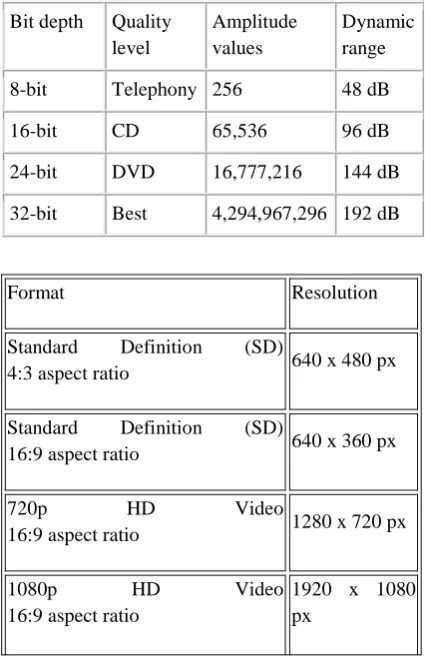
Bit depth determines dynamic range. When a sound wave is sampled, each sample is assigned the amplitude value closest to the original wave’s amplitude. Higher bit depth provides more possible amplitude values, producing greater dynamic range, a lower noise floor, and higher fidelity. For the best audio quality, remain at 32-bit resolution while transforming audio in Sound booth, and then convert to a lower bit depth for output.
Bit depth Quality level
Amplitude values
Dynamic range 8-bit Telephony 256 48 dB 16-bit CD 65,536 96 dB 24-bit DVD 16,777,216 144 dB 32-bit Best 4,294,967,296 192 dB
Figure 3. Bit depth and its value
Frame rate
Video is a sequence of images that appear on the screen in rapid succession, giving the illusion of motion. The number of frames that appear every second is known as the frame rate, and it is measured in frames per second (fps). The higher the
Format Resolution
Standard Definition (SD)
4:3 aspect ratio 640 x 480 px
Standard Definition (SD)
16:9 aspect ratio 640 x 360 px
720p HD Video
16:9 aspect ratio 1280 x 720 px
1080p HD Video 16:9 aspect ratio
display the sequence of images, resulting in smoother motion. The trade-off for higher quality, however, is that higher frame rates require a larger amount of data, which uses more bandwidth.
In motion pictures, television, and in computer video displays, the frame rate is the number of frames or images that are projected or displayed per second. Frame rates are used in synchronizing audio and pictures, whether film, television, or video. In motion pictures and television, the frame rates are standardized by the Society of Motion Picture and Television Editors (SMPTE). SMPTE Time Code frame rates of 24, 25 and 30 frames per second are common, each having uses in different portions of the industry. The professional frame rate for motion pictures is 24 frames per second and, for television, 30 frames per second (in the U.S.).
The higher the number of frames playing per second, the smoother the video playback appears to the user. Lower rates result in a choppy playback. (As a reference point, film uses 24 frames per second to allow the viewer to perceive smooth playback.) Several factors affect the actual frame rate you get on your computer. For example, your PC processor or graphics hardware may only be capable of playing 10-15 frames per second without acceleration.
Examples for frames per second used in various format.
1. 24 – PAL,Films & HD Video 2. 23.98 – NTSC,Films & HD Video 3. 25 – PAL,HD Video & TV
4. 30– PAL/NTSC ,Video(B/W) & PC’s 5. 29.97 – NTSC,HDTV & TV
6. 50 – PAL & Interlaced TV 7. 60 – HD Video , PC’s & Gaming
8. 59.94 – NTSC, HD Video,PC’s & Gaming
Key frames
Key frames are complete video frames (or images) that are inserted at consistent intervals in a video clip. The frames between the key frames contain information on changes that occurs between key frames. When reduce the key frame distance value,
raise the bit rate for the video file to maintain comparable image quality.
Image aspect ratio and frame size
As with the frame rate, the frame size for a file is important for producing high-quality video. At a specific bit rate, increasing the frame size results in decreased video quality. The image aspect ratio is the ratio of the width of an image to its height. The most common image aspect ratios are 4:3 (standard television), and 16:9 (widescreen and high-definition television).
Pixel aspect ratio
Most computer graphics use square pixels, which have a width-to-height pixel aspect ratio of 1:1. In some digital video formats, pixels aren’t square. For example, standard NTSC digital video (DV), has a frame size of 720x480 pixels, and it’s displayed at an aspect ratio of 4:3.
Interlaced versus noninterlaced video
Interlaced video consists of two fields that make up each video frame. Each field contains half the number of horizontal lines in the frame; the upper field (Field 1) contains all of the odd-numbered lines, and the lower field (Field 2) contains all of the even-numbered lines. An interlaced video monitor (such as a television) displays each frame by first drawing all of the lines in one field and then drawing all of the lines in the other field. Field order specifies which field is drawn first.
Noninterlaced video frames are not separated into fields. A progressive-scan monitor (such as a computer monitor) displays a noninterlaced video frame by drawing all of the horizontal lines, from top to bottom, in one pass.
High-definition (HD) video
standards, such as NTSC and PAL (around 480 or 576 vertical lines, respectively). The most common HD formats have pixel dimensions of 1280x720 or 1920x1080, with an image aspect ratio of 16:9.
HD video formats include interlaced and noninterlaced varieties. Typically, the highest-resolution formats are interlaced at the higher frame rates, because noninterlaced video at these pixel dimensions would require a prohibitively high data rate.
Sample resolution
The sample resolution is determined by the number of bits per sample. The larger the sampling size, the higher the quality of the sample. Just as the apparent quality (resolution) of an image is reduced by storing fewer bits of data per pixel, so is the quality of a digital audio recording reduced by storing fewer bits per sample. Typical sampling sizes are eight bits and 16 bits.
Channel
A sound source may be sampled using one channel (monaural sampling) or two channels (stereo sampling). Two-channel sampling provides greater quality than mono sampling and, as you might have guessed, produces twice as much data by doubling the number of samples captured. Sampling one channel for one second at 11,000 samples/second produces 11,000 samples. Sampling two channels at the same rate, however, produces 22,000 samples/second.
6.
BASIC COMPRESSION
TECHNIQUES
The most basic compression techniques are described here:
• Null compression - Replaces a series of blank spaces with a compression code, followed by a value that represents the number of spaces.
• Run-length compression - Expands on the null compression technique by compressing any series of four or more repeating characters. The
code, one of the characters, and a value that represents the number of characters to repeat. Some synchronous data transmissions can be compressed by as much as 98 percent using this scheme.
• Keyword encoding - Creates a table with values that represent common sets of characters. Frequently occurring words like for and the or character pairs like sh or th are represented with tokens used to store or transmit the characters.
• Adaptive Huffman coding and Lempel Ziv algorithms - These compression techniques use a symbol dictionary to represent recurring patterns. The dictionary is dynamically updated during a compression as new patterns occur. For data transmissions, the dictionary is passed to a receiving system so it knows how to decode the characters. For file storage, the dictionary is stored with the compressed file.
The simplest encoding algorithm, called run-length encoding, represents strings of redundant values as a single value and a multiplier. For example, consider the following bit values:
000000000000000000000000111111111111111100 0000000000000000000000
Using run-length encoding on the bit values above can reduce the amount of information to:
0 x 24, 1 x 16, 0 x 24
Or in binary:
0 [11000], 1 [10000], 0 [11000]
In the example above, the original 64 bits can be transmitted using only 18 bits.Run-length encoding is lossless, because all the information is retained after decoding. This technique is particularly useful for computer graphics applications, because there are often large fields of identical colors.
7.
CONCLUSION
Most formats use compression to reduce file size and bitrate by selectively reducing quality. Without the affect of quality video to reduce the file size and bit rate of the images in micro based. To reduce 4.7 GB (DVD)video to less than 700 MB(CD). Compression is essential for reducing the file size, so that they can be stored, transmitted, and played back effectively with less storage space for more data. To reduce the storage space is useful for not only the multimedia system. It is more required and essential for marketing, military and for the space data
.
8 . REFERENCE
[1] M. W. Marcellin and D. S. Taubman, “Jpeg2000: Image Compression Fundamentals, Standards, and Practice”, Kluwer International Series in Engineering and Computer Science, Secs 642.
[2] J. H. Kasner, M. W. Marcellin and B. R. Hunt, “Universal trellis coded quantization”, IEEE Trans. On Image Processing, vol. 8, no. 12, pp.1677-1687, Dec. 1999.
[3] D. Taubman, “High performance scalable image compression with EBCOT”, IEEE Trans. On Image Processing, Vol. 9, No. 7, pp. 1158-1170, Jul. 2000.
[4] M. Antonini, M. Barlaud, P. Mathieu and I. Daubechies, “Image coding using wavelet transform”, IEEE Trans. On Image Processing, Vol. 1, No. 2, pp. 205-220, Apr. 1992.