Volume 3, No. 2, March-April 2012
International Journal of Advanced Research in Computer Science
RESEARCH PAPER
Available Online at www.ijarcs.info
ISSN No. 0976-5697
An Efficient Method to Identify Users and Sessions from Web Logs
R.Umagandhi*
Assistant Professor
Dept. of Computer Technology
Kongunadu Arts and Science College
Coimbatore, India.
Dr.A.V.Senthil Kumar
Director, MCA
Hindustan College of Arts and Science
Coimbatore, India.
Abstract:
Web log files are created by the web server when the user accesses the web site. Web usage mining is a classification of web mining
used to discover the web usage patterns from the web log file. The Web log files are processed to determine the web users, URLs that the users
are accessed frequently, the time spent by the user in each session and the complete path of the web page. In this paper, we propose the
algorithms to merge the log files from different servers, clean the merged web log file, and identify the users and to generate the sessions for
each user.
Keywords:
web log file; merged log file; processing; user identification; session identification
I.
INTRODUCTION
Web plays an important role to provide the information
in the internet era. The information in the web is organised
in the form of web sites. Web site is a single page or
collection of more pages. There is a need for data log to
track any transaction or communications in the web. If the
user access the web page the log files stores the data either
in the web server or proxy server in the form log entries.
Web usage mining is one important sub area of web mining
and it uses web log data to retrieve the patterns of user’s
access.
Web log files contain usually noisy and uncertain data
[1]. We must clean the noise from log file to process the
user access sequences. A user session is a group of requests
made by a single user for a single navigation [2]. A user
may have one or more than one session during a period of
time [3]. In this paper an algorithm is proposed for merging
various web log files, cleaning the merged log file and for
identifying the web users and the sessions for every user.
The paper is organised as follows: Section 2 provides the
algorithms for merging, cleaning log file, identify the users
and sessions. In Section 3 performance of our algorithms are
discussed. Finally the paper is concluded in section 4.
II.
PROCESSING OF WEB LOG FILES
A.
Architecture for Processing of Web Log File:
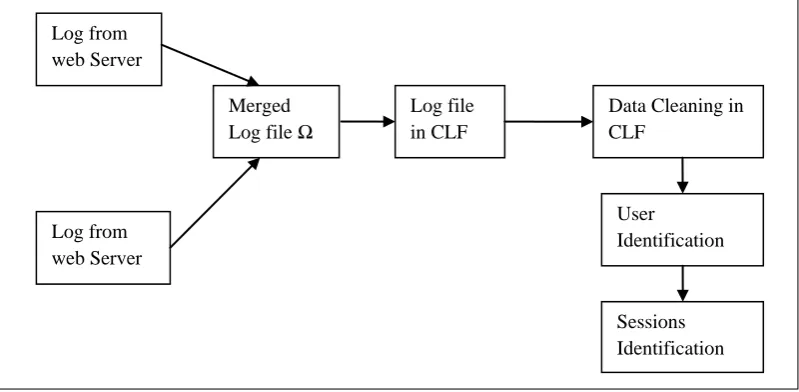
The figure 1 shows that the architecture for processing
the web log files. The log files from different web server or
proxy server are merged together. If the format of the log
files is different than retrieval of user sequences is a difficult
process. The log entries are converted into CLF (Common
Log Format) and the noisy data in the CLF file is removed.
Users and the sessions for each user are identified.
Figure 1. Architecture for web log processing
B.
Generating CLF web log file:
created and it is stored in the web server or proxy server. To
When the user access the web page the log entry is
merge and clean the web log file first we collect the log
entries from different web servers.
Log from
web Server
Log from
web Server
Merged
Log file
Ω
Log file
in CLF
Data Cleaning in
CLF
User
Identification
Consider the log files {
Log
1, Log
2…..Log
n} where
n
=number of log files; merge these log files into a single log
file
Ω (joint log file). Consider the log entries in
the log file
Log
iis {
Log
i,1, Log
i,2….Log
i,m} 1
≤ i ≤n where
m
=number of
log entries in the i
thlog file. The following algorithm is
used to merge the log files into a single log file
Ω.
Algorithm to create a merged file Ω Input: Log files from different web servers. Output: The merged Log file Ω.
begin
fields and the fields are separated by space. The unused field
is marked as “-“.
There is a difficulty in merging process since the log
formats for the web servers are different. The format of the
first log file that is used in the data set is
Client IP, date and time, URL visited, status code,
referrer, browser
The format of the second log file is Client IP, http status
code, url visited, date and time, referrer, browser
The format of the third log file is
Date/time, Client IP, Pages/directories, URL ,Method,
Username, Http status code, Referrer, Mime type, Filter
name, Filter reason, Profile, Interface IP, Interface port,
Events, Events (profile),Page views, Bytes transferred,
Bytes transferred (profile), Elapsed time, Elapsed time
(profile)
Since the formats of the log files are different, it is not
possible to access the user sequence. We must create the
CLF (Common Log file Format) file which is in the form of
Client IP, date and time, URL visited, status code,
referrer, browser
The description of the above attributes is shown in Table
I.
Table 1. Attribute and its Description
Attribute Description
Client IP The IP address of the user system that accessed the web server.
Date and time The date and time on which the web log activity occurred.
URL visited URL of the resource accessed
Status code The http status code returned by the server. Referrer The referring (parent) page of the selected document. Browser Type and version of a browser used by the user to
access a website. For e.g. Netscape, Microsoft Internet Explorer, Lynx, Mosaic.
The http status code is a three digit number. Generally
there are four types of status codes:
i. Success (200 Series)
ii. Redirect (300 Series)
iii. Failure (400 Series)
iv. Server Error (500 Series)
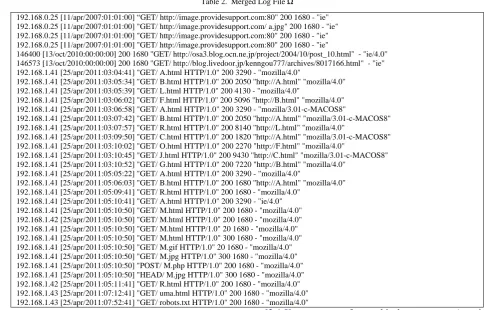
The Table II shows the log entries in the merged log file
Ω which is in CLF.
Table 2. Merged Log File Ω
192.168.0.25 [11/apr/2007:01:01:00] “GET/ http://image.providesupport.com:80" 200 1680 - "ie" 192.168.0.25 [11/apr/2007:01:01:00] "GET/ http://image.providesupport.com/ a.jpg" 200 1680 - "ie" 192.168.0.25 [11/apr/2007:01:01:00] "GET/ http://image.providesupport.com:80" 200 1680 - "ie" 192.168.0.25 [11/apr/2007:01:01:00] "GET/ http://image.providesupport.com:80" 200 1680 - "ie"
146400 [13/oct/2010:00:00:00] 200 1680 "GET/ http://osa3.blog.ocn.ne.jp/project/2004/10/post_10.html" - "ie/4.0" 146573 [13/oct/2010:00:00:00] 200 1680 "GET/ http://blog.livedoor.jp/kenngou777/archives/8017166.html" - "ie" 192.168.1.41 [25/apr/2011:03:04:41] "GET/ A.html HTTP/1.0" 200 3290 - "mozilla/4.0"
192.168.1.41 [25/apr/2011:03:05:34] "GET/ B.html HTTP/1.0" 200 2050 "http://A.html" "mozilla/4.0" 192.168.1.41 [25/apr/2011:03:05:39] "GET/ L.html HTTP/1.0" 200 4130 - "mozilla/4.0"
192.168.1.41 [25/apr/2011:03:06:02] "GET/ F.html HTTP/1.0" 200 5096 "http://B.html" "mozilla/4.0" 192.168.1.41 [25/apr/2011:03:06:58] "GET/ A.html HTTP/1.0" 200 3290 - "mozilla/3.01-c-MACOS8"
192.168.1.41 [25/apr/2011:03:07:42] "GET/ B.html HTTP/1.0" 200 2050 "http://A.html" "mozilla/3.01-c-MACOS8" 192.168.1.41 [25/apr/2011:03:07:57] "GET/ R.html HTTP/1.0" 200 8140 "http://L.html" "mozilla/4.0"
192.168.1.41 [25/apr/2011:03:09:50] "GET/ C.html HTTP/1.0" 200 1820 "http://A.html" "mozilla/3.01-c-MACOS8" 192.168.1.41 [25/apr/2011:03:10:02] "GET/ O.html HTTP/1.0" 200 2270 "http://F.html" "mozilla/4.0"
192.168.1.41 [25/apr/2011:03:10:45] "GET/ J.html HTTP/1.0" 200 9430 "http://C.html" "mozilla/3.01-c-MACOS8" 192.168.1.41 [25/apr/2011:03:10:52] "GET/ G.html HTTP/1.0" 200 7220 "http://B.html" "mozilla/4.0"
192.168.1.41 [25/apr/2011:05:05:22] "GET/ A.html HTTP/1.0" 200 3290 - "mozilla/4.0"
192.168.1.41 [25/apr/2011:05:06:03] "GET/ B.html HTTP/1.0" 200 1680 "http://A.html" "mozilla/4.0" 192.168.1.41 [25/apr/2011:05:09:41] "GET/ R.html HTTP/1.0" 200 1680 - "mozilla/4.0"
192.168.1.41 [25/apr/2011:05:10:41] "GET/ A.html HTTP/1.0" 200 3290 - "ie/4.0" 192.168.1.41 [25/apr/2011:05:10:50] "GET/ M.html HTTP/1.0" 200 1680 - "mozilla/4.0" 192.168.1.42 [25/apr/2011:05:10:50] "GET/ M.html HTTP/1.0" 200 1680 - "mozilla/4.0" 192.168.1.41 [25/apr/2011:05:10:50] "GET/ M.html HTTP/1.0" 20 1680 - "mozilla/4.0" 192.168.1.41 [25/apr/2011:05:10:50] "GET/ M.html HTTP/1.0" 300 1680 - "mozilla/4.0" 192.168.1.41 [25/apr/2011:05:10:50] "GET/ M.gif HTTP/1.0" 20 1680 - "mozilla/4.0" 192.168.1.41 [25/apr/2011:05:10:50] "GET/ M.jpg HTTP/1.0" 300 1680 - "mozilla/4.0" 192.168.1.41 [25/apr/2011:05:10:50] "POST/ M.php HTTP/1.0" 200 1680 - "mozilla/4.0" 192.168.1.41 [25/apr/2011:05:10:50] "HEAD/ M.jpg HTTP/1.0" 300 1680 - "mozilla/4.0" 192.168.1.42 [25/apr/2011:05:11:41] "GET/ R.html HTTP/1.0" 200 1680 - "mozilla/4.0" 192.168.1.43 [25/apr/2011:07:12:41] "GET/ uma.html HTTP/1.0" 200 1680 - "mozilla/4.0" 192.168.1.43 [25/apr/2011:07:52:41] "GET/ robots.txt HTTP/1.0" 200 1680 - "mozilla/4.0"
C.
Pre processing of CLF web log:
Pre processing step consists of removing all the data
tracked in Web logs that are useless for mining purposes
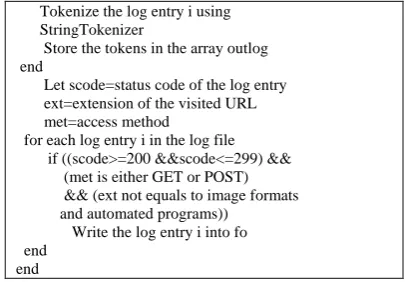
The following steps show the algorithm to clean the CLF
file.
a.
User profile will be created for the users those who are
accessing the textual information, so the requested
page with an extension gif, jpeg, bmp (image file
extensions) are removed.
b.
Due to some failures the requested pages are not
loaded properly in the user system. The log entries
with failure status code are removed from the CLF.
c.
The log entries which contain the automated programs
like web robot are removed from the CLF file.
d.
GET and POST methods are only considered. The log
entries which contain other methods are removed from
CLF.
Algorithm to Clean the CLF file
Input: CLF file which contains array list of log entries Output: Cleaned CLF file
begin
let inlog=String array contains the input log entries
Table III shows the cleaned log entries as a result of the
algorirthm.
Table 3. Cleaned Log File
192.168.1.41 [25/apr/2011:03:04:41] "GET/ A.html HTTP/1.0" 200 3290 - "mozilla/4.0"
192.168.1.41 [25/apr/2011:03:05:34] "GET/ B.html HTTP/1.0" 200 2050 "http://A.html" "mozilla/4.0" 192.168.1.41 [25/apr/2011:03:05:39] "GET/ L.html HTTP/1.0" 200 4130 - "mozilla/4.0"
192.168.1.41 [25/apr/2011:03:06:02] "GET/ F.html HTTP/1.0" 200 5096 "http://B.html" "mozilla/4.0" 192.168.1.41 [25/apr/2011:03:06:58] "GET/ A.html HTTP/1.0" 200 3290 - "mozilla/3.01-c-MACOS8"
192.168.1.41 [25/apr/2011:03:07:42] "GET/ B.html HTTP/1.0" 200 2050 "http://A.html" "mozilla/3.01-c-MACOS8" 192.168.1.41 [25/apr/2011:03:07:57] "GET/ R.html HTTP/1.0" 200 8140 "http://L.html" "mozilla/4.0"
192.168.1.41 [25/apr/2011:03:09:50] "GET/ C.html HTTP/1.0" 200 1820 "http://A.html" "mozilla/3.01-c-MACOS8" 192.168.1.41 [25/apr/2011:03:10:02] "GET/ O.html HTTP/1.0" 200 2270 "http://F.html" "mozilla/4.0"
192.168.1.41 [25/apr/2011:03:10:45] "GET/ J.html HTTP/1.0" 200 9430 "http://C.html" "mozilla/3.01-c-MACOS8" 192.168.1.41 [25/apr/2011:03:10:02] "GET/ G.html HTTP/1.0" 200 7220 "http://B.html" "mozilla/4.0"
192.168.1.41 [25/apr/2011:05:05:22] "GET/ A.html HTTP/1.0" 200 3290 - "mozilla/4.0"
192.168.1.41 [25/apr/2011:05:06:03] "GET/ B.html HTTP/1.0" 200 1680 "http://A.html" "mozilla/4.0" 192.168.1.41 [25/apr/2011:05:09:41] "GET/ R.html HTTP/1.0" 200 1680 - "mozilla/4.0"
192.168.1.41 [25/apr/2011:05:10:41] "GET/ A.html HTTP/1.0" 200 3290 - "ie/4.0" 192.168.1.41 [25/apr/2011:05:10:50] "GET/ M.html HTTP/1.0" 200 1680 - "mozilla/4.0" 192.168.1.42 [25/apr/2011:05:10:50] "GET/ M.html HTTP/1.0" 200 1680 - "mozilla/4.0" 192.168.1.41 [25/apr/2011:05:10:50] "POST/ M.php HTTP/1.0" 200 1680 - "mozilla/4.0" 192.168.1.43 [25/apr/2011:07:12:41] "GET/ uma.html HTTP/1.0" 200 1680 - "mozilla/4.0"
D.
User Identification:
The users are identified from the CLF web log file using
the fields IP address and browsing agent.
Algorithm to identify the Users from pre processed CLF file Input: Cleaned CLF web log file.
Output: The list of users who are accessing the web pages. begin Assign flag[j] is true;
Assign user x ending time into d1
Find dateDifference (d1, d2) calculates the time taken by the user and display it.
Increment x for the next user end
E.
Sessions Identification for each User:
The algorithm in section 2.D identifies the users from
Log file, next we have to identify the sessions for each user.
Here we selected the session maximum time is 30 minutes
[2][7][8].
Algorithm to identify the sessions for each user from the log file. Input: Log entries user wise.
if (referrer.equals("-") || timedifference(d1,d2)>30) Display it is a new Session and Visited Url is u[i]j][3]) else
backward: for k from 0 to j-1 // backward referrence if ( referrer.equlas(kth log entry URL))
The log entry j belongs to same user session and break backward
end
III.
EXPERIMENTAL RESULTS
The Algorithms discussed in section 2.C and 2.D is used
to identify the users and sessions for each user. The
algorithms are implemented in JDK 1.6.0_24. All
experiments are done on Intel Core i3 processor 2.53 GHz
with Windows 7 Home Premium (64-bit) and 4 GB RAM.
The algorithms are evaluated by using the following three
different server log files.
a.
www.kongunadu.ac.in analysed the log entries from
25-4-2011 1.00 pm to 25-4-2011 8.00 pm.
b.
www.group.slac.stanford.edu/wim/logfiles/info.html -
Analyzed few log entries.
c.
www.sawmill.net: analysed the log entries from
11-04-2007 1:00 pm to 12-04-11-04-2007 1:00 pm.
The log entries from the above servers are merged in the
log file
Ω. The Figure 2 shows the merged log file.
Figure 2. Input Merged Log file Ω
After pre processing the merged input log file is cleaned
and Figure 3 shows the output log file which is in CLF file.
Figure 3. Cleaned Output log file in CLF
The size of the sample input log is 2.91 KB and it is
reduced in the output CLF file as 1.81 KB. The figure 4
shows the memory difference between the log files.
M e m ory Size of the log file s
2.91
1.81
0 0.5 1 1.5 2 2.5 3 3.5
Input Log Ω Output Log
Log file s
M
em
o
ry i
n
K
B
Figure 4. Memory size of the log files
The users and sessions for the users are identified. The
tree structure of the URL visited by user1 is shown in figure
5.
Session 1 Session 2 Session 3
Session 4 Session 5 Session 6
Figure 5. Tree structure of URL visited by the User1
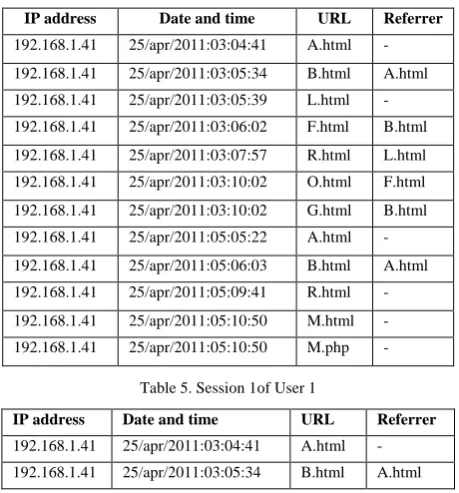
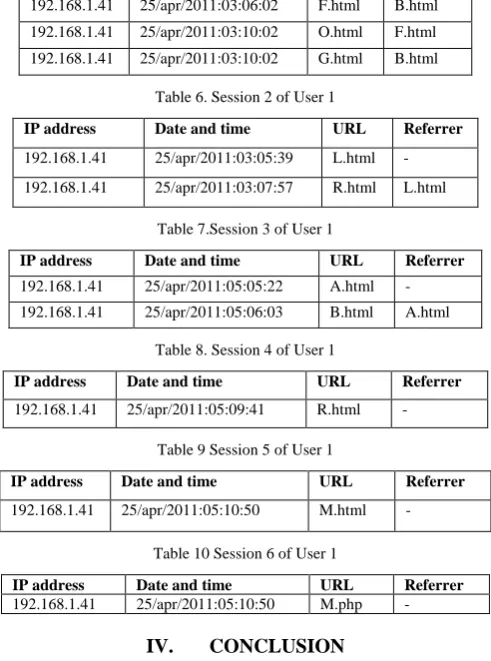
The table IV shows the log entries for the first user and
table V to table X shows the session information for the first
user which are identified using the algorithms discussed in
sections 2.C and 2.D.
Table 4.Log entries for User1
Table 5. Session 1of User 1
IP address Date and time URL Referrer
192.168.1.41 25/apr/2011:03:04:41 A.html -
192.168.1.41 25/apr/2011:03:05:34 B.html A.html
IP address Date and time URL Referrer
192.168.1.41 25/apr/2011:03:04:41 A.html -
192.168.1.41 25/apr/2011:03:05:34 B.html A.html
192.168.1.41 25/apr/2011:03:05:39 L.html -
192.168.1.41 25/apr/2011:03:06:02 F.html B.html
192.168.1.41 25/apr/2011:03:07:57 R.html L.html
192.168.1.41 25/apr/2011:03:10:02 O.html F.html
192.168.1.41 25/apr/2011:03:10:02 G.html B.html
192.168.1.41 25/apr/2011:05:05:22 A.html -
192.168.1.41 25/apr/2011:05:06:03 B.html A.html
192.168.1.41 25/apr/2011:05:09:41 R.html -
192.168.1.41 25/apr/2011:05:10:50 M.html -
192.168.1.41 25/apr/2011:05:10:50 M.php -
A
B
F
O
G
R
L
R
A
B
192.168.1.41 25/apr/2011:03:06:02 F.html B.html
192.168.1.41 25/apr/2011:03:10:02 O.html F.html
192.168.1.41 25/apr/2011:03:10:02 G.html B.html
Table 6. Session 2 of User 1
IP address Date and time URL Referrer
192.168.1.41 25/apr/2011:03:05:39 L.html -
192.168.1.41 25/apr/2011:03:07:57 R.html L.html
Table 7.Session 3 of User 1
IP address Date and time URL Referrer
192.168.1.41 25/apr/2011:05:05:22 A.html -
192.168.1.41 25/apr/2011:05:06:03 B.html A.html
Table 8. Session 4 of User 1
IP address Date and time URL Referrer
192.168.1.41 25/apr/2011:05:09:41 R.html -
Table 9 Session 5 of User 1
IP address Date and time URL Referrer
192.168.1.41 25/apr/2011:05:10:50 M.html -
Table 10 Session 6 of User 1
IP address Date and time URL Referrer
192.168.1.41 25/apr/2011:05:10:50 M.php -
IV. CONCLUSION
Personalising web access needs the processing of web
log files. In this paper we discussed the algorithm to merge
the different web logs, clean the merged log file and identify
the users and the sessions from the web log file which is in
Common Log format. Users are identified from the log
entries using the fields IP address and browsing agent and
the sessions are identified using URL clicks, referrer, inter
and intra session timeouts. In future the research will be
extended in larger data set and the algorithms will be applied
in deriving user profiles automatically in search engines.
V. REFERENCES
[1].
R. Cooley, B. Mobasher, and J. Sivastava, “Data preparation
for mining World Wide Web browsing patterns”, Journal of
Knowledge and Information Systems, Pages:5-32, 1999.
[2].
J. Srivastava, R. Cooley, M. Deshpande and Tan, “Web
Usage Mining Discovery and Applications of Usage Patterns
from Web Data” ACM SIGKDD Explorations Newsletter
Volume I (2):12-23, 2000.
[3].
G.Arumugam and S.Suguna, “Optimal Algorithms for
Generation of user Session Sequences Using Server Side
Web User Logs”, ESR Groups France, 2009.
[4].
C.R. Anderson, “A machine learning approach to web
personalization”, Ph.D. thesis, University of Washington,
2002.
[5].
B. Diebold and M. Kaufmann, “Usage-based visualization of
web localities”, Australian symposium on information
visualisation, pp. 159–164, 2009.
[6].
Federico Michele Facca and Pier Luca Lanzi “Mining
interesting knowledge from weblogs: a survey”, Department
of Electronics and Information, Artificial Intelligence and
Robotics Laboratory Italy Available online 11 September
2004.
[7].
B. Berendt, B. Mobasher, M. Spilopoulou and J. Wiltshire,
”Measuring the accuracy of sessioninzers for web usage
analysis”, Proc. Of the Workshop on Web Mining at the First
SIAM International Conference on Data Mining, Page(s):
7-14.
[8].
Z. Chen, A. Fu, J. Tang and F. Tung, “Optimal algorithms for
finding user web access sessions”, Journal of World Wide
Web.