© 2016, IJCSMC All Rights Reserved
699
Available Online atwww.ijcsmc.comInternational Journal of Computer Science and Mobile Computing
A Monthly Journal of Computer Science and Information Technology
ISSN 2320–088X
IMPACT FACTOR: 5.258
IJCSMC, Vol. 5, Issue. 3, March 2016, pg.699 – 704
RLCS – A Remote Lab
Controlling and Sharing System
Shubham Padade
1, Yahya Indorewala
2, Aakanksha Hedaoo
3, Meghana Gulhane
4,
Vaibhav Sonwane
5, Mahesh Panjwani
61,2,3,4,5,6
Computer Technology, RTMNU, India
1
[email protected]; 2 [email protected]; 3 [email protected];
4
[email protected]; 5 [email protected]; 6 [email protected]
Abstract — RLCS may be a straightforward, quick and secure application for remotely controlling PC which might support controlling multiple desktops at a time form same computer. The fundamental purpose of RLCS is to produce an application which is able to facilitate the users in accessing and controlling any desktop from anyplace within the world. The concept is to make a virtual lab for interaction with two or more computer systems. This enables making, modifying and sharing documents and knowledge together. Most of the existing systems do not have a good scalability and can only access only one system at a time. RLCS uses existing technologies and advanced functions to produce a stronger period collaboration system. The user access in RLCS is uncomplicated and kept as straightforward as possible with minimal human intervention while setting up. This is a platform independent application so that it is easy to control any computer system irrespective of which operating system it is running. The applications can be used in industries, organizations and academic institutes for cooperative studies, project demonstrations and distance learning. It can be used to monitor any suspicious activities on desktop to maintain cyber security.
Keywords— Collaboration, VNC; RFB; Socket Programming; Multi-threading; GUI
I. INTRODUCTION
© 2016, IJCSMC All Rights Reserved
700
There are as of now numerous Desktop Sharing Software accessible in business sectors which take a shot at PC upheld constant cooperation frameworks, however with specific confinements.
1) Many systems are slow, i.e. have bad scalability as their performances decreases with the increase in number of users. 2) Do not have a good Graphical user Interface, which could be easily used and understood by the users.
3) Many of them are required to be installed at the user‘s system and thus involve a heavy procedure while setting up for use.
4) They charge for their commercial use, which makes it difficult for the start-up companies to provide remote support for the clients
In this paper, we propose a complete solution which overcomes above limitations. This is achieved by using existing technologies – VNC – Virtual Network Computing, which is having Remote Frame Buffer Protocol, RFB as its underlying technology. VNC is a platform-independent system, that supports graphical desktop sharing. Optimization of VNC is done to support real time collaboration. ASP DOTNET – Dot Net is a web application development framework written in the C-sharp used to develop the Graphical User Interface. The GUI is such that it makes user access in RLCS very simple with minimal human intervention while setting up. This is an open source application so organizations can customize it according to their own needs.
II. RELATED WORK
During detailed study of the existing technologies it was found that the following technologies would be required to develop the application.
A. VNC
VNC – Virtual Network Computing – is remote control programming, which permits interfacing with one PC utilizing a basic system on another PC. It is a convention for getting to graphical client interfaces. It works at the framebuffer level, which makes it stage autonomous, and along these lines it is conceivably pertinent to every single working framework. It hence permits a client to control a remote machine, i.e. server on a nearby machine, i.e. customer. The fundamental operations.
1) VNC Server
It is a system which keeps running on a machine that shares its screen. It permits to see a desktop not just on the machine on which it runs, yet from anyplace on the Internet, The server sends frame buffer as little rectangles to the customer and inactively permits the customer to take control of it.
2) VNC Client
It is a project introduced on the customer's machine and associates with the server part. Otherwise called VNC viewer, it watches, controls, and connects with the remote machine, i.e. server by sending to it the inputs and tolerating the yields
3) RFB Protocol
A Communication Protocol on which VNC is based. It is utilized to remotely get to the graphical client interfaces. This convention all server to upgrade framebuffer which is shown on viewer's side. The occasions – console press and mouse developments – messages from customer are sent to server. Desktop is spoken to as little rectangles of pixel information at the predefined x, y position and transmission is finished by transferring the overhauled graphical screen parts in the other heading, over a network. The RFB depends on sending encoded pixels to the customer that contains the data of the Desktop of Server. The customer then disentangles the pixels and draws them on a graphical application running on its machine. Occasions happening at the customer side like console press and mouse pointer developments are caught and sent to the Server. Server then reflects back these progressions. For this reason the RFB convention proposes the utilization of a Frame Buffer. The Frame Buffer really contains the desktop data which is redesigned when the customer produces any sort of occasion. This redesigned cradle must be sent to the Server which upgrades its own desktop as needs be. So also when the Server produces occasions that influence the desktop, the redesigned cradle is redrawn at the Client. This trade of framebuffers gives synchronized desktop sharing. The essential accentuation is that there ought to be not very many necessities at the customer's side. As RFB works at the level of framebuffer, it is free of the stage, i.e. it is relevant to all windowing frameworks
B. Sockets
© 2016, IJCSMC All Rights Reserved
701
calls. The file descriptor came by socket() is sockfd, listen () is employed to attend for the incoming connections, settle for () returns a brand new socket file descriptor for every affiliation established. Socket-to-socket virtual affiliation is thought as session and send () and recv () area unit used for human action over datagram sockets or stream sockets.
Sockets deliver the incoming information packets to specific method or thread of associate application. Server is that the laptop application that gives application services. It creates sockets on commence in listening mode . Once auditor is run, all it will is to sit down there and listen whether or not a packet arrives or not. Equally several functions area unit there that area unit aforesaid to dam, i.e. if there's no information, they sleep there till some information arrives. Such functions area unit settle for (), recv (), even once the primary socket descriptor is formed victimisation socket (), the kernel sets it to dam. However to place a program on busy wait yearning for information isn't an honest follow as it‘ll suck up central processor time and therefore reduces the general potency.
The Client-Server communication is shown in the Fig.1
Fig. 1. Client – Server Communication
C. Advanced Techniques
To take care of the above issue select () function can be utilized to perform synchronous treatment of data and yield at numerous sockets
Select (): This function is somewhat strange, but it‘s very useful. Take the one situation: you are a server and you want to listen for incoming connections as well as keep reading from the connections you are already having. No need to worry, you say, just an accept() and a couple of recv()s. Not so fast, buster! What if you‘re blocking on an accept() call? How are you going to recv() data at the same time? "Use non-blocking sockets" No way! You don‘t want to be a CPU hog. What, then? select() gives you the power to monitor several sockets at the same time. It‘ll tell you which ones are ready for reading, which are ready for writing, and which sockets have raised exceptions. select() function monitors "sets" of file descriptors; in particular readfds, writefds, and exceptfds. If you want to know if you can read from standard input and some socket descriptor, sockfd, just add the file descriptors 0 and sockfd to the set readfds. The parameter numfds should be set to the values of the highest file descriptor plus one. When select() returns, readfds will be modified to reflect which of the file descriptors you selected which is ready for reading.
D. C# Dot Net
© 2016, IJCSMC All Rights Reserved
702
applications in ASP.NET are C# and VB.NET. While VB.NET is directly based VB (Visual Basic), C# was introduced along with the .NET framework, and is therefore a somewhat new language.
III.RLCSDESIGN
The necessities to outline a continuous coordinated effort framework to bolster connection of more than two clients were distinguished or more said advances were remembered while creating RLCS. The configuration is focussed to give a simple to get to joint effort framework that backings different clients and not just shared.
A. GUI
The Graphical client interface has been produced utilizing C# Dot Net, which gives a steady approach to add to a windows application .The client access in RLCS is kept as basic as could be expected under the circumstances with negligible human intercession while setting up. As it gives a single tick access to the remote desktop this builds the convenience of the item. This is encouraged via programmed running of the exe at the customer's side as well as server side. It is an open source apparatus, allowed to utilize and could be modified by inclinations.
B. Working
1. Connecting to Server and Controlling
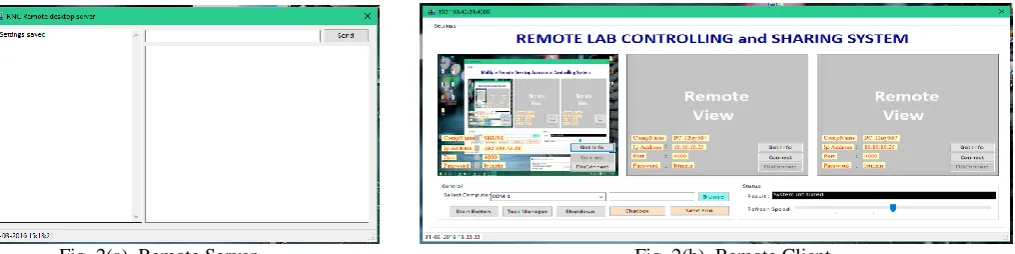
The whole module is divided in two parts Remote Client and Remote Server. The client is one who will control the remote system and the server is the one which will be controlled by the client
First we have to run the remote server application on the server side as an administrator. It will insert (or update if already present) the system information like machine id, machine name, IP Address, Port & Password to the database and start listening. Once the system is listening, we can connect to that system.
Now we have to run the remote client application on client side (i.e. Controller). In this application ‗GET INFO‘ button will fetch the information of the available system in the database like machine id, machine name, IP Address, Port.
By clicking on ‗CONNECT‘ button we can connect to the server system
After the connection is established, the server will continuously send screenshots to the client and client will send control information like cursor position and keystrokes.
Fig. 2(a). Remote Server Fig. 2(b). Remote Client
2. File Sharing
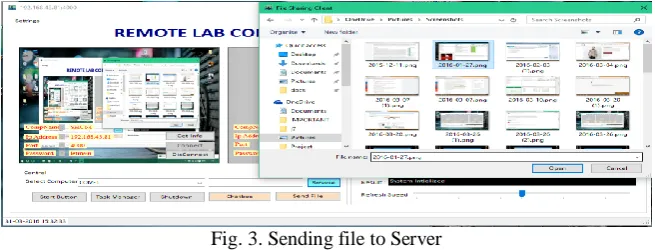
RLCS also provides a feature of sending file. Remote Client can send any file to the server system (the one which is being controlled by client). When user clicks the browse button an object of OpenFileDialog is created and a dialogbox is opened to select the path of the file to be sent. When the send button is clicked, the SendFile method is called and handled in parallel. Parallel execution makes sure that main form user interface does not get frozen while the file is being sent.
© 2016, IJCSMC All Rights Reserved
703
Fig. 3. Sending file to ServerIV.METHODOLOGY
For the device to be produced, an exceptionally basic procedure is utilized as a part of which the server will be running in listening mode. When the customer logins, an executable will keep running on the customer side which will contain the VNC server and the VNC customer, these are in charge of desktop sharing and also desktop getting to. This executable is in charge of associating with the server and doing further work. The common desktop and the sharing desktop are associated with the server by means of a control association. This will make a section in the control association table which is available at the server area. A percentage of the segments in information association table will be filled when the sharing desktop is associated and the passage will be full if the getting to desktop finishes every one of the qualifications and requests the consent to get to the desktop.
The Client collaborates with the Server through the accompanying capacities: Get Support Connection Setup technique is called when a customer requests that associate with Server and makes a Control Connection. Give Support Connection Setup gives Control Connection to the client. To ask for information transmission Remote Support Request is finished. Acknowledge Support Acknowledgment, acknowledges the information association demand and a Data Connection gets set up. After Data Connection foundation Data Exchange, happens synchronously among the customers joined amid a session. Thusly the server collaborates with the customers who are interfacing with it, and the information associations and information exchange are encouraged by the association handler strategy which deals with the document descriptors. This association between the Server and Client stops once a customer either logs out or the host breaks down the session, creating the information associations with its customers to get tidied up. This should be possible utilizing Get Logout Request and Give Logout Request strategies.
The server keeps up the record of customers which needs to share the desktop. It connects the information association of intrigued customers. Control association of customer with server is constantly dynamic.
Better is the availability between two machines better will be the Performance. Association Schema distinguishing customers on Server is put away in the accompanying way.
V. CONCLUSION
The current advances and extra propelled capacities alongside an easy to use GUI could make a much quicker and less complex remote desktop sharing framework to bolster multiparty gathering where notwithstanding distributed, more than two clients can interface. The venture is free and open source, the source code and documentation would be accessible at the task site.
The various customers are taken care of by giving a period cut to the attachments asking for information transmission and hence the numerous strings overseeing the attachments are taken care of appropriately. The expansion in number of clients, i.e. the adaptability can be dealt with by stretching out VNC to bolster multicast information transmission. Whether you need brisk access to your home PC from anyplace on the planet, remote desktop applications can make your life simpler. With the right remote desktop instrument, you can get to your home PC as if you're sitting directly before it—regardless of where you are, regardless of what you're doing.
VI.FUTURE SCOPE
© 2016, IJCSMC All Rights Reserved
704
ACKNOWLEDGEMENT
I wish to express my sincere gratitude to Mr M.G.Panjwani, Assistant Professor, Department of Computer Technology PCE, Nagpur for providing me an opportunity to do my project work in. ―Remote Lab Controlling and Sharing System‖.
REFERENCES
[1] Tristan Richardson; Quentin Stafford-Fraser; Kenneth R.Wood & Andy Hooper (January / February 1998) "VirtualNetworkComputing":http://aardappel.13thmonkey.org/ documentation/misc/VNC-paper-98.1.pdf
[2] Socket_programming :http://home.iitk.ac.in/~chebrolu/ee673-f06/sockets.pdf
[3] Beej‘s Guide to Network Programming : http://beej.us/guide/bgnet/output/html/singlepage/bgnet.html [4] Ruby on rails: http://www.abletech.co.nz/blog/white-paper-10-reasons-for-ruby-on-rails
[5] Beier,C.:CollabKit-A Multi-User Multicast Collaboration System based on VNC, HU-Berlin, Thesis, 04 2011. http://edoc.huberlin.de/docviews/abstract .php?id=39389
[6] Existing_Technologies:http://www.brighthub. com/office/ collaboration/articles/ 71329.aspx
[7] Interconnection Networks, An Engineering Approach by José Duato, Sud Interconnection Networks, An Engineering Approach by José Duato, Sudhakar Yalamanchili, and Lionel Ni