A Development Of Virtual Learning System For Tertiary Institutions
In Nigeria
Abasiama G. Akpan
Department of Computer Science & Mathematics, Evangel University, Akaeze, Ebonyi State - Nigeria.
E- mail: [email protected] Phone: +234(0)8034806141
Worsu Ednah Nwereka Department of Computer Science,
Captain Elechi Amadi Polytechnic, Port Harcourt - Nigeria
Email: [email protected]
Phone: +234(0)36005293
ABSTRACT
In this study, a Virtual Learning System that integrates Virtual Classroom and Virtual Laboratory services is presented. The Virtual Classroom represents an interface between the students and a virtual professor and provides personalized learning materials to the users. The Virtual Laboratory offers a possibility to the attendees to share different resources at once and work with them as if they were at the same place where (real) resources are.
In the system design, we use agents as entities that work on different tasks in the system. A set of agents of the same type is responsible for handling different users and their requests. The cooperation among agents is established through the act of exchanging messages.
Virtual Learning System is implemented in Windows 9x/NT environment using Java for the agents‟ implementation.
Keywords: Web system, Object-oriented design, Distance education systems, Mobile
agents, Java, Virtual Learning System (VLS).
1. 0 INTRODUCTION
In this study, a Virtual Learning System that integrates Virtual Classroom (VC) and Virtual Laboratory (VL) services is presented.
The VC service represents the interface between the students and a virtual professor and provides personalized learning materials to the users. Personalized learning materials can be created only if the system adapts to the student needs shown in the student‟s interaction process. That process is supported with the help of several mobile agents with different specialty, such as an agent responsible for student classification and a set of agents responsible for supporting learning activities such as finding the learning material relevant to student‟s needs. We consider VC only as a part of Virtual University. Thus, we try to develop a distributed architecture that can be reused for any course that can be activated in the Virtual University.
The VL offers a possibility to the attendees to share different resources at once and work with them as if they were at the same place where (real) resources are. One scenario can be to control remotely a robot system in a chemical laboratory from a PC connected on Internet. The idea of the resource is not limited to some specific
the VL design as well. The difference is that they do not expose any mobility behaviour. As it is stated before, the cooperation among agents is established through the act of exchanging messages. In the case of the VL service, we designed several protocols for socket communications between the agents of different levels and different hosts in the system. All protocol definitions are represented using XML (Extensible Markup Language). It proved our choice, providing a great deal of flexibility, which is very important for the service, since it brings many different resources into one standard interface.
Section 2 describes the VC design. Section 3 presents the design of the VL service. The discussion about the implementation is given in section 4. Section 5 concludes the paper.
2. 0 VIRTUAL CLASSROOM OBJECT-ORIENTED DESIGN
VC is defined as an alternative of the "classical classroom". It can be used as an additional source for materials presented in certain courses. The main idea in the VC design is that users can log on from anywhere, and that on the user‟s end, the only support necessary, is a Web browser. The whole system is web based and uses Java applets for its implementation [4].
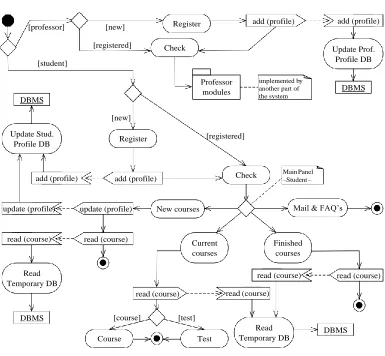
Fig. 1: VC activity diagram [professor] [new] Register
[registered] Check
[student]
Update Prof. Profile DB
Professor modules DBMS
implemented by another part of the system
DBMS
[new]
Update Stud.
Profile DB Register
[registered]
add (profile) add (profile) Check Main Panel –Student –
update (profile) update (profile) New courses Mail & FAQ‟s
read (course) read (course) Current
courses
Finished courses
Read Temporary DB
read (course) read (course)
read (course) read (course)
DBMS [course] [test]
Test
Read
xx x x xx( )
xxx
co m m u n icat e
w it h catc h
c o mmun ic at e
w it h cat c h
Pro fe sso rID Nam e Su rn am e EM ail In st it u t io n P ro fe sso r Exe c ut e S Q L( )
Ro w sA ffe c t e d ( ) m_ Ro w sA ffe c t ed
Up dat e Q u e ry
SQ LE x c e p t ion St ring
Co u rse S e le c to r A g en t D o In it ia lize ( ) Do Re m o t e Jo b ( ) Do Ho m e Jo b () ru n ( )
on Cre at ion ( ) on D isp osin g ()
…
Co n t e n t P ro vid e r Ag le t
Student registration is done through the Student Registration applet. Once the student logs on, the system opens student Main Panel. This panel allows the student to choose between several options (see Figure 1).
Professors are following the other branch of the diagram that is supported with another module of the system. These modules can be used for updating, posting new courses or previewing information about students attending a certain course. The system contains three groups of classes: agents, applets and query classes.
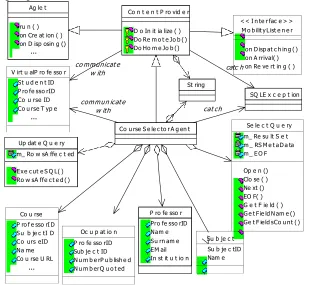
As an example, on Figure 2 we present two of the most representative classes from the agent group: Virtual Professor and Content Provider classes.
<< I n te r fac e > > M o b ilit y L ist e n e r
on D isp at c h in g ( ) on A rrival( ) on Re ve rt in g ( )
Fig. 2: Class diagram of the Virtual Professor, Content Provider and Course Selector Agent classes
The Virtual Professor class is an interface between applets and agents. It keeps data for the currently logged user and other useful data for the system. The Virtual Professor enables the communication among applets and agents. The Content Provider is a class parent for the rest of the agent classes. It defines agents' behaviour. The Content Provider class inherits its mobility characteristics from its ancestor classes, Aglet and Mobility Listener, which are part of the IBM Aglet agent-supporting platform. For more details about other VC system classes see [1].
3. 0 VIRTUAL LABORATORY OBJECT-ORIENTED DESIGN
The logical architecture of the VL system is given in Figure 3. Every user can work with the system by using a web-based interface. The Container Agent enables different resources, with different implementations of their graphical views, to be placed on the web-based interface. In this way every specific resource can be presented with a graphical interface representing the nature of the resource and can communicate with the users in a manner that is close to the “classical”.
V irt u alP ro fe sso r St u d e n t ID P ro fe sso rID Co u rse ID Co u rse T yp e
…
Se le c t Q u e ry m_ Re su lt S e t m _ RS M e t a D a ta m_ E O F
Op e n () Clo se ( ) Ne xt () EO F( ) G e t F ie ld ( ) G e t F ie ld N am e () Ge t F ie ld sCo u nt ( )
Su b je c t Su b je c tID Nam e Co u rse
P ro f e sso rI D S u b je c tI D Co urs eID Na me Co u rse U RL
…
server log database resource server
(Resource Selector Agent)
…
communicatinginterface (Communication
Agent)
resource protocol I (RPI) several communicating possibilities:
file exchange,
shared file/database,
other techniques resource simulation
(Simulation Agent) resource simulation
(Simulation Agent)
resource view <display interface>
(View Agent) resource view
<display interface> (View Agent)
resource protocol II (RPII)
socket comminucation Virtual Laboratory server (Server Agent)
resource definitions database
resource server (Resource Selector
Agent) communicating interface (Communication Agent)
…
optional…
optional…
run on request run on request…
…
…
Fig.3: The architecture of the VL
View Agent is the key player on the client side (the web browser that the user is using to view the VL system). The system can hold many definitions of different View Agents, since every different resource or a group of resources should present an interface of its own to the user.
All of the system communication is done through two agents that run on the VL server, the Server Agent and the Resource Selector Agent. Every View Agent in the system communicates with the Server Agent when a connection to the VL server is required in order to communicate with a particular resource. The Server Agent handles different connection requests and runs a Resource Selector Agent as a thread that handles the specific requests and passes back the resource responses to the View Agent.
The Resource Selector Agent‟s task is to get the request from the View Agent, find the appropriate Communication Agent to communicate with the specific Simulation Agent and the real resource and then pass back and forth the requests/responses between the View Agent and Communication Agent (with possible message translation).
The Communication Agent‟s task is to enable the message translation and communication in general with the Simulation Agent and the (real) resource. All of the agents mentioned above are stationary agents and implemented as pure Java classes, but the set of Simulation Agents implementation is based on DCOM (Distributed Component Object Model). This enables a distributed computing of the resource requests. The Simulation Agent‟s task is to wrap around a physical resource in a
(real) resource resource definitions database server log database web-based user interface web-based user interface Laboratory applet (Container Agent) Laboratory applet
software entity working in the VL system.
The communication between agents is accomplished via XML defined protocols (see an example of a XML defined protocol on Figure 4) that give a flexible way for agents to exchange common messages.
View Agent Resource Selector Agent
<CONTINUE>YES</CONTINUE>
<CONTINUE>YES</CONTINUE> <CONTINUE>YES</CONTINUE>
<CONTINUE>YES</CONTINUE>
<CONTINUE>YES</CONTINUE>
<CONTINUE>YES</CONTINUE> <DISCONNECT>
<ID>vlClient35</ID> <CODE>BALV</CODE> </DISCONNECT>
<RESPONSE> <ERROR>
<NUMBER>0</NUMBER> <DESCRIPTION>
No error.
</DESCRIPTION> </ERROR> <COUNT>1</COUNT> <ITEM>
<TYPE>NUMBER</TYPE> <NAME>x</NAME> <VALUE>135</VALUE> </ITEM>
<ITEM>
<TYPE>NUMBER</TYPE> <NAME>y</NAME> <VALUE>23</VALUE> </ITEM>
<ITEM>
<TYPE>NUMBER</TYPE> <NAME>z</NAME> <VALUE>-35</VALUE> </ITEM>
</RESPONSE>
<DISCONNECTED> <ID>vlClient35</ID> <CODE>VLAB</CODE> </DISCONNECTED>
View Agent Resource Selector Agent
<CONNECT/> <ACKNOWLEDGE>
<ID>vlClient35</ID> <CODE>VLAB</CODE> </ACKNOWLEDGE>
<RESOURCE>
<ID>vlResource_Chem_Robot</ID> </RESOURCE>
<REQUEST> <COUNT>1</COUNT> <ITEM>
<TYPE>STRING</TYPE> <NAME>Direction</NAME> <VALUE>LEFT</VALUE> </ITEM>
</REQUEST> <RESPONSE>
<COUNT>3</COUNT> <ITEM>
<TYPE>NUMBER</TYPE> <NAME>x</NAME> </ITEM> <ITEM>
<TYPE>NUMBER</TYPE> <NAME>y</NAME> </ITEM> <ITEM>
<TYPE>NUMBER</TYPE> <NAME>z</NAME> </ITEM> </RESPONSE>
<ACKNOWLEDGEMENT/>
<ACCEPTED>
<ID>vlClient35</ID> <CODE>BALV</CODE> </ACCEPTED>
<RESOURCE>
<ID>vlResource_Chem_Robot</ID> <AVAILABLE>YES</AVAILABLE> </RESOURCE>
<CONTINUE>YES</CONTINUE> <CONTINUE>YES</CONTINUE>
<CONTINUE>YES</CONTINUE> <CONTINUE>YES</CONTINUE> <CONTINUE>YES</CONTINUE> <CONTINUE>YES</CONTINUE>
<CONTINUE>YES</CONTINUE>
<CONTINUE>YES</CONTINUE>
Web Page
Fiji Applet
read/write Main DB Tahiti
Fig.4: XML defined protocol
4. 0 IMPLEMENTATION DETAILS
Virtual Learning System is implemented in Windows 9x/NT environment. All agents are developed in Java, with one exception, the set of Resource Simulation Agents in the VL service, which are based on DCOM technology.
The VC service agents use the mobile agents support platform, IBM Aglets. It is available for free download from http://www.trl.ibm.jp.co/aglets. Aglets are objects that can perform their work on many different hosts (servers). During the transfer from one host to another, they carry their code and internal state. For more details see [1].
The main components of the VC service are shown on Figure 5.
Web Browser Server
Fig. 5: The main components of the VC service
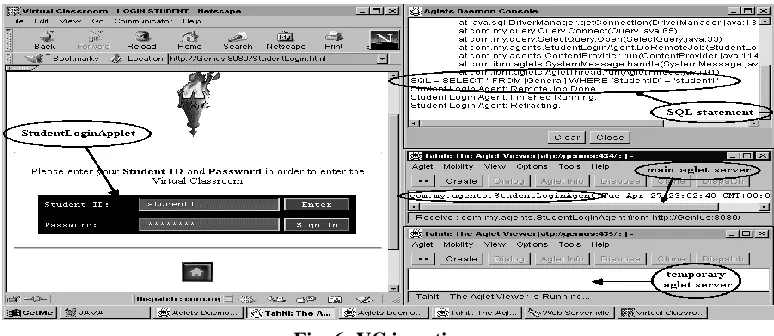
Figure 6 shows our classroom in action.
Fig. 6: VC in action
Being of stationary type, no mobility support platform is required for the VL service agents. Figure 7 shows the component layout of the VL service, which uses similar
Web Server CGI download applet/aglet classes
read
dispatch/retract Temp DB
read/write
Aglet Server - main
dispatch/retract Router Aglet Server - temporary
Applet classes Aglet classes
host architecture as the VC service.
Web Browser Web Server Resource Host
Fig.7: The main components of the VL service
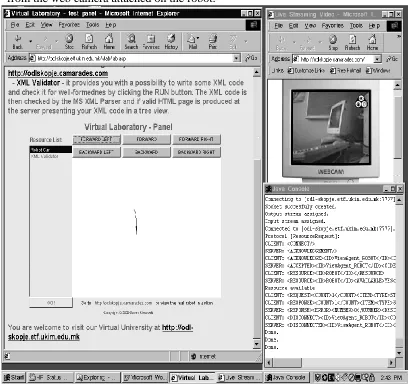
Figure 8 shows the VL service in action. In this case, our resource is a mobile robot. On the left side of the Figure 8, the VL panel provides six control commands for robot movements and the corresponding trajectory. On the right side, we can see the view from the web camera attached on the robot.
Web Page Web Server Communication Agent
Container Agent View
Agent
Web
site Simulation Agent
(real) resource
Resource Selector Agent
Server log
Server Agent
Fig. 8: VL in action
Implemented Virtual Learning System is modular. Adding the new features to the system can be achieved by defining new classes. Inheritance provides a way for derived classes to reuse all the functionality of ancestor classes with special functionality additionally applied to the derived classes.In the last phase of building the system, a group of 20 students at their last year of graduated studies have been involved in the design process rather than having them participate in a formal usability program. According to the experience of many companies, much can be gained from direct interaction between end users (students) and developers (a group of researchers at the Faculty) [2]. For example, in [3] usability testing is replaced with user dialogue. In our case, the students formulate their own user scenarios, rather than dictating specific test scenarios. From interactivity point of view, they described the system as a convenient tool for a professor - student communication. A lack of certain conferencing tool that can be used by the professor to point out certain important issues was reported. The need for sending files was also noticed. These suggestions will be a part of the next system upgrade (for example, by introducing on line chat facilities). Student groups with different background tested the usability of the system. The results of the test pointed out that the system is most suitable for students from the engineering and computer science department. These results were expected, because in that case the users were more familiar with the working environment. The use of VL services was emphasized as very useful. The system was less suitable for the students in human sciences where student - professor communication is mostly verbal. This weakness will be avoided with introduction of the audio conferencing tool into the system. General opinion about the system interactivity and usability is positive
0 CONCLUSION
In this study, a Virtual Learning System that integrates Virtual Classroom and Virtual Laboratory services was presented.
An important extension of the system is to add a module for knowledge level estimation of the students. We plan to design this module by deriving a new set of classes from the previously developed ones such as a Content Provider Class.
With the usage of software agents, we managed to provide a certain transparency of the physical allocation of the hosts in our system, needed for different types of data manipulation and resource sharing. During the usability testing, students found the system intuitive and easy to use.
References
[1]Vladimir Trajkovic, Danco Davcev, Goran Kimovski, Zaneta Petanceska. "Web - Based Virtual Classroom", In Proc. Of the TOOLS 34, Santa Barbara, California, USA, July 30 - August 4, 2000. [2]K. H. Madsen, "The Diversity of Usability Practices". Communications of the ACM, Vol. 42, No. 5, 1999,
pp. 60- 62.
[3]J. Buur, K. Bagger. "Replacing Usability Testing with User Dialogue", Communications of the ACM, Vol. 42, No. 5, 1999, pp. 63-66.