Automatic annotation of face velocity and acceleration in Anvil
Bart Jongejan
University of Copenhagen, Centre for Language Technology (CST) Njalsgade 140, 2300 København S, Denmark
E-mail: [email protected]
Abstract
We describe an automatic face tracker plugin for the ANVIL annotation tool. The face tracker produces data for velocity and for acceleration in two dimensions. We compare the annotations generated by the face tracking algorithm with independently made manual annotations for head movements. The annotations are a useful supplement to manual annotations and may help human annotators to quickly and reliably determine onset of head movements and to suggest which kind of head movement is taking place.
Keywords: Face detection, Automatic discourse annotation, Inter-annotator agreement
1.
Introduction
For a human annotator the manual segmentation and annotation of head movements in a multimodal corpus is a time consuming task. Inter-annotator agreement about segmentation is sub-optimal (Navarretta & Paggio, 2010). Automatic discourse annotation of head movements has the potential of making the annotation process swifter and less prone to personal choices. Also, automatic annotations, being based on raw position data without any psychological bias, may result in a physiological description of head movements in terms of velocities and (muscular) forces (acceleration) that is interesting in its own right and that can be compared with high level descriptions in terms of nods, shakes and other descriptors bearing conversational connotations.
2.
Background
As reported in (Jongejan, 2010) we have added a face tracker plugin1 to Anvil (Kipp, 2008), a generic annotation tool for multimodal dialogue. The plugin is based on OpenCV (Bradski & Kaehler, 2008), using the JavaCV2 programming interface to bridge the gap between OpenCV’s C/C++ world and Anvil’s Java world. Since our previous report, our algorithms for tracking faces have been much improved.
Earlier, Al Moubayed et al. (2009) have used OpenCV to detect faces. They applied the Lucas-Kanade algorithm to compute velocity as a function of time. By filtering away the low frequency component they obtained a signal that corresponded to e.g. head nods and shakes. Using the optical motion capture system Qualisys, Cerrato & Svanfeldt (2005) obtained automatic annotations for head nods. Their detection algorithm was based on velocity, a minimum number of consecutive frames and, in contrast to the current work, the amplitude of the head movements.
3.
Method
In our setup two people are in a dialogue that is filmed by
1 https://github.com/kuhumcst/Anvil-Facetracker 2 http://code.google.com/p/javacv
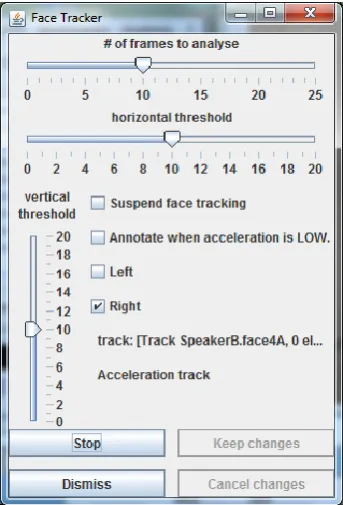
two cameras, one for each participant. The video streams are combined into a split screen video, showing both participants’ upper bodies and heads obliquely oriented towards a camera whereas, in reality, they are oriented towards each other. Because of this set-up, we use the OpenCV Haar-based routine for frontal face detection. If, as in our set-up, there are more than one faces in the scene, the user can select the person to analyse by pointing at the person’s face and clicking with the mouse. Optionally, the user can instruct the face tracker to stay and wait in the left or right half of the screen during periods when OpenCV cannot detect the face. See fig. 1. In the more common set-up with only one person in the field of view, more or less looking in the direction of the camera, the face tracker automatically finds the person’s face and can be run without human supervision and intervention for the full length of a video.
We have analysed the change in time of the face positions. The working hypothesis is that e.g. a head nod not only changes the orientation of a face, but also its lateral and vertical centre position.
We extracted velocity and acceleration vectors that are well correlated with head nods, shakes and other head movements. Each vector is based on a sequence of face positions of up to 25 frames, an analysis window covering a time span in the order of one second. For each frame, the program stores the horizontal and vertical positions of the face in a cyclic buffer containing enough cells to memorize a full analysis window. The mean velocity and acceleration during the window’s time span are computed by applying linear regression analysis on the data in the cyclic buffer.
The user can adjust the number of frames in an analysis window (Fig. 1), trading detail in the time domain against statistical reliability. The regression analysis requires at least two or three frames for the computation of velocity and acceleration, respectively. In practice, using much fewer than 8 frames makes the algorithm more sensitive to outliers, which for example can be caused by glitches in the recognition of the face in some frames. Using many more frames than 10 has the effect of desensitising the algorithm for quick, short movements that take place in a fraction of a second. Bursts of acceleration will go unnoticed if the duration of the analysis window is much longer than the bursts.
For every new frame the data for the oldest stored frame are removed from the cyclic buffer and the data for the new frame are added, shifting the span in time of analysed data by just one frame. So although looking at a high number of frames in each an analysis window smears out the data over time, the chosen method does not coarse grain the time domain from the user’s perspective: the generated annotations can begin at any frame.
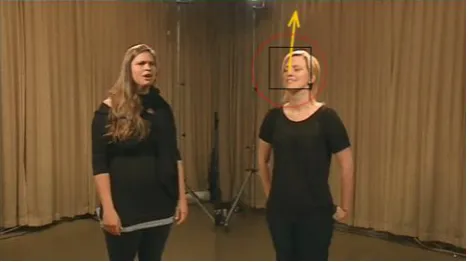
We create annotations for those time spans in which the velocity (or acceleration) is above a set threshold. The user can set thresholds for velocity and acceleration in the horizontal direction as well as in the vertical direction (Fig. 1). An annotation starts at the earliest frame in the earliest analysis window in which the threshold was surpassed, and it ends at the last frame in the last analysis window in which the threshold still was surpassed. If the onset of an annotation would be before the end of the previous annotation, the onset is delayed until the end of the previous annotation, because Anvil does not allow overlapping annotations in the same annotation track. The shortest time span for an annotation is the duration of the analysis window, except when the onset was delayed, in which case an annotation can be as short as two frames. The video overlay window is used to continuously inform the user about which part of the video is analysed, where the chosen physical quantity (velocity or acceleration) currently is pointing and whether the quantity is below or above the set thresholds. In fig. 2 the person on the right side nods, according to a manual annotation. The current velocity (yellow arrow) points in the “12 o’clock” direction. The red circle (or ellipse) indicates the currently
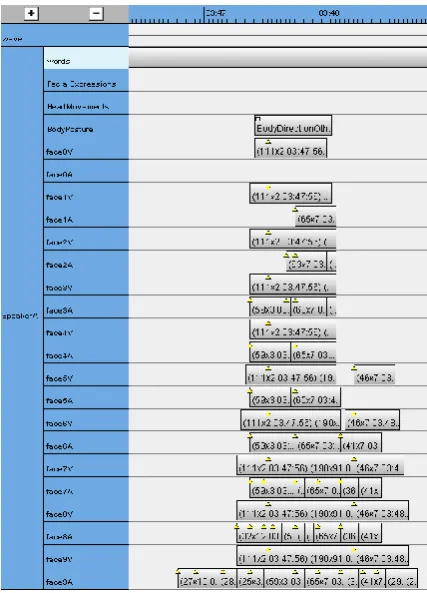
set thresholds for velocity components in the horizontal and vertical direction. Because the arrow reaches out of the red circle, an annotation will be created. The black square delineates the part of the image that is sent to the OpenCV software and is continuously adjusted in size and position. The person on the right in fig. 3 tilts her head, according to the manual annotation. The cyan arrow designates the current acceleration, which is “8 o’clock”. Fig. 4 shows a part of the annotation window. In the top line is a manual annotation: Nod, Repeated. The frame shown in fig. 2 is taken from this event.
Figure 2. Person nodding
Figure 3. Person tilting her head .
maxima fall outside the annotations and instead land in earlier annotations.
Figure 4. Part of the annotation window
The current hardware and software setup cannot quite attain a real time analysis of every frame in a video. Initially we allowed the analysis software to skip as many frames as needed to keep up with real time video, but after comparing these results with results obtained by frame-by-frame analysis of the same video material we concluded that skipping frames is indeed a bad idea, as already noted by (Matsusaka, 2009).
4.
Experiment
As test material for the face tracker we used a video containing about five minutes of dialogue between two persons (Fig. 2). On beforehand, the video was manually annotated by one annotator and checked by a second annotator. In cases of doubt a third person was involved. We repeatedly run the face tracker for the full length of the dialogue. We did this for each person.
While keeping the duration of the analysis window at 10 frames (about 0.4 seconds), we varied the thresholds between 5 and 14. To give an impression of what these numbers mean, a threshold of 10 for velocity corresponds to a velocity of 0.1 ‘head size’ per second or about 3 cm/s. An acceleration threshold of 10 corresponds to an acceleration of 0.5 ‘head size’ per second squared, or roughly 15 cm/s2. An acceleration of 15 cm/s2 sustained in the same direction during 0.4 seconds, starting from rest, results in a velocity of 6 cm/s and displaces the head by just 1.5 cm. If the head already moves at a velocity of 3 cm/s and an acceleration of 15 cm/s2 counteracts the movement during a time span of 0.4 s, the velocity never gets above the threshold value of 3 cm/s but is instead reversed to the opposite direction. From this we can conclude that, with these settings, which are the default settings, an acceleration annotation without a corresponding velocity annotation is indicative of change of direction of a head movement.
5.
Analysis
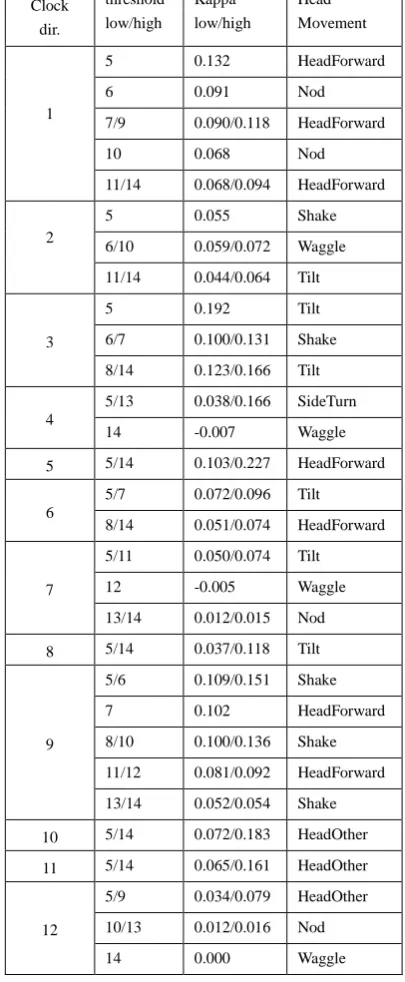
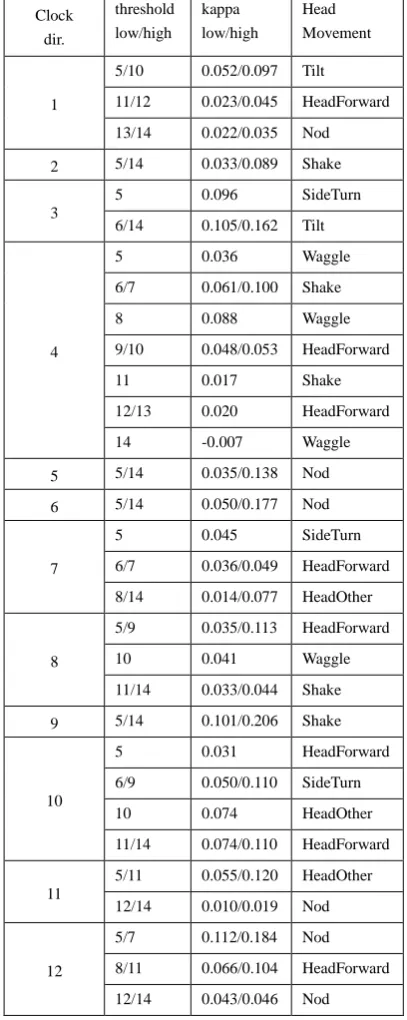
We have compared the automatically generated annotations with manual annotations. For each video frame in the sequence of almost 8000 frames (5’20”), we checked whether the human annotator and the face tracker agreed or not under the assumption that a specific class of automatically generated annotations was equivalent to a specific class manual of annotations. Because we wanted to compensate for agreement by chance, we chose Cohen’s kappa (Cohen 1960) as a measure of agreement. The classes of manual annotations we looked at were the seven distinct communicative gestures with the head that
occurred in our test material: HeadForward, (down-)Nod, Shake, SideTurn, Tilt, Waggle, and HeadOther. The automatic annotations were categorized in 240 distinct classes, each class defined by quantity (velocity or acceleration), clock direction (1-12), and threshold (5-14). For each person we computed 7x240=1680 kappa values. To keep the number of variables manageable, in this analysis we ignored the maximum magnitude of velocity or acceleration during an annotation’s time span. We also ignored additional information in the manual annotations, such as whether a head nod was repeated or not.
Also disregarded were the manual annotations for facial expressions and for body posture, although the face tracker isn’t insensitive to body postures and even facial expressions. For example, fig. 5 shows a manual annotation for the body posture “BodyDirectionOther, BodyToInterlocutor” that neatly corresponds with automatic annotations for velocity and for acceleration over a range of thresholds: face0V and face0A (the annotation tracks just below the BodyPosture track) have threshold 14, while face9V and face9A lie in the opposite end of the spectrum with thresholds of 5.
Figure 5. A BodyToInterlocutor posture
The results presented here are as closely based on raw data as possible. To see the effects of some algorithmic massaging, we also performed the analysis after coarse graining the time domain in chunks of 10 or even 25 frames (0.4 s – 1 s). However, although we obtained better Cohen’s kappa values, we lacked a theoretical sound motivation for coarse graining.
Table 1 Table 2 Table 3 Table 4
Clock Veloc. L Veloc. R Accel. L Accel. R
1 5 4 3 1
2 3 2 1 7
3 3 3 2 6
4 2 2 7 3
5 1 2 1 6
6 2 1 1 1
7 3 3 3 2
8 1 5 3 2
9 5 1 1 5
10 1 7 4 7
11 1 1 2 5
12 3 1 3 1
Table 5. Number of ranges in each direction
We did not consider percent agreement as a meaningful measure, because even if the face tracker defected and had not created any annotations at all, percent agreement would still be fairly high, as e.g. the number of frames where a person was nodding would be low in comparison to the number of frames where the same person was not nodding, thus agreeing for most of the time with the silent face tracker.
Figure 6. A succession of head movements
Our numerical analysis disregards a number of phenomena that are readily visible when scrolling through the Anvil’s annotation window. Here we mention a few. There are many successions of manual annotations
without intervening pauses in the material. Fig. 6 shows a succession of annotations for head movements (a Tilt, a Nod and a SideTurn) together with automatic annotations for velocity and acceleration at ten thresholds levels. Visual inspection immediately tells us that each head movement is automatically detected. At the highest threshold level, only the SideTurn is detected. As the threshold is lowered the Tilt and the Nod are detected, the former by the velocity transgressing the threshold and the latter by the acceleration transgressing the threshold. The maxima in the annotations in the acceleration tracks always precede the maxima in the velocity annotations. Furthermore, the Tilt and the SideTurn have velocity annotations that continue beyond the end of the acceleration annotations (if they are there at all). During the Nod (which is repeated) it is the other way around: the accelerations go on for a longer time than the velocities: the acceleration directions switch so quickly that the velocity has not time enough to build up. In none of the tracks the automatic annotations continue until the end of the manual annotation. This is the rule rather than an exception.
Visually, there seems to be a good correlation between onset and, sometimes, end of manual annotations and automatically created annotations. Moreover, the automatic acceleration annotations often seem to start a few frames earlier than the manual annotations, as though the human annotator is mostly looking at movements and not at the forces that cause the movements. This discrepancy might be an artefact of the way the program chooses to define the beginning and end of an annotation. Since as mentioned earlier, an annotation covers at least as many frames as are needed to fill an analysis window, by increasing or decreasing this number we can to some degree influence the width of the generated annotations, even without adjusting the sensitivity thresholds. Therefore the discrepancy between onsets of manual and automatic annotations might disappear if we set the duration of the analysis window low enough. This explanation can easily be refuted, however, because, as illustrated by the yellow marks in fig. 4, the maximum value of the chosen quantity during the time span of the whole annotation often lies very close to the beginning of the annotation, well to the left of the start of the manual annotation. Whereas the exact time of the start of an annotation is dependent on program settings like duration of analysis window and thresholds (see figs. 5 and 6), the time of the maximum value of velocity or acceleration is a function of the measured positions of the head during that window. There is no obvious way to explain that time as an artefact.