by Steve Holzner, PhD
Design Patterns
FOR
DUMmIES
‰Design Patterns
FOR
DUMmIES
‰by Steve Holzner, PhD
Design Patterns
FOR
DUMmIES
‰About the Author
Steve Holzneris the award-winning author of 100 books on computing. He’s a former contributing editor for PC Magazine,and has been on the faculty of Cornell University and MIT. In addition to his busy writing sched-ule, he gives programming classes to corporate programmers around the country and runs his own training company, which you can find at http://www.onsiteglobal.com/.
Dedication
Author’s Acknowledgments
The book you hold in your hands is the result of many peoples’ work. I would particularly like to thank Mark Enochs, editor extraordinaire, and Katie Feltman, my acquisitions editor, who helped get this book off the ground and keep it in flight the rest of the way. Thanks also to my copy editor, Heidi Unger, for dotting the I’s and crossing the T’s.
Publisher’s Acknowledgments
We’re proud of this book; please send us your comments through our online registration form located at www.dummies.com/register/.
Some of the people who helped bring this book to market include the following:
Acquisitions, Editorial, and Media Development
Project Editor:Mark Enochs
Acquisitions Editor:Katie Feltman
Copy Editor:Heidi Unger
Technical Editor:John Purdum
Editorial Manager:Leah Cameron
Media Development Coordinator:
Laura Atkinson
Media Project Supervisor:Laura Moss
Media Development Manager:Laura VanWinkle
Editorial Assistant:Amanda Foxworth
Cartoons:Rich Tennant (www.the5thwave.com)
Composition
Project Coordinator: Tera Knapp
Layout and Graphics: Carl Byers, Andrea Dahl, Lauren Goddard, Heather Ryan
Proofreaders: Debbye Butler, Christine Pingleton
Indexer: Techbooks
Publishing and Editorial for Technology Dummies
Richard Swadley,Vice President and Executive Group Publisher
Andy Cummings,Vice President and Publisher
Mary Bednarek,Executive Acquisitions Director
Mary C. Corder,Editorial Director
Publishing for Consumer Dummies
Diane Graves Steele,Vice President and Publisher
Joyce Pepple,Acquisitions Director
Composition Services
Gerry Fahey,Vice President of Production Services
Contents at a Glance
Introduction ...1
Part I: Getting to Know Patterns...5
Chapter 1: Congratulations, Your Problem Has Already Been Solved...7
Chapter 2: Putting Plans into Action with the Strategy Pattern...17
Chapter 3: Creating and Extending Objects with the Decorator and Factory Patterns...39
Chapter 4: Watch What’s Going On with the Observer and Chain of Responsibility Patterns ...65
Chapter 5: From One to Many: The Singleton and Flyweight Patterns...91
Part II: Becoming an OOP Master ...117
Chapter 6: Fitting Round Pegs into Square Holes with the Adapter and Facade Patterns...119
Chapter 7: Mass Producing Objects with the Template Method and Builder Patterns ...145
Chapter 8: Handling Collections with the Iterator and Composite Patterns ...177
Chapter 9: Getting Control of Your Objects with the State and Proxy Patterns ...207
Chapter 10: Coordinating Your Objects with the Command and Mediator Patterns ...233
Part III: The Part of Tens...257
Chapter 11: Ten More Design Patterns ...259
Chapter 12: Ten Easy Steps to Create Your Own Patterns ...281
Table of Contents
Introduction...1
About This Book...1
Foolish Assumptions ...2
Conventions Used in This Book ...2
How This Book Is Organized...3
Part I: Getting to Know Patterns...3
Part II: Becoming an OOP Master ...3
Part III: The Part of Tens...4
Icons Used in This Book...4
Where to Go from Here...4
Part I: Getting to Know Patterns ...5
Chapter 1: Congratulations, Your Problem
Has Already Been Solved . . . .7
Just Find the Pattern that Fits ...8
Enter the Gang of Four Book...9
Getting Started: The Mediator Pattern...10
Adapting to the Adapter Pattern...11
Standing In for Other Objects with the Proxy Pattern ...12
Taking a Look at the Observer Pattern ...13
Chapter 2: Putting Plans into Action with the Strategy Pattern . . . . .17
Extending Object-Oriented Programming...18
The big four OOP building blocks ...19
Abstraction is the good kind of breakdown ...19
Encapsulating all that junk ...20
Mighty polymorphism rangers ...20
Inheritance without the pesky taxes...22
Composition versus inheritance: A first attempt at designing the new cars ...23
Handling Change with “has-a” Instead of “is-a”...27
Drawing Up Your Plans ...29
Creating your algorithms...29
Using your algorithms ...30
Selecting algorithms at runtime ...33
Design Patterns For Dummies
xiv
Chapter 3: Creating and Extending Objects
with the Decorator and Factory Patterns . . . .39
Closed for Modification, Open for Extension ...41
Enter the Decorator Pattern ...42
Putting the Decorator Pattern to Work ...45
Creating a decorator ...45
Adding a disk ...46
Adding a CD...47
Adding a monitor...47
Testing it out ...48
Improving the New Operator with the Factory Pattern ...50
Building Your First Factory ...52
Creating the factory ...53
Creating the abstract Connection class ...54
Creating the concrete connection classes ...55
Testing it out ...56
Creating a Factory the GoF Way ...59
Creating an abstract factory ...59
Creating a concrete factory...60
Creating the secure connection classes ...61
Testing it out ...62
Chapter 4: Watch What’s Going On with the Observer
and Chain of Responsibility Patterns . . . .65
Notifying Observers with the Observer Pattern ...66
Creating a subject interface ...69
Creating an observer interface ...70
Creating a subject...70
Creating observers...73
Testing the Database observers ...75
Using Java’s Observer Interface and Observable Class...78
Watching with the Observer interface...78
Notifying with the Observable class ...79
Creating the Observable object...80
Creating the Observer objects...82
Testing the Observable code ...84
Using the Chain of Responsibility Pattern ...86
Creating a help interface ...87
Creating chainable objects...87
Chapter 5: From One to Many: The Singleton
and Flyweight Patterns . . . .91
Instantiating Just One Object with the Singleton Pattern...92
Creating a Singleton-based database ...94
Testing the Singleton pattern...98
Uh oh, don’t forget about multithreading ...99
Putting the synchronized solution to work ...100
Handling threading better ...103
Putting the pre-thread solution to work...104
The Flyweight Pattern Makes One Look like Many...106
Creating a student ...109
Testing the Flyweight pattern ...110
Handling threading better ...112
Part II: Becoming an OOP Master ...117
Chapter 6: Fitting Round Pegs into Square Holes
with the Adapter and Facade Patterns . . . .119
The Adapter Scenario...119
Fixing Connection Problems with Adapters ...121
Creating Ace objects ...123
Creating Acme objects...124
Creating an Ace-to-Acme object adapter...125
Testing the adapter ...127
Inheriting class adapters ...128
Simplifying Life with Facades ...134
Dealing with a difficult object ...137
Creating a simplifying facade ...140
Testing the facade ...143
Chapter 7: Mass Producing Objects with the
Template Method and Builder Patterns . . . .145
Creating the First Robot ...146
Creating Robots with the Template Method Pattern...149
Creating robots by template ...150
Testing the creation of robots ...155
Built-in Template Methods in Java ...156
xv
Table of Contents
Design Patterns For Dummies
xvi
Adding a hook ...158
Testing the hook method ...160
Building Robots with the Builder Pattern ...161
The client rules ...161
Letting clients build robots...165
Creating some buildable robots ...168
Testing the robot builder ...172
Chapter 8: Handling Collections with the
Iterator and Composite Patterns . . . .177
Accessing Objects with the Iterator Pattern ...178
Accessing your objects with an iterator ...179
Gathering the vice presidents into a collection ...181
Creating the iterator...183
Iterating over vice presidents...186
More fun with for/in ...190
Putting Together Composites...191
It all starts with an abstract class ...193
Creating the vice president leaves ...194
Creating the division branches...196
Building your corporation...198
Tracking the Composite Pattern in the Wild ...203
Chapter 9: Getting Control of Your Objects
with the State and Proxy Patterns . . . .207
Getting the State of Your Union with the State Pattern...208
Using methods to hold state ...209
Using objects to encapsulate state ...213
Creating the state objects ...218
Putting the rental automat to the test ...223
Standing In for Other Objects with Proxies ...224
Can you hear me now? Creating the automat server ...225
Anyone there? Creating the automat proxy ...228
Using the proxy to connect around the world...230
Chapter 10: Coordinating Your Objects with the
Command and Mediator Patterns . . . .233
Taking Command with the Command Pattern ...234
Aiming at the target: Creating your receiver objects...236
Be the boss: Creating your commands...239
Putting commands to the test ...242
Supporting undo...244
Testing the undo...247
Coordinating with the Mediator Pattern ...249
Designing the Rutabagas-R-Us site ...251
Connecting it all up with the mediator ...254
Testing the Rutabagas-R-Us site ...255
Part III: The Part of Tens ...257
Chapter 11: Ten More Design Patterns . . . .259
Creating a Factory Factory: The Abstract Factory Pattern ...260
Cloning when You Need It: The Prototype Pattern ...261
Decoupling Abstractions from Implementations with the Bridge Pattern ...262
Creating Your Own Language: The Interpreter Pattern...264
Forget Me Not: The Memento Pattern ...264
The Visitor Stops In for a Moment ...266
Going in Circles with Circular Buffers ...268
Doing Your Magic Off-Screen with the Double Buffer Pattern...274
Getting Multiple-Use Objects Out of the Recycle Bin Design Pattern ...277
Entering the Big Time with the Model/View/Controller Pattern...278
Chapter 12: Ten Easy Steps to Create Your Own Patterns . . . .281
Following the Pattern Catalog Style...283
Introducing the Veto Pattern ...283
1. Intent ...284
2. Motivation ...285
3. Applicability ...285
4. Structure...285
5. Participants ...286
6. Collaborations ...287
7. Consequences...287
8. Implementation/Sample Code ...288
9. Known Uses...292
10. Related Patterns ...293
Getting Your Pattern into a Pattern Catalog ...293
Index...295
xvii
Table of Contents
Design Patterns For Dummies
xviii
Introduction
I
f you’re ever writing code and get the funny feeling that you’ve solved the problem you’re working on before, you probably have. You may well have come across the same type of situation in the past, puzzled about it, and come up with the solution. And before that, you may have faced the same type of situation and come up with the same type of solution. And even before that . . . same thing.Why keep reinventing the wheel? Why not just write down your solution and refer back to it as needed? That’s what design patterns are all about. A design pattern represents a solution to a problem or class of problems that you can put to work at once in your own code.
In fact, design patterns go one step further — they also let you share in the solutions found by other programmers, and expertprogrammers at that. The design patterns you see in this book represent insightful solutions to dilem-mas that just about every programmer comes up against sooner or later, and knowing them is going to save you a lot of time and effort.
Got a problem? Most likely, there’s a design pattern for that. All you need to know is that someone has already solved your problem for you, with a careful eye towards good programming practices and efficiency. And all you have to do is apply that solution to your own code. Once you know how, there’s nothing to it.
The design patterns covered in this book are essential for any programmer to know — and certainly for any professional programmer. There’s a lot of ad hoc programming that goes on in the world, and that can lead to a lot of errors in critical code. Why be the one sitting in front of the debugger all day? Put design patterns to work for you and just slip the solution into place.
About This Book
There are plenty of design patterns floating around the programming world, and in time, a particular set of 23 of them has become accepted as the stan-dard set. These patterns were first corralled in a book named Design Patterns: Elements of Reusable Object-Oriented Software(1995, Pearson Education, Inc. Publishing as Pearson Addison Wesley) by Erich Gamma, Richard Helm, Ralph Johnson, and John Vlissides — who have since been called the Gang of Four,or GoF,for short. And those 23 design patterns became known as the GoF design patterns.
You see all 23 of those standard patterns in this book, and some additional ones as well. I explain what each pattern does and when you should use the pattern. You also see a programming problem that the design pattern solves, implemented in code. In other words, every design pattern is put to work in easily understandable, runable code in this book.
In fact, some of the design patterns have already been put to work by the people who wrote the Java programming language. In such cases, I also dis-cuss the part of Java that implements the design pattern already — such as closing windows in Swing or registering listeners with event-causing objects. Doing so gives you an immediate leg up with the design patterns covered — hey, you might find yourself saying: Thatlooks familiar.
Foolish Assumptions
To fully understand how each pattern can make your life easier, you need to see it at work in a program, and this book uses the most widely used object-oriented programming language (Java) for its examples. For that reason, I assume you know Java.
You don’t need to be a Java expert, though. If you can put together a program and work with objects, you’ll be okay. You don’t need to be a Java meister; the programming isn’t super-challenging. The idea is to show each pattern at work with the easy-to-understand examples.
Besides Java, there’s no special knowledge or skill needed to read this book. You don’t have to know what patterns are or how they’re put to work. All that’s coming up in this book, from the most simple to the most powerful.
Conventions Used in This Book
Some books have a dozen dizzying conventions that you need to know before you can even start. Not this one. All you need to know is that new terms are shown in italics, like this,the first time they’re discussed. And when new lines of code are introduced, they’re displayed in bold, like this:
JButton button = new JButton(“Check Spelling”); JTextField text = new JTextField(30);
public void init() {
2
Design Patterns For Dummies
Container contentPane = getContentPane(); contentPane.setLayout(new FlowLayout());
. . .
button.addActionListener(new ActionListener() {
public void actionPerformed(ActionEvent event) { text.setText(“Good job.”);
} }); }
Note, also, that three vertical dots represent code that’s been omitted. That’s all there is to the notation in this book.
When I refer to something from the code, such as the name of an object or class, I set it off using a monofonttypeface like this: Call the drawmethod.
How This Book Is Organized
Here are the various parts you see in this book:Part I: Getting to Know Patterns
Part I introduces patterns and how they make life easier. Chapter 1, “Congratulations, Your Problem Has Already Been Solved,” shows how patterns fit into the scheme of things and how this book is going to make your programming problems easier to solve (no kidding). In the chapters that follow, you’re introduced to the Strategy, Factory, Observer, and Singleton patterns, and more as you get to know patterns and how to work with them.
Part II: Becoming an OOP Master
Patterns rely heavily on object-oriented programming (OOP), and in this part, you see how patterns let you take charge of object-oriented work. I show you how to redefine steps of algorithms using subclasses with the Template Method pattern, how to convert an object’s interface into a totally different interface with the Adapter pattern, how to handle object collections with the Iterator and Composite patterns, how to coordinate objects with the Command and Mediator patterns, and a great deal more in this part. After you read this part, you’ll be an accomplished OOP meister.
3
Introduction
Part III: The Part of Tens
Chapter 11 tells you about the remainder of the standard patterns, some of which are not in common use anymore, but all of which we cover in this book. Besides those standard patterns, you also see some newer patterns that have been added to the standard set of patterns, bringing us up to the modern day. Chapter 12 is all about joining the worldwide patterns community by creating your own pattern. You’re going to see how to abstract a pattern from a set of problem solutions in this chapter and what it takes to introduce your new pattern to the world.
Icons Used in This Book
You find a couple of icons in this book, and here’s what they mean:
This icon indicates something to remember, such as how you handle a partic-ularly tricky part of a pattern.
This icon gives you something more — a behind-the-scenes way of working with a pattern, for example.
This icon means that what follows is technical, insider stuff. You don’t have to read it if you don’t want to, but if you want to become a pattern pro (and who doesn’t?), take a look.
This icon tells you how not to fall into a pattern of trouble. Ignore this icon at your peril.
Where to Go from Here
Alright, you’re all set and ready to jump into Chapter 1. You don’t haveto start there; you can jump in anywhere you like — the book is written to allow you to do just that. But if you want to get the full patterns story from the beginning, jump into Chapter 1 first — that’s where all the action starts.
Also, for your convenience, all the code I provide in the book is available for downloading at www.dummies.com/go/designpatternsfd1e.
4
Design Patterns For Dummies
Part I
Getting to Know
Patterns
In this part . . .
I
n this part, your guided tour of design patterns begins. Here, you see what patterns are all about. The idea is that other programmers have faced the same issues you’re facing now and have come up with solutions that have been well tested. Through the use of patterns, they share their solutions with you, saving you lots of time and effort.Chapter 1
Congratulations, Your Problem
Has Already Been Solved
In This Chapter
䊳Introducing design patterns
䊳Knowing how design patterns can help
䊳Extending object-oriented programming
䊳Taking a look at some specific design patterns
A
s a programmer, you know how easy it can be to get lost in the details of what you’re doing. And when you lose the overview, you don’t plan effectively, and you lose the bigger picture. When that happens, the code you’re writing in the trenches ends up working fine for a while, but unless you understand the bigger picture, that code really is a specialized solution to a particular problem.And the heck of it is that problems rarely stay solved after you’ve handled them once. Developers typically regard their work as tackling individual problems by writing code and solving those problems. But the truth is that in any professional environment, developers almost always end up spending a lot more time on maintenance and adapting code to new situations than writ-ing entirely new code.
So if you consider it, it doesn’t make sense to think in terms of Band-Aid fixes to remedy the problems you face because you’ll end up spending a great deal of time putting out fires and trying to extend code written for a specific prob-lem so that it can handle other cases as well. It makes more sense to get a little overview on the process of code design and maintenance.
The idea behind this book is to familiarize you with a set of design patterns to simplify the programming process automatically. The plan is to get you some overview automatically, no additional effort required. A design pattern is a tested solution to a standard programming problem. When you’re famil-iar with the design patterns presented in this book, you can face a program-ming issue and — Bam! — a solution will come to you more quickly. Instead of banging your head against the wall in desperation, you’ll say, “What I need here is the Factory pattern.” Or the Observer pattern. Or the Adapter pattern.
That’s notto say, as some design books seem to suggest, that you should spend a great deal of time dealing with abstractions and planning before tack-ling a project. Adding unneeded layers of abstraction to the programming process is not a burden any programmer needs.
The whole beauty here is simply that someone has already faced the problem you’re facing and has come up with a solution that implements all kinds of good design. And being familiar with design patterns can make the design process all but automatic for you.
How do you turn into a software design expert, the envy of all, with hardly any work on your part? Easy. You read this book and get familiar with the pat-terns I cover in depth. You don’t have to memorize anything; you just get to know those patterns. Then when you encounter a real-world issue that matches one of those patterns, something deep inside you says, “Hey! That looks like you need the Iterator pattern.” And all you have to do is look up that pattern in this book and leaf through the examples to know what to do. So without further ado, this chapter gets you started on your tour of these handy, helpful design patterns.
Just Find the Pattern that Fits
The charm of knowing about design patterns is that it makes your solution easily reusable, extendable, and maintainable. When you’re working on a pro-gramming problem, the tendency is to program to the problem, not in terms of reuse, extensibility, maintainability, or other good design issues. And that’s where most programmers should be putting in more work because they end up spending far more time on such issues than on solving the original prob-lem in the long run.
For example, you may want to create Java objects that can, say, parse XML documents. And to do that, you create a proprietary parser class, and then instantiate objects of that class to create XML parser objects as needed. So far, so good, you think. But it turns out that there are dozens of XML parser classes out there written in Java that people are attached to, and they might want to use the special features of the XML parser class they’re used to. If you’d used the Factory pattern, you would have written code that could use any XML parser class to create parser objects (instead of hardcoding a pro-prietary solution). And your code would be extendable, reusable, and easier to maintain.
In other words, design patterns are solutions to programming problems that automatically implement good design techniques.Someone has already faced the issues you’re facing, solved them, and is willing to show you what the best techniques are. All without a lot of memorization on your part; all you have to do is recognize which design pattern fits which situation and lock it into place.
Sweet.
Enter the Gang of Four Book
The set of 23 standard design patterns was published by Erich Gamma, Richard Helm, Ralph Johnson, and John Vlissides in their seminal 1995 book Design Patterns: Elements of Reusable Object-Oriented Software(Pearson Education, Inc. Publishing as Pearson Addison Wesley).They’ve come to be known in programming circles as the Gang of Four, or, more popularly, GoF.
A lot of water has passed under the bridge since the GoF book appeared, and it turns out that some of the original 23 patterns were not used as much as some of the others. You see them all in this book, but I empha-size the patterns that are used the most — and that includes some new, non-GoF patterns in Chapter 11 that have appeared since the GoF book debuted.
It’s important to realize that there is more going on here than just memorizing design patterns. There are also specific design insights about object-oriented programming that are just as important, and I talk about them throughout the book. OOP is a terrific advance in programming. But too many programmers
9
Chapter 1: Congratulations, Your Problem Has Already Been Solved
blindly apply its design strategies without a lot of insight, and that can cause as many problems as it fixes. A large part of understanding how to work with design patterns involves understanding the OOP insights behind them — encapsulating what changes most, for example, or knowing when to convert from is-a inheritance to has-a composites (see Chapter 2 for more on what these terms mean) — and I talk about those insights a lot.
Getting Started: The Mediator Pattern
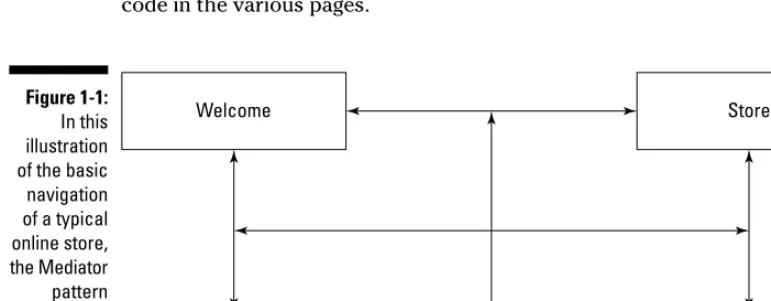
Figure 1-1 provides an example design pattern, the Mediator pattern, that shows what design patterns can do for you. Say that you’ve got a four-page Web site that lets users browse a store and make purchases. As things stand, the user can move from page to page. But there’s a problem — the code in each page has to know when to jump to a new page as well as how to activate the new page. You’ve got a lot of possible connections and a lot of duplicate code in the various pages.You can use a mediator here to encapsulate all the navigation code out of the separate pages and place it into a mediator object instead. From then on, each page just has to report any change of state to the mediator, and the mediator knows what page to send the user to, as shown in Figure 1-2.
Welcome Store
Purchase Goodbye
Figure 1-1: In this illustration of the basic navigation of a typical online store, the Mediator pattern mediates between objects.
You can build the mediator to deal with the internals of each page so the vari-ous pages don’t have to know the intimate details of the other pages (such as which methods to call). And when it’s time to modify the navigation code that takes users from page to page, that code is all collected in one place, so it’s easier to modify.
Adapting to the Adapter Pattern
Here’s another design pattern, the Adapter pattern. Say that for a long time you’ve been supplied with a stream of objects and fit them into code that can handle those objects, as shown in Figure 1-3.
I‘m an old object I take old objects Figure 1-3:
Everything seems to be working here.
Welcome Store
Purchase Goodbye
Mediator
Figure 1-2: The mediator directs Web site traffic.
11
Chapter 1: Congratulations, Your Problem Has Already Been Solved
But now say there’s been an upgrade. The code isn’t expecting those old objects anymore, only new objects, and the old objects aren’t going to fit into the new code, as shown in Figure 1-4.
If you can’t change how the old objects are generated in this case, the Adapter pattern has a solution — create an adapter object that exposes the interface expected by the old object and the new code, and use the adapter to let the old object fit into the new code, as shown in Figure 1-5.
Problem solved. Who says design patterns are hard?
Standing In for Other Objects
with the Proxy Pattern
Here’s another pattern, the Proxy design pattern. Say that you’ve got some local code that’s used to dealing with a local object as shown in Figure 1-6:
I‘m an old object I am an old to new Adapter
I only take new objects Figure 1-5:
Old objects work with new objects via an adapter.
I‘m an old object I only take
new objects Figure 1-4:
This isn’t going to work.
But now say that you want to deal with some remote object, somewhere else in the world. How can you make the local code think it’s dealing with a local object still when in fact it’s working with that remote object?
With a proxy.A proxy is a stand-in for another object that makes the local code think it’s dealing with a local object. Behind the scenes, the proxy con-nects to the remote object, all the while making the local code believe it’s working with a local object, as you can see in Figure 1-7.
You see the Proxy pattern at work in Chapter 9 in an example that lets you connect to a remote object over the Internet anywhere in the world, with just a few lines of code.
Taking a Look at the Observer Pattern
You’re most likely familiar with a number of the patterns in this book, such as the Observer pattern. This pattern, like many others, is already implemented in Java.Local code
Remote object Proxy
Figure 1-7: Trick your local code and remote object into working together.
Local code
Local object Figure 1-6:
Code and an object, working together in the same neighbor -hood.
13
Chapter 1: Congratulations, Your Problem Has Already Been Solved
The Observer design pattern is about passing notifications around to update a set of objects when some important event has occurred. You can add new observer objects at runtime and remove them as needed. When an event occurs, all registered observers are notified. Figure 1-8 shows how it works; an observer can register itself with the subject.
And another observer, Observer 2, can register itself as well, as shown in Figure 1-9.
Now the subject is keeping track of two observers. When an event occurs, the subject notifies both observers. (See Figure 1-10.)
Subject Observer 1
Observer 2 notification
notification Figure 1-10:
When events occur in the subject, registered observers are notified.
Subject Observer 1
Observer 2 register
Figure 1-9: More than one observer can register with a subject.
Subject Observer 1
register Figure 1-8:
The Observer pattern lets observers register with subjects.
Does this sound familiar in Java? If Java event listeners came to mind, you’d be right. Event listeners can register with objects like push buttons or win-dows to be informed of any events that occur.
That’s just one example of the kind of design pattern you’ve probably already seen implemented in Java. When such examples come up, I include Java example code showing how a particular design pattern is already built into Java. The example code might ring a few bells.
This book is written to be easy to use and understand. You’re not going to see chalkboard diagrams of complex abstractions that you have to plow through. The chapters in this book are aimed at programmers, to be useful for programmers; even if you don’t read all of them, you’re going to benefit. The design insights and patterns covered here are becoming standard throughout the programming world, and they are helpful on an everyday level. Hopefully, the next time you face a tough coding issue, you’ll suddenly find yourself saying: Aha! this is a job for the Facade pattern.
15
Chapter 1: Congratulations, Your Problem Has Already Been Solved
Chapter 2
Putting Plans into Action
with the Strategy Pattern
In This Chapter
䊳Extending object-oriented programming
䊳Getting to know abstraction, encapsulation, polymorphism, and inheritance
䊳Switching from “is-a” to “has-a”
䊳Handling tasks using algorithms
䊳Bringing the Strategy pattern to the rescue
A
s you, the design pattern expert, walk into the boardroom of MegaGigaCo, the CEO and members of the board are celebrating their new contract to design a set of cars in the sedate way you’d expect — by high-fiving each other and whooping around the room.“This contract is going to mean a huge amount of income for us,” says the CEO, sloshing a little champagne on the boardroom table in his excitement. “All we’ve got to do is make sure we get the design process right.” He turns on the overhead projector, and as several large charts appear on the wall, the CEO says, “Now here’s my idea . . .”
“Wrong,” you say.
The CEO looks startled, and says, “But if we . . .”
“Nope,” you say, shaking your head.
“What . . .”
“Sorry,” you tell the CEO and the board, “it’s clear you’re risking your entire contract by doing things the wrong way. I can see a dozen problems just look-ing at that chart.”
The board murmurs with concern and the CEO asks, “And you are?”
“I’m the design pattern pro who’s going to solve all your design problems,” you say. “For a whopping fee, of course.”
The CEO writes down a tentative figure for your fee that, while large, doesn’t seem large enough to you.
“Wrong again,” you say.
The CEO looks at you with raised eyebrows.
“Design patterns,” you explain, “represent solutions to known programming problems. Not only that, but they also represent good programming practice, making maintenance and extension of your code that much easier. So as you can see, hiring an expert like me makes a lot of sense — when I see a pro-gramming problem that has already been solved with a design pattern, I can tell you all about it.”
“Well,” the company programmers say reluctantly, “the idea behind design patterns sounds okay. But we already use object-oriented techniques in our programming. Doesn’t that already cover the problem?”
“Nope,” you say. In fact, that’s one of the main points behind design patterns — they extend object-oriented programming (OOP).
Extending Object-Oriented Programming
Note the subtitle of the Gang of Four’s Design Patterns: Elements of Reusable Object-Oriented Software(1995, Pearson Education, Inc. Publishing as Pearson Addison Wesley). Reuse is an important aspect of working with design pat-terns, and so is handling OOP issues. I discuss OOP first in this chapter, and then you’ll see how working with OOP issues fits in with the Strategy pattern.OOP was originally introduced as programs became larger and more com-plex. The idea was to wrap functionality inside objects. In other words, the inspiration was to divide and conquer. Until OOP appeared, you could divide your code into functions, but that wasn’t enough in the long run. As pro-grams became longer and longer, some way of dividing them up in terms of easily handled concepts was needed. What those concepts were, depended on the program itself, and those conceptscame to be known as objects.
18
Part I: Getting to Know Patterns
For example, if you take a look at what’s going on in a kitchen behind the scenes, there’s an enormous amount of complexity. A refrigerator can con-tain coolant pumps, thermostats, fans, lights, and more. A stove can concon-tain various heating elements, timers, thermostats, lights, and more. Considered this way, looking at every present element at once, a kitchen becomes very complex.
But if you wrap what you see up into objects, the situation is a lot easier to handle. There’s the refrigerator. There’s the stove. That’s the dishwasher, and so on. No problem — internal regulation and the various parts that work together are wrapped up into an easily conceptualized object.
That’s why objects are called objects in object-oriented programming — you wrap functionality up into those objects and they’re easily conceptualized, much like refrigerators, stoves, dishwashers, and so on. Exactly what those objects are, is up to you (which is why they’re just generically called objects, and why you’ve never heard of refrigerator-oriented programming or stove-oriented programming).
For example, in a program, you may have an object named displaythat han-dles all the aspects of displaying your application’s results. Another object might be named databaseto interact with a database server, and so forth. There can be a lot of complexity inside each object, but when you wrap everything up in a set of objects, life becomes a lot easier. You can work in terms of the displayobject and the few simple methods it exposes, not the setRasterScanRate, populateVideoBuffer, adjustHorizontalHold and dozens of other functions. That makes the programming a lot easier, which is why OOP became important as programs became longer and longer.
The big four OOP building blocks
There are four pillars of OOP — abstraction, encapsulation, polymorphism, and inheritance. I discuss these in the following sections.
Abstraction is the good kind of breakdown
A good part of working with design patterns involves abstraction— the care-ful consideration of how you’re going to handle the problem. Abstraction isn’t a programming technique; in essence, it just means that you conceptual-ize a problem before applying OOP techniques.
Abstraction is all about breaking your approach to a problem into natural segments. This is where you come up with the objects that divide the prob-lem into manageable parts. In other words, abstracting a probprob-lem simply
19
Chapter 2: Putting Plans into Action with the Strategy Pattern
means thinking of how to tackle that problem in terms of object-oriented code. The data items needed by each object become that object’s properties, whether public or private, and the actions each object needs to perform in the real world become its actions in code.
Much of what design patterns are all about has to do with making sure you’re setting up the way you attack the problem correctly. Working with design pat-terns often means spending more time on the abstraction part of the process than on the concrete classes part.
Encapsulating all that junk
When you wrap methods and data up into an object, you encapsulatethose methods and data. That’s the power of working with objects — you remove the complexity from view and make it into an easily graspable object. That’s how a mass of pipes, tubing, pumps, thermostats, and lights becomes, con-ceptually, a refrigerator.
When you encapsulate functionality into an object, you decide what interface that object exposes to the world. That refrigerator may handle a lot of complex actions behind the scenes, but you might want to put a dial in it to let the user tell the appliance how cold he wants his food. In the same way, you decide what getter and setter methods and/or public properties your objects present to the rest of the application so that the application can interact with it.
That’s the idea behind encapsulation — you hide the complexities inside objects and then create a simple interface to let that object interact with the rest of your code. Design patterns are particularly big on encapsulation. One of the primary design insights here is that you should encapsulate what changes the most. A number of patterns revolve around that idea — extracting the part of your code that changes the most, or that needs the most maintenance, and encapsulating that part into its own object for easier handling. You see a lot about encapsulation and how to put it to work in unexpected ways to solve common problems in this book.
Mighty polymorphism rangers
Another cornerstone of OOP is polymorphism:the ability to write code that can work with different object types and decide on the actual object type at runtime. For example, you might want to write code that handles all kinds of different shapes — rectangles, circles, triangles, and so on. Although they’re different shapes, they all have in common certain actions as far as your code goes — for example, they can all be drawn.
Using polymorphism, you can write your code to perform various actions on the shapes you’re working with — and then decide on the actual shape(s) you want to use at runtime. Polymorphic(which means many form) code works with any such shape without being rewritten.
Start with this Shapeclass that draws a generic shape when you call its draw method:
class Shape {
public void draw() {
System.out.println(“Drawing a shape.”); }
}
Then you extend a new class, Rectangle, from Shape, and let it draw a rec-tangle when you call its drawmethod as follows:
class Rectangle extends Shape {
public void draw() {
System.out.println(“Drawing a rectangle.”); }
}
Want to draw a shape? No problem. You just write some code to create an object named shapeand call the object’s drawmethod:
public class Polymorphism {
public static void main(String[] args) {
Shape shape = new Shape(); shape.draw();
} }
Running this example gives you this:
Drawing a shape.
21
Chapter 2: Putting Plans into Action with the Strategy Pattern
Want to draw a rectangle using the same code? No problem. Through the magic of polymorphism, just reload the shapevariable with a rectangle object instead and then proceed with the same code as before:
public class Polymorphism {
public static void main(String[] args) {
Shape shape = new Shape(); shape = new Rectangle();
shape.draw(); }
}
Running this code gives you:
Drawing a rectangle.
In the first case, you loaded a shapeobject into the shapevariable and then called its drawmethod. In the second case, you took a rectangleobject and loaded it into that same variable, shape— even though that variable was declared to be a shapeobject — and then called the drawmethod again to draw a rectangle.
So you used the same variable, shape, to hold a shapeobject and a rectangleobject, which works because rectangleis derived from shape. In this way, you can decide what type of object to load into the shapevariable at runtime, leaving your code unchanged.
Inheritance without the pesky taxes
The last of the formal cornerstones of OOP is inheritance:the process by which one class can inherit methods and properties from another. You just saw inheritance at work (in the previous section) — starting with the Shape class as shown here:
class Shape {
public void draw() {
System.out.println(“Drawing a shape.”); }
}
Then deriving the Rectangleclass from Shape, as you see here:
class Rectangle extends Shape {
public void draw() {
System.out.println(“Drawing a rectangle.”); }
}
Polymorphism often comes into play when you work with design patterns because design patterns tend to favor compositionover inheritance. (You use composition when your object contains other objects instead of inheriting from them.) Inheritance sets up “is-a” relationships — Rectangle “is-a” Shape, for example. As you’re going to see, however, that can introduce unexpected rigidity and problems into your code, especially when it comes time to main-tain that code.
Design pattern-oriented programming often prefers object composition over inheritance. When you use composition, your code contains other objects, rather than inheriting from them. And to be supple enough to deal with the various kinds of contained objects in the same way, with the same code, design-patterns often rely on polymorphism.
Composition versus inheritance: A first
attempt at designing the new cars
So who says that you should favor composition over inheritance? Perhaps an example will help. The programmers at MegaGigaCo (from the beginning of the chapter) know all about inheritance, and they’ve started designing the new cars despite your warnings to wait until you’ve had the chance to talk with them. They know they’re supposed to be designing a series of vehicles, so they’ve started by creating a base class named Vehiclewith a method named gothat displays the text Now I’m driving.
public abstract class Vehicle {
public Vehicle() {
}
public void go() {
System.out.println(“Now I’m driving.”); }
}
23
Chapter 2: Putting Plans into Action with the Strategy Pattern
Then they’ve created new classes, such as StreetRacer, using Vehicleas a base class like so:
public class StreetRacer extends Vehicle {
public StreetRacer() {
} }
So far, so good. If you create a new StreetRacerand run it like this:
public static void main(String[] args) {
StreetRacer streetRacer = new StreetRacer();
streetRacer.go(); .
. . }
Then you’re going to see:
Now I’m driving.
That looks fine. So fine, in fact, that MegaGigaCo decides to run with it and comes out with a Formula One racer that also extends the Vehicleclass as you can see in the following:
public class FormulaOne extends Vehicle {
public FormulaOne() {
} }
And you can run both the street racer and the Formula One racer this way:
public static void main(String[] args) {
StreetRacer streetRacer = new StreetRacer(); FormulaOne formulaOne = new FormulaOne();
streetRacer.go(); formulaOne.go();
. . . }
And you get:
Now I’m driving. Now I’m driving.
Not bad, say the CEO and the board. Who needs design patterns? they ask, shooting you dirty looks. But then they get a contract to produce helicopters. Helicopters, they reason, are just another type of vehicle. So they create heli-copters using a Helicopterclass, extending the Vehicleclass like this:
public class Helicopter extends Vehicle {
public Helicopter() {
} }
But now there’s a problem — if you run the helicopter in addition to the cars like this:
public static void main(String[] args) {
StreetRacer streetRacer = new StreetRacer(); FormulaOne formulaOne = new FormulaOne(); Helicopter helicopter = new Helicopter();
streetRacer.go(); formulaOne.go(); helicopter.go();
. . . }
Then you get this when you run all three vehicles: one street racer, one Formula One race car, and one helicopter:
Now I’m driving. Now I’m driving. Now I’m driving.
That doesn’t look right, says the CEO doubtfully. Why should the helicopter be driving? Shouldn’t it be flying? And the problem only gets worse when MegaGigaCo gets a contract to produce jets, which they also extend from the Vehicleclass:
public class Jet extends Vehicle {
public Jet() {
} }
25
Chapter 2: Putting Plans into Action with the Strategy Pattern
Running all four vehicles — street racer, Formula One race car, helicopter, and jet, now gives you this:
Now I’m driving. Now I’m driving. Now I’m driving. Now I’m driving.
That’s definitely not right, says the CEO. Jets don’t drive when they’re in the air. They fly — and fast. No problem, say the company programmers. We can just override the gomethod in the Helicopterand Jetclasses to give the right behavior. They create something like this, which makes the
Helicopterclass fly, not drive:
public class Helicopter extends Vehicle {
public Helicopter() {
}
public void go() {
System.out.println(“Now I’m flying.”); }
}
“Okay,” says the CEO, “but the board of directors has already voted to change that from ‘Now I’m flying.’ to ‘Now I’m flying at 200 mph’ next week. And more changes will be coming later, if I know them.”
There’s a problem here, you explain, and it’s that the company programmers are spreading the way a single task is accomplished — driving a car or flying a helicopter — across several generations of classes. That’s not necessarily a big problem, but if how you want to handle that task is going to change fairly often, as here, having to edit all those classes becomes a maintenance issue.
You say: maybe inheritance isn’t the answer in a case like this, where you have to spread out the handling of a changeable task over several generations of classes. You’re going to be maintaining a lot of customized code across gen-erations of classes when that task changes. And as the derived classes get to be long and involved, it’s going to be tough to maintain them through all those changes. You’re going to have to update the gomethod forever.
The problem you’re trying to solve is how to avoid spreading out the han-dling of a particular, changeable task over several generations of classes. If you don’t avoid that, you’ll be editing a lot of files to update your code.
26
Part I: Getting to Know Patterns
Perhaps there’s a better way of handling the task of making vehicles move than using inheritance in this case. Hey, says a company programmer — how about using interfaces instead of using inheritance? You could set up an IFly interface and give that interface a method named gothat the Helicopter class has to implement as shown in the following:
public class Helicopter implements IFly {
public Helicopter() {
}
public void go() {
System.out.println(“Now I’m flying.”); }
}
No good, you say. You haven’t solved the problem at all — each class and subclass still has to implement its own version of the gomethod, which is just as bad as when you used inheritance. And because interfaces don’t include code, you still have to write custom code in each class, which means code reuse goes out the window.
Handling Change with “has-a”
Instead of “is-a”
Things change. In commercial development, things change a lot, so it’s worth-while planning for it. If you’ve got a small problem that needs a small solution, you probably won’t have to plan for a great deal of change. But if you’re work-ing on a serious project of some substantial size and it’s gowork-ing to be around for a while, you should start thinking in terms of change. The requirements your code must meet will vary over time, and you will have to modify your code at some point in the future to handle those evolving requirements. Most develop-ers don’t take this potential for change into account, and they invariably regret it later. How big does a project have to be before you should code to allow for graceful change? That’s a judgment call, part of the art of programming. By understanding how to handle change, you’ll know better when to allow for it.
Here’s a design insight that you may have seen mentioned: Separate the parts of your code that will change the most from the rest of your application and try to make them as freestanding as possible for easy maintenance. You should also always try to reuse those parts as much as possible.
27
Chapter 2: Putting Plans into Action with the Strategy Pattern
What this means is that if part of your application changes a lot, get it out of those large files that otherwise change very little and make the sections that change a lot as freestanding as you can so that you can make changes as easily as possible while reducing side effects. And if you can, reuse the sepa-rated components that change a lot so that if you need to make a change, that change will be made automatically throughout the many places in the code that use those components.
Here’s how to think about this way of planning for change, and why inheri-tance often can’t handle change very well. With inheriinheri-tance, base classes and derived classes have an “is-a” relationship. That is, a Helicopter “is-a” Vehicle, which means Helicopter inherits from Vehicle, and if you have to customize the methods you inherit a great deal, you’re going to run up against mainte-nance issues in the future. The base class handles a particular task one way, but then a derived class changes that, and the next derived class down the line changes things yet again. So you’ve spread out how you handle a task over several generations of classes.
If, on the other hand, you can extract the volatile parts of your code and encapsulate them as objects, you can use those objects as you need them — and the entire task is handled by the code in such an object, it’s not spread out over generations of classes. Doing so allows you to customize your code by creating composites of objects. With composites, you select and use the objects you want, instead of having a rigid hard-coded internal way of doing things. That gives you a “has-a” relationship with those objects — a street racer “has-a” certain way of moving, which is encapsulated in an object; a helicopter “has-a” different way of moving, which is also encapsulated in an object. And each object performs a task.
One object, one task often makes sense instead of writing multi-generation code where one task is spread out over a dozen generations. In other words, you’re reorganizing around the tasks,not around the generations of classes that inheritance gives you.
Using inheritance automatically sets things up in terms of strict, inclusive “is-a” relationships, which is more likely to cause maintenance and extensibil-ity issues down the line. If you want to plan for change, it usually helps to think as much as you can in terms of “has-a” relationships, where your code has a number of objects whose code can be more easily updated as change happens.
When planning for change, consider “has-a” instead of “is-a” relationships, and put volatile code in the objects your application contains, rather than inheriting that code.
Drawing Up Your Plans
How would the idea of separating out volatile code work in the Vehicle/ StreetRacer/Helicopterexample in this chapter? According to the CEO, the part that is going to be changing the most is the gomethod, so that’s the part to separate out. In design pattern terms, each implementation of the go method is called an algorithm(basically that’s just another name for a strat-egy). So you want to create a set of algorithms that can be used by your vari-ous StreetRacer, FormulaOne, Helicopter, and Jetobjects. Doing so separates the volatile code into algorithms. Each algorithm handles one complete task, so you don’t have to spread out the handling of that task over generations of classes.
Creating your algorithms
To make sure that all the algorithms implement the same methods (that’s just the gomethod here), you need to create an interface, the GoAlgorithm interface, which all algorithms must implement:
public interface GoAlgorithm {
public void go(); }
The GoAlgorithminterface has one method: go. To make sure any algo-rithm can be used by any Vehicle, all algorithms should implement this interface, which means they all have to define a gomethod. The first algo-rithm, GoByDrivingAlgorithm, displays Now I’m driving.Here’s what the GoByDrivingAlgorithmlooks like:
public class GoByDrivingAlgorithm implements GoAlgorithm {
public void go() {
System.out.println(“Now I’m driving.”); }
}
The GoByFlyingalgorithm, on the other hand, displays Now I’m flying.
public class GoByFlying implements GoAlgorithm {
public void go() {
System.out.println(“Now I’m flying.”); }
}
29
Chapter 2: Putting Plans into Action with the Strategy Pattern
And the GoByFlyingFastalgorithm, used by jets, displays Now I’m flying fast.
public class GoByFlyingFast implements GoAlgorithm {
public void go() {
System.out.println(“Now I’m flying fast.”); }
}
Great. You just separated algorithms from your code. You’re starting to imple-ment “has-a” rather than “is-a” design techniques. Now you’ve got to put those algorithms to work.
Using your algorithms
Now you’ve got a number of algorithms you can create objects from in order to build your code using “has-a”, not “is-a”, relationships. After you create an object from an algorithm, you’ve got to store that object somewhere, so I’ll add a new method to the Vehiclebase class, setGoAlgorithm. That method stores the algorithm you want to use in an internal, private variable, goAlgorithmas shown in the following:
public abstract class Vehicle {
private GoAlgorithm goAlgorithm;
public Vehicle() {
}
public void setGoAlgorithm (GoAlgorithm algorithm) {
goAlgorithm = algorithm; }
. . . }
Now when you want to use a particular algorithm in a derived class, all you’ve got to do is to call the setGoAlgorithmmethod with the correct algorithm object, this way:
setGoAlgorithm(new GoByDrivingAlgorithm());
30
Part I: Getting to Know Patterns
The Vehicleclass’s gomethod also has to change. Previously, it just dis-played the message Now I’m driving.
public void go() {
System.out.println(“Now I’m driving.”); }
Now, however, it has to call the gomethod defined in the algorithm, so here’s how the new code works:
public abstract class Vehicle {
private GoAlgorithm goAlgorithm; public Vehicle()
{ }
public void setGoAlgorithm (GoAlgorithm algorithm) {
goAlgorithm = algorithm; }
public void go() { goAlgorithm.go(); }
}
Now all you have to do is select which algorithm you want to use for which vehicle. For example, the street racer will use GoByDrivingAlgorithm:
public class StreetRacer extends Vehicle {
public StreetRacer() {
setGoAlgorithm(new GoByDrivingAlgorithm()); }
}
The Formula One race car will also use GoByDrivingAlgorithm:
public class FormulaOne extends Vehicle {
public FormulaOne() {
setGoAlgorithm(new GoByDrivingAlgorithm()); }
}
31
Chapter 2: Putting Plans into Action with the Strategy Pattern
But the helicopter will use GoByFlyingAlgorithm:
public class Helicopter extends Vehicle {
public Helicopter() {
setGoAlgorithm(new GoByFlyingAlgorithm()); }
}
And the jet will use GoByFlyingFastAlgorithm:
public class Jet extends Vehicle {
public Jet() {
setGoAlgorithm(new GoByFlyingFastAlgorithm()); }
}
It’s time to put this to the test. Just compile and run StartTheRace.java, as well as the needed Helicopter.java, Jet.java, and other files in the downloadable code for this book. StartTheRace.javacreates an object of each vehicle type and calls each gomethod:
public class StartTheRace {
public static void main(String[] args) {
StreetRacer streetRacer = new StreetRacer(); FormulaOne formulaOne = new FormulaOne(); Helicopter helicopter = new Helicopter(); Jet jet = new Jet();
streetRacer.go(); formulaOne.go(); helicopter.go(); jet.go();
} }
And here’s what you get:
Just what you wanted, except now you’re using “has-a” relationships instead of inheritance-based “is-a” relationships. All kinds of code can use these algo-rithms because the code in these algoalgo-rithms is no longer buried in the StreetRacer, Helicopter, and other classes.
This technique gives you an alternative to subclassing and inheritance. If you use “is-a” inheritance, you may end up spreading out how you handle a par-ticular task in the base class and all derived classes — as when you overrode the gomethod for helicopters and jets. If you use the “has-a” model, you can create a well-defined family of algorithms — as many as you need — and then choose the algorithm you want to use.
In this way, you’re been able to overcome a problem that inheritance causes for many programmers: If you have to spread out how you handle a task across several generations of classes, and how you handle that task changes a lot, you’re going to be editing a lot of code as you maintain it. If, on the other hand, you can concentrate how you handle that task into a single algo-rithm object, changes will be a lot easier to handle.
The board of directors says the message should change from Now I’m flying.to Now I’m flying at 200 mph.No problem, just change that in the GoByFlyingalgorithm:
public class GoByFlying implements GoAlgorithm {
public void go() {
System.out.println(“Now I’m flying at 200 mph.”); }
}
Now all the code that uses this algorithm is updated automatically; no need to go searching through a lot of class files. In this way, when you concentrate how you handle a task into a single algorithm object, you have a lot more control over that task, especially when you want to make changes to it.
Selecting algorithms at runtime
“Wait a minute,” the CEO of MegaGigaCo says. “It occurs to me that jets don’t just ‘fly fast.’ They drive for a while along the runway first. And when they land, they drive along the runway too. So shouldn’t their behavior be drive, fly fast, and then drive again?”
“Theoretically, yes,” groan the company programmers. “But that would take a lot of extra code.”
33
Chapter 2: Putting Plans into Action with the Strategy Pattern
“Not at all,” you say. “That’s one of the charms of using external algorithm objects — you can change the behavior you want at runtime.”
When you hardcode a task into your class files, you can’t switch tasks at run-time. But when you use external algorithm objects in a “has-a” relationship, it’s easy to switch at runtime. In other words, the “has-a” relationship can give you more flexibility than the “is-a” relationship when it comes to config-uring behavior at runtime.
Here’s how selecting algorithms dynamically works in a new example,
RealJet.java. To make the jet taxi, you create a new Jetobject and set the jet’s algorithm to the GoByDrivingAlgorithm, as shown in the following code:
public class RealJet {
public static void main(String[] args) {
Jet jet = new Jet();
jet.setGoAlgorithm(new GoByDrivingAlgorithm()); .
. . }
To make the jet drive along the runway, use its gomethod:
public class RealJet {
public static void main(String[] args) {
Jet jet = new Jet();
jet.setGoAlgorithm(new GoByDrivingAlgorithm()); jet.go();
. . . }
You can call the jet’s setGoAlgorithmto change the jet’s goalgorithm dynamically, then call the gomethod again after each time you change that algorithm:
public class RealJet {
public static void main(String[] args) {
Jet jet = new Jet();
jet.setGoAlgorithm(new GoByDrivingAlgorithm()); jet.go();
jet.setGoAlgorithm(new GoByFlyingFastAlgorithm()); jet.go();
jet.setGoAlgorithm(new GoByDrivingAlgorithm()); jet.go();
} }
Here are the results — the jet taxis, flies, and then taxis again, no problem:
Now I’m driving. Now I’m flying fast. Now I’m driving.
As you see, switching algorithms at runtime is no problem. On the other hand, if you had hardcoded specific behavior into the jet, there would have been no way to change it at runtime. In other words, you can set the strategy you want to use at runtime. All of which brings us to the design pattern for this chapter, which this chapter’s whole discussion has really been about — the Strategy design pattern.
Making Your Move with
the Strategy Pattern
The Strategy design pattern is the first one covered in this book, and in fact you’ve seen it at work throughout this chapter already. This design principle comes into play when it makes sense to extract code that handles specific tasks from your app.
35
Chapter 2: Putting Plans into Action with the Strategy Pattern
Creating a family of algorithms lets you choose your strategy by choosing consciously which algorithm(s) you want to work with. This design pattern is often used as an alternative to inheritance, where you can end up spreading out the way you handle one specific task over many class files.
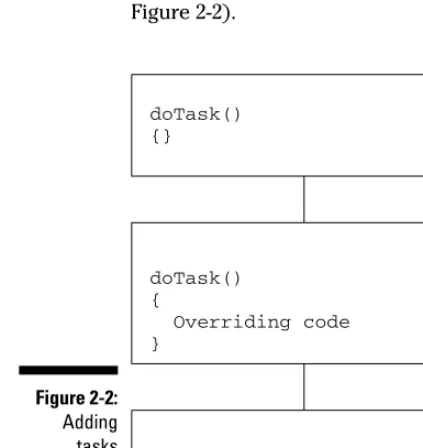
Here’s the problem, in general. You may find yourself implementing a single task across several generations of classes. At first, everything is fine, you handle the task in one class alone, as shown in Figure 2-1.
But as time goes on, special cases seem to require new classes, and you use inheritance and overriding code in the inheriting classes, spreading the way you handle the single task across a number of inheriting classes (see Figure 2-2).
doTask() {}
doTask() {
Overriding code }
doTask() {
More overriding code }
Figure 2-2: Adding tasks requires rewriting code.
doTask() {}
Figure 2-1: One object, one task.
The Strategy design pattern says that you should extract the volatile parts of your code and encapsulate them as objects; you can use those objects as you need them. Now you can customize your code by creating composites of objects. At runtime, you just use polymorphism to choose the object(s) you want to work with, as shown in Figure 2-3.
The GoF book says the Strategy design pattern should: “Define a family of algorithms, encapsulate each one, and make them interchangeable. Strategy lets the algorithm vary independently from clients that use it.”
The Strategy design pattern points out that, sometimes, it’s good to be task-oriented. That’s especially important if you want to maintain volatile code away from the main code for your app, or if you want to change the algorithm you use at runtime.
Consider using the Strategy design pattern if you have one of the following situations:
⻬You have volatile code that you can separate out of your application for easy maintenance.
⻬You want to avoid muddling how you handle a task by having to split implementation code over several inherited classes.
⻬You want to change the algorithm you use for a task at runtime.
So there you have it — any time you start to get task-oriented and want to make those tasks one of the main design points of your code, the Strategy design pattern should spring to mind. That’s the way design patterns work. They don’t provide you with specific code. Instead, you familiarize yourself with the idea, and when that idea could come in handy there’s an Aha! moment. This looks like a job for the Strategy pattern!
Yourcode Algorithm object 1
Algorithm object 2
Algorithm object 3
Algorithm object 4 Algorithm variable
Figure 2-3: The Strategy pattern saves you time in the long run.
37
Chapter 2: Putting Plans into Action with the Strategy Pattern
Knowing how various design patterns work also gives you a way of talking to other people who are familiar with those design patterns. Most professional programmers should know at least some standard design patterns. When someone on your team starts talking about using the Strategy design pattern and everyone starts nodding knowingly, you want to be able to nod knowingly as well.
Chapter 3
Creating and Extending Objects
with the Decorator and
Factory Patterns
In This Chapter
䊳Keeping code closed for modification, open for extension
䊳Introducing the Decorator pattern
䊳Creating your own decorators
䊳Wrapping objects in decorators
䊳Building objects with factories
䊳Encapsulating object creation in factories
䊳Using the Factory Method pattern
Y
ou’re on the job as the new Design Pattern consultant at GigantoComputer company, getting paid an exorbitant amount of money, and you’re in the company cafeteria.“What’ll you have?” asks the surly cook behind the grill counter.
“A burger,” you say, wrestling with your tray.
The cook rings it up on the cash register, and then remembers to ask, “Fries with that?”
“Sure,” you say.
The cook clears the order on the cash register and starts over, saying, “Burger and fries,” and enters that.
“Let’s make that a cheeseburger,” you say on impulse.
The cook gives you a dirty look and starts the order over from scratch, peck-ing at the keyboard and saypeck-ing, “Burger with cheese and fries. Okay. That it?”
“Hmm,” you say, scanning the posted menu. “Maybe make that a bacon cheeseburger.”
The cook stares at you and seems on the verge of saying something unpleas-ant, but enters the order into the cash register, starting the whole process over.
“Hey,” you say, “you sure could benefit by using the Decorator design pat-tern, eh?”
“Yeah,” says the cook, wondering what you’re talking about. “I’ve said the same thing a thousand times.”
You take your bacon cheeseburger with fries happily, and ask, “How about some tomato slices on that?”
This chapter is a