ISSN (Print) : 2320 – 3765 ISSN (Online): 2278 – 8875
I
nternational
J
ournal of
A
dvanced
R
esearch in
E
lectrical,
E
lectronics and
I
nstrumentation
E
ngineering
(An ISO 3297: 2007 Certified Organization)
Vol. 4, Issue 5, May 2015
Security System for the School Bus Using
IP-based Camera
Chaithra.P
1, M.Dakshayini
2, Mahesh Premachandra
3PG Student [CNE], Dept. of ISE, BMS College of Engineering, Bangalore, Karnataka, India1 Professor, Dept. of ISE, BMS College of Engineering, Bangalore, Karnataka, India2
BI Consultant, NCS Group, Singapore3
ABSTRACT: School buses generally serve as the first and last school function for millions of school children every school day. School bus is also a kind of a classroom where children learn positive and negative behavior. However, now a day‟s security for school children even in the school has become a major issue, hence, there is a need of security system for school children in school bus. So, many school managements want to provide security to children in school bus with the help of a system using which they could have the continuous visibility and monitoring of school buses. In this paper, we present the design and development of a security system for schools by deploying an IP based camera inside the school buses, and making it viewable / controllable by the authorized people of the school management through an android device. Also the system enable the IP based camera to upload the videos and pictures captured on to a private cloud platform of the school automatically as it enters the Wi-Fi zone of the school.
KEYWORDS: IP based camera, DDNS, IPC Finder tool, NAT.
I.INTRODUCTION
In all over the country transportation directors at schools are faced with problems that are making the day-to-day process of transporting students to school difficult. Student transportation key problem is students themselves. Student movement is always an issue, and while some districts may have constant student numbers, other districts have highly portable student populations. Accounting for where your students are in relation to bus stops and school boundaries is answer to creating a good transportation system. Rather than that student behavior is always an issue, some of the behaviors are immature, irritating, thoughtless behavior, improper cell phone and laptop usage in class, cheating, side conversation, disregard for deadlines etc. such kind of student behavior causes the negative impact on student life to avoid this drawbacks in this paper we are proposing a security system for school children‟s.
II.LITEARTURE SURVEY
Student safety in educational institution can be improved by placing surveillance cameras, this surveillance camera records images and video inside the school bus. Most commonly used system for monitoring is Closed-Circuit Television (CCTV) that comes with camera and recorder. Video and images recorded in the surveillance camera will be reviewed at the end of the day. The main drawbacks of such process are, in case of emergency immediate review of data was difficult, CCTV camera generates analog signal which results in poor quality of images, prevents easy searching and tracking, storage tapes erode over time, storage is bulky, impractical to broadcast live images, apart from the difficult in converting analog signal to digital (see [2]).
ISSN (Print) : 2320 – 3765 ISSN (Online): 2278 – 8875
I
nternational
J
ournal of
A
dvanced
R
esearch in
E
lectrical,
E
lectronics and
I
nstrumentation
E
ngineering
(An ISO 3297: 2007 Certified Organization)
Vol. 4, Issue 5, May 2015
numerous forms of media, easily encrypt digital images for security, instantly transmits images to any location in the world through remote or shared viewing via the web(see[2]).
III.SYSTEM MODEL
This paper proposes the system that remotely controls the IP based camera using android device allowing the authorized people to watch the recorded pictures and videos as and when they are in need. Camera local IP address is automatically visible within a network. In order to control and view the contents recorded by the IP-based camera from global network such as internet, it is required to configure the camera for remote controlling and monitoring. To achieve this remote configuration we need to setup the Dynamic Domain Name System (DDNS) system and Port Forwarding to the Local device. DDNS system configuration was developed by using IPC Finder tool along with DDNS Server Domain Name. Port mapping was developed by NATING and in this case local IP address will be converted in to the public address by remapping local address on gateway level.
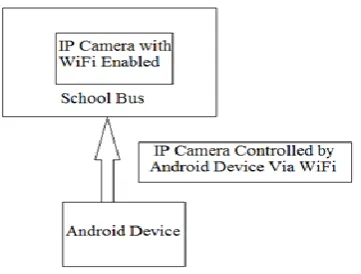
Step1: Remotely control IP based camera when the school bus outside the school Wi-Fi zone as shown in the below Figure 1.
Fig 1: IP based camera outside the school Wi-Fi zone.
1) Design IP based camera to support remote configuration.
IP address configuration.
DDNS configuration.
NAT configuration.
2) Deploy IP camera inside the school bus.
3) Android application to control IP based camera remotely by using IP addresses and port number of the camera.
ISSN (Print) : 2320 – 3765 ISSN (Online): 2278 – 8875
I
nternational
J
ournal of
A
dvanced
R
esearch in
E
lectrical,
E
lectronics and
I
nstrumentation
E
ngineering
(An ISO 3297: 2007 Certified Organization)
Vol. 4, Issue 5, May 2015
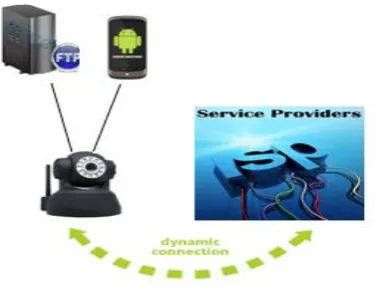
Fig 2: IP based camera inside a school Wi-Fi zone.
1) Configure the server.
2) Configure a system to upload whatever data captured by IP based camera to the private cloud ones bus enter in to the school Wi-Fi zone.
IV.IMPLEMENTATION
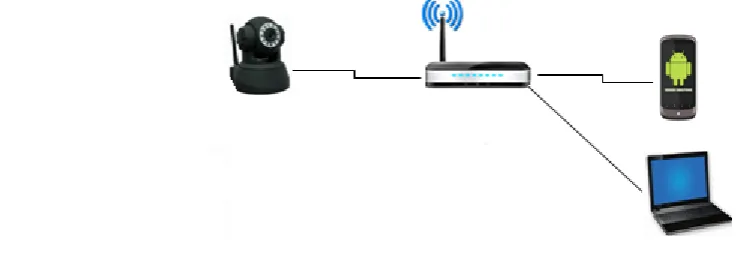
IP based camera is a type of digital video camera commonly employed for surveillance and also to support sending and receiving of data via internet. Figure 3 shows the view of wireless IP based camera. Camera is wirelessly connected with the wireless router using router SSID and password, camera is controlled by the android device and PC connected in the same LAN. Without remote configuration it is viewable and controllable within a LAN. Remote configuration helps to view the camera from outside the network such as Internet. Remote configuration supports two steps such as DDNS policy and Port Forwarding (NAT).
Fig 3: Wireless LAN view.
DDNS policy
ISSN (Print) : 2320 – 3765 ISSN (Online): 2278 – 8875
I
nternational
J
ournal of
A
dvanced
R
esearch in
E
lectrical,
E
lectronics and
I
nstrumentation
E
ngineering
(An ISO 3297: 2007 Certified Organization)
Vol. 4, Issue 5, May 2015
that is necessary for the camera to communicate with the DDNS server. This actual DNS IP address can be obtained from the Internet Service Provider (ISP) or from a PC placed with the same LAN where the IP based Camera is also located.
Fig 4: DDNS system configuration.
IPC Finder is a tool that allows a communication between Router Platform process and routing application. The IPC Finder process stores the mappings between application requests and the particular IPC calls necessary to answer those requests and also support multiple transport such as intra-process calls, host-local IPC, and networking communications. it also discovers IPC calls using IPC redirector. When an application wishes to make an IPC call, then IPC redirector consult the IPCFinder to discover how to do it,thus it is easy to change how application requests are handled at runtime(see[1]).
Port Forwarding
Port Forwarding is an application of Network Address Translation ( NAT) that conveys a communication request from one address and port number grouping to another while the packets are traversing a network gateway, such as a router or firewall. As Private IP address space like class A, class B and class C is restricted, it is difficult to obtain a large block of registered IP addresses to connect devices within a network. This causes problems for machines that are connected to private networks using private IP addresses as they are not directly connected to the outside World through public IP address.NAT solves this problem by enabling the privately addressed host to access registered networks by mapping between public IP address and private IP address.
ISSN (Print) : 2320 – 3765 ISSN (Online): 2278 – 8875
I
nternational
J
ournal of
A
dvanced
R
esearch in
E
lectrical,
E
lectronics and
I
nstrumentation
E
ngineering
(An ISO 3297: 2007 Certified Organization)
Vol. 4, Issue 5, May 2015
In the above Figure 5, all of the machines on the LAN are using the 172.23.5.x private IP address range. None of these machines can communicate directly via the internet. The gateway is used between the LAN and the internet. It is a part of the LAN (172.23.5.1) and also has a public IP address (4.3.2.1). Gateway makes it possible for the machines in the LAN to communicate via the internet, by performing NAT. Packets from machines on the LAN going to machines on the internet, such as the packet from 172.23.5.2 destined for 5.6.7.8, are modified by gateway to use the public IP address of the gateway (4.3.2.1). When packets from the Internet reach the gateway, which will detect if they are actually intended for a machine inside the LAN, then modifies the packet to use the address from the LAN machine and then sends the packet on to its final destination during this process internally remapping the IP packets header source and destination address to the public IP address (see [4]).
V. RESULT AND DISCUSSION
After completing implementation design at section III, school management gets a complete remote control of the IP Camera deployed inside the school bus using android application as shown in the below snapshots.First step of the android application is user authentication in that two steps user registration and login. This will support only authorized people of the school will get complete control of the camera.
ISSN (Print) : 2320 – 3765 ISSN (Online): 2278 – 8875
I
nternational
J
ournal of
A
dvanced
R
esearch in
E
lectrical,
E
lectronics and
I
nstrumentation
E
ngineering
(An ISO 3297: 2007 Certified Organization)
Vol. 4, Issue 5, May 2015
IP address of the camera automatically detected by the application along with the device name as shown in the below
snapshot. Otherwise click „manually add camera‟ to enter IP address and port number of the camera.
ISSN (Print) : 2320 – 3765 ISSN (Online): 2278 – 8875
I
nternational
J
ournal of
A
dvanced
R
esearch in
E
lectrical,
E
lectronics and
I
nstrumentation
E
ngineering
(An ISO 3297: 2007 Certified Organization)
Vol. 4, Issue 5, May 2015
After clicking the save button live images and videos captured by the camera displayed on the device screen along with the control buttons such are adjust the brightness, adjust the contrast, camera view mode, horizontal pan, vertical tilt, record video to android device , take snapshot and receive audio from the camera.
VI.CONCLUSION
ISSN (Print) : 2320 – 3765 ISSN (Online): 2278 – 8875
I
nternational
J
ournal of
A
dvanced
R
esearch in
E
lectrical,
E
lectronics and
I
nstrumentation
E
ngineering
(An ISO 3297: 2007 Certified Organization)
Vol. 4, Issue 5, May 2015
REFERENCES
[1]Mark Handley and Adam Greenhalgh, “Breaking the Mould in Router Software”, Dept of Computer Science, University College London, pp.1-3. [2]Jack Cabasso, “Analog vs. IP cameras”, volume.1 issue.2, pp.1-8, February 2009.
[3]“DDNS Management System User Manual v1.0”.
[4]Geoff Constable and Welsh, “videoconferencing across NAT, firewall”, Version 1.0-Release. [5]”http://support.easydns.com/tutorials/DynamicDNS/index2.php”.