Transformation of Data from RDBMS to HDFS by using Load
Atomizer
B. Sindhuja1, K. Bala Chowdappa2
1
Computer Science and Engineering Dept, GPREC,
Kurnool (District), Andhra Pradesh-518007, INDIA. [email protected]
2
Asst.Prof, Computer Science and Engineering Dept, GPREC, Kurnool (District), Andhra Pradesh-518007, [email protected]
Abstract
The arrival of Internet has been resulted in quick
growth of data size endlessly. Distributed, processing and
storing of such vast data sets has turn out to be a challenge
for the database industry. 'Big data' term is generally used
for storing large data sets. Relational Database
Management Systems (RDBMS) can’t handle and huge
data sets. For efficient data storage and analysis we are
moving to hadoop. It is a framework for big data
management and analysis. For data exchanging process we
need a connectivity called Sqoop, which loads a table
from RDBMS to HDFS and vice-versa. To schedule and
manage Hadoop jobs in a distributed environment we
introduce Oozie provides a mechanism to run a job at a
given schedule. Workflow in Oozie specifies a sequence of
actions arranged in a control dependency DAG (Directed
Acyclic Graph).
Keywords: Big data, RDBMS, Apache Hadoop, Apache
Sqoop, HDFS, Mapreduce, Oozie.
1.
Introduction
Big Data[1] is not just large amount of data that is
obtainable from numerous sources, it also refers to the
complete process of gathering
,
storing and analyzing thatcollected data. Generally, the data that is coming from
various multiple sources [2] will be in different formats
that will make the data even more complicated. And due to
this it is becoming more challenging task to manage all
these forms of data in a well-structured format. The main
three data forms are structured data, unstructured data and
semi-structured data
• Structured data : Relational data,
• Semi Structured data : XML ,
• Unstructured data : Word, PDF, Text, Media .
Hadoop[3] was created by Doug Cutting and
Mike Cafarella in 2005. Hadoop is a framework from the
Apache software foundation written in Java. The
motivation comes from Google’s Map Reduce and Google
File System identification.
MapReduce[4] is a programming model and an
associated implementation for processing and generating
large data sets with a parallel distributed algorithm on a
cluster. A MapReduce program is composed of a map()
that performs filtering as sorting and reduce () function that
performs a summary operation.
A Relational Database Management System
(RDBMS)[5] is a database management system on
Relational model, data is represented in terms of tuples.
All relational database management systems like MySQL,
MS Access, Oracle, and SQL Server. MYSQL is a fast,
easy-to-use RDBMS being used for many small and big
businesses.
Sqoop[5] is a tool designed to transfer data
between Hadoop and relational database servers. It is used
to import data from relational databases such as MySQL to
Hadoop HDFS, and export from Hadoop file system to
relational databases.
Apache Oozie is a Java Web application used to
schedule Apache Hadoop jobs. Oozie combines multiple
jobs sequentially into one logical unit of work. It is
integrated with the Hadoop stack, with YARN as its
architectural centre, and supports Hadoop jobs for Apache
MapReduce, Apache Pig, Apache Hive, and Apache
Sqoop. Oozie can also schedule jobs specific to a system,
like Java programs or shell scripts. This provides greater
control over jobs and also makes it easier to repeat those
jobs at predetermined intervals. At its core, Oozie helps
administrators derive more value from Hadoop.
2. Problem Statement
2.1 Existing System
RDBMS is capable to handle small amount of
data. RDBMS stores and process only structured data. If
the data to be processed is in the degree of Terabytes and
petabytes, it is not appropriate to process them in parallel
independent tasks and collate the results to give the output.
MapReduce has taken this concept from functional
programming and has been very effectively used. Hadoop
is an implementation of MapReduce in Java.
2.2 Proposed System
T
o
overcome the problems of existing one madeof using Apache Sqoop,Oozie.Sqoop is a utility to import
data that resides in RDBMS system onto Hadoop/HDFS
cluster.It can also be used to export data from
Hadoop/HDFS into RDBMS. Sqoop internally uses Map
Reduce jobs to import the data and spread it across the
cluster. There are various parameters you can specify to a
Sqoop command that gives you better control. To schedule
jobs specific to a system , Oozie provides a greater control
over jobs. These Jobs are based upon time-interval. It will
assign once the multiple processes working in a single span
3. Methodology
3.1 Loading Data into RDBMS
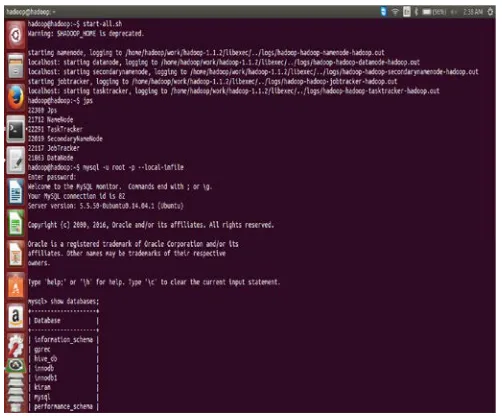
To load data into rdbms start the Hadoop shell
using start-all.sh and check the visibility purpose of all
active nodes using jps(Java Programming Services). Login
into MYSQL using mysql – u root -p –local-in file and
enter password : Hadoop.
Consider a Weather dataset which is in the form
of CSV file, to perform operations like create and load
data in a database.
Figure 3: Start the hadoop and enter into mysql
3.2 Importing data from RDBMS to HDFS
.
Sqoop import the data from RDBMS to Hadoop
Distributed File System (HDFS). Among Sqoop[5],
can import data from a relational database system into
HDFS. The input to the import process is a database table.
Sqoop will read the table row-by-row into HDFS. The
output of this import process is a set of files containing a
copy of the imported table. The import process is
performed in parallel. For this reason, the output will be in
multiple files. These files may be delimited text files (for
example, with commas or tabs separating each field), or
binary Avro or Sequence Files containing sequential
record data
The following command is used to import all data
from a table’s from MYSQL database.
---
$ sqoop import --connect jdbc:mysql://localhost/db name/
--table ORDERS --username test --password ****
---
Figure 4: Describe the sqoop
In this command the various options specified are as
follows:
•
import: This is the sub-command that instructsSqoop to initiate an import
.
• --connect <connect string>, --username <user
name>, --password <password>: These are
connection parameters that are used to connect
with the database. This is no different from the
connection parameters that you use when
• --table <table name>: This parameter specifies
the table which will be imported.
The import is done in two steps. .In the first Step
Sqoop introspects the database to gather the necessary
metadata for the data being imported. The second step is a
map-only Hadoop job that Sqoop submits to the cluster.
The imported data is saved in a directory on
HDFS based on the table being imported. As the case with
most aspects of Sqoop operation, the user can specify any
alternative directory where the files should be populated.
By default these files contain comma delimited fields, with
new lines separating different records. You can easily
override the format in which data is copied over by
explicitly specifying the field separator and record
terminator characters
.
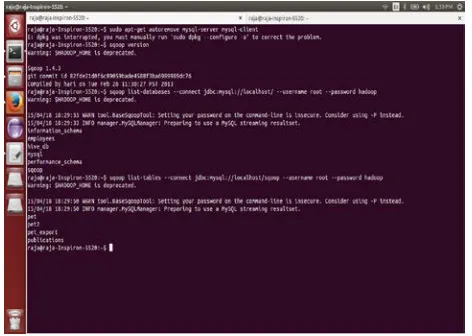
Sqoop also supports different data formats for
importing data. Some Sqoop commands like sqoop
version ,list of databases and tables in hadoop.
Figure 5: Import the data by using sqoop
3.3 Exporting Data from HDFS to RDBMS
In some cases data processed by hadoop pipelines
may be needed in production systems to help run
additional critical business functions. Sqoop can be used to
export such data into external data stores as necessary
.
Figure 6: Export the data by using sqoop
In this command the various options specified are as
follows:
• export: This is the sub-command that instructs
Sqoop to initiate an export.
• --connect <connect string>, --username <user
name>, --password <password>: These are
connection parameters that are used to connect
with the database. This is no different from the
connection parameters that you use when
connecting to the database via a JDBC
connection.
• --table <table name>: This parameter specifies
the table which will be populated.
• --export-dir <directory path>: This is the
directory from which data will be exported.
After manipulating the imported records you may
have a result data set which you can then export back to
the relational database. Sqoop’s export process will read a
set of delimited text files from HDFS in parallel, parse
database table, for utilization by external applications or
users.
3.4 Oozie
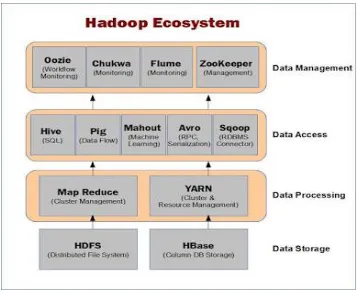
Oozie’s role in the Hadoop Ecosystem
Oozie fits in the larger Hadoop ecosystem. It
captures a high-level view of Oozie’s place in the
ecosystem. Oozie[16] can drive the core Hadoop
components namely, MapReduce jobs and Hadoop
Distributed File System (HDFS) operations. In addition,
Oozie can orchestrate most of the common higher-level
tools such as Pig, Hive, Sqoop, and DistCp. More
importantly, Oozie can be extended to support any custom
Hadoop job written in any language. Although Oozie is
primarily designed to handle Hadoop components, Oozie
can also manage the execution of any other non Hadoop
job like a Java class or a shell script.
Oozie Architecture
When Oozie runs a job, it needs to read the XML
file defining the application. Oozie expects all application
files to be available in HDFS. This means that before
running a job, you must copy the application files to
HDFS. Deploying an Oozie application simply involves
copying the directory with all the files required to run the
application to HDFS. The Oozie server is a Java web
application that runs in a Java servlet container. By default,
Oozie uses Apache Tomcat, which is an open source
implementation of the Java servlet technology. Oozie
clients, users, and other applications interact with the
Oozie server using the oozie command line tool. The
Oozie[17] server is a stateless web application.
Fig: 7. Architecture of Oozie
Oozie supports four types of databases: Derby, MySQL,
Oracle, and PostgreSQL. Oozie has built-in purging logic
that deletes completed jobs from the database after a
period of time. If the database is properly sized for the
expected load, it can be considered maintenance-free other
than performing regular backups. Within the Oozie server,
there are two main entities that do all the work, the
Command and the Action Executor classes. A queue
consumer executes the commands using a thread pool. By
using a fixed thread pool for executing commands, It
ensure that the Oozie server process is not stressed due to a
large number of commands running concurrently. When
the Oozie server is under heavy load, the command queue
backs up because commands are queued faster than they
can be executed. As the load goes back to normal levels,
the queue depletes. The command queue has a maximum
capacity. If the queue overflows, commands are dropped
silentlyfromthequeue.
A Oozie Job
To get started with writing an Oozie application and
running an Oozie job, It create an Oozie workflow
application named identity WF that runs an identity
MapReduce job. The identity MapReduce job just echoes
its input as output and does nothing else. Hadoop bundles
the Identity Mapper class and Identity Reducer class so it
Using Oozie in your environment to schedule
Hadoop jobs and would like to call Sqoop from within
your existing workflows.
Fig:8. Start the Oozie
When running the workflow job, Oozie begins with the
start node and follows the specified transition to identity
MR. The identity MR node is a <map-reduce> action. The
<map-reduce> action indicates where the MapReduce job
should run via the job-tracker and name-node elements
(which define the URI of the JobTracker and the
NameNode, respectively). The prepare element is used to
delete the output directory that will be created by the
MapReduce job. If don’t delete the output directory and
try to run the workflow job more than once, the
MapReduce job will fail because the output directory
already exists. The configuration section defines the
Mapper class, the Reducer class, the input directory, and
the output directory for the MapReduce job. If the
MapReduce job completes successfully, Oozie follows the
transition defined in the ok element named success. If the
MapReduce job fails, Oozie follows the transition
specified in the error element named fail. The success
transition takes the job to the end node, completing the
Oozie job successfully. The fail transition takes the job to
the kill node, killing the Oozie job.
Oozie Job Work flows
An Oozie workflow is a multistage Hadoop job. A
workflow is a collection of action and control nodes
arranged in a directed acyclic graph (DAG) that captures
control dependency where each action typically is a
Hadoop job (e.g., a MapReduce, Pig, Hive, Sqoop, or
Hadoop DistCp job). There can also be actions that are not
Hadoop jobs (e.g., a Java application, a shell script, or an
email notification). The order of the nodes in the workflow
determines the execution order of these actions. An action
does not start until the previous action in the workflow
ends. Control nodes in a workflow are used to manage the
execution flow of actions.
Fig: 9.DAG
Figure:10. DAG Failure
Sqoop job in oozie
Apache Sqoop is a Hadoop tool used for
importing and exporting data between relational databases
(MySQL, Oracle, etc.) and Hadoop clusters. Sqoop
importing or exporting data from various relational
databases. It often uses JDBC to talk to these external
database systems (refer to the documentation on Apache
Sqoop for more details). Oozie’s sqoop action helps users
run Sqoop jobs as part of the workflow.
The following elements are part of the Sqoop action:
•job-tracker(required)
•name-node(required)
•prepare
•job-xml
•configuration
•command (required if arg is not used)
•arg (required if command is not used)
•file
•archive
The Sqoop eval option runs any random and valid SQL
statement on the target (relational) DB and returns the
results. This command does not run a MapReduce job on
the Hadoop side and this caused some issues for Oozie.
Fig:11. Running and completed jobs in oozie
Oozie Web Interface for Coordinator Jobs
Oozie provides a basic, read-only user interface
for coordinator jobs very similar to what it provides for
workflows and bundles. Users can click on the Coordinator
Jobs tab on the Oozie web interface at any time. It displays
the list of recent coordinator jobs in a grid-like UI. This UI
captures most of the useful information about the
coordinator jobs. The last column titled Next
Materialization shows the nominal time for the next
coordinator action to be materialized for any running
coordinator job.
3.5 Related Work
Hadoop is a massively scalable parallel
computation platform capable of running hundreds of jobs
concurrently, and many thousands of jobs per day.
Managing all these computations demands for a workflow
and scheduling system. In this paper, we identify four
indispensable qualities that a Hadoop workflow
management system must fulfill namely Scalability,
Security, Multi-tenancy, and Operability. We find that
conventional workflow management tools lack at least one
of these qualities, and therefore present Apache Oozie, a
workflow management system specialized for Hadoop. We
discuss the architecture of Oozie, share our production
experience over the last few years at Yahoo, and evaluate
Oozie's scalability and performance
4. Performance Analysis
Consider a weather dataset of 1GB, 2GB and
3GB for analysis. Below figure shows the analysis report
In figure, it shows the performance analysis report
during import and export of data from Hadoop/RDBMS.
This paper shows Hadoop is best for low-latency rate than
RDBMS.
5. Conclusion
As data is being increasing day by day due to
wide range use of social networking sites, the problem will
raises like how to store, process, manage, use all these
large amount of data By the use of big data a user can
access the past, present data which has been stored and
analyzed from past years. Transformation of data from
RDBMS to HDFS is possible now through Apache Sqoop
efficiently. Sqoop transfers the data in less time and also
the performance will be high. The result will be performed
in a single node.
Future Enhancement
Beyond the scope of this project, we can further
process the data Oozie to Hive, map-reduce, performance
with PIG or Spark technologies.
References
[1] Kiran kumara Reddi & Dnvsl Indira “Different
Technique to Transfer Big Data : survey” IEEE
Transactions on 52(8) (Aug.2013) 2348 { 2355}
[2] S. Aral and D. Walker, “Identifying Influential and
Susceptible Members of Social Networks,” Science, vol.
337, pp. 337-341, 2012.
[3]Hadoop Distributed File System (HDFS),
http://hortonworks.com/hadoop/hdfs/
[4] C.T. Chu, S.K. Kim, Y.A. Lin, Y. Yu, G.R. Bradski,
A.Y. Ng, and K. Olukotun, “Map-Reduce for Machine
Learning on Multicore,” Proc. 20th Ann. Conf. Neural
Information Processing Systems (NIPS ’06), pp.
281-288, 2006.
[5].Padhy, Patra & Satapathy, RDBMS to NoSQL:
“ReviewingSomeNextGenerationNoRelationalDatabase
s”International Journal of Advanced Engineering
Science and Technologies, 2011.
[6].Pathak Anand Prakashbhai , hari mohan, “Inference
Patterns from Big data using Aggregation, Filtering
and Tagging survey”, 2014
[7].D. Gillick, A. Faria, and J. DeNero, MapReduce:
Distributed Computing for Machine Learning, Berkley,
Dec. 2006
[8].White paper on “Aggregation and analytics on Big data
using the Hadoop ecosystem” by Impetus technologies
Inc.
[9].Zhang, KaipingLi, BinWu , “The Research and
Design of SQL Processing Based on Map
Reduce”2011
[10].Bialecki, Cafarella, Cutting, and OSMalley, "Hadoop:
A Framework for Running Applications on Large
Clusters Built of Commodity Hardware,”2010.
.[11].Dean & S.Ghemawat ,“MapReduce: simplified data
[12]. Martín Díaz, Gonzalo Juan, “Big Data on the Internet
of Things”, 2012 Sixth International Conference on
Innovative Mobile and Internet Services in Ubiquitous
Computing, 978-0-7695- 4684-1/12, 2012 IEEE.
[13]. Gregory Mone, Beyond Hadoop, Communications of
the ACM, 2013
[14]. The Hadoop Distributed File System: Architecture
andDesign.http://hadoop.apache.org/docs/r2.5.1/hadoop
-project-dist/hadoophdfs/HdfsDesign.html
[15].Rubao Lee, Tian Luo, Yin Huai, Fusheng Wang,
Yongqiang He, and Xiaodong Zhang, YSmart: Yet
Another SQL-to-MapReduce Translator, ” International
Conference on Distributed Computing Systems, pp.
25-36, 2011.
[16] http://hortonworks.com/apache/oozie/