Smart 16e Shelf
User Manual
4202023L5 Smart 16e, 2nd Gen, AC Version 4202023L6 Smart 16e, 2nd Gen, Dual AC Version 4202023L7 Smart 16e, 2nd Gen, DC Version
4202023L8 Smart 16e, 2nd Gen, Dual DC Version
Trademarks
Any brand names and product names included in this manual are trademarks, registered trademarks, or trade names of their respective holders.
To the Holder of the Manual
The contents of this manual are current as of the date of publication. ADTRAN reserves the right to change the contents without prior notice.
In no event will ADTRAN be liable for any special, incidental, or consequential damages or for commercial losses even if ADTRAN has been advised thereof as a result of issue of this publication.
About this Manual
This manual provides a complete description of the Smart 16e Shelf system and system software. The purpose of this manual is to provide the technician, system administrator, and manager with general and specific information related to the planning, installation, operation, and maintenance of the Smart 16e Shelf. This manual is arranged so that needed information can be found quickly and easily.
901 Explorer Boulevard P.O. Box 140000 Huntsville, AL 35814-4000
Phone: (256) 963-8000
© 2004 ADTRAN, Inc. All Rights Reserved.
64202023L5-1B © 2004 ADTRAN, Inc. 3
Smart 16e Shelf User Manual
Conventions
Notes provide additional useful information.
Cautions signify information that could prevent service interruption.
Smart 16e Shelf User Manual
4 © 2004 ADTRAN, Inc. 64202023L5-1B
IMPORTANT SAFETY INFORMATION
When using your telephone equipment, please follow these basic safety precautions to reduce the risk of fire, electrical shock, or personal injury:
1. Do not use this product near water, such as near a bath tub, wash bowl, kitchen sink, laundry tub, in a wet basement, or near a swimming pool.
2. Avoid using a telephone (other than a cordless-type) during an electrical storm. There is a remote risk of shock from lightning.
3. Do not use the telephone to report a gas leak in the vicinity of the leak.
64202023L5-1B © 2004 ADTRAN, Inc. 5
Smart 16e Shelf User Manual
Affidavit Requirements for Connection to Digital Services
• An affidavit is required to be given to the telephone company whenever digital terminal equipment without encoded analog content and billing protection is used to transmit digital signals containing encoded analog content which are intended for eventual conversion into voice band analog signal and transmitted on the network.
• The affidavit shall affirm that either no encoded analog content or billing information is being trans-mitted or that the output of the device meets Part 68 encoded analog content or billing protection spec-ification.
• The end user/customer will be responsible for filing an affidavit with the local exchange carrier when connecting unprotected CPE to a 1.544 Mbps or subrate digital service.
Smart 16e Shelf User Manual
6 © 2004 ADTRAN, Inc. 64202023L5-1B
Affidavit for Connection of Customer Premises Equipment to 1.544 MBPS and/or Subrate Digital Services
For the work to be performed in the certified territory of ______________ (telco name)
State of ________________________________
County of ______________________________
I, _______________________ (name), ____________________ (business address), _____________________ (telephone number) being duly sworn, state:
I have the responsibility for the operation and maintenance of the terminal equipment to be connected to 1.544 Mbps and/or __________________ subrate digital services. The terminal equipment to be connected complies with Part 68 of the FCC rules except for the encoded analog content and billing protection specification. With respect to encoded analog content and billing protection:
( ) I attest that all operations associated with the establishment, maintenance and adjustment of the digital CPE with respect to encoded analog content and billing protection information continuously complies with Part 68 of the FCC rules and Regulations.
( ) The digital CPE does not transmit digital signals containing encoded analog content or billing information which is intended to be decoded within the telecommunications network.
( ) The encoded analog content and billing protection is factory set and is not under the control of the customer.
I attest that the operator(s) maintainer(s) of the digital CPE responsible for the establishment, maintenance and adjustment of the encoded analog content and billing information has (have) been trained to perform these functions by successfully having completed one of the following (check appropriate blocks):
( ) A. A training course provided by the manufacturer/grantee of the equipment used to encode analog signals; or
( ) B. A training course provided by the customer or authorized representative, using training materials and instructions provided by the manufacturer/grantee of the equipment used to encode analog signals; or
64202023L5-1B © 2004 ADTRAN, Inc. 7
Smart 16e Shelf User Manual
( ) D. In lieu of the proceeding training requirements, the operator(s)/maintainer(S) is (are) under the control of a supervisor trained in accordance with _______________ (circle one) above.
I agree to provide ____________________ (telco’s name) with proper documentation to demonstrate compliance with the information in the preceding paragraph, if so requested.
_____________________ Signature
_____________________ Title
_____________________ Date
Subscribed and sworn to before me
This _________ day of ___________________, 20__
_______________________________________ Notary Public
Smart 16e Shelf User Manual
8 © 2004 ADTRAN, Inc. 64202023L5-1B
FCC regulations require that the following information be provided in this manual:
1. This equipment complies with Part 68 of the FCC rules. There is a label on the equipment that shows the FCC registration number and Ringer Equivalence Number (REN) for this equipment, if applicable. If required, this information must be given to the telephone company.
2. The following information may be required when applying to the local telephone company for leased line facilities.
3. An FCC compliant telephone cord with a modular plug may be provided with this equipment. This equipment is designed to be connected to the telephone network or premises wiring using a com-patible modular jack, which is FCC Part 68 compliant. See installation instructions for details. 4. If this equipment causes harm to the telephone network, the telephone company may temporarily
discontinue service. If possible, advance notification is given; otherwise, notification is given as soon as possible. The telephone company will advise the customer of the right to file a complaint with the FCC.
5. The telephone company may make changes in its facilities, equipment, operations, or procedures that could affect the proper operation of this equipment. If this happens, the telephone company will provide advance notification and the opportunity to make the necessary modifications to maintain uninterrupted service.
6. If experiencing difficulty with this equipment, please contact ADTRAN for repair and warranty information. If the equipment is causing harm to the network, the telephone company may request this equipment to be disconnected from the network until the problem is resolved or it is certain that the equipment is not malfunctioning.
7. This unit contains no user serviceable parts.
8. The FCC recommends that the AC outlet to which equipment requiring AC power is to be installed is provided with an AC surge arrester.
Service Type Digital Facility Interface Code Service Order Code Network Jacks
2.4 kbps Digital Interface 4.8 kbps Digital Interface 9.6 kbps Digital Interface 19.2 kbps Digital Interface 38.4 kbps Digital Interface 56 kbps Digital Interface 64 kbps Digital Interface
04DU5-24 04DU5-48 04DU5-96 04DU5-19 04DU5-38 04DU5-56 04DU5-64 6.0F 6.0F 6.0F 6.0F 6.0F 6.0F 6.0F RJ-48S RJ-48S RJ-48S RJ-48S RJ-48S RJ-48S RJ-48S
Basic Rate ISDN 02IS5 6.0N RJ-49C
1.544 Mbps-SF
1.544 Mbps-SF and B8ZS 1.544 Mbps-ESF
1.544 Mbps-ESF and B8ZS
64202023L5-1B © 2004 ADTRAN, Inc. 9
Smart 16e Shelf User Manual
Federal Communications Commission Radio Frequency Interference Statement
This equipment has been tested and found to comply with the limits for a Class A digital device, pursuant to Part 15 of the FCC Rules. These limits are designed to provide reasonable protection against harmful interference when the equipment is operated in a commercial environment. This equipment generates, uses, and can radiate radio frequency energy and, if not installed and used in accordance with the
instruction manual, may cause harmful interference to radio frequencies. Operation of this equipment in a residential area is likely to cause harmful interference in which case the user will be required to correct the interference at his own expense.
Changes or modifications to this unit not expressly approved by the party responsible for compliance could void the user’s authority to operate the equipment.
Smart 16e Shelf User Manual
10 © 2004 ADTRAN, Inc. 64202023L5-1B
Industry Canada Compliance Information
Notice: The Industry Canada label applied to the product (identified by the Industry Canada logo or the “IC:” in front of the certification/registration number) signifies that the Industry Canada technical specifications were met.
Notice: The Ringer Equivalence Number (REN) for this terminal equipment is supplied in the
documentation or on the product labeling/markings. The REN assigned to each terminal device indicates the maximum number of terminals that can be connected to a telephone interface. The termination on an interface may consist of any combination of devices subject only to the requirement that the sum of the RENs of all the devices should not exceed five (5).
Canadian Emissions Requirements
This digital apparatus does not exceed the Class A limits for radio noise emissions from digital apparatus as set out in the interference-causing equipment standard entitled “Digital Apparatus,” ICES-003 of the Department of Communications.
64202023L5-1B © 2004 ADTRAN, Inc. 11
Smart 16e Shelf User Manual
Product Warranty
ADTRAN will repair and return this product within the warranty period if it does not meet its published specifications or fails while in service. Warranty information can be found at www.adtran.com/warranty.
Product Registration
Registering your product helps ensure complete customer satisfaction. Please take time to register your products on line at www.adtran.com. Click Service and Support on the top of the page, and then click Product Registration under Support.
Customer Service, Product Support Information, and Training
ADTRAN will repair or return this product within the warranty period if it does not meet its published specifications or fails while in service. Warranty information can be found at www.adtran.com/warranty.
A return material authorization (RMA) is required prior to returning equipment to ADTRAN. For service, RMA requests, training, or more information, use the contact information given below.
Repair and Return
If you determine that a repair is needed, please contact our Customer and Product Service (CAPS) department to have an RMA number issued. CAPS should also be contacted to obtain information regarding equipment currently in house or possible fees associated with repair.
Identify the RMA number clearly on the package (below address), and return to the following address:
Pre-Sales Inquiries and Applications Support
Your reseller should serve as the first point of contact for support. If additional pre-sales support is needed, the ADTRAN Support web site provides a variety of support services such as a searchable knowledge base, latest product documentation, application briefs, case studies, and a link to submit a question to an Applications Engineer. All of this, and more, is available at:
When needed, further pre-sales assistance is available by calling our Applications Engineering Department.
CaPS Department (256) 963-8722
ADTRAN Customer and Product Service 901 Explorer Blvd. (East Tower)
Huntsville, Alabama 35806
RMA # _____________
http://support.adtran.com
Smart 16e Shelf User Manual
12 © 2004 ADTRAN, Inc. 64202023L5-1B
Post-Sale Support
Your reseller should serve as the first point of contact for support. If additional support is needed, the ADTRAN Support web site provides a variety of support services such as a searchable knowledge base, updated firmware releases, latest product documentation, service request ticket generation and
trouble-shooting tools. All of this, and more, is available at:
When needed, further post-sales assistance is available by calling our Technical Support Center. Please have your unit serial number available when you call.
Installation and Maintenance Support
The ADTRAN Custom Extended Services (ACES) program offers multiple types and levels of installation and maintenance services which allow you to choose the kind of assistance you need. This support is available at:
For questions, call the ACES Help Desk.
Training
The Enterprise Network (EN) Technical Training Department offers training on our most popular products. These courses include overviews on product features and functions while covering applications of
ADTRAN’s product lines. ADTRAN provides a variety of training options, including customized training and courses taught at our facilities or at your site. For more information about training, please contact your Territory Manager or the Enterprise Training Coordinator.
http://support.adtran.com
Technical Support (888) 4ADTRAN
http://www.adtran.com/aces
ACES Help Desk (888) 874-ACES (2237)
Training Phone (800) 615-1176, ext. 7500
Training Fax (256) 963-6700
64202023L5-1B © 2004 ADTRAN, Inc. 13
Table of Contents
Chapter 1. Introduction . . . 19
About This Manual . . . 19
Product Overview . . . 19
Chapter 2. Installation . . . 21
Unpack, Inspect, Power Up . . . 21
Receiving Inspection . . . 21
ADTRAN Shipments Include . . . 21
Customer Provides . . . 21
Power Up . . . 22
Installation into Cabinet or Rack . . . 22
Installation of Power Supplies . . . 22
Installation of Controller Card . . . 24
Connecting Input Devices to the Controller Card . . . 24
Chapter 3. Operation . . . 31
VT100 Terminal . . . 31
Local Configuration . . . 31
Remote Configuration . . . 32
Menu Descriptions . . . 33
DATAMATE . . . 46
Network Manager Operation Using SLIP, Async PPP, or Ethernet Interface . . . 47
Configure Network Interface Using a VT100 Terminal . . . 48
Using Telnet . . . 48
Interpreting Alarms and Status Messages . . . 48
Appendix A. Pinouts. . . 51
Appendix B. Specifications . . . 53
Table of Contents Smart 16e Shelf User Manual
64202023L5-1B © 2004 ADTRAN, Inc. 15
List of Figures
Figure 1. Smart 16e Shelf . . . 20
Figure 2. Alarm Connection . . . 25
Figure 3. Single AC Version Rear Power Interface Card (4202023L5 Shelf) . . . 27
Figure 4. Dual AC Version (4202023L6 Shelf . . . 28
Figure 5. Single DC Version (4202023L7 Shelf) . . . 29
Figure 6. Dual DC Version (4202023L8 Shelf) . . . 30
Figure 7. Local Configuration . . . 31
Figure 8. Remote Configuration . . . 32
Figure 9. Main Menu . . . 33
Figure 10. System Configuration Menu . . . 35
Figure 11. Shelf Port Configuration Menu . . . 36
Figure 12. Ethernet Port Configuration Menu . . . 37
Figure 13. SNMP Options Menu . . . 38
Figure 14. View Statistics Menu . . . 39
Figure 15. System Statistics Menu . . . 40
Figure 16. EIA-232 Statistics Menu . . . 40
Figure 17. Ethernet Statistics Menu . . . 41
Figure 18. Shelf Statistics Menu . . . 41
Figure 19. Test Menu . . . 43
Figure 20. Self Test Menu . . . 43
Figure 21. Ping Test Menu . . . 44
Figure 22. Firmware Upgrade Menu . . . 45
Figure 23. Firmware Upgrade Using XMODEM . . . 45
Figure 24. DATAMATE . . . 46
List of Figures Smart 16e Shelf User Manual
64202023L5-1B © 2004 ADTRAN, Inc. 17
List of Tables
Table 1. Controller Status Line Messages . . . 34
Table 3. Smart16e Controller Card Status Messages . . . 42
Table 2. Smart16e Card Status Messages . . . 42
Table 4. Alarm Messages. . . 49
Table 5. STATUS LED Conditions . . . 50
Table A-1. 10/100BaseT Connector Pinout . . . . 51
Table A-2. Alarm Connector Pinout . . . 51
Table A-3. EIA-232 (DB-9) Connector Pinout . . . 52
List of Tables Smart 16e Shelf User Manual
64202023L5-1B © 2004 ADTRAN, Inc. 19
Chapter 1
Introduction
1.
ABOUT THIS MANUAL
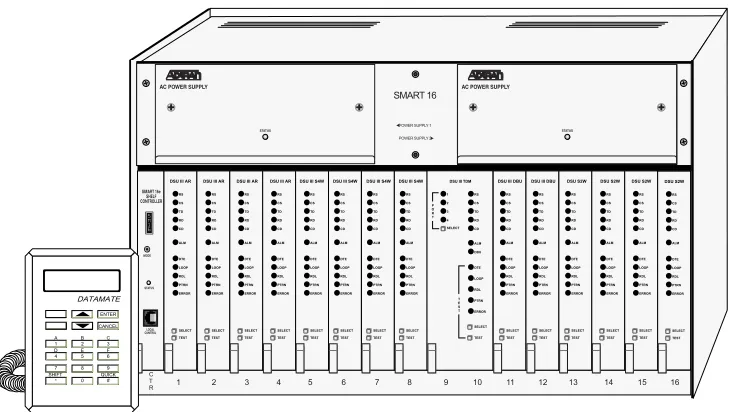
This manual provides the information needed for the installation and operation of the Smart 16e Shelf (shown in Figure 1 on page 20). Operation instructions for the data communication devices used with the shelf are provided in the manuals furnished with those products.
2.
PRODUCT OVERVIEW
The ADTRAN Smart 16e Shelf provides convenient mounting for up to 16 data communications devices for large host-type applications. The shelf can be mounted in either 19” or 23” racks and cabinets by using a set of brackets mounted alongside the shelf.
The Smart 16e Shelf has an intelligent controller card designed to configure and control all devices in the local shelf. SNMP management is available for all Smart 16e devices via the embedded SNMP agent.
There are five choices of input devices for the controller card:
• A VT100 compatible terminal which can be connected to the EIA-232 (DB-9) interface located on the rear panel of the controller card. For remote applications, a modem can be used.
• The optional DATAMATE, a hand-held keypad with a 2 x 16 LCD display. This unit plugs into the RJ-11 jack on the front of the controller card.
• A device running SLIP protocol. A SLIP interface (the EIA-232, DB-9 interface) is located on the rear panel of the controller card. For remote applications, a modem can be used.
• A device running async PPP protocol. An async PPP interface (the EIA-232, DB-9 interface) is located on the rear panel of the controller card. For remote applications, a modem can be used.
• A LAN running Ethernet protocol. An Ethernet 10/100BaseT interface is located on the rear panel of the controller card.
Product Overview Smart 16e Shelf User Manual
20 © 2004 ADTRAN, Inc. 64202023L5-1B
64202023L5-1B © 2004 ADTRAN, Inc. 21
Chapter 2
Installation
1.
UNPACK, INSPECT, POWER UP
Receiving Inspection
Carefully inspect the Smart 16e Shelf for any shipping damages. If damage is suspected, file a claim immediately with the carrier and contact ADTRAN Customer Service (see front pages of this manual for contact information). If possible, keep the original shipping container for use in shipping the Smart 16e Shelf for repair or for verification of damage during shipment.
ADTRAN Shipments Include
The following items are included in ADTRAN shipments of the Smart 16e Shelf:
• Smart 16e chassis • Controller card
• Power supply (AC or DC) (two included in 4202023L6 and L8) • Blank power faceplate (only in 4202023L5 and L7)
• Rear panel segment for power input and controller operation • Mounting brackets for shelf
Customer Provides
The customer must supply the following items:
• A PC capable of emulating VT100 for configuring devices installed in the Smart 16e Shelf • An EIA-232, DB-9 cable for connection to the VT100 interface
• Optionally, a DATAMATE (part number 1200045L1) can be used for most shelf configuration • For SNMP access, a cable for connection to either the controller card’s EIA-232 connector (for SLIP
or PPP async protocol) or the card’s 10/100BaseT interface (for Ethernet protocol)
Installation into Cabinet or Rack Smart 16e Shelf User Manual
22 © 2004 ADTRAN, Inc. 64202023L5-1B
Power Up
The shelf and installed units are internally powered by an AC or DC supply. An optional second power supply can be used for redundant protection.
The dual input power shelves 4202023L6 (AC) and 4202023L8 (DC) provide the user greater redundancy by allowing the shelf to be powered by two separate AC (or DC) circuits so that service will not be interrupted upon a single circuit breaker fault. Shelf power inputs can be both AC or both DC, but they cannot be mixed.
2.
INSTALLATION INTO CABINET OR RACK
The set of brackets supplied with the Smart 16e Shelf can be used for either 19” or 23” applications. For 19” applications, the longer side of the bracket should be flush with the side of the chassis. For 23” applications, the short side of the bracket should be flush with the side of the chassis.
There are two sets of mounting holes for the brackets on the left and right sides of the Smart 16e Shelf. One set positions the front of the Smart 16e Shelf in line with the front of the rack. The other set extends the front of the Smart 16e Shelf beyond the front of the rack.
3.
INSTALLATION OF POWER SUPPLIES
In accordance with UL 60950, the following safety guidelines must be met for installation of the Smart 16/16e AC power supply (P/N 1200048L3 or 1202048L1):
• To be installed in a Restricted Access Location. • Input Voltage Rating: 120 VAC, +6%, -10%. • Use appropriately sized copper conductors only.
• Care should be exercised not to upset the stability of the equipment rack when installing this product. • The proper means of the earth connection shall be included in the installation instructions.
Second generation dual power interface cards shipped with this shelf are ONLY for use in second generation Smart 16/16e Shelves. Shock hazard may result from accidentally plugging a second generation dual power interface card into a first generation Smart 16/16e Shelf (P/N 4200023L3 through 4200023L6).
Affected power interface cards: Smart 16 Dual Input AC1202035L2 Smart 16 Dual Input DC1202044L2 Smart 16e Dual Input AC1202163L2 Smart 16e Dual Input DC1202164L2
Smart 16e Shelf User Manual Installation of Power Supplies
64202023L5-1B © 2004 ADTRAN, Inc. 23
In accordance with UL 60950, the following safety guidelines must be met for installation of the Smart 16/16e DC power supply (P/N 1200048L4 or 1202048L1):
• The branch circuit over-current protection shall be a fuse or circuit breaker rated minimum 48 V, maximum 15 A.
• To be installed in a Restricted Access Location.
• For use only with the Smart 16/16e family of products (P/N 4100023L3, 4200023L5, 4202023L1, 4202023L2, 4202023L5, and 4202023L6).
The power supply can be installed in either of the two slots at the top of the Smart 16e Shelf. If only one power supply is used, the blank power supply faceplate furnished with the rack should be installed over the unused slot.
The Smart 16e Shelf is fully operational with one power supply; however, a second supply can be added to provide backup for the power supply subsystem. With the two-supply configuration, one of the supplies will operate in a hot-standby mode (the corresponding output on the standby supply will automatically provide the power required if any of the four outputs from a supply fails or begins to operate out of specifications).
Slide the power supply along the card guides of one of the top slots until it is fully seated in the connector and the faceplate is flush with the chassis. Tighten the screws on the front of the power supply panel. Ensure screws on faceplate are tightened securely with a screwdriver.
Each power supply has a STATUS LED that illuminates green when the power supply output voltages (+5V, -5V, +12V, and -12V) are within compliance; the STATUS LED illuminates red when a voltage is out of tolerance. When operation of any one of the four voltages drops out of specification, an SNMP trap will be sent from the controller. Failing power supplies are not user serviceable and require replacement.
• Two fuses provided for separate circuits. Test before touching.
• For continued protection against the risk of fire, replace only with the same type of rating of fuse.
• Two fuses provided for separate circuits. Test before touching.
• For continued protection against the risk of fire, replace only with the same type of rating of fuse.
Only individuals familiar with installation and maintenance of the Smart 16e Shelf should install or replace the power supplies. A shock hazard could be present if an empty power supply slot is left uncovered.
Installation of Controller Card Smart 16e Shelf User Manual
24 © 2004 ADTRAN, Inc. 64202023L5-1B
4.
INSTALLATION OF CONTROLLER CARD
The Smart 16e Shelf has 17 vertical slots in the front and rear of the chassis. The left-most front position is reserved for the Smart 16e Shelf controller card. All other front slots can be used in any order for
rackmount cards. The PWR/CTRL power interface card occupies the slot behind the Smart 16e Shelf controller card. All other rear slots are for DTE/network interface cards.
The controller card slides into the corresponding front slot until contact is made with both the backplane connector and the rear power interface connector and the panel is flush with the front of the chassis. The controller card may be inserted and removed while the Smart 16e Shelf is receiving power without affecting the data service on the other cards.
Connecting Input Devices to the Controller Card
There are five choices of input devices for the Smart 16e controller card: a VT100 terminal, the optional DATAMATE (part number 1200045L1), SLIP, async PPP, and Ethernet 10/100BaseT.
DATAMATE Connection
The optional DATAMATE is a hand-held device that plugs into the RJ-11 jack on the front of the controller card.
Ethernet Connection
The 10/100BaseT Ethernet connector (labeled LAN 10/100BASET) on the rear of the controller card provides a LAN interface used for both local and remote configuration using SNMP and Telnet.
VT100, Modem, SLIP, or Async PPP Connection
The DB-9 EIA-232 connector (labeled DTE/DCE EIA 232) on the rear power interface of the controller card provides an interface for an asynchronous ASCII VT100 terminal, used for both local and remote configuration. The terminal must be set to line wrap off, flow control off, 8-bit character size, no parity, one stop bit, and VT100 mode.
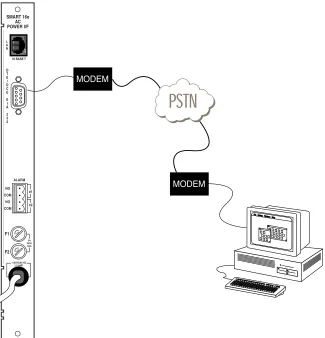
The Smart 16e Shelf and any rackmount units in the shelf can be configured remotely using a modem connected to the EIA-232 connector. See Chapter 3, Operation, on page 31 for more detailed information on remote operation.
This connector also provides an interface for SLIP or async PPP. This interface is used for both local and remote configuration using SNMP and Telnet.
The pin assignments for the EIA-232 connector are listed in Appendix A, Pinouts, on page 51.
Smart 16e Shelf User Manual Installation of Controller Card
64202023L5-1B © 2004 ADTRAN, Inc. 25
Alarm Connections
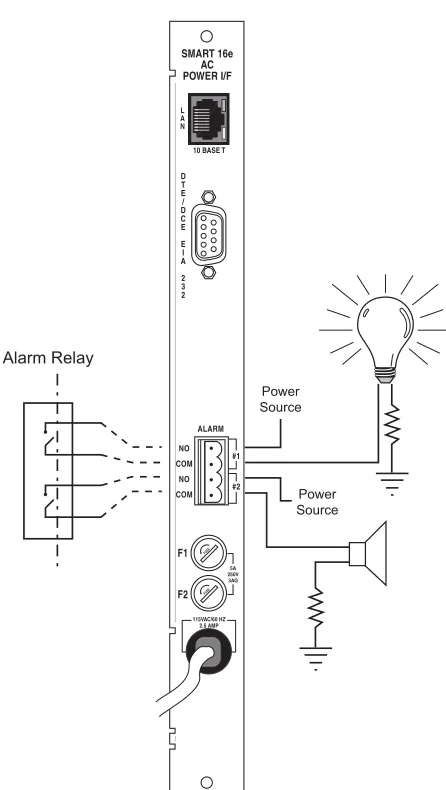
The terminal strips located on the back of the Smart 16e Shelf controller card are labeled ALARM. They are used for audio or visual alarm indicators provided by the user. The top two terminals are a set and the bottom two are a set. The terminals are activated together when the cards inserted in the designated slots encounter an alarm condition such as primary link failure.
To verify operation of the terminal strip, measure the impedance across each set. The impedance should be open when the shelf is not in alarm and shorted (approximately 0.6 ohm) when in alarm. The two alarm sets operate identically and should have the same impedance. The power specifications for any alarms used are NEC Class 2 and 48 VDC @ 500 mA maximum. Figure 2 shows the alarm connection.
Figure 2. Alarm Connection
Power Source Power Source Alarm Relay D T E / D C E E I A 2 3 2 SMART 16e AC POWER I/F ALARM NO COM NO COM F1 F2 #1 #2 5A 250V 3AG 115VAC/60 HZ 2.5 AMP L A N
10 BASE T
FUSE
Installation of Controller Card Smart 16e Shelf User Manual
26 © 2004 ADTRAN, Inc. 64202023L5-1B
Fuses
There are two fuses located on the rear panel. Fuse one (F1) corresponds to power supply 1 (left slot), and fuse two (F2) corresponds to power supply 2 (right slot). See Specifications and Features on page 53 for fuse ratings.
AC/DC Power
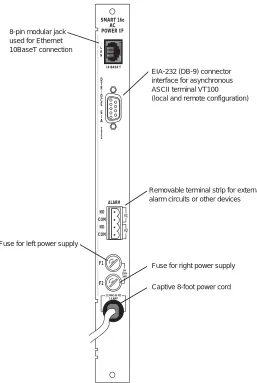
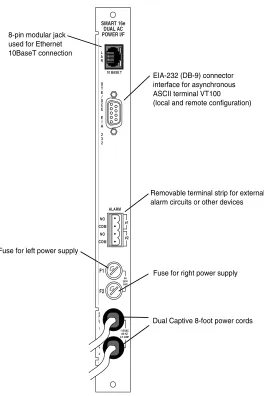
The single and dual AC versions, illustrated in Figure 3 on page 27 and in Figure 4 on page 28, each have captive 8-foot power cords. The power cords are terminated by a three-prong plug which connects to a grounded power receptacle. The grounded power receptacle should be installed near the shelf and be easily accessible. The power receptacle should also have suitable disconnect devices that are provided as part of the building wiring. The power receptacle should be properly grounded. The protection of the
telecommunications network relies on the protective grounding of the Smart 16e Shelf.
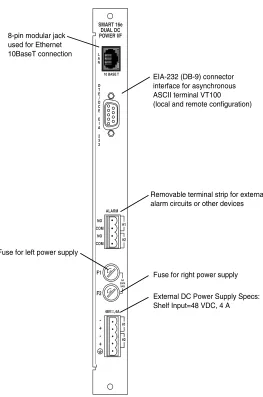
The single DC version, illustrated in Figure 5 on page 29, provides a 3-position screw terminal block for connection to a -48V source. The dual DC version, illustrated in Figure 6 on page 30, provides a 5-position screw terminal block for connection to two -48V sources. In both DC versions, the last position is frame ground.
See Appendix A, Pinouts, on page 51 for the pin assignments for the DC power supply.
The 2nd generation dual input power interface cards are not compatible with the 1st generation Smart 16/16e shelves (4200023L3-L6). These dual power cards are 2nd generation only and are listed below:
• Smart 16 Dual Input AC 1202035L2 • Smart 16 Dual Input DC 1202044L2 • Smart 16e Dual Input AC 1202163L2
• Smart 16e Dual Input DC 1202164L2
The 2nd generation single input power interface cards are fully compatible with the earlier 1st generation Smart 16/16e shelves. The single input power cards are listed below:
Smart 16e Shelf User Manual Installation of Controller Card
64202023L5-1B © 2004 ADTRAN, Inc. 27
Figure 3. Single AC Version Rear Power Interface Card (4202023L5 Shelf)
D T E / D C E E I A 2 3 2 SMART 16e AC POWER I/F ALARM NO COM NO COM F1 F2 #1 #2 5A 250V 3AG 115VAC/60 HZ 2.5 AMP L A N
10 BASE T
FUS E
FUSE
EIA-232 (DB-9) connector interface for asynchronous ASCII terminal VT100 (local and remote configuration) 8-pin modular jack
used for Ethernet 10BaseT connection
Removable terminal strip for external alarm circuits or other devices
Fuse for left power supply
Fuse for right power supply
Installation of Controller Card Smart 16e Shelf User Manual
28 © 2004 ADTRAN, Inc. 64202023L5-1B
Figure 4. Dual AC Version (4202023L6 Shelf
Second generation dual power interface cards shipped with this shelf are ONLY for use in second generation Smart 16/16e Shelves. Shock hazard may result from accidentally plugging a second generation dual power interface card into a first generation Smart 16/16e Shelf (P/N 4200023L3 through 4200023L6).
Affected power interface cards: Smart 16 Dual Input AC1202035L2 Smart 16 Dual Input DC1202044L2 Smart 16e Dual Input AC1202163L2 Smart 16e Dual Input DC1202164L2
The second generation dual power interface cards are, however, completely safe when properly installed in a second generation Smart 16/16e Shelf (P/N 4202023L1 through 4202023L8).
EIA-232 (DB-9) connector interface for asynchronous ASCII terminal VT100 (local and remote configuration)
Removable terminal strip for external alarm circuits or other devices
Fuse for left power supply
Fuse for right power supply
Dual Captive 8-foot power cords 8-pin modular jack
used for Ethernet 10BaseT connection D T E / D C E E I A 2 3 2 SMART 16e DUAL AC POWER I/F ALARM NO COM NO COM F1 F2 #1 #2 5A 250V 3AG 115VAC 60 HZ 2.5 AMP S P L Y 1 S P L Y 2 L A N
10 BASE T
Smart 16e Shelf User Manual Installation of Controller Card
64202023L5-1B © 2004 ADTRAN, Inc. 29
Figure 5. Single DC Version (4202023L7 Shelf)
D T E / D C E E I A 2 3 2 SMART 16e DC POWER I/F ALARM NO COM NO COM F1 F2 #1 #2 5A 250V 3AG -+ 48V ,4A L A N
10 BASE T
FUSE
FUSE
EIA-232 (DB-9) connector interface for asynchronous ASCII terminal VT100 (local and remote configuration)
Removable terminal strip for external alarm circuits or other devices
Fuse for left power supply
Fuse for right power supply
External DC Power Supply Specs: Shelf Input=48 VDC, 4 A
NO ALARM
Installation of Controller Card Smart 16e Shelf User Manual
30 © 2004 ADTRAN, Inc. 64202023L5-1B
Figure 6. Dual DC Version (4202023L8 Shelf)
Second generation dual power interface cards shipped with this shelf are ONLY for use in second generation Smart 16/16e Shelves. Shock hazard may result from accidentally plugging a second generation dual power interface card into a first generation Smart 16/16e Shelf (P/N 4200023L3 through 4200023L6).
Affected power interface cards: Smart 16 Dual Input AC1202035L2 Smart 16 Dual Input DC1202044L2 Smart 16e Dual Input AC1202163L2 Smart 16e Dual Input DC1202164L2
The second generation dual power interface cards are, however, completely safe when properly installed in a second generation Smart 16/16e Shelf (P/N 4202023L1 through 4202023L8). D T E / D C E E I A 2 3 2 SMART 16e DUAL DC POWER I/F ALARM NO COM NO COM F1 F2 #1 #2 5A 250V 3AG -+ -+ 48V ,4A #1 #2 L A N
10 BASE T
FUSE
FUSE
EIA-232 (DB-9) connector interface for asynchronous ASCII terminal VT100 (local and remote configuration)
Removable terminal strip for external alarm circuits or other devices
Fuse for left power supply
Fuse for right power supply
External DC Power Supply Specs: Shelf Input=48 VDC, 4 A 8-pin modular jack
64202023L5-1B © 2004 ADTRAN, Inc. 31
Chapter 3
Operation
There are five methods of configuration for the Smart 16e Shelf: a VT100 terminal, a DATAMATE (part number 1200045L1), SLIP, async PPP, and Ethernet 10/100BaseT.
1.
VT100 TERMINAL
Local Configuration
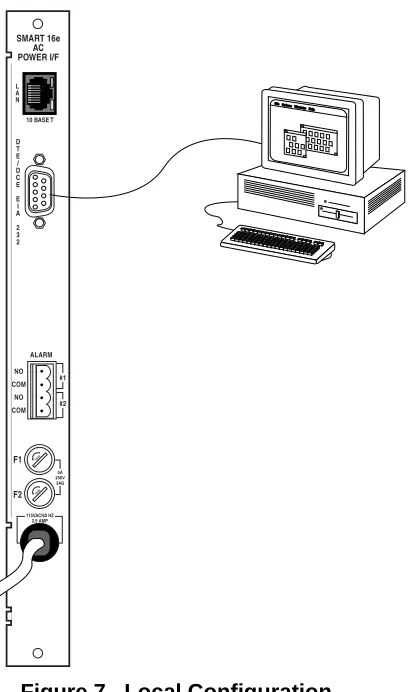
The Smart 16e Shelf may be configured by attaching the VT100 compatible terminal or equivalent to the
DTE/DCE EIA 232 port on the rear of the Smart 16e Shelf controller card. The terminal must be set to line wrap off, flow control off, and VT100 mode, 8-bit character size, no parity, and one stop bit. If enabled, the password parameter protects the terminal interface from unauthorized configuration.
The connection to a terminal is made through the EIA-232 DB-9 connector on the rear SMART 16e AC/DC POWER I/F segment (see Figure 7). This connection is used for both local and remote configuration.
Figure 7. Local Configuration
D T E / D C E E I A 2 3 2 SMART 16e AC POWER I/F ALARM NO COM NO COM F1 F2 #1 #2 5A 250V 3AG 115VAC/60 HZ 2.5 AMP L A N
10 BASE T
FUSE
Remote Configuration Smart 16e Shelf User Manual
32 © 2004 ADTRAN, Inc. 64202023L5-1B
Remote Configuration
The Smart 16e Shelf and any rackmount units in the shelf can be configured remotely through the
DTE/DCE EIA 232 port using a modem. See Figure 8. Follow these steps to set up this application. 1. Configure the modem as follows:
• Display Result Code • Echo Off
• Result Code Displayed as Words (verbose form) • Normal DTR
• Normal DCD • Auto Answer On
2. At the remote site, configure the EIA232 DIR option as DTE. 3. Make sure the shelf baud rate is not configured above 19.2 kbps.
4. Set the data format as follows: word length = 8 bits, parity = none, stop bit = 1.
Figure 8. Remote Configuration
MODEM MODEM D T E / D C E E I A 2 3 2 SMART 16e AC POWER I/F ALARM NO COM NO COM F1 F2 #1 #2 5A 250V 3AG 115VAC/60 HZ 2.5 AMP L A N
10 BASE T
FUSE
Smart 16e Shelf User Manual Menu Descriptions
64202023L5-1B © 2004 ADTRAN, Inc. 33
Menu Descriptions
Main Menu
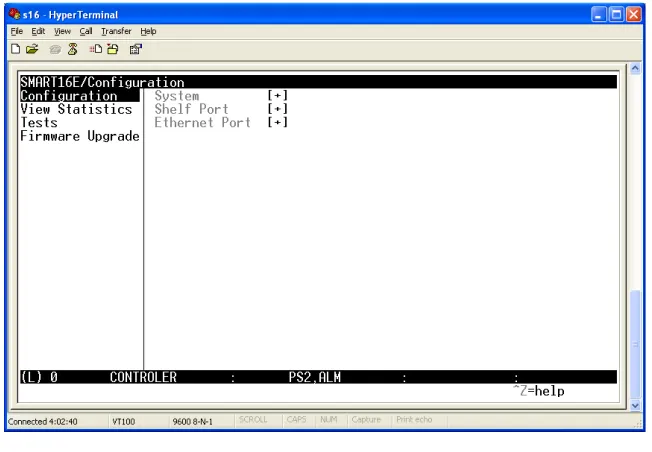
Initiate a terminal session by pressing the carriage return key until the Login screen appears. The default login is adtran. The Main menu is displayed following a successful login. The terminal display will be divided into two sections (see Figure 9).
Figure 9. Main Menu
1. The left-hand section displays all options of a menu level.
2. The right-hand section displays the submenus for the option highlighted on the left.
Menu Descriptions Smart 16e Shelf User Manual
34 © 2004 ADTRAN, Inc. 64202023L5-1B
Table 1. Controller Status Line Messages Error Message Condition
ALM One or more of the cards installed in the self is in alarm.
PS1 There is an alarm on PS1. PS2 There is an alarm on PS2
Smart 16e Shelf User Manual Menu Descriptions
64202023L5-1B © 2004 ADTRAN, Inc. 35
System Configuration Menu
The SYSTEM CONFIGURATIONmenu, illustrated in Figure 10, appears after selecting SYSTEM from the CONFIGURATION menu.
Figure 10. System Configuration Menu
SYSTEM NAME Set system name.
SYSTEM TIME Set time of day.
SYSTEM DATE Set the date.
TERMINAL PASSWORD
Set password for a terminal session.
PASSWORD SELECT
Enable or disable the terminal password function.
DATAMATE PASSCODE
Set password for the DATAMATE.
DATAMATE PASSCODE SELECT
Enable or disable password function for the DATAMATE.
TWATCH PASSCODE
Menu Descriptions Smart 16e Shelf User Manual
36 © 2004 ADTRAN, Inc. 64202023L5-1B
TERMINAL TIMEOUT (MIN)
Set how many minutes of keyboard inactivity can take place before the terminal session is ended. To disable the timeout, enter 0 minutes.
EIA-232 DIRECTION
Set direction of EIA-232 port to DCE for local configuration or DTE for remote configuration.
EIA-232 BAUD RATE
Set baud rate for EIA-232 port. Rates are in the range of 9600 to 115.2K. The default baud rate is 9600.
TERMINAL ALARM SELECT
Enable or disable terminal alarm function.
CHANGE SLOT NAMES
Edit Slot Names (up to 15 characters) that appear on status screens.
MIB II SYSTEM SUPPORT
Edit System Contact, System Name, and System Location.
MAKE CHANGES PERMANENT
Save all changes made to options on this menu.
Shelf Port Configuration Menu
The SHELF PORT CONFIGURATIONmenu, illustrated in Figure 11, appears after selecting SHELF PORT from the CONFIGURATION menu.
Smart 16e Shelf User Manual Menu Descriptions
64202023L5-1B © 2004 ADTRAN, Inc. 37
The right-hand section of the screen will show all the cards that are currently installed in the Smart 16e Shelf. To access a card, highlight the [+] to the right of the card and press enter. The main menu for the selected card will appear.
Ethernet Port Configuration Menu
The ETHERNET PORT CONFIGURATIONmenu, illustrated in Figure 12, appears after selecting ETHERNET PORTfrom the CONFIGURATION menu.
Figure 12. Ethernet Port Configuration Menu
IP ADDRESS
For SNMP and Telnet operation, view and edit the Smart 16e controller IP address.
SUBNET MASK
For SNMP and Telnet operation, view and edit the Smart 16e controller subnet mask.
EDIT GATEWAY ADDRESS
For SNMP and Telnet operation, view and edit the Smart 16e controller gateway address.
AUTO NEG
Enable or disable automatic negotiation between 10BaseT and 100BaseT.
DATA RATE
Select Data Rate as 100 Mbps or 10 Mbps.
DUPLEX MODE
Menu Descriptions Smart 16e Shelf User Manual
38 © 2004 ADTRAN, Inc. 64202023L5-1B
SNMP OPTIONS
Set SNMP Parameters (See Figure 13).
MAKE CHANGES PERMANENT
Save all changes made to options on this menu.
Figure 13. SNMP Options Menu
PHONE NUMBER
For SNMP dial-up operation, enter the phone number that the controller calls to send an SNMP trap.
GET COMMUNITY
For SNMP operation, view and edit the SNMP get community string.
SET COMMUNITY
For SNMP operation, view and edit the SNMP set community string.
TRAP COMMUNITY
For SNMP dial-up operation, view and edit the trap community.
AUTHORIZE TRAPS
For SNMP operation, enable or disable traps.
TRAP MANAGER IP
For SNMP operation, view and edit up to five trap host addresses.
MAKE CHANGES PERMANENT
Smart 16e Shelf User Manual Menu Descriptions
64202023L5-1B © 2004 ADTRAN, Inc. 39
View Statistics
The VIEW STATS menu (Figure 14) appears after selecting VIEW STATISTICS from the left-hand section of the Main menu. This menu provides access to statistical information on the system level (see Figure 15 on page 40), on the EIA-232 port (see Figure 16 on page 40), on the Ethernet port (see Figure 17 on page 41), and on each individual card installed in the Smart 16e Shelf (see Figure 18 on page 41). Table 2 on page 42 lists the status messages that appear on the SHELF STATS menu for the installed cards. Additionally, the SHELF STATS menu provides the status of the controller card. Table 3 on page 42 lists the possible status messages for the controller.
Menu Descriptions Smart 16e Shelf User Manual
40 © 2004 ADTRAN, Inc. 64202023L5-1B
Figure 15. System Statistics Menu
EIA -232
Smart 16e Shelf User Manual Menu Descriptions
64202023L5-1B © 2004 ADTRAN, Inc. 41
Figure 17. Ethernet Statistics Menu
Menu Descriptions Smart 16e Shelf User Manual
42 © 2004 ADTRAN, Inc. 64202023L5-1B
Table 2. Smart16e Card Status Messages Error Message Condition
NA The slot is empty.
ADLP Transparent mode for a T1 ESF CSU or a TSU Family card.
TRAP Device has sent a trap to the Smart 16e controller.
TEST Device is currently in test mode. DBU Device is in a dial backup condition. ALM Device is in an alarm condition.
NORM Device is installed and operating normally.
Table 3. Smart16e Controller Card Status Messages Error Message Condition
TEST The controller card is in test.
PROV There is a fault in the provisioning area of the flash.
APP There is a fault in the application code. PS1 There is an alarm on PS1.
PS2 There is an alarm on PS2
Smart 16e Shelf User Manual Menu Descriptions
64202023L5-1B © 2004 ADTRAN, Inc. 43
Tests
The TESTmenu (Figure 19) appears after selecting TEST from the left-hand section of the Main menu. This menu allows the user to initiate a self-test on the controller card (see Figure 20), restore factory defaults to the controller card, or initiate a ping test (see Figure 21 on page 44).
Figure 19. Test Menu
Menu Descriptions Smart 16e Shelf User Manual
44 © 2004 ADTRAN, Inc. 64202023L5-1B
Smart 16e Shelf User Manual Menu Descriptions
64202023L5-1B © 2004 ADTRAN, Inc. 45
Firmware Upgrade
The FIRMWARE UPGRADEmenu (Figure 22) appears after selecting FIRMWARE UPGRADE from the left-hand section of the Main menu. This menu allows the user to download new firmware for the controller card. Two methods of file transfer are available: TFTP (Figure 22) or XMODEM (Figure 23).
Figure 22. Firmware Upgrade Menu
DATAMATE Smart 16e Shelf User Manual
46 © 2004 ADTRAN, Inc. 64202023L5-1B
2.
DATAMATE
The DATAMATE, illustrated in Figure 24, is a hand-held keypad with a 2x16 LCD display. The
DATAMATE connects to the 6-pin modular jack on the front of the controller card. See Figure 25 on page 49 for jack locations.
Figure 24. DATAMATE
Manual Operation and Button Functions
The following function descriptions apply to the DATAMATE.
LCD Window
Displays menu items and messages in 2 lines by 16 characters.
Enter
Selects active menu items. To activate a menu item, press the number of the item. When the menu item is flashing, press Enter to select it. This action displays a submenu item (if there is one) or sets the
configuration parameter. The display of COMMAND ACCEPTED indicates a valid operation.
Numeric Keypad
The numeric keypad contains the numbers 0 through 9 and alpha characters A through F, which are used to activate menu items. Numbers 0 through 9 are also used to enter parameters.
Shift
Alpha characters are entered by pressing and releasing Shift before each desired character. To activate a menu item designated by an alpha character rather than a number, display the menu item using the up and down arrows, press Shift and then the letter. Press Enter to select the item.
When entering the IP address information, use the pound key (#) to insert decimal points.
1 2 4 5 7 * 8 9 # 0 A B D E 3 6 C F SHIFT QUICK ENTER CANCEL DATAMATE Displays menu items and messages
Press to select active (flashing) menu items
Press to stop current activity and return to previous menu
Use numeric keypad to activate menu items and enter parameters Use arrows to scroll
through submenu items
Press before desired alpha character selection
Smart 16e Shelf User Manual Network Manager Operation Using SLIP, Async PPP,
64202023L5-1B © 2004 ADTRAN, Inc. 47
If a key is pressed without using Shift, the numbered item becomes active instead of the alpha item. If this happens, repeat the correct procedure.
Quick
During most operations, the Quick key returns the display to the Main menu. During a test, this key returns to the top of the TESTmenu.
Cancel
The Cancel key stops the current activity and returns to the previous menu. Press Cancel until the desired menu level is reached.
Up and Down Arrows
These arrows scroll through the submenu items available in the current menu. Submenu items appear two at a time. When scrolled, they continuously appear from beginning to end in a forward (down arrow) or reverse (up arrow) pattern
3.
NETWORK MANAGER OPERATION USING SLIP, ASYNC PPP, OR ETHERNET
INTERFACE
Before SLIP, async PPP, or Ethernet communication can be established with a network manager, some initial network settings must be configured using a local VT100 terminal or DATAMATE attached to the EIA-232 port of the Smart 16e controller card.
The Ethernet LAN interface in the Smart 16e controller card has the network media access control (MAC) address as displayed in hexidecimal byte notation. The IP address, subnet mask, gateway, and trap host systems are entered using dotted decimal notation.
The subnet mask is the filter used for subnetwork addressing. The default value is a typical Class C subnet mask value (255.255.255.0).
The SNMP community names are used in SNMP GET, SET, and trap messages for authentication.
The trap host IP address identifies where the network manager system receives trap messages from the Smart 16e Shelf.
Configure Network Interface Using a VT100 Terminal Smart 16e Shelf User Manual
48 © 2004 ADTRAN, Inc. 64202023L5-1B
Configure Network Interface Using a VT100 Terminal
To set up the Smart 16e Shelf to accept SLIP, async PPP, or Ethernet communication from a network manager, perform the following steps:
1. Connect the terminal to the Smart 16e controller EIA-232 port. The terminal settings should match the Smart 16e controller baud rate setting (i.e., 9600 bps, 8 data bits, no parity, and 1 stop bit).
2. Apply power to the Smart 16e controller card. Press Enter until the Login screen appears on the terminal screen.
3. Go to theETHERNET CONFIGURATION menu.
4. Configure the following Smart 16e network interface settings: IP address, Subnet Mask, Gateway IP address (if required), Trap Host IP address, GET community name, SET community name, and SNMP Trap community name.
4.
USING TELNET
The Smart 16e Shelf supports Telnet access, allowing remote access to the Smart 16e Shelf menu interface by the network manager.
To access the Smart 16e Shelf menu interface, establish a Telnet session using the Smart 16e Shelf IP address to open a device session. The Smart 16e Shelf’s Main menu will display. Configure or monitor the Smart 16e Shelf devices as if they were locally connected to the shelf with a VT100 terminal. Close the Telnet application according to the network manager’s instructions.
5.
INTERPRETING ALARMS AND STATUS MESSAGES
The four character display on the controller card front panel (Figure 25 on page 49) provides status information about the Smart16e Shelf and the data communication cards that are installed in the shelf. If no alarm conditions exists, SM16 appears on the display. If an alarm condition exists, the display will alternate between ALM and SM16. Pressing the MODE button on the front of the controller card will display the source of the alarm. Table 4 on page 49 lists the alarm messages.
Smart 16e Shelf User Manual Interpreting Alarms and Status Messages
64202023L5-1B © 2004 ADTRAN, Inc. 49
.
Figure 25. Controller Card Front Panel
Table 4. Alarm Messages
Error Display Condition SLX Slot number in alarm PROV Provisioning error BOOT Problem in boot sector RTC Real time clock failure PS1 Power supply 1 (right) failure PS2 Power supply 2 (left) failure
Displays Smart 16 alarm conditions (see Table 2)
Displays status of controller (see Table 3 for status conditions) Pressing MODE displays
source of alarm condition.
Interpreting Alarms and Status Messages Smart 16e Shelf User Manual
50 © 2004 ADTRAN, Inc. 64202023L5-1B
Table 5. STATUS LED Conditions
STATUS LED Condition
Green OK
Flashing green Flash download
Yellow Test
Red Warning
64202023L5-1B © 2004 ADTRAN, Inc. 51
APPENDIX A
PINOUTS
10/100BaseT Ethernet Pinout
Table A-1 shows the pinout for the LAN port on the 10/100BaseT Ethernet card.
Table A-1. 10/100BaseT Connector Pinout
Alarm Connection Pinout
Table A-2 shows the pinout for the alarm connection.
Table A-2. Alarm Connector Pinout
Pin Name Description
1 TX1 Transmit Positive 2 TX2 Transmit Negative 3 RX1 Receive Positive
4, 5 - Not Used
6 RX2 Receive Negative
7, 8 - Not Used
Pin Description 1 COM #2
Pinouts Smart 16e Shelf User Manual
52 © 2004 ADTRAN, Inc. 64202023L5-1B
EIA-232 (DB-9) Connector Pinout
Table A-3 shows the pinout for the EIA-232 (DB-9) connector.
Table A-3. EIA-232 (DB-9) Connector Pinout
DC Power Supply
Table A-4 shows the pinout for the DC power supply connection.
Table A-4. DC Power Supply Connector Pinout
Pin EIA Description
1 CF Received Line Signal Detector (DCD) 2 BB Receive Data (RD)
3 BA Transmit Data (TD)
4 CD Data Terminal Ready (DTR) 5 AB Signal Ground (SG)
6 CC Data Set Ready (DSR) 7 CA Request to Send (RTS) 8 CB Clear to Send (CTS)
9 — Unused
Pin Single DC Input Dual DC Input
1 Frame Gnd Frame Gnd
2 -48V Return -48V Return #2
3 -48V -48V #2
4 N/A -48V Return #1
64202023L5-1B © 2004 ADTRAN, Inc. 53
APPENDIX B
SPECIFICATIONS
SPECIFICATIONS AND FEATURES
This section describes the standard specifications and features incorporated in the Smart 16e Shelf.
Network Compatibility
• DDS, 4-wire Switched 56, T1, FT1, ISDN
Indicators and Controls Faceplate
• LED status indicator • Status display
Rackmount Units
• LED indicators (defined in each unit’s user manual) • 2 Test push-buttons
Power Supplies
• AC and DC: LED status indicator
Rear Panel Connections
Control/SLIP/Async PPP/Modem Port
• DB-9 (EIA-232)
Ethernet Port
• 10/100BaseT
Captive Power Cord
• AC versions with single or dual inputs
Screw Terminals
• DC versions with single or dual inputs
Alarm
• 4-screw terminals
Physical Size
• 17.25” wide, 10.5” high, 14.875” deep
Weight
• 20 pounds (empty)
• 45 pounds (full)
Mounting
• 19” rack or cabinet
Specifications Smart 16e Shelf User Manual
54 © 2004 ADTRAN, Inc. 64202023L5-1B
Power Inputs
• AC voltage: 120 VAC ±20% • Frequency: 47 - 63 Hz • DC voltage: 48 VDC
Fuse Ratings
• AC version: 3A, 3AG • DC version: 3A, 3AG
Relay Contact Ratings
• Noninductive load
• Maximum switched power: 60W or 125 VA • Maximum switched current: 2 amps
• Maximum switched voltage: 150 VDC or 300 VAC • U.L. Rating: 2 A @ 48 VDC; 1A @ 120 VAC
Power Supply Outputs to Shelf
• +5 VDC @ 14 amps • -5 VDC @ 1.5 amps • +12 VDC @ 2 amps • -12 VDC @ 2 amps
Environmental Temperature
• Operating : 0O C to 50O C (32O F to 122O F) • Storage: -20O C to 70O C (-4O F to 158O F)
Relative Humidity
• Up to 95% non-condensing
Agency Approvals
64202023L5-1B © 2004 ADTRAN, Inc. 55
Index
A
AC version 26
affidavit 5, 6
alarm connections 25, 51
alarm menu 39, 43, 45
alarm messages 48, 49
async PPP 19, 21, 24, 47
connection to controller card 24
C
card status message 42
change password 36
comtroller card
status messages 42
contents of shipment 21
controller card
connecting input devices 24
front panel 49
installation 24
controller card status messages 42
controller status line messages 34
Customer Service, Product Support
Informa-tion, and Training 11
D
DATAMATE 19, 21, 46
arrow keys 47
cancel 47
connection to controller card 24
enter 46
LCD window 46
numeric keypad 46
quick 47
shift 46
DC version 26
E
edit gateway address 37
edit shelf/slot descriptions 35, 36
edit SNMP ge tcommunity 38
edit SNMP get community 38
edit SNMP phone number 38
edit SNMP set community 38
edit subnet mask 37
EIA-232 statistics menu 40
environmental
specifications, 54
equipment included 21
equipment needed 21
ethernet 19, 21, 24, 47
ethernet port configuration menu 37
ethernet statistics menu 41
F
FCC information 9
FCC regulations 8
firmware upgrade menu 45
firmware upgrade using XMODEM 45
fuse ratings 54
fuses 26
I
indicators 53
input devices 19
installation 21
cabinet/rack 22
controller card 24
power supply 22
L
LAN 19
M
main menu 33
modem 32
connection to controller card 24
mounting 19
N
network compatibility 53
network manager 47
O
operation 31
overview 19
P
password 36, 38
ping test menu 44
pinouts 51
Index Smart 16e Shelf User Manual
56 © 2004 ADTRAN, Inc. 64202023L5-1B
power supply 19
installation 22
power up 21, 22
Product Registration 11
R
rear panel connections 53
receipt inspection 21
relay contact ratings 54
remote configuration 32
remote operation 32
S
safety instructions 4
select unit menu 35, 36, 37
self test menu 43
service type information 8
set date 35
set time 35, 36, 37
shelf port configuration menu 36
shelf statistics menu 41
shipment contents 21
SLIP 19, 21, 24, 47
connection to controller card 24
Smart 16 Shelf
features 53
SNMP 24
SNMP agent 19
SNMP options menu 38
specifications 53
status messages 48
system configuration menu 35
T
telnet 24, 48
terminal alarm 35
test menu 43
tion 24
V
view statistics menu 39
VT 100 19, 31, 48
connection to controller card 24, 31
VT100