7
COMPUTER INTEGRATED
CLASSROOM (CIC) TECHNOLOGY
TOOLS: INTERACTIONS FOR
KNOWLEDGE CONSTRUCTION
ABDUL RAHIM HJ SALAM
ZAIDATUN TASIR
ADLINA ABDUL SAMAD
INTRODUCTION
Computer Support in the Microteaching module for ESL Pre-service Teachers
to ensure that the system can really be considered pedagogically helpful for ESL pre-service teachers. This paper will elaborate on the specific tools in CiC that are necessary for the execution of this study.
Why Computer Integrated Classroom Environment?
Computer Integrated Classroom (CiC) could be looked upon as the future pedagogical practices in schools and higher institutions. CiC is seen as a way to integrate face-to-face in a CSCL setting. What happens in this environment is similar to a typical classroom situation where a group of learners sit together to discuss a topic. The assumption is that these collaborative situations can be improved with the appropriate collaborative technology. Overdijk, W. and Diggelen. A. M. (2006), stated that “studying this complex interplay within a collaborative classroom setting has hardly been addressed in educational research and practice.” In fact there is a high probability that tomorrow’s learning will still take place in schools where learners meet face-to-face to collaborate, discuss and solve problems. These face-to-face learning situations are largely ignored by much of current research into computer-supported collaborative learning.
and, thus, social interaction. In this case, the integration of CSCL with face-to-face communication is of great relevance to be studied. Certainly, with the accessibility of CiC infrastructure, this study can fill the gap left in CSCL, thus expand this research.
It is noticeable that lacking media richness might not be enough to invoke a sense of openness and honesty for genuine response and feedback to occur. Rourke (1998) remarks that “if students are to offer their tentative ideas to their peers, if they are to critique the ideas of their peers, and if they are to interpret others’ critique as valuable rather than as personal affronts, certain conditions must exist. Students need to trust each other, feel a sense of warmth and belonging, and feel close to each other before they will engage willfully in collaboration”. Thus, the inclusion of elements in face-to-face peer response is necessary to reciprocate the issue. These statements bring about the idea that more studies in CSCL area with the integration of face-to-face elements are necessary to find out the extent of cognitive activity elements the learners (teacher-trainees) use during the peer response to lesson plan activity.
How do the tools benefit the ESL teacher trainees? How does peer response take place with the assistance of the tools in contributing to the construction of knowledge? These are the questions that the researcher hopes to answer in this paper.
Methodology for Data Collection
approach that examines phenomena in their natural settings “attempting to make sense of, or interpret, phenomena in terms of the meanings that people bring to them” (p.3). In the present study, the role of peer-interaction in knowledge construction development was examined in a face-to-face classroom setting in natural conversations among learners with the integration of CSCL setting.
The pilot study was conducted from an interpretive framework, rather than a positivistic one. Positivism poses that through carefully designed studies, researchers can achieve accurate and unambiguous knowledge of a particular issue (Crotty, 1998). In using an interpretive approach, the researcher was not concerned with testing a hypothesis. The study was not conducted in an experimental situation in which variables are controlled in order to determine their effect on other variables. In order to address the research questions, the researcher was not interested in quantifying the interactional mechanism used by learners in the classroom. With the assistance of CiC, the researcher explored those mechanisms with the purpose of describing them and interpreting their impact on knowledge construction.
Implementation of the Study
and Sanako Media Assistant have made it possible for the activities during microteaching course to be implemented.
Sanako Lab 300
Sanako Lab 300 is a classroom management program software designed to assist teaching and learning via LAN. In order for the tool to function, this program has to be linked to workstations (students’ PCs) via Computer Supervisory System (CSS) hardware that offers a graphical interface.
260,7,Tools & Material
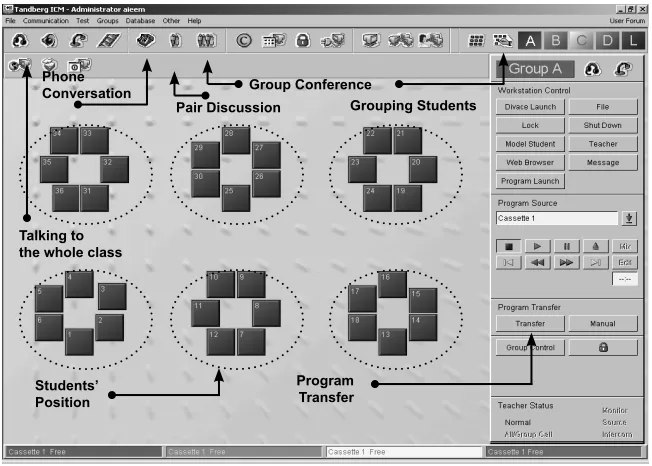
Figure 1: Interface of Classroom Management System (Sanako Lab 300)
Pair Discussion Phone
Conversation Group Conference
Grouping Students
Talking to the whole class
Students’ Position
Program Transfer
1, it allows the researcher to activate specific classroom instructions by choosing specific icons on the screen of the researcher’s pc to any positions of the students. In relation to this study, the researcher managed among others to activate and execute some of the program as follows:
Subjects were grouped and put in a “pair discussion” command. This enabled them to interact verbally with one another through a communicative tool called Sanako Media Assistant (SMA). The communicative too appeared on the students’ screen. With headphones and microphones as well as SMA available, subjects were able to record, retrieve and listen to the interaction easily.
By activating the “communication-chat” icon, subjects were able to execute text-based chatting to communicate with one another.
For input purposes, the researcher transferred video, audio or document files to chosen students’ workstations as he deemed fit.
The researcher could control and monitor the individuals’ workstations as he desired by activating “workstation control”.
In addition to that, the audio interaction as well as text-based interaction were recorded and saved in a designated folder created for the study located in the media server (Dglabam).
Sanako Media Assistant
This software is integrated with Sanako Lab 300 for the purpose of recording and playing audio video file as well as functioning as a communication tools for the subjects.
a.
b.
c.
d.
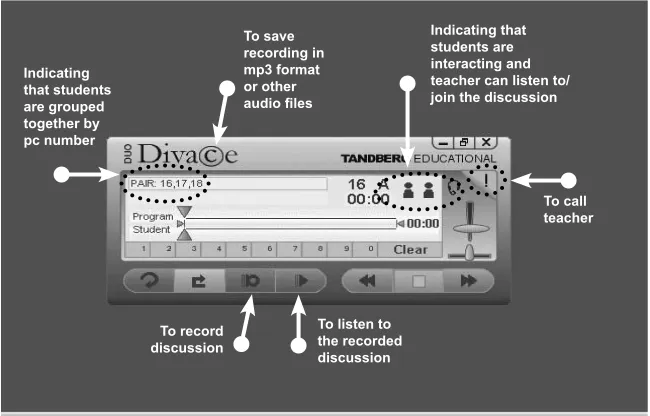
For this particular study, the subjects were grouped to do discussions using the tools of Sanako Lab 300. This was indicated by the pc number appeared at the top left hand corner of SMA as depicted in figure 2. This software allows the subjects to interact with the researcher individually or as a group by clicking the “exclamation” mark appeared on the SMA. Looking at the feature of SMA, subjects were able to save, record, play and listen to the activity easily according to their own pace. In fact this software could also create a digital learning material (audio or video) for classroom teaching as well as self-access learning.
Sanako Study 300
The library pilot software (Study 300) linked to the media server is considered as a resource for information management. This can be
Figure 2: Media Assistant Software Interface
Indicating that students are grouped together by pc number
To save recording in mp3 format or other audio files
Indicating that students are interacting and teacher can listen to/ join the discussion
To call teacher
To listen to the recorded discussion To record
used by the researcher as well as the subjects. Specifically, it was used by the researcher to do the following tasks for the study:
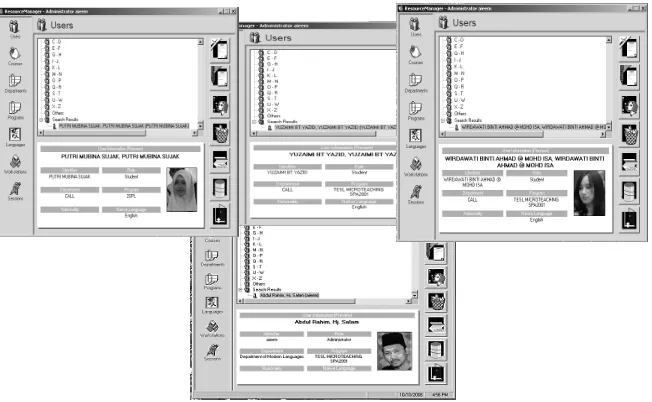
To record the profile of users or subjects. This had to be done so that only the registered users could access the resources. Subjects were given their usernames and passwords to access the software. This requirement appeared every time they logged on to the pc. This is shown in figure 3. The researcher created the users or subjects’ profile according to courses enrolled. This is depicted in figure 4.
Figure 3: Sanako Study 300 Library Pilot Log on Interface
To upload and download digital resources. The uploading was done by the researcher to ensure that the resources available in Sanako Study 300 were helpful to the students. Certainly, this allowed the subjects to download the necessary materials (document, audio and video) as well as internet resources to enhance their information about issues discussed.
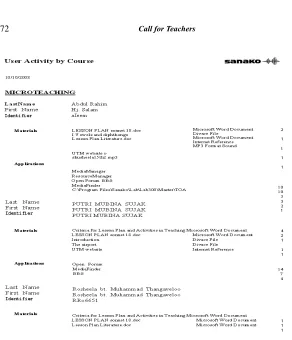
To track activities done by the subjects. The researcher could monitor and track the activities automatically once the subjects entered their usernames and password. As depicted in figure 5, the tracking showed the users, materials, application and usage frequency.
To allow forum application for subjects to interact using text-based forum apart from face-to-face verbal discussion.
Figure 4: Example of users’ profiles interface
b.
c.
Implementation of the Computer Support
In order to ensure stability of access and connectivity, this study used a classroom local-area networks or computer integrated classroom (CIC) for the execution of activities. This networked infrastructure has created a learning environment that offers interactivity among peers and machines. (Southworth, 1988).
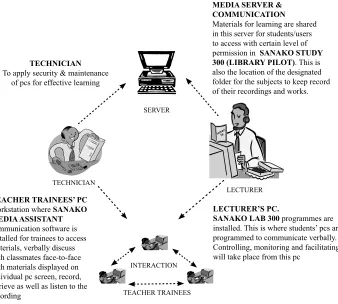
For the pilot study, the issue of integrating face-to-face discussion through networked environment was investigated. As depicted in figure 6, ESL teacher trainees in pairs discussed a lesson
plan using a local area networked classroom setting (via computer terminal). Since the learning that occurred in CSCL environments was heavily dependent on verbal interaction, it should be important to identify potential operative factors in the communication activity that might reveal components of a learning process. To this end, the exploration and explanation on events that involved learners’ cognitive participation was emphasized. In order to see this, verbal elements representing cognitive and collaborative activities were identified in the content of the group communications.
TEACHER TRAINEES’ PC
Workstation where SANAKO MEDIA ASSISTANT
communication software is installed for trainees to access materials, verbally discuss with classmates face-to-face with materials displayed on individual pc screen, record, retrieve as well as listen to the recording
TECHNICIAN
To apply security & maintenance of pcs for effective learning
MEDIA SERVER & COMMUNICATION
Materials for learning are shared in this server for students/users to access with certain level of
permission in SANAKO STUDY
300 (LIBRARY PILOT). This is also the location of the designated folder for the subjects to keep record of their recordings and works.
LECTURER’S PC.
SANAKO LAB 300 programmes are installed. This is where students’ pcs are programmed to communicate verbally. Controlling, monitoring and facilitating will take place from this pc
SERVER
LECTURER TECHNICIAN
INTERACTION
TEACHER TRAINEES
CSCL in this feasibility study involved collaborative learning that included both: groupings of learners around computers, as in conventional classroom arrangements; and groupings of learners via computer networks. The investigation applied only to human-human communication via computer networks. This reflected the emphasis of this study on “computer supported collaborative learning” and was intended to emphasize the verbal interaction that took place between collaborative ESL teacher trainees. They were linked through computer networks with the assistance of software tools.
The software tools (Sanako Lab 300, Sanako Media Assistant and Sanako Study 300) were pilot tested at the Digital Language Lab UTM on ESL pre-service teachers. Four ESL pre-service teachers doing their microteaching activities at the Digital Language Lab participated in a run-through of the procedures and produced certain parts of initial transcripts.
Data collected throughout a 3-week period. Those verbal response sessions were digitally recorded using Sanako Media Assistant with Lab 300 classroom information management system. This software is integrated in a system that enables users to be grouped, hence allowed to verbal interaction in a face-to-face setting to take place synchronously.
The recording of these sessions were not videotaped for the purpose of capturing the non-verbal behavior, because the subjects were not expected to use gestures to compensate for their linguistic knowledge gaps. Subjects were digitally connected as a group for the discussion to take place. They needed to put on the headphones with microphone attached in order to communicate with each other and visible to one another.
CONCLUSION
This trial study shows that the CiC can facilitate the face-to-face collaborative learning in a CSCL setting. For that matter, ESL pre-service teachers could benefit from LAN infrastructure and software tools that should be integrated in CiC. Looking back at this study that is parallel to the nature of CSCL, all activities and events are being implemented via technology. Sanako Lab 300 was used to control the pairing and grouping of participants as desired. By activating the pairing or grouping program in Lab 300, Sanako media assistant communication software automatically helps ESL pre- service teachers to communicate with one another verbally without any difficulty which could encourage rapid feedback as well as media richness. At the same time, the Lab 300 allows researcher to dedicate similar screen for every subjects to view and access helpful resources or references for more ideas and contents. In fact, with CiC system participants could record, save, retrieve and listen to their interaction, the researcher can easily access the data instantly for analysis purposes. Apart from verbal output, this system allows chat program as well as forum application to function as an effective mediator to the synchronous text-based peer communication. With the uploaded materials available in the digital media resource library or Study 300, participants are more resourceful in their interaction and knowledge construction. Participants’ selections track of computer activities can also be monitored automatically by Study 300. In short, data based on the trial sessions conducted show that these tools are appropriate for facilitating the study of CSCL in various interaction modes including computer support for face-to-face collaborative learning (COSOFL).
Crotty, (1998). The Foundations of Social Research: Meaning and Perspective in the Research Process, Sage, London (1998). Lengel, R.H. & Daft, R.L. (1988). The Selection of Communication
Media as an Executive Skill. Academy of Management Executive, 2(3), 225-232
Denzin, N. K and Lincoln, Y.S. (1998). Introduction: Entering the
field of qualitative research. Thousand Oaks, CA: Sage. Overdijk, W. v. Diggelen. a. M. (2006). The LEAD Project:
Computer Support for Face-to-Face Collaborative Learning In Innovative Approaches for Learning and Knowledge Sharing: Springer Berlin / Heidelberg.
Rice, (1993). Media appropriateness: using social presence theory to compare traditional and new organizational media. Human Communication Research 19, pp.452-453.
Rourke, B. (1998). A Network-based Tool for Organizing Second-Language Vocabulary. Paper presented at the ED-Media/ ED-Telecom, Freiburg