University of Huddersfield Repository
Meng, Zhaozong, Lu, Joan and Sawsaa, Ahlam
Integrating Smartphone’s Intelligent Techniques on Authentication in Mobile Exam Login Process
Original Citation
Meng, Zhaozong, Lu, Joan and Sawsaa, Ahlam (2013) Integrating Smartphone’s Intelligent
Techniques on Authentication in Mobile Exam Login Process. In: Computational Collective
Intelligence. Technologies and Applications: 5th International Conference, ICCCI 2013, Craiova,
Romania, September 1113, 2013, Proceedings. Lecture Notes in Computer Science (8083).
Springer, London, pp. 130142. ISBN 9783642404948
This version is available at http://eprints.hud.ac.uk/id/eprint/18399/
The University Repository is a digital collection of the research output of the
University, available on Open Access. Copyright and Moral Rights for the items
on this site are retained by the individual author and/or other copyright owners.
Users may access full items free of charge; copies of full text items generally
can be reproduced, displayed or performed and given to third parties in any
format or medium for personal research or study, educational or notforprofit
purposes without prior permission or charge, provided:
•
The authors, title and full bibliographic details is credited in any copy;
•
A hyperlink and/or URL is included for the original metadata page; and
•
The content is not changed in any way.
For more information, including our policy and submission procedure, please
contact the Repository Team at: [email protected].
Integrating Smartphone’s Intelligent Techniques on
Authentication in Mobile Exam Login Process
Zhaozong Meng, Joan Lu, Ahlam Sawsaa
School of Computing and Engineering, University of Huddersfield, UK
{z.meng,j.lu,a.sawsaa}@hud.ac.uk
Abstract. The emerging build-in sensing techniques create opportunities for Human-Computer Interaction capability of the mobile devices. This investiga-tion explores novel build-in sensing techniques and relevant computainvestiga-tion inten-sive algorithms to enhance the operational efficiency and usability of mobile applications. A case study on mobile application authentication involving touch screen manual input, camera barcode scanning, NFC recognition is implement-ed. Qualitative and quantitative evaluations on usability, efficiency, stability, and accuracy of user operation are examined on mainstream mobile platforms. Result illustrates the advantage of the proposed scheme and verifies the feasibil-ity to enhance user-mobile interaction with mobile sensing techniques.
Keywords: Mobile Computing, Mobile Application, Human-Computer Interac-tion (HCI), Barcode scanning, Near Field CommunicaInterac-tion (NFC)
1
Introduction
The Smartphone today can be used for some computing tasks intelligently assisting people’s activities with build-in sensors in many different scenarios in data tailoring, navigation, recommendation, etc. [1]. However, the mobile devices are limited in user interaction, that is information representation and data input [2]. Usability, simplicity, and efficiency become crucial concerns of user experience of mobile applications.
However, mobile devices create new ways to enhance the human phone interaction of mobile applications with the novel sensing techniques [3]. Smartphone oriented applications can be reached by: (1) Employing novel build-in hardware and sensing techniques to replace the traditional complex operations, and (2) Utilizing the compu-tation intensive algorithms to reduce the time consuming and error prone tasks. The intelligent sensing technique is critical support for the Smartphones to be able to at-tract over one billion users worldwide [4].
interac-tion for camera enabled devices to write just by moving the device, using discrete cosine transform and k-Nearest Neighbour rule to discriminate feature and classifica-tion, and created a recognition rates ranged from 92% to 98% [7]. Broll et al. present-ed a Java ME prototype of Physical Mobile Interaction (PMI) paradigm supporting and facilitating mobile interaction with services through the interaction with physical objects, such as through NFC, pointing through visual marker recognition, and direct input through standard input widgets [8]. These techniques convert human interaction to a form that can be easily captured by mobile devices. Thus, it improves the interac-tion and makes it easy to operate for some use cases. However, we can hardly find studies evaluating the promising novel user interaction techniques, especially for the heterogeneous mobile platforms which are limited in user interaction.
This investigation aims to verify the feasibility of utilizing the build-in sensing techniques to create innovative user interaction approaches for the mobile applica-tions, and determine the affecting factors and underlying limitations of these tech-niques on different mobile platforms. This work employs the mobile application user authentication as a use case and implements innovative sensing techniques to enhance the usability and efficiency of operation compared with traditional touch screen input.
2
A Case Study - User Authentication with Smartphone Sensing
Technologies
2.1 Background
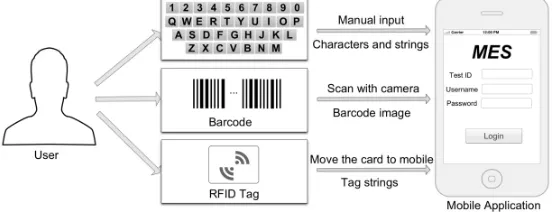
[image:3.612.168.444.489.595.2]Unlike traditional examination entries, this project implements Smartphone sensing technology into mobile examination system (MES) to authenticate users entering the examination system. As each student has a unique ID card with a barcode on the card and a NFC chip, the camera and NFC technique can be used for user identification and authentication to simplify the operation and improve the speed and accuracy. The accelerometer can be used for user interaction with specific actions such as shaking (see Fig. 1).
Fig. 1. Technique methods employed in the case study
stu-dent ID card barcode scanning, and stustu-dent ID barcode NFC recognition are designed and implemented on the latest mobile platforms as shown in Fig.1.
The attributes that can be used to assess the efficiency and usability of the sensing technologies include easy to use, operation speed, error rate, vulnerable to inference, computation intensity, arbitrary degree, and use cases [9]. The evaluation of the user interaction in the case study is focused on the comparison of performance of these approaches and the determination of how the performance of these techniques varies on the heterogeneous mobile platforms.
2.2 System Design
[image:4.612.162.443.271.387.2]2.2.1 System Architecture of MES User Authentication Module
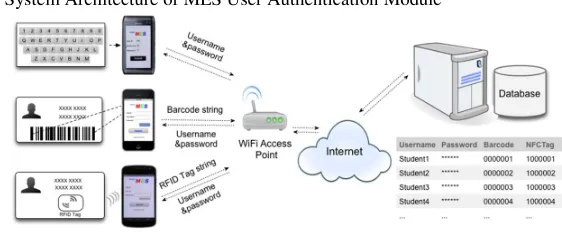
Fig. 2. System architecture of user authentication
The MES is a cross-platform system for the mainstream mobile operating systems, such as Apple iOS, Google Android, Windows Phone 7, and Symbian^3. The system architecture is described in Fig. 2. The accounts of the authorized users are stored in the database of the backend server. When the user login with barcode or NFC magnet-ic card, the mobile devmagnet-ice first obtains data from the barcode or NFC and then access-es the bounded username and password from remote server for login.
2.2.2 Barcode Scanning – A Camera based Computation Intensive Approach
1. Student ID card Barcode Format
The formats for barcodes vary in different areas, the student ID barcode for most uni-versities in the UK is a proprietary format widely used in libraries, which is named Telepen. The Telepen symbology was devised by George Sim, Chairman of SB Elec-tronic System Limited in early 1972. The specification of this symbology is presented in [10]. Compactness and security are advantages of the Telepen symbology.
2. Encoding Format of Telepen Barcode
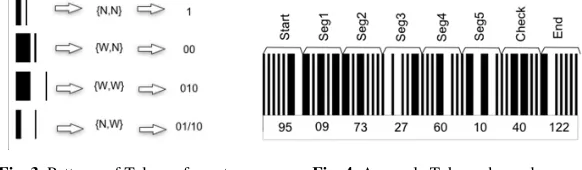
of bar and space pairs (see Fig. 3). Let the barcode shown in Fig. 4 be a sample bar-code, the encoding method is introduced as follows.
Fig. 3. Patterns of Telepen format Fig. 4. A sample Telepen barcode
In each Telepen barcode there is a specific beginning and an ending segment. As shown in Fig. 4, the first and the last segments are the start and end of the whole bar-code respectively. Besides, seg1 - seg5 are data segments, and segment 6 is the check segment. Each segment is encoded with the patterns pairs in Fig. 3.
Take Seg1 in Fig. 4 for example, the corresponding patterns in the segment are: Patterns [Seg1] = {{W,N}, {N,N}, {W,N}, {N,N}, {W,N}}
Then, comparing with the encoding digit pairs of each pattern in Fig. 3, the binary digit of the segment Binary[Seg1] can be obtained: 00100100. The binary digit is 8-bit even-parity, the initial value can be obtained with equation (1):
value_init= decoded_byte & 0x7F (1)
Then, the decimal data of segment 1 Dec[Seg1] is reversed digit of the initial value of Binary [Seg1]: 1×25 + 1×22 = 36. Using the same method, the decimal data of the data segment Dec[barcode] can be obtained: {95,36,100,54,87,37,67,122}. For verifi-cation, the data should meet equation (2):
(127 – ∑Dec[Seg i]) %127 = Dec[Check] (2)
For sample barcode, the verification value is: 127 - (36+100+54+87+37)%127 = 67, which equals to the value of the check segment. Then, the data segments subtract 27, the data of the barcode Dec_barcode[dataSeg] can be obtained: {09,73,27,60,10}.
Then, the string ‘0973276010’ is the encoded data of the sample barcode in Fig. 4.
3.Barcode Scanning based on Image Processing.
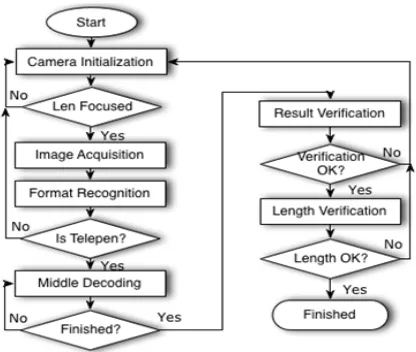
Most of the barcode readers are laser scanners which work with PC applications. On mobile devices, the barcode can be gathered with the build-in camera, and the decod-ing can be done with image processdecod-ing algorithm with the workflow in Fig. 5.
Fig. 5. Flow chart of barcode scanning module
2.2.3 NFC Recognition – A Radio Frequency Identification Technique
The NFC technique is a subset of RFID and limits the range of communication within 4 inches which is strong in security for some use cases. The strength of NFC technol-ogy is its ability to precisely identify objects and at low cost [12]. Thus, it becomes a fast growing area of research and application in the recent years.
The application of NFC recognition on mobile devices is a new technology for the Smartphone and Tablets. In this investigation, a NFC enabled mobile phone Samsung Google Nexus is selected as a test platform. The main purpose is to compare the dif-ferent methods on the same device. When the NFC module is enabled, students just move their student ID cards close the mobile device to login the system immediately.
3
Experiments and Evaluation
Barcode scanning and NFC recognition is implemented for the authentication in MES application. The barcode scanning is implemented on four mobile platforms iOS, Android, Windows Phone 7, and Symbian^3. The NFC magnetic card login is imple-mented on Android Phone Galaxy Nexus. Experiments are carried out to test and compare the operation, speed and error rate of the three interaction approaches. Per-formance evaluation of the different methods on different platforms is conducted.
3.1 Simplified Operations using the Interaction Techniques
3.1.1 Barcode Scanning Approach
scanning is initiated; (2) Target the red line in the camera vision over the barcode till the scanning finishes; (3) Confirm matched ID to login.
Fig. 6. Work flow of the barcode scanning module on iOS platform
With barcode scanning, the user just needs to shake the phone and target the bar-code in the camera vision. It is much easier compared with operations on soft keypad.
3.1.2 NFC Recognition Approach
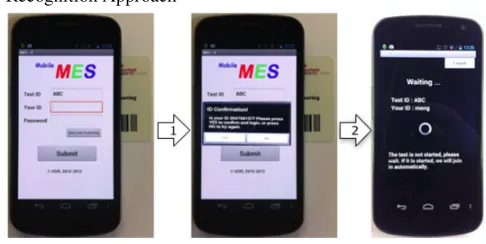
Fig. 7. Work flow of NFC recognition approach
The NFC recognition is implemented on an Android device Nexus S, which also largely simplifies the operations of login process. The operation steps of the login process with a student ID card are: Launch the MES application on mobile devices and input the Test ID. Then, follow steps 1 and 2 in Fig. 7: (1) Move the student ID card close to the phone, till the recognition is finished; (2) Confirm the ID to login.
The NFC recognition approach converts the operation on the soft keyboard to mov-ing the student ID card close to the mobile, which is much easier and convenient.
3.2 Testing of the Interaction Techniques
The testing aims to provide the answers to the following questions:
[image:7.612.182.425.346.468.2]• What are the influencing factors of these technologies?
• How they differ among the different mobile hardware and software platforms?
With these questions, the approaches implemented in the system including the touch screen manual input, barcode scanning, and NFC recognition are tested sepa-rately. The parameters to be measured are: speed (time spent) and error rate. The mean value and standard deviation (STDEV) of time spent can be calculated accord-ingly for further analysis. Mean value can be used to estimate the real value of some parameters, and standard deviation is a parameter that can be used to evaluate disper-sion degree. Thus, they are used to evaluate efficiency and stability of the approaches.
The strategies for the testing and evaluation are descried as below:
• Test the techniques on the same platform to evaluate the interaction techniques • Test the same technique on the different platforms to examine its performance • Discuss the underlying influencing factors based on the testing results
As some methods such as the barcode scanning is easy to be affected by the ambi-ent environmambi-ent such as brightness of illumination and light reflection, the testing of different devices are expected to be done under the identical condition. The account to be used is randomly generated by specially designed algorithm, and each of the meth-od on different device is repeatedly tested for 20 times.
1. Devices used in the testing
Platforms Devices OS Version Camera (Pixels) Screen(Inches)
iOS Apple iPhone 4s iOS 4.3.5 5M 3.5
Android Samsung Galaxy Nexus Android 4.1.1 5M 4.65
WP7 HTC HD2 WP 7.1 5M 4.3
Symbian Nokia N8 Symbian^3 12M 3.5
The devices to be used in the test are required to cover the mainstream mobile op-erating systems. The devices used in the testing are listed in Table 1.
The speed of the three user interaction techniques is tested. The lengths of username and password are set from 8 to 20 in even values. The touch screen, barcode scanning, and NFC recognition are tested separately with the same user. The time is gathered using the timer function on the mobile platform, and the accuracy is 1 milli-second. Timer starts and ends in the tests are:
• Touch screen: From launching the application to pressing the submit button • Barcode scanning: From initiation of scanning till account is shown and
confirma-tion is required
• NFC recognition: From launching the application till account is shown and confir-mation is required.
3.2.1 Performance Analysis of the Three Interaction Techniques
Fig. 8. Mean value of time spent (Seconds) of three techniques on Galaxy Nexus
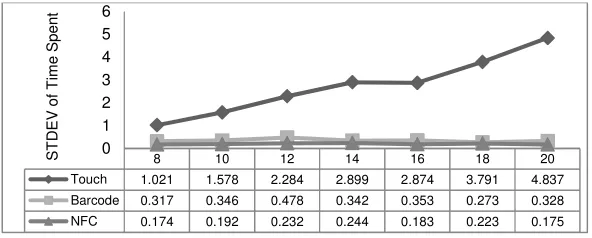
Fig. 9. Standard deviation of time spent of three techniques on Galaxy Nexus
From Fig. 8, it is found that NFC approach is the fastest (Average[MEAN, STDEV]=[1.005, 0.203]), barcode scanning is medium (Average[MEAN, STDEV]= [3.849, 0.348]), and the touch screen manual input is the slowest (Average[MEAN, STDEV]=[25.548, 2.755]). Thus, the barcode and NFC technique is more efficient than touch screen for the interaction. From the curves in Fig. 9, it is clear that the time spent in the interaction regularly increases with the length of information input using the touch screen manual input approach. While it is consistent for the barcode scan-ning and NFC recognition, no matter how long the information to input is.
From Fig. 9, it is found that the standard deviation of the gathered data varies. The standard deviation of touch screen manual input increases with the length of the input data. That means the longer the input data is, the more uncertainty of the time spent of the input will be. While the standard deviation of the other two approaches remains small and varies smoothly. Namely, no matter how long the data to input, the time spent is constant. The barcode scanning and NFC is more stable in the interaction.
3.2.2 Performance Analysis of Interaction Techniques on Different Platforms
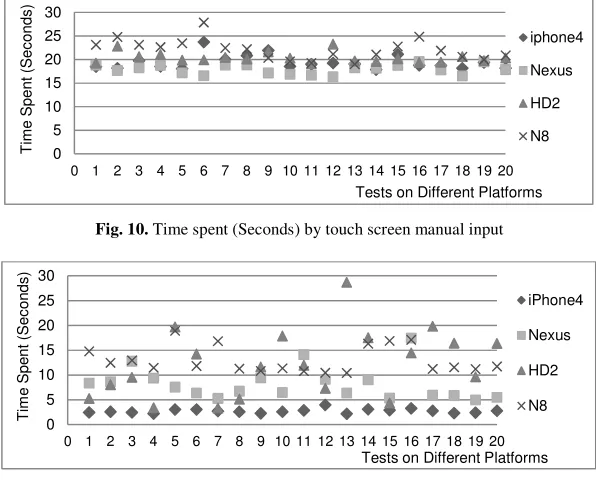
The touch screen manual input and barcode scanning on different mobile platforms are also tested with user name and password length of 8 digits that are randomly gen-erated, and the results are given in Fig. 10 and 11. The condition of the testing
envi-8 10 12 14 16 18 20
Touch 17.946 19.341 21.948 25.826 27.557 32.048 34.167
Barcode 3.888 3.868 3.808 3.883 3.839 3.851 3.806
NFC 1.039 1.017 1.036 1.034 0.963 0.974 0.974
0 5 10 15 20 25 30 35 40 M e a n V a lu e o f T im e S p e n t ( S e c o n d s )
8 10 12 14 16 18 20
Touch 1.021 1.578 2.284 2.899 2.874 3.791 4.837
Barcode 0.317 0.346 0.478 0.342 0.353 0.273 0.328
NFC 0.174 0.192 0.232 0.244 0.183 0.223 0.175
[image:9.612.158.454.283.402.2]ronment is considered to guarantee that the external affect can be ignored and will not become a critical problem influencing the performance of the system.
Fig. 10. Time spent (Seconds) by touch screen manual input
Fig. 11. Time spent (Seconds) by barcode scanning
[image:10.612.159.452.467.570.2]With the raw data, the mean value of parameters and standard deviations are calcu-lated to evaluate the efficiency and stability. The mean value, standard deviation, and error rate of the two technologies barcode scanning and NFC recognition on different platforms are presented in Fig. 12-14.
Fig. 12. Time spent (seconds) of touch screen and barcode scanning
Fig. 12 shows the mean time spent in the user authentication in touch screen manu-al input and barcode scanning. It revemanu-als that the barcode scanning approach is faster than the touch screen, especially on iPhone4 (MEAN=2.687S) and Galaxy Nexus (MEAN=3.888S). Moreover, the operation speed of an approach varies on the
differ-0 5 10 15 20 25 30
0 1 2 3 4 5 6 7 8 9 10 11 12 13 14 15 16 17 18 19 20
T im e S p e n t (S e c o n d s )
Tests on Different Platforms iphone4 Nexus HD2 N8 0 5 10 15 20 25 30
0 1 2 3 4 5 6 7 8 9 10 11 12 13 14 15 16 17 18 19 20
T im e S p e n t (S e c o n d s )
Tests on Different Platforms iPhone4
Nexus
HD2
N8
iPhone4 Nexus HD2 N8
Touch 19.4 17.946 20.394 22.085
Barcode 2.687 3.888 12.247 13.025
ent mobile platforms. For manual input method, the operation on Galaxy Nexus (MEAN=17.946S) is the fastest because of the biggest screen size (4.65 Inches). Con-versely, the operation on Nokia N8 (MEAN=22.085S) is the slowest due to the small-est screen size (3.5 Inches) and the interface is not convenient as that of iPhone4 (MEAN=19.400S) with the same size. For barcode scanning, the operation speeds vary remarkably across mobile platforms. The reason may lie in the control efficiency of the camera and the quality of camera lens. The HTC HD2 (MEAN=12.247S) and Nokia N8 (MEAN=13.025S) are much slower, because the control of the camera is not efficient and it adjusts again and again in the scanning.
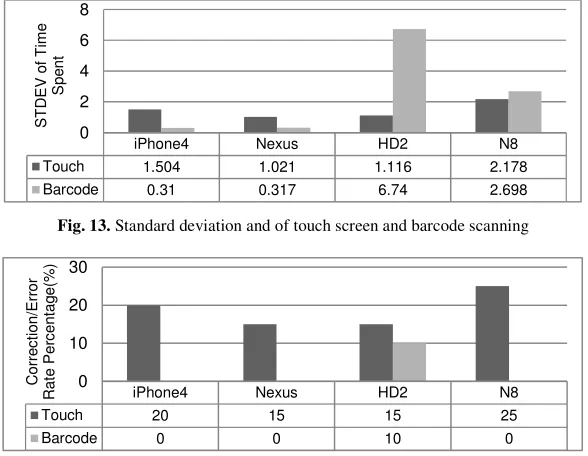
Fig. 13. Standard deviation and of touch screen and barcode scanning
Fig. 14. Correction rate (touch screen) and error rate (barcode scanning)
Fig. 13 shows the standard deviation of time spent in user authentication of these two technologies. The results illustrate that the standard deviation of the manual input on different devices is basically consistent. That is because manual input is not easily affected by some objective conditions. Conversely, the barcode approach is high in standard deviation except the iPhone4 (STDEV=0.310) and Galaxy Nexus (STDEV=0.317) as the camera on iPhone 4 and Galaxy Nexus is of high quality and focuses fast. The Nokia N8 (STDEV=2.698) is high in standard deviation because the control of the camera is not very fluent, and the HTC HD2 (STDEV=6.74) is high in speed standard deviation because the control of the camera is very slow. Besides the focus speed of the camera, the quality of image is also an influencing factor.
Finally, Fig. 14 depicts the correction rate in touch screen manual input and error rate in barcode scanning operations. The correction rate is calculated as the percent-age of the corrected logins, which is determined by the screen size and the usability of the soft keypad. The Galaxy Nexus and HTC HD2 are lower in correction because the
iPhone4 Nexus HD2 N8
Touch 1.504 1.021 1.116 2.178
Barcode 0.31 0.317 6.74 2.698
0 2 4 6 8 S T D E V o f T im e S p e n t
iPhone4 Nexus HD2 N8
Touch 20 15 15 25
Barcode 0 0 10 0
screen sizes are bigger, and Nokia N8 is the highest because its keys on soft keypad are too small. On the other hand, the error rate of HTC HD2 is high possibly because the camera is susceptible to light intensity and the image quality is usually not good.
[image:12.612.152.463.228.331.2]3.3 Summary
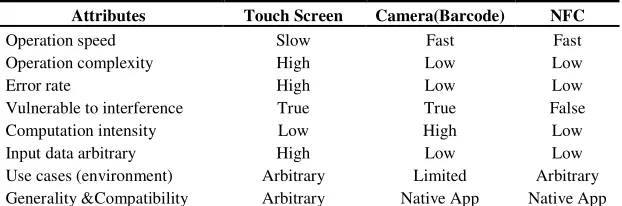
Table 2. Mobile sensing technologies and the attributes
Attributes Touch Screen Camera(Barcode) NFC
Operation speed Slow Fast Fast
Operation complexity High Low Low
Error rate High Low Low
Vulnerable to interference True True False
Computation intensity Low High Low
Input data arbitrary High Low Low
Use cases (environment) Arbitrary Limited Arbitrary
Generality &Compatibility Arbitrary Native App Native App
Table 2 summarizes the three methods and their performance in user interaction. All the listed attributes may affect the efficiency and usability of the interaction technolo-gies applied in mobile applications. The touch screen is slow and complex in opera-tion, high in error rate of operaopera-tion, vulnerable to interference such as user behavior, its strength is low in computation intensity, input arbitrary information, and can be used in any environment and any kind of applications. The camera barcode scanning is fast in operation speed and low in operation complexity and error rate, but it is vul-nerable to interference, high in computation intensity, input only fixed information, and can be used only in appropriate environment and with mobile native applications. The NFC recognition approach is similar to camera barcode scanning, but it is re-sistant to interference and low in computation intensity.
4
Conclusion
This investigation employs the novel hardware and sensing technologies to simplify the user interaction and promote the efficiency and usability of mobile applications. The barcode scanning and NFC recognition methods are successfully implemented on the mainstream mobile operating systems. Result verifies the feasibility and ad-vantages they are used to improve the user interaction of mobile applications.
From the evaluation, it is evident that the application of the technologies can effec-tively help relieve the inherent problems in operational efficiency of touch screen manual input because of the limited screen size. These technologies convert the man-ual keyboard input operation into simple and convenient actions. It firstly simplifies the operations and accelerates the speed of input, and then reduces error rate in the operations. The efficiency and usability of the interaction is therefore raised.
platform. Due to the heterogeneity in mobile devices, how much the sensing technol-ogy can enhance user interaction dependents on the coordination of hardware and related processing algorithms. In addition, from the testing we also find that sensing technologies may be affected by ambient environments. Therefore, the technologies can make sense only when the interference in the ambient environment is acceptable.
Acknowledgements
This research project has been funded with support from the European Commission, Project Number: 511485-LLP-1-2010-1-NO-KA3-KA3MP. The views expressed in this publication are those of the authors and do not necessarily represent the views of the Commission. The Commission cannot be held responsible for any use which may be made of the information contained therein.
References
1. Kanjo, E., Bacon, J., Landshoff, P., Roberts, D.: MobiSens: Making Smart Phones
Smart-er. IEEE Pervasive Computing, 8(4), 50-57 (2009)
2. Zhou, D., Chander, A., Inamura, H.: Optimizing User Interaction for Web-based Mobile
Tasks. In: Proc. of 2010 10th Annual International Symposium on Applications and the In-ternet, pp. 68-76 (2010)
3. Khan, W., Xiang, Y., Aalsalem, M., Arshad, Q.: Mobile Phone Sensing System: A Survey.
IEEE Communications Survey & Tutorials, 99, 1-26 (2012)
4. Alexander, A.: Smartphone Usage Statistics 2013. From
<http://ansonalex.com/infographics/smartphone-usage-statistics-2012-infographic/>(2012)
5. Hinckley, K., Pierce, J., Sinclair, M., Horvitz, E.: Sensing Techniques for Mobile
Interac-tion, In: Proc. of the 13th Annual Symposium on User Interaction Software and
Technolo-gy, 91-100 (2000)
6. Feng, J., Johnston, M., Bangalore, S.: Speech and Multimodal Interaction in Mobile
Search. IEEE Signal Processing Magazine, 28(4), 40-49, (2011)
7. Hannuksela, J., Sangi, P., Heikkila, J.: Motion-based Handwriting Recognition for Mobile
Interaction, In: Proc. of 18th International Conference on Pattern Recognition, 4, pp.
397-400 (2006)
8. Broll, G., Siorpaes, S., Rukzio, E., Paolucci, M., Hamard, J., Wagner, M., Schmidt, A.:
Supporting Mobile Service Usage through Physical Mobile Interaction. In: Proc. of Fifth Annual IEEE International Conference on Pervasive Computing and Communications, pp. 262-271 (2007)
9. Hornbæk, K.: Current Practice in Measuring Usability: Challenges to Usability Studies and
Research. International Journal of Human-Computer Studies, 64, 79–102 (2006)
10. SB Electronics: Barcode symbology – Information and History. SB Electronics Systems
Ltd., From http://www.telepen.co.uk/telepen_symbology.htm (2012)
11. ZXing Group: ZXing – Multi-format 1D/2D Barcode Image Processing Library with
Cli-ents for Android, Java, From <http://code.google.com/p/zxing > (2012)
12. Sheng, Q. Z., Li, X., Zeadally, S.: Enabling Next-generation RFID Applications: Solutions