Technologybased approach for managing
large classes : a case study
Meziane, F and Kulathuramaiyer, N
Title Technologybased approach for managing large classes : a case study Authors Meziane, F and Kulathuramaiyer, N
Type Conference or Workshop Item
URL This version is available at: http://usir.salford.ac.uk/2203/ Published Date 1997
USIR is a digital collection of the research output of the University of Salford. Where copyright permits, full text material held in the repository is made freely available online and can be read, downloaded and copied for noncommercial private study or research purposes. Please check the manuscript for any further copyright restrictions.
TECHOLOGY-BASED APPROACH FOR MAAGIG LARGE
CLASSES: A CASE STUDY
Farid Meziane and arayanan Kulathuramaiyer
Faculty of Information Technology, Universiti Malaysia Sarawak,
94300 Kota Samarahan, Sarawak, Malaysia.
Tel.: + 60 82 671 000 Fax.: +60 82 672301 Email: {farid,nara}@fit.unimas.my
Abstract: Educational institutions are faced with many problems. In one hand they face a shortage of staff and funding and at the same time the number of students enrolled is ever increasing. The lecturers are faced with large and sometimes huge classes. Providing a quality course using traditional methods of teaching- learning becomes very difficult if not impossible. This calls for a shift in the teaching-learning paradigm whereby the traditional modes become inadequate to both deal with the large number of students and to provide an interactive learning environment. Technology-based and student-centred approaches need to be employed to overcome the space-time barriers in this new environment.
In this paper we present our experience in conducting the TMX2012, “IT Tools for Knowledge Workers” course, which had 670 students enrolled. We will describe the various aspects of course management such as the laboratory and tutorial booking system, access to course material, modes of communication and interaction with students, administration of assessments and the monitoring of student progress. We will also describe how Information Technology has been used extensively throughout the course.
1. ITRODUCTIO
The massification of education brings about many new challenges in the administration of teaching-learning. It becomes a challenge to provide quality education to a large number of students at a low cost (Rada, 96). Educational institutions are faced with many departmental constraints such as the shortage of teaching and administrative staff and have inadequate resources such as laboratories and equipment to deal with the growing number of students. To cope with this situation, course administrators or lecturers often have to deal with large or even huge classes. More time is spent in administering these classes than in delivering the course. Quality assurance requires tremendous effort on the part of the course administrators to manage these large classes.
balance between autonomy and co-operation. As such TMX2012 is a skills based and student oriented course whereby the emphasis is more on inculcating the capability of exploiting IT tools in whatever field of study or employment the student may be involved in.
The course being a skills based course offered to a large number of students poses many course management and technological difficulties. Conventional teaching-learning methods become almost impossible to cope with the magnitude of students related activities such as course delivery, evaluation, and communication. Some research work (Mackie, 1992), (Crookes, 1993), (Dion, 1996) described approaches for dealing with large classes in the range of 80 to 200 students. These articles generally call for the creation of a small class environment in these large classes so that effective teaching-learning can take place.
In this paper, we describe how we take this recommendation one step further to create a small class environment in a huge class. In order to achieve this, we have employed technologies such as WWW, video conferencing and automated course administration. Technology allows lecturer to accommodate individual differences in student goals, learning styles, and abilities, while providing improved convenience for both students and lecturer on an "any time, any place" basis (Massy, 1995). We have thus been able to reduce the manpower requirements of the course, making it manageable without overlooking course quality.
The paper is organised as follows. Section 2 will focus on the initial administration of the course which is very critical because of the number of students involved. Section 3 addresses the course organisation. In section 4 different methods employed for the course assessment will be described. Finally our experiences and suggestions will be summarised in section 5.
2. THE BOOKIG SYSTEM
Considering the number of students taking the course, booking of laboratories, tutorials and dividing the class into groups in itself becomes a major problem. Students generally fill up booking forms to indicate their choice of slots. The course administrator then has to check through the paper forms manually to determine duplicate bookings, over-booking of slots and missing names. For a class of 40 students, this process takes between five to fifteen minutes. The administrator then has to directly communicate with students to ratify over-booking and omissions of names. For a class of 670, it would require a great deal of patience on the part of course administrators. It will take approximately 6 hours to ensure that all students have made a legal booking, assuming that it takes only 30 seconds for each student.
becomes easy to obtain the exact number of students who have registered their bookings and over-booking for each lab. The reports generated can be disseminated to students via electronic mail requesting them to confirm bookings and/or re-book where required. We are also able to immediately determine student drop-outs early in the course from the reports produced. We were able, for example, to determine that 2 students had dropped out based on the initial registration. There were 10 other drop-outs in the courses which was only determined at the end of the semester.
3. COURSE ORGAISATIO
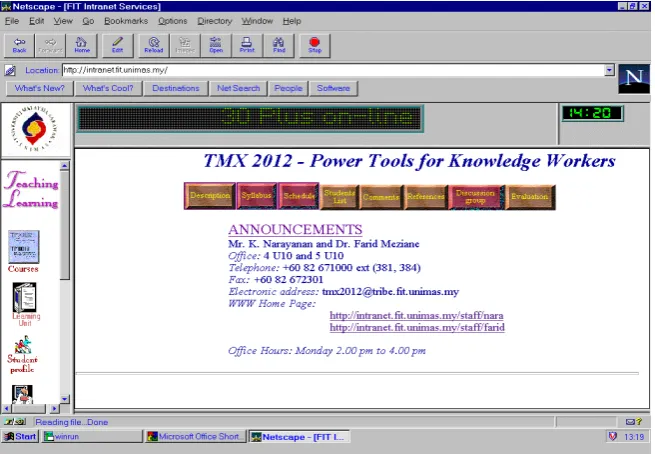
The course is modular, designed using the learning units framework described in (Zahran, 1994). A modular approach allows the flexibility of incorporating new technologies and trends and removing out-dated stuff. The course syllabus and all materials needed for the entire class are made available on the Faculty’s Intranet home page. Figure 1 shows the course home page with its different components. The Intranet and World Wide Web (WWW) technologies have played an important role in the course delivery and its administration. Students can access course material, administrative information, and announcements or download materials as needed. By using Electronic mail (e-mail), electronic discussion groups and a mailing list, effective communication was possible between the lecturers and the students. This has also allowed us to promote the IT culture among students. They were however problems arising from the number of mails received by lecturers. This calls for a Frequently Asked Questions (FAQ) page, which could be used to address many of the questions. The students can also give feedback regarding the course by filling an online appraisal form.
The total duration of the course is 16 weeks and is organised as follows:
• One hour lecture a week
• Two hours of supervised laboratory per week
• And one hour tutorial a fortnight
3.1 Lectures
Lecture notes and related materials were posted on the course home page before each lecture and students are expected to review the topic to participate actively in discussions. The lecturer will provide students with the necessary learning materials and will act as a facilitator for the students.
Figure 1: The course home page
3.2 Laboratories
The aim of the laboratories is to develop the capabilities of the students in applying IT tools and introduce them to current technologies. The laboratory sessions play an important part of this skills-based course. Given the capacity of our laboratories, each group can only accommodate a maximum of 30 students. A total of 23 laboratory groups have to be managed. Each group has to choose a slot that is not clashing with other courses or activities. Demonstrators supervised the laboratory sessions and are chosen from the best undergraduate senior students who have successfully passed the course or postgraduate students. The demonstrators were given an appropriate training and they meet the lecturers every week. Attendance is compulsory for all students and is considered as part of the assessment. During these sessions, students will learn the use of particular IT tools. The outline, instructions and assessment for each lab is published on the course home page. To ensure that students have mastered the use of the tool concerned an assessment is conducted at the end of each lab. A more detailed description of automatic testing and laboratory assessments is given is section 4. We find that the choice of demonstrators played an important role in ensuring quality.
3.3 Tutorials
major problem in facilitating tutorials, as there were insufficient tutors available to conduct 30 tutorial classes fortnightly. To overcome this problem, tutorials were organised and conducted as Facilitated Group Discussions (FGD). Graduate assistants were given the role of monitoring the FGDs. They divided each tutorial class into 6 different groups. Each group, consisting of 4-6 students, was given the role of facilitating one tutorial. A topic was assigned to each group and to guide the discussions, a set of questions was made available to the students on the Web page. We have noticed that most groups took great pains to present topics to their best of abilities. The groups were assessed on the way these sessions were conducted. It is the responsibility of the group that acts as facilitators to make these sessions lively and interactive.
4. COURSE ASSESSMET
Assessment plays an important role in ensuring that course objectives are met and teaching-learning has taken place effectively. Carefully planned and organised assessments are required to enhance the quality of teaching-learning in a course. However, course assessment in a skill-based course of this nature to a large number of students, posed the biggest problem. This is largely due to the fact that a substantial amount of practical work was required. And to make things worse, resources such as computers, laboratories and manpower were limited.
Assessment consists of two major activities, which are, making judgements and doing administration (Rosbottom, 1994). The major concern for academics is in providing consistent judgements across all students in a course. Generally, the administrative aspect, though tedious, would be considered trivial. In a large class such as ours, the management of the administrative tasks itself becomes unimaginable. Administrative tasks involved include creating and maintaining careful records of all assessments and at the same time minimising the possibility of mistakes or omissions. One approach often employed in other generic courses is to introduce multiple assessors (often done by academic staff). In this situation providing consistent judgement among the assessors could become difficult. This is also highlighted in (Rosbottom, 1994). The co-ordination required for administration of assessments also increases with the number of assessors. To illustrate the magnitude of the problem, we will consider the time required for marking a single assessment. If it takes 5 minutes for a lecturer to mark one assessment, then it will take at least 55 hours to mark the assessment for all students without even considering the administration involved.
Considering the skills-based student-oriented course that we had to cope with, we needed one staff at least to be exclusively employed for just administering the assessments. For this purpose, a tutor was assigned to support the administrative tasks. The course itself had 6 laboratory practical assessments, one student presentation, an examination and a project. In the following subsections we describe different assessment methods we adopted for the course.
Graduate assistants and senior undergraduate students were used as facilitators and assessors of laboratories. These facilitators demonstrated the use of software and ensured that students learnt how to use the software. They would also check whether that students submitted the laboratory assessments at the end of the practical.
In the previous semesters, submission of assessments was done using electronic mail or placing the assessments in the course directory. Although this approach is better than receiving floppy disks from students or a paper-based system, it does involve a great amount of marking and careful keying in of marks. These marks then need to be compiled for all students for all assessments. To overcome this problem we used Web-based automated testing to assess the students for their laboratories. Here students were required to answer a few questions directly related to the practical. Randomisation of questions was used to ensure that students do not obtain answers from other students who have completed their labs. Apart from this a password is given by the facilitator to ensure that only those present for the laboratory session were allowed to submit an answer. Using this approach, the marks compiled can be exported to a spreadsheet. The administration required is in compiling the spreadsheet for each lab and integrating with the course database. Though the administrative task requires much lesser efforts, it can also be eliminated by integrating the automatic testing results to the class database.
4.2 Automated Testing and Examinations
Automated testing promises a solution to the traditional woes of academics. Apart from eliminating the need to mark assessments, opportunities for cheating can also be minimised. Automated assessment enhances the capability of providing a rich set of assessments, especially for large classes. The automated testing software used (Question Mark Professional 1) provided us with features such as the randomisation of questions and answers, the use of passwords, the ability to use colour graphics and multimedia documents and the reporting facility. Colour graphics and multimedia documents were used to test for skills and student’s capabilities, which was required in this course. We were able to use screen captures from the various software taught in the course to assess students on the usage of the software. An example is given in figure 2.
The reporting facility allows the analysis of student answers to each question including the number of tries. It also revealed questions that are too difficult or too easy. This is an important feedback for planing better assessments in future.
For the final examination we experimented the use of Web-based automated testing on a group of 23 students from the Faculty of Economics and Business. For the rest of the students, we used the traditional approach of conducting the examination in a large hall using multiple choice questions. We have taken a cautious approach of experimenting with automatic testing only on a small subset of all the students as examination provides the best indication of the knowledge (and even skills) acquired by the students.
1
Based on the experiments done, we found that automated examinations require more time for preparation though it eliminated the marking time. It is desirable for large classes. However care should be taken in conducting assessments for large classes. Some of the problems that we faced were that too much graphics in a document could slow down access and even hang the system. We also found that the configuration of the computers used for testing played an important role in ensuring a smooth implementation.
Figure 2: An example of an on-line test
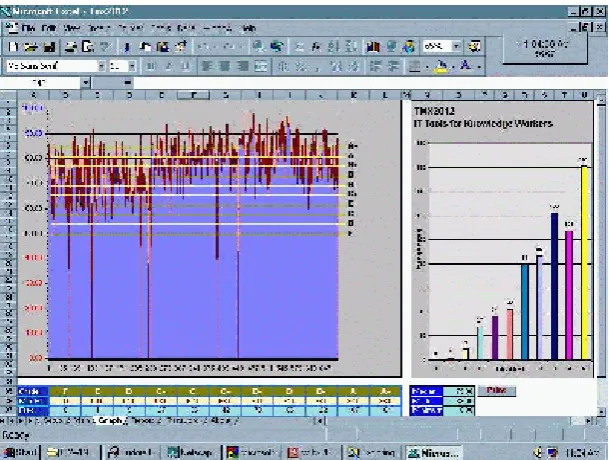
[image:8.595.152.457.548.778.2]Figure 3: Monitoring the students performance
4.3 Final Projects
The final group project is aimed to give students an opportunity to work on a real life project and to complete the development of a Web page for an organisation. Students are encouraged to look for a suitable organisation and to develop a Web page for it. This assessment determined how well the students have mastered the software taught to address a real-world situation. In developing the Web pages students’ ability to apply the image processing software, multimedia technology and other information processing software was also assessed. As the final project was a group project, it would have been difficult to determine the contribution of each members of the group. To remedy to this situation, each group was required to submit a Gantt Chart using a project management software learnt in this course. In this way we could also test their ability in using of the project management software. It then becomes the responsibility of the students to select a project and plan and co-ordinate the work.
5. COCLUSIOS, AD FUTURE WORK
In employing about twenty students and graduate assistants as facilitators for the laboratories and tutorial, we faced a problem in that their ability as facilitators and their technical skills varied greatly. Based on the course appraisal we found that some facilitators were not as effective as others, especially in the laboratory sessions. This was the main issue raised by the students. The use of well-explained courseware as instructions and guides for the laboratory sessions will greatly improve this situation. Furthermore, the use of such courseware will also reduce the amount of training to be given to the facilitators and also help to provide consistency in the student guidance.
Students also generally, disliked the video conferencing mode of lecture delivery. As we have stated earlier, students prefer the physical presence of the lecturer. There is an issue of culture here whereby the students are more used to the traditional methods of course delivery. This can be overcome as students are more exposed to the new teaching methods. This situation can also be improved by providing the lectures in digitised form which students can then view as many times as they like in their leisure.
Apart from these two shortcomings, the majority of students found the course very interesting and has stated that they learnt a great deal. Some students even expressed that more IT oriented generic courses should be taught. A number of organisations have expressed their total satisfaction on the work done by the students for their final project. The overall performance of the class also showed that a majority of students have acquired the capabilities and met the objectives set at the start of the course.
For the future works we aim to improve the current course on several aspects:
• Developing self-paced courseware to complement the lectures, tutorials and laboratories and to build a rich pool of the learning resources.
• Finally we intend to consider automated examination for all students for the next semester. However care should be placed on the co-ordination and in ensuring quality and security of the examination.
ACKOWLEDGEMETS
We would like to thank the Intranet team for helping in the development of the Intranet and its maintenance. We would also like to thank Mr Azman Hussin, the tutor assigned to this course for his help in the course organisation and Mr Leng Chee Kong for developing the student progress monitoring system. We are also grateful to all graduate assistants involved in the tutorials and the demonstrators who helped in the laboratories.
REFERECES
Crookes, P. J., Coey, W. A. and Crookes, D. (1993),“Creating a Positive Learning Environment for Large Classes”, All-Ireland Conference on the Teaching of Computing.
De Bra, P. M. E., (1996), “Teaching Hypertext and Hypermedia through the Web”,
Journal of Computer Science, vol. 2 no 12, Springer Pub co.
Massy W. F., and Zemsky R., (1995), “Using Information Technology to Enhance Academic Productivity”, Wingspread Enhancing Academic Productivity Conference.
Mackie, J., (1992) “The Challenge of Large Classes”, The Teaching and Academic Growth (TAG) newsletter,
http://mrn.media-services.ubc.ca/facdev/services/newsletter/92/m92-1.html Dion, L., (1996), “About Teaching”, A -ewsletter of the Centre for Teaching
Effectiveness, http://www.physics.udel.edu/~pbl/cte/spr96-bisc2.html Rada R., (1996), “Teaching on the WWW: Assignment Focus and Information
Indexing”, Journal of Universal Computer Science, vol. 2, No. 10. Rosbottom J., (1994), “Software Tools for Peer Assessment”, CTI Annual
Conferences, Dublin.