AP COMPUTER SCIENCE
PROGRAMMING PRACTICE
⦿
Write a program to produce a Space Needle
ASCII Art image as output. Use good
procedural decomposition, and make use of
SCALING
⦿ Take a look at this program:
for (int i = 0; i < 5; i++) {
for (int j = 0; j < 5; j++) { System.out.print("*");
}
System.out.println(); }
⦿
What does this do?
⦿
What do those 5's
mean?
SCALING
⦿
Now look at this one:
for (int i = 0; i < 5; i++) {
for (int j = 0; j < 5; j++) { System.out.print(i * j);
for (int k = 0; k < 5; k++) { System.out.print(" "); }
}
System.out.println(); }
⦿
What does this do?
⦿
What do the 5's
mean?
MAGIC NUMBERS
⦿ A magic number in a computer program is a number that appears without context
⦿ Magic numbers are BAD
◼ Poor readability
◼ Error-prone on changes
SCOPE
⦿
A variable could work,
but…
public static void main(String[] args) { int size = 5;
printLabels(); printTable(); }
public static void printLabels() { for (int i = 0; i < size; i++) { ...
} }
public static void printTable() { for (int i = 0; i < size; i++) { ...
SCOPE
⦿
A variable could work,
but…
public static void main(String[] args) { int size = 5;
printLabels(); printTable(); }
public static void printLabels() { for (int i = 0; i < size; i++) { ...
} }
public static void printTable() { for (int i = 0; i < size; i++) { ...
SCOPE
⦿ We know that variables cannot be used across methods. The reason for this is scope.
⦿ The scope of a variable is the part of the program in which it exists and is usable.
⦿ Essentially, a variable is in scope for code:
◼ Inside the same set of curly braces in which the variable is declared
CLASS CONSTANTS
⦿ We can avoid our scope problems with a class constant
public static final <type> <name> = <value>;
⦿ A class constant is declared outside any method so it's scope is the entire program
CLASS CONSTANTS
⦿ A constant is a variable whose value cannot be changed once it is assigned
⦿ By convention, name is all upper case, separated by underscores
⦿ To scale the program, we then just change value of constant
◼ One change instead of many
◼ Will only change the necessary places
SCALING
⦿ Take a look at this program:
for (int i = 0; i < SIZE; i++) {
for (int j = 0; j < SIZE; j++) { System.out.print("*");
}
System.out.println(); }
⦿
What does this do?
⦿
What do those 5's
mean?
SCALING
⦿
Now look at this one:
for (int i = 0; i < SIZE; i++) {
for (int j = 0; j < SIZE; j++) { System.out.print(i * j);
for (int k = 0; k < 5; k++) { System.out.print(" "); }
}
System.out.println(); }
⦿
What does this do?
⦿
What do the 5's
mean?
SCALING
⦿ Exercise: Rewrite your Space Needle program so that the
size of the figure can be changed by changing the value of a class constant. Replace magic numbers in your program with uses of the constant.
CLASS CONSTANTS
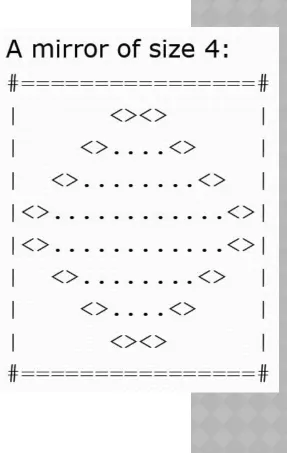
[image:15.960.665.952.43.496.2]⦿ Exercise: Write a Java method to produce the figure at the right. Use a class constant so that the figure can be easily scaled.
REDUCING REDUNDANCY
⦿ Say we wanted to print this:
********** *****
************** **
REDUCING REDUNDANCY
⦿
We could do this:
public static void lineOf10() { for(int i = 0; i < 10; i++) { System.out.print("*"); }
System.out.println(); }
public static void lineOf5() { for(int i = 0; i < 5; i++) { System.out.print("*"); }
REDUCING REDUNDANCY
⦿
Or maybe this:
public static void main(String[] args) {
int size = 10; printLine(); size = 5; printLine(); ...
}
public static void printLine() {
for (int i = 0; i < size; i++) { System.out.print("*");
}
PARAMETERS
⦿ In many cases, we need or want additional information for our methods
◼ For example, when we want to do almost the exact same thing
⦿ We can get this information using parameters
⦿ Parameters are closely related to arguments
◼ When defining the function, we have parameters or formal arguments
◼ When calling a function, we have actual arguments, or simply arguments
PARAMETERS
⦿ We add parameters to our methods by specifying the types and
names in the prototype
public static void printProduct(int a, int b)
◼ Parameter declarations have the same rules as variable declarations
◼ Parameters have the same scope as local variables
⦿ Once we have declared parameters, we can use them in the
method body
PARAMETERS
⦿ Examples:
public static void printSum(int a, int b) { System.out.println(a + b);
}
PARAMETERS
⦿ When calling a method, you must provide the correct number and type of arguments:
public static void main(String[] args) { Scanner kb = new Scanner(System.in); System.out.print(“Enter a string: ”); String input = kb.nextLine();
System.out.println("Is the length of that odd?"); hasOddLength(input);
}
PARAMETERS
⦿ Exercise 1: Write a method that takes two integers and prints out a rectangle of stars with the given dimensions. For example,
printRectangle(3, 5) should print 3 rows of 5 stars each.
⦿ Exercise 2: Write a method that takes a number n as a parameter and prints out the first n perfect squares.
⦿ Exercise 3: Write a method to interleave two strings by taking
letters alternately from each string. Write a program to read two strings from the console and interleave them.
RETURN VALUES
⦿ Parameters allow the caller to give information to the callee
⦿ To go the other way around, we use return values
⦿ A return value is a value that is the result of a method call
RETURN VALUES
⦿ We've seen this already:
String str = "Hello!";
String short = str.substring(1, 3);
⦿ substring returns a value (namely, the chunk of the string we asked for)
⦿ When a method returns a value, we must do something with
that value
◼ Store it in a variable, pass it as a parameter, print it out, etc.
THE
MATH
CLASS
⦿ The Math class in the Java Class Library includes a bunch of methods that return values
◼ Math.abs() - absolute value
◼ Math.pow() – exponentiation
◼ Math.sqrt() – square root
◼ Math.max(), Math.min() - maximum and minimum
◼ Math.sin(), Math.cos(), Math.tan() - trig functions
◼ Etc.
METHODS THAT RETURN VALUES
⦿ To declare a method that returns a value, make two changes:
◼ Declare the return type instead of using void in the prototype e.g. public static int add(int x, int y) {
◼ Add one (or more) return statements to the code
METHODS THAT RETURN VALUES
public static String cutFirstAndLast(String str) {String trimmed = str.substring(1, str.length() - 1); return trimmed;
}
// can return the expression directly
public static double hypotenuse(int leg1, int leg2) { return Math.sqrt(leg1 * leg1 + leg2 * leg2);
}
public static double twiceTheConstant() { double result = CONSTANT * 2;
RETURN VALUES
⦿ Exercise 1: Write a method to compute and return the area of a rectangle given its length and width.
⦿ Exercise 2: Write a method that takes an integer as an
argument and returns true if the integer is even and false if it is odd.
⦿ Exercise 3: Write a method that takes a String as an
argument and returns a new String consisting of every other character.
MINI-PROJECT
CONDITIONALS
⦿ We can use conditionals to only execute code under certain conditions
⦿ The Java for this looks like:
if (myVar == 0) {
CONDITIONALS
⦿ We can also use an if-else block:
if (myVar > 0) {
System.out.println(“Hello!”); } else {
CONDITIONALS
⦿ We have the following relational operators:
⦿ Note that "equal to" is a double equals!!
◼ What is single equals?
⦿ For object types (like String), DO NOT use == or != ◼ Use the equals method instead: str.equals("hello")
== Equal to
!= Not equal to
> Greater than
< Less than
>= Greater than or equal to
CONDITIONALS
⦿ We also have three Boolean operators:
⦿ An and expression is true when both parts are true
⦿ An or expression is true is when at least one part is true
⦿ A not expression is true when the component expression is false
cond1 && cond2 AND
cond1 || cond2 OR
BOOLEAN OPERATORS
⦿ Truth Tables:
AND T F
T T F
F F F
OR T F
T T T
F T F
NOT
T F
CONDITIONALS
⦿ Exercise 1: Write a method that takes a String as a parameter and returns whether or not the String has the letter 'e' in it.
◼ Look up indexOf in the String class in the API, or use charAt and a loop.
⦿ Exercise 2: Write a method that takes two numbers and returns the result of subtracting the smaller from the larger.
⦿ Exercise 3: Write a method that takes three numbers as arguments and returns the maximum.
⦿ Exercise 4: Write a method that takes a String and returns a new String that is the same as the argument but with all vowels
CHAINED/NESTED CONDITIONALS
⦿ We can string a series of ifs and elses together in three ways:
◼ Nested if/else (exactly one path):
if (x > 0) {
System.out.println("Positive"); } else if (x < 0) {
System.out.println("Negative"); } else {
CHAINED/NESTED CONDITIONALS
⦿ Nested if/else/if (at most one path):
if (place == 1) {
System.out.println("Gold medal!"); } else if (place == 2) {
System.out.println("Silver medal!"); } else if (place == 3) {
CHAINED/NESTED CONDITIONALS
⦿ Chained if (any number of paths): if (num % 2 == 0) {
System.out.println("Divisible by 2"); }
if (num % 3 == 0) {
System.out.println("Divisible by 3"); }
if (num % 4 == 0) {
ADVANCED CONDITIONALS
⦿ Exercise 1: Write a method to take a numeric grade (0-100) as a parameter and return the corresponding letter grade (A-F).
⦿ Exercise 2: Write a method to take a String as a parameter and print out whether the String contains an ‘a’, an ‘e’, an ‘i’, an ‘o’, and/or a ‘u’. (Look at the indexOf method on the String class.)
⦿ Exercise 3: Write a method to take a String and an integer as parameters and print out whether the length of String is
TOKENIZING
⦿ When we use a Scanner, we are doing what is called
tokenizing input
⦿ A token is a chunk of input with a distinct meaning or value
⦿ By default, tokens are separated by whitespace
⦿ We can change this with the useDelimiter() method on
Scanner
TOKENIZING
⦿ As we read tokens, an input cursor moves through the text
⦿ The text token is read starting from the current cursor position
⦿ Different methods work different ways
TOKENIZING
⦿ Scanner has some useful methods to help us know what's coming:
◼ hasNext() - is there another token?
◼ hasNextInt(), hasNextDouble(), … - is the next token of this type?
TOKENIZING
⦿ We can also use Scanner to tokenize Strings, instead of console input
⦿ The neat thing is…this works exactly the same way as tokenizing input!!
⦿ The only difference:
Scanner kb = new Scanner(System.in);
becomes
OBJECTS
⦿ Recall that only some Java types are primitive types
◼ int, char, boolean, etc.
⦿ Most types in Java are object types
⦿ An object is an entity that encapsulates related data and behavior
REFERENCES
⦿ Technically, things like System.out are not objects. They are references to an object:
⦿ The actual object lives in memory somewhere
Some
PrintStream object
REFERENCES
⦿ This means we can declare our own variable and have it
refer to the same object as System.out
PrintStream myStream; myStream = System.out;
⦿ Note that this does not create a new object, just a new reference
Some
PrintStream object
System.out
REFERENCES
⦿ A similar example, using the String class: String firstString = “Java”;
String secondString = firstString;
⦿ In Java, each string has a unique object that represents it: String firstString = "Java";
String secondString = "Java";
The string “Java”
firstString
COMPARING STRINGS
⦿ Try this:
...
if (input == "Hello") {
System.out.println("Hello to you, too!"); }
COMPARING STRINGS
⦿ The issue is that, for objects, the == compares the
reference, not the underlying object or value
◼ Fortunately, there's another way to compare objects
⦿ Every object in Java has a method called equals() that does a more interesting comparison
COMPARING STRINGS
⦿ For String, .equals compares the values instead of the references
...
if (input.equals("Hello")) {
System.out.println("Hello to you, too!"); }
⦿ This will work the way you hope
◼ But what if you type "hello" instead?
WHILE
LOOPS
⦿ The while loop is the most powerful and versatile loop in programming
◼ All other loops can be rewritten as while loops
⦿ A while loop takes the following general form:
while ( <condition> ) {
<statement> <statement>
…
<statement>
WHILE
LOOPS
⦿ Execution happens in this order:
1. Test the condition
2. If the condition is false, skip to step 5 3. Execute the body of the loop
4. Return to step 1 (iterate)
5. Continue with the statement after the body of
WHILE
LOOPS
int n = 1;
while (n < 10) {
System.out.println(n*n); n++;
}
System.out.println("Final n: " + n);
⦿ What does this code do?
⦿ How many times does the loop run?
WHILE
LOOPS
int n = 1;
while (n < 10) {
System.out.println(n*n); }
System.out.println("Final n: " + n);
⦿ What does this code do?
⦿ How many times does the loop run?
DO…WHILE
LOOPS
⦿ The while loop has a cousin, called the do…while loop
⦿ A do…while loop takes the following general form:
do {
<statement> <statement>
…
<statement>
DO…WHILE
LOOPS
⦿ while loop:
1. Test the condition
2. If the condition is false,
skip to step 5
3. Execute the body of the
loop
4. Return to step 1 (iterate)
5. Continue with the
statement after the body of the loop (terminate)
do…while loop:
1. Execute the body of the loop
2. Test the condition
3. If the condition is false, skip
to step 5
4. Return to step 1 (iterate)
5. Continue with the statement
DO…WHILE
LOOPS
⦿ while loop:
1. Test the condition
2. If the condition is false,
skip to step 5
3. Execute the body of the
loop
4. Return to step 1 (iterate)
5. Continue with the
statement after the body of the loop (terminate)
do…while loop:
1. Execute the body of the loop
2. Test the condition
3. If the condition is false, skip
to step 5
4. Return to step 1 (iterate)
5. Continue with the statement
WHILE
LOOPS
⦿ Exercise 1: Write a Java program to read in a number from the
keyboard. Then, act as follows (modifying the number each time):
◼ If the user enters “n”, add one to the number and print the result.
◼ If the user enters “p”, subtract one from the number and print the
result.
◼ If the user enters anything else, exit the program.
⦿ Exercise 2: Write a Java program to read in integers from the