168
Volume-4, Issue-1, February-2014,
ISSN No.: 2250-0758
International Journal of Engineering and Management Research
Available at:
www.ijemr.net
Page Number: 168-179
Software Template to Improve Quality of Database Design on basis of
Error Identification from Software Project Documentation
Vikas S. Chomal1, Dr. Jatinderkumar R. Saini2
1Assistant Professor, The Mandvi Education Society Institute of Computer Studies, Mandvi, District Surat, Gujarat, INDIA 2Director (I/C) & Associate Professor, Narmada College of Computer Application, Bharuch, Gujarat, IND
ABSTRACT
Software development projects are an indispensable constituent of computer science courses. They offer the prospects for students to apply theoretical material and to expand valuable knowledge in an environment typical of the workplace. This paper deals with a vital and noteworthy concern in the development of computer software - its quality. The software systems which students as well as professional software engineers design are increasing in complexity, and it is often away from human ability to confirm their correctness. These benefits, however, are difficult to realise. In particular, we provide a software template for software engineering projects through which quality of students software project can be improved. The software template been designed can find out various errors committed by the students while developing their software projects in any of the following areas – database, designing, reports, testing, exceptions handling and so on. Software template also further provides necessary assistance in order to get rid of these errors and thus improving the quality of the software project. We consider our template will be a useful tool in indentifying errors in student’s software project and to eliminate these errors and hence improving the quality. The paper presents and discusses about software template that has been developed and how it can be incorporated to access the quality of software projects developed by the students.
Keywords – Database Design, Software Documentation, Software Systems, Software Template, Software Project, Quality.
I.
INTRODUCTION
Quality is one of those terms that everyone uses; but there is probably not a universal, consistent understanding and agreement about its meaning. Software engineers (and academics) apply the term "quality" to both the product being produced and to the process used to produce it. Although these two types of "quality (product quality and process quality) are dependent on each other, they involve different techniques, measures, and implications. Broadly speaking, product quality is related to how well the product satisfies its customer/user requirements. Related to this (but maybe not specified) are the usability, performance, reliability, and the maintainability of the software. Process quality is concerned with how well the process used to develop the product worked. In this ease we are concerned with elements such as cost estimation and schedule accuracy, productivity, and the effectiveness of various quality control
techniques (e.g., inspection rates and yields) [3]. One basic goal of software engineering is to produce the best possible working software along with the best possible supporting documentation [2].
169
Students are in general skilled in programming and up-to-date in current technology innovations, but have a poor software engineering background. I.e., they have no experience in applying known software engineering concepts and methods to practical development problems. Also, they are not used to teamwork, i.e., students often work individually and dislike collaboration, and mutual responsibilities and they are not used to communicate and present fruit-fully their work, or to discuss with people with a different background [1].
The overall objectives of this paper are: first, to focus on the methodology; second, to highlight on finding and analysis; and at last discussion on software template.
II.
LITERATURE REVIEW
Eduardas et al [1] The aim of Software Engineering Master Studies is to prepare software development leaders – the future chief engineers, project executives, experts that can both acquire and implement efficient design methods and new technologies in practice. The study program provides the possibilities for preparing of professional development of software systems and for scientific research. According to Marcello et al [2] Software quality has been identified as the goal of the 90s in the software engineering field [B&91]. The purpose of this section is to show that software documentation products and process are key components of software quality. We will show that poor or missing documentation is a major contributor to the “software crisis”, namely low product quality and high development and maintenance costs. Documentation is the written record of what the software is supposed to do, what it does, how it does it and how to use it. Virtually everyone agrees that good documentation is important to the analysis, development and maintenance phases of the software process and is an important software product. Thomas B. et al [3] stats that - quality is one of those terms that everyone uses; but there is probably not a universal, consistent understanding and agreement about its meaning. Software engineers (and academics) apply the term "quality" to both the product being produced and to the process used to produce it. Although these two types of quality (product quality and process quality) are dependent on each
other, they involve different techniques, measures, and implications.
III.
METHODOLOGY
The present work considers documentation of software projects prepared by students as a source for data collection. Specifically, documentations of large software projects of only final year students of Masters level course have been considered for the research purpose. The duration of these software projects is six months. The said documentations of software projects were procured from college libraries.
Structure and Management of Student Software Project
These documentations include complete project profile along with the following elements:
1) Requirement analysis 2) Technology used 3) Database design
4) Structural and Object Oriented Modelling Techniques
5) Screen layouts
6) Testing techniques along with test case and data
We analyzed and reviewed 505 large software project documentations developed during a period of academic years from 2001-2002 to 2011-2012. During our exploration we considered all of the above described elements. For simplicity and better exhaustive analysis of the documentations, the phased process was followed. As each project is a uniquely different definition from other projects, it is noteworthy here that this was repeated for each of the 505 project reports under study.
Phased Process for Documentation
These phases are presented below: 1) Exploration of Project Profile 2) Exploration of Existing System
and Proposed System
3) Exploration of Requirement Gathering Techniques
4) Exploration of Requirement Analysis done by Students 5) Exploration of Technology on
170
6) Exploration of Process Model adapted for Software Project Development
7) Exploration of Data Dictionary (including Database Design) 8) Exploration of various Structural
and Object
9) Oriented Modelling Techniques 10) Exploration of Screen Layouts 11) Exploration of Generated Reports 12) Exploration of Testing
Techniques and Test data
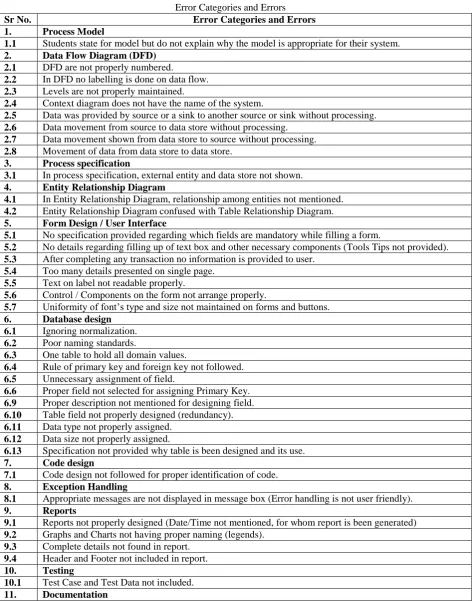
The main errors and error categories found from the review of project documentations are listed in Table I. We also present an analysis of the identified points which can be termed as the errors. There were eleven broad categories under which various errors were found. Figure 1, shows
diagrammatic shows methodology as well as finding and analysis. The next section presents the findings obtained through analysis of documentation reports.
IV.
FINDING AND ANALYSIS
Figure – 1 Diagrammatic Representation of Methodology & Findings and Analysis
Sr. No. Error Categories
1. Process Model
2. Data Flow Diagram (DFD)
3. Process specification
4. Entity Relationship Diagram
5. Form Design / User Interface
6. Database design
7. Code design
8. Exception Handling
9. Reports
10. Testing
11 Documentation
Submission and
Removal of Errors
Software Professionals
Feedback
Software Development
Finding & Analysis
.
.
.
,
Documentation
1
2
n
Software Template
171
Table I
Error Categories and Errors
Sr No. Error Categories and Errors
1. Process Model
1.1 Students state for model but do not explain why the model is appropriate for their system.
2. Data Flow Diagram (DFD)
2.1 DFD are not properly numbered.
2.2 In DFD no labelling is done on data flow.
2.3 Levels are not properly maintained.
2.4 Context diagram does not have the name of the system.
2.5 Data was provided by source or a sink to another source or sink without processing.
2.6 Data movement from source to data store without processing.
2.7 Data movement shown from data store to source without processing.
2.8 Movement of data from data store to data store.
3. Process specification
3.1 In process specification, external entity and data store not shown.
4. Entity Relationship Diagram
4.1 In Entity Relationship Diagram, relationship among entities not mentioned.
4.2 Entity Relationship Diagram confused with Table Relationship Diagram.
5. Form Design / User Interface
5.1 No specification provided regarding which fields are mandatory while filling a form.
5.2 No details regarding filling up of text box and other necessary components (Tools Tips not provided).
5.3 After completing any transaction no information is provided to user.
5.4 Too many details presented on single page.
5.5 Text on label not readable properly.
5.6 Control / Components on the form not arrange properly.
5.7 Uniformity of font‟s type and size not maintained on forms and buttons.
6. Database design
6.1 Ignoring normalization.
6.2 Poor naming standards.
6.3 One table to hold all domain values.
6.4 Rule of primary key and foreign key not followed.
6.5 Unnecessary assignment of field.
6.6 Proper field not selected for assigning Primary Key.
6.9 Proper description not mentioned for designing field.
6.10 Table field not properly designed (redundancy).
6.11 Data type not properly assigned.
6.12 Data size not properly assigned.
6.13 Specification not provided why table is been designed and its use.
7. Code design
7.1 Code design not followed for proper identification of code.
8. Exception Handling
8.1 Appropriate messages are not displayed in message box (Error handling is not user friendly).
9. Reports
9.1 Reports not properly designed (Date/Time not mentioned, for whom report is been generated)
9.2 Graphs and Charts not having proper naming (legends).
9.3 Complete details not found in report.
9.4 Header and Footer not included in report.
10. Testing
10.1 Test Case and Test Data not included.
11. Documentation
11.1 Documentation does not have uniformity.
The total number of errors found during our exploration which belongs to the said error categories along with the summation of total number of errors encountered for
172
Table II
Error Category–wise Year-wise Number of Errors
Error Categories
Year Total
2002 2003 2004 2005 2006 2007 2008 2009 2010 2011 2012
1 0 0 2 1 1 0 5 7 6 10 15 47
2 10 10 7 8 13 24 13 19 8 19 11 142
3 3 6 4 3 9 3 2 2 5 7 3 47
4 0 2 1 4 0 2 5 5 5 14 15 53
5 16 12 10 7 26 31 15 14 21 62 43 257
6 10 9 15 11 22 47 45 69 65 46 45 384
7 3 2 1 2 1 0 0 2 2 4 5 22
8 3 7 4 5 7 8 5 6 13 11 9 78
9 0 5 2 0 5 8 1 4 4 15 16 60
10 6 12 11 3 21 16 10 7 13 12 13 124
11 0 6 0 0 3 8 5 7 10 7 5 51
Total 51 71 57 44 108 147 106 142 152 207 180 1265
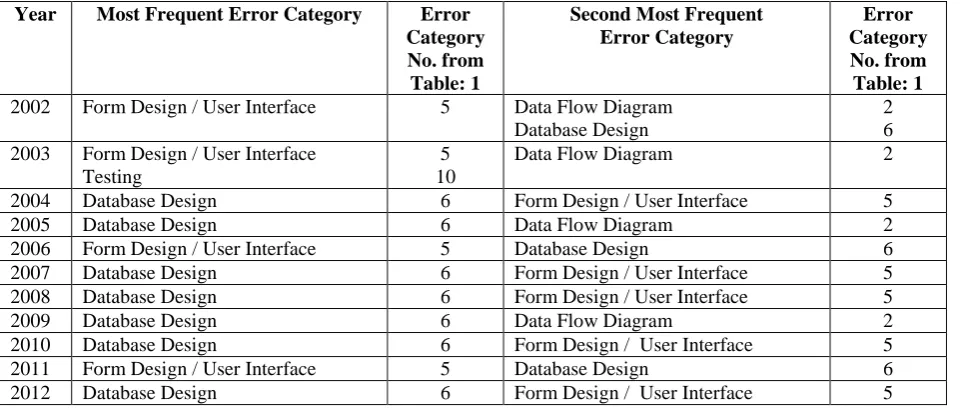
Table III shows data regarding the most frequent error category as well as second most frequent error category. It gives clear indication that the error category number 6 of Table I is having maximum occurrence;
we conclude that „Database Design‟ is the error category where highest number of errors have been encountered during last eleven years.
Table III
Year–wise Most Frequent & Second Most Frequent Error Category
Year Most Frequent Error Category Error
Category No. from Table: 1
Second Most Frequent Error Category
Error Category No. from Table: 1
2002 Form Design / User Interface 5 Data Flow Diagram Database Design
2 6 2003 Form Design / User Interface
Testing
5 10
Data Flow Diagram 2
2004 Database Design 6 Form Design / User Interface 5
2005 Database Design 6 Data Flow Diagram 2
2006 Form Design / User Interface 5 Database Design 6 2007 Database Design 6 Form Design / User Interface 5 2008 Database Design 6 Form Design / User Interface 5
2009 Database Design 6 Data Flow Diagram 2
2010 Database Design 6 Form Design / User Interface 5 2011 Form Design / User Interface 5 Database Design 6 2012 Database Design 6 Form Design / User Interface 5
The next section describes the structure and working of software template proposed by us to improve the quality of the student‟s final year project.
V.
SOFTWARE TEMPLATE
Software quality should be highlighted in the beginning and throughout while student is carrying out their final year software development as a part of their curriculum. Quality reviews should be integrated as well as taken care when students are executing any of the stated activity related to software
173
software template developed by us for validating errors come across in any of the above mentioned activities and also to eradicate them. Software template is been designed and developed using Java Programming Language 1.7.
Pseudo Algorithm for Software Template
Input a file that consists of errors in various error categories mentioned in Table I
Then
Software Template checks – If error committed any of the following software development process – process model, Data Flow Diagram (DFD), Process Specification, Entity Relationship Diagram, Form Design/ User Interface, Database Design, Code Design, Exception Handling, Reports, Testing and Documentation. If
Found any errors in above mention area
Then
A Log File is generated stating the error committed in specific error category as well as provide with necessary instructions to solve the error
Applying Software Template
Now, we will be highlighting the working of software template by explaining and demonstrating how it has been used to verify errors and how errors are been removed. As earlier we concluded that Database Design‟ is the error category where highest number of errors have been encountered during last eleven years, so we will commence our symposium demonstrating how software template make out and take away database design errors. First of all, a template includes following considerations for database design:
(a) It checks the necessary table name and its format
(b) It checks whether the table designed contains mandatory fields or not
(c) It further checks other fields along with mandatory fields and at last (d) It also verifies the audit field which include; insert and update timestamp.
After validating the above mentioned points, a log file is generated giving details of errors been encountered. Discussing in detail the database design must have predetermined specified format for table naming for example:
SYSTEM_FUNCTIONALITY and SYSTEM_FUNCTIONALITY_TYE, here let us consider the example of Library Management System, so the table name may be BOOK_MST and BOOK_FINE_TRANSACTION. It means template provides a provision to verify. Whether proper naming conventions has being used or not if not it prompts an error showing that naming conventions rules for table are been violated. After validating naming conventions for table, next task executed by template is to check whether the table designed for the system included mandatory fields or not. During this checking procedure, template authenticates the following details:
(a) Whether the column name, data type and data size has being assigned as per specification or not. If any discrepancy found in any of the above mentioned specification, a log file shows the users were the errors are been encountered.
(b) Template also make available with the functionality of auditing on the table. For this, audit fields are integrated which confirm the details of inserting and updating queries on the table i.e. time stamp for inserting and updating on the table. For extracting table details from database i.e. table name, description, an SQL script is used by providing table name as input which in then returns user with the following information – table name, table description along with field name, data type and data size. (c) Provision for validating
relationship has also being included in template for authenticating relationships between master and child table.
174
finding and analysis. The blunder that students perform during designing form and user interface are included in Table I already. Template checks all the constraints or specifications mentioned for form and user interface design, and if found any variations, user is been informed with complete details regarding the area where design constraints are not followed by producing a log file.
Now moving to cover error category number 2 which includes Data Flow Diagram and the errors which students encounter in this category are highlighted in Table I. For validation of this category, template prompt the user asking whether Data Flow Diagram are included in software project documentation, if no then no checklists are been provided. But, if it is a part of software project documentation, then checklists designed are been provided via which we can authenticate on correctness of the Data Flow Diagram for the software developed.
Reports generated by software‟s is of the most crucial component as well as
the main purpose for which software‟s are been developed. Hence, the next class of error is Report, and the faults which students encountered in this category can be referred from Table I. The functionality for confirming the completeness and correctness is been included in the template.
175
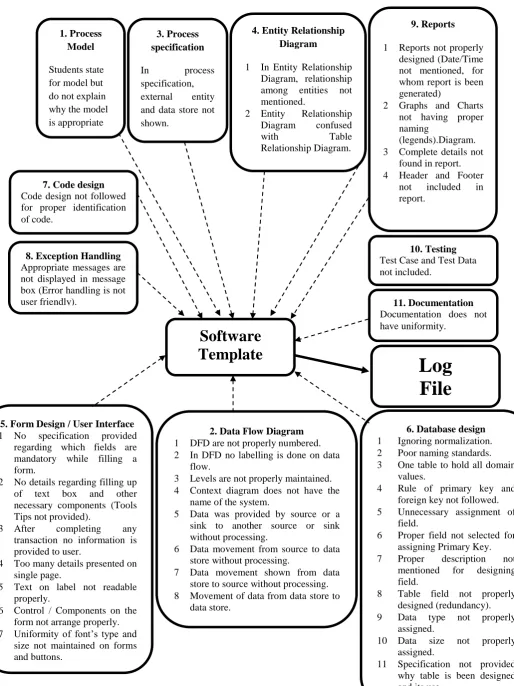
Figure – 2 Block Diagram of Software Template1. Process Model
Students state for model but do not explain why the model is appropriate for their system.
3. Process specification
In process specification, external entity and data store not shown.
2. Data Flow Diagram
1 DFD are not properly numbered. 2 In DFD no labelling is done on data
flow.
3 Levels are not properly maintained. 4 Context diagram does not have the
name of the system.
5 Data was provided by source or a sink to another source or sink without processing.
6 Data movement from source to data store without processing.
7 Data movement shown from data store to source without processing. 8 Movement of data from data store to
data store.
4. Entity Relationship Diagram
1 In Entity Relationship Diagram, relationship among entities not mentioned.
2 Entity Relationship Diagram confused with Table Relationship Diagram.
9. Reports
1 Reports not properly designed (Date/Time not mentioned, for whom report is been generated)
2 Graphs and Charts not having proper naming
(legends).Diagram. 3 Complete details not
found in report. 4 Header and Footer
not included in report.
7. Code design
Code design not followed for proper identification of code.
8. Exception Handling
Appropriate messages are not displayed in message box (Error handling is not user friendly).
10. Testing
Test Case and Test Data not included.
11. Documentation
Documentation does not have uniformity.
5. Form Design / User Interface
1 No specification provided regarding which fields are mandatory while filling a form.
2 No details regarding filling up of text box and other necessary components (Tools Tips not provided).
3 After completing any transaction no information is provided to user.
4 Too many details presented on single page.
5 Text on label not readable properly.
6 Control / Components on the form not arrange properly. 7 Uniformity of font‟s type and
size not maintained on forms and buttons.
6. Database design
1 Ignoring normalization. 2 Poor naming standards. 3 One table to hold all domain
values.
4 Rule of primary key and foreign key not followed. 5 Unnecessary assignment of
field.
6 Proper field not selected for assigning Primary Key. 7 Proper description not
mentioned for designing field.
8 Table field not properly designed (redundancy). 9 Data type not properly
assigned.
10 Data size not properly assigned.
11 Specification not provided why table is been designed and its use.
Software
Template
176
Figure – 2 shows that various identified errors under error categories mentioned in Table I are submitted to Software Template. After executing and verifying errors in various heads, Software Template generates a Log File which
provides user with the details regarding errors committed under specific error categories.
In the below section, we discusses about Software Template handling error pertaining to error category “Database Design”.
177
Figure – 3 Screen displaying standard Table Name and Field provided by user
Figure – 3 shows that how we can specify table name and field using template. Once table name and field are given a standard
file with name Detail_Master in text format is created as shown in Figure – 4.
Figure – 4 Text File Generated Showing details of Standard Table Name and Mandatory Fields for table
The Text file generated includes the following details: (a) Table Name Specified
(b) Mandatory columns
Now an SQL script is used extracting table name and columns, details are to be manually copied down in another text file. In the next step where we are having two
178
Figure – 5 Screen Showing Comparison of two text files
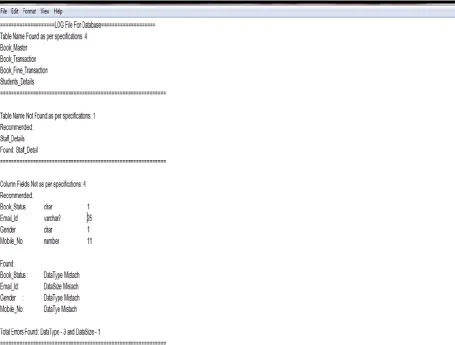
Figure – 6 LOG FILE
After comparing both the text files, a LOG File is generated as shown in Figure – 6 with following details:
(a) Table name found according to specifications.
(b) Table name not found according to specifications.
(c) Table name found according to specifications.
(d) Table name not found according to specifications.
(e) Recommended mandatory columns with name, data type and data size.
(f) List down errors made in data type, data size for recommended columns. (g) Total errors found in data type and
data size for columns.
179
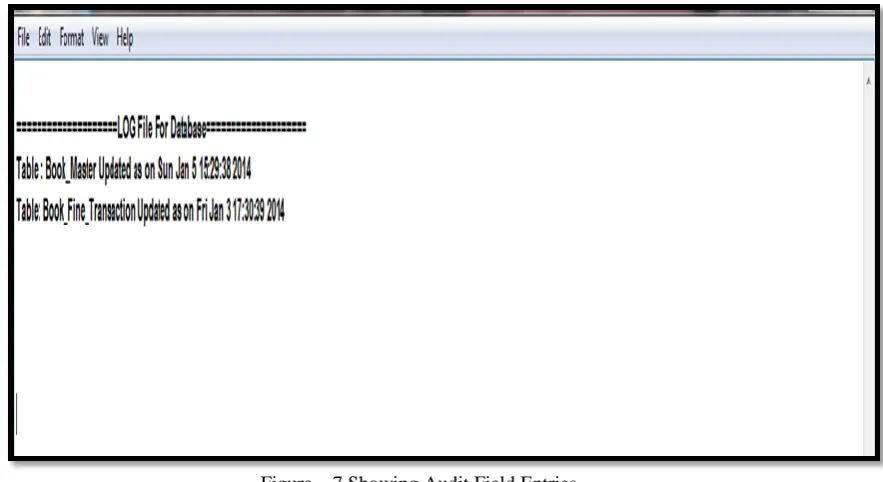
deletion or insertion operations performed on any of the table mentioned in the standard file as shown in Figure - 7
Figure – 7 Showing Audit Field Entries
VI.
CONCLUSION
Database Design‟ is the error category where highest number of errors has been encountered during last four years. Form Design / User Interface is the second most notorious error category been identified from finding and analysis. Hence, if due concern is not given to the most frequently occurring error category identified by us
then a still higher number of errors are predicated for projects to develop. Hence at last to mitigate number of errors and to improve software quality, through software template we have tried to remove these errors. We have been encouraged by our results. We are continuing to use and refine the Software Template
REFERENCES
[1] Eduardas Bareiša, Eimutis Karčiauskas, Virginija Limanauskienė, Romas Marcinkevičius, Kęstutis Motiejūnas, “Software engineering process and its improvement in the academy “ISSN 1392 – 124X INFORMATION TECHNOLOGY AND CONTROL, 2005, Vol.34, No.1.erau.edu.edutscript?
[2] Marcello Visconti, Curtis Cook, “Software System Documentation Process Maturity Model” Published in Proceeding CSC 93 Proceedings of the 1993 ACM conference on Computer Science Pages 352 – 357
[3] Thomas B. Hilburn, Embry-Riddle, “Software Quality: A Curriculum” Published in Proceeding SIGCSE ‟00 Proceedings of the thirty – first SIGCSE technical symposium on Computer Science Education Pages 167 – 171 ACM
New York, NY, USA ©2000 ISBN:1-58113-213-1
[4] Vikas Sitaram Chomal, Dr. Jatinderkumar R. Saini, “Software Quality Improvement by Documentation – Knowledge Management Model”, National Journal of System and Information Technology, Volume 6, Number 1, June 2013 – ISSN: 0974-3308
[5] Vikas Sitaram Chomal, Dr. Jatinderkumar R. Saini, “Finding Trend of Both Frequency and Type of Errors from Software Project Documentation” International Journal of Emerging Trends & Technology in Computer Science (IJETTCS), Volume 2, Issue 5, September – October 2013 ISSN 2278-6856