Evaluator Group Inc.
Executive Editor: Russ Fellows
Analysts:
Randy Kerns, John Webster
Version 2.0 – January 2012
Stora
ge
Eva
lu
ati
on
Guide
Seri
es
Storage for VDI Environments
Planning and Considerations
Stora
ge
Eva
lu
ati
on
Guide
Seri
Copyright 2012 Evaluator Group Inc. Page: ii of iii Version 2: January 2012
This document is distributed courtesy of Tegile Systems. Inc. More information on Tegile can be found at www.tegile.com .
About Evaluator Group
Evaluator Group Inc. is dedicated to helping IT professionals and vendors create and implement strategies that make the most of
the value of their storage and digital information. Evaluator Group services deliver in-depth, unbiased analysis on storage
architectures, infrastructures and management for IT professionals. Since 1997 Evaluator Group has provided services for
thousands of end users and vendor professionals through product and market evaluations, competitive analysis and education.
www.evaluatorgroup.com Follow us on Twitter @evaluator_group or www.evaluatorgroup.com
Copyright 2012 Evaluator Group, Inc. All rights reserved.
No part of this publication may be reproduced or transmitted in any form or by any means, electronic or mechanical, including photocopying and recording, or stored in a database or retrieval system for any purpose without the express written consent of Evaluator Group Inc. The information contained in this document is subject to change without notice. Evaluator Group assumes no responsibility for errors or omissions. Evaluator Group makes no expressed or implied warranties in this document relating to the use or operation of the products described herein. In no event shall Evaluator Group be liable for any indirect, special, inconsequential or incidental damages arising out of or associated with any aspect of this publication, even if advised of the
possibility of such damages. The Evaluator Series Research and Storage Evaluation Guide Series are trademarks of Evaluator
Copyright 2012 Evaluator Group Inc. Page: iii of iii
Table of Contents
2BSS
Executive Summary ... 1
2BSS Storage and VDI Overview ... 1
VDI Usage scenarios ... 2
Issues for Storage ... 2
3B Capacity Planning ... 4
Performance Requirements ... 5
VDI Operations ... 5
Steady State Load ... 6
Virtual Desktop I/O Storms ... 7
6B Administrative Requirements ... 8
Provisioning ... 8
Backup and Recovery ... 8
Additional Considerations ... 9
Image Refresh and Reclones ... 9
Security ... 9
Virus Scans ... 9
Recommendations ... 9
Summary ... 10
Copyright 2012 Evaluator Group Inc. Page: 1 of 12
2BSS
Executive Summary
Virtual Desktop Infrastructure (also known as VDI) is a growing trend among companies in an effort to reduce costs and administrative overhead while improving reliability and security of users desktops. The three primary vendors with desktop virtualization software are Citrix, Microsoft and VMware. Successful implementations require several factors, including reasonable costs and good performance from desktop users’ perspective.
Bringing the desktop applications, operating systems, and storage into a centralized IT function represents opportunities to save in administrative costs, system costs, and enhance the security of business data.1
Achieving performance for virtual desktops while maintaining costs at levels similar to
traditional desktops requires careful planning and architecture, and an understanding of how to optimize the most common bottleneck encountered.
Storage is often cited as the item most often responsible for performance success or failures, and also has the largest impact on total costs. Achieving good cost - performance levels requires a storage architecture optimized for VDI. The issues relating to storage can be categorized into three areas: storage capacity, storage performance requirements, and administrative changes. This paper examines the issues IT architects and administrators should consider before embarking on a VDI implementation.
2BSS
Storage and VDI Overview
Several vendors provide VDI software solutions. Some of the most popular include: VMware View
Microsoft Remote Desktop Services (formerly Microsoft Terminal Services) Citrix Xen
Each of these solutions differs in several ways. The demands on a storage system to effectively support VDI are different than other applications in a number of ways. Some methods of using VDI technology allow multiple desktops to utilize a common system image. This common cloned image may be used through VDI software, third party software or though the use of storage system clones. The impact of these choices is discussed in this guide with respect to the impact these choices have for capacity, performance and administration
Several storage vendors have relationships with software vendors and VDI vendors and are working toward tighter integration between system clones and storage systems. Thus, optimal architecture may require the use of a specific VDI vendor, 3rd party software and storage system.
Copyright 2012 Evaluator Group Inc. Page: 2 of 12 VDI Usage scenarios
There are a number of use case scenarios common with desktops and VDI. Provided below are three common scenarios that outline how users interact with their desktops, applications and access to file data. These different scenarios can have a major effect on what is required to implement VDI.
Task Automation: The user at a virtual desktop is often a telephone sales or a customer service
representative. Their application use is limited to a small set of applications. There may be hundreds or even thousands of these users utilizing a CRM and other applications. This use case typically involves little or no access to user specific file data.
Typical Office: Users are running a standardized set of applications, including typical
productivity applications as a web browser, a word processor and a spreadsheet. All users are provided the same applications, which they cannot modify, but they each have different data (e.g. word and spreadsheet documents) that they create, edit and want to save.
Knowledge Worker: These users may be designers, engineers or heavily customized office
workers. Each user has their own desktop environment, including preferences for applications, different from other users, with each managing and maintaining a large set of documents and other file data. I/O intensive operations such as media players, compilers and other applications may be used which impact the environment.
This paper will explore how these different scenarios can have a major effect on the storage system requirements. These three scenarios are merely illustrative. There are, of course, other scenarios, each with their own particular usage patterns. A given implementation could be any combination of these examples, or other possibilities.
Issues for Storage
Storage system vendors traditionally characterize their systems in a number of ways including capacity, performance measured in throughput in MB/s and I/Os per second. Other storage system aspects such as the amount of cache, the configurability of solid state disks, as well as the availability of extra features such as clones, snapshot copy, etc. are all important considerations in comparing storage systems for VDI implementations.
When promoting storage for VDI, some vendors have been quoting a cost per virtual desktop. Vendors often provide results using their own workloads and measurements, providing results that are not directly comparable. We suggest caution when evaluating requirements using only vendor-supplied data. We have observed data that are with further investigation are not
reproduce-able, inaccurate, or require a significant investment in proof of concept testing. A new benchmark known as VDI-IOmark2 helps to bring consistency around VDI workloads and how performance is measured and reported. Developed by leading industry vendors in
2 VDI-IOmark is vendor neutral benchmark for VDI performance testing available at
Copyright 2012 Evaluator Group Inc. Page: 3 of 12
conjunction with Evaluator Group, VDI-IOmark establishes workloads and results that may be used to compare storage vendors’ products.
Comparisons between storage products for VDI workloads can be done with an understanding of the features provided by different storage systems. In general, VDI implementation must
consider three areas:
Capacity, including OS shared, desktop specific customization and user data Performance under several workloads
Administration and security
First, the capacity requirements for VDI have a significant impact on the choice of a storage system. However, this isn’t as simple a question as it would first appear, as the user of clones, or layered images can dramatically reduce the real storage requirement by keeping only one copy of common data. Other technologies such as thin-provisioning, deduplication and other features may have an impact as well.
The second consideration is the performance of the proposed storage system with a specific mix of VDI desktop types. The key questions here are how many I/Os per second are required, and how does this scale with the number of virtual desktops?
Again, this issue is very complex, with several factors adding to considerations:
The phenomenon of “boot storms” (many systems booting at the same time) can create very high loads on the storage system for brief periods of time during the day
Some of the technologies used to reduce capacity can improve or reduce storage system performance depending upon the implementation.
The use of solid state (aka flash or SSD) storage can make a substantial
performance improvement, but due to its higher cost it must be used judiciously. In the VDI environment, there are opportunities for cost effective use of SSD technology.
Different storage system vendors have different combinations of features that effect capacity and performance, and each one implements whatever they do in different ways. For more details on what capabilities are available in each vendor’s offerings, see the Evaluator Group comparison matrices available in the Evaluator Series™ Research subscription area of the
EvaluatorGroup.com website.
Third is the broad area of administrative issues. The key questions here relate to what changes are needed, or at least useful, in various traditional functions such as provisioning (adding a new virtual desktop), backup, restore, security, etc. You will want to examine each of these issues, looking at how they are done today, who is responsible for each and whether and how this should change with VDI.
Copyright 2012 Evaluator Group Inc. Page: 4 of 12
3B
Capacity Planning
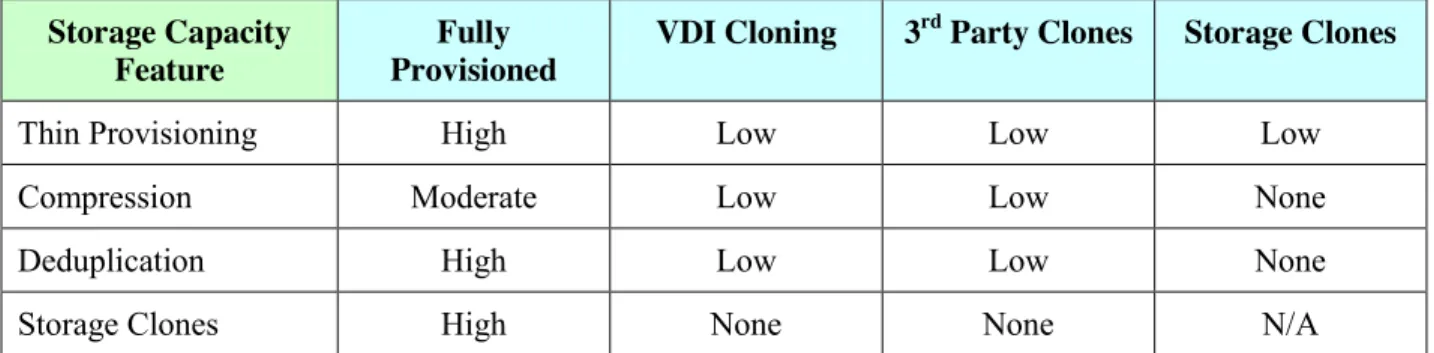
The main question around capacity is how much storage space is required for each virtualized desktop, and how this number scales as more virtual desktops are added. Many factors can impact this, including how the desktops are provisioned, and the underlying storage technology. Storage vendors have a number of technologies that can decrease storage capacity requirements. These include technologies like snapshots, writeable clones, thin provisioning, compression and data deduplication. Each has different costs and benefits, which affects both capacity and performance scaling.
The scaling metric is the most important factor as it has a significant impact on cost. It is directly dependent upon the how each desktop is provisioned. There are four choices for provisioning VDI which include:
Static allocation for each desktop (also known as Fully Provisioned) Shared allocation for desktop OS
o Clones using VDI software (such as Linked Clones)
o Clones using Third Party software (MokaFive, Unidesk, Wanova, etc.)
o Clones using storage system technologies (such as writeable clones) The architecture chosen has a significant impact on the entire VDI solution including capacity, performance and administration. The benefit of storage capacity features varies with each method of VDI cloning as follows:
Storage Capacity Feature
Fully Provisioned
VDI Cloning 3rd Party Clones Storage Clones
Thin Provisioning High Low Low Low
Compression Moderate Low Low None
Deduplication High Low Low None
Storage Clones High None None N/A
Table 1: Benefit of Storage Capacity Features with specific methods of VDI
There are potentially thousands of virtual desktops that will be created. With this large
multiplier, the use of storage capacity can grow quickly. Allocating only what is needed is the first consideration. Using a static capacity allocation such as a volume with a fixed capacity is not only wasteful, but multiplied by thousands can be overwhelmingly expensive. With Thin Provisioning, a storage system only allocates capacity in chunks as it is needed which reduces the overall usage and waste of storage space.
Other technologies that can help reduce capacity requirements are the use of compression and de-duplication facilities in the storage system. Both can be useful, as there is typically a lot of commonality among multiple virtual desktops. Deduplication and compression are typically automatic, with new information being compressed or deduplicated automatically without administrative intervention.
Copyright 2012 Evaluator Group Inc. Page: 5 of 12
The amount of duplication is dependent upon the exact usage scenario. Obviously, the less each virtual desktop user can customize their environment, the more commonality among desktops and the larger the gain from de-duplication.3
Another way to approach addressing the potential capacity problem is to use writeable clones or snapshot features of the storage system. Not all clones are equal however so the requirements need to be considered. Each clone must be able to share common data for the desktop images in a space efficient manner and must be read/write and able to grow as an individual virtual desktop increases the storage requirement. However, storage systems typically have a limit on the
number of clones and the limit may be less than the number of virtual desktops required.
Performance Requirements
In many ways, determining the I/O requirements for a storage system to be used with VDI is similar to the way it is done for any new application. However, there are some special
considerations for VDI, as well as the requirements to handle “I/O” and “boot storms” (discussed later in this section).
VDI Operations
There are several steps required to create, allocate and refresh VDI storage that plays an
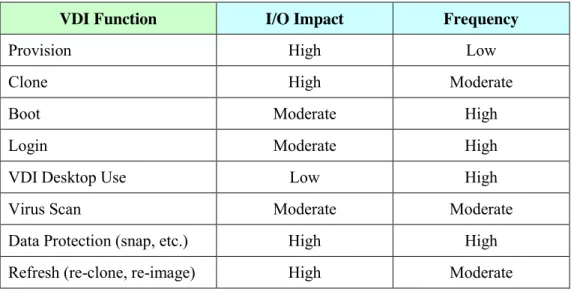
important part in the overall impact VDI has on storage systems. Many of the VDI management processes that create high loads are administrative; including cloning, booting, virus scan and related functions.
The storage lifecycle for VDI may be categorized as follows:
VDI Function I/O Impact Frequency
Provision High Low
Clone High Moderate
Boot Moderate High
Login Moderate High
VDI Desktop Use Low High
Virus Scan Moderate Moderate
Data Protection (snap, etc.) High High
Refresh (re-clone, re-image) High Moderate
Table 2: Storage Performance Considerations for VDI
Copyright 2012 Evaluator Group Inc. Page: 6 of 12 Steady State Load
Analysts, users and vendors report different number of I/Os per second required for each VDI user. Attempting to assign a specific I/O rate, I/O size or pattern is difficult due to the nature of the workload. Some applications may have a far greater impact than anticipated, such as Web browsing, while others that are assumed to have large impact may not.
Evaluator Group has performed extensive analysis of VDI workloads and found the workloads to be highly complex and apparently random in nature. The I/O request sizes range from 512 bytes up to 2 MB, with requests seeming to be random. In contrast, database applications including Exchange tend to operate using only one or two block sizes, with random I/O requests. Other file base operations may have a large number of block size differences, but may be somewhat sequential in their I/O requests. Moreover, VDI workloads are the result of many applications and hundreds of users interacting in a manner that presents challenges to many storage systems. The strategic use of solid state or flash media is often cost justified and can improve all VDI operations. The highly random nature of I/O’s can impact storage systems and caching, by constantly reading or writing data that is not cache resident. These combine to make estimating storage performance requirements a difficult task.
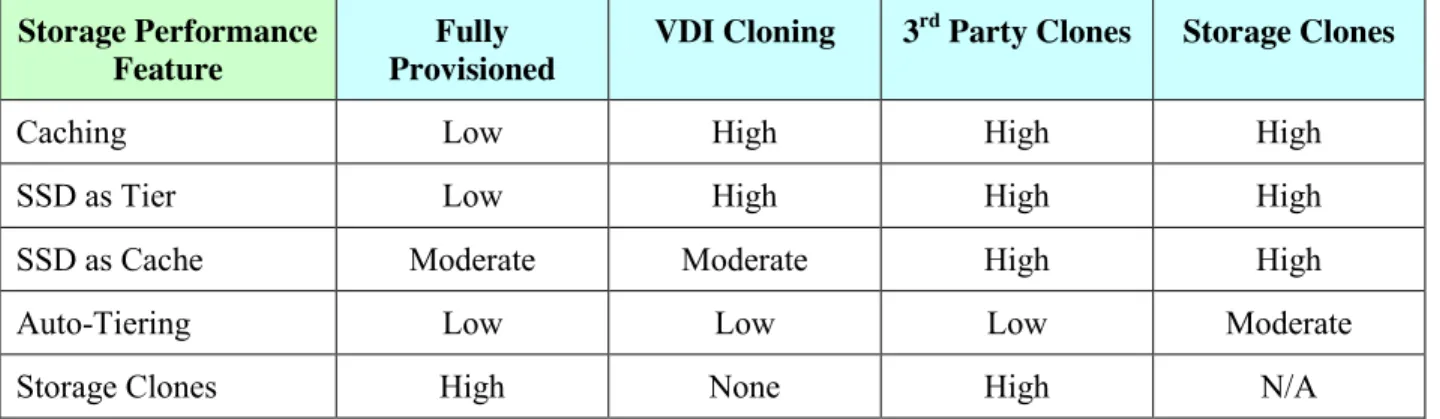
Storage performance features impact using various VDI methods are as follows: Storage Performance
Feature
Fully Provisioned
VDI Cloning 3rd Party Clones Storage Clones
Caching Low High High High
SSD as Tier Low High High High
SSD as Cache Moderate Moderate High High
Auto-Tiering Low Low Low Moderate
Storage Clones High None High N/A
Table 3: Benefit of Storage Performance Features with methods of VDI
Additionally, features such as thin provisioning, compression and de-duplication can negatively impact performance, particularly without using SSD. While there may be capacity advantage by reducing the amount of storage required, that reduction means that fewer spinning disks must handle the I/O load than would otherwise be required.
Another feature that can benefit storage systems is a large amount of cache - at least 100 Gigabytes available for both read and write caches. A large read cache allows a higher hit rate and thus reduces the load on rotating disks. The larger write cache allows absorbing more writes before destaging to smooth out the load on rotating media. The size of the cache does not need to scale beyond 100 GB if some type of cloning technology is used. If fully provisioned desktops are utilized, then the cache should be 10% of the total size of all desktops.
Copyright 2012 Evaluator Group Inc. Page: 7 of 12 Virtual Desktop I/O Storms
There are several operations that may contribute to I/O storms with virtual desktops. These include booting, virus scanning and cloning as the most typical examples. This is an area where VDI implementations differ from many physical system implementations, in that I/O impact to local drives are often not considered.
When a virtual desktop is booted, it may perform I/Os at a very large rate for a short time period. This rate can be ten times the normal or steady state rate. This acceptable if the increased boot load is staggered. However, it is common to have times of the day when a large number of systems boot up, such as mornings or shift changes. This sudden increase in I/O load the causes a “boot storm” which the storage system must be handle in order performing “acceptably” for users.
The storage system used, features available and the use of cloning architecture can all have significant impact on I/O storms. If fully provisioned desktops are used, the total of each image will overwhelm the I/O capacity of spinning media, and exceed the capacity of nearly all storage systems caching technologies. Flash and SSD caching technologies will also become
overwhelmed, or much less effective in these cases as well.
If virtual desktop images can be loaded only once and then remain in cache, simultaneous booting can be more effectively handled. As noted above in table 3, clones can provide marked improvement for boot storms in many cases, since the original data will be brought into the storage system cache with the first boot and then can be used for other images.
A technology that can help with both steady state and boot storms is the use of SSD or flash to replace some of the rotating disk storage. A pair of 200 gigabyte SSD’s can often handle the I/O load at a lower cost than the required number of rotating disks. Depending upon requirements and storage system capability, this SSD/flash might be attached to an existing or new enterprise type storage controller, or it may even be simply placed within the VDI server itself.
Using the earlier example, if 90% of image data is common, 1,000 desktops may be retained in 100 GB’s if each image is 10 GB. This scenario works well if SSD caches are used, since memory cache of 100 GB’s is extremely expensive compared to the cost of a pair of mirrored SSD’s or other flash caching technology.
In this scenario, without caching of some type, the I/O load will require significantly more spinning media to handle the I/O requirements than is needed for capacity. This is the kind of analysis IT administrators must do to plan the correct configuration and sizing for the storage system.
Copyright 2012 Evaluator Group Inc. Page: 8 of 12
6B
Administrative Requirements
Administration and security are often two of the primary justifications and rational provided for justification of VDI projects. These can be difficult to quantify in terms of monetary value, which makes evaluation of these requirements more difficult.
There are a number of issues to consider where the “correct” thing to do may be different from how IT operations currently are performed with physical desktop environments. In some cases, these changes may require reassigning functions between different people in the IT department. This section discusses some of the issues, together with an explanation of why IT may want to change polices, and some suggestions for implementing the new methods.
It is important to understand what features the virtualization software products discussed earlier provide. In addition, some storage systems provide enhanced capabilities to manage the storage part of VDI. Furthermore, some VDI software products have controls that can exploit the some storage system features and provide the base for the administration of VDI.
Provisioning
Provisioning is the creation of a new virtual desktop environment on the host server and the allocation of that new environment to a particular user. This is a new function that didn’t have to be performed in a physical desktop environment.
Creating hundreds and potentially thousands of virtual desktops must be automated in some fashion. Scripting or a utility process to create the desktop images from a golden image is crucial because of the potential number of virtual desktops. The performance impact of provisioning methods must be understood as well.
The VDI software provides a method, but it may take a lot of time and may impose a
performance burden on production systems. Other approaches include using third party layering or cloning software, or using storage system cloning capabilities. Limitations to number of clones or snapshots are important considerations, as well as the administrative ease of these methods.
All of these methods also have implications for the process of refreshing or re-cloning images when software updates are available.
Backup and Recovery
Protection of virtual desktops, along with customization and user file data are all important considerations. The answer to each of these requirements may involve a different set of tools and techniques.
Hypervisor or storage system snapshots may be a protection element, but this method alone does not provide disaster protection. Recovering after a disaster or an inadvertent deletion must be addressed similar to normal IT operations except that the scale may be multiplied by thousands. If backup software is used, it should be able to avoid making multiple backups of parts of the virtual desktop that are highly duplicated across multiple virtual desktops.
Copyright 2012 Evaluator Group Inc. Page: 9 of 12
Virtual desktops may be backed up with standard backup software. Creating a backup of a set of snapshots may be more effective in that the storage system functions regarding snapshots and recovery can be utilized.
File data is another item that should be considered, with data protection handled differently. A best practice is to separate all user file data onto one or more shared SAN or NAS storage
systems. This data may be protected more efficiently when treated as file data, rather than being included with desktop images.
Restoration and disaster recovery are also considerations for VDI desktops and user files. Additional Considerations
There is a growing list of best practices for setting up VDI that differ from traditional physical desktops. These include indexing, virus scans, defragmenting and many other OS settings.
Image Refresh and Reclones
Software updates and patches are a common occurrence. Without planning, the use of carefully crafted golden images and clones can become useless after the first set of OS updates.
Additional impact on the amount of time to reclone images, system performance impact and other issues must be weighed.
Security
Improved security is often a major justification for VDI. However, security concerns do not go away simply by utilizing VDI. Offsite access, disconnected use, and protection of sensitive information are still issues that must be addressed.
Virus Scans
Anti-virus protection for the virtual desktops is another item that can operate differently in VDI environments. At a minimum, virus scan times must be coordinated to not impact production systems during peak times. If file data is maintained on a NAS system, offloading of virus scanning to NAS systems may be possible; thereby removing the need for scans within virtual desktops. This is another consideration, which will affect the choice of architecture.
Recommendations
As typical of many new technologies, VDI provides opportunities for an organization to gain appreciable benefits, but comes at a cost. This requires careful evaluation of the tradeoffs in order to maximize the benefits and minimize the problems. Evaluator Group recommends the following when considering the storage implementation.
An understanding of the type of desktops deployed (task, office or knowledge), and the total number of desktops are the first considerations. From there, an architecture may be envisioned and tested using I/O proof of concept tools such as VDI-IOmark, Liquid Labs, VMware or Login VSI. Scaling should be done in stages, to ensure the products chosen
Copyright 2012 Evaluator Group Inc. Page: 10 of 12
are able to perform as the solution is expanded. Performance is largely determined by the storage system and tools used, and is often the most critical item.
Another common consideration is the use of existing equipment, or new servers and storage. If existing storage is used, it is important to ensure the necessary features exist in order to support the chosen deployment and usage scenario.
There is potential interplay between the choice of software package and storage vendor. It is important to talk with both to see what combination makes the most sense.
The use of some type of cloning technology typically has the greatest overall effect on both the total cost and performance of the system. Understand the tradeoff’s involved. Judicious use of SSD or flash memory can provide significant performance improvements
across the board, and minimize the impact of I/O storms. Large amounts of cache can be very useful.
The new centralized administration of desktops may have an effect on “customer” support. Organizational changes may be necessary.
Data protection and backup strategies may change and needs to be thought through. This area is rapidly changing. It is important to understand the software and storage
vendor’s future plans, even to the level of NDA presentations.
Summary
Evaluator Group has seen a growing interest in VDI, with adoption growing significantly in some market segments. Environments where security, reliability and reduced administrative burdens are the greatest concerns have been those leading the adoption of VDI. These include vertical segments such as finance, government and education. In other markets, there will be selected adoption based on usage scenarios and cost considerations.
With careful consideration, architecture and choice of storage systems, many other environments will be able to find success with VDI acceptance with their end-users. Storage performance can be achieved within budget if the correct understanding and knowledge of storage requirements are understood by IT staff before implementing a potential solution.
To be successful, storage capacity, performance and administration must be carefully considered to deliver expected end-user service levels. Evaluator Group encourages IT architects and administration to work closely with the end user community in building the IT infrastructure and business case for VDI implementations.
Copyright 2012 Evaluator Group Inc. Page: 11 of 12
Evaluator Group Overview of Tegile
Tegile is a company of high-tech industry veterans that formed to address the evolutionary complexity introduced into storage systems over time. Making storage simpler to use and deploy, architecting new technology in the initial design, and incorporating the highest-value capabilities were the initial goals for Tegile. As a company, they have introduced a new storage system with the characteristics of high availability, high performance, and low price for the amount of data stored that will appeal to a large segment of the market.
The Zebi storage system is an integrated system of disk controllers, disk drives, solid state devices (SSDs), and logic that offers both block and file storage in the same system. With both SSDs and disk drives, Tegile terms the Zebi as a hybrid storage array. The storage system has a multiple node architecture where each node is a storage controller with associated storage capacity. The initial Zebi offering is a multi-node system with automatic failover to enable high availability.
The focus areas of Tegile for expanding on the value delivered from a storage system are in the efficiency of storage by implementing a new data reduction approach and in performance with multi-level caching and handling of metadata. Simplicity has been addressed with Application Profiles to configure the system for specific patterns of operation by application and by browser-based dashboards for system monitoring and reporting.
Data reduction with Zebi includes inline deduplication and compression to increase the effective storage capacity for each node. Handling of the metadata created and used by the data reduction technology and RAID protection is a key performance improvement offered with Zebi. In addition to performance acceleration with the metadata handling, a multi-level cache using protected DRAM and SSDs enable read and write caching. The DRAM cache is mirrored to another controller and protected with capacitor hold-up and is used for reads and writes. Data is deduplicated before it is stored in a second level cache of SSDs, increasing the effective capacity and bandwidth of the SSDs. Large capacity disks are used as the backing store location for data and are configured with raw (without data reduction) capacities of between 10TB and 90TB per node. The effective capacity of the storage systems represents an average across different data types but has been demonstrated to be three to four times the actual capacity with current
customers. The performance has also been measured to be five times the legacy storage systems that were being replaced.
The usage areas highlighted with existing customers have been in server virtualization and virtual desktop infrastructure (VDI) areas. The effectiveness of data reduction and the
performance increases have allowed greater numbers of virtual machines and virtual desktops instances to be created than was possible with other storage systems in their environments. The Zebi includes the VMware vSphere APIs for Array Integration to also integrate with VMware. The support for a unified SAN and NAS environment with block storage over Fibre Channel and iSCSI protocols and file storage using CIFS and NFS has also allowed customers to consolidate different workloads to the Zebi system. The performance increases allow support of greater consolidation across various workload types.
Copyright 2012 Evaluator Group Inc. Page: 12 of 12
Evaluator Group has been explaining the changes in dynamics for managing storage, especially in the mid-tier enterprise space and below where dedicated storage administrators are rarely seen. Administration for storage has changed where it is handled by an IT generalist who does not have the deep training or technical storage background usually seen with storage administrators. The Tegile Zebi is targeted at these types of environments with the IT generalist staffing. The system has been designed for simple installation and automated actions including the caching operations. The browser-based dashboards provide a view into the storage system operation. The Tegile Zebi storage system provides advantages for Information Technology by improving the economics of storage both in reduction in the cost to store data and in the increase in
performance to be able to handle more application usages. The greater performance and the support for both file and block protocols enables consolidation from many storage systems to a Zebi storage system while still accommodating capacity growth demand. The data reduction technology using deduplication and compression enables larger capacities for the physical storage without impacting performance. Price and performance are interrelated concerns for IT operations and Tegile has addressed both with the Zebi storage system.