R. Perrott et al. (Eds.): HPCC 2007, LNCS 4782, pp. 809–820, 2007. © Springer-Verlag Berlin Heidelberg 2007
Environment
Jinpeng Huai, Qin Li, and Chunming Hu
Trustworthy Internet Computing Lab, Beihang University, Beijing, China
[email protected], [email protected], [email protected]
Abstract. The purpose of virtual computing environment is to improve resource utilization by providing a unified integrated operating platform for users and applications based on aggregation of heterogeneous and autonomous resources. With the rapid development in recent years, hypervisor technologies have become mature and comprehensive with four features, including transparency, isolation, encapsulation and manageability. In this paper, a hypervisor based virtual computing infrastructure, named CIVIC, is proposed. Compared with existing approaches, CIVIC may benefit in several ways. It offers separated and isolated computing environment for end users, and realizes hardware and software consolidation and centralized management. Beside this, CIVIC provides a transparent view to upper layer applications, by hiding the dynamicity, distribution and heterogeneity of underlying resources. Performance of the infrastructure is evaluated by an initial deployment and experiment. The result shows that CIVIC can facilitate installation, configuration and deployment of network-oriented applications.
1 Introduction
Along with the rapid development of IT infrastructures and Internet, the network has brought together large amount of resources, including computers, data, software and services. But the utilization of these resources is far from their full potential. Beside this, the internet-oriented applications demand for large-scale computing, massive data processing and global information services. At this point, how to organize and manage distributed, heterogeneous and autonomic resources, to share and coordinate resources across the autonomous domains, and finally to improve utilization of resource becomes a key issue of designing the software infrastructures for network-based computing systems.
One of the possible way to solve this problem is to build a virtual computing environment, on the open infrastructure of the Internet, providing harmonic, transparent and integrated services for end-users and applications[1]. Many interesting computing paradigm has been proposed from both academic and industrial communities, such as the Grid, Peer-to-Peer (P2P) systems, ubiquitous computing, and desktop computing[2-4]. Grid Computing is mainly focusing on the dynamic and across-domain network resource share and coordination; P2P is commonly used for end-to-end resource and information services; Ubiquitous computing is aiming at
accessing resources at anytime and anywhere; and the desktop computing is trying to integrate large numbers of idle resources to provide computing intensive applications with high-performance computing power. All of these approaches are trying to provide a unified resource virtualization environment to get better utilization of resource capacities.
In recent years, the virtual machine technology has got wider attention. Hypervisor or virtual machine[5] is a virtual layer between the hardware and software. It can provide applications with independent runtime environment by shielding the dynamic, distributed and heterogenic hardware resources. It can assign an independent and isolated computing environment to each individual user. And it can help system administrators to manage hardware and software resources in a virtual, centralized approach. According to these advantages, the virtual computing environment based on virtual machine has now become a hot spot, many virtual machine based mechanisms and systems has been proposed, such as Virtual Workspaces[6], VIOLIN[7], and Virtuoso[8]. However, the research of virtual computing environment based on virtual machine is still in its infancy. Existing approaches are usually focusing on single virtual machine, and lacked of the crossover of a variety of related technologies. In addition, management and monitoring features are not well supported in these systems, the status and the characteristics of the virtual computing environment.
In this paper, a hypervisor based computing infrastructure, named CIVIC, is proposed. Compared with existing approaches, CIVIC may benefit in several ways. It offers separated and isolated computing environment for end users, realizes hardware and software consolidation and centralized management. Beside this, CIVIC provides a transparent view to upper layer applications, by hiding the dynamicity, distribution and heterogeneity of underlying resources. Performance of the infrastructure is evaluated by an initial deployment and experiment. The result shows that CIVIC can facilitate installation, configuration and deployment of network-oriented applications.
This paper is organized as follows. In Section 2, a brief introduction on the hypervisor technology is given. In Section 3, several hypervisor based virtual computing systems are introduced. A hypervisor based software infrastructure for virtual computing, named CIVIC, is proposed in Section 4 with layered architecture and modules. Finally, the performance of the infrastructure is evaluated by an initial deployment and experiment in Section 5.
2 Virtual Machine and Hypervisor
The concept of virtual machine (VM) is still not clearly defined. When people are talking about virtual machine, sometimes, they refer to a type of software which can emulate a physical machine, like Virtual PC or VMWare. In this case, it is more accurate to use the word hypervisor, or Virtual Machine Monitor (VMM). Beside this, virtual machine can also refer to an instance of emulated (or virtual) machine with software installed inside. In this case, the word virtual machine instance is more appropriate. In this paper, we will follow this rule to avoid ambiguity.
2.1 Background
Hypervisor has a long history. In 1966, VM/360 (Virtual Machine) system[9] came into being in IBM Cambridge research center VM/360, which is used to share
hardware resources for different user. In 1997, Connectix provided Virtual PC[10] able to run PC applications in a Mac machine, therefore transparent portability for legacy software could be archived. In 1998, VMWare Company released VMware
hypervisor which is the first hypervisor software able to emulate PC on PC platform[11]. VMWare is now highly valued and widely deployed in enterprises.
In order to eliminate the impact of hardware failure and maintenance to enhance the stability and reliability of software, VMWare and Xen both proposed on-line migration technology in their own hypervisors, named VMotion [12] and Live Migration[13] respectfully. It can be used as a dynamic load balancing mechanism for hardware resources provision.
The performance issue is always the main obstacle to prevent the wider use of hypervisor. Hypervisor is preferred to be transparent to hardware and software, which also made its implementation complex and inefficient. Technologies like Xen[14] and Intel VT[15] greatly improved the performance of hypervisor while eliminate part of its transparency to software and hardware.
2.2 Features of Hypervisor
According to previous analysis of the hypervisor, we conclude there are four main features of hypervisor:
(1) Transparency. Transparency means software can execute in virtual machine environment directly, without being revised. Other features of hypervisor, such as hardware resource sharing, isolated environment, live migration, portability, etc, can be easily applied to any software running in virtual machine without modification.
(2) Isolation. Hypervisor enables multiple instances of virtual machine to be hosted in a physical machine. Not only software can share hardware resources via virtual machine, but also be protected and isolated by virtual machine. Each virtual machine can install its own version of software, without having to consider compatibility with the software installed in other virtual machines. Each virtual machine also maintains a separated runtime environment, while preventing software failure caused by software running in other virtual machines.
(3) Encapsulation. Whole system of a virtual machine is enclosed in a virtual hard disk, which is an ordinary file of the host machine. Through this form of encapsulation, virtual machine installation, backing up and restoring are as easy as copying and pasting a file in operating system, which can effectively reduce the difficulty of the system configuration and deployment, and increase the flexibility of software.
(4) Manageability. For virtual machine operations, such as boot, shutdown, sleep, and even add, modify, or remove virtual hardware, there all have programming interface. Via programming interface, virtual machine can be controlled by program completely. Therefore administrators have greater flexibility in controlling virtual machines, compared to manually controlling physical machines. Based on virtual machine, remote and centralized management of hardware resources can be achieved. The aforementioned live migration is another example of the manageability of virtual machine, software running in virtual machine can be controlled to change runtime environment without being interrupted.
3 Related Work
Virtual Workspaces[6] aims to provide a customizable and controllable remote job execution environment for Gird. Traditional grid mainly focuses on job exciting, but neglects the deployment and maintenance of execution environment. Virtual Workspaces implements web service interface that conform to WSRF and GSI standard for virtual machine remote management. Client can create and deploy virtual machine on-demand via the interface.
Virtual Workspaces supports unmanned installation of legacy applications, which can effectively reduce the deployment time, significantly minimize the artificial participation in it. By allocating and enforcing resources required by jobs with different priorities, virtual machine can realize fine-grained resource provision, including CPU, memory, network bandwidth, etc. However, in some cases, applications need to run in a network environment with multiple machines, Virtual Workspaces do not suit for the situation because it cannot provide a network environment for these applications.
VIOLIN[7] is another hypervisor-based project proposed by Purdue University, which can provides the isolated network environment for applications. In VIOLIN, users can design and create virtual network topology on physical machines and physical networks. Every virtual network is isolated and independent from each other. Each virtual machine and virtual network equipment can be customized. For example, VIOLIN can build a virtual mobile IP network using Mobile IP protocol stack to test the stability and performance without actual moving of the terminals.
Similar projects like In-VIGO [16] of University of Florida and Virtuoso[8] of Northwestern University, can facilitate configuration and management of virtual machine network for network applications, and serve as the basis for emulation and evaluation infrastructure of network software. However, these projects mostly focus on runtime support, but lack of designing support which can facilitate user’s creating and customizing the virtual machine network.
Internet Suspend and Resume (ISR)[17] is another interesting hypervisor systems. It can provide a personal mobile computing environment for users, without having to carry any portable device. The personal computing environment is encapsulated in the virtual machine which is stored in a distributed file system. Whenever user closes or suspends the virtual machine, ISR will copy its state back to the distributed file system so that the virtual machine can be restored from anywhere later.
The demerit of ISR is that virtual machine must be suspended before user moves, therefore virtual machine will stop running during the movement. With the use of virtual machine live migration, this restriction can be removed somehow. However, live migration requires that the source and destination machine reside in the same link, which greatly limits the mobility.
SoftGrid[18] product provided by Softricity uses light-weight hypervisor technology to solve software management problem on the Windows platform. The light-weight hypervisor only need to intercept a small part of system call from application to emulate virtual file system and virtual registry. A similar technology under Linux platform is called jail or chroot. Since each application is isolated in a separate virtual file system and has separate registry namespace, software compatibility problem caused by file version conflicts and registry key conflicts can
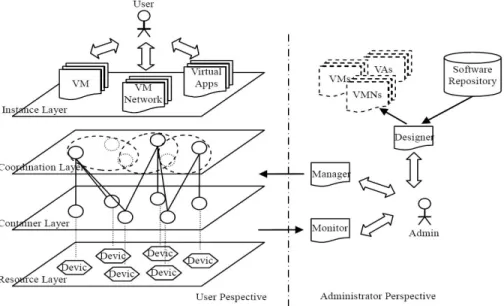
Fig. 1. CIVIC Perspectives
be reduced to minimum. Using SoftGrid, the image file only need to contain the application and its library dependency, which will be relatively smaller than normal virtual machine image which include full operating system. But this light-weight hypervisor has very limited isolation other than file system and registry, such that two applications running in SoftGrid hypervisor can interfere with each other.
4 CIVIC Architecture
In this section, we propose the CROWN-based Infrastructure for VIrtual Computing (CIVIC), a hypervisor-based computing environment. CROWN (China R&D Environment Over Wide-area Network) is a service-oriented Grid middleware system which enables resource sharing and problem solving in dynamic multi-institutional virtual organizations in for China e-Science community[19]. CIVIC is a core component of CROWN Grid Middleware version 3.0. CIVIC provides better support for grid service in CROWN with isolated runtime environment.
The benefit of CIVIC is listed as follows: Firstly, it can offer separated and isolated computing environment for users. Secondly, it can also realize hardware and software consolidation and centralized management for computer administrators. Thirdly, it can be transparent to upper layer applications, hiding the dynamicity, distribution and heterogeneity of underlying resources from applications.
As shown in figure 1, CIVIC can be viewed in two perspectives. From normal user perspective, CIVIC establishes a middleware infrastructure on top of raw hardware resources to provide hosting environment for virtual machine instance and virtual network instance. User can interact with the instance just like with a physical machine or physical network without having to know which specific physical machine hosts
the instance. Using technologies like virtual machine live migration, CIVIC can keep virtual machine instance running from the infection of underlying hardware failure or maintenance.
From administrator perspective, CIVIC provides three modules. Firstly, CIVIC Monitor module can collect and present overall runtime status to administrator. Secondly, CIVIC Manage module can provide administrator a centralized management console for resources registered in CIVIC environment. Thirdly, CIVIC Designer module provides a visual editor which can facilitate the installation and configuration of virtual machine instance and virtual network.
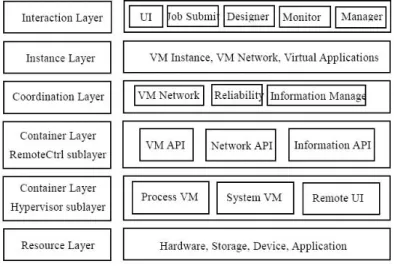
As shown in figure 2, CIVIC can be divided into five layers: resource layer, container layer, coordination layer, instance layer, and interaction layer.
Fig. 2. CIVIC Layers
4.1 Resource Layer
Resource layer is formed by multiple resource nodes. Each resource node is a physical machine. Generally, software is installed directly into these physical machines. However, resource nodes are distributed over the Internet, which may be incompatible with each other; both hardware and software may encounter unexpected failure. All these circumstances make software unreliable and vulnerable to environment changes.
In CIVIC, software will be installed into virtual machines. With the middleware infrastructure established on top of raw hardware resources, CIVIC can provide isolated and reliable hosting environment for virtual machines over dynamic and heterogeneous resource nodes on the Internet.
4.2 Container Layer
The layer on top of the resource layer is the container layer, which is composed of container nodes. Each container node is a physical machine with CIVIC Container
component installed. Each container node has hypervisor software deployed that can host multiple virtual machine instances, and these instances can be controlled remotely through container interface.
Container layer can be further divided into two sub-layers:
(1) Hypervisor Sub-layer. CIVIC supports three type of hypervisor. The first one is Xen hypervisor, which can host full functioned virtual machine with operating system and application software installed in the virtual machine instance. The second one is jail virtual machine, which can provide isolated file system hierarchy for software. The third one is Java virtual machine which can host software written in Java.
(2) Remote Control Sub-layer. This sub-layer provides remote management interface, including virtual machine management interface, network configuration interface, and information query interface, etc. Each virtual machine instance can be controlled by other nodes through virtual machine management interface, including operations like booting, halting and hibernating. A tunnel connection can be established between two container nodes using network configuration interface, which can be used to connect multiple virtual machine instances hosted by different container nodes. Administrator can monitor CPU, memory usage in virtual machine instances hosted by container node through information query interface.
4.3 Coordination Layer
Container node has the ability to host virtual machine instance. However it is not efficient to deploy an instance of virtual network containing several virtual machines into a single container node. To keep reliability of the virtual machine instance, it is also important to deploy multiple replicated instances to several container nodes. Therefore, in these cases, it is essential to coordinate several related container nodes to serve one purpose.
CIVIC builds coordination layer over container layer. Coordination layer consists of multiple coordination nodes, which are special container nodes with coordinating function configured. Coordination nodes are responsible for the management of other container nodes.
As mentioned above, there are different kinds of coordination functions in CIVIC, for example, resource management for the resource registration and query, virtual network management for maintaining virtual network over a number of container nodes, etc.
4.4 Instance Layer
There are multiple nodes in instance layer, which are isolated computing environment provided for users. CIVIC support three different kinds of instance nodes: virtual machine instance, virtual machine network instance, and virtual application instance. Virtual machine instance contains a complete operating system, which is isolated by hypervisor like Xen. Virtual machine network consists of multiple virtual machines with a specific network topology. Virtual application instance contains only a single application.
4.5 Interaction Layer
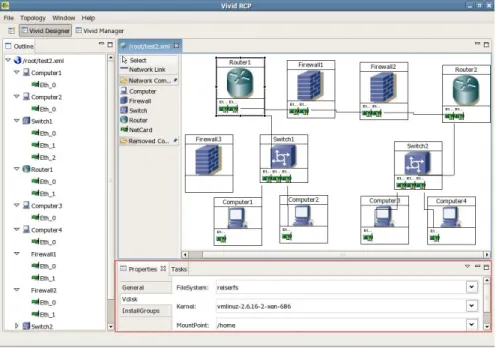
This layer contains two types of interaction modules. First type of interactive modules is CIVIC administrative tools, including CIVIC Monitor, CIVIC Manager and CIVIC Designer. Monitor module can collect and present overall runtime status to administrator. Manager module can provide administrator centralized management for resources registered in CIVIC environment. Designer module provides a visual editor which supports creation of multiple virtual machines with a specific network topology, as shown in Figure 3.
Second type of interaction module provides access interface to CIVIC instance. Users can interact with CIVIC instance nodes through a variety of interactive method, such as command line interface, graphical user interface, and Web Service interface to submit jobs to execute in virtual machine.
5 Implementation and Performance Evaluation
CIVIC is still in its active development. Under the design considerations mentioned above, we have finished part of our systems including CIVIC Designer, which is a GUI application based on Eclipse RCP framework, and CIVIC Job Engine, which implements front-end interface for virtual machine. Performance of our systems is evaluated through carefully designed experiments.
5.1 CIVIC Designer
CIVIC Designer can provide easy to use user interface for creating, modifying, deploying virtual machines and virtual networks. Figure 3 is shows the interface of CIVIC Designer.
There are two ways to create a new virtual machine instance in CIVIC Designer. The first one is to create from scratch, which is to install a new operating system into a virtual machine. Users can customize the software installation and configuration of virtual machine instance via dialogs and wizards in CIVIC Designer. The second one is to create from existing physical machine, also known as Physical-to-Virtual (P2V). CIVIC Designer supports a remote P2V feature, which can turn a physical machine into virtual machine instance remotely with only few requirements from the physical machine. This function is very useful for maintaining runtime environment for legacy software.
CIVIC Designer also provides a visual network topology editor which can be used to create, configure and deploy virtual network with multiple virtual machines. Each instance of virtual machine network created by CIVIC Designer will be treated as an atom element, which can be encapsulated as a single image file, and be deployed and managed as a single instance.
An instance of virtual machine network can be hosted on a single physical machine, and can also be hosted on several different machines, even on two machines that are not attached in the same network link. In case two machines from different links host an instance of virtual network, a tunnel will be established between these machines connecting virtual machines among them. In current implementation, OpenVPN is used to establish such network tunnel.
Fig. 3. CIVIC Designer
Performance regarding to creating, deploying virtual machine or virtual network using CIVIC Designer is studied and discussed in section 5.4.
5.2 CIVIC Job Engine
As mentioned, there are several ways for users to use virtual machine instance in CIVIC. Users can log on to the command line interface or graphic user interface to control the virtual machine directly, or use job submission interface to execute a job on virtual machine.
CIVIC Job Engine provides a Web Services interface which support Job Submission Description Language (JSDL) standard[20]. After Job Engine received submitted the job, it will execute the job in the virtual machine instance specified by the JSDL document. Since the runtime environment of job engine and jobs are isolated and protected by hypervisor, and each job is guaranteed by hypervisor with specific allocated computing resources, such as number of processors, and size of memory and disk. Therefore hypervisor can ensure QoS and reliability of job scheduling.
However, since the job engine and job is totally isolated by hypervisor, the communication between engine and job can be inconvenient and inefficient. In current implementation of CIVIC Job Engine, we used SSH as the communication channel between engine and job. In order to improve efficiency, previous SSH session will be cached for future communication.
5.3 Experiment
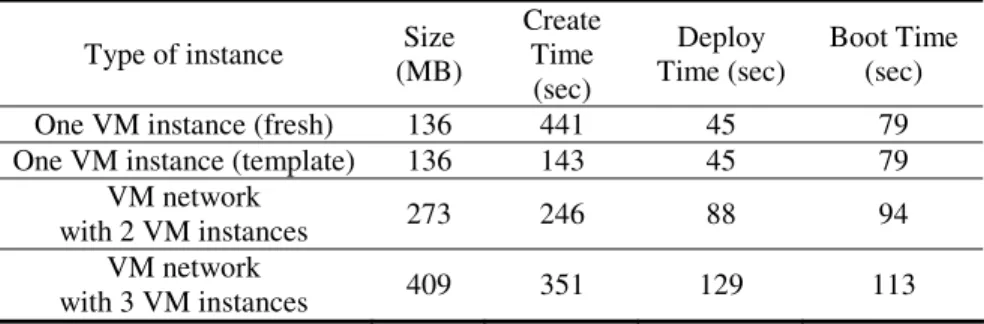
We designed some experiments to evaluate the performance of our initial implementation of CIVIC. Our experimental environment includes two Intel P4 machine, with 3GHz CPU and 1G memory. One machine is used for the designing and creating of virtual machine and virtual network, and the other one is used to host the virtual machine or virtual network created by the first one. The experimental metric includes install time, deploy time, and boot time of different type of instance. The experimental results are shown in Table 1.
Table 1. CIVIC Designer experiments
Type of instance Size (MB)
Create Time
(sec)
Deploy Time (sec)
Boot Time (sec)
One VM instance (fresh) 136 441 45 79
One VM instance (template) 136 143 45 79 VM network
with 2 VM instances 273 246 88 94
VM network
with 3 VM instances 409 351 129 113
The virtual machine created in the experiment is a minimized Linux system, including the basic network tools like ftp, ssh, etc. This virtual machine occupied 136 megabytes of disk space. From the experimental results shown in Table 2, Using CIVIC to create a fresh Linux virtual machine only takes about 7 minutes, and if we use previously created virtual machine template to accelerate the installation procedure, we can reduce the install time to 2 minutes. Taking into account that the installation of a physical machine usually takes between 30 to 60 minutes, using CIVIC can effectively speed up the system installation work and minimize manual participation in installation. Furthermore, It only takes about 2 minutes to deploy a virtual network consists of three virtual machines. In practice, it usually takes far more than 2 minutes to install and configure a physical network including several physical machines. This shows that CIVIC can facilitate installation, configuration and deployment of network-oriented applications.
6 Conclusion and Future Work
This paper introduces the emergence and development of virtual machine technology with the conclusion of four characteristics of virtual machine: transparency, isolation, encapsulation and manageability. We also analyzed several related implementations. Finally, we presented the system function design and experimental results of initial implementation of CIVIC, a virtual computing infrastructure based on CROWN.
Our future work includes investigating security access control mechanisms in CIVIC which enforcing resource provision and reservation, as well as improving
software availability and resource utilization by supporting virtual machine migration over wide-area network.
Acknowledgments. This work is partially supported by grants from the China National Science Foundation (No.90412011), China 863 High-tech Program (Project No. 2005AA119010), China 973 Fundamental R&D Program (No. 2005CB321803) and National Natural Science Funds for Distinguished Young Scholar (Project No. 60525209). We would also like to thank members in CROWN team in Institute of Advanced Computing Technology, Beihang University for their hard work on CROWN grid middleware.
References
1. Lu, X., Wang, H., Wang, J.: Internet-based virtual computing environment (iVCE): Concepts and architecture. In: Science in China Series F-Information Sciences, vol. 49, pp. 681–701 (2006)
2. Foster, I.: The Physiology of the Grid - An Open Grid Service Architecture for Distributed Systems Integration. In: Open Grid Service Infrastructure WG, Global Grid Forum (2002) 3. Qiu, D., Srikant, R.: Modeling and Performance Analysis of BitTorrent-Like Peer-to-Peer
Networks. In: Proceedings of ACM SIGCOMM, ACM Press, New York (2004)
4. Liu, Y., Liu, X., Xiao, L.: Location-Aware Topology Matching in P2P Systems. In: Proceedings of IEEE INFOCOM, IEEE Computer Society Press, Los Alamitos (2004) 5. Goldberg, R.P.: A survey of virtual machine research. IEEE Computer. 7, 34–45 (1974) 6. Keahey, K., Foster, I., Freeman, T., Zhang, X., Galron, D.: Virtual Workspaces in the
Grid. In: 11th International Euro-Par Conference Lisbon, Protugal (2005)
7. Ruth, P., Jiang, X., Xu, D., Goasguen, S.: Virtual Distributed Environments in a Shared Infrastructure. IEEE Computer 38, 39–47 (2005)
8. Virtuoso: Resource Management and Prediction for Distributed Computing Using Virtual Machines, http://virtuoso.cs.northwestern.edu/
9. Adair, R.J., Bayles, R.U., Comeau, L.W., Creasey, R.J.: A Virtual Machine System for the 360/40. IBM Corp. Cambridge Scientific Center 320-2007 (1966)
10. Microsoft Virtual PC (2004), http://www.microsoft.com/windows/virtualpc/default.mspx 11. VMware - Virtualization Software, http://www.vmware.com/
12. Nelson, M., Lim, B.H., Hutchins, G.: Fast Transparent Migration for Virtual Machines. In: USENIX Annual Technical Conference, pp. 391–404 (2005)
13. Clark, C., Fraser, K., Hand, S., Hansen, J.G., Jul, E., Limpach, C., Pratt, I., Warfield, A.: Live Migration of Virtual Machines. In: NSDI. 2nd ACM/USENIX Symposium on Networked Systems Design and Implementation, Boston, MA, pp. 273–286. ACM Press, New York (2005)
14. Barham, P., Dragovic, B., Fraser, K., Hand, S., Harris, T., Ho, A., Pratt, I., Warfield, A., Barham, P., Neugebauer, R.: Xen and the Art of Virtualization. In: ACM Symposium on Operating Systems Principles, pp. 164–177. ACM Press, New York (2003)
15. Uhlig, R., Neiger, G., Rodgers, D., Santoni, A.L., Martins, F.C.M., Anderson, A.V., Bennett, M.S., Kägi, A., Leung, F.H., Smith, L.: Intel Virtualization Technology. IEEE Computer 38, 48–56 (2005)
16. Adaballa, S.: From Virtualized Resources to Virtualized Computing Grid: The In-VIGO System. Future-Generation Computing System 21, 896–909 (2005)
17. Kozuch, M., Satyanarayanan, M.: Internet Suspend / Resume. In: Workshop on Mobile Computing Systems and Applications (2002)
18. Greschler, D., Mangan, T.: Networking lessons in delivering ’Software as a Service’ Part1. International Journal of Network Management 12, 317–321 (2002)
19. Huai, J., Hu, C., Sun, H., Li, J.: CROWN: A service grid middleware with trust management mechanism. Science in China Series F-Information Sciences 49, 731–758 (2006)
20. Anjomshoaa, A., Brisard, F., Drescher, M., Fellows, D.: Job Submission Description Language (JSDL) Specification Version 1.0 (2005),