Successful User-Centred Design for Tablet PC
A Conceptual Framework
Ahmed Al-Sa’di & Dave Parry, Auckland University of Technology
The use of tablet PCs in education enhances the learning process of students. However, the main components of the human–machine system, such as the user characteristics, task analysis, environments and tools (tablet PC specifications) of non-English tablet PC applications have received little attention. This article proposes a conceptual framework of user-centred design for tablet PCs. The user interface design will be improved through simplified user-centred design solutions. By applying this concept, novice designers and developers can better understand the essential components of the user-interface design process. This is illustrated with Arabic language as a case study.
Keywords: Arabic educational interface design, tablet PC, usability, user interface, UI designers
Arabic is a bidirectional language, but also because the characteristics differ between Arabic and Western users (Al-Sa'di, Parry & Carter 2014).
The idea of understanding user needs and goals through UCD has at-tracted growing interest (Chamberlain, Sharp, & Maiden 2006). UCD professionals apply UCD techniques and methods as part of a collaborative and iterative design process. UI design is a central component of the soft-ware development process and establishes the core criteria for evaluating and accrediting software artefacts (Zoltowski, Oakes & Cardella 2012).
Ensuring the usability of, and user satisfaction with, a system interaction through UCD can be difficult for novice designers (Treder 2012). Novice designers are less skilled in the formulation of UI design problems than experts (Kim & Ryu 2014) and they struggle to find the balance between meeting business goals and focusing on users’ needs (Ahmed, Wallace & Blessing 2003). Consequently, we propose a framework that helps novice designers to understand the design process and that also guides them through the software design and development process.
An e-learning system is fundamentally interactive. Therefore, interaction must be a central element in system design, and should meet the needs and characteristics of the end users. The main objective of an e-learning system is to guide students through their learning process. To this end, it adapts the content and the navigation guide to the personal characteristics and needs of each user (Digión & Digión 2013).
E-learning environments should provide spaces that facilitate the teach-ing–learning process. To achieve the desired educational goals, the system must therefore be usable. Both the learning environment and the educa-tional materials are designed from a set of technological and educaeduca-tional requirements (Shulamit & Yossi 2011), while also considering the basic principles of human computer interactions (HCIs). The HCI discipline provides techniques and methodologies for the design of interactive systems (Shneiderman & Plaisant 2004).
Such research will guide future tablet PC development and help design-ers of tablet PC applications to produce effective UI designs that improve the acceptance rate of new technologies by users (Rashed & Santos 2013). This idea is supported by Kobsa (1993), who considered the significance of UI design in successful information systems and in user acceptance of new technology. The proposed framework will be introduced and developed in the following sections.
Proposed Concept
The UCD aims to produce a highly usable system (Rubin & Chisnell 2008). Usability is related to the efficiency and effectiveness of the UI (Hansen 1998). The UI development process evolves similarly to general software development (Nielsen 1993), which adopts four core strategies: user research, generating many possible ideas, prototyping, and iterative refinement (Hartmann 2009).
divided the UI design process into three main phases: user analysis, system prototype and interface evaluation.
To achieve a successful UI, the designer must apply a balanced approach during the developmental life cycle, which typically involves design, im-plementation and testing phases (Microsoft 2012). Inspired by Gottfredson (2014), Hartmann (2009) and Shackel (2009) developed a framework encompassing four principal components of the human–machine system. Most UI designers follow the framework shown in Figure 1, which includes the research, design and evaluation components.
Figure 1. Framework of the UI design process
Environment of use: the physical place in which a student performs specific tasks through the interface. Typical environments are schools, classes and homes.
Task analysis: identifying and understanding the structure flow and attributes of UI tasks through various techniques.
User characteristics: the psychological and physiological characteris-tics of the target users.
Platform: the hardware and software aspects of the system (in our case, a tablet PC).
The second component (prototype design activity) is essential for achieving an innovative, usable, compelling, and ultimately successful user interface. However, this objective is rarely achieved during the first round of development. Therefore, the UI design process is an intrinsically open, iterative and incomplete process (Coyette & Vanderdonckt 2005). Iterative design, which refines the early-stage design through repeated design– evaluation, is the main way of maximising the usability of a UI. The idea is first sketched on paper, then expanded through an interactive process called interactive wireframing, and finally developed into a functional prototype.
To maximise the usability of their final product, UI designers should evaluate the usability dimensions in order of their listings in Table 1. First, the designer should test the effectiveness of the UI. Based on the new result, the designer should re-design the UI, test its efficiency and finally evaluate satisfaction.
Criteria Explanation
Effectiveness Good learning decisions Efficiency Fast learning decisions Satisfaction Enjoyment learning
Table 1. Usability dimensions
In the next section, we introduce some related work on the first compo-nent (research). Here we find the simplest model of these structures, which reveals only part of the picture.
User Characteristics (Analysis)
User characteristics should be the main focus of designers, as end users are the ultimate targets of the interface design. As such, identifying the interac-tion level of the UI with the area of the domain applicainterac-tion is an important task.
Many studies have classified users or defined user characteristics. For in-stance, Burns (2011) identified the essential characteristics of users as physi-cal characteristics, cognitive and perceptual abilities, personalities and general abilities. These characteristics apply to general users, not necessarily to potential users of a specific UI. Jaramillo and Vargas-Lombardo (2013) classified users based on their knowledge of the system. Cultural differences are also important factors when designing any artefactual interface.
The three generations of formal education pedagogy are cognitive– behaviourism, constructivism and connectivity. Distance education has evolved through many technologies applying these pedagogical generations. The same education categories are also applicable to university learning (Anderson & Dron 2010).
To engage with the UI of any system, learners rely on several factors, in-cluding their own memory. Dix (2004) classified human memory into the following three categories:
Sensory memory: this memory provides a buffer for incentives re-ceived through each of the senses.
Short-term memory: this memory stores the required information fleetingly. It has limited capacity but is rapidly accessible.
Long-term memory: this memory has unlimited capacity but is slow to access. It comprises episodic memory (our social lives, expe-riences and events) and semantic memory (which stores our facts, concepts and skills).
This article ignores the cultural factors, but overviews the most im-portant studies on culture and its effects on learners. Many researchers have reviewed the topic and provided materials that connect cultures and UI design. Geert Hofstede’s model is among the most widely accepted models of cross-cultural challenges. Cultural dimensions in the Hofstede model were derived from an enormous sample of multinational IBM Corporation studies conducted throughout the 1960s, 70s and 80s. Four cultural di-mensions were identified: power distance, individualism, masculinity, and uncertainty and ambiguity. In 1982, Hofstede extended his model to in-clude ten additional independent countries and three additional regions, and thereby added a fifth cultural dimension called long-term orientation (Akheela Khanum, Fatima & Chaurasia 2012; Al-Harthi 2005).
Fernandes (2013) showed that user interfaces in different locales are af-fected by nationalism, language, social context, time, currency, units of measure, cultural values, symbols, and aesthetics (look and feel).
UI design is an essential element of e-learning systems, because a good UI design ensures that the learner gains enjoyment and convenience from the learning process (Bakar & Long 2013). To enhance the learning pro-cess, the designer must consider the learner’s needs and customise the UI design accordingly. However, educational theory is beyond the scope of this article.
In addition, the language of Arabic students is an intrinsic part of their culture (Duncker, Sheikh & Fields 2013). The characteristics of the lan-guage should also be considered in an Arabic UI design, as mentioned above. Owing to the political environment of the Arabic world, security is higher valued than free and creative thinking.
Moreover, religion affects the choices of Arabic students and their reac-tions to the interface (Lim 2011). Religion is a mainstay of Arabic cultures. The majority of Arabic peoples (92%) are Muslims. Symbolic meanings vary among different religious societies; for example, Islamic culture avoids pigs because its religious sanction associates them with “pollu-tion/impurity”.
The attitudes, characters and preferences of users interacting with tablet PC interfaces can be understood through several methodologies. Sharp, Rogers and Preece (2007) mentioned that pinpointing users’ mannerisms can thoroughly reveal user attitudes. They also mentioned four essential challenges to collecting data from users: a) setting goals, b) establishing a relationship with participants, c) triangulation and d) conducting pilot studies.
Task
task analysis must define the model and support methods for designing a usable and useful interface. Tasks can refer to the functions required by users to accomplish or achieve their goals. According to Brown (2006), a UI task refers to the jobs, activities and objectives to be achieved. Tasks may involve action, actors, grouping, objectives, information sources, tools, relationship importance, decompositions, and terminology.
The first stage of designing a new interface is considering the user goals. Although the goals may not change, the steps to achieve these goals may change. If the user’s goals are not considered in the user interface, the inter-face might not engage the user’s interest. Task analysis with understanding of the user goals is a critical stage in successful product design (Hackos & Redish 1998). In the task analysis, the designer must know how users move from goals to action (Hackos & Redish 1998).
User-centred systems should help users to achieve their goals. For this purpose, the system should be clear and easily understandable, and its de-sign should be guided by questions such as “What is the target task?” and “What is the nature of this task?” Task analysis techniques reveal the user-activity characteristics and provide a framework for analysing current prac-tices, thereby allowing the design of a compound system (Hackos & Redish 1998).
Methods and techniques for task analysis have developed slowly over the last 40 years (Van Welie 2001). Task analysis tools include Hierarchical Task Analysis (HTA) by Annett and Duncan (1967), Goals, Operator, Methods, and Selection rules (GOMS) by Newell and Card (1985), and Task Analysing for Knowledge Description (TAKD) by Johnson (1992).
Some tasks are important for usability testing purposes; that is, for as-sessing positive or negative reactions in a usability study. There are two types of tasks: structured tasks, which systematically guide the user through the task, and uncertain tasks, in which users cannot guarantee to find their required information while using the application.
think aloud (CTA) and eye-tracking (ET). He compared three different types of tasks: an easy interactive task, a reading task and a complex prob-lem-solving task (Røsand 2013). Zhao (2013) identified two types of usa-bility-testing tasks: articulation tasks and formatting tasks, which can be presented in two main dyads (direct tasks or scenario tasks). A scenario task is presented as a story, whereas a direct task is purely instructional and can be open-ended or closed. A closed task guides the user through specific instructions to accomplish the task, whereas an open-ended task contains minimum information and provides less specific directions to the user.
Platform (Tablet PC)
Touchscreen devices combine input and output features into a single device by enabling direct interaction with the screen using a finger or stylus (Pek-kala 2012). Touchscreen technology was pioneered in 1965 for flight con-trol systems (Johnson 1965).
Modern hardware technology has improved the accuracy and reliability of touchscreen technology. Therefore, if the application and program are properly designed, the interactions in modern touchscreens can provide fast operations with little or no training (Kurtz, Fenwick Jr & Ellsworth 2007).
A tablet PC is a portable PC with the advantage of a multi-touch screen interface. A tablet PC is a cross between a smartphone and notebook. The screen size, weight, and functionality of tablet PCs exceed those of smartphones. On computers such as mobile phones and tablet PCs, users interact with the system through gestures (Gonzáles, Santos, Garvin & Ruegger 2013). Therefore, to improve the usability of devices, Gonzáles et al. (2013) suggested developing UI design guidelines that are specific to these devices.
A common feature of tablet PCs and smartphones is the multi-touch technology, which allows the system to detect at least three points simulta-neously. This feature has considerably improved users’ experience of touchscreen systems. Touch-interaction has become the default method in speedy, efficient interfaces (Benlloch-Dualde, Buendía & Cano 2010). In the next section, we discuss the touch behaviour of users interacting with tablet PCs.
User Touch Behaviour
One challenge of a finger-interactive interface is producing a clear touch design on a tablet PC. How we interact with touchscreens is important for other reasons also, such as minimising action paths, prioritising essential features, ensuring easy site navigation and creating appropriately sized touch targets.
Microsoft studied the behaviour of two groups performing various touch actions using buttons of different sizes, and measured their success as a function of size of the touch target. The larger the touch target, the faster the subjects were able to tap. Although the chance of one’s fingers covering an adjacent icon is slim, finger misplacement generates an undesired out-come (Microsoft 2011). The user–UI interaction must be straightforward and fast, requiring a unique display and an interactive design.
A touchscreen experience that focusses on a tablet PC allows more inti-mate interaction between users and the device content through gestures such as sliding, tapping, and other user-interface actions. Saturating the screen with UI components should be avoided; instead, the design should exploit gestural interactions. For example, instead of pressing a button to zoom into an image, users can now use the pinch gesture (Zhai, Kris-tensson, Appert, Anderson, & Cao 2012).
been mentioned in a range of research materials, including those of Wroblewski (2010).
According to touchscreen developers, tablet PC applications should in-clude general instructions that developers can follow when designing the interface. For example, users who are not familiar with or competent with the interfaces of Apple applications can understand and interact with the contents more quickly and easily through Apple’s UI (Heikkilä 2013).
Tablet PC Specifications
In this section, we classify the specifications of the tablet PC into software and hardware elements, as recommended by Kaur (2013). Tablet PCs have been classified in a few studies.
Among these was the study of Singh, Sakpal, and Mathur (2012), who attempted to classify the tablet PCs of vendors such as Apple, Samsung and HTC. They identified three main factors: hardware components, software components and wireless/network protocol supports for internet connectiv-ity. They failed to find a clear classification for tablet PCs, because of the variety of criteria in the classification (Singh et al. 2012).
Pekkala (2012) reported that the components of tablet PCs differ from those of laptop PCs and mobile phones because the sizes, displays, connec-tions, cameras and other technical specifications differ among the devices.
Tablet PC in Educational Environment
Information and communications technology (ICT) is now regarded as a major learning tool (Roschelle et al. 2007). Today’s educational technology revolution is replacing traditional teaching tools such as blackboards and chalk with modern tools such as mobile devices (including tablet PC devic-es) (Albirini 2007).
Some educators believe that the use of tablet PCs and other novel tech-nologies will exploit concepts from educational instruction and pedagogy. Students often enjoy and enthusiastically participate in technology-based learning activities (Wise, Toto & Lim 2006).
Tablet PCs can be regarded as tools that enhance learning and thinking by introducing modern methods (Cromack 2008). The major objective of these modern tools is to motivate learning by students and boost their con-fidence (Earle 2002). Schools and colleges have begun converting to tablet PCs as educational tools (Manuguerra & Petocz 2011).
Handheld devices such as tablet PCs, mobile devices and smartphones can obtain and provide educational contents. Apple Inc. reported that 1.5 million of their iPads are already employed in educational institutions, with over 1 000 schools implementing one-to-one iPad programs (Apple 2013).
PCs have well penetrated into classrooms and have proven their effec-tiveness as educational tools (Stigler & Hiebert 2009). Owing to their natu-ral advantages (lightweight and portability), tablet PCs might expand and replace the use of large computers. Unlike bulky desktops and laptops, tablet PCs require only a charger. They can be carried anywhere by both students and teachers and are easily shared with others who have forgotten their own devices or who require help. The anytime–anywhere availability of tablet PCs is a major perceived benefit of their use as educational tools (Carol 2013).
interactions. They are cheaper than PCs; when students or their families cannot afford to buy them, schools are beginning to loan or rent them to students for an enriched learning experience (Harper, Rodden, Rogers & Sellen 2008).
With the current use of tablet PCs within the classroom context, re-searchers have recently examined the effectiveness of tablet PCs in facilitat-ing the learnfacilitat-ing process. Several studies (Ambikairajah, Epps, Sheng, Celler & Chen 2005; Anderson, Schwager & Kerns 2006; Anderson et al. 2004; Corlett & Sharples 2005; Kurtz et al. 2007; Rogers & Cox 2008) have reported that by using tablet PCs in the classroom, students can effectively interact, collaborate, and share information through the allocation of func-tion between the user and system interface.
The learning environment is a critical factor when designing educational systems involving e-learning processes (Harel & Papert 1990). The learning environment refers to the space in which the tablet PC learning occurs. It can be indoors (home, school, office), or outdoors (public spaces, transpor-tation). Users’ environments can be classified as individual or group envi-ronments. Working at home or in the public arena, such as schools and communities, requires a personal or collective sense of competence and confidence in one’s ability to achieve one’s goals through group learning.
Tablet PCs in the Classroom
tablet PCs create an interactive way for students to collaborate and share information effectively.
Arabic User Interface
Arabic is a bi-directional language. The text is presented and read from right to left, whereas numbers are presented from left to right. Additionally, Arabic letters occupy different spaces from English letters, depending on whether or not they are attached to other letters (Alsumait, Al-Osaimi & AlFedaghi 2009). Arabic font variation is currently lacking on tablet PCs, since the Arabic script is complex to design, and faces technical and design problems.
As shown in Figure 2 and cited in numerous studies, the Arabic lan-guage has unique characteristics (Alghamdi, Aldabbas, Alshehri & Nusir 2012; Chahine 2016; Hemayssi, Sanchez, Moll & Field 2005). These characteristics are listed below:
Direction: writing flows from right to left, so any application or web-site should enable characters that present in this direction. Accord-ingly, bulleted lists, paragraph indentations, and menus are aligned to the right.
Arabic alphabetical order: this affects the sort-item functions. For abbreviations and acronyms not found in Arabic, the designer should specify the full term before translation.
Arabic words occupy more space horizontally than English words, and should be set with a typeface up to four points larger than Eng-lish fonts.
The form of Arabic letters depends on their glyph location; that is, whether the letter occupies the beginning, middle, or end of the word. This alters the rhythm of ascenders and descenders, and Ara-bic fonts require bolding to increase their legibility.
Because of the dots and diacritic signs, many characters begin to look similar or resemble ink blobs.
Figure 2. Some of the unique characteristics of the Arabic language
Spacing problems: As mentioned above, Arabic script is joined. Therefore, the spacing in Arabic differs from that of Latin.
Diacritic signs (also called vocalisation marks) appear above or below the letters.
Arabic letters are allographs, meaning that their shapes differ de-pending on their neighbours. In particular, the shape of an Arabic letter depends on its position in the word.
Conclusions
Development of ICT will widen the use of new technologies such as tablet PCs. In our current educational systems, ICT includes features that facili-tate effective learning and can strengthen the education process. By using interactive tablet PC applications, students and young learners find enjoy-ment in learning.
Understanding the UCD process is challenging for novices, and is espe-cially difficult for Arabic novices because the features of Arabic users are poorly understood. Motivated by these facts, we created a framework for understanding and improving the design of Arabic UIs for tablet PCs. By adopting this framework, novice designers of Arabic UIs will better under-stand the design process.
relationships among UI design factors. It is hoped that designers of Arabic interfaces will use the framework to hone their thinking skills when design-ing tablet PC applications.
This work also aims to provide designers and developers of Arabic UIs with a mapping process that connects the components of the design process with the usability testing components. We considered the use of tablet PCs in the educational system. Our goal was to find, classify and connect the relationships among these concepts, leading designers and facilitators to-wards useful interfaces for tablet PC applications in the educational do-main.
UI preferences differ among users. The literature has highlighted the important roles of language and culture in UI preferences. Therefore, the optimal UIs of Arabic users will differ from those of Western and Asian users. When interacting with the UI of a tablet PC, users must make deci-sions that lead them towards task completion. The present study explored how the UI design principles are understood by UI designers and develop-ers. Our understanding of the relationships between users and devices are summarised below.
1. User characteristics. The user is the centre of any design. Humans in-teracting with an application’s interface share common characteristics. Conversely, each human has a distinct personality constructed from per-sonal (individual) characteristics. Humans are genetically similar, but their experiences vary widely. Adapting a system to a user’s thinking is easier than changing the user’s thinking. Arabic touchscreen users exhibit differ-ent learning styles and behaviours from Western users. Designers of Arabic UIs should consider the factors that improve Arabic users’ experience of the target application. For example, whereas Western cultures assert individual-ism, Arabic cultures focus on collectivism (Eldin 2015). Therefore, we consider that the applications created by Arabic designers should support collaborative learning and work.
should flexibly adapt to the user’s environment, and should be changeable in different environments.
3. Tasks. Task design, which is mainly influenced by designers, is among the most important aspects of UI development. UI designers must improve the ease-of-use and logical functioning of their design-assistance tools.
4. Tablet PC. The designer cannot change the hardware capability of tools but can design a system that reduces the power requirements and enhances the performance of the application. The designer should under-stand the limitations of operating systems for tablet PCs and review their style guidelines before starting the design.
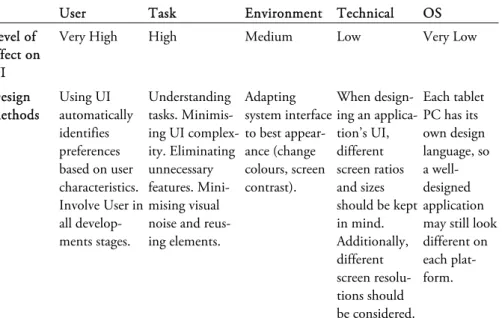
Some students of educational applications consider learning as a tedious process requiring perseverance. Given the subjectivity and uniqueness of the learning experience, designers and developers are unlikely to achieve a universally positive outcome. In our research, we recommended methods that by which designers can increase the satisfaction levels of users. The recommendations are summarised in Table 2.
User Task Environment Technical OS
Level of effect on UI
Very High High Medium Low Very Low
Design methods Using UI automatically identifies preferences based on user characteristics. Involve User in all develop-ments stages.
Understanding tasks. Minimis-ing UI complex-ity. Eliminating unnecessary features. Mini-mising visual noise and reus-ing elements.
Adapting system interface to best appear-ance (change colours, screen contrast).
When design-ing an applica-tion’s UI, different screen ratios and sizes should be kept in mind. Additionally, different screen resolu-tions should be considered. Each tablet PC has its own design language, so a well-designed application may still look different on each plat-form.
The usefulness of tablet PCs in education is likely to increase. Under-standing the UI preferences of Arabic users will assist the educational pur-poses of Arabic learners because the appearance and elements of the UI can be adapted to the particular needs of those learners.
UI design is an essential aspect of e-learning systems, and largely deter-mines the enjoyment and convenience of the learning process (Bakar & Long 2013). Accordingly, to enhance the learning process, the designer must customise the UI design to suit the learner’s needs. We found that designers and developers need to understand or gain sufficient knowledge of the usability evaluation process. As discussed earlier, we recommend that designers and developers of tablet PC applications determine the relation-ships among the principal components of the design factors for tablet PCs.
Ahmed Al-Sa’di is a lecturer and UX researcher with over eight years of experi-ence at several academic institutions teaching students from diverse social and cultural backgrounds. His research and professional interests are in human– computer interaction, exploring people's user interface preferences and how culture influences them. Additionally, he is interested in mobile–tablet PC applications and how to improve their UI design to achieve user satisfaction.
Contact: [email protected]
Dave Parry is an Associate Professor and Head of the Department of Computer Science at Auckland University of Technology. His research interests include Ubiquitous computing, eHealth and Radiofrequency Identification.
References
AH ME D, SA E E M A, KE N M. WA L L AC E & LU CIE N NE T BL E S S I N G (2003). “Understanding the Differences between How Novice and Experienced Designers Approach Design Tasks.” Research in engineering design 14.1: 1–11.
AKHE E LA KHA N U M, MO H A M M A D I, SHA MEE M FATI MA & MO U S MI A. CH A U R A SIA (2012). “Arabic Interface Analysis Based on Cultural Markers.” Interna-tional Journal of Computer Science Issues (IJCSI) 9.1.
AK I N Y E MI, AD E K U N L E (2003). “Web-based learning and cultural interference: Perspectives of Arab students.” Symposium conducted at the meeting of the Proceed-ings of World conference on e-learning in corporate, government, healthcare, and higher education.
AL-HA R T H I, AIS HA S. (2005). “Distance Higher Education Experiences of Arab
Gulf Students in the United States: A Cultural Perspective.” The International Review of Research in Open and Distance Learning 6.3.
AL-SA'D I, AH ME D, DAVE PARRY & PH IL CA R T E R (2014). “Usability
considera-tions for educational tablet applicaconsidera-tions using an Arabic interface.” In Information and Communication Systems (ICICS), 2014 5th International Conference on, Irbid, Jordan. 1–6.
AL B I R I N I, ABD UL K AF I (2007). “The Crisis of Educational Technology, and the Prospect of Reinventing Education.” Educational Technology & Society 10.1: 227–36.
AL G H A M D I, AL I, E T AL. (2012). “Adopting User-Centred Development for Arabic E-Commerce Websites.” International Journal of Web & Semantic Technology 3.2.
AM BI K A I R A J A H, EL I A T H A M B Y, E T A L (2005). “Experiences with an electronic whiteboard teaching laboratory and tablet PC based lecture presentations [DSP cours-es].” In Acoustics, Speech, and Signal Processing, 2005. Proceedings. (ICASSP'05). IEEE International Conference on. IEEE. 5: 565–568.
ANDE R S O N, JO H N E., PA U L H. SC H W AG E R & RICHA RD L. KE R N S (2006). “The Drivers for Acceptance of Tablet Pcs by Faculty in a College of Business.” Journal of Information Systems Education 17.4: 429–440.
ANDE R S O N, RI C H AR D E T A L. (2004). “Experiences with a tablet PC based lecture
presentation system in computer science courses.” ACM SIGCSE Bulletin36.1: 56–60.
ANDE R S O N,TE R R Y & JO N DRO N (2010). "Three Generations of Distance
Educa-tion Pedagogy." The International Review of Research in Open and Distance Learning
12.3: 80–97.
AN NE T T, JO H N & KEITH D. DUN C AN (1967). “Task Analysis and Training Design.”
APPLE. Ipad. <https://www.apple.com/nz/ipad/> [2017-09-11]
BA K A R, ZU R IA NA ABU & PH I L L I P LO N G (2013). “A Study of Visual Appeal Interfaces Based on Subjective Preferences.” Proceeding of the International Conference on Artificial Intelligence in Computer Science and ICT (AICS 2013).
BE N L L O C H-DU A L D E, JO SÉ-V., FÉ L I X BUE ND ÍA & JUA N-CA R L O S CA NO
(2010). “On the design of interactive classroom environments based on the tablet PC technology.” Frontiers in Education Conference (FIE), 2010 IEEE.
BR O W N, DA VE (2006). User Analysis & Task Analysis. Worcester Polytechnic Insti-tute. <web.cs.wpi.edu/~dcb/courses/CS3041/UAandTA.html > [2014-01-30]
BUR N S, JO H N T. (2011). Users and User Characteristics. De Montfort University
<http://slideplayer.com/slide/5098090/> [2017-09-11]
BUX T O N, BI L L (2010). Sketching User Experiences: Getting the Design Right and the
Right Design. Amsterdam: Morgan Kaufmann.
CA R O L, JE SS IC A (2013). The Updated Classroom – Developing Student Writing Skills
<http://www.emergingedtech.com/2013/03/the-updated-classroom-improving-student-writing-with-tablet-and-smartphone-apps/> [2017-09-11]
CH A H IN E, NA D I NE (2016). Problems of Arabic Typefaces. <http:// www.arabictype.com/blog/articles/problems-of-arabic-typefaces/> [2017-09-11]
CH A M B E R L A I N, ST E P H A NI E, HE L E N SHA RP & NE I L MAI DE N (2006). “To-wards a framework for integrating agile development and user-centred design.” Extreme programming and agile processes in software engineering. 143-153.
CO R L E T T, DAN & MI K E SHAR PLE S (2005). “Tablet Technology for Informal Collaboration in Higher Education.” Mobile learning anytime everywhere. 59–61.
CO YE T T E, ADRIE N & JE AN VA ND E R D O N C K T (2005). “A sketching tool for
designing anyuser, anyplatform, anywhere user interfaces.” INTERACT. 3585: 550–564.
CRO MAC K, JA M I E (2008). “Technology and learning-centered education: Research-based support for how the tablet PC embodies the Seven Principles of Good Practice in Undergraduate Education.” FIE 2008, Frontiers in Education Conference, 38th Annual. IEEE.
DI GIÓ N, BE A TRI Z LE D A & MARIS A AN GÉ L IC A DI GI Ó N (2013). “Marco Con-ceptual De Calidad De Interfaz Para Educación Virtual.”
DIX, ALA N (2004). Human Computer Interaction. Pearson Education.
DU NC K E R,EL K E,JAVE D ANJ U M SHEI K H & BO B FI E L D S (2013). “From Glob-al Terminology to LocGlob-al Terminology: A Review on Cross-CulturGlob-al Interface Design Solutions.” Cross-Cultural Design: Methods, Practice, and Case Studies. Springer. 197– 207.
EA R L E, ROD NE Y S. (2002). “The Integration of Instructional Technology into Public Education: Promises and Challenges.” Educational Technology 42.1: 5–13.
EL D I N, AH M A D ABD E L TA W W A B SHA RAF (2015). “Teaching Culture in the
Classroom to Arabic Language Students.” International Education Studies 8.2: 113–120.
FE R N AN D E S, TONY (1995). “Global user interface design.” Conference companion on Human factors in computing systems.
GO T T F R E D S O N, JO H N A. (2014). “Design Process in Landscape Architecture: Developing a Learning Guide for the Design Workshop Archives at Utah State Univer-sity.”
HA C K O S, JOAN N T. & JA N I C E RE D IS H (1998). User and Task Analysis for Inter-face Design. New York: Wiley.
HANS E N, PR E BE N (1998). “Evaluation of Ir User Interface-Implications for User Interface Design.” Human IT 2.2: 28–41.
HA R E L, ID IT & SEYMO UR PA P E R T (1990). “Software Design as a Learning Envi-ronment.” Interactive learning environments 1.1: 1–32.
HAR PE R, R, E T A L. (2009). “Being Human–Human-Computer Interaction in the
Year 2020.” Microsoft Research. <https://hxd.research.microsoft.com/manage/ resources/beinghumana3-1.pdf> [2017-09-11].
HA R T MA NN, BJ Ö R N (2009). Gaining Design Insight through Interaction Prototyping Tools. Doctoral dissertation. Stanford University.
HE IK K IL Ä, HARRI (2013). Towards Tablet Publication Heuristics Improving Accessa-bility, Usability and User Experience with New Expert Evaluation.
HEMA Y SSI, HA L A, E T A L. (2005). “Designing an Arabic user experience: methods and techniques to bridge cultures.” Proceedings of the 2005 conference on Designing for User eXperience. AIGA: American Institute of Graphic Arts,
ISO9241-210 (2010). “Ergonomics of System Interaction – Part 210: Human-Centred Design for Interactive Systems.”
JAME S, BR A D (2009). What's Your Learning Style – Visual, Auditory or Kinesthetic?
<http://lifelearning-liveandlearn.blogspot.co.nz/2009/11/whats-your-learning-style-visual.html> [2017-09-11]
JA R A MI L L O, ZA Y R A & MI G UE L VA R G A S-LO M BA R D O (2013). “Framework of
User Participation for the Interface Design in the Saas Layer.” Journal of Software Engi-neering and Applications 6: 236–242.
JO H N S O N, PE T E R (1992). Human Computer Interaction: Psychology, Task Analysis, and Software Engineering. McGraw-Hill.
KAUR, SUK H PREE T (2013). “The Revolution of Tablet Computers and Apps: A Look at Emerging Trends.” Consumer Electronics Magazine 2.1: 36–41.
KIM, JIE UN &HOKYO UNG RY U (2014). “A Design Thinking Rationality Frame-work: Framing and Solving Design Problems in Early Concept Generation.” Human– Computer Interaction 29.5–6: 516–53.
KO B S A, AL F R E D (1993). “User Modeling: Recent Work, Prospects and Hazards.”
Human Factors in Information Technology 10.
KURT Z, BAR RY L., JA ME S B. FE N W I C K JR. & CHR IST O P HE R C. EL L S -WORT H (2007). “Using podcasts and tablet PCs in computer science.” Proceedings of the 45th annual southeast regional conference. ACM.
LI M, LI ND A (2011). The Enigma of Web Interfaces: Cultural Aspects of Web Site Design. Doctoral dissertation. Murdoch University.
MAN U G UE R R A, MA UR I Z I O & PE T E R PETOCZ (2011). “Promoting Student Engagement by Integrating New Technology into Tertiary Education: The Role of the Ipad.” Asian Social Science 7.11: p61–65.
MI C R O S O F T (2011). Designing for Direct Manipulation. <https://msdn.microsoft.com/en-us/library/ms698539(v=vs.85).aspx> [2017-09-11]
MI C R O S O F T (2012). Overview of the User Interface Development Process. <https:// msdn.microsoft.com/en-us/library/windows/desktop/ff728828(v=vs.85).aspx> [2017-09-11]
NE W E L L, AL L E N & ST UA R T K CA R D (1985). “The Prospects for Psychological Science in Human-Computer Interaction.” Human-computer interaction 1.3: 209–242.
NI E L S E N, JA K O B (1993). Usability Engineering. Boston: AP Professional.
PA R K, CL A R A C. (2002). “Crosscultural Differences in Learning Styles of Secondary
English Learners.” Bilingual Research Journal 26.2: 443-459.
RAS HED, AB D UL L AH & HE N R I Q U E SANT O S (2013). “New Technology Ac-ceptance in Europe and Arabic Cultures: Comparative Study." Proceedings of the Informing Science and Information Technology Education Conference. Informing Science Institute.
RE I D, JO Y M. (1987). “The Learning Style Preferences of Esl Students.” TESOL quarterly 21.1: 87–111.
ROGE R S, JA ME S W., A N D JAME S R. CO X (2008). “Integrating a Single Tablet Pc in Chemistry, Engineering, and Physics Courses.” Journal of College Science Teaching
37.3: 34–39.
RØSA ND,TE R JE (2013). Think Aloud Methods with Eye Tracking in Usability Testing: A Comparison Study with Different Task Types. Master’s thesis. Norwegian University of Science and Technology.
RO S C HE L L E, JE R E M Y, E T A L. (2007). “Ink, Improvisation, and Interactive
Engage-ment: Learning with Tablets.” Computer 40.9: 42–48.
RU BI N, JE F F R E Y & DA NA CH I S N E L L (2008). Handbook of Usability Testing: How to Plan, Design, and Conduct Effective Tests. Wiley.
SH A C K E L, BRIA N (2009). “Usability–Context, Framework, Definition, Design and Evaluation.” Interacting with Computers 21.5-6: 339–346.
SHAR P, HE L E N, YVO NN E ROGE R S & JE N N Y PR E E C E (2007). Interaction De-sign: Beyond Human-Computer Interaction. Chichester: Wiley.
SHN EIDE R MA N, BE N (2000). “Universal Usability.” Communications of the ACM
43.5: 84–91.
SHN EIDE R MA N, BE N & CAT HER IN E PL A I S A N T (2004). Designing the User Interface: Strategies for Effective Human-Computer Interaction. Boston: Pearson/Addison Wesley.
SHUL A MI T, KOTZE R & EL R A N YO S S I (2011). “Development of E-Learning
Environments Combining Learning Skills and Science and Technology Content for Junior High School.” Procedia-Social and Behavioral Sciences 11: 175–179.
ST I G L E R, JA ME S W., A N D JA ME S HIE BE RT (2009). The Teaching Gap: Best Ideas from the World's Teachers for Improving Education in the Classroom. Simon and Schuster.
TI N T A R E V, NAVA & JU D IT H MA S T HO F F (2011). “Designing and Evaluating Explanations for Recommender Systems.” Recommender Systems Handbook. Springer. 479–510.
TR E D E R, MA R C I N (2012). “Beyond Wireframing Real Life Ux Design Process. <https: //www.ceros.com/blog/beyond-wireframing-real-life-ux-design-process/> [2017-09-11]
VAN WE L I E, MA R T IJ N (2001). Task-Based User Interface Design. Doctoral disserta-tion. Vrije Universiteit Amsterdam.
WISE, JO H N C., RO X A N N E TO T O & KYU YO N LI M (2006). “Introducing
Tablet PCs: Initial results from the classroom.” Frontiers in Education Conference, 36th Annual. IEEE.
WRO BL E W SK I, LUK E (2010). “Touch Gesture Reference Guide.” <https://www. lukew.com/ff/entry.asp?1071> [2017-09-11]
YE, L. RI C H AR D & PA U L E. JOHNS ON (1995). “The Impact of Explanation Facilities on User Acceptance of Expert Systems Advice.” Mis Quarterly June 1995: 157–172.
YO U N G, WE SL E Y (2014). Study: Consumers Increasingly Turn to Mobile & Varied
Media Combinations in Last Mile.
<http://searchengineland.com/study-consumers-increasingly-turn-mobile-varied-media-combinations-last-mile-200283> [2017-09-11]
ZHA I, SH U M IN, E T A L. (2012). “Foundational Issues in Touch-Surface Stroke Gesture Design—an Integrative Review.” Foundations and Trends® in Human– Computer Interaction 5.2: 97–205.
ZHA O, TI N G T IN G (2014). “Usability Testing: How Do We Design Effective Tasks."
<https://design.canonical.com/2013/08/usability-testing-how-do-we-design-effective-tasks/> [2017-09-11]
ZO L T O W S K I, CA R L A B., WI L L I A M C. OAKES & MO N I C A E. CA R D E L L A