Seven Reclamation Targets
APTARE provides holistic visibility into storage environments
from the host to the array to backup to recovery, giving
organizations the valuable insight they need to discover and
reallocate unused capacity
Storage is growing at an unsustainable rate, and poor utilization makes storage one of the most inefficient and costly expenditures on the balance sheet. Reclaiming unal-located and unused capacity mitigates the cost of purchasing storage by optimizing existing infrastructure while better meeting the needs of the organization.
But where to start?
This white paper will discuss:
• The problem of storage growth and poor utilization rates plaguing IT depart-ments today
• How APTARE’s architecture is optimized to help organizations implement effec-tive reclamation projects
• Areas within the storage environment to target for reclamation
Storage and Associated Costs Growing
According to Gartner, the world created 1.8 ZBs in 2011, a growth rate of 9x over the past five years. Our collective knowledge, measured in total data stored on the planet, effectively doubles every two years. That’s a lot of zeros. It’s not just email, CRM environments, streaming video and social media that are driving growth. Robust data protection policies in an increasingly shrinking and dangerous business environment are contributing to this expansion as well. It’s not just mission-critical data that is get-ting backed up to multiple copies and replicated to disaster recovery facilities. Fear of losing any data is forcing companies and even individuals to back everything up to multiple platforms.
However, it’s not just hardware that is driving unsustainable costs. The cost of manag-ing storage infrastructures is growmanag-ing at a much higher rate, representmanag-ing the true problem of under-utilized capacity. The real problem isn’t capital expenditures. It’s with the growing operational costs of owning the storage you’ve already purchased. Gartner estimates that it costs $5,000 per year to own 1 TB of storage , nearly double the cost in 2005. That’s a big problem since we’re talking about petabytes upon petabytes—making the cost of owning storage a ten million dollar problem for many organizations.
Table of Contents:
Storage and AssociatedCosts Growing 1
APTARE Provides Valuable
Insight for Reclamation 2
Unallocated LUNs 2
LUNs Allocated to a Host
That Have not Been Discovered 3
LUNs allocated and discovered
but not used 3
LUNs allocated to a
decommissioned host 4
Unused space inside a
volume group 4
Unused space inside a database 5
Over-provisioned hosts 6
APTARE Provides Valuable Insight for Reclamation
It’s these rising costs why reclamation should be a mission-critical function of the storage and IT departments. But where do you start? Consider the following questions:• Once I allocate storage, where does it go? How is it used? • Are any policy changes I make improving my utilization? • How do we get the server, application, and storage teams
all on the same page?
• Where do I start? What are the low hanging fruits?
• How do I buy less storage next year or at least slow my stor-age growth?
APTARE’s agentless technology makes it easy to collect informa-tion throughout your environment, allowing you to really focus on utilization and making certain you’re getting the most out of your existing infrastructure. Reclaiming storage that is under-utilized helps save immediate budget by reducing the amount of storage you’ll need to purchase in the future. Since APTARE can see the array, host, AND application views there are many different areas where storage can be reclaimed including:
1. Unallocated LUNs
2. LUNs allocated to a host that haven’t been discovered 3. LUNs allocated and discovered but not used
4. LUNs allocated to a decommissioned host 5. Unused space inside a volume group
6. Unused space inside a database such as SQL Server or Oracle
7. Over- and under- provisioned hosts
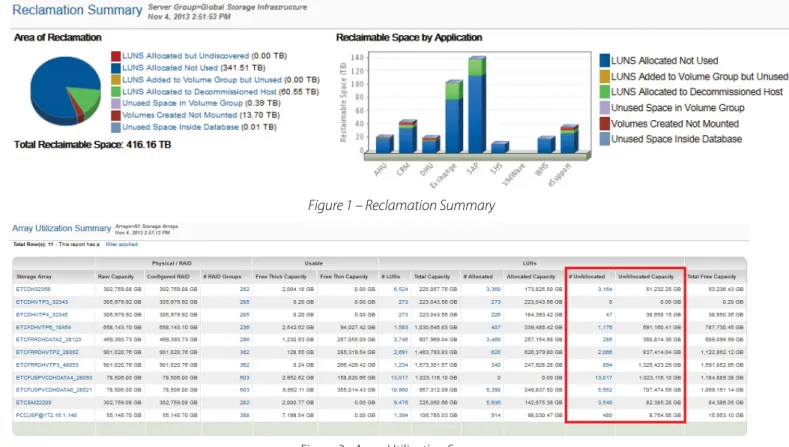
On a holistic level, APTARE provides a dashboard view that sum-marizes all of the areas of reclamation (Figure 1 – Reclamation Summary). You can run this report across your entire enterprise or by any logical grouping as shown below by application.
1. Unallocated LUNs
Unallocated LUNs are storage that is immediately available. While this information is usually easy to see array by array, it be-comes more difficult when you have multiple arrays, locations, vendors, and tiers. APTARE provides a single view that breaks down available storage and available LUNs (Figure 2 – Array Uti-lization Summary). In addition, the report may show that there might be additional usable capacity available for each array.
2. LUNs Allocated to a Host That Have not Been
Discovered
Probably the easiest storage to reclaim are LUNs allocated to a host. LUN Masking from the array side may have been com-pleted, but the host is unable to “see” the storage for one reason or another. Typically this storage is difficult for storage adminis-trators to find because they can only view the storage from the array perspective. Since APTARE collects from both arrays and hosts, it makes it easy to find storage that the host is unable to utilize. In the view below, the first box on the left highlights stor-age from the array perspective — LUNs allocated to the host. The second box shows storage from the host perspective or the
number of LUNs the host operating system “sees” (Figure 3 – Host Capacity and Utilization).
3. LUNs Allocated and Discovered But Not Used
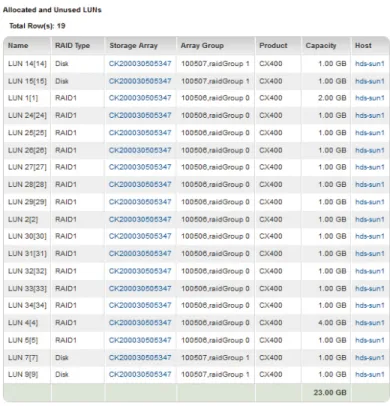
LUNs that the operating system of the host has discovered but hasn’t been used can be easy to reclaim as well through APTARE StorageConsole, because the solution provides insight into whether an application (usually a database) is using the storage outside of the operating system. APTARE StorageConsole Host Detail View makes it easy to find the LUNs that are not being used by a host (Figure 4 – Utilization Detail).Figure 3 – Host Capacity and Utilization
4. LUNs Allocated to a Decommissioned Host
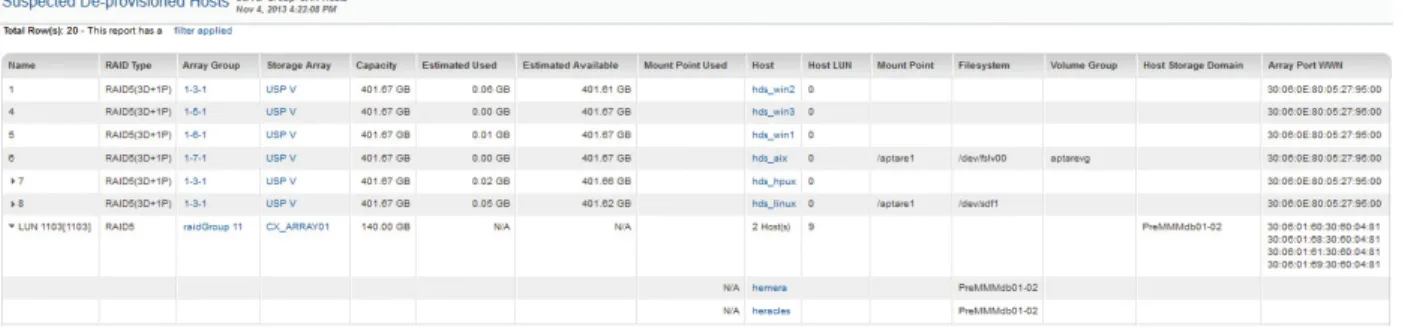
In a medium- to large- sized environment, hosts are added and removed from the environment quite frequently. The problem starts when the storage team is not always alerted to hosts being decommissioned. Over time, considerable amounts of storage can still be allocated to hosts that are no longer present in the environment. APTARE provides a simple view (Figure 5 – Suspected De-Provisioned Hosts) to show storage allocated to hosts that have not been contacted in more than a user defined period of time (three weeks in this example). This is storage that is easily reclaimed.
5. Unused Space inside a Volume Group
Once a host has added a LUN to a volume group, it is more difficult to reclaim that storage. There are two instances worth discussing that are both shown in the screen shot below (Figure 6 – Utilization Detail). The first volume group shows a LUN that is entirely unused. This is storage that might be reclaimed or at a minimum would prevent additional storage from being allocated until this current storage is used. The second volume group also has added a LUN from an array but there have been volumes created from the LUN. This is space that is difficult to reclaim but is still potentially available for future use.
Figure 5– Suspected De-Provisioned Hosts
APTARE can also show logical volumes that were created but not used in a filesystem (Figure 7 – Unused Partitions). For non-database servers, this is usually a sign of unused storage.
6. Unused Space Inside a Database
Databases require a tremendous amount of capacity and can account for the majority of the entire storage allocation for most organizations. Unfortunately, most storage administrators do not have insight into how much of the storage they’ve allocated
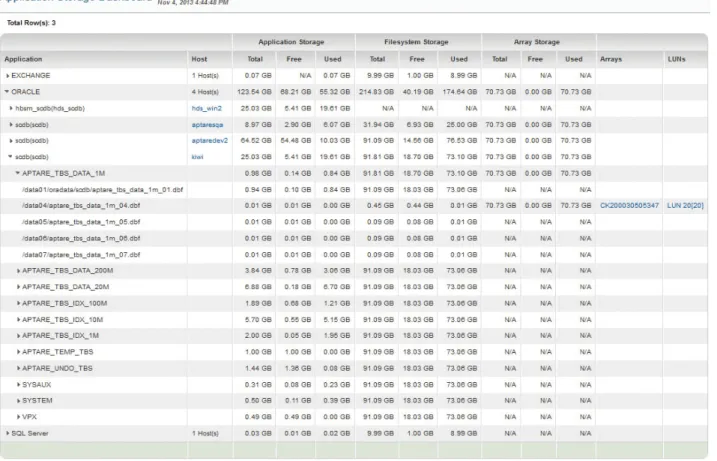
to the host is actually being utilized by the database. APTARE StorageConsole Database View allows administrators to not only see the mapping from the database data files to the storage array, but how much of that storage is actually used. This usage by database instance, table, and data file is highlighted in Figure 8 – Array Utilization Summary.
Figure 7 – Unused Partitions
7. Overprovisioned Hosts
A key view into your environment is a list of hosts that are under-utilizing the storage that has been allocated. APTARE StorageConsole allows you to set multiple thresholds in order to determine what constitutes under-utilized in your environment. As shown in the view below (Figure 9 – Over-Provisioned Hosts), APTARE StorageConsole tracks current usage as well as a date range of historical values chosen by the user to determine the high-water mark, so it can compare it against actual utilization.
In Conclusion
Reclaiming storage capacity is a smart way to mitigate the growing storage problem. APTARE’s unique agentless architec-ture gives organizations detailed insight into the entire storage environment from the host to the array to backup to recovery, allowing the IT team to discover under-utilized capacity that can be reallocated to other uses. Reclamation delays hardware buys, reduces overhead, saves money and enables IT to continue to meet the needs of the organization.
For more information, visit APTARE.com.