Database-as-a-Service (DBaaS)
Reference Architecture with
VMware and Tintri
WHITE PAPER
Authors:
VLSS: Dean Bolton
Tintri: Christopher Slater, Rob Girard VMware: Don Sullivan, Mohan Potheri
Table of Contents
Executive Summary ... 5
What is Database-‐as-‐a-‐Service (DBaaS)? ... 6
DBaaS Solution Architecture ... 7
vSphere Servers ... 7
Network ... 7
Storage ... 7
Tintri VMstore Storage ... 8
DBaaS vSphere Cluster ... 9
vRealize Automation Components ... 10
Service Catalog ... 10
Advanced Service Designer ... 10
Infrastructure-‐as-‐a-‐Service ... 10
vSphere ESXi and VMware vCenter Server VMware vSphere ... 11
vRealize Orchestrator ... 11
vRealize Automation Installation Components ... 11
Deploying vRealize Automation for the DBaaS Reference Architecture ... 12
vRA Appliance ... 12
IAAS Components ... 12
vRA Environment Configuration ... 12
DBaaS Blueprints ... 13
Service Catalog ... 14
Database Templates ... 15
SQL Server 2012 VM Template ... 15
Oracle 12c VM Template ... 16
Using the Database-‐as-‐a-‐Service (DBaaS) ... 17
DBaaS Performance Testing Scenarios ... 18
Results: ... 18
Best Practices Revealed from Performance Testing ... 19
Day 2 Activities ... 21
Day-‐2 Activity: Reconfigure an existing virtual machine ... 21
Day-‐2 Activity: Reset VMs to a Baseline Snapshot ... 21
Day-‐2 Activity: Replicate Database VMs ... 21
Day-‐2 Activity: Refresh Test and Development Database Files ... 22
Conclusion: ... 24
Appendix A -‐ Hardware and Software Details ... 25
Server Hardware and Configuration ... 25
VMware ... 25
Tintri VMstore ... 25
Tintri® VMstore™ Features ... 26
Appendix B: DBaaS Provisioning Tests and Results ... 27
Test 1: Baseline Test – Provision 50 VMs with VAAI Disabled ... 27
Test 2: Provision 50 Oracle VMs ... 28
Test 4: Generate a High IOPS Workload and Provision 50 Database VMs ... 32 Appendix C -‐ References ... 34
Table of Figures
Figure 1: DBaaS Deployment Architecture ... 7
Figure 2: VMware Cluster for DBaaS ... 9
Figure 3: Details for an Individual Server in the VMware Cluster for DBaaS ... 9
Figure 4: vRA Logical Architecture ... 10
Figure 5: Edit Blueprint ... 13
Figure 6: vRA Service Catalog ... 14
Figure 7: SQL Server Template Details ... 15
Figure 8: Oracle Template Details ... 16
Figure 9: DBaaS process ... 17
Figure 10: Tintri SyncVM Screen ... 23
Figure 12: DBaaS provisioning test with Oracle ... 29
Figure 13: DBaaS provisioning test with SQL Server ... 31
Figure 14: DBaaS provisioning test with high latency ... 33
Executive Summary
Database-‐as-‐a-‐Service (DBaaS) is a real-‐world example of cloud computing that delivers databases and database applications through self-‐service portals without IT intervention. One thing that needs to be emphasized here is that the DBaaS in this paper refers to provisioning individual database servers for every database, compared to having multiple instances within a database. Providing multiple copies of relational database servers for testing and development is traditionally a complex operation that involves the combined efforts of multiple teams and the creation of custom scripts. Yet the ability to quickly provision instances of Oracle and SQL Server databases can reduce the time to create, test, deliver, and deploy new applications.
Basing a DBaaS reference architecture on VMware vRealize Automation gives us a robust architecture for running a DBaaS solution. vRealize Automation accelerates the deployment and management of applications and compute services, thereby improving business agility and operational efficiency.
VMware vRealize Automation provides the following IT services on vSphere:
• A secure portal where authorized administrators, developers or business users can
request new IT services while ensuring compliance with business policies
• On-‐demand creation of multiple Oracle and SQL Server databases, with server,
network, and storage resources.
• Complete management of the lifecycle of provisioned databases.
• Provisioning, monitoring, and management of the VMs by the end user, without IT
administrator involvement
• The ability to incorporate day 2 activities, such as backup, reconfigure, data
replication, and decommissioning
We set out to document the viability of a DBaaS solution based on vRealize Automation and decided that the overall performance and responsiveness is a useful metric by which we can measure our success. Thus we created a DBaaS solution that provisions Oracle database and SQL Server VMs. We chose the Tintri VMstore T800 hybrid-‐flash series storage to host these workloads due to their VM-‐aware storage architecture that provides VM-‐level isolation. We ran tests against the entire system to document the provisioning performance. We also ran increasingly large workloads against the system to see if the performance and responsiveness changes as the workload increases.
The rest of this document describes the reference architecture and the tests we performed to validate the performance and usability of this DBaaS reference architecture.
What is Database-‐as-‐a-‐Service (DBaaS)?
Database-‐as-‐a-‐Service (DBaaS) describes a cloud-‐based, self-‐service model for deploying databases and database applications to end users without requiring the efforts of IT staff, a DBA, or an Application team to deploy or manage the database instances.
Physical deployments of test and development environments for database applications typically involve the consumption of large numbers of servers, large amounts of storage, and orphaned resources. Simplifying the deployment and life cycle management of these databases can provide substantial savings in time and hardware expenses to the teams in charge of the care and feeding of these databases.
With VMware vRealize Automation, we are provided with tools that simplify the deployment of large numbers of database servers as VMs. Because they are VMs, we can use vRealize Automation to standardize the database deployments and provide pre-‐tested and pre-‐configured “Day 2” tasks to hundreds of servers quickly. We can also monitor the use of these servers and return orphaned resources to a shared pool.
With vRealize Infrastructure-‐as-‐a-‐Service (IaaS), you can rapidly model and provision servers and desktops across virtual and physical, private and public, or hybrid cloud infrastructures. Modeling is accomplished by creating a machine blueprint, which is a specification for a virtual, cloud, or physical machine. Blueprints are published as catalog items in the common service catalog. When a user requests a machine based on one of these blueprints, IaaS provisions the machine.
Some of the benefits of deploying DBaaS
• On-‐demand, self-‐service database provisioning. End-‐users can create or tear down database services based on their needs.
• Provides for outsourcing the administration and monitoring of databases and operational activities such as backup, recovery, tuning, optimization, and patch management. Administration tasks can be automated — scheduled or proactively initiated to support various database activities.
• Ability to measure database usage and chargeback users.
• IT staff do not have to manage the database environment. All tasks are offloaded to the DBaaS provider.
• Speeds up application development and testing through faster provisioning of new databases and automation of the administration process.
• A move from CAPEX to OPEX for the database service. Capacity can be obtained as and when needed without having to procure capacity in advance.
DBaaS Solution Architecture
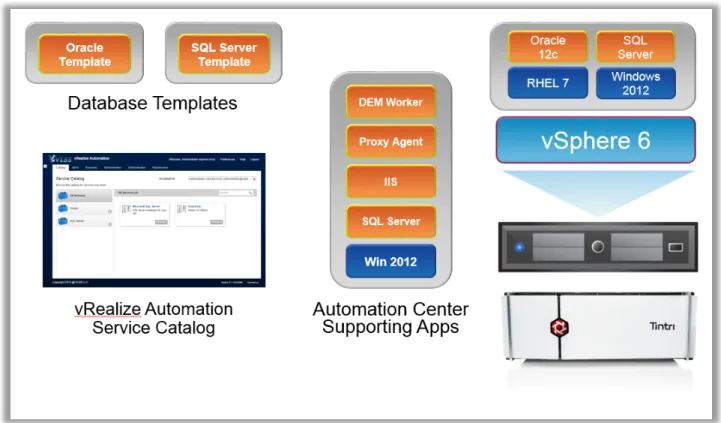
vRealize Automation has many components, which work in concert with each other to support the provisioning and management of individual VMs. The hardware infrastructure that supports vRealize Automation components and provisioned databases must be robust and capable of providing high performance to the entire environment. End users must experience fast provisioning times, a responsive system, and great performance for the provisioned database servers.
Figure 1: DBaaS Deployment Architecture
vSphere Servers
Ensure that you employ a cluster of vSphere servers with enough compute resources to support the number and configuration of VMs that you plan to support.
Network
ESXi hosts should be connected by redundant 10GbE networking. Storage
Low latency, high performance storage provides the storage foundation for this DBaaS reference architecture. The Tintri VMstore T880 was specifically chosen for this reference architecture as it provides low-‐latency, high performance storage, with per-‐VM performance isolation, and space saving compression and de-‐duplication technology.
As we plan to run this system in production while we provision hundreds of VMs, it is important to use a storage array that has the following capabilities:
• Hybrid-‐Flash or All-‐Flash storage technology for performance • VM-‐level performance isolation
• Efficient space saving features such as in-‐line compression and de-‐duplication. • VAAI enabled to offload cloning to the storage array.
Tintri VMstore Storage
The Tintri VMstore T880 Hybrid-‐Flash Array was used to provide the storage foundation for this reference architecture. This flash-‐based system provides low-‐latency and high performance storage for the DBaaS deployment. Tintri is the first VM-‐aware storage array that has been engineered specifically to support the unique performance demands that is required by VMware Virtual Machines.
As hundreds of VMs are loaded onto a traditional flash-‐based storage array, it is typical for those VMs to suffer from uneven performance and be affected by “noisy neighbor” problems. Noisy Neighbors are those VMs that demand large amount of I/O from the array and thus starve other VMs from access to I/O. Tintri recognized that solving the I/O challenge was key to providing a storage array that could support thousands of VMs concurrently.
Thus the Tintri VMstore was designed from the ground up to provide low-‐latency, high throughput performance to each and every VM, no matter their IO profile. Tintri does this by providing each VM with its own IO lane and monitors those IO lanes by automated Quality of Service that provides predictable performance to every VM. This technology provides both high performance and eliminates the noisy neighbor problem. As we will see in this paper, solving the noisy neighbor problem is very important to successfully deploying a high performance DBaaS reference architecture.
The Tintri VMstore T880 provides full Integration with VMware Management Tools via vStorage APIs for Array Integration (VAAI). This integration allows us to leverage the VMstore offload technology for rapid deployment of Oracle and SQL Server VMs on the VMstore. Leveraging the VAAI technology helps significantly reduces the total provisioning time for the vRA workflow.
In addition to space efficient snapshots via SnapVM, and space efficient clones via CloneVM, Tintri employs powerful compression and de-‐duplication technologies to ensure it makes the most efficient use of physical storage resources on the system.
In addition to the Tintri VMstore T800 hybrid-‐flash series storage, Tintri also offers the VMstore T5000 all-‐flash series for more demanding environments. Certain DBaaS use cases may require the consistent flash performance and sub millisecond latency of all flash, especially where more than 5-‐10 TB of actively accessed database data is required.
DBaaS vSphere Cluster
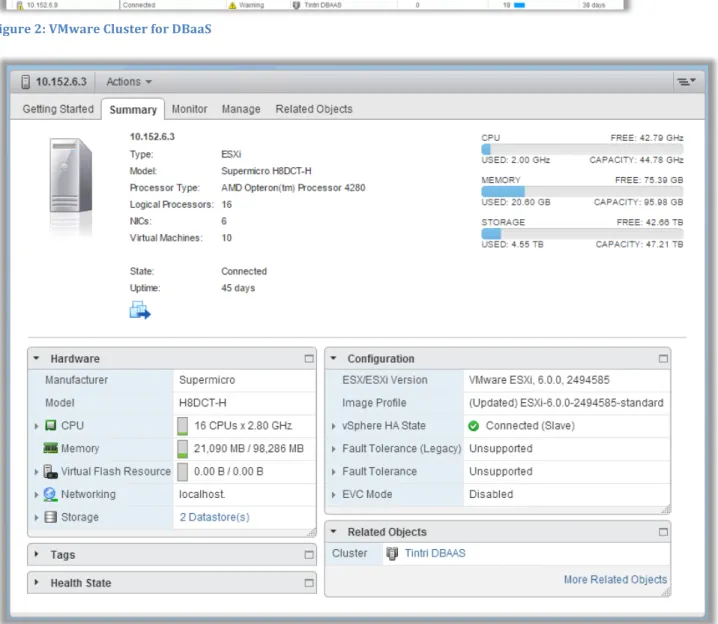
Seven ESXi servers host all the VMs required for deploying and managing the DBaaS. The VMware vCenter cluster consists of seven Supermicro servers running vSphere 6.0. Each server features 16 cores, 96 GB RAM, and dual 10GbE networking.
Figure 2: VMware Cluster for DBaaS
vRealize Automation Components
IT organizations use VMware vRealize Automation (vRA) to deliver services to their lines of business. Using vRealize Automation we can provide a powerful and stable basis for delivering Database-‐as-‐a-‐Service (DBaaS) to administrators, developers and end-‐users.
vRealize Automation provides a secure portal where authorized administrators, developers or business users can request new IT services and manage specific cloud and IT resources, while ensuring compliance with business policies. Requests for IT service, including infrastructure, applications, desktops, and many others, are processed through a common service catalog to provide a consistent user experience.
Service Catalog
The service catalog provides a unified self-‐service portal for consuming IT services. Users can browse the catalog to request items they need, track their requests, and manage their provisioned items.
Figure 4: vRA Logical Architecture
Advanced Service Designer
With the Advanced Service Designer, service architects can create advanced services and publish them as catalog items. With advanced services, you can provide anything as a service using the capabilities of VMware vRealize Automation. This allows for the creation of various “day 2” activities. For example, you can create a service that allows a user to request a backup of a database. After completing and submitting a backup request, the user receives a backup file of the database they specified.
Infrastructure-‐as-‐a-‐Service
With Infrastructure-‐as-‐a-‐Service (IaaS), you can rapidly model and provision servers and desktops across virtual and physical, private and public, or hybrid cloud infrastructures.
Modeling is accomplished by creating a machine blueprint, which is a specification for a virtual, cloud, or physical machine. Blueprints are published as catalog items in the common service catalog. When a user requests a machine based on one of these blueprints, IaaS provisions the machine.
With IaaS, you can manage the machine life cycle from a user request and administrative approval through decommissioning and resource reclamation. Built-‐in configuration and extensibility features also make IaaS a highly flexible means of customizing machine configurations and integrating machine provisioning and management with other enterprise-‐critical systems such as load balancers, configuration management databases (CMDBs), ticketing systems, IP address management systems, or Domain Name System (DNS) servers.
vSphere ESXi and VMware vCenter Server VMware vSphere
ESXi is a virtualization platform for building cloud infrastructures. vSphere enables you to confidently run your business-‐critical applications to meet your most demanding service level agreements (SLAs) at the lowest total cost of ownership (TCO). vSphere combines this virtualization platform with the award-‐winning management capabilities of VMware vCenter Server. This solution gives you operational insight into the virtual environment for improved availability, performance, and capacity utilization.
vRealize Orchestrator
vRealize Orchestrator is a development-‐ and process-‐automation platform that provides a library of workflows. You can use the vRealize Orchestrator workflows to create and run automated, configurable processes to manage the VMware vSphere infrastructure as well as other VMware and third-‐party technologies.
By default, vRealize Orchestrator exposes every operation in the VMware vCenter Server API, and you can integrate all of these operations into your automated processes. By using vRealize Orchestrator, you can also integrate with other management and administration solutions through its open plug-‐in architecture.
vRealize Automation Installation Components
A vRealize Automation installation includes installing and configuring single sign-‐on (SSO) capabilities, the user interface portal, and Infrastructure-‐as-‐a-‐Service (IaaS) components. You can use the Identity Appliance SSO provided with vRealize Automation or some versions of the SSO provided with vSphere. For information about supported versions, see vRealize Automation Support Matrix on the VMware Web site.
• VMware Identity Appliance -‐ Identity Appliance is a preconfigured virtual appliance that provides single sign-‐on (SSO) capabilities for the vRealize Automation environment.
• VMware vRealize Appliance -‐ The vRealize Appliance is a preconfigured virtual appliance that deploys the vRealize Automation server. vRealize Automation is delivered as an open virtualization format (OVF) template. The system administrator deploys the virtual appliance to an existing virtualized infrastructure.
•
vRealize Automation Infrastructure-‐as-‐a-‐Service – Infrastructure-‐as-‐a-‐Service (IaaS) enables the rapid modeling and provisioning of servers and desktops across virtual and physical, private and public, or hybrid cloud infrastructures.Deploying vRealize Automation for the DBaaS Reference Architecture
This section describes how vRealize Automation was deployed for the DBaaS reference architecture.vRA Appliance
A vRealize Automation 6.2.1 environment was configured against the vCenter environment using standard installation procedures (https://www.vmware.com/support/pubs/vcac-‐ pubs.html). vRA Appliance was deployed from an OVA for a quick and easy install. After the OVA was deployed, the host, SSL certificates, SSO and Licensing were configured. IAAS Components
The next step was to setup the IAAS components. As this was a proof of concept environment, we created a single Windows 2012 Server virtual machine and installed all of the IAAS components on that server using the “Complete” install process.
vRA Environment Configuration
After the two servers were deployed and configured, a few additional steps were required to get the environment up and running. As our environment was configured for a POC and not production, we were not concerned with role separation. As such, everything was configured by the local Administrator; however, separate roles can and should be used in a production version.
1. An endpoint is required. A new Virtual -‐> vCenter endpoint was created and then the requisite credentials were provided.
2. A fabric group was created by specifying compute resources imported from vCenter that are available for DBaaS. In our scenario, we separated the hosts available for DBaaS, which can be very important from a licensing perspective.
3. A reservation policy and a storage reservation policy were created. A network profile with a minimum of one IP address was specified. A machine prefix was specified to identify and group the DBaaS provisioned VMs. A business group was created along with a reservation to limit the amount of resources available to the DBaaS provisioning.
4. Important Note: vRA considers everything as thick provisioned from a storage perspective. In our environment, we provisioned over 50TB of storage at a time within 100 VMs, which was larger than the total capacity of the Tintri array. However, since we were employing the VAAI plug-‐in, the array intelligently used de-‐ duplication during cloning to deploy new copies of the Oracle and SQL Server VMs. Each new VM consumed little additional storage comprising only the unique blocks associated with it. Therefore, it is sometimes required to overprovision the total storage available within vRA.
DBaaS Blueprints
DBaaS Service Catalog items are created and published using the blueprint feature of vRealize Automation. The tools to create new blueprints are available from the vRA Infrastructure tab. By using the Edit Blueprint screen you can select the Blueprint Type, Action, Workflow and the VM Template. The Blueprint screen also provides tools for modifying the VM by changing the CPU, Memory and Storage.
The DBaaS Blueprints use the Clone action. The use of the Clone action, combined with the Tintri VAAI plug-‐in, allows vCenter to offload the VM copy commands to the array. The Tintri actually uses cloning technology to rapid provisioning VMs irrespective of their size. With this clone technology fifty VMs with 50 GB disk space can be provisioned just as quickly as fifty VMs with 1TB disk space.
Figure 5: Edit Blueprint
Service Catalog
After the blueprint is created, it is published, which is followed by service creation. An entitlement to link the services to the catalog items allows end users access to the item in the Service Catalog.
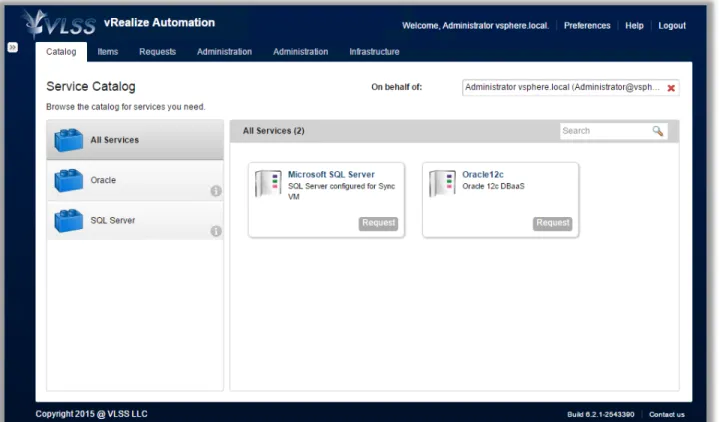
On successful completion of the configuration, an end user can login and see the Service Catalog screen:
Figure 6: vRA Service Catalog
Database Templates
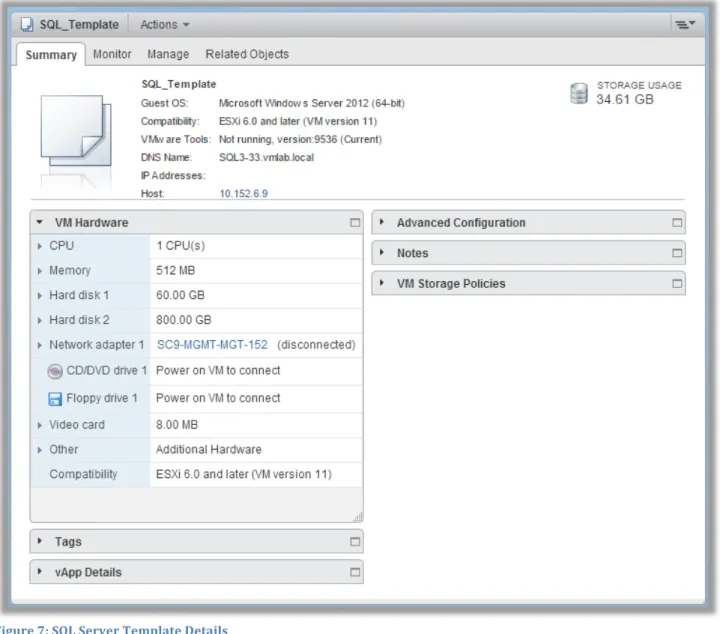
SQL Server 2012 VM TemplateThe template used for the SQL Server deployment workflows models the database servers used by end-‐users for development, test and QA. The SQL Server VMs were provisioned with a single vCPU, 512 MB RAM, a 60 GB vDisk for the OS and an 800 GB vDisk for data (MDF) and log (LDF) files.
VM Summary: 1 vCPU, 512 MB vRAM and 1.04 TB storage
Figure 7: SQL Server Template Details
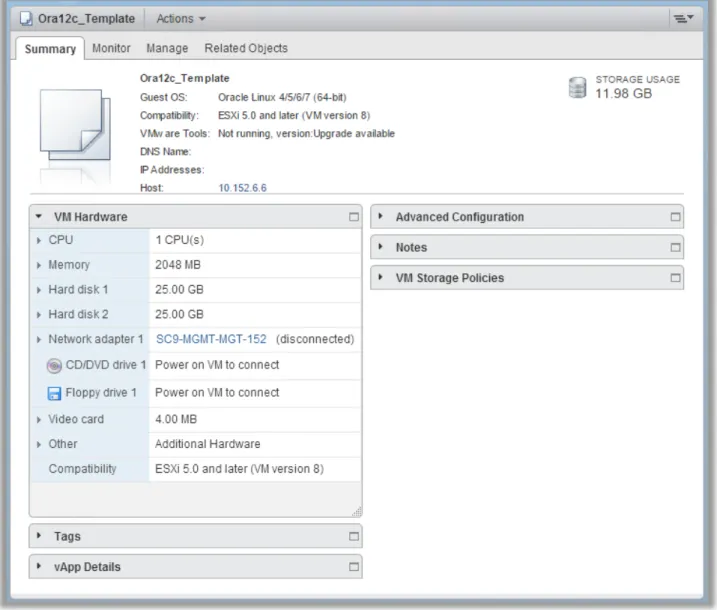
Oracle 12c VM Template
The template use for the Oracle deployment workflows is setup for a Test and Development scenario; hence, it has a simplified storage layout that uses the Linux Ext3 file system. The Ora12c_Template VM has an Oracle 12.1.0.1 database running on Oracle Enterprise Linux 6.5 with a single listener configured on port 1521. The template uses 1 vCPU, 2048 MB of vRAM with two 25GB SCSI virtual disks. One disk held the root of the file system which included the OS system files as well as the Oracle software installed under /u01 conforming to OFA standards. The second disk was mounted as /u02 and was used to store 20GB of user data imported into the database.
VM Summary: 1 vCPU, 2 GB vRAM and 50 GB storage.
Figure 8: Oracle Template Details
Using the Database-‐as-‐a-‐Service (DBaaS)
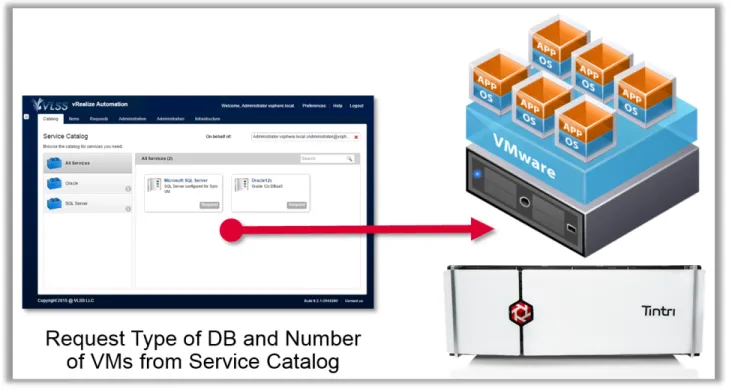
After deploying these vRealize Automation components, we have a working environment for DBaaS. A user would first login to the vRealize Automation catalog and then they could request as many Oracle12c VMs or Microsoft SQL Server VMs as they desire.
Figure 9: DBaaS process
The vRealize Automation infrastructure has many components, which work in concert with each other to allow the provisioning of VM templates to the vCenter hosts. These components must be robust and capable of providing high performance to the environment, so that the end users experience a fast and responsive environment.
Making a VM from the template first involves copying the contents of the VM template to create the VM. This process can be throttled by the speed of the servers, the network and the storage. The entire process can be made efficient by using the VAAI-‐enabled offload features of the Tintri VMstore. This will reduce the time to deploy a VM significantly as Tintri uses cloning technology that takes merely seconds to create a new VM from a template. The VAAI cloning offload to the storage is automatically enabled once VAAI is installed on the individual vSphere servers.
DBaaS Performance Testing Scenarios
Now that we have created a DBaaS from vRealize Automation, how do we determine that it is a useful cloud-‐based service for our end-‐users? We decided that constructing workload tests to reveal what end users experience with the DBaaS service would be a good metric. Thus in our testing we ran workflows to provision 50 database VMs at a time while running TPC-‐C “like” database workloads against VMs that shared the DBaaS environment – servers, network and storage. At the end of the test run we noted the time to provision the 50 databases and compared it with the latency experienced by the storage.
In our DBaaS architecture, we purposely placed all of the DBaaS components together with the same vSphere servers that support the provisioning workflows. This means that the vRealize infrastructure VMs share the same resources on the vSphere servers that are running the database workloads and provisioning the new database VMs. If any of these VMs suffer from IO starvation this will become apparent as the time to provision and configure VMs will increase dramatically.
These tests were designed to verify the responsiveness of the entire system and its ability to quickly provision many Database VMs. The provisioning process should not be affected by the amount of workload on the storage array. The vRealize Automation Service Catalog should remain responsive as well as all the other VMs on the array.
Summarized Results:
The detailed test scenarios and results are shown in Appendix B. The time to provision 50 SQL Server VMs stays between 5 and 6 minutes even as we increase the latency on the storage from 1 ms to 72 ms. This shows that the system remains responsive even as the IOPS workload increases substantially.
The Tintri VMstore was designed from the ground up to provide low-‐latency, high throughput performance to each and every VM, no matter their IO profile. Tintri does this by providing each VM with its own IO lane and monitors those IO lanes by automated Quality of Service that provides predictable performance to every VM. This technology provides both high performance and eliminates the noisy neighbor problem.
The consistency of the provisioning times demonstrates that the VM performance isolation features of the Tintri VMstore provides low latency access to IO to every VM regardless of the workload applied to the storage.
When heavy workloads are applied to flash storage arrays that are not VM-‐aware, these systems are forced to supply IO on a first come, first served basis. With “noisy neighbor” VMs this can lead to IO starvation to other VMs on the array. By attempting to consume all of the available IO on the flash-‐based array these “noisy neighbor” VMs effectively block
other VMs with lower IOPS profiles from being serviced. Thus these non VM-‐aware systems experience continuous high-‐latency that leads to unresponsive VMs.
In the DBaaS reference architecture, all of the VMs share the Tintri VMstore T880 storage array. All of the vRA servers are running on the array, the Tools server that deploys and configures the VMs is running on the array, as are all of the newly provisioned VMs. If any of these VMs suffer from IO starvation this will become apparent as the time to provision and configure VMs will increase dramatically.
These tests will reveal the responsiveness of the entire system and the ability to quickly provision many Database VMs. The system should not be affected by the amount of pressure on the storage array. The vRealize Automation Service Catalog should remain responsive, as should the tools server, as well as all the other VMs on the array.
The DBaaS reference architecture is only useful if end-‐users can deploy a catalog of VMs under varying conditions and workloads. These test results highlight three accomplishments in the vRA DBaaS reference architecture with Tintri.
1. VAAI enabled offload allowed the Tintri storage array cloning feature to drop the average time to provision 50 VMs from 17 minutes to 6 minutes; a 65% decrease. 2. The DBaaS provisioning times were low and stable even as the load is increased
significantly on the DBaaS systems.
3. Even when an extreme workload is applied to the Tintri VMstore storage array, the DBaaS provisioning times were consistently low.
The last test highlights the Tintri VMstore’s resistance to “Noisy Neighbor” workloads, even when an extreme load is applied to the system. This responsiveness under load is very important to the end-‐users of a DBaaS solution.
Best Practices Revealed from Performance Testing
While testing this reference architecture we found several things of interest when designing this architecture to reduce the time to deploy 100s of VMs with vRealize Automation tools.
1. Employing the VAAI integration with the Tintri VMstore allowed us to use the cloning feature when deploying VMs from the template. This reduced the time to deploy a VM significantly as the cloning technology takes merely seconds to create a new VM from a template, no matter how large the template. The VAAI cloning offload to the storage is automatically enabled once VAAI is installed on the vSphere servers.
2. When vRA provisions a VM, it calculates and accounts for storage based on the fully provisioned size. However, since we use the VAAI plug-‐in, the Tintri VMstore intelligently cloned the Oracle and SQL Server VMs. Each new VM consumed little
additional storage, which comprise only the unique blocks associated with that VM. In the DBaaS environment we provisioned over 50TB of storage at a time with 50 1TB SQL Server VMs, which was larger than the total capacity of the Tintri array. In this scenario, it is safe and necessary to over allocate storage resources within vRealize Automation.
3. Tuning the DEM workers is not normally possible, but given the speed of the deployment of the VMs we were able to reduce some DEM worker timeouts without incurring collisions. This tuning allowed us to reduce the time to perform the configuration of the individual VMs after they were cloned.
4. The use of high performance, low latency, shared flash storage arrays provide the foundation for a responsive and good performing DBaaS deployment. Testing with the Tintri VMstore Flash array showed that the time to provision 50 database VMs stays consistent no matter the workload on the storage array. This illustrates the value of using a Flash storage array that can work effectively with both “noisy neighbors” and “quiet neighbors” when creating a DBaaS deployment.
5. If you plan to deploy 100’s of VMs with vRealize Automation in a DBaaS architecture, ensure you have plenty of IP addresses available for use by the newly created VMs. When we first started testing we worked with a small range of IP addresses and the DHCP server quickly cut us off from new IP addresses! Once we configured the DHCP server to supply a large range of IP addresses we were able to work with the system for months without running out of IP addresses.
6. Anticipate the various uses for the Database VMs that are being created. If the VM template referenced by the Blueprint has vDisks that are too small for your end-‐ users then they can run out of space before they accomplish their tasks with the database. Work with your DBAs to determine the optimal configuration of the VM Templates that are being used in your DBaaS blueprints.
Day 2 Activities
There is more you can do with a VM than just provision it, such as provision, snapshot, restore or destroy. Fortunately these Day-‐2 post-‐provisioning activities can also be captured and incorporated into Blueprints delivered to end-‐users via the Service Catalog.
Examples of Day-‐2 post-‐provisioning activities:
• Database and VM backup • VM-‐level snapshots • VM-‐level restores • VM-‐level replication
• Restore data from other sources • Restore entire lab environments • Reset demo kiosks
• Destroy VM
Automated Day-‐2 activities are made possible through the VMware vRealize Orchestrator which is the automation and management engine. vRealize Orchestrator exposes every operation in the VMware vCenter Server API so they can be integrated into a Day-‐2 activity.
vRealize Orchestrator also supports a large number of plug-‐ins that can be used to access external technologies. By using the Windows PowerShell plug-‐in we can call SnapVM, CloneVM and SyncVM commands within the shared Tintri VMstore storage array and extend the capabilities of our Day-‐2 tasks.
Day-‐2 Activity: Reconfigure an existing virtual machine
The reconfiguration of a machine can become a Day-‐2 activity that is made available as a separate action and independently executed. This Day-‐2 activity would reconfigure the resources assigned to a virtual machine. Any of the following changes are possible:
• Increase or decrease memory
• Increase or decrease the number of CPUs
• Modify storage by adding, removing, or increasing the size of volumes • Modify networks by adding, removing, or updating network adapters
Day-‐2 Activity: Reset VMs to a Baseline Snapshot
Database test environments, demonstration systems, or lab systems can be reset to a known baseline by restoring the VMs to a previously created snapshot.
Day-‐2 Activity: Replicate Database VMs
A Day-‐2 activity can replicate a VM from one datacenter to another. This can be useful when the primary or production database is located in one cluster, and the test and development activities are in another cluster.
Day-‐2 Activity: Refresh Test and Development Database Files
Once you create a test and development environment using VMs provisioned from the DBaaS catalog, you need to initialize or refresh the Oracle and SQL Server database VMs with data from a new source, or from a production database.
Normally, the process of updating vDisks containing database data files from a production database in a VM to multiple VMs, can be time consuming to script and execute. With the Tintri SyncVM technology we can simplify this task by performing the following steps.
Four Steps to Synchronize vDisks between a “master” VM and a “child” VM
Step 1 Use SnapVM to create a snapshot of the master database VM
Step 2 Use SyncVM to refresh individual vDisks on the “child” VM from the vDisks contained in the snapshot that you created in Step 1
Step 3 SyncVM automatically restarts the “child” VM.
Step 4 If needed, manually start the database and perform recovery.
In the DBaaS environment, we purposely created Oracle and SQL Server VMs with separate vDisks for storing the database data and log files for these Day 2 activities. Using the SyncVM technology we were able to update the vDisks that contain the database data files on the target VMs without affecting the OS disk, or the configuration of the VM.
The Tintri PowerShell API allows us to access the SyncVM commands on the Tintri VMstore. These commands can be included into a Day-‐2 activity to refresh the vDisks on any number of individual database VMs from a single production database VM.
For the sake of illustrating how the Tintri functionality works we have included GUI screenshots to show how vDisks from one VM can be restored to another VM. In this case the action will refresh two vDisks (SCSI 0:1 and SCSI 0:2) in the VM titled “SQL_Child_DBaaS_001” to the vDisks and data contained in a snapshot of the VM titled “SQL Master DB”. These functions can also be scripted using Tintri’s REST API.
Figure 10: Tintri SyncVM Screen
When combined with the DBaaS reference architecture, the Tintri VMstore SyncVM technology makes Day 2 tasks nearly instantaneous, thus accelerating application development and data recovery. SyncVM can also be combined with ReplicateVM to synchronize vDisks in remote VMstores. SyncVM technology is accessed via the Tintri VMstore UI, or automated via PowerShell scripts or REST APIs.
Figure 11: SyncVM updating multiple VMs from a single master VM
Conclusion:
Databases are an indispensable component of business critical application infrastructures. However, deploying just one database has been a complex operation that requires time and resources from IT staff, storage administrators, and experienced DBAs. Delivering Databases-‐as-‐a-‐Service to create a self-‐service catalog allows end users to provision multiple copies of a database without involving IT staff or other administrators.
DBaaS gives us an opportunity to reduce operating expenses and improve the time to provision new database instances. The DBaaS reference architecture is only useful if end-‐ users can deploy a catalog of VMs under varying conditions and workloads. These test results highlight three accomplishments in the vRA DBaaS reference architecture with Tintri.
1. VAAI enabled offload allowed the Tintri storage array cloning feature to drop the average time to provision 50 VMs from 17 minutes to 6 minutes; a 65% drop.
2. The DBaaS provisioning times were low and stable even as the load is increased significantly on the DBaaS systems.
3. Even when an extreme workload is applied to the Tintri VMstore storage array, the DBaaS provisioning times were consistently low.
The last test highlights the Tintri VMstore’s resistance to “Noisy Neighbor” workloads, even when an extreme load is applied to the system. This responsiveness under load is very important to the end-‐users of a DBaaS solution.
In summary, we have shown that by deploying a DBaaS reference architecture with the VMware vRealize Suite and the Tintri VMstore we can achieve remarkably short provisioning times, even under load. This shows that the DBaaS solution continues to perform well even when real-‐world workloads are already running on the DBaaS servers and storage.
Appendix A -‐ Hardware and Software Details
This section details the equipment used in the DBaaS reference architecture. Server Hardware and Configuration
Manufacturer Supermicro
Model H8DCT-‐H
CPU Cores 16 CPUs x 2.799 GHz Processor Type AMD Opteron 4280
Memory 98,286 MB
Operating System VMware vSphere 6 Enterprise Plus
VMware
VMware vSphere vSphere 6.0.0 Enterprise Plus
VMware vRealize Automation vRealize Automation 6.2.1.0 (2 vCPU / 8GM vRAM) vRA Tools Server Microsoft Windows Server 2012 (4vCPU / 16GB vRAM) Oracle Database VM Oracle 12c / RHEL 6 (1 vCPU / 2GB vRAM)
SQL Server Database VM Microsoft SQL Server / Windows Server 2012 (64-‐bit) (1 vCPU / 512MB vRAM)
Tintri VMstore
Tintri OS OS 3.2.1.4
Tintri VMstore Model T880 Hybrid-‐Flash
VM Density (max) 3,500 VMs and 10,000 vDisks
Flash Capacity 8.8 TB
Total Raw Capacity 78 TB Effective Total Capacity (via
Space Savings technology) 100TB
Controllers Gen 5 Dual Controller (active-‐standby) supporting Tintri OS 3.1 and up
Data Ports 2x 10GbE (10GBASE-‐SR/10GBASE-‐T) Management Ports 2x 1GbE (RJ-‐45)
Optional Software Replication, Encryption and Synchronization
Dimensions 4 RU, 7” (178 mm) x 19” (483 mm) x 28.5” (724 mm)
Tintri® VMstore™ Features
Tintri Advanced Cloning
Enables IT administrators to dramatically improve efficiency of virtual machine (VM) provisioning. IT operations teams can now create hundreds of clones to support virtual desktop infrastructure (VDI), instant provisioning, and test & development environments in minutes instead of hours.
Tintri SyncVM™
Based on SnapVM™ snapshot technology, the SyncVM tool distributes vDisk snapshots from one master VM to multiple child VMs. The vDisk granularity means that you can update child VMs without having to touch the OS disk or reconfigure the child VM. Developers can create a new test/dev environment, or use an existing test/dev environment, and distribute updates from a master database to the child VMs in minutes rather than hours.
SyncVM can be combined with ReplicateVM™ to update VMs in datacenters around the datacenter or around the world. The SyncVM commands are accessed via the Tintri VMstore UI, PowerShell or REST APIs.
Tintri VAAI Plug-‐in
The Tintri VMstore provides full Integration with VMware Management Tools via vStorage APIs for Array Integration (VAAI). Seamless integration with VMware management tools means that IT operations teams issue VM clone commands from VMware vCenter™ or VMware vCloud™ Director to instantly create space efficient Tintri VM clones on the VMstore appliances. The combination of VAAI and CloneVM™ significantly reduced the vRA provisioning time in the DBaaS reference architecture.
Appendix B: DBaaS Provisioning Tests and Results
Results from the four performance tests are documented here. Test 1: Baseline Test – Provision 50 VMs with VAAI DisabledThe first test was run to create a baseline so as to document the performance of the vRA deployment architecture with no load on the servers, network, or storage. For a true baseline we must also disable the VAAI plug-‐in to prevent vCenter from offloading tasks to the Tintri storage.
Test 1
Configuration
Description
VAAI status storage offload disabled
Infrastructure
workload idle (no workload)
Test Use vRA Catalog to provision 50 Oracle VMs
VM Template Oracle VM Template
(1 vCPU, 2 GB vRAM and 50 GB storage)
Data capture Capture the total amount of time needed to provision and configure all 50 Oracle VMs.
Result DBaaS workflow took 17 Minutes to provision 50 Oracle VMs
Test 2: Provision 50 Oracle VMs
The second test documents the performance of the DBaaS system as it deploys 50 moderately sized Oracle databases onto vSphere servers already running HammerDB database workloads. The HammerDB workloads are increased before each test run so that we can observe the effect upon the provisioning workflow.
Test 2
Configuration Description
VAAI status Enabled -‐ the tasks are offloaded to the Tintri storage
Infrastructure
workload Create a large workload on all 7 vRA deployment servers using HammerDB to drive database instances with a TPC-‐C “like” workload.
vRA Test Use vRA Catalog to provision 50 Oracle VMs
VM Template Oracle VM Template
(1 vCPU, 512 MB vRAM and 1.04 TB storage)
Data capture Capture the total amount of time needed to provision and configure all 50 Oracle VMs, and capture the HammerDB TPM/NOPM performance output.
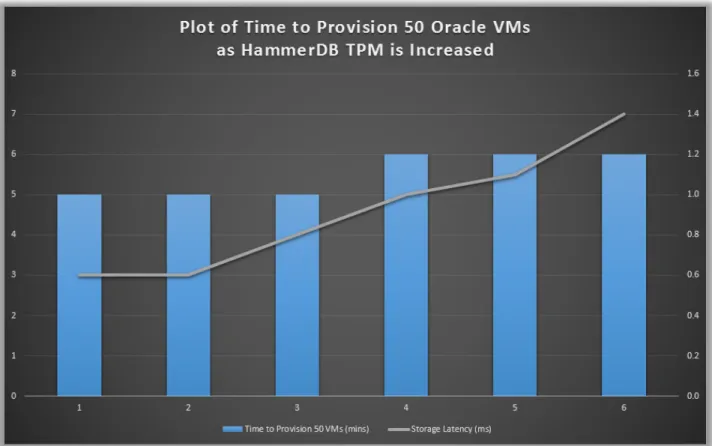
Results The DBaaS workflow took less than 6 minutes to provision 50 VMs. This time increases slightly as the workload on the storage increased. HammerDB Workload (TPM) 440943 816846 1169855 1483902 1783713 2039850 Time to Provision fifty (50) VMs (mins) 5 5 5 6 6 6 Time to Provision one (1) VM (secs) 6 6 6 7.2 7.2 7.2 DBaaS
Response Time (msecs) 0.6 0.6 0.5 0.5 0.5 0.5
Storage Latency (msecs) 0.6 0.6 0.8 1.0 1.1 1.4
Figure 12: DBaaS provisioning test with Oracle
This graph shows test results generated as we provisioned 50 Oracle database VMs from the vRealize Service Catalog.
• The X-‐axis shows 6 separate test runs: 1-‐6
• The HammerDB workload increases from left to right.
• The LHS Y-‐axis shows the time to provision 50 Oracle database VMs, in minutes. • The RHS Y-‐axis shows the storage latency as reported by the Tintri VMstore.
Notice that the time to provision 50 Oracle VMs increases slightly as we increase the HammerDB workload from 440,943 TPM to 2,039,850 TPM. This shows that the system remains responsive even as the workload increases substantially.
Test 3: Provision 50 SQL Server VMs
The third test documents the performance of the DBaaS system as it deploys 50 large SQL Server databases onto vSphere servers already running HammerDB database workloads. The HammerDB workloads are increased before each test run so that we can observe the effect upon the provisioning workflow.
Test 3
Configuration Description
VAAI status Enabled -‐ the tasks are offloaded to the Tintri storage
Infrastructure
workload Create a large workload on all 7 vRA deployment servers using HammerDB to drive database instances with a TPC-‐C “like” workload.
vRA Test Use vRA Catalog to provision 50 SQL Server VMs
VM Template SQL Server VM Template
(1 vCPU, 512 MB vRAM and 1.04 TB storage)
Data capture Capture the total amount of time needed to provision and configure all 50 SQL Server VMs, and capture the HammerDB TPM/NOPM performance output.
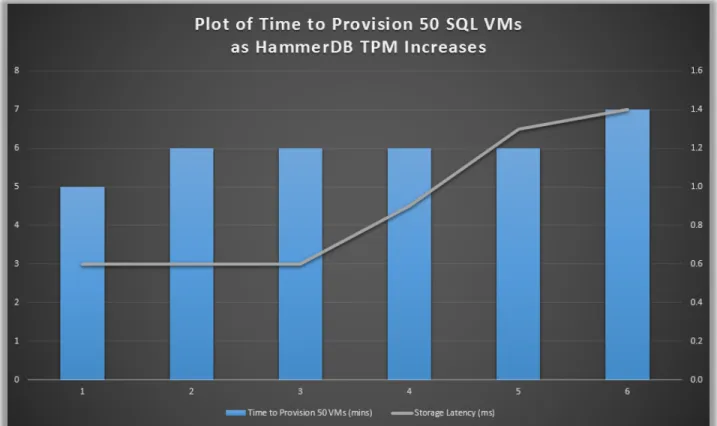
Results The DBaaS workflow took less than 7 minutes to provision 50 VMs. This time increased slightly as the workload on the storage increased. HammerDB Workload (TPM) 428233 845794 1261867 1643178 1889421 2048988 Time to Provision 50 VMs (mins) 5 6 6 6 6 7 Time to Provision ONE VM (secs) 6 7.2 7.2 7.2 7.2 8.4 DBaaS
Response Time (msecs) 0.6 0.5 0.5 0.5 0.4 0.4 Storage
Latency (msecs) 0.6 0.6 0.6 0.9 1.4 1.4
Figure 13: DBaaS provisioning test with SQL Server
This graph shows test results generated as we provisioned 50 SQL Server VMs from the vRealize Service Catalog.
• The X-‐axis shows 6 separate test runs: 1-‐6
• The HammerDB workload increases from left to right.
• The LHS Y-‐axis shows the time to provision 50 SQL Server VMs, in minutes.
• The RHS Y-‐axis shows the storage latency as reported by the Tintri VMstore console.
Notice that the time to provision 50 SQL Server VMs increases slightly as we increase the HammerDB workload from 428,233 TPM to 2,048,988 TPM. This shows that the system remains responsive even as the workload increases substantially.
Test 4: Generate a High IOPS Workload and Provision 50 Database VMs
The fourth test documents the performance of the DBaaS system as it deploys 50 large SQL Server databases onto vSphere servers already running a massive IOPS workload. The IOPS workloads are increased before each test run so that we can observe the effect upon the provisioning workflow.
In this test we ran a Tintri storage tool that is able generate a very high IOPS workload to stress the vSphere servers and the storage. The purpose of this tool is to create a high IOPS and high latency in the DBaaS infrastructure. This level of latency is beyond what was possible to create with the HammerDB workloads.
Test 4
Configuration Description
VAAI status Enabled -‐ the tasks are offloaded to the Tintri storage
Infrastructure
workload Create a massive IOPS-‐based workload on all 7 vRA deployment servers to force the storage into a high-‐latency situation.
vRA Test Use vRA Catalog to provision 50 SQL Server VMs
VM Template SQL Server VM Template
(1 vCPU, 512 MB vRAM and 1.04 TB storage)
Data capture Capture the total amount of time needed to provision and configure all 50 SQL Server VMs.
Results The DBaaS workflow took 5-‐6 minutes to provision 50 VMs. This time stayed consistent even as the IOPS-‐based workload on the storage increased the response time to 72 msecs of latency.
Storage Latency (msecs) 1 2 4 7 7 13 21 31 47 62 72
Time to Provision
50 VMs (mins) 6 5 5 6 6 6 5 5 5 5 6 Time to Provision
ONE VM (secs) 7.2 6 6 7.2 7.2 7.2 6 6 6 6 7.2 DBaaS