1 Service Description: Dell Cloud with VMware® vCloud™ Datacenter Service | v1.5|
Service Description
Dell Cloud with VMware
®
vCloud
™
Datacenter Service
Introduction to Your Service
Dell Cloud with VMware vCloud Datacenter Service (the “Service”) is an Infrastructure as a Service (IaaS) offering designed to extend an existing internal VMware implementation into a secure private cloud environment or as a stand-alone secure hosted public cloud solution. This Service Description and the attached appendices (collectively, the “Service Description”) describe the service as well as what to expect for your implementation on Dell’s cloud infrastructure.
Offer Description
Service Tiers
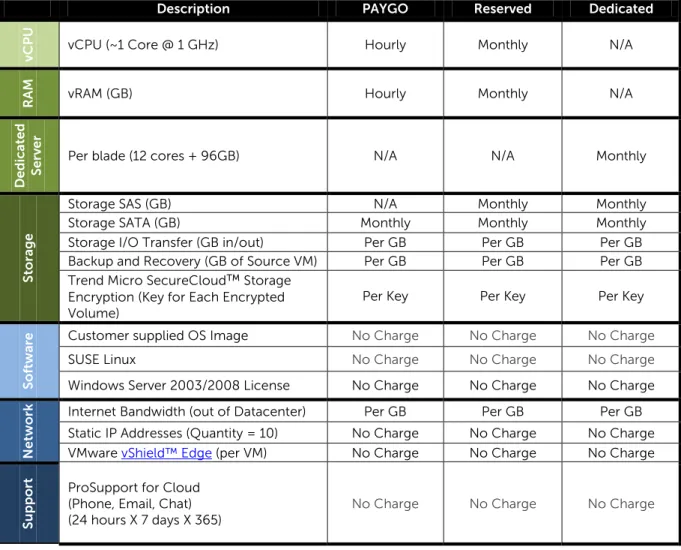
Dell will offer 3 tiers of Service based on VMware vCloud Director: Pay-as-You-Go (“PAYGO”), Reserved Capacity (“Reserved”) and Dedicated Capacity (“Dedicated”). Customers will designate the desired amount of virtual CPUs (“vCPU”) and virtual RAM (“vRAM”) for their desired implementation. A maximum ratio of 4GB of vRAM per vCPU will be enforced across the entire pool of capacity (e.g., a Reserved capacity of 100 vCPUs can have a maximum of 400GB of vRAM). See Table 1 for a summary of the offering and billing metrics.
PAYGO is a multi-tenant service that enables a customer to place VMware vSphere workloads on Dell’s cloud on a month-by-month basis. Customers are committed for only one month at a time with most fees charged on an hourly basis (when VMs are “powered-on”). Capacity is on a first-come-first-served basis and is not guaranteed.
Reserved is a multi-tenant service whereby a customer can ask Dell to set aside a fixed amount of cloud capacity for their use. The minimum commitment for this level of service is one year. Additional networking, storage, and security options are available.
Dedicated is a single-tenant service whereby a customer occupies entire servers for their VMware vCloud environment. Server capacity is purchased in increments of 4 servers. Storage and networking are shared with the other servers in Dell’s cloud. The minimum commitment for this level of service is one year. Additional networking, storage, and security options are available.
Billing for each tier is done on a monthly basis in arrears and will include both fixed and variable costs.
No hardware or software is being transferred, sold, leased or licensed to Customer under this Service Description. To the extent Dell uses hardware or software as part of its delivery of the Service, such hardware or software will be licensed, owned or otherwise held by Dell.
2 Service Description: Dell Cloud with VMware® vCloud™ Datacenter Service | v1.5|
Table 1: Product Offering with Billing Metrics
Description PAYGO Reserved Dedicated
vC
P
U
vCPU (~1 Core @ 1 GHz) Hourly Monthly N/A
RA
M vRAM (GB) Hourly Monthly N/A
D e d ic at e d Ser
ver Per blade (12 cores + 96GB) N/A N/A Monthly
S
to
ra
ge
Storage SAS (GB) N/A Monthly Monthly
Storage SATA (GB) Monthly Monthly Monthly
Storage I/O Transfer (GB in/out) Per GB Per GB Per GB Backup and Recovery (GB of Source VM) Per GB Per GB Per GB Trend Micro SecureCloud™ Storage
Encryption (Key for Each Encrypted Volume)
Per Key Per Key Per Key
So
ft
wa
re Customer supplied OS Image No Charge No Charge No Charge
SUSE Linux No Charge No Charge No Charge
Windows Server 2003/2008 License No Charge No Charge No Charge
N
et
wo
rk Internet Bandwidth (out of Datacenter) Per GB Per GB Per GB Static IP Addresses (Quantity = 10) No Charge No Charge No Charge VMware vShield™ Edge (per VM) No Charge No Charge No Charge
S
u
p
p
o
rt ProSupport for Cloud
(Phone, Email, Chat) (24 hours X 7 days X 365)
3 Service Description: Dell Cloud with VMware® vCloud™ Datacenter Service | v1.5|
Guest Operating Systems
You may use one of Dell’s Operating System (“OS”) Templates or import your own OS image. The current list of VMware vSphere supported guest operating systems can be found here:
http://www.vmware.com/pdf/GuestOS_guide.pdf. Customers are responsible for obtaining software license rights for any software used in connection with the Service.
Table 2: Guest Operating System Templates
Guest Operating System Template
32-bit x86
64-bit x64
SUSE Linux Enterprise Server 11 (SP1) ● ● Windows Server 2003, Datacenter Edition (SP2) ● ● Windows Server 2008 R2, Datacenter Edition (SP1) ●
Networking
The networking portion of this Service consists of physical and virtual components. You will be charged for data leaving Dell’s datacenter going to the Internet. Data bandwidth in and data between VMs in the same datacenter will not be charged. Dell is responsible for operating, maintaining, and troubleshooting all physical network components residing in Dell datacenters. Customer is
responsible for operating, maintaining, and troubleshooting all virtual networking components created in its virtual environments. You will be provided with 10 Static IP Addresses. The following optional network component is available:
VMware vShield Edge provides perimeter security and network services such as DHCP, NAT, Load balancing, and VPN service. vShield Edge is a virtual firewall appliance that can be provisioned on-demand and its services enabled on-the-fly to meet the flexibility requirement of cloud deployments. Implementing this service is optional; there is no additional charge for use of this software. Please consult the vShield Edge Design Guide for more information.
Backup and Recovery
Dell performs daily snapshots of all storage arrays and maintains copies for a rolling 7 day period; this is included in the standard offering at no additional charge. For an additional charge, an optional backup service is also available where Dell will perform daily backups on a rolling 7 day schedule and retain weekly backups for a rolling 6 month period. Backup is done at a virtual machine level
(selection of individual files is not supported). Please consult Getting Started – Dell Cloud with VMware vCloud® Datacenter Service for implementation details.
Optional Storage Encryption
Customers may choose to protect storage data “at rest” with Trend Micro SecureCloud™ encryption (the “Encryption Service”). Each encryption key purchased from Dell protects one volume of storage. If Customer elects to purchase the Encryption Service, Dell will transfer certain Customer information (name and e-mail address of the applicable Customer contact authorized to receive the encryption key(s) and company name, city, state, and country) to Trend Micro, Incorporated or one of its affiliates (in Germany) (“Trend Micro”) that manages the encryption keys using a Key Management Portal in their datacenter. Once the Customer information is provided to Trend Micro, Trend Micro will e-mail Customer with instructions on how to obtain and use the encryption keys. Use of the encryption keys
4 Service Description: Dell Cloud with VMware® vCloud™ Datacenter Service | v1.5|
will require the download and installation of an operating system specific agent from Trend Micro. Customer must agree to Trend Micro’s terms and conditions in order to receive Encryption Services. Dell has no access to the encryption keys.
Onboarding Process
Dell’s Global Onboarding Team will collaborate with designated Customer contacts to provide standardized onboarding of the Service.
The standard onboarding Service will include:
• A phased project management process with defined project deliverables (Kick Off, Provisioning, Validation Testing, Training)
• An assigned Dell Project Manager and Technical Consultant for the duration of the onboarding project
• Provisioning (“Provisioning”) is considered complete when a customer is capable of accessing and operating the vCloud Director console
• Creation of and troubleshooting of one or more of the Customer’s vCloud Organization virtual datacenters (“vDC”)
• Enabling one vCloud Organization vDC administrator
• Working with Customer to set up any dedicated VPN links over the Internet or dedicated WAN links
• Providing Customer virtual access to its vCloud Organization vDC
• Providing Customer access to its Dell Portal
• A 1 hour Customer walk-through training session on its vDC and Portal
• Transition to Dell Support
The Activation Date of this Service Description is the date on which the related Order Form is executed by the Customer and accepted by Dell. The Billing Start Date will begin at the conclusion of
Provisioning.
Support
Customers can identify up to 10 administrators to contact Dell support via email, phone, or online chat.
Customer Responsibilities:
• Customer will support implementation activities set forth herein for the Service. Customer will obtain all licenses necessary in connection with all software and applications used on the Service.
• Customer will provide timely access to Customer resources, including but not limited to, virtualization administrators, and engineering and project management. Dell and the Customer to agree on standard access protocols.
• The Customer is responsible for modifying and tracking changes to its environment
• Configuration/software/data backups. It is the Customer’s responsibility to perform complete backups of all existing data, software, and programs. NOTWITHSTANDING ANYTHING CONTAINED HEREIN TO THE CONTRARY OR DELL’S PERFORMANCE OF BASIC SNAPSHOT
5 Service Description: Dell Cloud with VMware® vCloud™ Datacenter Service | v1.5|
SERVICES OR BACKUP AND RECOVERY SERVICES, DELL WILL HAVE NO LIABILITY FOR LOSS OR RECOVERY OF DATA OR PROGRAMS or loss of use of system(s) arising out of the Service or support or any act or omission, including negligence, by Dell or a third-party service provider.
• Customer is responsible for all design and implementation of network security settings and requirements definition.
• Customer is responsible for all application and performance monitoring.
Dell Support Responsibilities:
• Assist Customer in identifying causes of issues experienced in Customer’s virtual environment.
• Assist in troubleshooting the Customer’s vCloud Organization virtual datacenter (“vDC”)
• Assist in troubleshooting the Customer’s VMware vCloud vDC
• Support backup/recovery requests, which may include additional costs and be subject to a separate agreement
• Work with Customer to troubleshoot any dedicated VPN links over the Internet or dedicated WAN links
• Answer questions related to billing and invoices
Miscellaneous
Dell will provide security in connection with the Service in accordance with Dell’s Dell Cloud with VMware vCloud Datacenter Service Security Statement attached as Appendix B.
The excluded support/services described below are available from Dell outside of this Service Description for an additional charge.
• Virtualization design
• Evaluation of Customer’s IT operations and organization
• Migration of any existing physical servers into a virtualized server environment
• Virtualization platform software licenses
• Application profiling, which includes identification of applications compatible with virtualization and analysis of server/application interdependencies, and
• Any activities other than those specifically noted in this Service Description.
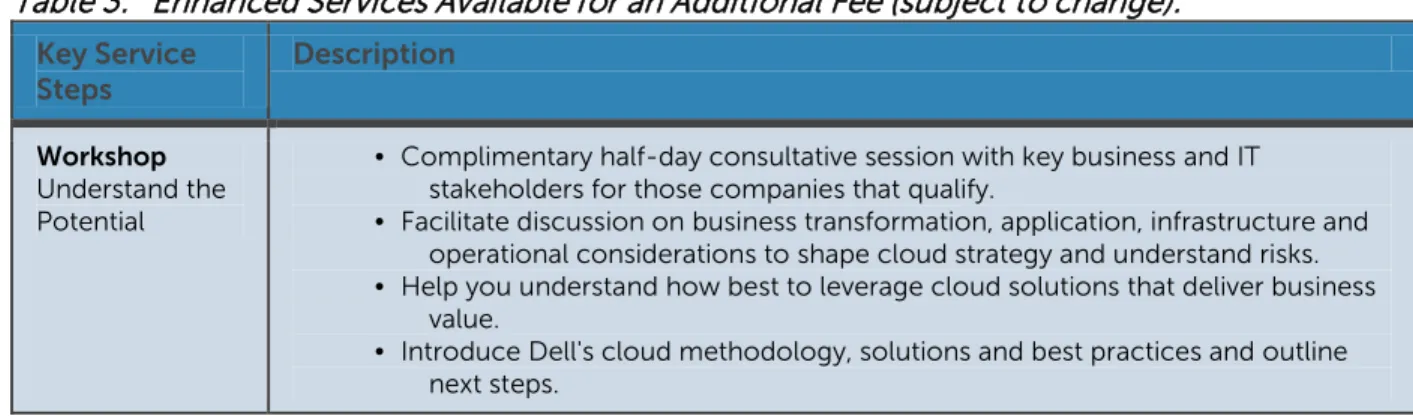
Table 3: Enhanced Services Available for an Additional Fee (subject to change):
Key Service Steps Description Workshop Understand the Potential
• Complimentary half-day consultative session with key business and IT stakeholders for those companies that qualify.
• Facilitate discussion on business transformation, application, infrastructure and operational considerations to shape cloud strategy and understand risks. • Help you understand how best to leverage cloud solutions that deliver business
value.
• Introduce Dell's cloud methodology, solutions and best practices and outline next steps.
6 Service Description: Dell Cloud with VMware® vCloud™ Datacenter Service | v1.5|
Assessment
Make Informed Decisions
Cloud Roadmap Accelerator:
• Help clearly define your business, operational, and IT objectives. • Analyze business process, applications, operations, and infrastructure. • Deliverables include:
o Cloud adoption strategy, investments, risks and roadmap. o Analyze shortlisted applications for suitability of public, private or
hybrid clouds.
o Recommend applicable cloud platforms and the right mix of
IaaS/SaaS/PaaS for your organization.
o Executive briefing and transformational blueprint clearly defining
the “AS-IS” and “TO-BE” environments.
Design
Lay the Path for Success
• Comprehensive design including impact of cloud solution on major areas of enterprise architecture: business, data, application and technology. • Cloud application pilot to understand needed changes, validate benefits,
security and performance before committing to long-term change. • Deliverables include:
o Design specs for your applications, infrastructure and operational
processes.
o Implementation plan. Implementation
Capture the value
• Translate your cloud design into a successful deployment —to build a private, public or hybrid cloud.
• Application migration and development to tailor existing or new applications to cloud environments.
• Integration of cloud solution with on-premise and other cloud services. • Testing, on-site deployment and roll-out of the cloud solution.
• Guidelines for operational best practices, governance, knowledge transfer and implementation reporting.
Terms & Conditions
Please refer to the Cloud Solutions Agreement for the latest terms and conditions.
Availability varies by country. To learn more, customers and Dell Channel Partners should contact your sales representative for more information.
© 2012 Dell Inc. All rights reserved. Trademarks and trade names may be used in this document to refer to either the entities claiming the marks and names or their products. Specifications are correct at date of publication but are subject to availability or change without notice at any time. Dell and its affiliates cannot be responsible for errors or omissions in typography or
photography. Dell's terms and conditions of sale apply and are available on request or online: (i) for US customers at www.Dell.com/cloudterms, and (ii) for Canada customers at www.dell.com/downloads/global/services/sd/csacanada.pdf.
For more information about any of our service offerings, please contact your Dell representative or visit www.dell.com/services /services.
7 Service Description: Dell Cloud with VMware® vCloud™ Datacenter Service | v1.5|
Appendix A
Service Level Agreement for Dell Cloud with VMware vCloud
Datacenter Service Offering
The service levels and associated remedies described below apply to the Dell Cloud with VMware vCloud Datacenter Service (the “Service”) when that Service is purchased directly from Dell for use in the United States.
Dell Cloud with VMware vCloud Datacenter Services SLA (the “Cloud SLA”): During the term of the applicable Order Form between Dell and Customer for the Service, Dell will use commercially reasonable efforts to achieve a Monthly Uptime Percentage of at least 99.95% for the Dell Cloud Infrastructure for any calendar month. If we do not meet this Cloud SLA, and so long as your account with Dell is current and not suspended, you may be eligible to receive the below-referenced Credits.
Definitions: The following definitions apply to this Cloud SLA.
• Dell Cloud Infrastructure: The network infrastructure which extends from the Service computing resources to the datacenter located router that provides the outside interface of each of Dell’s WAN connections to its backbone providers, in addition to the datacenter infrastructure which includes the HVAC, managed power systems, backup generators, and battery backup systems, as well as the servers, the storage, and the network related to the Service.
• Downtime: The time in which the Dell Cloud Infrastructure is not capable of being accessed or used by the Customer, as determined by Dell.
• Monthly Uptime Percentage: The total number of minutes in an average month (43,800 minutes) minus the number of minutes of Downtime, the balance is then divided by the total number of minutes in an average month.
Total number of minutes in an average month – number of minutes of downtime Total number of minutes in an average month
= Monthly Uptime Percentage
• Exclusion from Downtime: The following are not counted as Downtime for the purpose of calculating Monthly Uptime Percentage.
o This Service Level Agreement does not go into effect until after Onboarding has completed
its activities and the Customer has been turned over to ongoing Support (as described in the Onboarding Process section of the Service Description);
o Service unavailability caused by maintenance of the platform used to provide the Service
which does not exceed the pre-determined unavailability window for such maintenance (Dell will endeavor to provide seven (7) days’ advance notice of Service-affecting planned maintenance.);
o Service unavailability caused by events outside the reasonable control of Dell or its
subcontractor, including failure or unavailability of the Customer’s systems, the Internet, or any other service or third-party used by Customer to use, connect to, or access the Service; and
o Dell may modify the Service (including modifications to the software and other elements of
the Dell Cloud Infrastructure) at any time, without prior notice, provided the modification does not materially denigrate the functionality of the Service.
8 Service Description: Dell Cloud with VMware® vCloud™ Datacenter Service | v1.5|
• Service Level Agreements will only apply to PAYGO customers who have their VM(s) powered up for the entire billing period. Service Level Agreements ALWAYS apply to Reserved and Dedicated service offerings.
If Dell does not meet the Cloud SLA for a particular month during the term set forth in the Order Form, Dell will, at Customer’s request, provide the applicable credit (“Credit”) set out below:
Average Monthly Uptime Percentage
Downtime Minutes / Average Month
Credit Percentage Amount
100% - 99.95% 0 - 22 0% of charges billed in month of occurrence 99.94% - 99.50% 23 -219 10% of charges billed in month of occurrence 99.49% - 99.00% 220 - 438 25% of charges billed in month of occurrence 98.99% - 98.00% 439 - 876 50% of charges billed in month of occurrence 97.99% - 96.50% 877 - 1533 75% of charges billed in month of occurrence
< 96.50% > 1533
100% of charges billed in month of occurrence
Fractions of a minute will be rounded-up to the next highest minute.
• Example:
o 25 minutes of outage time means the Uptime Percentage was 99.94%, which results in a 10%
Credit toward the amount due for the month of occurrence.
Maximum Credit: The maximum Credit available to Customer if Dell is unable to meet the Cloud SLA is up to 100% of the monthly fees for the month of the occurrence. Any “credit” that Dell may owe you, such as a Credit for a failure to meet the Cloud SLA, will be applied to fees due from you for the Service, and will not be paid to you as a refund. All claims for Credit are subject to review and verification by Dell, and all Credits will be based on Dell’s measurement of its performance of the Service and will be final.
• Example:
o As noted above, if there is a Cloud SLA breach of 25 minutes of outage time this means the
Uptime Percentage was 99.94%, which results in a 10% Credit toward the amount due for the month of occurrence. If Customer’s monthly fees for service equal $2,500 during the month of the occurrence then Customer will receive a credit for $250 on the next invoice. In this case, the maximum Credit allowed would be up to $2,500 for monthly fees during the month of the occurrence.
Customer’s sole remedy, and Dell’s sole liability, with respect to Dell’s inability to meet any Cloud SLA is the Credits described above and Customer explicitly disclaims any and all other remedies, whether in law or equity.
Claim Procedure: To receive a Credit, a Customer is responsible for making a claim alleging Dell’s failure to achieve the Cloud SLA within 30 days of the last date of the reported Downtime. The claim must be sent by e-mail to the following address: [email protected]. The e-mail must include the following information:
9 Service Description: Dell Cloud with VMware® vCloud™ Datacenter Service | v1.5|
Customer name:
Customer account number [if applicable]:
Name of the Service to which the claim relates: (e.g. Dell Cloud with VMware vCloud Datacenter Service) Customer contact name:
Customer contact e-mail address: Customer contact telephone number:
Date(s) & time(s) for each claim for downtime:
10 Service Description: Dell Cloud with VMware® vCloud™ Datacenter Service | v1.5|
Security Statement
Dell Cloud with VMware
®
vCloud
™
Datacenter Service
Commitment to Security
The Dell Cloud with VMware vCloud Datacenter Service (the “Service”) is an Infrastructure as a Service (IaaS) offering designed to extend an existing internal VMware implementation into a secure cloud environment or as a stand-alone hosted cloud solution.
The Service is designed and built to address key security aspects, including:
Integrity: Through Internet Protocol Security (IPsec), Secure Socket Layer (SSL) and MPLS connections, the Service provides industry standard encryption and message authentication to help ensure that customer data cannot be modified during transmission.
Confidentiality: The Service is designed to allow only authorized users to access information within their virtual environment.
Availability: The Service uses mission-critical, highly robust, top-tier datacenters, designed to enable service availability at all times.
Overview
The Service uses the following controls to ensure that the integrity, confidentiality and availability of your information meet strong standards:
Physical controls, including environmental controls, are countermeasures that affect the physical environment; for example, access controls, fire prevention systems, cooling systems, exit routes, security personnel and datacenter surveillance monitoring.1
Technical controls (also called logical controls) are countermeasures that rely upon use of technology to mitigate risk; for example, firewalls, intrusion detection and prevention systems, and encryption mechanisms.
1 The controls outlined in this Appendix are designed to provide strong data security safeguards that meet the needs of a typical user. They are not intended or designed to address all industry specific requirements that are driven by regulatory requirements such as HIPAA. Users with specific data security requirements that exceed the controls listed in this Appendix should discuss alternative cloud solutions with their Dell representative.
11 Service Description: Dell Cloud with VMware® vCloud™ Datacenter Service | v1.5|
Administrative controls are countermeasures that involve policy and procedures; for example, security and escalation policies, log audits, vulnerability scanning and penetration testing.
Physical Controls
Service datacenters are designed to support and protect mission-critical operations. These datacenters provide multi‐level physical security features and a rigidly-controlled operating
environment to help protect customer assets and operations. Service datacenters are audited annually to the SAS‐70 Type 2 / SSAE 16 Type 2 standard and maintain ISO/IEC 27001 certification.
Access and Security Controls
Access to Service datacenters is highly controlled. All entrances are monitored and have alarms for protection. These datacenters are staffed with 24‐hour security officers to augment physical security features, providing protection of your operations.
CCTV Digital Recorders
CCTV security cameras monitor designated sensitive areas. Fire Suppression
Industry standard fire suppression systems for multi‐tenant datacenters are in use. Environmental Controls
Service datacenters are constructed to meet the highest standards of redundancy. Service datacenters also include critical power and cooling systems that are provisioned with appropriate redundant failover infrastructure. The critical power and cooling infrastructure is backed up by an emergency power generation system.
Technical Controls
Network and System SecurityMultiple levels of disparate defenses are used to protect customer information and strictly control network access to the datacenter. Customers connect with the Service via IPsec, SSL and MPLS connections to provide industry-standard link encryption and message authentication to help ensure that customer data cannot be modified during transmission. All access to servers is strictly monitored. In addition, Service servers are configured to prevent intrusions and protect against day‐to‐day threats. The servers are selected and configured to maximize their reliability, security, scalability and efficiency. Trend Micro’s SecureCloud ™ encryption service provides optional data volume encryption with third-party key escrow for customers requiring additional data safeguards for their data volumes.
Firewalls
Customer data transfers are made from the customer’s environment to the Service system via standard Internet Protocol Security (IPsec) or Secure Socket Layer (SSL) connections through the customer’s firewall. All non‐required firewall ports are blocked on the Dell Cloud with VMware vCloud Datacenter Service firewalls.
Intrusion Prevention Systems
Dell uses enterprise-grade intrusion detection / intrusion prevention systems (IDS/IPS) within the Service infrastructure to provide another mechanism for the early detection and prevention of data breaches.
12 Service Description: Dell Cloud with VMware® vCloud™ Datacenter Service | v1.5| Security Operations Center Monitoring
Dell SecureWorks Security Operations Center (SOC) monitors all firewalls, web application firewalls and other network probes within the Service infrastructure to facilitate early detection of any attempted data breaches.
Access Controls
Access to corporate systems is restricted, based on procedures to ensure appropriate approvals. To reduce the risk of misuse, intentional or otherwise, access is provided based on segregation of duties and least privileges. Remote access and wireless computing capabilities are restricted and require that both user and system safeguards are in place. Specific event logs from key devices and systems are centrally collected and reported on an exceptions basis to enable incident response and forensic investigations by recognized experts in this area.
Vulnerability Scanning and Penetration Testing
Internal and external vulnerability scans are performed on Dell’s cloud infrastructure periodically and after any significant change in the network. External and internal penetration tests, including network- and application-layer penetration tests are performed annually and after any significant infrastructure or application upgrades or modifications.
Administrative Controls
Data Center Access HistoryPhysical access history to the datacenters is recorded. Personnel Security
All users with access to the Service environment are responsible for compliance with Dell information security policies and standards. As part of the employment process, employees undergo a screening process applicable per regional law. In the United States, personnel screening procedures include criminal background checks and drug screening.
A banner stating Dell’s standard on Acceptable Use is displayed upon login to servers, desktops and notebooks. Dell’s annual compliance training includes a requirement for employees to complete an online course and pass an assessment covering information security and data privacy. Additional mechanisms for security awareness and education include articles in the corporate newsletters, website and whitepapers, presentation seminars and additional online courses.
Communications and Operations Management
Changes to the Service infrastructure, systems and applications are managed through a centralized change management program, which includes testing, back out procedures, business impact analysis and management approval, where appropriate.
Incident response procedures exist for security and data protection incidents. The procedures include incident analysis, containment, response, remediation, reporting and procedures for returning to normal operations.
To protect against malicious use of assets and malicious software, the following additional controls are implemented: designated development and test environments; malware detection on servers, desktops and notebooks; email attachment malware scanning; and information handling procedures based on data type, application and network security.