Jenni Susan Reuben
Helsinki University of Technology
[email protected]
Abstract
Virtualization plays a major role in helping the organizations to reduce the operational cost, and still ensuring improved efficiency, better utilization and flexibility of existing hardware. "Virtualization is both an opportunity and a threat -says Patrick Lin, Senior director of Product Management for VMware" [4]. This paper presents a literature study on vari-ous security issues in virtualization technologies. Our study focus mainly on some open security vulnerabilities that vir-tualization brings to the environment. We concentrate on curity issues that are unique for virtual machines. The se-curity threats presented here are common to all the virtu-alization technologies available in the market, they are not specific to a single virtualization technology. We provide an overview of various virtualization technologies available in the market at the first place together with some security benefits that comes together with virtualization. Finally we provide a detailed discussion of several security holes in the virtualized environment.
KEYWORDS: Virtualization, Security, Threats, Benefits.
1
Introduction
Virtualization - A technology that has an enormous effect in today’s IT world. It is a technique that divides a physical computer into several partly or completely isolated machines commonly known as virtual machines (VM) or guest ma-chines. Multiple of these virtual machines can run on a host computer, each possessing its own operating system and ap-plications. This gives an illusion to the processes on these virtual machines as if they are running on a physical com-puter, but in reality they are sharing the physical hardware of the host machine. The software that allows multiple op-erating systems to use the hardware of the physical machine is called a hypervisor or a control program. Hypervisors sit between the operating system of the host machine and the virtual environment. There are various virtualization tech-nologies available in the market, having their own merits and demerits.
In non-virtual environment, the applications running on the machine can see each other, and in some cases can even communicate with each other, whereas in virtual environ-ment [7] the programs running in one guest machine are iso-lated from the programs running in another guest machine, in other words guest machines "provide what appear to be independent coexisting computers" [7] to their running pro-grams. The degree of isolation should be strong enough that
the vulnerabilities in one virtual machine should not affect either the virtual machines or the underlying host machine.
The computer that is being virtualized is of no difference from the computer that is not virtualized. The virtualized en-vironment is vulnerable to all the traditional attacks and ex-ploits that are common to the normal environment. The case is even worse in the virtualized environment, where there are several virtual computers running. The security expec-tations are higher in here because "there are more systems to protect" [4], more possible points of entry, more holes to patch and there are more interconnection points in the virtu-alized environment [4]. Attackers and Hackers are already been actively developing new malware programs for virtual machine environment. "Root kit infections, malware that de-tects a virtual environment and modifies itself accordingly" [4, 11] are some of them. "Low-level hypervisor attacks, and deployment of malicious virtual systems" [4] are few possi-ble attacks that are unique to this environment.
On the other hand new security protection programs are also emerging in the market every now and then from differ-ent vendors, but most of these security solutions are mainly focused on hypervisor. Since hypervisor is a new layer be-tween the host’s OS and virtual environment, it creates new opportunities for the malicious programs. And more over, hypervisor is basically a software program, so it has all the traditional software bugs and the security vulnerabilities as any software have. One of such product that hits the market recently is SHype [4], a new secure hypervisor that binds se-curity policies to the virtual environment. A good debate on recent security solutions can be found on [10].
However, virtual machine security is more than just de-ploying a secure hypervisor to the environment. Virtualiza-tion technologies are still evolving. Newer versions with added features are introduced before the security conse-quences of the older version has been fully studied. This work analyzes the general security threats in a virtual envi-ronment and suggests possible solutions for few of the men-tioned threats.
Understanding of virtualization technologies greatly helps to understand the security consequences that occur in the en-vironment. Sec. 3 discuss the back ground of various vir-tualization technologies together with some security benefits offered by these virtualization technologies and finally Sec. 4 analyze the security issues concerning virtualization.
2
Research Methodology
This paper is a literature survey that analyse various issues concerning security in virtual machine environment. This
TKK T-110.5290 Seminar on Network Security 2007-10-11/12
work provides an overview of security consequences arises in a virtualized environment. However this paper does not provide one prefect solution for all the described threats. But do provide an understanding of how these threats can be avoided while implementing virtualization.
3
Background
Virtualization was first developed in 1960’s by IBM Cor-poration, originally to partition large mainframe computer into several logical instances and to run on single physi-cal mainframe hardware as the host. This feature was in-vented because maintaining the larger mainframe computers became cumbersome. The scientist realized that this capa-bility of partitioning allows multiple processes and applica-tions to run at the same time, thus increasing the efficiency of the environment and decreasing the maintainance over-head. By day to day development, virtualization technolo-gies has rapidly attains popularity in computing, in fact it is now proven to be a fundamental building block for today’s computing [14].
Although the main focus of this paper is to provide an overview of security vulnerabilities in a virtual environment. It is worth mentioning some of the security benefits that comes together with virtualization.
Two primary benefits offered by any virtualization tech-nology are 1.Resource sharing and 2.Isolation. Resource sharing - Unlike in non-virtualized environment where all the resources are dedicated to the running programs, in vir-tualized environment the VMs shares the physical resources such as memory, disk and network devices of the underly-ing host. The resources are allocated to the virtual machine on request. Hypervisors plays a significant role in resource allocation.
Isolation - One of the key issue in virtualization, provides isolation between virtual machines that are running on the same physical hardware. Programs running in one virtual machine cannot see programs running in another virtual ma-chine. This is contrast to non-virtual environment where the running programs can see each other and if allowed can com-municate with each other.
Virtualization provides a facility of restoring a clean non infected environment even the underlying system is infected by malicious programs. Since, Virtualization provides an isolated environment this can be used for debugging mali-cious programs. and also to test new applications.
Virtualization can be done in several ways. There are var-ious virtualization technologies available in the market that helps to virtualize the environment. Depending on the needs and goals of the organization, one virtualization technology is better than the other. This section gives an overview of some of the existing virtualization technologies.
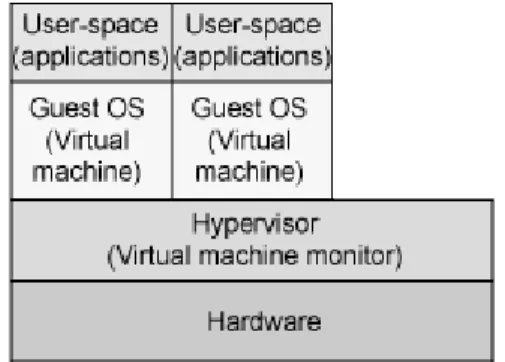
Before going into the details of different virtualization technologies, Fig. 1 gives a basic idea of a virtual machine environment.
In Fig. 1 [6] there are two virtual machines running on top of a physical computer possessing their own operating sys-tem and applications. Every guest machines appears to be an independent computer for their running processes. As al-ready mentioned, Hypervisor layer is the host software layer
Figure 1: Overview of a virtual machine environment
that provides the ability to run multiple operating system on a physical hardware. It sits between the host physical hard-ware and the guest machines.
3.1
Full virtualization
In this approach the hypervisor simulates several logical in-stances of completely independent virtual computers pos-sessing its own virtual resources. These virtual resources included IO ports and DMA channels. Therefore, each vir-tual machine can run any operating system supported by the underlying hardware. Besides the fact, that this is the most commonly used virtualization technology, true full virtual-ization where the virtual processors have to reproduce the CPU operations of the host machine is hard to achieve. More over, the overhead of handling these CPU operations makes true full virtualization difficult to manage. However the vir-tual machine environment that provides "enough represen-tation of the underlying hardware to allow guest operating systems to run without modification can be considered to provide "Full Virtualization" [7]".
In this kind of setup the I/O devices are allotted to the guest machines by imitating the physical devices in the vir-tual machine monitor; interacting with these devices in the virtual environment are then directed to the real physical de-vices either by the host operating system driver or by the "hypervisor driver [7]".
3.2
Paravirtualization
Unlike full virtualization, in paravirtualization the running guest OS should be modified in order to be operated in the virtual environment. Paravirtualization is a subset of server virtualization, which provides a thin software interface be-tween the host hardware and the modified guest OS. An in-teresting fact in this technology is that the guest machines are aware of the fact that they are running in a virtualized environment.
One of the main characteristics of paravirtualization tech-nology is, the virtual machine monitor is simple which al-lows paravirtualization to achieve performance closer to non-virtualized hardware.
Device interaction in paravirtualized environment is very similar to the device interaction in full virtualized environ-ment, the virtual devices in paravirtualized environment also rely on physical device drivers of the underlying host [8].
3.3
Application virtualization
In Application virtualization, the user is able to run a server application locally using the local resources without needing the complexity of completely installing this application on his/her computer. Such virtualized applications are designed to run in a small virtual environment containing the only the resources needed for the application to execute. Thus in ap-plication virtualization each user have an isolated apap-plication environment virtually. This small isolated virtual environ-ment acts as a layer between the application and the host operating system [8].
3.4
Hardware support virtualization
This approach has recently gains attention when Intel and AMD released their processors with inbuilt hardware which supports virtualization. The hardware support virtualization architecture creates a trusted "root mode" and an untrusted "non-root mode". The hypervisor resides in the root mode whereas all the guest operating systems reside in the non-root mode. Hypervisor is responsible for resource allocation and I/O device interaction. Since the hypervisor reside in the root mode the guest operating systems calls out for the hypervisor in order to process their requests for resources by means of a special virtualization instruction known as hyper-calls [7].
3.5
Resource virtualization
Virtualizing system specific resources such as "storage vol-umes, name spaces and the network resources [8]" is known as resource virtualization. There are various approaches to perform resource virtualization. Some of them are,
• Aggregating many individual components into larger resource pool
• Grid computing or computer clusters where multiple discrete computers are combined to form a large super-computers with enormous resources
• partitioning a single resource such as disk space into number of smaller and easily accessible resources of same type
3.5.1 Storage virtualization
Storage virtualization is a form of Resource virtualization, where a logical storage is created by abstracting all the phys-ical storage resources that are scattered over the network. First the physical storage resources are aggregated to form a storage pool which then forms the logical storage. This logical storage which is the aggregation of scattered physi-cal resouces appears to be a single monolithic storage device to the user.
4
Security vulnerabilities in
virtual-ization
Most of security flaws identified in a virtual machine envi-ronment are very similar to the security flaws assoicated with
any physical system. The following are some general flaws that are unique [9] to the virtual environment.
4.1
Communication between VMs or Between
VMs and host
One of the primary benefits that virtualization bring is isola-tion. This benefit, if not carefully deployed become a threat to the environment. Isolation should be carefully configured and maintained in a virtual environment to ensure that the ap-plications running in one VM dont have access to the appli-cations running in another VM. Isolation should be strongly maintained that break-in into one virtual machine should not provide access either to virtual machines in the same envi-ronment or to the underlying host machine.
Shared clipboard in virtual machine is a useful feature that allows data to be transferred between VMs and the host. But this useful feature can also be treated as a gateway for trans-ferring data between cooperating malicious program in VMs. In worst case, it is used to "exfiltrate data to/from the host operating system [7]".
In some VM technologies, the VM layer is able to log keystrokes and screen updates across the virtual terminals, provided that the host operating system kernel has given nec-essary permission. These captured logs are stored out in the host, which creates an opportunity to the host to monitor even the logs of encrypted terminal connections inside the VMs.
Some virtualization avoids isolation, in order to support applications designed for one operating system to be oper-ated on another operating system, this solution completely exploits the security bearers in both the operating systems. This kind of system, where there is no isolation between the host and the VMs gives the virtual machines an unlimited ac-cess to the host’s resources, such as file system and network-ing devices. In which case the host’s file system becomes vulnerable [7].
4.2
VM Escape
Virtual machines are allowed to share the resources of the host machine but still can provide isolation between VMs and between the VMs and the host. That is, the virtual ma-chines are designed in a way that a program running in one virtual machine cannot monitor, or communicate either with programs running in other VMs or with the programs run-ning in the host. But in reality the organizations compromise isolation. They configure flexible isolation to meet their or-ganization needs which exploits the security of the systems. New software bugs were already introduced to compromise isolation [2].
One such example of this kind of attack is VM escape. VM escape is one of the worst case happens if the isolation between the host and between the VMs is compromised. In VM escape, the program running in a virtual machine is able to completely bypass the virtual layer (hypervisor layer), and get access to the host machine. Since the host machine is the root, the program which gain access to the host machine also gains the root privileges basically escapes from the virtual
TKK T-110.5290 Seminar on Network Security 2007-10-11/12
machine privileges. This result in complete break down in the security framework of the environment [7].
This problem can be solved by properly configuring the host/guest interaction.
4.3
VM monitoring from the host
Host machine in the virtual environment is considered to be the control point and there are implications that enable the host to monitors and communicate with the VM applications up running. Therefore it is more necessary to strictly protect the host machines than protecting distinctive VMs.
Different virtualization technologies have different impli-cations for the host machine to influence the VMs up running in the system. Following are the possible ways for the host to influence the VMs [7],
• The host can start, shutdown, pause and restart the VMs.
• The host can able to monitor and modify the resources available for the virtual machines.
• The host if given enough rights can monitor the appli-cations running inside the VMs.
• The host can view, copy, and likely to modify the data stored in the virtual disks assigned to the VMs.
And particularly, in general all the network traffic to/from the VMs pass through the host, this enables the host to mon-itor all the network traffic for all its VMs. In which case if a host is compromised then the security of the VMs is un-der question. Basically in all virtualization technologies, the host machines are given some sort of basic rights to con-trol some actions such as resource allocations of the VMs running on top. But care should be taken when configuring the VM environment so that enough isolation should be pro-vided which avoids the host being a gateway for attacking the virtual machine [7].
4.4
VM monitoring from another VM
As mentioned several times earlier in Sec. 3 and in Sec. 4 iso-lation plays a vital role in virtualization. It is considered as a threat when one VM without any difficult may be allowed to monitor resources of another VM. Thanks to today’s mod-ern CPUs, which comes with a built in memory protection feature. The hypervisor who is responsible for memory iso-lation can make use of this feature; this memory protection feature prevents one VM seeing the other VM’s memory re-sources. And more over the VMs does not have the possibil-ity to directly access the file system of the host machine, so its impossible for a VM to access the virtual disk allocated to another VM on the host.
When comes to the network traffic, isolation completely depends on the connection (network) setup of the virtualized environment. If the host machine is connected to the guest machine by means of physical dedicated channel, then its unlikely that the guest machine can sniff packets to the host and vice versa. However in reality the VMs are linked to the host machine by means "virtual hub" or by a virtual switch.
In which case, it enables the guest machines to sniff packets in the network or even worse that the guest machines can use ARP poisoning to redirect the packets going to and coming from another guest [7].
Authenticating the network traffic could be a solution the problem described above.
4.5
Denial of Service
In virtual machine architecture the guest machines and the underlying host share the physical resources such as CPU, memory disk, and network resource. So it is possible for a guest to impose a denial of service attack to other guests residing in the same system.
Denial of service attack in virtual environment can be de-scribed as an attack when a guest machine takes all the pos-sible resources of the system. Hence, the system denies the service to other guests that are making request for resources, this is because there is no resource available for other guests. The best approach to prevent a guest consuming all the re-sources is to limit the rere-sources allocated to the guests. Cur-rent virtualization technologies offer a mechanism to limit the resources allocated to each guest machines in the envi-ronment. Therefore the underlying virtualization technology should be properly configured, which can then prevent one guest consuming all the available resources, there by pre-venting the denial of service attack [7].
4.6
Guest-to-Guest attack
As mentioned in Sec. 4.3 it is important to prevent the host machine than the individual VMs. If an attacker gains the administrator privileges of the hardware then its likely that the attacker can break-in into the virtual machines. It is termed as guest-to-guest attack because the attacker can able to hop from one virtual machine to another virtual machine provided that the underlying security framework is already broken [4].
4.7
External Modification of a VM
There are some sensitive applications exists which rely on the infrastructure of the VM environment. These applica-tions running inside a virtual machine requires the virtual machine to be a trusted environment to execute that applica-tion. If a VM is modified for some reason, the applications can still be able to run on the VM but the trust is broken. Sudhakar and Andrew [3]in their paper emaphasis more at-tacks on application virtualization.
A best solution for this problem is to digitally sign the VM and validating the signature prior to the execution of this sensitive applications [7].
4.8
External modification of the hypervisor
As mentioned earlier in Sec. 4.4 hypervisor is responsible for providing isolation between the guest machines. The VMs are said to be completely isolated or "self protected" [7, 2] only if the underlying hypervisor behaves well. A badly be-haved hypervsior will break the security model of the system.
the recommended solution is to use secure hypervisor like SHype [4] to ensure security in the hypervisor layer. An-other solution is to protect the hypervisor from unauthorized modifications [7] or enable the guest machines to validate the hypervisor.
5
Conclusion
The paper has presented some of the security flaws in the virtual machine environment. Some of the threats presented here may be considered as benefits in some situations, but they are presented here so that proper care should be taken while designing and implementing the virtual environment.
Virtualization brings very little added security to the en-vironment. One of the key issue is that everyone should be aware of the fact that virtual machines represent the logical instance of an underlying system. So many of the traditional computer threats apply the same to the virtual machines also. Another issue that makes the security consequences difficult to understand is that, there are so many different types of virtualization technologies available in the market. Each of it has it own merits and demerits, each virtualization deploy-ment is different depending on the need for the virtualiza-tion. It is common that any single virtualization technology will not provide shield to all the security issues arise. How-ever, the key to create a good virtualization environment is to study carefully the environment that is to be virtualized, the needs and goals of the organization, and taking into con-sideration all the possible security issues that puts the virtual machines at risk. Finally carefully design the virtual envi-ronment with the help of correct virtualization technology that matches the goals.
Majority of the security issues presented here concerns the security of the host and the hypervisor. If the host or the hy-pervisor is compromised then the whole security model is broken. Attacks against the hypervisor becoming more pop-ular among the attackers realm [11]. Therefore after setting up the environment, care should be taken to ensure that the hypervisor is secure enough to the newly emerging threats, if not patches has to be done. Patches should be done fre-quently so that the risk of hypervisor being compromised will be avoided [5].
Virtualization is a powerful solution to reduce the oper-ational costs in today’s computing but if done wrong it be-come as a threat to the environment. While implementing, exaggerate the security model to with stand the attacks. And as mentioned earlier keep monitoring for new developments that emerges in this field and continue to stay up to date.
References
[1] P. Ferrie. Attacks on virtual Machine Emulators.
SYMANTEC ADVANCED THREAT RESEARCH.
http://www.symantec.com/avcenter/ reference/Virtual_Machine_Threats. pdf.
Harder than Real: Security Challenges in Virtual Machine Bases computing Environments. Stanford University Department of Computer Science. http: //www.stanford.edu/~talg/papers/ HOTOS05/virtual-harder-hotos05.pdf%. [3] S. Govindavajhala and A. W. Appel. Using Memory
Errors to Attack a Virtual Machine. Princeton
Univer-sity. http://www.cs.princeton.edu/sip/ pub/memerr.pdf.
[4] K. J. Higgins. Vm’s create potential risks. Tech-nical report, darkREADING, 2007. http: //www.darkreading.com/document.asp? doc_id=117908.
[5] B. Huston. Secuirty tip: 3 steps towards securing virtual machines. Security, Septem-ber 2007. http://security.itworld.com/ 4367/nlssecurity071009/page_1.html. [6] M. Jones. Discover the Linux Kernel Virtual
Machine. IBM. http://www-128.ibm. com/developerworks/linux/library/ l-linux-kvm/.
[7] J. Kirch. Virtual machine security guidelines.
The center for Internet Security, September 2007.
http://www.cisecurity.org/tools2/vm/ CIS_VM_Benchmark_v1.0.pdf.
[8] A. Mann. The pros and cons of virtualization.
BTQ, 2007. http://www.btquarterly.com/ ?mc=pros-cons-virtualization\&page= virt-view%research.
[9] D. Marshall. Whitepaper: Virtual machine security guidelines. InfoWorld, September 2007. http://weblog.infoworld.com/ virtualization/archives/2007/09/ whitepaper_%virt.html.
[10] E. Messmer. Security in the ’virtual ma-chine’? NETWORKWORLD, April 2006.
http://www.networkworld.com/weblogs/ security/012014.html.
[11] R. Naraine. Vm rootkits: The next big threat.
eWeek, March 2006. http://www.eweek.com/ article2/0,1759,1936666,00.asp.
[12] R.P.Goldberg. Architecture of virtual machines. In
Proceedings of the workshop on virtual computer sys-tems, pages 74 – 112. THE ACM, 1973.
[13] R.P.Goldberg. Survey of virtual machine research. In
Computer, volume 7, pages 34–35. IEEE, June 1974.
[14] VMware. VMware security center. http://www. vmware.com/support/security.html.