International Technical Support Organization http://www.redbooks.ibm.com
LDAP Implementation Cookbook
LDAP Implementation Cookbook
June 1999
First Edition (June 1999)
This edition applies to the IBM SecureWay Directory, available for IBM AIX, IBM OS/400, IBM OS/390, Microsoft Windows NT, and Sun Solaris.
Comments may be addressed to:
IBM Corporation, International Technical Support Organization Dept. JN9B, Building 003 Internal Zip 2834
11400 Burnet Road Austin, Texas 78758-3493
When you send information to IBM, you grant IBM a non-exclusive right to use or distribute the information in any way it believes appropriate without incurring any obligation to you.
Before using this information and the product it supports, be sure to read the general information in Appendix B, “Special Notices” on page 273.
Contents
Figures . . . .ix
Tables. . . .xi
Preface . . . xiii
The Team That Wrote This Redbook . . . xiii
Comments Welcome . . . xiv
Chapter 1. Introduction . . . 1
1.1 What Is a Directory? . . . 2
1.1.1 Differences Between Directories and Databases . . . 3
1.1.2 Directory Clients and Servers . . . 5
1.1.3 Distributed Directories . . . 6
1.1.4 Directory Security . . . 8
1.1.5 Users, Platforms, and Networks . . . 9
1.2 The Directory as Infrastructure . . . 10
1.2.1 Directory-Enabled Applications . . . 10
1.2.2 The Benefits of a Common Directory for Applications . . . 11
1.2.3 Directory-Enabled Networks . . . 12
1.3 LDAP: Protocol or Directory? . . . 13
1.3.1 X.500: The Directory Service Standard . . . 13
1.3.2 LDAP Server as a Gateway . . . 14
1.3.3 LDAP as Standalone Server . . . 14
1.4 The LDAP Road Map . . . 15
1.4.1 LDAP Is More than a Programming Model . . . 16
1.5 The Framework for Creating Enterprise-Wide Solutions . . . 17
1.6 IBM Directory Strategy . . . 20
1.7 IBM Directory Offerings . . . 21
1.7.1 The IBM SecureWay Directory . . . 22
1.7.2 The IBM SecureWay Directory Client SDK . . . 24
1.7.3 Lotus Domino R5.0 . . . 24
1.7.4 Tivoli User Administration: LDAP Connection . . . 26
1.8 LDAP Standards. . . 28
1.9 Summary . . . 28
Chapter 2. Schema and Namespace . . . 31
2.1 LDAP Information Model Overview . . . 31
2.2 LDAP Names . . . 33
2.2.1 String Form . . . 33
2.2.2 URL Form. . . 34
2.3 Directory Information Tree (Namespace) Structure. . . 36
2.4 Relationship Between Objects . . . 37
2.4.1 Object and Attribute Reuse. . . 39
2.4.2 Naming Conventions . . . 40
2.5 The IBM Schema . . . 41
2.5.1 Schema Information . . . 43
2.6 Schema Categories . . . 44
2.6.1 Directory Server Objects. . . 45
2.6.2 White Pages Objects . . . 46
2.6.3 Security Objects . . . 51
2.6.4 Policy Objects . . . 54
2.6.5 Profile Objects . . . 55
2.6.6 System Objects . . . 58
2.6.7 Software Objects . . . 60
2.6.8 Service Objects . . . 62
2.6.9 Other Objects . . . 63
2.7 The IBM Schema Repository . . . 63
Chapter 3. A Step-by-Step Approach for Directory Implementation . . 65
3.1 Define the Objective for Using an LDAP Directory Service . . . 65
3.2 Define the Data to Store in the Directory Service . . . 66
3.2.1 The Type and Use of Directory Data . . . 66
3.2.2 Survey the Directory Data. . . 67
3.3 Evaluate Data and Its Relationship to Directory Schema . . . 68
3.4 Define and Assign Responsibilities for the Data . . . 68
3.5 Evaluate Data and Its Placement in the Namespace . . . 69
3.6 Evaluate the Existing Security Policy . . . 70
3.7 Define the Migration Model . . . 70
3.8 Define the LDAP Programming Model . . . 72
3.9 Define the Deployment and Performance Criteria . . . 73
3.9.1 Availability of the Directory Service. . . 73
3.9.2 Performance Considerations . . . 74
3.10 Step-by-Step Summary . . . 74
Chapter 4. Managing an LDAP Directory . . . 77
4.1 Overview: Administration Tools, Utilities, and APIs. . . 77
4.2 Centralized versus Distributed Administration . . . 79
4.2.1 Who Administers The Data? . . . 79
4.2.2 Attribute Grouping . . . 80
4.2.3 Multiple Applications. . . 82
4.3 UTF-8 Support . . . 83
4.4 Tivoli TME Considerations . . . 85
4.5.1 Partitioning a Directory . . . 88
4.5.2 Administering a Split Namespace . . . 90
4.6 Migration from the Previous Release . . . 91
4.7 Migration from Non-LDAP Sources . . . 92
4.7.1 The LDIF File Format . . . 93
4.7.2 LDIF Data Encoding . . . 95
4.7.3 Creating Directory Entries Using LDIF . . . 95
4.7.4 LDIF File Example . . . 97
4.7.5 Importing LDIF Data . . . 97
4.8 Summary and Conclusions . . . 101
Chapter 5. Directory Security . . . 103
5.1 Security of the Directory . . . 103
5.2 Security Support of the IBM SecureWay Directory . . . 104
5.2.1 Overview of Simple Authentication and Security Layer (SASL) . 105 5.2.2 Overview of Secure Sockets Layer (SSL) . . . 106
5.3 SSL Utilities . . . 108
5.3.1 GSKit Installation . . . 109
5.3.2 The ikmgui Utility . . . 110
5.4 Configuring SSL Security . . . 111
5.4.1 Creating a Certificate Signed by a Trusted Certificate Authority 112 5.4.2 Creating a Self-Signed Certificate. . . 114
5.4.3 Configuring an LDAP Server to Use SSL . . . 116
5.4.4 Configuring an LDAP Client to Use SSL . . . 117
5.5 Delegation Model . . . 117
5.6 Access Control . . . 120
5.6.1 ACL Permissions . . . 121
5.6.2 Attribute Classes . . . 122
5.6.3 Propagation . . . 123
5.6.4 LDAP ACL Attributes . . . 123
5.6.5 Pseudo DNs . . . 125
5.6.6 Granting Access . . . 126
5.7 Storing Security Related Information in the Directory . . . 126
5.7.1 Passwords . . . 126
5.7.2 Certificates . . . 129
5.7.3 Displaying Sensitive Data . . . 129
5.7.4 Attacks . . . 129
Chapter 6. Installation and Configuration . . . 131
6.1 Windows NT . . . 131
6.1.1 System and Software Requirements . . . 131
6.1.2 Installing the Server . . . 132
6.1.4 Unconfiguring and Uninstalling the Server . . . 136
6.2 AIX . . . 137
6.2.1 System and Software Requirements . . . 138
6.2.2 Installing the Server . . . 138
6.2.3 Configuration . . . 139
6.2.4 Unconfiguring and Uninstalling the Server . . . 139
6.3 OS/390 . . . 140
6.3.1 System and Software Requirements . . . 141
6.3.2 Installing the Server . . . 141
6.3.3 Configuration . . . 142
6.3.4 Unconfiguring and Uninstalling the Server . . . 150
6.4 OS/400 . . . 150
6.4.1 System and Software Requirements . . . 151
6.4.2 Installing the Server . . . 151
6.4.3 Configuration . . . 152
6.4.4 Uninstalling the Server . . . 158
Chapter 7. LDAP Data and System Administration . . . 159
7.1 The Directory Management Tool . . . 159
7.1.1 Startup and Configuration . . . 160
7.1.2 Example: Expanding the Schema . . . 161
7.2 The Administrator Graphical User Interface . . . 166
7.2.1 Launching the Administrator GUI . . . 167
7.2.2 Window Layout . . . 167
7.3 Database Configuration . . . 169
7.3.1 Default Database . . . 170
7.3.2 Custom Database . . . 171
7.4 Defining a Suffix . . . 171
7.5 Database Population . . . 172
7.5.1 Adding Data Entries . . . 173
7.5.2 Verifying Data Entries . . . 175
7.5.3 Updating Data Entries . . . 176
7.5.4 Back up the Database . . . 177
7.6 Replication . . . 178
7.6.1 Configuration . . . 178
7.6.2 Promote a Replica as Master . . . 182
7.7 Referrals . . . 184
7.8 Command Line Utilities . . . 187
7.8.1 The LDIF Utility . . . 188
7.8.2 The LDIF2DB Utility . . . 189
7.8.3 The BULKLOAD Utility . . . 189
7.8.4 The DB2LDIF Utility . . . 192
7.8.6 The LDAPMODIFY and LDAPADD Utilities. . . 197
7.8.7 The LDAPDELETE Utility . . . 200
7.8.8 The LDAPMODRDN Utility . . . 202
7.9 Security Setup . . . 204
7.9.1 Creating and Working with Access Groups . . . 204
7.9.2 Creating and Working with Access Roles . . . 206
7.9.3 Ownership and Access Control . . . 206
7.10 Schema Data Management . . . 213
7.10.1 The rootDSE. . . 214
7.10.2 Schema Files . . . 216
7.10.3 Back up and Restore Schema Information . . . 217
7.11 Locating LDAP Servers Using DNS . . . 218
7.11.1 TXT Records . . . 218
7.11.2 SRV Records . . . 219
7.11.3 CNAME Records . . . 220
7.11.4 APIs Provided for DNS Support . . . 220
Chapter 8. Developing Directory-Enabled Applications. . . 223
8.1 Java Naming and Directory Interface (JNDI). . . 223
8.1.1 Introduction . . . 224
8.1.2 Directory Context and Schema Context . . . 226
8.1.3 Java Object Serialization . . . 229
8.1.4 JNDI and Security. . . 230
8.1.5 JNDI Example Program . . . 233
8.2 C LDAP Application Programming Interface (API) . . . 235
8.2.1 Introduction . . . 235
8.2.2 Synchronous and Asynchronous Use of the API . . . 240
8.2.3 A Synchronous Search Example . . . 241
8.2.4 More about Search Filters . . . 245
8.2.5 Parsing Search Results . . . 245
8.2.6 An Asynchronous Search Example . . . 249
8.2.7 Error Handling . . . 253
8.2.8 Authentication Methods . . . 257
8.2.9 Multithreaded Applications . . . 261
8.3 Special Programming Topics . . . 264
8.3.1 Data Considerations, Discrete Attributes versus Blobs . . . 264
8.3.2 Caching Considerations . . . 265
Appendix A. Standards . . . 269
Appendix B. Special Notices . . . 273
C.2 Redbooks on CD-ROMs . . . 277
C.3 Other Publications . . . 277
C.4 The Internet Engineering Task Force (IETF) . . . 278
C.5 The University of Michigan (UMICH) . . . 279
C.6 IBM Internet Wet Site for the IBM SecureWay Directory . . . 279
C.7 IBM Intranet Web Site. . . 279
C.8 Lotus Notes Discussion Database . . . 280
C.9 Software Development Kits . . . 280
C.10 Other Sources. . . 281
C.10.1 LDAP, General . . . 281
C.10.2 Request for Comments (RFCs) and other References . . . 281
How to Get ITSO Redbooks . . . 283
IBM Redbook Fax Order Form . . . 284
List of Abbreviations. . . 285
Index . . . 287
Figures
1. Directory client/server interaction. . . 5
2. LDAP server acting as a gateway to an X.500 server . . . 14
3. Stand-alone LDAP server . . . 15
4. Application framework for e-business . . . 18
5. The Domino 5.0 directory architecture . . . 26
6. Tivoli database versus the real configuration. . . 27
7. Namespace organization . . . 37
8. The big picture of the IBM schema . . . 42
9. Class hierarchy for person object classes . . . 48
10. Class hierarchy for group object classes . . . 50
11. Class hierarchy for miscellaneous object classes . . . 50
12. Person - User relationship . . . 52
13. Person - Account and their application system relationships. . . 54
14. Property set and property object relationships. . . 56
15. Preferences - Example 1 . . . 57
16. Preferences - Example 2 . . . 58
17. System-level object relationships. . . 60
18. Software object class relationships . . . 61
19. Service object class relationships . . . 63
20. Data passes in UTF-8 character set . . . 84
21. Referrals example . . . 89
22. The schema migration tool. . . 92
23. IBM key management (ikmgui) utility main window . . . 111
24. Delegation . . . 118
25. IBM SecureWay directory configuration (using ldapxcfg) . . . 134
26. Sample DSNAOINI file . . . 143
27. Sample ldapspfi.spufi file . . . 145
28. A sample SLAPD file . . . 147
29. Operations navigator LDAP administration . . . 152
30. LDAP administration pop-up menu . . . 153
31. LDAP configuration wizard - Welcome screen. . . 154
32. LDAP configuration wizard - Specify database library . . . 155
33. LDAP configuration wizard - Administrator name . . . 155
34. LDAP configuration wizard - Choose directory suffixes . . . 156
35. LDAP configuration wizard - Start server option . . . 157
36. LDAP configuration wizard - Configuration summary . . . 157
37. IBM SecureWay directory management tool . . . 159
38. Adding an attribute. . . 161
39. Define a new object class - Name and superior class . . . 162
41. Add a new person using the new object class . . . 164
42. Select the object classes for the new entry . . . 165
43. Enter the attribute values for the new entry . . . 165
44. New person entry in the directory tree . . . 166
45. Initial administration interface . . . 168
46. Configure database . . . 170
47. Importing an LDIF file (with errors) . . . 174
48. Import error message. . . 174
49. List of replicas . . . 180
50. Promote a replica server as master server . . . 183
51. Referrals . . . 185
52. Create ownership. . . 208
53. ACL control list entry . . . 209
54. ACL with additional group . . . 210
55. Additional ACL owner . . . 210
56. JNDI API and SPI interfaces . . . 225
57. DirContext for different directory services . . . 226
58. Schema context . . . 228
59. Java object serialization. . . 229
60. SASL plugins . . . 231
61. External SASL . . . 232
62. Synchronous versus asynchronous calls. . . 240
63. Different search scopes . . . 244
64. Result of a search request . . . 246
Tables
1. Example ACL for an employee’s directory entry . . . 8
2. The ASCII encoding of an RDN surname (example) . . . 34
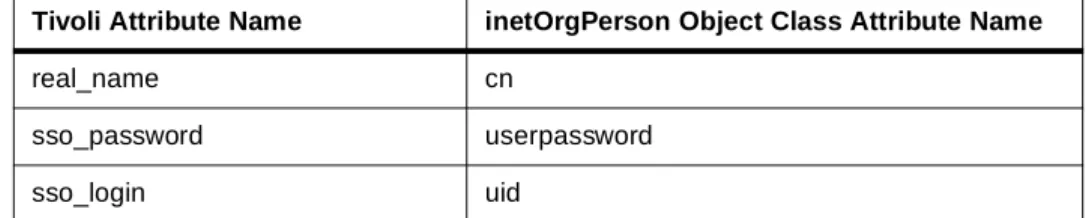
3. Tivoli LDAP connection attribute mapping . . . 86
4. LDIF fields . . . 94
5. Administration matrix . . . 101
6. Permissions required for basic LDAP operations . . . 122
7. Search filter operators . . . 195
8. Boolean operators . . . 196
Preface
The implementation and exploitation of centralized, corporate-wide directories are among the top priority projects in most organizations in the years 1999 and 2000. The need for a centralized directory emerges as organizations realize the overhead and cost involved in managing the many distributed micro and macro directories introduced in the past decade with decentralized client/server applications and network operating systems. Directories are key for a successful IT operation in medium and large
environments. IBM understands this requirement and supports it by providing directory implementations based on industry standards at no additional cost on all its major platforms and even important non-IBM platforms. TheIBM SecureWay Directory, formerly known as theIBM eNetwork LDAP Directory, implements the Lightweight Directory Access Protocol (LDAP) standard that has emerged quickly in the past years as a result of the demand for such a standard.
This redbook will help you understand, install, and configure the IBM SecureWay Directory. It is targeted at system specialists who need to know the concepts and the detailed instructions for a successful LDAP
implementation.
The Team That Wrote This Redbook
This redbook is an evolution of an IBM working paper,IBM eNetwork LDAP Exploitation Guide, that was written by Mike Schlosser and Ellen Stokes at IBM Austin. The redbook was produced by a team of specialists from around the world working at the International Technical Support Organization, Austin Center.
Heinz Johner is an Advisory I/T Specialist at the International Technical Support Organization, Austin Center. He writes extensively on the Distributed Computing Environment (DCE), security-related areas, and eNetwork
deployment. Before joining the ITSO, he worked in the Professional Services organization of IBM Switzerland and was responsible for DCE and Systems Management in medium and large customer projects.
Harri Stranden is an I/T Architect for e-business Solutions at IBM Finland. He has over 20 years of experience in the IT field on networking and Systems Management. He has worked with IBM for 12 years. His areas of expertise include building solutions exploiting Internet technologies.
Permana Widhiasta is an I/TAP System Services Representatives from IBM Global Services in Indonesia. He has worked with IBM for several years. He holds a degree in Materials Engineering from the University of Indonesia. His area of expertise includes AS/400 Systems Management.
Thanks to the following people for their invaluable contributions to this book: Matt Barber, IBM Austin
Debora Byrne, IBM Austin Patrick Fleming, IBM Rochester Mike Garrison, IBM Austin Karen Gdaniec, IBM Endicott Timothy Hahn, IBM Endicott Kyle L. Henderson, IBM Rochester Paul Immanuel, IBM Raleigh James Manon, IBM Austin Mark McConaughy, IBM Austin Ellen Stokes, IBM Austin Diane H. Pearce, IBM Canada Paul de Graaff, ITSO Poughkeepsie Fant Steele, ITSO Rochester
Special thanks go to the editors for their invaluable help in finalizing the book: John Owczarzak
Milos Radosavlijevic
Comments Welcome
Your comments are important to us!
We want our redbooks to be as helpful as possible. Please send us your comments about this or other redbooks in one of the following ways:
• Fax the evaluation form found in “ITSO Redbook Evaluation” on page 293 to the fax number shown on the form.
Chapter 1. Introduction
People and businesses are increasingly relying on networked computer systems to support distributed applications. These distributed applications might interact with computers on the same local area network (LAN), within a corporate intranet, within extranets linking up partners and suppliers, or anywhere on the worldwide Internet. To improve functionality and ease-of-use, and to enable cost-effective administration of distributed applications, information about the services, resources, users, and other objects accessible from the applications needs to be organized in a clear and consistent manner. Much of this information can be shared among many applications, but, it must also be protected in order to prevent unauthorized modification or the disclosure of private information.
Information describing the various users, applications, files, printers, and other resources accessible from a network is often collected into a special database that is sometimes called a directory. As the number of different networks and applications has grown, the number of specialized directories of information has also grown resulting in islands of information that are difficult to share and manage. If all of this information could be maintained and accessed in a consistent and controlled manner, it would provide a focal point for integrating a distributed environment into a consistent and seamless system.
The Lightweight Directory Access Protocol (LDAP) is an open industry standard that has evolved to meet these needs. LDAP defines a standard method for accessing and updating information in a directory. LDAP is gaining wide acceptance as the directory access method of the Internet and is therefore also becoming strategic within corporate intranets. It is being supported by a growing number of software vendors and is being
incorporated into a growing number of applications. For example, the two most popular Web browsers, Netscape Navigator/Communicator and Microsoft Internet Explorer, support LDAP functionality as a base feature. ThisLDAP Implementation Cookbookexplains the steps to get started with LDAP directory implementation projects and is intended to give the reader a detailed understanding of the architecture, use, and benefits of LDAP. It also contains product-specific installation, configuration, and administration information.
step-by-step approach for directory implementation projects. The
management and administration of a centralized or distributed directory from a design and planning point of view are covered in Chapter 4. Next, Chapter 5 discusses security topics like authentication of directory users and access control lists (ACL). Chapter 6 provides information about the installation and configuration of the IBM SecureWay Directory. Directory and system
administration considerations are discussed in Chapter 7. Chapter 8 finally explains how to develop directory-enabled applications. Various reference material is collected in the appendices.
1.1 What Is a Directory?
A directory is a collection of information about objects arranged in some order that gives details about each object. Popular examples are a city telephone directory and a library card catalog. For a telephone directory, the objects listed are people; the names are arranged alphabetically, and the details given about each person typically include an address and telephone number. Books in a library card catalog are ordered by author or by title, and
information such as the ISBN number of the book and other publication information is also contained.
In computer terms, a directory is a specialized database, also called a data repository, that stores typed and ordered information about objects. A particular directory might list information about printers (the objects) consisting of typed information, such as location (a formatted character string), speed in pages per minute (numeric), print data streams supported (for example PostScript or ASCII), and so on.
Directories allow users or applications to find resources that have the
characteristics needed for a particular task. For example, a directory of users can be used to look up a person’s e-mail address or fax number. A directory can be searched to find a nearby PostScript color printer. Or, a directory of application servers can be searched to find a server that can access customer billing information.
than the yellow pages of a telephone directory because they can usually be searched by specific criteria not just by a predefined set of categories.
1.1.1 Differences Between Directories and Databases
A directory is often described as a database, but it is a specialized database that has characteristics that set it apart from general purpose relational databases. One special characteristic of directories is that they are accessed (read or searched) much more often than they are updated (written).
Hundreds of people might look up an individual’s phone number, or thousands of print clients might look up the characteristics of a particular printer. But, the phone number or printer characteristics rarely ever change. Because directories must be able to support high volumes of read requests, they are typically optimized for read access. Write access might be limited to system administrators or to the owner of each piece of information. A general purpose database, on the other hand, needs to support applications, such as airline reservations and banking applications, with relatively high update volumes.
Because directories are meant to store relatively static information and are optimized for that purpose, they are not appropriate for storing information that changes rapidly. For example, the number of jobs currently in a print queue probably should not be stored in the directory entry for a printer because that information would have to be updated frequently to be accurate. Instead, the directory entry for the printer can contain the network address of a print server. The print server can be queried to get the current queue length if desired. The information in the directory (the print server address) is static, whereas the number of jobs in the print queue is dynamic.
Another difference between directories and general purpose databases is that directories normally do not support transactions. This may, however, change in the future and some vendor implementation may already support transactions. Transactions are all-or-nothing operations that must be completed in total or not at all. For example, when transferring money from one bank account to another, the money must be debited from one account and credited to the other account in a single transaction. If only half of this transaction completes or someone accesses the accounts while the money is in transit, the accounts will not balance. General-purpose databases usually support such transactions, which complicates their implementation.
locations, and so on. If one directory entry is updated, and the other directory entry is then updated, there is a brief period during which the directory will show that both people have the same phone number. Because updates are relatively rare, such anomalies are considered acceptable.
The type of information stored in a directory usually does not require strict consistency. It might be acceptable if information such as a telephone number is temporarily out of date. Because directories are (currently) not
transactional, it is not a good idea to use them to store information that is sensitive to inconsistencies, such as bank account balances.
Because general-purpose databases must support arbitrary applications such as banking and inventory control, they allow arbitrary collections of data to be stored. Directories may be limited in the type of data they allow to be stored (although the architecture does not impose such a limitation). For example, a directory specialized for customer contact information might be limited to storing only personal information such as names, addresses, and phone numbers. If a directory is extensible, it can be configured to store a variety of types of information making it more useful to a variety of programs. Another important difference between a directory and a general-purpose database is in the way information can be accessed. Most databases support a standardized, very powerful access method called Structured Query Language (SQL). SQL allows complex update and query functions at the cost of program size and application complexity. LDAP directories, on the other hand, use a simplified and optimized access protocol that can be used in slim and relatively simple applications.
1.1.2 Directory Clients and Servers
Directories are usually accessed using the client/server model of
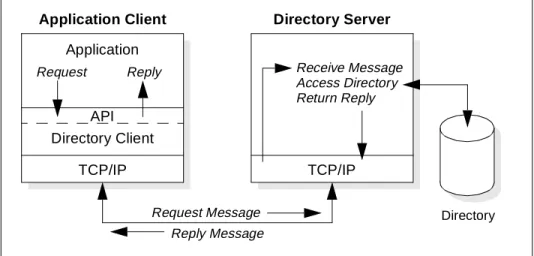
communication. An application that wants to read or write information in a directory does not access the directory directly. Instead, it calls a function or application programming interface (API) that causes a message to be sent to another process. This second process accesses the information in the directory on behalf of the requesting application. The results of the read or write are then returned to the requesting application (see Figure 1).
Figure 1. Directory client/server interaction
The request is performed by the directory client, and the process that maintains and looks up information in the directory is called the directory server. In general, servers provide a specific service to clients. Sometimes, a
Many of the differences just mentioned may lead to the suspicion that a directory is no more than a limited-function database. This is indeed partly true since one of the important design goals of a directory service is that it can be accessed and used from relatively small and simple applications. In fact, certain vendor products, such as the IBM SecureWay Directory, use a relational database under the cover to implement the functions. Also, proposals are being discussed in the standards bodies to add some functions to future versions of LDAP that currently are specific to databases, such as support for transactional updates.
What About the Future?
Application Client Directory Server
Request Message Reply Message Application
TCP/IP Directory Client Request Reply
TCP/IP Receive Message Access Directory Return Reply
server might become the client of other servers in order to gather the information necessary to process a request.
A directory service is only one type of service that might be available in a client/server environment. Other common examples of services are file services, mail services, print services, Web page services, and so on. The client and server processes might or might not be on the same machine. A server is capable of serving many clients. Some servers can process client requests in parallel. Other servers queue incoming client requests for serial processing if they are currently busy processing another client’s request. An API defines the programming interface that a particular programming language uses to access a service. The format and contents of the messages exchanged between client and server must adhere to an agreed upon protocol. LDAP defines a message protocol used by directory clients and directory servers. There is also an associated LDAP API for the C language and ways to access the directory from a Java application using JNDI (see Chapter 8, “Developing Directory-Enabled Applications” on page 223 for more details on these APIs). The client is not dependent upon a particular
implementation of the server, and the server can implement the directory however it chooses.
It may seem confusing, at this time, to discuss directories as well as protocols while the acronymLDAPstrictly refers to a protocol only. Section 1.3, “LDAP: Protocol or Directory?” on page 13 will clarify this.
1.1.3 Distributed Directories
The termslocal,global,centralized, anddistributedare often used to describe a directory or directory service. These terms mean different things to different people in different contexts. In this section, these terms are explained as they apply to directories in different contexts.
In general,localmeans something is close by, andglobal means that something is spread across the universe of interest. The universe of interest might be a company, a country, or the Earth. Local and global are two ends of a continuum. That is, something may be more or less global or local than something else. Centralized means that something is in one place, and distributed means that something is in more than one place. Like local and global, something can be distributed to a greater or lesser extent.
department or workgroup. A directory that stores global information might store information for an entire company. Here, the universe of interest is the company.
The clients that access information in the directory can be local or global. Local clients may all be located in the same building or on the same LAN. Global clients might be distributed across the continent or planet.
The directory itself can becentralizedordistributed. If a directory is
centralized, there is one directory server (or a server cluster) at one location that provides access to the directory. If the directory is distributed, there are multiple servers, usually geographically dispersed, that provide access to the directory.
When a directory is distributed, the information stored in the directory can be
partitionedorreplicated. When information is partitioned, each directory server stores a unique and non-overlapping subset of the information. That is, each directory entry is stored by one and only one server. The technique to partition the directory is to use LDAP referrals. LDAP referrals allow the users to refer LDAP requests to either the same or different name spaces stored in a different (or same) server. When information is replicated, the same directory entry is stored by more than one server. In a distributed directory, some information may be partitioned, and some information may be
replicated.
The three dimensionsof a directory — scope of information, location of clients, and distribution of servers — are independent of each other. For example, clients scattered across the globe can access a directory containing only information about a single department, and that directory can be
replicated at many directory servers. Or, clients in a single location can access a directory containing information about everybody in the world that is stored by a single directory server.
The design and maintenance of a directory service can be complex, and many trade-offs may be involved. You can see more detailed information about the topic in the following chapters.
1.1.4 Directory Security
The security of information stored in a directory is a major consideration. Some directories are meant to be accessed publicly on the Internet, but any user should not necessarily be able to perform any operation. A company’s directory servicing its intranet can be stored behind a firewall to keep the general public from accessing it, but more security control may be needed within the intranet itself.
For example, anybody should be able to look up an employee’s e-mail address, but only the employee or a system administrator should be able to change it. Members of the personnel department might have permission to look up an employee’s home telephone number, but their co-workers might not. Depending on the confidentiality of the data, information may need to be encrypted before being transmitted over the network. A security policy defines who has what type of access to what information. The security policy is defined by the organization that maintains the directory.
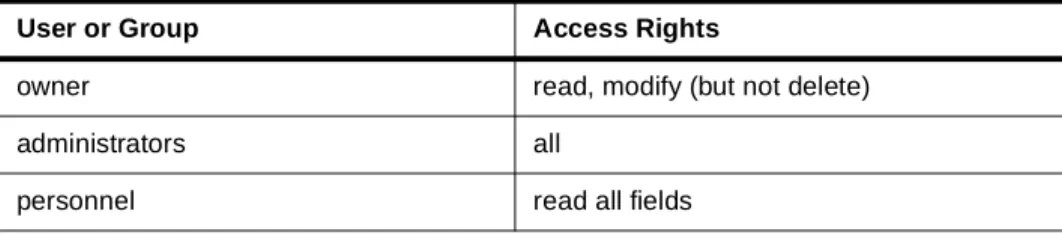
A directory should support the basic capabilities needed to implement a security policy. The directory might not directly provide the underlying security capabilities, but it might be integrated with a trusted network security service that provides the basic security services. First, a method is needed to authenticate users. Authentication verifies that users are who they say they are. A user name and password is a basic authentication scheme. Once users are authenticated, it must be determined if they have the authorization or permission to perform the requested operation on the specific object. Authorization is often based on access control lists (ACLs). An ACL is a list of authorizations that may be attached to objects and attributes in the directory. An ACL lists what type of access each user or a group of users is allowed or denied. In order to make ACLs shorter and more manageable, users with the same access rights are often put into security groups. Table 1 shows an example ACL for an employee’s directory entry.
Table 1. Example ACL for an employee’s directory entry
User or Group Access Rights
owner read, modify (but not delete)
administrators all
The authentication and authorization methods and related standards and proposals relevant to LDAP, likeSecure Sockets Layer (SSL) andSimple Authentication and Security Layer (SASL), are discussed in more detail in Chapter 5, “Directory Security” on page 103.
1.1.5 Users, Platforms, and Networks
The concept ofusers, what a user is, where the information about a user is stored, how it is used, and so on is key to understanding the relationship between LDAP directory services and platform operating systems. Starting with LDAP directory service, there are two obvious ways to think about users:
• A user may be an LDAP directory user. LDAP sessions begin with a bind operation. For cases other than unauthenticated access, a bind request must supply a distinguished name (DN) and a password or another type of credential. So, a user must be defined in the directory server (the user must have a DN) in order to be authenticated to access the directory. • A user may be a white pages entry in an LDAP directory. The common
white pages or phone book application will contain information about people, in most cases many people. There can be, but does not have to be, a relationship between a white pages entry and an LDAP directory user; that is, everyone listed in the white pages directory may not have access to the directory. The inverse may also be true; people not listed in the directory may access the data as, for example, when internal users access a directory that stores customer person objects.
Most operating system platforms provide local or remote access for users; so, a user can also be the following:
• A user may be a system-defined user. The user must be defined on the system platform in order to be authenticated so he/she can be a user of that platform for access to system services, such as file and print sharing. Such users are usually defined by a user ID and a password, or, with increasing importance, by a digital certificate signed by a known Certificate Authority (CA).
Historically, multi-user interactive applications and subsystems used the platform-level user definitions on the hosted platform to authenticate user access to transactions, programs and data. While single sign-on, and the
all others read restricted
overall security architecture are beyond the scope of this guide, it is sufficient to say that, as the number of systems in a network continues to grow and applications themselves are distributed across multiple systems, the strict application-to-host system user affinity is insufficient. So, many applications have developed their ownprivate user and authentication files.
• A user may be an application user. The user must be defined/enrolled in the specific application in order to be authenticated and have access to that application and its resources.
It is important to understand this current topology with its mix of semantics, syntax, and backing stores foruserinformation in order to understand the context ofuserswithin a distributed environment.
1.2 The Directory as Infrastructure
A directory that is accessible by multiple applications is a vital part of the infrastructure supporting networked systems. A directory service provides a single logical view of the users, resources, and other objects that make up a distributed system. This allows users and applications to access network resources transparently. That is, the system is perceived as an integrated whole, a network, not a collection of independent parts. Objects can be accessed by name or function without knowing low-level identifiers such as host addresses, file server names, and e-mail addresses.
1.2.1 Directory-Enabled Applications
A directory-enabled application is an application that uses a directory service to improve its functionality, ease of use, and administration. Today, many applications make use of information that can be stored in a directory. For example, consider a group calendar application that is used to schedule meetings of company personnel in different conference rooms.
In the worst case, the calendar application does not use a directory service at all. If this were the case, a user trying to schedule a meeting would have to remember the room number of every conference room that might be appropriate for the meeting. Is the room big enough, does it have the
necessary audio and video equipment, and so on? The user would also have to remember the names and e-mail addresses of every attendee that needs to receive a meeting notice. Such an application would obviously be
cumbersome to use.
can be accessed from a directory service, the application will be much easier to use. Also, the functionality of the application can be improved. For
example, a list of all available conference rooms meeting the size and equipment requirements can be presented to the user.
But, the developers of directory-enabled applications are faced with a problem. What if they cannot assume that a directory service will exist in all environments? If there is a directory service, it might be specific to a certain network operating system (NOS) making the application non-portable. Can the existing directory service be extended to store the type of information needed by the application? Because of these concerns, application developers often take the approach of developing their own
application-specific directory.
1.2.2 The Benefits of a Common Directory for Applications
An application-specific directory stores only the information needed by a particular application and is not accessible by other applications. Because a full-function directory service is complex to build, application-specific
directories are typically very limited. They probably store only a specific type of information, probably do not have general search capabilities, probably do not support replication and partitioning, and probably do not have a full set of administration tools. An application-specific directory can be as simple as a set of editable text files, or it can be stored and accessed in an
undocumented proprietary manner.
In such an environment, each application creates and manages its own application-specific directory, which quickly becomes an administrative nightmare. The same e-mail address stored by the calendar application might also be stored by a mail application and by an application that notifies system operators of equipment problems. Keeping multiple copies of information up-to-date and synchronized is difficult especially when different user interfaces and even different system administrators are involved.
What is needed is a common, application-independent directory. If application developers could be assured of the existence of a directory service,
When such a directory infrastructure is in place, application developers can devote their time to developing applications instead of application-specific directories. In the same way that developers rely on the communications infrastructure of TCP/IP, remote procedure call (RPC), and object request brokers (ORBs) to free them from low-level communication issues, they will be able to rely on powerful, full-function directory services. LDAP is the protocol to be used to access this common directory infrastructure. Like HTTP (hypertext transfer protocol) and FTP (file transfer protocol), LDAP will become an indispensable part of the Internet’s protocol suite.
When applications access a standard common directory that is designed in a proper way, rather than using application-specific directories, redundant and costly administration can be eliminated, and security risks are more
controllable. The calendar, mail, and operator notification applications can all access the same directory to retrieve an e-mail address. New uses for directory information will be realized, and a synergy will develop as more applications take advantage of the common directory.
1.2.3 Directory-Enabled Networks
But, it is not only directory-enabling your applications, but also
directory-enabling all your network resources, such as users, systems, and network devices, and integrating them into the directory infrastructure. The information model and schema for the next generation of distributed networks has been defined by the Directory-Enabled Networks (DEN) initiative
incorporated by Desktop Management Task Force’s Common Information Model (CIM). The information models and schemas are discussed in more detail in Chapter 2, “Schema and Namespace” on page 31.
What does this mean to directory development projects? It means that the IBM SecureWay Directory or other LDAP-based directory services will define users and other resources. While this will occur in stages, the goal is to sign on to the network via the LDAP directory, rather than signing on to a platform or to an application. As the mechanisms for supporting the platform/system resource user and the application user decline, they will be replaced by the network-enabled user by providing the directory infrastructure for
authentication and authorization of the network resources. The guidelines for directory exploitation projects are:
• For existing applications and subsystems: When re-engineering for network computing, implement LDAP based resource enrollment, definition, and authentication.
• For existing platform and platform services: When re-engineering for network computing or other initiatives, implement LDAP-based user and resource enrollment, definition, and authentication.
When it comes to administration of network resources, directory-enabled networks will bring even greater benefits than are described in 1.2.2, “The Benefits of a Common Directory for Applications” on page 11. Directory services are the central pillar for network computing.
1.3 LDAP: Protocol or Directory?
LDAP defines a communication protocol. That is, it defines the transport and format of messages used by a client to access data in an X.500-like directory. LDAP does not define the directory service itself. Yet, people often talk about LDAP directories. Others say LDAP is only a protocol and that there is no such thing as an LDAP directory. What is an LDAP directory? Let us first consider some basic information about X.500.
1.3.1 X.500: The Directory Service Standard
The CCITT (Comite Consultatif International Telephonique et Telegraphique or Consultative Committee on International Telephony and Telegraphy, which is nowadays ITUT, International Telecommunications Union
-Telecommunication Standardization Sector) defined the X.500 standard in 1988, which then becameISO 9594, Data Communications Network
Directory, Recommendations X.500/X.521in 1990, though it is still commonly referred to as X.500.
X.500 organizes directory entries in a hierarchical name space capable of supporting large amounts of information. It also defines powerful search capabilities to make information retrieval easier. Because of its functionality and scalability, X.500 is often used together with add-on modules for interoperation between incompatible directory services.
1.3.2 LDAP Server as a Gateway
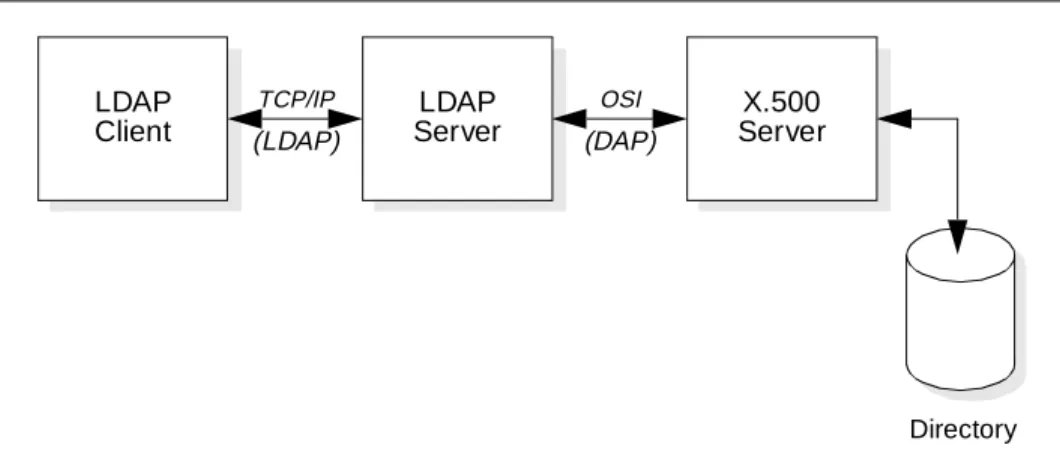
An application client program initiates an LDAP message by calling an LDAP API. But, an X.500 directory server does not understand LDAP messages. In fact, the LDAP client and X.500 server even use different communication protocols (TCP/IP vs. OSI). The LDAP client actually communicates with a gateway process (also called a proxy or front end) that translates and forwards requests to the X.500 directory server (see Figure 2). This gateway is known as an LDAP server. It services requests from the LDAP client. It does this by becoming a client of the X.500 server. The LDAP server must communicate using both TCP/IP and OSI.
Figure 2. LDAP server acting as a gateway to an X.500 server
This way, clients can access the X.500 directory without dealing with the overhead and complexity which X.500 requires.
1.3.3 LDAP as Standalone Server
As the use of LDAP grew and its benefits became apparent, people who did not have X.500 servers or the environments to support them wanted to build directories that could be accessed by LDAP clients. So, why not have the LDAP server store and access the directory itself instead of only acting as a gateway to X.500 servers (see Figure 3). This eliminates any need for the OSI protocol stack. Of course, this makes the LDAP server much more
complicated since it must now be able to store and retrieve directory entries. These LDAP servers are often called stand-alone LDAP servers because they do not depend on an X.500 directory server. Since LDAP does not support all X.500 capabilities, a stand-alone LDAP server only needs to support the capabilities required by LDAP.
LDAP
Client ServerLDAP ServerX.500
TCP/IP OSI
Directory
Figure 3. Stand-alone LDAP server
RFC 1777 (LDAP Version 2) discusses providing access to the X.500 directory. RFC 2251 (LDAP Version 3) discusses providing access to directories supporting the X.500 model. This change in language between Version 2 and Version 3 of the LDAP protocol standard reflects the idea that an LDAP server can implement the directory itself or can be a gateway to an X.500 directory.
From the client’s point of view, any server that implements the LDAP protocol is an LDAP directory server, whether the server actually implements the directory or is a gateway to an X.500 server. The directory that is accessed can be called an LDAP directory whether the directory is implemented by a stand-alone LDAP server or by an X.500 server.
In fact, when referring to an LDAP server, as is the case throughout this book in reference to the IBM SecureWay Directory, only a standalone LDAP server is meant.
1.4 The LDAP Road Map
LDAP has evolved to meet the need of providing access to a common directory infrastructure. LDAP is an open industry standard that is supported by many system vendors on a variety of platforms. It is being incorporated into software products and is quickly becoming the directory access protocol of choice. LDAP allows products from different vendors on different platforms to interoperate and provide a global directory infrastructure much like HTTP enabled the deployment of the World Wide Web.
Directory LDAP
Client
LDAP Server
Current LDAP products support at least the LDAP Version 2 protocol level. Many products already support parts or all of LDAP Version 3. Further enhancements beyond Version 3 are being discussed by the IETF (Internet Engineering Task Force).
Application developers can take advantage of LDAP to develop
next-generation directory-enabled applications. While X.500 has traditionally been deployed only in large organizations that can commit the resources necessary to support it, LDAP is also appropriate for small organizations. For example, a small company might want to exchange documents with its customers and suppliers using Electronic Data Interchange (EDI). EDI requires both parties to agree on the types of documents to be exchanged, communication requirements, and so on. Companies can publish their EDI characteristics in publicly accessible LDAP directories to facilitate EDI. A common directory infrastructure encourages new uses. The Directory Enabled Networks (DEN) specification, for example, allows information about network configuration, protocol information, router characteristics, and so on to be stored in an LDAP directory. The availability of this information in a standardized format from many equipment vendors will allow for the intelligent management and provisioning of network resources. These examples show the diverse uses of directory-enabled applications supported by a common directory infrastructure accessed with LDAP.
1.4.1 LDAP Is More than a Programming Model
Most of the books and articles on LDAP provide sample applications that help to explain the LDAP programming model. These samples are quite often some form of a white pages (address book) application and are implemented on a pristine system as the sole user of the directory service.
These samples are valuable as a quick-start lesson for LDAP programming, but, while there are a few brand new applications written from scratch that will use an LDAP directory service, most directory exploitation projects will involve the re-engineering of existing applications. The LDAP literature does not provide much guidance for this complex re-engineering task.
In fact, very little is written about the real-life considerations that most directory exploitation projects experience. Based on the trivial sample application model, many projects set very aggressive schedules and design points and begin to code as if a new application using LDAP on a new directory service will be the only application. Exploiters in these projects quickly realize the need for application re-engineering and data modeling tasks which are, as designers and developers discover, fundamental to the success of directory exploitation projects.
It is the intention of his book to define some of the important design considerations for many of the directory exploitation and implementation projects. While not every topic may apply to every project, the understanding gained should help to make design goals and schedules more realistic and such projects more successful.
1.5 The Framework for Creating Enterprise-Wide Solutions
As businesses incorporate Internet technologies into their core business processes, they start to achieve real business value. Today, companies large and small are using the Web to communicate with their partners, to connect with their back-end data systems, and to conduct electroniccommerce. This ise-businesswhere the strength and reliability of traditional information technology meet the Internet. The IBM Application Framework for e-business (Figure 4 on page 18) is designed to enable businesses to build and deploy applications based on Internet and Web technologies quickly and easily. To accomplish this goal, the architecture is based on open industry standards (like LDAP among others) that are or have been widely adopted in the computer industry.
Figure 4. Application framework for e-business
Now that directory standards are emerging, the opportunity exists for enterprises to simplify their directory issues. If an enterprise is able to store directory information once, the total cost of maintaining this information can be significantly reduced. However, in some enterprises, specific application requirements and migration costs may dictate that multiple directories continue to be maintained. In these environments, directory standards enable central administration and reduce the cost and complexity of synchronization. Given the distributed and heterogeneous nature of network computing, the Application Framework for e-business directory architecture is defined to satisfy the following requirements:
• Directory services must be based on existing or emerging standards when available.
• Access to directory services must be available from a variety of client platforms through a standardized API and standard Web browsers. • A common schema for universal objects, such as users and groups, must
be standardized to eliminate application dependence on specific directory implementations.
• Information maintained in existing directories must be accessible without requiring a complete migration to a new directory.
• Central administration of common objects stored in multiple different directories must be provided.
users. In addition, the directory architecture must allow for storage and management of security information.
• Directory services must be available when needed by applications. As part of the Application Framework for e-business, IBM has defined a standards-based directory architecture to address the requirements of directory-based enterprise computing. The architecture contains the following key elements:
• Standards-based LDAP client and server
LDAP, the lightweight directory access protocol, was developed to provide standards for accessing the data in network directories. The LDAP distributed architecture supports scalable directory services with server replication capabilities (being defined for LDAP Version 3) ensuring that directory data is available when needed. For security, LDAP supports both basic client authentication using a distinguished name and password and SSL (Secure Socket Layer), which provides mutual authentication
between clients and servers as well as data security via encryption. LDAP Version 3 supports the Simple Authentication and Security Layer (SASL), a framework for adding additional authentication mechanisms. (More information on security can be found in Chapter 5, “Directory Security” on page 103.)
• Common directory schema
A directory schema defines the rules by which objects are stored and retrieved in the directory. A common schema allows different applications to share the same set of objects (user, printer, etc.) such that the
information for a person or resource is not created and stored in multiple places in different formats within the network. In addition, a common schema definition allows directory-enabled applications to be developed independently of a specific directory implementation. More detailed information about schemas can found in Chapter 2, “Schema and Namespace” on page 31.
• Meta directory
To ensure interoperability with non-LDAP based directory and synchronization of their contents, a set of meta directory functions is defined. The meta directory serves two purposes: it is used as themaster
information stored in the directory by different applications, such as configuration and security data.
1.6 IBM Directory Strategy
To address the proliferation of application-specific directory services, it is IBM’s strategy to consolidate its directory offerings onto a standards based LDAP directory service. In addition, IBM will directory-enable a wide range of products to reduce the administrative effort required to maintain them and to improve the level of data consistency across IBM product offerings.
IBM's directory strategy comprises four principles: 1. Directory enable IBM and ISV products.
Several IBM product groups and selected ISVs (Independent Software Vendors) work together to exploit the IBM SecureWay Directory since the benefits for customers proportionally grow as a common directory is exploited across operating systems, networks, and applications. IBM offerings will be able to use this LDAP directory to store user,
configuration, and security information reducing administrative costs and improving end users access to information.
Though this is not a formal announcement, the following examples show how this can be achieved. IBM networking products can store
configuration information in the directory so that each individual device can load its configuration from a central directory service. IBM firewall products can store policy information in the directory so that the policy can be quickly updated throughout the enterprise. IBM middleware products can exploit the directory to maintain a common base of users and security information that can be shared across applications. Once the various levels of the product stack are directory enabled, the synergy between components can be leveraged to deliver powerful benefits. A user running a transaction can be given a high priority on the transaction server and priority on the network to provide improved end-to-end response time. This can be made possible by providing a common directory service that can be leveraged by multiple components. As more and more products become directory-enabled and share the same data, the possibilities for providing cross-product synergy become limitless.
2. Provide a highly scalable cross platform LDAP directory
directory service for the wide range of directory-enabled products IBM will be delivering as well as providing leading directory support for third party directory-enabled solutions. The choice of a relational database as a backing store will provide high levels of scalability and reliability. For customers that use a Lotus Domino/Notes environment in their organizations, their Lotus Domino directory conforms to the LDAP standards beginning with Domino Release 5.
IBM also offers the eNetwork X.500 Directory for customers that need an LDAP directory that is also compliant with the X.500 standard. This directory is available on the AIX platform.
3. LDAP support across existing IBM directories
IBM supports LDAP across the existing directory servers to provide consistent access for application developers and clients. This will provide customers (ISVs, corporate developers, and users) with a single API and protocol for IBM and Lotus-based networks. IBM is also further improving the operational characteristics of LDAP support by providing a common schema across the IBM, Lotus, and Tivoli directories, which is expected to be consistent with the networking-oriented schema that IBM is actively working on as part of the Desktop Management Task Force (DMTF) Directory-Enabled Networks (DEN) initiative.
4. Provide directory management tools
With the IBM SecureWay Directory (server and client SDK), IBM ships the graphical Directory Management Tool (DMT) that allows an administrator to easily browse the directory tree and perform common administration tasks (see 7.1, “The Directory Management Tool” on page 159). In environments where Tivoli is deployed, support for a heterogeneous directory environment through the Tivoli User Administration is provided. Today, this component allows Tivoli to manage NT, NetWare, Domino, various UNIX directories, and the OS/390 Security Server. Through the LDAP Connection (see 1.7.4, “Tivoli User Administration: LDAP
Connection” on page 26), the Tivoli User Administration is even capable of managing information stored in an LDAP directory through the versatile administration user interface.
1.7 IBM Directory Offerings
requirements in each particular environment that the selection for the directory infrastructure can be made. In some situations, the infrastructure can contain multiple directory servers that might even be using a mixture of IBM SecureWay Directory and Domino servers.
1.7.1 The IBM SecureWay Directory
The IBM SecureWay Directory implements the IETF LDAP V3 specifications. It also includes enhancements added by IBM in functional and performance areas. This version uses the IBM DB2 as the backing store to provide per-LDAP operation transaction integrity, high performance operations, and on-line backup and restore capability. It interoperates with the IETF LDAP V2 based clients. Other major new features include:
• A graphical directory management tool – The IBM SecureWay Directory Management Tool (DMT) allows an administrator to easily browse the directory and add or edit objects, such as object classes, attributes, and entries.
• A dynamically extensible directory schema – This means that
administrators can define new attributes and object classes to enhance the directory schema. Changes can be made to the directory schema, too, which are subject to consistency checks. Users may dynamically modify the schema content without rebooting the directory server. Since the schema itself is part of the directory, schema update operations are done through standard LDAP APIs. The major functions provided by LDAPv3 dynamic extensible schema are:
• Queryable schema information through LDAP APIs • Dynamic schema changes through LDAP APIs • Server rootDSE
• Dynamic configuration changes using LDAP APIs
• The Directory-Enabled Network (DEN) schema – The DEN specification defines a standard schema for storing persistent state and an information model for describing the relationships among objects representing users, applications, network elements and networking services. More about schema and namespace is described in Chapter 2, “Schema and Namespace” on page 31.
• UTF-8 (Universal Character Set Transformation Format) – An IBM SecureWay Directory server supports data in multiple languages and allows users to store, retrieve and manage information in a native
language code page. More information about UTF-8 support can be found in 4.3, “UTF-8 Support” on page 83.
• Simple Authentication and Security Layer (SASL) – This support provides for additional authentication mechanisms. SSL provides encryption of data and authentication using X.509v3 public-key certificates. A server may be configured to run with or without SSL support. Security is further detailed in Chapter 5, “Directory Security” on page 103.
• Replication – Replication is supported, which makes additional read-only copies of the directory available thus improving the performance and reliability of the directory service. Replication is further described in 7.6, “Replication” on page 178.
• Referrals – Support for LDAP referrals allows directories to be distributed across multiple LDAP servers where a single server may only contain a subset of the whole directory data. More about referrals is explained in 7.7, “Referrals” on page 184.
• Access Control Model – A powerful, easy-to-manage access control model is supported through ACLs (Access Control Lists, further explained in 5.6, “Access Control” on page 120).
• Support for DNS – An LDAP server can be located through DNS (Domain Name Services) by publishing the Directory server address via Service Resource record in DNS, and clients can find the LDAP server knowing only a symbolic name. See more details in 7.11, “Locating LDAP Servers Using DNS” on page 218.
• Support for server plug-ins – An extensible server architecture which allows implementers to write server plug-ins that carry out additional functions for the server to perform. A plug-in is a dynamic link library (or shared object) that can be included in the server’s address space dynamically. They follow the plug-in APIs published by Netscape, and directory plug-ins are compatible with the Netscape LDAP directory server. Server plug-ins are not further discussed in this book.
Administration and configuration for the IBM SecureWay Directory is provided by a Web browser-based GUI. The administration and configuration functions allow the administrator to:
• Perform the initial setup of the directory • Change configuration parameters and options • Manage the daily operations of the directory
The IBM SecureWay Directory is available on IBM AIX, Microsoft Windows NT/Intel, and Sun Solaris platforms, and it supports ten languages including English, French, German, Japanese, Simplified Chinese, Traditional Chinese, Korean, Italian, Spanish and Brazilian Portuguese. Catalan is also supported on AIX.
The IBM SecureWay Directory is also available for OS/390 and OS/400. They are integrated in the OS/390 Security Server software and OS/400 Operating System, respectively. The OS/390 and OS/400 implementations are currently on LDAP V2 level.
Platform-specific considerations are described in more detail in Chapter 6, “Installation and Configuration” on page 131.
1.7.2 The IBM SecureWay Directory Client SDK
In addition to the IBM SecureWay Directory, which incorporates an LDAP server, IBM also provides a client development kit that provides the necessary APIs and libraries for development of directory-enabled applications. The IBM SecureWay Directory Client SDK also contains the directory management utilities as explained in Chapter 7, “LDAP Data and System Administration” on page 159.
The IBM SecureWay Directory Client SDK is available for IBM AIX, Microsoft Windows NT/95/98, Sun Solaris. Please check the IBM SecureWay Directory Web site athttp://www.ibm.com/software/enetwork/directoryfor the latest information about products, supported platforms, and availability.
1.7.3 Lotus Domino R5.0
Today's Domino Directory can be part of a general purpose directory infrastructure for the enterprise and for multi-enterprise extranets. On the other hand, in a heterogeneous networking environment with other directory systems, the Domino Directory can also serve as the integration point for directory synchronization, administration, and authentication.
Directory features in Domino R5 include:
• Support for X.500 naming conventions, including hierarchical naming and extensible attributes, for maximum flexibility in configuring the namespace. • LDAP protocol support in both the client and the server providing lookup
(read), add, delete, and modify (write) support for non-Notes clients (for example Web browsers) and servers (for example NDS and Four11). • Rule-based domain relationships for faster lookups across large
namespaces.
• Hierarchical naming and trust between domains to support the relationship of entries across domains.
• Support for a Public Key Infrastructure.
• A dynamically extensible directory schema ideal for customizing the directory to meet specific business requirements.
• Multi-master replication, a key element for reliable directory synchronization and maximum availability.
Figure 5. The Domino 5.0 directory architecture
Lotus Domino R5 is available for all the IBM platforms (AIX, OS/2, OS/390, and OS/400), Windows NT, Solaris and HP-UX platforms.
1.7.4 Tivoli User Administration: LDAP Connection
The Tivoli Management Architecture is a highly sophisticated, universal systems management framework available for all major platforms, including Windows NT/95, many UNIX brands and all the IBM platforms.
The Tivoli User Administration (TUA) is based on the Tivoli Configuration and Change Management (CCMS) architecture. The central database, together with a graphical management user interface, allows an administrator to manage user accounts, called profiles, independently of any underlying system. The user information database supports a large number of attributes suitable for almost any kind of target environment. Sets of profiles are maintained within a profile manager. The profile managers distribute profile information to subscribed profile endpoints. The Tivoli LDAP Connection is such a profile endpoint. For example, data in user profiles can travel to LDAP directories via distribute. The reverse process, called population, collects the data from an LDAP directory and stores it in Tivoli user profiles for
subsequent management. Figure 6 on page 27 depicts this relationship. Replicas of Domino Directories A & B on Local Servers
Directory Catalog
Domino Directory
A
Domino Directory
B
Domino Server
Domino Directory
C
Domino Directory
D Domino Server Domino Server
LDAP Request
(Queries can be made against the
Replica of Catalog
A B
Figure 6. Tivoli database versus the real configuration
Through the addition of an LDAP endpoint, Tivoli User Administration is enriched in its functionality to manage LDAP directory data (while other system-related management and monitoring can be done using other Tivoli systems management and monitoring functionality). This connection runs on any managed node that may or may not be on the same system as the Tivoli Administration Server, which is also called the TMR Server (Tivoli
Management Region) Server. Since LDAP is a system-independent standard, the actual LDAP service can be run on any platform. This approach centers the Tivoli User Administration database, and all other user data repositories, including the LDAP directory, are kept in sync with the master Tivoli
database. An administrator only uses one common user interface and one single tool to manage user accounts whether the actual users exist on a UNIX system, in an NIS domain, in LDAP, or in any other of the many supported endpoints (Figure 6 above).
It should be mentioned that the Tivoli User Administration also supports a command line interface for all operations. This allows automation of administration tasks from within command language programs.
Tivoli User
LDAP Directory
NIS Users UNIX
Users Distribute
Populate
Tivoli User Administration Object Configuration
Other User Repositories
Add User: Graphical User
Interface
Name UID