Abstract—Cloud virtualization technologies are becoming more and more prevalent, cloud users usually encounter the problem of how to access to the virtualized remote desktops easily over the web without requiring the installation of special clients. To resolve this issue, we took advantage of the HTML5 technology and developed web-based remote desktop. It permits users to access the terminal which running in our cloud platform from anywhere. We implemented a sketch of web interface following the cloud computing concept that seeks to enable collaboration and communication among users for high performance computing. Given the development of remote desktop virtualization, it allows to shift the user’s desktop from the traditional PC environment to the cloud platform, which is stored on a remote virtual machine rather than locally. This proposed effort has the potential to positively provide an efficient, resilience and elastic environment for online cloud service. This is also made possible by the low administrative costs as well as relatively inexpensive end-user terminals and reduced energy expenses.
Keywords—Virtualization, Remote Desktop, HTML5, Cloud Computing.
I. INTRODUCTION
N cloud computing environment, there are various important issues, including standard, virtualization, resource management, information security, and so on. Among these issues, desktop computing in virtualized environment has emerged as one of the most important ones in the past few years. Currently, users no longer use a powerful, more-than-required hardware but share a remote powerful machine using light weight thin-client [1]. A thin-client is a stateless desktop terminal that has no hard drive. All features typically found on the desktop PC, including applications, sensitive data, memory, etc., are stored back in the server when using a thin client. These thin clients may not necessarily be a totally different hardware but can also be in the form of PCs. Thin clients, software services, and backend hardware make up thin client computing, a remote desktop computing model.
In current remote desktop solutions, there is one instance of the operating system running over a powerful remote server which supports multiple users logged in to it remotely. There are many obvious problems in this scenario; for instance, imbalance in loads of different remote servers and inherent sharing of the operating system instance among multiple users. To solve these problems, adopting virtualization technology [2], [3] in cloud environment becomes a major trend. Virtualization technology acts as a central component that can achieve the
S.T. Wang and H.Y. Chang are with the National Center for High-Performance Computing, Taiwan, R.O.C. (e-mail: [email protected] [email protected]).
purpose of cloud platforms and services, and it is a promising approach to consolidating multiple services onto a smaller number of computing resources. A virtualized server environment allows computing resources to be shared among multiple performance-isolated platforms called virtual machines [4], [5]. A virtual machine is a software implementation of a machine that executes related programs like a physical machine. Each virtual machine includes its own system kernel, OS, supporting libraries and applications. A hypervisor provides a uniform abstraction of the underlying physical machine, and multiple virtual machines can execute simultaneously on a single hypervisor. Decoupling of virtual machine from the underlying physical hardware is able to allow the same virtual machine to be started and run on different physical environments.
Considerations for an individual user's desktop in cloud computing environment, the virtual desktop [6] has received great interests in virtualization research community. Many authors [7]-[9] have realized the concept of desktop virtualization. In a traditional computing environment, users need to locally install operating systems and applications under a granted license before use. Software users may be burdened with many complex tasks in terms of software installation, configuration, updating and even troubleshooting when dependency on the host operating system causes compatibility issues. For the system provider there are two alternative methods of making the platform available. One is to develop software based on Web technologies. This not only requires significant work, but may also encounter compatibility problems with the numerous browsers. The second approach is based on desktop virtualization, which separates the presentation and execution of applications. This provides a transparent way to deliver an application based remote virtual desktop.
In this paper, we aim at the adoption of desktop virtualization and developed web-based interface following the cloud computing concept. We implemented a sketch of clientless remote desktop that seeks to enable collaboration and communication among users, which is efficient, resilience and independent of the operating system. The remote desktop can be accessed from any OS platform through any HTML5 compliant browser like Internet Explorer, Mozilla Firefox, Google Chrome, Safari, Opera, etc. So our implementation can make such a service is simple and easy to use and allow users to access the terminal which running on remote desktop from anywhere, any devices and without requiring the installation of special clients.
The rest of this paper is organized as follows. Section II lists
Shuen-Tai Wang, Hsi-Ya Chang
Development of Web-Based Remote Desktop to
Provide Adaptive User Interfaces in Cloud Platform
I
the related works. Section III gives descriptions of architecture and platform. Section IV gives some details of the implementation. Section V discusses future work and concludes.
II.RELATED WORKS
Currently, many research communities have realized the concept of desktop virtualization. We also tried many products before deploying virtual desktop and developing remote desktop interface. Following two technologies provide the low cost computing using remote desktop virtualization. These both are proprietary products.
A.Citrix XenDesktop
Citrix XenDesktop [10] is a suite of desktop virtualization products from Citrix Systems. Through its bundled components, it can deliver several different types of virtual desktops. The core components are:
1) XenServer: It uses Xen [11] hypervisor to create and run multiple virtual machines on the physical machine. 2) Desktop Delivery Controller: It authenticates users,
manages user's virtual desktop environments and establishes connections between users and the virtual desktops.
3) Desktop Receiver: It is installed on user's endpoint devices.
4) Virtual Desktop Provisioning: It provisions server, creates and manages virtual desktops from a single desktop image on demand.
B.VMware View
VMware View [12] is a commercial desktop-virtualization product developed by VMware that allows end users to access their virtual desktop. The computation or execution of application happens at remote place and users can access the desktop from multiple locations. VMWare View has following components.
1) VMWare server: It is an enterprise-level computer virtualization product. It runs on host Operating System as a software.
2) View Client Software: This software runs on user's PC or thin client. It is used to access user's desktop running over virtual machine.
3) View Connection Server: It is for user authentication by using Window Active Directory. After authentication, it redirects request to appropriate VM running over server. 4) View Administrator: This is Web-based application. It
allows administrators to configure View Connection Server, deploy and manage View desktops, etc..
Using XenDesktop or VMware View, users can access their desktop from anywhere and anytime where Internet access is available. But both are commercial products, deployment of this product is not affordable by educational institutions or small enterprises. The most important is the remote desktop interface is not web-based. It has to install some software on user's endpoint devices such as thin client or PCs.
III. ARCHITECTURE
A.System Architecture
Fig. 1 below provides an overview of the logical architecture for a standard, three tiers implementation of clientless remote desktop. When a client (computer or mobile device) requests a remote desktop from terminal server (server can be hosted privately in virtual machine on the Intranet), it connects to web server and open a widget to establish a WebScoket [13] to the backend terminal server. A terminal proxy generally sits on the gateway of a corporate network. The terminal proxy will interrupt the communication and check if that session is already present in it. If it is present, it would provide the session information to the web server, and act as a bridge between client and terminal server. If it is not present, the proxy will set up a new session for it, and the request is forwarded over network to the terminal server which running on virtual machine. The terminal server receives the request (from the web server), processes it, and sends back the response.
Fig. 1 System architecture B.Software Architecture
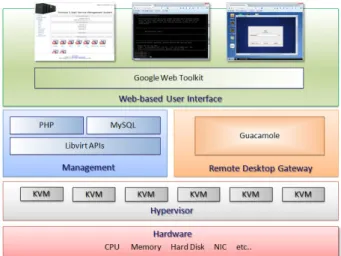
Fig. 2 illustrates the software stack of our cloud platform. Our system is entirely web-based that way the end user doesn’t need to download and install any tools or plugins on his/her computer. In particular, this enables accessing our interface from a wide range of devices, including mobile devices such as Smartphone or Pad.
Fig. 2 Software architecture
The basic components are as follows:
1) Hardware: There are many physical devices including CPU, memory, hard disk, NIC (Network Interface Card), etc.
2) Hypervisor: We adopt KVM [14] to attain virtualization aim. KVM consists of a loadable kernel module that provides the core virtualization infrastructure and a processor specific module. KVM also requires a modified QEMU although work is underway to get the required changes upstream. Using KVM, we can run multiple virtual machines running unmodified Linux or Windows images..
3) Libvirt APIs: Libvirt [15] is an open source API, daemon and management tool for managing platform virtualization. It can work with a variety of hypervisors in the development of a cloud based solution. Thus, we employ these APIs to control and manage our KVM, and we can switch the underlying hypervisor technology at a later stage with minimal efforts.
4) PHP: We adopt the PHP program language to build all web pages. PHP is an open source server-side scripting language designed for Web development to produce. 5) MySQL: MySQL is the world's most used open source
relational database management system (RDBMS) that run as a server providing multi-user access to a number of databases.
6) Guacamole [16]: It is an HTML5 web application that supports graphical access via remote desktop protocols directly in the browser, without the need for additional plugins.
7) Google Web Toolkit [17]: While our web based interface is built using a Model-View-Controller (MVC) based Google Web Toolkit (GWT) framework. GWT is a development toolkit for building and optimizing complex browser-based applications. The GWT SDK provides a set of core Java APIs and Widgets. These allow us to write AJAX applications in Java and then compile the source to highly optimized JavaScript that runs across all browsers. C.Cloud Platform
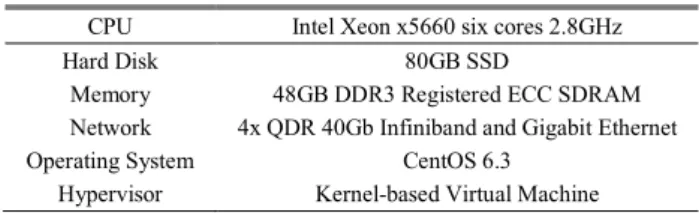
Table I shows the specification information of our cloud platform named Formosa 3. Formosa 3 [18] is a 64bits high-performance Beowulf cluster located within Southern Business Unit of the National Center for High Performance Computing (NCHC) [19]. It consists of 76 IBM X3550M3 servers as its compute nodes. This self-made cluster was designed and constructed by the 'HPC Cluster Group' at NCHC for cloud service and came online in 2012. Each node has two Six-Core Intel Xeon x5660 2.8GHz processors and 48GB of DDR3 registered ECC SDRAM. All nodes were connected on the InfiniBand high speed network and a private subnet with 1000 Mbits/s Gigabit Ethernet. An additional 4 nodes are used as front ends to interface with cluster, and 4 nodes as storage for the user file systems by Parallel File System.
TABLEI
FORMOSA 3CLOUD CLUSTER SPECIFICATION
CPU Intel Xeon x5660 six cores 2.8GHz
Hard Disk 80GB SSD
Memory 48GB DDR3 Registered ECC SDRAM Network 4x QDR 40Gb Infiniband and Gigabit Ethernet
Operating System CentOS 6.3
Hypervisor Kernel-based Virtual Machine
IV. IMPLEMENTATION
The web-based remote desktop system allows more than one person to collaborate or execute application remotely in real-time. Currently we adopt GWT to allow the use of existing Java knowledge and tools to build high performance, desktop web applications. GWT abstracts away many complexities of web application development by not requiring us to learn Javascript and HTML. For terminal proxy, we integrated the Guacamole to make the desktops accessible via Virtual Network Computing (VNC) [20], Remote Desktop Protocol (RDP) [21] and SSH can run either on the application server itself or on a different computer on the network. These protocols generally provide methods for accessing a remote virtual desktop. It rests on today's web standards: AJAX, JSON and HTML5 as well. This section aims to explain the details of implementation involved with Virtualization Manager, Guacamole Integration and Session Controller.
A.Virtualization Manager
Virtualization Manager provides virtualization of operating system and customization of remote desktop environment. It allows us to quickly and easily manage the virtual environment with functionality for virtualization desktop, virtualization monitoring, virtualization storage, and much more. The development of this module is based on KVM and Libvirt; it was designed according to the user requirements. This module is responsible for allocating computing resources of terminal servers and hypervisors dynamically. This module also manages the user connection sessions and authenticating accounts information. The user session begins when the user accesses the desktop and ends when the user closes the connection from the web browser. It plays a role of bridge between application servers and client devices. It applied the Secure Shell and HTTP protocol to provide the single entry website.
Fig. 3 Guacamole architecture B.Guacamole Integration
The Guacamole software is split into multiple packages, one
package providing the web application, others providing the native components (proxy daemon and library) or support for specific protocols. Fig. 3 shows the architecture of Guacamole. When users opening the terminal widget in our web page. The desktop web application will connect to a Guacamole server. The Guacamole client, written in JavaScript, is served to users by Apache Tomcat within the Guacamole server. Apache Tomcat is an open source web server and servlet container. On the Guacamole server-side, the Guacamole web application runs on an Apache server with a servlet container and then reads the Guacamole protocol and forwards it to the guacd. It acts as a proxy that translates graphical output from VNC and RDP into XML and vice versa. Once loaded, the client connects back to the server over HTTP using the Guacamole protocol.
The guacd is the heart of Guacamole which dynamically loads support for remote desktop protocols and connects them to remote desktops based on instructions received from the Guacamole web application. In fact, the guacd is a daemon process which is installed along with Guacamole and runs in the background, listening for TCP connections from the web application. The guacd also does not understand any specific remote desktop protocol, but rather implements just enough of the Guacamole protocol to determine which protocol support needs to be loaded and what arguments must be passed to it. Actually, The guacd interprets the contents of the Guacamole protocol, connecting to any number of remote desktop servers on behalf of the user.
C.Session Controller
For controlling the user's session, our system has a session server to perform the role of virtualization controller, and to manage user’s connection and accounting information. The session controller also communicates with application servers to deliver the virtual desktop. Besides, the session controller is deployed on the GWT to provide the single web-based portal for user login. It also enhances the system security and elasticity by applying the centralized control of applications and files.
While implementing our cloud platform for remote desktop, we came across several issues that have previously not been addressed. For example, for accessing the remote desktop which is streamed from Guacamole, due to the virtual machine may execute on different physical machines every time. This can be troublesome if we provide a fixed public IP address and port for connecting to the user’s desktop of virtual machine. So, we use iptables and thus setup port forwarding connections to the virtual machine that user launched. Our interface will allocate a mapping port dynamically while user opening the terminal widget in our web page. After that users can connect to the Guacamole terminal proxy with the dedicated IP address of and the port which will be forwarded to the appropriate physical machine which is currently hosting the user's virtual machine.
On the other hand, to speed up the transmission rate of remote desktop, the terminal servers also supports both multicast and unicast transmissions in our virtualization environment. For unicast connections, either UDP or TCP can
be used. Since TCP provides reliable communication and flow control, it is more suitable for unicast sessions. Multiple TCP client sessions sharing a single desktop may have different bandwidths, so an algorithm which sends the updates at the link speed of each client will be developed. For UDP clients, the system controls the transmission rate because UDP does not provide flow and congestion control. Several simultaneous multicast sessions with different transmission rates can be created at the system.
Fig. 4 The cloud platform web portal
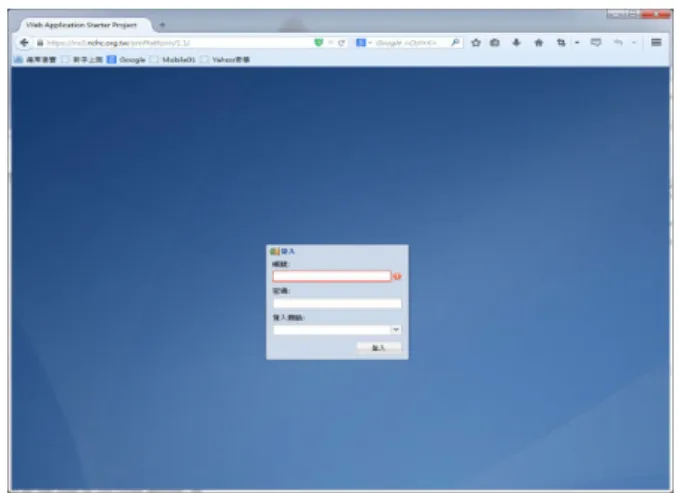
Fig. 4 shows the web portal of our cloud platform, once user has logged in he/she should be able to choose which widget wants to use.
Fig. 5 Web-based remote X-window terminal
Fig. 5 illustrates the X-window terminal widget, the main task of this widget is to allow user to access to back-end servers via x11vnc through a web-based interface. This feature also allows the other server which installed different operating system to be accessed natively from a mobile device such as a tablet.
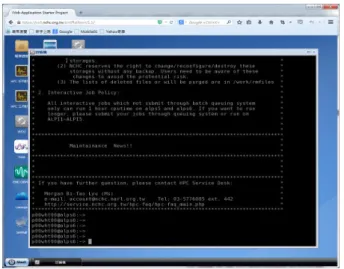
Unlike X-window terminal widget, Fig. 6 is web-based SSH terminal widget. SSH is a text protocol, the implementation of this widget is actually a combination of a terminal emulator and SSH client, because the SSH protocol isn't inherently graphical.
So this widget emulates a terminal on the server side by Guacamole, and draws the screen of this terminal remotely on the client.
Fig. 6 Web-based remote SSH terminal V.CONCLUSION
In this paper, we aim at the adoption of desktop virtualization and developed web-based interface following the cloud computing concept. We implemented a sketch of clientless remote desktop based on Google Web Toolkit framework. The remote desktop can be accessed from any OS platform through any HTML5 compliant browser. So our development can make such a service is simple and easy to use and allow users to access the terminal which running on remote desktop from anywhere, any devices and without requiring the installation of special clients. Given the development of web-based remote desktop, we seek to enable collaboration and communication among users, which is efficient, resilience and independent of the operating system.
Currently, the remote desktop normally enforces authentication, requiring all users to have a corresponding set of credentials. We plan to removes the authentication, giving anyone from our authenticated web server can access to the desktop directly in the near future. Also, we plan to reduce the communication overhead of terminal proxy and adapt some smart management strategies for physical machines to prevent energy waste in cloud platform.
REFERENCES
[1] J. Nieh, S. J. Yang, and N. Novik, “A Comparison of Thin-Client Computing Architectures,” Technical Report CUCS-022-00, Department of Computer Science, Columbia University, Nov. 2000.
[2] L. Nussbaum, F. Anhalt, O. Mornard and J.-P. Gelas, “Linux-based virtualization for HPC clusters,” Linux Symposium, pp. 221-234, July 2009.
[3] G. Goth, “Virtualization: Old Technology Offers Huge New Potential,” IEEE Distributed Systems Online, vol. 8, no. 2, 2007.
[4] R. A. Meyer and L. H. Seawright, “A Virtual Machine Time-Sharing System,” IBM Systems Journal, vol. 9, no. 3, 1970.
[5] R. P. Goldberg, “Architecture of Virtual Machines, “National Computer Conference Proceedings, AFIPS Press, vol. 42, pp. 309-318, June 1973.
[6] A. Sultana, B. Daimary, M. Chettri, J. Joseph, “Virtualized Remote Web Desktop,” IEEE NCETACS National Conference on Emerging Trends and Applications in Computer Science, 2012.
[7] M. Miller, “Cloud Computing: Web-Based Applications That Change the Way You Work and Collaborate Online,” Que Publishing, 2009. [8] H. Lee, “Design for management software of desktop virtualization
solutions,” IEEE Information and Communication Technology Convergence, ICTC 2010.
[9] L. Yan, “Development and application of desktop virtualization technology,” IEEE Communication Software and Networks ICCSN, 2011.
[10] Citrix XenDesktop.
http://www.citrix.com/products/xendesktop/overview.html, 2012. [11] Xen hypervisor. http://www.xen.org/.
[12] VMWare View. http://www.vmware.com/products/view/overview.html, 2012.
[13] V. Wang, F. Salim, P. Moskovits, “The Definitive Guide to HTML5 WebSocket,” 2013.
[14] A. Kivity, Y. Kamay, D. Laor, U. Lublin, and A. Liguori. “kvm: the Linux Virtual Machine Monitor,” In Proceedings of the Linux Symposium, vol. 1, pp. 225-230, 2007.
[15] Libvirt - The virtualization API. http://libvirt.org/
[16] Guacamole - HTML5 Clientless Remote Desktop. http://guac-dev.org/ [17] P. Chaganti , “Google Web Toolkit: GWT Java AJAX Programming,”
Packt Publishing, 2007.
[18] NCHC Formosa 3 Cloud Cluster. http://formosa3.nchc.org.tw/ [19] NCHC, National Center for High-performance Computing.
http://www.nchc.org.tw/
[20] T. Richardson et al., “Virtual Network Computing,” IEEE Internet Computing, vol. 2, no. 1, Jan./Feb. 1998, pp. 33–38.
[21] RDP - Remote Desktop Protocol.
http://en.wikipedia.org/wiki/Remote_Desktop_Protocol