The Language Resource Switchboard
Claus Zinn
University of T ¨ubingen Department of Computational Linguistics
The CLARIN research infrastructure gives users access to an increasingly rich and diverse set of language-related resources and tools. Whereas there is ample support for searching resources using metadata-based search, or full-text search, or for aggregating resources into virtual col-lections, there is little support for users to help them process resources in one way or another. In spite of the large number of tools that process texts in many different languages, there is no single point of access where users can find tools to fit their needs and the resources they have. In this squib, we present the Language Resource Switchboard (LRS), which helps users to discover tools that can process their resources. For this, the LRS identifies all applicable tools for a given resource, lists the tasks the tools can achieve, and invokes the selected tool in such a way so that processing can start immediately with little or no prior tool parameterization.
1. Introduction
The pan-European CLARIN project is building an eScience infrastructure for language-related resources and tools (Hinrichs and Krauwer 2014). The project is driven by about 20 national consortia, each of which is sharing and making available their digital lan-guage data and services. This produces an aggregate of resources that is both abundant and diverse, but that also needs to be managed. Among the pillars of the infrastructure is the Virtual Language Observatory (VLO), which gives users a metadata-based access to language resources [1],1 the Federated Content Search (FCS) that gives users a full-text search across resources [2], and the Virtual Collection Registry (VCR), where users can collect resources in a virtual set [3]. CLARIN uses the Component MetaData infra-structure (CMDI) to describe resources in a common, flexible language (Broeder et al. 2010), and persistent identifiers based on the Handle system to ensure a persistent URL addressing of resources.
Until now, information about tools was scattered throughout the CLARIN national communities and consortia. Knowledgeable users would install their tool of choice
1 Web references are marked by bracketed number order and can be found at the end of this squib.
Submission received: 28 June 2017; revised version received: 14 March 2018; accepted for publication: 22 May 2018.
locally on their desktop machines, or they would direct their browser to the Web-based tools they knew. However, less knowledgeable users and newcomers to the field struggled to keep up with the dynamics of the pan-European tool space.
The Language Resource Switchboard (LRS) aims at bridging the gap between re-sources (as identified in the VLO, FCS, and VCR) and tools that can process these resources in one way or another. The LRS can be seen as an intelligent virtual tool registry or a tool discovery device. For a given resource in question, it identifies all tools that can process the resource. It then sorts the tools in terms of the tasks they perform, and presents a task-oriented list to the user. Users can then select and invoke the tool of their choosing. By invoking the tool, all relevant information about the resource in question is passed on to the tool, and the tool uses this information to set (some of) its parameters. This makes it easy for users to identify the right tools for their resource, but also to use the chosen tool in the most effective way possible.
2. The Language Resource Switchboard
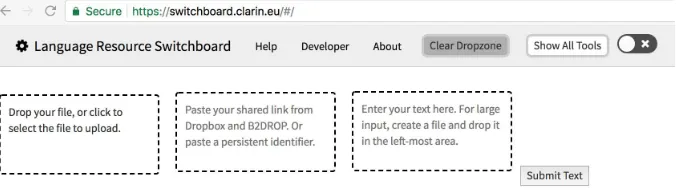
Figure 1 displays the main interface of the switchboard. When users access it directly, they are given three possible input methods: they can upload a file (left), paste a URL (middle), or type plain text (right). The switchboard can also be invoked with a file from the VLO; the following scenario covers the VLO–switchboard link.
2.1 Usage Scenario
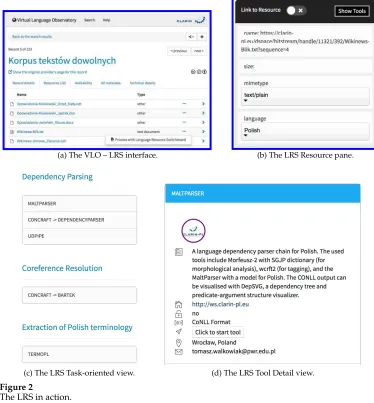
[image:2.486.52.390.540.635.2]The VLO gives users access to about 1.6 million metadata records on language re-sources; for about 40 mostly European languages, the VLO hosts at least a thousand records each. Now, consider an educational scenario in which a student of linguistics would like to learn about tools that perform syntactic analyses on Polish texts. For this, she first searches the VLO to find an interesting text that she would like to investigate further. On the VLO search results page, the student then clicks on the· · ·area to invoke the LRS with this file (see Figure 2(a)). In a new browser tab, the LRS opens and shows a resource pane that depicts all relevant information about the file (see Figure 2(b)). The user is free to correct this metadata, before clicking on “Show Tools” to get to the task-oriented view, shown in Figure 2(c). If the student is interested in the dependency parsing task, for example, then she may wish to get more information about the three tools offered, in which case more detailed information about the chosen tool is given (see Figure 2(d)). When the student then clicks on “Click to start tool,” the chosen tool—here
Figure 1
(a) The VLO – LRS interface. (b) The LRS Resource pane.
[image:3.486.54.428.65.468.2](c) The LRS Task-oriented view. (d) The LRS Tool Detail view.
Figure 2
The LRS in action.
the MaltParser [19]—opens in a new browser tab. The MaltParser obtains from the LRS a reference to the resource, loads the resource, and sets all relevant parameters so that the user is left to click on MaltParser’s “Analyze” command to start the process. No further user action is required to parameterize the MaltParser for this. If the student would like to compare MaltParser’s result with the result of another dependency parser, then the student returns to the browser tab holding the switchboard. Here, only a simple click is needed to start another applicable tool (e.g., UDPIPE [18]) to process the same resource.
2.2 Architecture
Figure 3
The metadata entry for UDPIPE.
The resource profileris responsible for identifying those resource characteristics that support identifying applicable tools that can process the resource. The current version of the LRS takes into account the resource’s mimetype and language, whose values are transferred from the VLO to the LRS. In the standalone version of the switch-board [4], the profiler makes use of Apache Tika to identify these characteristics [5].
The application registrymanages a set of metadata descriptions. Figure 3 depicts the metadata entry for UDPIPE, a versatile tool from the Czech LINDAT/CLARIN project [18]. For the LRS user, relevant metadata include the title of the application, an English description about its capabilities, and contact information about the tool provider. For the LRS, the relevant parts are the tool’s task description (using a con-trolled vocabulary, e.g., “tokenization,” “part-of-speech-tagging,” “dependency pars-ing”), an ISO 639-3–based identification of the languages the tool can handle, and the media types it can process. For tool invocation, the metadata holds the tool’s Web address and a list of parameters that the tool understands. With this information, a URL can be constructed where all relevant information is URL-encoded.
The matcheruses the resource’s metadata from the profiler and the tools’ metadata from the application registry to find matches. For the given resource profile, it computes a list of all applicable tools and the analyses they offer. For the time being, only the resource’s mimetype and language are taken into account.
The LRS is implemented using React, a Javascript library for building user interfaces [6] and a number of nodejs-based libraries. The source code of the LRS is maintained in a GitHub repository [7]. For more details, please consult Zinn (2016).
2.3 Tool Integration Effort
media type. When the switchboard invokes the tool via a URL request, all three pieces of information can be encoded in the URL. But it is the tool developer who decides the names for the URL parameters, and whether all three parameters, or other default parameters, should be passed on. As a bare minimum, only the input parameter needs encoding. A tool connected to the LRS should be able to extract this parameter from the tool’s invocation URL and fetch the resource from the given location.
The browser-based tools must hence be extended to parse and interpret parameters added to the tools’ URL invocation path. In case the tool already provides a parameter passing via URL encoding, the switchboard “honors” the existing parameter names. For this, standard parameter names used by the LRS such as “input” are mapped to a tool’s parameter name, say, “URL.” The metadata entry for each tool captures such information (see the “mapping” structure in Figure 3). Of course, the tool maker should also update the browser-based interface, making it clear to its users that the tool is aware of the parameterization it received from its LRS-based invocation. On the LRS side, the main integration task is the creation of the metadata entry for the tool (see Figure 3).
2.4 Status
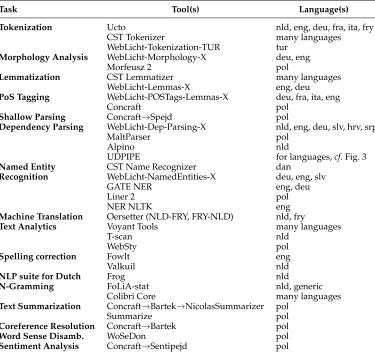
At the time of writing (June 2018), a total of 60 browser-based applications have been connected to the switchboard; see Table 1 for a selection thereof. Note that the WebLicht work engine has multiple entries with predefined workflows to match the tasks and languages at hand. These workflows engage well-known NLP tools from Stanford’s CoreNLP toolset [14], the OpenNLP library [15], and the Berkeley NLP Group [16].
The LRS also supports a “batch mode” by accepting a zip archive of files sharing a common media type and language. Note, however, that the switchboard itself does not perform the batch processing itself. Rather, it delegates the task to those tools that can handle such zip archives.
3. Related Work
There are a number of directory services for language processing software. A faceted search on the Virtual Language Observatory, for instance, yields around 400 different metadata entries for language-related processing tools and services. Each metadata record comes with a short description and sometimes has a link to the tool’s homepage where more information is available, such as the tool’s download location. The VLO has no systematic classification of the tools so it is hard for users to identify tools of interest.
Table 1
Tools connected to the Language Resource Switchboard (fragment).
Task Tool(s) Language(s)
Tokenization Ucto nld, eng, deu, fra, ita, fry CST Tokenizer many languages WebLicht-Tokenization-TUR tur
Morphology Analysis WebLicht-Morphology-X deu, eng
Morfeusz 2 pol
Lemmatization CST Lemmatizer many languages WebLicht-Lemmas-X eng, deu
PoS Tagging WebLicht-POSTags-Lemmas-X deu, fra, ita, eng
Concraft pol
Shallow Parsing Concraft→Spejd pol
Dependency Parsing WebLicht-Dep-Parsing-X nld, eng, deu, slv, hrv, srp
MaltParser pol
Alpino nld
UDPIPE for languages,cf.Fig. 3
Named Entity CST Name Recognizer dan
Recognition WebLicht-NamedEntities-X deu, eng, slv GATE NER eng, deu
Liner 2 pol
NER NLTK eng
Machine Translation Oersetter (NLD-FRY, FRY-NLD) nld, fry
Text Analytics Voyant Tools many languages
T-scan nld
WebSty pol
Spelling correction Fowlt eng
Valkuil nld
NLP suite for Dutch Frog nld
N-Gramming FoLiA-stat nld, generic
Colibri Core many languages
Text Summarization Concraft→Bartek→NicolasSummarizer pol
Summarize pol
Coreference Resolution Concraft→Bartek pol
Word Sense Disamb. WoSeDon pol
Sentiment Analysis Concraft→Sentipejd pol
Computer Science, Polish Academy of Sciences, has a well organized Web page on language tools and resources for Polish [10]. Here, each tool comes with its own Web page, often with background information with references to publications, download locations, installation instructions, and sometimes with a demo page where the tool can be tried online.
TheLanguage Application Grid (LAPPS Grid)[11] is an open, Web-based infras-tructure that offers a very good range of language-related tools. Moreover, the tools can be composed into tool chains using a graphical editor. Similar to WebLicht, for tools to take part of the Grid, they need to be adapted so that they can read and write LAPPS Grid formats. Tool developers should be aware of the LAPPS Interchange Format (LIF) and the Web Services Exchange Vocabulary (WSEV). The LAPPS Grid also offers additional features such as visualization and the sharing of various types of data (such as LAPPS interaction histories, workflows, and visualizations).
4. Discussion
The task of the LRS is rather simple: given some information about a resource, help users to findandstart a tool that can process the resource in one way or another. Once the user has been directed to the tool, LRS’s engagement ends; it is a deliberate design decision that the LRS is unaware of the processing, and that it will not know whether the processing succeeded or failed. Of course, users may manually save the output of the tool to a file, and then upload it to the standalone version of the LRS to find post-processing tools. But such tools are rarely available, as most tools have their proprietary output format that other tools cannot read.
The LRS was never designed to be a workflow engine such as WebLicht or the LAPPS Grid. Nevertheless, a good share of tools connected to the switchboard execute predefined processing workflows, which in turn make use of well-known NLP software. Also note that both LAPPS Grid and WebLicht come with their build-in user interface capabilities, and that they run all tools or services in the background. In contrast, the LRS is mainly advertising tools that come with their own Web-based GUI, each of which is optimized for the tool at hand. Naturally, the LRS and its tools are ill-suited for big data processing, as browser-based tools face http request timeouts. For big data, users should directly use services amenable to such processing such as WebLicht as a service; see [12].
The ease of tool integration gives the switchboard a head start for growth. Tools need to be amended only to process a number of URL-encoded input parameters and to update their user interface to reflect that parameters were successfully processed. No in-ternal data formats need to be changed. In this respect, note that the integration of tools into WebLicht or LAPPS Grid is very labor-intensive because tools must be adapted to become capable of reading and writing WebLicht- or LAPPS Grid–compliant data. Also, we do not see the switchboard as a competitor to WebLicht or the LAPPS Grid. On the contrary, each new predefined workflow in WebLicht can be advertised by and directly invoked from the switchboard, hence directing more user traffic to WebLicht. In a similar way, we aim at integrating LAPPS Grid tools with the switchboard, and hence making available many more popular NLP tools at users’ fingertips.
The switchboard is also being integrated with B2DROP, a cloud storage open to all European researchers [17]. Here, a plug-in enables users to invoke the switch-board with their cloud resources (Zinn 2018), hence guiding further traffic towards the switchboard.
subsequently process the resource with a tool of their choice, they may find that the resource’s content is not what they expected. Similarly, accessibility and authentication issues affect the usability of the switchboard. When the user invokes an applicable tool in the switchboard, the tool might not be able to download the resource from the resource provider. Also, some tools require authentication, and some users may not have the proper access rights to make use of the tools. For this, a number of user delegation issues need to be tackled, with many technical intricacies involved (Blumtritt et al. 2014). For now, users can often side-step the problem by first downloading the resource from the provider, and then uploading it to the standalone version of the LRS. With a tool gaining greater visibility through the “business leads” of the switch-board, tool developers must address operational challenges. In an ideal world, all the tools listed by the LRS are indeed online, but sometimes, the server hosting the tool is offline, the tool’s behavior has changed so that an LRS invocation fails, or another error occurs. For the time being, the LRS does not “ping” the tools’ server to check whether the tools are available for invocation. In the future, the LRS might want to replicate the system status report facility of CLARIN [13] to inform developers about the offline status of their tools.
5. Conclusion
Given a language-related resource, the LRS helps users to identify the tools capable of processing the resource and then to invoke the tool with a default configuration that minimizes user involvement. The switchboard solves this task well, and it has received positive feedback from the linguistics community. The LRS is indeed perceived as the missing low-technology link between language-related resources and the tools that can process them. The LRS fulfills an important role within and across the CLARIN com-munity. The switchboard’s discovery service adds enormous visibility to all the tools connected to the switchboard, and hence, increases their use. It also helps users to better get to know the many tools that each consortium partner contributes to the alliance. The switchboard, however, is not restricted to the tools that originate in the CLARIN world. It already features quite a few classic, well-known NLP tools, and it expands its tool registry steadily. Tool makers are invited to contact the author to get their tool integrated with the switchboard so that the LRS gives a more accurate reflection of the existing tool landscape. Likewise, students and researchers are encouraged to use the switch-board for their work, and to report their feedback to steadily improve the switchswitch-board service.
Acknowledgments
The project has been funded from the European Union’s Horizon 2020 research and innovation programme under grant agreement no. 676529 (CLARIN-PLUS). Thanks to the many tool developers who helped to integrate their tool with the switchboard. Thanks to Twan Goosen for linking the VLO with the LRS. Thanks to Dieter Van Uytvanck for valuable feedback on usability aspects, and for promoting the LRS in the CLARIN community. Thanks to the anonymous referees for their comments.
References
Blumtritt, J., W. Elbers, T. Goosen, M. Hinrichs, W. Qiu, M. Sall´e, and M. Windhouwer. 2014. User delegation in the CLARIN Infrastructure.Link¨oping Electronic Press, (116):14–24.
Hinrichs, E., M. Hinrichs, and T. Zastrow. 2010. WebLicht: Web-based LRT services for German. InProceedings of the ACL 2010
System Demonstrations,http://dl.acm
.org/citation.cfm?id=1858933 .1858938.
Hinrichs, E. W. and S. Krauwer. 2014. The CLARIN research infrastructure: Resources and tools for ehumanities scholars. InProceedings of the 9th International Conference on Language Resources and Evaluation (LREC’14), pages 25–29, Uppsala.
J ¨org, B., H. Uszkoreit, and A. Burt. 2010. LT world: Ontology and reference
information portal. In Calzolari, Nicoletta, Khalid Choukri, Bente Maegaard, Joseph Mariani, Jan Odijk, Stelios Piperidis, Mike Rosner, and Daniel Tapias, editors,
Proceedings of the 7th International Conference on Language Resources and Evaluation (LREC’10), pages 1002–1006, Valetta. Zinn, C. 2016. The CLARIN Language
Resource Switchboard. InProceedings
of the CLARIN Annual Conference,
Aix-en-Provence.
Zinn, C. 2018. A Bridge from EUDAT’s B2DROP cloud service to CLARIN’s Language Resource Switchboard.
Link¨oping Electronic Press, (147):36–45.
Web References(Accessed: June 15, 2018)
[1]vlo.clarin.eu
[2]clarin.eu/contentsearch
[3]clarin.eu/vcr
[4]switchboard.clarin.eu
[5]tika.apache.org
[6]reactjs.org
[7]github.com/clarin-eric/LRSwitchboard
[8]www.lt-world.org
[9]lindat.mff.cuni.cz/en/services
[10]clip.ipipan.waw.pl/LRT
[11]www.lappsgrid.org
[12]weblicht.sfs.uni-tuebingen.de/WaaS
[13]status.clarin.eu
[14]stanfordnlp.github.io/CoreNLP
[15]opennlp.apache.org
[16]nlp.cs.berkeley.edu/software.shtml
[17]b2drop.eudat.eu
[18]ufal.mff.cuni.cz/udpipe