April 1984
No. 17
TABLE OF CONTENTS
Big Voice For The BB I
0 0 0 0 0 0 0 0 0 0 0 0 0 0 0 0 0 0 0 0 0 0 0 0 0 0 0 0 0 0 0 0 0 0 0 04
The Xerox 820 .. II and the Dynadisk
0 0 0 0 0 0 0 0 0 0 0 0 0 0 0 0 0 0 0 0 0 0 0 0 010
Pascal Procedures
0 0 0 0 0 0 0 0 0 0 0 0 0 0 0 0 0 0 0 0 0 0 0 0 0 0 0 0 0 0 0 0 0 0 0 0 0 0 0 0 014
Kaypro Column
0 0 0 0 0 0 0 0 0 0 0 0 0 0 0 0 0 0 0 0 0 0 0 0 0 0 0 0 0 0 0 0 0 0 0 0 0 0 0 0 0 018
SBASIC Column
0 0 0 0 0 0 0 0 0 0 0 0 0 0 0 0 0 0 0 0 0 0 0 0 0 0 0 0 0 0 0 0 0 0 0 0 0 0 0 0 022
CP
1M
86: A Close Look
0 0 0 0 0 0 0 0 0 0 0 0 0 0 0 0 0 0 0 0 0 0 0 0 0 0 0 0 0 0 0 0 0 026
FORTHwords
0 0 0 0 0 0 0 0 0 0 0 0 0 0 0 0 0 0 0 0 0 0 0 0 0 0 0 0 0 0 0 0 0 0 0 0 0 0 0 0 0 0 0 028
C'ing Clearly
0 0 0 0 0 0 0 0 0 0 0 0 0 0 0 0 0 0 0 0 0 0 0 0 0 0 0 0 0 0 0 0 0 0 0 0 0 0 0 0 0 0 0 0 030
Xerox 820 and Up
0 0 0 0 0 0 0 0 0 0 0 0 0 0 0 0 0 0 0 0 0 0 0 0 0 0 0 0 0 0 0 0 0 0 0 0 0 0 0 034
BBI Dual Density: New Version From SWP
0 0 0 0 0 0 0 0 0 0 0 0 0 0 0 0 0 037
A Very Calculating BB II
0 0 0 0 0 0 0 0 0 0 0 0 0 0 0 0 0 0 0 0 0 0 0 0 0 0 0 0 0 0 0 0 0 0 038
Morse Code Interface For The Kaypro
0 0 0 0 0 0 0 0 0 0 0 0 0 0 0 0 0 0 0 0 0 0 040
On Your Own
0 0 0 0 0 0 0 0 0 0 0 0 0 0 0 0 0 0 0 0 0 0 0 0 0 0 0 0 0 0 0 0 0 0 0 0 0 0 0 0 0 0 0 044
Technical Tips
0 0 0 0 0 0 0 0 0 0 0 0 0 0 0 0 0 0 0 0 0 0 0 0 0 0 0 0 0 0 0 0 0 0 0 0 0 0 0 0 0 0 046
M68K Single Board Computer
0 0 0 0 0 0 0 0 0 0 0 0 0 0 0 0 0 0 0 0 0 0 0 0 0 0 0 0o.
48
...:
en
w
::J
o
w
a:
z
o
>
D-O
o
w
wa:
~
~
z
oCt
a:
a:
;
c
w
!::
~:i
~
c
o en
a:
::J
o
~o
en
~
a:
w
I-W ::I:
I-o
l-
I-o
w
..,
m::J
en
w
C
oCt ~
en
w ...J
oCt
en
...J ...J
oCt
"THE ORIGINAL BIG BOARD"
OEM - INDUSTRIAL - BUSINESS - SCIENTIFIC
SINGLE BOARD COMPUTER KIT!
Z-80 CPU! 64K RAM!
(DO NOT CONFUSE WITH ANY OF OUR FLATTERING IMITATORSI)
THE BIG BOARD PROJECT: With thousands sold worldwide and over two years of field experience, the Big Board may just be one of the most reliable single board computers available today. This is the same design that
was licensed by Xerox Corp. as the basis for their 820 computer.
$259
00
(64KKIT
* *
BASIC I/O)The Big Board gives you the right mix of most needed computing features all on one board. The Big Board was designed from scratch to run the latest version of CP/M·. Just imagine all the off-the-shelf software that can be run on the Big Board without any modifications needed.
SIZE: 8'12 x 133/. IN. SAME AS AN 8 IN. DRIVE. REQUIRES: +5V @ 3 AMPS + - 12V @.5 AMPS.
FULLY SOCKETED! FEATURES: (Remember, all this on one board!)
64K RAM
Uses Industry standard 4116 RAM's. AII64K Is available to the user, our VIDEO and EPROM sections do not make holes In system RAM. Also, very special care was taken In the RAM array PC layout to eliminate potential noise and glitches.
Z-80 CPU
Running at 2.5 MHZ. Handles all 4116 RAM refresh and supports Mode 2 INTERUPTS. Fully buffered and runs 8080 software.
SERIAL 1/0 (OPTIONAL)
Full 2 channels using the Z80 510 and the SMC 8116 Baud Rate Generator. FULL RS2321 For synchronous or asynchronous communication. In synchronous mode, the clocks can be transmllted or received by a modem. Both channels can be set up for either data-communication or data-terminals. Supports mode 2lnt. Price for all parts and connectors: $39.95
BASIC 1/0
Consists of separate parallel port (Z80 PIO) for use with an ASCII encoded keyboard for Input. Output would be on the 80 x 24 Video Display.
BLANK PC BOARD - $99.95
The blank Big Board PC Board comes 'complete with full documentation (including schematics), the character ROM, the PFM 3.3 MONITOR ROM, and a diskette with the source of our BIOS, BOOT, and PFM 3.3 MONITOR.
r---~2~4-x~8~0~C~H~A~R~A~C:T=E=R~V~ID~E~0=---~
With a crisp, flicker-free display that looks extremely sharp even on small monitors. Hardware scroll and full cursor control. Composite video or split video and sync. Character set Is supplied on a 2716 style ROM, making customized fonts easy. Sync pulses can be any desired length or polarity. Video may be inverted or true. 5 x 7 Matrix - Upper & Lower Case.
FLOPPY DISC CONTROLLER
Uses WD1771 controller Chip with a TTL Data Separator for enhanced reliability. IBM 3740 compatible. Supports up to four 8 inch disc drives. Directly compatible with standard Shugart drives such as the SA800 or SA801. Drives can be configured for remote AC off-on. Runs CP/M" 2.2 .
TWO PORT PARALLEL 1/0 (OPTIONAL)
Uses Z-80 PIO. Full 16 bits, fully buffered, bl-dlrectlonal. Uses selectable hand shake polarity. Set of all parts and connectors for parallel I/O: $19.95
REAL TIME CLOCK (OPTIONAL)
Uses Z-80 CTC. Can be configured as a Counter on Real Time Clock. Set of all parts: $9.95
CP/M* 2.2 FOR BIG BOARD
The popular CP/M" D.O.S. to run on Big Board Is available for $139.00.
DOUBLE DENSITY ADAPTER BOARD - $149.95 (A&T~
Requires no cuts or MODS to an existing Big Board. Gives up to 670K storage on a single sided 8 in. diskette. With software to patch your CP/M· 2.2.
PFM 3.3 2K SYSTEM MONITOR
The real power of the Big Board lies In Its PFM 3.3 on board monitor. PFM commands Include: Dump Memory, Boot CP/M", Copy, Examine, Fill Memory, Test Memory, Go To, Read and Write I/O Ports, Disc Read (Drive, Track, Sector), and Search PFM occupies one of the four 2716 EPROM locations provided. Z-80 Is a Trademark of Zilog.
Digital Research Computers
(OF TEXAS)
P.O. BOX 461565 • GARLAND, TEXAS 75046 • (214) 271-3538
TERMS: Shipments will be made approximately 3 to 6 weeks after we receive your order. VISA, MC, cash accepted. We will accept COD's (for the Big Board only) with a $75 deposit. Balance UPS COD. Add $4.00 shipping.
USA AND CANADA ONLY
MICRO CORNUCOPIA
P.O. Box 223
Bend, Oregon 97709
503-382-8048
Editor & Publisher
David]. Thompson
Assistant Editor
Eric Belden
Graphic Design
Sandra Thompson
Technical Department
Dana Cotant
Advertising Director
Alice Holbrow
Staff Assistants
Dorcas Dsenis
Tracey Braas
Typography
Patti Morris
&Martin White
Irish Setter
MICRO CORNUCOPIA is the single board systems journal sup-porting systems programming lan-guages and single board systems-including the Big Board, Big Board II, Xerox 820, Kaypro, and Slicer. MICRO CORNUCOPIA is pub-lished six times a year by Micro Cor-nucopia -of Oregon, P.O. Box 223, Bend, Oregon 97709.
SUBSCRIPTION RATES:
1 yr.(6 issues) $16.00 1 yr. (first class) $20.00 1 yr. (Canada & Mexico) $20.00 1 yr. (other foreign) $26.00 Make all orders payable in U.S. funds on a U.S. bank, please. ADVERTISING RATES: Available on request.
CHANGE OF ADDRESS: Please send your old label and new ad-dress.
SOFTWARE, HARDWARE, AND BOOK VENDORS: We would very much like to review your CP/M &
MSDOS compatible products. Send materials to the Review Depart-ment, Micro Cornucopia.
CP/M is a trademark of Digital Research, Inc. Copyright © 1983 by Micro Cornucopia
All rights reserved
IICID CDIRUCDrll
April 1984
The Single Board Systems Journal
No. 17
Read
AGood
CP/M
Book
Lately?
You may have noticed that the e"dito-rial is often a collection of things that probably should have been put else-where in Micro C, but I just didn't get around to prettying them up enough for a formal presentation. This editorial is no exception for herein is a book review and a plea for help (a little self-help, that is). Book
I purchased a book called A Program-mer's Notebook by David Cortesi at my lo-cal bookstore. This is a bit unusual for me because publishers are constantly offer-ing to send me every imaginable (and unimaginable) kind of book, free. I should have saved some of the more "in-teresting" titles such as A Review of
Busi-ness Programs for the VIC 20. (I'm sorry, that was a bit facetious.)
Anyway, I bought the book and, with it, an 8" disk containing the programs developed in the book, and I'rn delight-ed with it. Cortesi is a first rate program-mer and writer. You get to participate as he works his way through the designing, coding, and debugging of a number of complete CP/M utilities in 8080 code.
You'll learn really good assembly lan-guage programming methods, you'll learn a lot about interfacing with CP/M, and you'll feel like you've gotten to know a very interesting person.
You'll need to have some program-ming experience first, for he notes at the beginning, "If you are a complete novice at programming you might enjoy read-ing this book, but you will learn little from it. It will probably seem that we are continually leaping from problem to conclusion without any intermediate steps. The programs will seem to grow up of their own volition, like plants. If
you have some experience with pro-gramming, perhaps in BASIC or Pascal, things will make more sense."
The only complaint I have about the book is that Cortesi is writing in 8080 as-sembly language rather than Z80. I mean, who has an 8080? Of course any-thing written for the 8080 will run on the Z80 but Z80 nmemonics are much easier to learn and the Z80 instruction set is more powerful. However, with my trusty little 8080-Z80 translator, I can change all those source files into some-thing more intelligible.
Meanwhile, this is a super book and Cortesi has another book called System Programming Under CP/M-80 which sounds very interesting. After all, The Programmer's Notebook is better reading than most novels.
A Programmer's Notebook David Cortesi
Reston Publishing Company Reston Virginia
$16.95 (without disk) Self-Help Anyone?
Support has turned into a real prob-lem here at Micro C. You see, Dana and I have been scrambling to keep systems running, build new systems (the Little Board and the Latest Slicer), modify our present systems (the Big Board, the Big Board II, the new Kaypro 4, and old Kay-pro II), and tryout all those software and hardware packages (the PROM pro-gramming packages for the BB II, for in-stance) that people send us and plead wi th us to review.
Meanwhile, we are spending well over half of our working hours answer-ing calls for help. Mondays and Fridays are the worst with Tuesday, Wednesday, and Thursday a little lighter (usually).
Some people have suggested that we set specific hours when we will handle technical calls, say, afternoons on Tues-days and ThursTues-days. Others have sug-gested that we limit each call to 3 min-utes.
I don't like either of these options. Mi-cro C is at its best when it helps people
LITTIRS
Dear Editor,
With a few minor problems I got my BB I running.
First, there weren't any display sync. signals, vertical or horizontal. A 74S04 for
un
got the 14.318mhz oscillator run-ning, instead of a 74LS04. Still no sync.I found the C external pins on the 74LS123 one shots grounded. Even on the schematic it showed this. Most appli-cations I found didn't ground them. Af-ter cutting away the Pc ground path, the display took right off.
My ORBIS 76 Disk drive wanted to see 10ms step rate. So I had to change loca-tion FF6A from 00 to 02.
When interfacing the centronics 700 printer to channel a PIO, a oneshot had to be added on the "Ready out Line." It seems the 700 wanted to see the positive going trailing edge, before it would send back the ACK or strobe.
Chris Gentile
3256 Roxborough Ave. N. Clearwater FL 33520
Dear Editor,
I noticed in issue #15, page 2, editor's note to Chris Paulson, the installation of the IFORTH monitor (user disk #18) was not in the recommendation. Everyone I know who has used this monitor has considered, it a big improvement over PFM so why was it not included in the list?
I have considered sending in some im-provements to IFORTH but I have seen little feedback on it in recent issues of Mi-cro C so I wonder if it is worth my time? Raymond L. Buvel
Box 3071
Moscow ID 83843 208-885-8818
Editor's note:
Sorry, Ray. I guess we are as guilty of no feedback as anyone. Yes there has been a lot of interest in IFORTH. We have been recom-mending it to many BB owners. You should take a look at making it available on the 820. I
think that would be very popular. Especially since you are offering inexpensive ROM pro-gramming for f~lks.
Since I don't program in FORTH I haven't put it on my system though it is a very nice extension to the PFMmonitor.
Dear Editor,
Wow! the gang at Micro C is making the humble little Kaypro into one hot machine. First 5MHz and now 800K per drive. Those PC clones better watch out! There is one modification that many of us would love to see on the Kaypro-a 256K RAM disk. It ought to make PW swap files and TW work like a dream.
Why not get together with Tony Ozre-lic of LA Software and produce a Dyna-Disk for the Kaypro at a reasonable price. I'm sure you'd have a lot of interest-especially those of us who can't afford (and see little need for) a full blown co-processor.
One question ... will the Pro-Monitor ROM's (II, 4 and 8) work with the Uni-form software and still enable the Kay-pro to read and write disks formatted for other machines?
Mike Perry 6035 40th Ave NE Seattle WA 98115
Editor's note:
Check with MicroSphere for an inexpen-sive RAM disk for the Kaypro.
Uniform (as shipped by Kaypro) requires that both A and B drives be correct for that version of Uniform. Since we are also sup-porting two additional drives, you can make
C and D be 96 trackers and still have full use of Uniform. .
Also, the CO-power board expects to see Kaypro II or 4 drives as A and B. So by put-ting 96 track drives on C and IT you willstiTl-be totally compatible with these add-ons.
Dear Editor,
My sons and I are at an impasse with Adventure. We can accumulate 262 points, but have not learned to kill the ogre or to avoid paying an onerous tax to the troll.
Since there aren't any user groups in our town, we saw your note in Micro C and thought you might be willing to ex-change some hints. The advice on what to with the food is in the last paragraph in case you wouldn't want to sully the purity of your one man Adventure.
There can be many saved games, not just one, as your column indicated. Just type "SAVE OGRE", or any other four letter name, and the name will be ap-pended to the ADVD.SAV file, making it ADVDOGRE.SAV.
As you recommended, that file can be made durable by PIPing it under a new name to the same or different disk to be re-PIPed as needed.
Anyway, we're stuck and getting
frus-trated after running out of ideas of what to try. Of course, the solution will seem obvious, and we'll wonder why we nev-er thought of it.
(The food is for quieting the fierce cave bear. Be sure to bring the keys along. Have you wondered why the emerald is the size of a "plover's" egg? Don't be afraid of whirlpools. WD-40 is nice, but oil still works.)
David A. Satchell
Manitowoc Surgical Association 600 York Street Suites 5 and 6 Manitowoc WI 54220
Editor's note:
I've been trying to tread the fine line be-tween saying too much and not saying any-thing about Adventure. For some people the goal is the struggle, for others, the goal is 550 points.
I'm tempted to include hints (such as yours) in Micro C and mark them plainly so that people can avoid them if they wish. You need the sword to get past the ogre, by the way.
I'd like to know what to do with the broken up skiff.
Dear Editor,
I dropped you this note just to let you know that I am happy to renew my sub-scription to Micro C.
I have installed the 256K RAM on my BB I as described in issue #12 and it works fine.
At the same time, I installed the 4 MHz modification described in issue #1. It works fine too.
One thing readers should know about the 256K mod. is that you must install all 256K RAM chips in order to run just as before. It took me awhile to realize this. One 64K segment is spread over the 4 rows.
R. Warichet Av. de la Jeunesse 4 1030 Bruxelles
Belgium
Dear Editor,
I would like to correct some informa-tion in the letter from Charles Woodard published in issue #15.
Yes, I can supply parts and informa-tion on MFE 8" floppies. However, the correct daytime phone is 603-893-1921. The evening phone (preferred calling time) is 603-329-5838. Please see my Want Ad in this issue.
Dear Editor,
I have been salivating at the possibility of having a 5 MHz Hotrod-Kaypro since I received the issue of Micro C (June 1983) with your column describing the speed-up modificatioI}.
First, let me say that since performing the speed-up operation two weeks ago, I have been much happier with my com-puter. The performance at 4 MHz with all my programs has been substantially improved. But I would sill like to in-crease the speed to 5 MHz if possible.
However, I was not able to increase the speed to 5 MHz. When I switched the toggle to the 5 MHz position, garbage characters filled the screen and the sys-tem would neither boot nor would key-board commands have any effect. I as-sumed that although I checked the connections and wires that I added, I had made an error in following the in-structions.
At this month's user's meeting, I met another gentleman that had also fol-lowed the instructions in your column and likewise was not able to get beyond 4 MHz. So I am writing to you.
I purchased an 'SGS' brand Z80B and 'SGS' brand monitor ROM. I inserted the Z80B into the socket at U63 and the ROMatU43.
Next, rather than soldering to the pins on U66 (as I was advised not to by a good. friend who is also an electronics tech. and the half-willing overseer of the job) I cut the leads in the board to pins 4 and 5, and ran trace wires to the destination pins.
As I noted above, the 4 MHz speed-up is great. I cannot imagine doing anything on my computer at the slower speed. Al-so I have been very pleased that I have not found a single program that would not work at the faster speed. Even with-out 5 MHz I am a much happier Kaypro owner.
Matthew Kesner 6345 Lochmoor Drive San Diego CA 92120
Editor's note:
Some SGS parts have been slow, especially the ROMs. Get a 250 ns 2732 and burn the ROM data into the top half. Then plug that in place of the 2716-1-that' s what we are do-ing and it has solved the ROM problem com-pletely.
Also, some sources of SGS Z80Bs have been shipping poor quality parts. I haven't tracked down the culprits but some of the SGS's people are getting won't run 5 MHz.
Micro Cornucopia, Number 17, April 1984
•
BIG BOARD
•
•
•
•
COLOR GRAPHICS
*
•
*
•
•
•
*
*
*
*
*
$2995:~~~d
TMS 9918A Based Graphics System
256H-192V
*
16 Colors
*32 Simultaneous Fast Moving Sprites
* Composite Video Output
*Highest Quality PC Construction
* Software Includes Character
&
Sprite Editor
Demo Program In Pascal
&
Basic
* Drivers Are Above The Monitor For Use
With High Le·.Jel Languages
Requires 1 trace cut and 1 jumper (see adding 6K of Ram MicroC#7) Plugs Into U70 (U70 Still Available for Prom with Jumper)
TMS9918A Graphics Chip
'34
95E
Check
*
Money Order
*
COD
:~j
GRAPHTECH
P.o. Box 1185, Mcpherson, KS 67460 - (316) 241-6330 Call for Availability & Price of Parts Kit
Kansas Residents Add 4% Tax/Include $3 For Postage & Handling
*
•
•
*
•
*
•
*
•
•
*
•
•
Allow Four to Six Weeks for Delivery
*
•
• •
•
• •
•
•
•
• •
•
Dear Editor,
I am impressed. I expected the usual 4 to 6 week waiting period between the time when you order a magazine and when you receive the first issue and was really surprised, as well as pleased, when I received my first issue within two weeks.
It came yesterday and I have already read it once. I am assuming this is a state-ment of the quality of services you strive to provide to your subscribers. Keep up the good work.
I am a newcomer to the computer world and am basically an illiterate with lots of questions. What is an EPROM? Is it edible? It's OK with tabasco sauce if you watch out for the legs.
After reading what my manuals had to say about HEX I felt as though I had been hexed. Is a Slicer any good for cutting tough tomato skins? Yes, and it is fast.
One reader, in your letters column in issue #15, talked about stepping in and stepping out at 3ms on a 1771 while forcefully interrupting. Is that a new dance where you try to make more noise than the band?
Is a MONOSTABLE a place where they keep one legged horses?
Seriously, I realize that these things will become clearer as I go along but I can
also appreciate why some people are put off by the bewildering array of strange items, jargon and concepts that they are confronted with when they peek into this field.
I would like to know where I can get some good resource material that is com-prehensible to the lay person? I would appreciate any contacts from Kaypro us-ers in my area.
What are the advantages of turning my Kaypro 4 into an 8? If I purchase your Pro-set 4 (or 8) do I need to upgrade my machine first? What needs to be done? How is it done? How much will it cost? Larry D. Ruddell
214 E. Euclid Spokane WA 99207
Editor's note:
You can pop our PRO-8 monitor into your Kaypro 4 without making any changes. You will get faster disk accesses and the setable cursor. You can, of course, alsq do the speed up to 5 MHz. You will need a copy of issue #12, a Z80B, some wire-wrap type wire and a switch.
With the PRO-8 monitor you can go to the quad density drives if you wish but you cer-tainly don't have to.
(Letters continued on page 50)
Big Voice For The BB I
By
James
R.
Thompson
Communications with the comput-er-touch sensitive screens, high reso-lution crt's and graphics printers, voice pattern recognition, speech synthesis, etc.-are the predominant pushin the computer industry these days. Along with these come a trend to reduce the peripheral control burden on the CPU and memory and offload it onto the pe-ripheral.
Big Voice
One peripheral for the Big Board that retains most of its control and storage in hardware (thus freeing the CPU and memory for more important work) is the Big Voice speech synthesizer.
The board, based on the Votrax (R)SC-01 phoneme speech synthesizer, con-tains approximately 1400 English words plus the 64 basic phonemes all in a com-pressed data format in two 32k EPROMS with expansion capability t9 two 64k EPROMS (up to about 2800 words). Each spoken word or phoneme requires a two byte code to specify the word and its pitch.
The synthesizer module stacks on top of the Big Board and plugs into its gener-al purpose pargener-allel port. The forty-pin plug is extended above the board for those using the GPI/O for printers or whatever. The only restriction is that the Port A handshake not be used. Port A may be used in Mode 3 and Port B may be used in any mode.
Even though the speech synthesizer was designed primarily for the Big
Figure 7 -Word Mode Data
Board, it could easily be interfaced to any microcomputer with an eight-bit parallel output port and handshake signals. Software
Speech can be initiated in two ways: word-at-a-time (Word Mode) or pho-neme-at-a-time (Phoneme Mode). From the standpoint of communications to the module, these two modes differ only in data rate and address. The following are the protocols for each mode.
1) low byte of the word or phoneme is sent to Port A
2) voice module loads low byte and re-turns handshake
3) GPIO interrupts CPU requesting high byte
4) CPU responds by sending high byte to PortA
5) module starts speaking
6) upon completion, module returns handshake
7) GPIO again interrupts CPU signal-ing end of speech
8) Repeat 1-7 for each word or pho-neme
One hardware requirement that the software must recognize is that the ready signal must load the high byte within 40 milliseconds after loading the low byte or the chip will do an internal RESET.
Since the module uses only Port A to load successive bytes, some means of automatic reset must be built into the chip to keep the phoneme generator and the computer from getting out of sync.
high byte low byte
msb lsb
M M A A A A A A A A A A A A A A where,
M
=
00 (low pitch) through 11 (high pitch) A=
0 through 3FBF hex (word starting address)Figure 2 -Phoneme Mode Data
where, msb
MM111111
lsb
1 1 P P P P P P
M
=
00 (low pitch) through 11 (high pitch) P=
0 through 3F hex (phoneme code)9910 Leawood Blvd. Houston TX 77099
Word Mode
The word mode data rate averages about 3.5 bytes per second (1.7 words per second). Word Mode data (i.e., the pitch and starting address of the word in the module's EPROM) is shown in Fig-ure1.
Phoneme Mode
Phoneme mode data rate averages about 23 bytes per second (11.5 pho-nemes per second). Phoneme Mode data (Le., the pitch and address of the pho-neme in the module's EPROM) is shown in Figure 2.
The two programs labeled SPEAK.Z80 and BSPEAK.Z80 are combination driv-er and intdriv-errupt sdriv-ervice routines. They are written in assembly language.
The first is used to setup the Big Board for word or phoneme speech with as-sembly language programs. The second is used with BASIC when speaking pho-nemes. Even BASIC at 5 MHz can't feed phoneme data fast enough to keep the speech from sounding strung out, so words are POKEd into memory by BAS-IC and then spoken by CALLing the driver. BASIC is easily fast enough for continuous WORD speech.
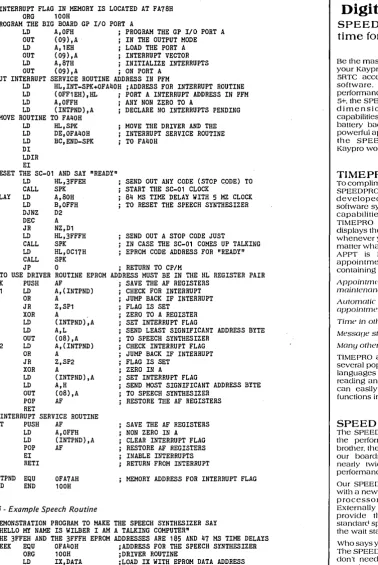
SPEAK, when assembled and execut-ed, programs the GPI/O Port A in the output mode, moves the driver and in-terrupt service routines into memory at FA40H (above PFM), resets the SC-01 and speaks the word "ready." To use this driver routine, load the HL register pair with the address of the word or pho-neme to be spoken (formats described above) then CALL FA40H. See Figure 3.
The program DEMO. COM demon-strates the driver SPEAK when used with an assembly language program (see Figure 4).
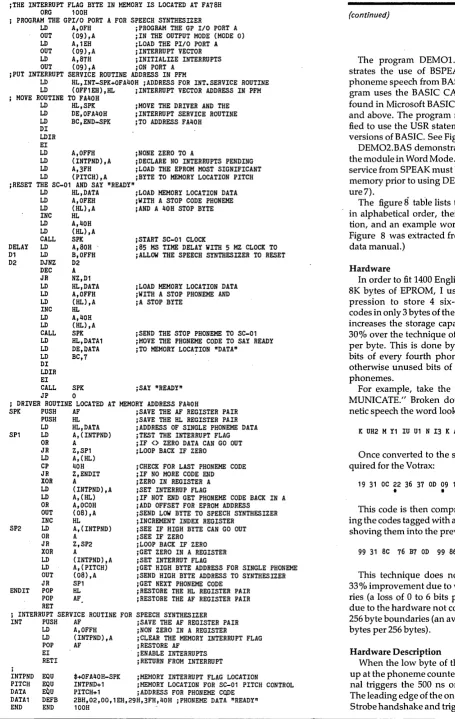
BSPEAK (see Figure 5) performs es-sentially the same way as SPEAK except that phoneme codes are loaded into memory in sequence starting at FA7 AH (up to 127 phonemes) and terminating the sequence with 40H. A CALL to FA40H will initiate speech. A byte POKEd at FA79H sets the pitch for the entire sequences as shown:
3FH
=
low pitch 7FH=
medium low BFH=
medium high FFH = high pitch .Figure 3 - Big Voice Interrupt Routine
; INTERRUPT FLAG IN MEMORY IS LOCATED AT FA78H ORG 100H
;PROGRAM THE BIG BOARD GP I/O PORT A
LD A,OFH PROGRAM THE GP I/O PORT A OUT (09),A IN THE OUTPUT MODE LD A,1EH LOAD THE PORT A OUT (09),A INTERRUPT VECTOR LD A,87H INITIALIZE INTERRUPTS OUT (09),A ; ON PORT A
;PUT INTERRUPT SERVICE ROUTINE ADDRESS IN PFM
LD HL,INT-SPK+OFA40H ;ADDRESS FOR INTERRUPT ROUTINE LD (OFF1EH),HL PORT A INTERRUPT ADDRESS IN PFM LD A,OFFH ANY NON ZERO TO A
LD (INTPND),A DECLARE NO INTERRUPTS PENDING MOVE ROUTINE TO FA40H
LD HL,SPK LD DE,OFA40H LD BC,END-SPK DI
LDIR EI
MOVE THE DRIVER AND THE INTERRUPT SERVICE ROUTINE TO FA40H
;RESET THE SC-01 AND SAY "READY" LD HL,3FFEH
CALL SPK SEND OUT ANY CODE (STOP C,ODE) TO START THE SC-01 CLOCK DELAY LD A,80H 84 HS TIME DELAY WITH 5 HZ CLOCK TO RESET THE SPEECH SYNTHESIZER D1 LD B,OFFH
D2 DJNZ D2 DEC A JR NZ,D1 LD HL,3FFFH CALL SPK LD HL,OC17H CALL SPK
SEND OUT A STOP CODE JUST
IN CASE THE SC-01 COMES UP TALKING EPROM CODE ADDRESS FOR "READY"
JP 0 ; RETURN TO CP/M
; TO USE DRIVER ROUTINE EPROM ADDRESS MUST BE IN THE HL REGISTER PAIR SPK PUSH AF SAVE THE AF REGISTERS
SP1 LD A, (INTPND) CHECK FOR INTERRUPT OR A JUMP BACK IF INTERRUPT JR Z,SP1 FLAG IS SET
XOR A , ZERO TO A REGISTER LD (INTPND),A SET INTERRUPT FLAG
LD A,L SEND LEAST SIGNIFICANT ADDRESS BYTE OUT (08),A TO SPEECH SYNTHESIZER
SP2 LD A, (INTPND) CHECK INTERRUPT FLAG OR A JUMP BACK IF INTERRUPT JR Z,SP2 FLAG IS SET
XOR A ZERO IN A LD (INTPND),A SET INTERRUPT FLAG
LD A,H SEND MOST SIGNIFICANT ADDRESS BYTE OUT (08),A TO SPEECH SYNTHESIZER
POP AF RESTORE THE AF REGISTERS RET
; INTERRUPT SERVICE ROUTINE
INT PUSH AF SAVE THE AF REGISTERS NON ZERO IN A LD A,OFFH
LD (INTPND),A POP AF EI RETI
;
CLEAR INTERRUPT FLAG RESTORE AF REGISTERS INABLE INTERRUPTS RETURN FROM INTERRUPT
INTPND EQU
END END OFA7AH 100H
[image:7.615.68.447.43.609.2]MEMORY ADDRESS FOR INTERRUPT FLAG
Figure 4 -Example Speech Routine
;DEHONSTRATION PROGRAM TO HAKE THE SPEECH SYNTHESIZER SAY ;"HELLO MY NAME IS WILBER I AM A TALKING COMPUTER"
;THE 3FFEH AND THE 3FFFH EPROM ADDRESSES ARE 185 AND 47 MS TIME DELAYS SPEEK EQU OFA40H ;ADDRESS FOR THE SPEECH SYNTHESIZER
ORG 100H ;DRIVER ROUTINE
LD IX, DATA ;LOAD IX WITH EPROM DATA ADDRESS LOOP LD A,(IX) ;LOAD A WITH EPROM ADDRESS LOW BYTE
CP 40H ;TEST TO SEE IF LAST BYTE JR Z,END ;END IF STOP BYTE
LD L,A ;PUT LOW BYTE IN REGISTER L INC lX ;INCREHENT COUNT
LD H,(IX) ;LOAD H WITH EPROM ADDRESS HIGH BYTE INC IX ;INCREHENT COUNT
CALL SPEEK ;CALL DRIVER ROUTINE JR LOOP ;GET NEXT BYTE END JP 0
.
DATA DEFW DEFW DEFW DEFB
END
073EH,3FFEH,OA1DH,OA25H,083FH OF3DH,3FFEH,0788H,0076H 0000,3FFFH,OD9AH,02EOH 40H
Micro Cornucopia, Number 17, April 1984
Digital Dynamics'
SPEEDPRO-5RTC It's
time for your Kaypro.
Be the master of your time by equipping your Kaypro II or 4 with our SPEED PRO 5RTC accessory board and TIMEPRO software. Offering the high speed performance of our popular SPEED PRO· 5+, the SPEEDPR05RTC adds the fourt!1 dimension to your computing capabilities - TIME! with its built·in, battery backed·up clock/calendar and powerful appointment tracking software, the SPEEDPRO'5RTC makes your Kaypro work like no Kaypro has before.
TIMEPRO
To compliment the clock/calendar of the SPEEDPRO'5RTC, Digital Dynamics has developed TIMEPRO, a complete software system designed to exploit the capabilities of the clock/calendar. TIMEPRO includes SEE·TIME, Wl1icl1 displays the time and date on the screen whenever your Kaypro is operating - no matter wl1at software you may be using. APPT is Digital Dynamics' powerful appointment management software containing features like:
Appointment schedulinu and maintenance;
Automatic worninu of impendinu oppointments, and perenniol events;
Time in other places;
Messaoe stomne ond retrieval, and;
Mony other useful copalJilities.
TIMEPRO also includes source code in several popular computer programming languages for all of the clock/calendar reading and setting routines so that you can easily incorporate time and date functions into your own programs.
SPEED
Tl1e SPEEDPRO'5RTC, of course, shares the performance heritage of its little brother, the SPEEDPRO·5+. Eit!1er one of our boards will give your computer nearly twice the standard processing performance.
Our SPEEDPROs soup up your Kaypro wit!1 a new Zilog Z80B 11igh speed miCro· processor and support circuitry. Externally mounted toggle switches provide the ability to switch from standarci speed to 11igh speed and to turn
the wait state on and off.
Who says you can't own a time machine? The SPEEDPR05RTC is here, now. If you don't need the clock/calendar, but do want increased processing speed, then order the SPEEDPRO·5+. Both SPEED PROs are available from Kaypro dealers nationwide. And, the prices are right - just $99.95 for the SPEEDPRO·5+ and $ 199.95 for t!1e SPEEDPRG'5RTC wit!1 TIME PRO software.
NOW IS THE TIME!
DIGITAL DYNAMICS
performance prod ucts for Microcomputers
(206) 627-0797 Tacoma, WA
P.O. Box 5653 98405
Figure 5 -BSPEA K Program
jTHE INTERRUPT FLAG BYTE IN MEMORY IS LOCATED AT FA78H ORG 100H
PROGRAM THE GPIIO PORT A FOR SPEECH SYNTHESIZER
LD A,OFH jPROGRAM THE GP 1/0 PORT A OUT (09),A jIN THE OUTPUT MODE (MODE 0) LD A,1EH jLOAD THE PlIO PORT A OUT (09),A jINTERRUPT VECTOR LD A,87H jINITIALIZE INTERRUPTS OUT (09),A JON PORT A
jPUT INTERRUPT SERVICE ROUTINE ADDRESS IN PFM
LD HL,INT-SPK+OFA40H jADDRESS FOR INT. SERVICE ROUTINE LD (OFF1EH),HL jINTERRUPT VECTOR ADDRESS IN PFM MOVE ROUTINE TO FA40H
LD HL,SPK LD DE,OFA40H LD BC,END-SPK DI
LDIR EI
jMOVE THE DRIVER AND THE jINTERRUPT SERVICE ROUTINE JTO ADDRESS FA40H
LD A,OFFH JNONE ZERO TO A
LD (INTPND),A jDECLARE NO INTERRUPTS PENDING LD A,3FH jLOAD THE EPROM MOST SIGNIFICANT LD (PITCH),A jBYTE TO MEMORY LOCATION PITCH jRESET THE SC-01 AND SAY "READY"
LD HL,DATA jLOAD MEMORY LOCATION DATA LD A,OFEH jWITH A STOP CODE PHONEME LD (HL),A jAND A 40H STOP BYTE INC HL
LD A,40H LD (HL),A
CALL SPK jSTART SC-01 CLOCK
DELAY LD A,80H j85 MS TIME DELAY WITH 5 HZ CLOCK TO jALLOW THE SPEECH SYNTHESIZER TO RESET D1 LD B,OFFH
D2 DJNZ D2 DEC A JR NZ,D1 LD HL,DATA LD A,OFFH LD (HL),A INC HL LD A,40H LD (HL),A CALL SPK LD HL,DATA1 LD DE, DATA LD BC,7 DI
LDIR EI
CALL SPK JP 0
jLOAD MEMORY LOCATION DATA jWITH A STOP PHONEME AND jA STOP BYTE
jSEND THE STOP PHONEME TO SC-01 jMOVE THE PHONEME CODE TO SAY READY JTO MEMORY LOCATION "DATA"
JSAY "READY"
j DRIVER ROUTINE LOCATED AT MEMORY ADDRESS FA40H
SPK PUSH AF jSAVE THE AF REGISTER PAIR
SP1
SP2
PUSH HL jSAVE THE HL REGISTER PAIR LD HL,DATA jADDRESSOF SINGLE PHONEME DATA LD A, (INTPND) JTEST THE INTERRUPT FLAG
OR A jIF <> ZERO DATA CAN GO OUT
JR Z,SP1 jLOOP BACK IF ZERO LD A,(HL)
CP 40H JR Z,ENDIT XOR A LD (INTPND),A LD A, (HL) OR A,OCOH OUT (08),A INC HL LD A, (INTPND) OR A
JR Z,SP2 XOR A LD (INTPND),A LD A, (PITCH) OUT (08),A JR SP1
j CHECK FOR LAST PHONEME CODE jIF NO MORE CODE END JZERO IN REGISTER A jSET INTERRUP FLAG
jIF NOT END GET PHONEME CODE BACK IN A jADD OFFSET FOR EPROM ADDRESS
jSEND LOW BYTE TO SPEECH SYNTHESIZER jINCREMENT INDEX REGISTER
jSEE IF HIGH BYTE CAN GO OUT jSEE IF ZERO
jLOOP BACK IF ZERO jGET ZERO IN A REGISTER jSET INTERRUT FLAG
jGET HIGH BYTE ADDRESS FOR SINGLE PHONEME jSEND HIGH BYTE ADDRESS TO SYNTHESIZER jGET NEXT PHONEME CODE
END IT POP HL jRESTORE THE HL REGISTER PAIR POP AF
RET . jRESTORE THE AF REGISTER PAIR j INTERRUPT SERVICE ROUTINE FOR SPEECH SYNTHESIZER
INT PUSH AF jSAVE THE AF REGISTER PAIR
J
INTPND PITCH DATA DATAl END
LD A,OFFH JNON ZERO IN A REGISTER
LD (INTPND),A jCLEAR THE MEMORY INTERRUPT FLAG POP AF j RESTORE AF
EI jENABLE INTERRUPTS RETI jRETURN FROM INTERRUPT EQU
EQU EQU DEFB END
$+OFA40H-SPK jMEMORY INTERRUPT FLAG LOCATION
INTPND+1 jMEMORY LOCATION FOR SC-01 PITCH CONTROL PITCH+1 jADDRESS FOR PHONEME CQDE
2BH,02,OO,1EH,29H,3FH,40H jPHONEME DATA "READY" 100H
BIG VOICE FOR THE BIG BOARD I (continued)
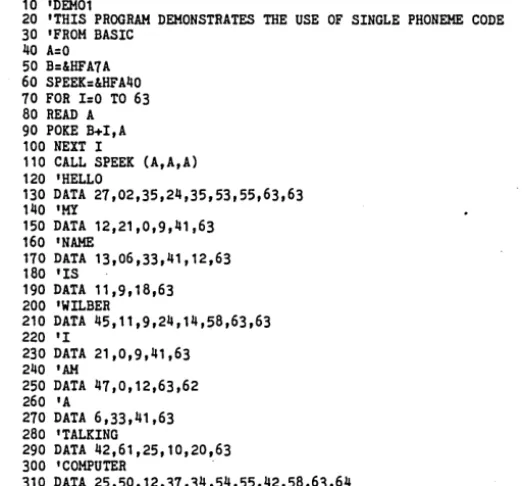
The program DEM01.BAS demon-strates the use of BSPEAK to handle phoneme speech from BASIC. This pro-gram uses the BASIC CALL statement found in Microsoft BASIC Revision 5.xx and above. The program may be modi-fied to use the USR statement in earlier versions of BASIC. See Figure 6.
DEM02.BAS demonstrates the use of the module in Word Mode. The interrupt service from SPEAK must be loaded into memory prior to using DEM02 (see Fig-ure7).
The figure
8
table lists the phonemes in alphabetical order, their code, dura-tion, and an example word. (The list in Figure 8 was extracted from the Votrax data manual.)Hardware
In order to fit 1400 English words into 8K bytes of EPROM, I used data com-pression to store 4 six-bit phoneme codes in only 3 bytes of the EPROM. This increases the storage capacity by about 30% over the technique of storing 6 bits per byte. This is done by storing the 6 bits of every fourth phoneme in the 2 otherwise unused bits of the first three phonemes.
For example, take the word "COM-MUNICATE." Broken down into pho-netic speech the word looks like this.
K UH2 M Y1 IU U1 N 13 K A1 Y T Stop
Once converted to the six bit code re-quired for the Votrax:
19 31 OC 22 36 37 OD 09 19 06 29 2A 3F
•
•
•
This code is then compressed by tak-ing the codes tagged with an asterisk and shoving them into the previous 3 codes.
99 31 8C 76 B7 OD 99 86 A9 3F
This technique does not yield a full 33% improvement due to word bounda-ries (a loss of 0 to 6 bits per word) and due to the hardware not counting across 256 byte boundaries (an average loss of 3 bytes per 256 bytes).
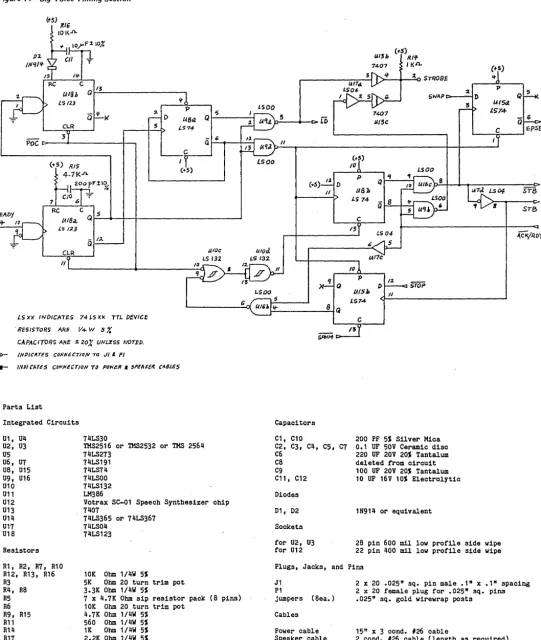
Hardware Description
auto-reset one-shot. The trailing edge increments the load pointer U8a so the system is ready for the high data byte.
Before the 50 ms one-shot can time out, the high byte data from the port must be stable and a second ready signal must be received; otherwise, the load pointer will be reset to low byte.
This second ready triggers the 500 ns one-shot again. The leading edge of the one-shot's ou tput resets all flip/ flops and clears the accumulator. The trailing edge then sets the Start flip/flop.
The Start flip/flop issues a STB signal to the SC-01. Once the SC-01 has ac-cepted the data, an ACK is returned. STB is then removed, the phoneme counter is advanced, the accumulator shifts in the most significant two bits of the current EPROM byte, and the accumulator shift counter is incremented. The controller then waits for the SC-01 to return RDY to indicate the completion of the current phoneme.
This process will repeat until a 3FH (STOP phoneme code) is detected by U1. This will set the Stop flip/flop U15b which will issue a Reset pulse to the Start flip/flop U8b.
If the word is longer than three pho-nemes, the accumulator shift counter U5a,h will be s~t to 3 (counting sequence is Grey code: 0-1-3-2) indicating that the fourth phoneme is to come from the ac-cumulator, not from the EPROM.
The phoneme counter is disabled by the SWAP signal. When ACK is returned during the third byte, U15a will be set, disabling the EPROM output and ena-bling the accumulator dump gate U14.
In the single phoneme mode, U4 forces the system to stop after each pho-neme and wait for another phopho-neme and handshake from the port. In this mode, each word or phrase must be followed by an explicit Stop code (phoneme 3FH) or the SC-01 will continue to repeat the pre-vious phoneme.
Package Available
You can get a complete phoneme package from the author for $70 post-paid. This package includes the printed circuit board, two 2532 EPROMS con-taining approximately 1400 words, an 8" SSSD floppy containing utilities and the source of the word file and documenta-tion.
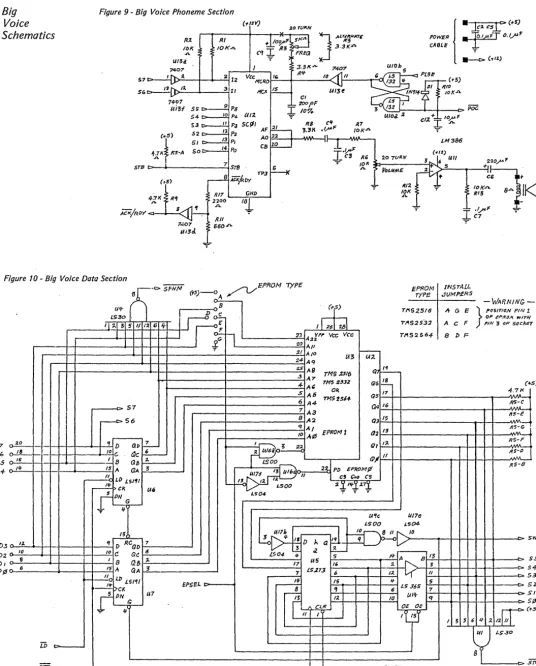
(Schematics follow on pages 8 & 9)
•••
[image:9.624.244.505.44.287.2]Micro Cornucopia, Number 17, April 1984
Figure 6 -D£MOl.BAS 10 'DEM01
20 'THIS PROGRAM DEMONSTRATES THE USE OF SINGLE PHONEME CODE 30 'FROM BASIC
40 A=O 50 B=&HFA7A 60 SPEEK=&HFA40 70 FOR 1=0 TO 63 80 READ A 90 POKE B+I,A 100 NEXT I
110 CALL SPEEK (A,A,A) 120 'HELLO
130 DATA 27,02,35,24,35,53,55,63,63 140 'HY
150 DATA 12,21,0,9,41,63 160 'NAME
170 DATA 13,06,33,41,12,63 180 'IS
190 DATA 11,9,18,63 200 'WILBER
210 DATA 45,11,9,24,14,58,63,63 220 'I
230 DATA 21,0,9,41,63 240 'AM
250 DATA 47,0,12,63,62 260 'A
270 DATA 6,33,41,63 280 'TALKING
290 DATA 42,61,25,10,20,63 300 'COMPUTER
310 DATA 25,50,12,37,34,54,55,42,58,63,64
Figure 7 -D£M02.BAS 10 'DEM02
20 'THIS PROGRAM DEMONSTRATES THE USE OF PHONEME CODE FROM EPROM 30 'WITHOUT USING THE DRIVER ROUTINE. MEMORY LOCATION FA78H IS THE 40 'MEMORY INTERRUPT FLAG.
50 READ A 60 READ B 70 OUT 8,B 80 POKE &HFA78,0 90 OUT 8,A 100 C=PEEK (&HFA78) 110 IF C=O THEN GOTO 100 120 GOTO 50
130 DATA 7,62,63,254,10,29,10,37,8,63 140 DATA 15,61,63,254,7,136,0,118,0,0 150 DATA 13,154,63,254,9,197,2,224
Figure 8 -Phoneme Table
Phoneme Phoneme Duration Example Symbol Hex Code (MS) Word
A 20 185 qay A1 06 103 made A2 05 71 made AE 2E 185 dad AE1 2F 103 after AH 24 250 mop AH1 15 146 father AH2 08 71 honest AW 3D 250 call AW1 13 146 lawful AW2 30 90 salty AY 21 65 day B OE 71 bag CH 10 71 chip D 1E 55 paid DT 04 47 butter E 2C 185 meet E1 3C 121 be EH 3B 185 get EH1 02 121 heavy EH2 01 71 enlist EH3 00 59 jacket ER 3A 146 bird F 1D 103 fast G 1C 71 get H 1B 71 hello I 27 185 pin 11 OB 121 inhibit 12 OA 80 inhibit 13 09 55 inhibit IU 36 59 you J 1A 47 judge
Phoneme Phoneme Duration Example Symbol Hex Code (MS) Word
K 19 80 trick L 18 103 land M OC 103 mat .. N OD 80 sun NG 14 121 thing 0 26 185 cold 01 35 121 aboard 02 34 80 for 00 17 185 book 001 16 103 looking P 25 103 past PAO 03 47 no sound PA1 3E 185 no sound R 2B 90 red S 1F 90 pass SH 11 121 shop STOP 3F 47 no sound
T 2A 71 tap
TH 39 71 thin THV 38 80 the U 28 185 move U1 37 90 you UH 33 185 cup UH1 32 103 uncle UH2 31 71 about UH3 23 47 mission V OF 71 van W 2D 80 win Y 29 103 any Y1 22 80 yard Z 12 71 zoo ZH 07 90 apzure
Big
Voice
Schematics
Figure 9 - Big Voice Phoneme Section
C11:1V)
R~ RI
10K IOK4 1.11311.
2 12 Vee HeRO IG
56 ,,- 3 rt 110< 15
74-07
9 Ps
Ui3f $5" C>
S4§1" UIZ
S3 " PJ 5CPI
(+:$) 52 12 p;.
~l·tR5-A
51 /3 PISO 14 Po
STB 7srs G
Ac.¥OY
TP3(t-s)
RI7 GHD 411< Rif 2200
I~
8 .J1..
ACKjRO>'
lUI
t;60.r.. T
;.orURN
3.3K;r.
J
,4L~ATE740"1'
j
•
]£2.
CSr
(t-S)POWER •
!' ...
F-r
O.VUt:CABLE "'f
~(~I2.)
(t5)
IfIO
'OKA
Figure 10 - Big Voice Data Section
EPROM TYPE
()7
D6
Ds D+
D3
D2
J)t
/)¢
~
,.. 18 ~ 16
o-l!!-h
11-"- to
~ e
n. 6
,
-- ..
"
-to
J
srn
" ,
-a
~.5)--O~.","5fH' ~ E PROM INSTALL
Type
c4-1.1'1- ~B
.~
TI152.5/(j LS30.ID~
T"'S2532
'I :l.1 ~I 5 II I" G If E I 26 28
1 I I
cfn
23 A VI'I' Vee Veer,.,S2564-.22
1
-¥
20 All:1.1 AIO
-U3 U;l..
2.4 Aq
2S A9
TMS :lS16 Ql~
.3 A7
1MS Z~3Z 18
4-A& GIG ; -5 AS OR 11
77151514- QS 6 A4
57
7 A3 G4
16
r---t> 56 8 A2 Q3 /~
q AI 11
EPROM 1 Q2
10 Jt~
if D ~p
r!-~
611,,-10 C ~c ~
II
I 8 GB :z. !Soo rY/
/5 A GA ~
~"
2~ PD £PI{OMp//I cS (;NU CS
LD LS'" ' - - IJ /1
13-:Zt /
q..:t
17:t
Ilf
i>CK LSOO
; - - - lA,
(DHG
LS04T If
UI7e U'r,
/.soo /.s()4.
H
~
5 I f " D ha
1",1~[)'O
,
RC GD 7/)
/.504
!
r2 ~10 c! Gc! .s
S "'",A lJ 13
I 8 Q6
,.
/7 us"
:z. JIS A QA 3 lS.213
~o Ll> LS/'fI
7 6 1:1.
"
!If IS If S
---l.!..>CK EPSEL
r---;
,
6 LS .J6S7
(PN
tl7I"i
(JI'I-f;
r
11- 10 qACLfl OE Oe . If
"
,
'L/j
i
START
J()MP£RS
~ G t:
A C F
B p F
-WARNING-OF ePIfOM ",Irlf
} !'USITION PIN 1
I'IN 3 OF soclrn
( 4.~:
I
RS-C
A. "
1f5:~
RS-G-R5-F .A, IlS-IJ
v.,.,A
RS-8
...
s WAP- - c : - 5 s
4-3 2
I
ff
$)
~ S
J . 5
- - - ( > S
S S
I ~ J G 1/ .4 12 II
l~(t-~
. . oo [image:10.623.43.580.77.744.2]Figure 11 - Big Voice Timing Section
(+5) TUG
101<'-0.
tXl. U/3b (.-5) Rtf
'"'1'If
74.07 I K./l.(*,5)
/If 3 If ~ STROBE
14-C
UI8h Q 13
LS 123 It
P LSOO
QIf :z. 5
D LIBel Q 5
CLR 3 LS7-+
:l P Q 5
SWAP
UISd
7401
IS74-ro
U/3C -G 6C EpSEL
poe
:5 Q 6 IIC
(TS) (\15 LSoo
4·7KJl. "'S)
(t5)
10
LSOO llo P 'f
(+5) D Q
II tl81> srB
LS 74 B
ii 8 .$r8
C RC U18~ Q~.5~~-4 C __ +-______________________________________ ~
200 rF:tI~
CIO T
1 6
/3
1.504 A,cKjR.D'f
i.s 123
~ 5
ClR lAI1c
1/
If)
'I G P D 1:1. STOP
1.500 U/SJ, /I
L574-8 Q
5
~ _____________________ o~ U~1~~~ ___________ ~~
is x)( INDICATES 74 loS XX TTL DEVICE
. RESISTOR~ ARe V4-W S %
CAPACITORS AliI: ;t 20i: UNL1!SS NO T& D.
0 - /NOICATES ca/l'UCTIO/V ro J I ' PI
__ /NPI CATES CD"'/v£CT/O/V.,O PO'f(/!Jf .. ~I'I!AItI( CABLes
Parts List
Integrated Circuits
U1, U4 U2, U3 U5 U6, U7 U8, U15 U9, U16 U10 U11 U12 U13 U14 U17 U1S
Resistors
R1, R2, R7, R10 R12, R13, R16 R3
R4, RS R5 R6 R9, R15 R11 R14 R17
74LS30
TMS2516 or TMS2532 or TMS 2564 74LS273
74LS191 74LS74 74LSOO 74LS132 LM3S6
Votrax SC-01 Speech Synthesizer chip 7407
74LS365 or 74LS367 74LS04
7liLS123
10K Ohm 1/4W 5%
5K Ohm 20 turn trim pot 3.3K Ohm lIliW 5%
7 x 4.7K Ohm sip resistor pack (S pins) 10K Ohm 20 turn tric pot
4.7K Ohm 1/4W 5% 560 Ohm 1/4W 5% 1K Ohm 1/liW 5% 2.2K Ohm 1/4W 5%
Micro Cornucopia, Number 17, April 1984
SifiM·
Capacitors
C1, C10
C2, C3, Cli, C5, C7 C6
CS C9 C11, C12
Diodes
D1, D2
Sockets
for U2, U3 for U12
C 1'5
200 PF 5% Silver Mica 0.1 OF 50V Ceramic disc 220 OF 20V 20% Tantalum deleted from circuit 100 OF 20V 20% Tantalum 10 UF 16V 10% Electrolytic
1N914 or equivalent
28 pin 600 mil low profile side wipe 22 pin 400 mil low profile side wipe
Plugs, Jacks, and Pins
J1 P1
jumpers (Sea.)
Cables
Power cable Speaker cable
2 x 20 .025 n sq. pin male .1n x .1 n spacing 2 x 20 female plug for .025 n sq. pins .025 n sq. gold wirewrap posts
15n x 3 condo #26 cable
2 condo #26 cable (length as required)
9
The Xerox 820-11
and
the
Dynadisk
By
Clarence Peckham
After owning a Xerox 820-II for over a year, I was ready for some form of mass storage other than floppy disks. The problem was not one of storage capacity, I'm using 8 inch double density drives, but one of performance. One obvious so-lution was to add a winchester subsys-tem.
However, the winchester was out due to the high cost. The next solution was a solid state disk. A solid state disk is a me-dium-cost storage system with perform-ance in the 125 KB/sec range and zero access time. It seemed ideal!
Most of the solid state disk systems available in the marketplace are de-signed for 5100 applications. The one unit I found which was usable was the Dynadisk from LA Software. Tony Ozre-lie is the designer of the Dynadisk and after a short telephone conversation, I ordered the documentation and soft-ware with the intent to wire wrap a breadboard version of the Dynadisk.
I don't recommend this approach. Tony now has a printed circuit board available at a very reasonable price. I spent a lot of time checking my wiring when the problem was really an error in the software.
Dynadisk
The Dynadisk is a 256 KB RAM array with the necessary TTL logic to provide an interface to the spare parallel interface on the BB I. This is the problem. The Dynadisk was designed to operate with the BB I and wasn't tested for use with the Xerox 820-11. Although the hardware interface is the same, the software is not. Fortunately, the 820-11 still maintains a strong link to it's BB I heritage. The CBIOS for the BB I works fine with both the 820 and the 820-U. This allowed me to use a version of CP 1M set up for the BB Ion my system for testing purposes. So, armed with Dynadisk and a version pf CPIM for the BB I, I proceeded to convert the Dynadisk software to work with the 820-11 CBIOS.
Hardware Modifications
No software project is complete with-out hardware mods. Fortunately, the hardware mods are minimal and only ef-fect the 820-11 motherboard. No changes on the Dynadisk board are required.
10
13075 SW Davies Rd. " Beaverton OR 97005
The first change required is to remove the two IC's from the 820-11 mother-board. Remove U90 and U91 and ~eplace
them with jumper blocks as described in the Dynadisk Operating Manual. U90 and U91 are 74LS243 bidirectional buff-ers and are not required for the Dyna-disk.
block on the 820-11 motherboard. The necessary connections are .as follows:
3 - 4 5 - 6 7 - 8
13-14 15-16
Once these changes are made, the last step is to connect the cable to the Dyna-disk. This connection is made using con- " The next step is to make the necessary
[image:12.624.228.571.256.748.2]jumper connections in the J11 jumper
Figure 1 -CBlOS Patch To Use Dynadisk on the Xerox 820
0008 0009 000A 000B
0000 0001 0002 0004 0008
0008 0009 000C 0004 000A
F368 F384 F800
0100 0103 0106 0109
010B 0100 0110 O1l3
0117 0119
21 0l2C
11 F800 01 0149 ED BO
3E 02 32 F368 01 F800 ED 43 F384
3E 8F 03 09
,
ddata actl dcsr bctl ,
title RAMOSK - Oynadisk I/O patcher Based on ddyna - dynadisk i/o patcher by Tony Ozrelic
Copyright (c) 1982
This version Copyright (c) 1983 by Clarence Peckham
i/o ports equ equ equ equ
8
9
10
11
idata port ipio control A icontrol/status port ipio control B
i Output Bit patterns
,
tOld sId ref data rw
,
dtrack dsect dread dwrite drfsh
,
seltab dvrtab dyna
,
ddyna: equ equ equ equ equ
00000000B 0000000lB 000000l0B 00000l00B 00001000B
equ tId + rw equ sId + rw equ data + rw equ data equ ref + rw
iTrack load iSector load iRefresh on bit iOata selection
i R/W bit
.Memory addresses in 820-II monitor
equ Of360h + 8 equ Of380h + 4
equ Of800h iStart of ram driver code
Here We go!
.z80 aseg org l00h
load,patch and set up pio
Id hl,begdyn ;start of code Id de,dyna ;Oestination Id bc,enddyn-begdyn ; length Idir ;go to it!
Id a,02 ;Select disk driver two Id (seltab) ,a iS tore in table Id bc,ramdvr istart of driver Id (dvrtab) ,bc iGo stuff i t
Set up pio
nector J8 on the 820-11 motherboard and the pinout is the same as JS on the BB I. Software
Since I used a version of CP 1M for the BB I, I was able to use all of the utility software that came with the Dynadisk. Along with the necessary driver, the Dynadisk comes with a format routine and an extensive test routine. I had an early version of the Dynadisk driver rou-tine, so several changes were required before the driver software would work correctly. Tony has since corrected and released a new version of the software.
The format program must be patched in order to work with the 820-11. The HE-XOUT routine used by the format pro-gram is located in a different location in the 820-11 monitor than in the BB I. Change locations in DFORMAT.COM with DDT.
014D CDF3D2 should be CDFC1B 01F3 CDF3D2 should be CDFC1B
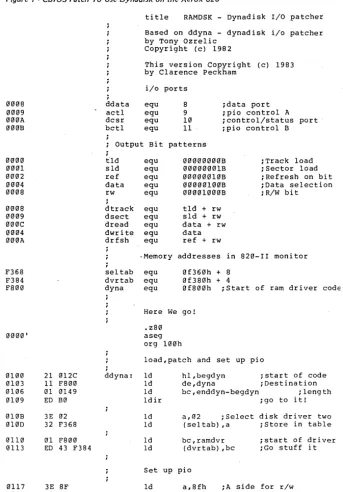
This is the only change required to use the software distributed with the Dyna-disk. But in order to use the CHIOS that comes with the 820-11 the next step was to write a driver routine for the Dynadisk which would work with the 820-11 soft-ware. Two problems had to be resolved. First the 820-11 uses drives A-D for the two floppy disks so I chose drive E for the Dynadisk instead of drive D used by the standard BB I Dynadisk software.
The second problem was the 820-11 monitor. There is no listing available for the ROM monitor used in the 820-11 and it is radically different from the monitor used in either the BB I or the 820-1. The only solution was to disassemble the monitor which was a slow and tedious process.
The 820-11 monitor uses the loadable disk drivers and a standardized com-mand block to communicate with all disk drivers. Two tables in RAM are used to reference the correct driver for each drive. The standard 820-11 has two disk drivers built in. One for the floppies and one for the SASI interface option. At boot time the correct driver is configured
(continued on page 12)
Micro Cornucopia, Number 17, April 1984 ~llB ~llD ~llF ~12l ~123 ~125 ~127 ~129 ~12C F8~~ F8~1 F8~2 F8~4 F8~5 F8~6 F8~7 F8~8 F8~9 F8~A F8~B F80C F8~D F8~E F80F F8l~ F8ll F8l2 F8l3 F8l4 F8l5 F8l6 F8l7 F8l8 F8l9 F81A F81B F81C F81D F81F F82~ F822 F824 F825 F827 F829 F82B F82C F82E F82F F83~ F83l F832
3E CF 03 ~B 3E F~ 03 ~B
3E ~A 03 ~A DB ~8
7E 3C 28 5~
E5 23 23 23 5E 23 56 23 7E 23 23 E5 3D EB 29 E5 01 29 29 E5 Cl 29 ~9 19 4F ~6 ~~ ~9
3E ~8 03 ~A 7C 03 ~8
3E 09 03 0A 70 03 ~8
El 5E 23 56 El
,
ld out ld out ld out in jpa,~cfh ;B side 4 out 4 in (bctl),a
a,~f~h (bctl) ,a
a,drfsh ;turn on refresh (dcsr) , a
a, (ddata) ;clear ready line
;GO TO CPM!!
Here is the disk handler;
On entry HL points to a command block wit following information.
HL -) defb command -l=select,l=read, defb logicalunit
defb physicalunit defw track defw sector
defw address buffer
begdyn equ $
.phase dyna
ramdvr: ld a, (hl) ;get command
inc a
jr z,select
Not select so set up for read/write
push inc inc inc ld inc ld inc ld inc inc push dec ex hl hl hl hl e, (hl) hl
d, (hl) hl
a,
(hl) hl hl hl a de,hlhl = track a = sector-l
;address of cmd block
;track number to DE
;A = sector
;pointer to buffer add. ;sector is 0-25
;hl = Track
Compute ramadd = 26*trk + (sector - 1)
add push pop add add push pop add add add ld ld add hl,hl hl de hl,hl hl,hl hl bc hl,hl hl,bc hl,de c,a b,~ hl,bc
output to ramdsk
1 = sector h = track
;2*trk
; 4*trk ;8*trk
;16*trk ; + 8*trk
; + 2*trk
=
26*trk ;bc= sector-l;hl= 26*trk + sector-l
ld a,dtrack ;trk register
out (dcsr) , a
ld a,h ;get track value
out (ddata) ,a
ld a,dsect ;sector register
out (dcsr) ,a
ld a,l ;get sector value
out (ddata) , a
now get buffer address and set up for r/w
pop hl
ld e, (hl)
inc hl
ld d, (hl) ide
pop hl ;hl
address address of cmd
(Listing continued on page 12)
XEROX 820 - DYNADISK INTERFACE
(continued)
into the monitor depending on which in-terface is installed in the 820-11. .
Adding a disk driver for the Dynadisk turned out to be an easier task than I ex-pected (if you overlook the two months spent disassembling the monitor). Each driver has a single entry point and is re-quired to handle three requests; select, read, and write. The read and write re-quests read or write one sector of infor-mation from the' track and sector con-tained in the command block. The select request has to do nothing except return the address of the CP 1M disk descriptor block.
The listing contains the complete driv-er code required to support the Dyna-disk as drive E on an 820-11. Note that the sector translate routine is not required by the Dynadisk but it is required by the warm boot routine in the 820-11 CBIOS. Usage
The best way to use the Dynadisk is to bring the system up using a floppy and then copy any compilers and editors you will be using to the Dynadisk and swap the A and E drives using the swap pro-gram which is an 820-11 utility (SWAP A
=
E). Then all of the disk accesses will be done using the Dynadisk as the logged in A drive. The A floppy drive can be accessed an drive E.One thing to remember is that when the power goes off all of the data which was on the Dynadisk goes into the bit bucket. So save all your work before you shut off the power!
Is it worth it? Yes, the performance in-'crease is excellent. Warm boots occur in
the blink of an eye and assemblies and compiles are blindingly fast.
I want to thank Tony Ozrelic for de-signing an excellent product and for be-ing so helpful over the telephone.
•••
12
CBlOS PA TCH LISTING (continued)
F833 F835 F836 F838 F839 F83A F83C F83E F840 F842 F845 F846 F847 F849 F84B F84D F850 F852 F853 F854 F857 F858 F859 F85B F85D F85E F860 F861 F862 F863 F865 F867 F868 F869 F86B F86D F86F F873 F877 F87B F87F F883 F887 F889 F88B F88F F891 F895 F899 F919 F939 0275 Macros: 06 80 7E 0E 08 EB 3D 28 0B
3E 04 03 0A ED B3 CD F859 AF C9
3E 0C 03 0A ED B2 CD F859 DB 08 AF C9
21 F889 AF C9 3E 0A 03 0A C9 001A 03 07 00 00F2 003F C0 00 0010 0002 0000
01 07 00 13 19 05 0B 11 17 03 09 0F 15 02 08 0E 14 lA 06 0C 12 18 04 0A 10 16
F86F 0000 0000 0000 F899 F85E F939 F919
Symbols:
0009 ACTL
012C BEGDYN
000A DCSR
F899 DIRBUF
000C DREAD 0008. DTRACK
F800 DYNA
F847 READ
0008 RW
F368 SELTAB
No Fatal error(s)
,
read: ; Id Id 1d ex dec j r b,128 a, (hI) c,ddata de,hl a z,readWrite request
1d out otir call xor ret a,dwrite (dcsr) ,a rfshon a
read request
Id a,dread
out (dcsr) ,a
inir call in
rfshon a, (ddata)
xor a
ret
select ramdisk
sector length r/w
=
1/0 c=
data port hI=
buffer address;ramdsk to write
;do write ;turn refresh on ;no error a110wec
;clear ready line
select: Id xor ret rfshon: Id
h1,dph a
a,drfsh (dcsr) ,a
;disk parameter block ;no error allowed
,
dpblk: , sectab: dph:,
dirbuf: all: chk: enddyn F919 F939 0008 F85E 000A F384 0275 0002 F86F 0001 out ret defw defb defb defb defw defw defb defb defw defw defw 26 3 7 o 242 63 11000000bo
16 2 o .; sector/track;block shift constant ;block mask constant ;extent mask constant ;max block number ;max dire entries ;al10cation ;mask ;check size ;reserved tracks
Sector translate table for single density
defb 1,7,13,19
defb 25,5,11,17
defb 23,3,9,15
defb 21,2,8,14
defb 20,26,6,12
defb 18,24,4,10
defb 16,22
defw sec tab
defw 0,0,0
defw dirbuf,dpblk
defw chk,a11
defs 128
defs 32
defs 16
.dephase
equ $
end ddyna
ALL CHK DDATA DPBLK DRFSH DVRTAB ENDDYN REF SECTAB SLD 000B 0004 0100 F889 0009 0004 F800 F859 F854 0000 BCTL DATA DDYNA DPH DSECT DWRITE RAMDVR RFSHON SELECT TLD
'GET
REAL 16
BIT
POWER
;ASINGLE BOARD COMPUTER FEATURING THE
INTEL 80186
THE SLICER
• Full8MHz l6-bit microprocessor having completesoftwarecompatibility with the 8086 and 8088
• 256KBytesofRAMpius 32K Bytes of EPROM'memory capacity on board • Floppy disk controller can run the
combination of 8", 5-1/4", 3-1/2" drives :; simultaneously
• SASI port for hard disk controller • TwoJul1 function HS232C serial ports
with individually controlled baud rates from 50 to 38.4K baud
• 8K of EPROM contains drivers for peripherals, commands for hardware checkout and software testing
• Source for monitor and bios included on disk • Bios for CP/M 86* supports' 8",5-1/4",3·1/2"
drives and the Xebec 1410 controller for hard disks
• Board size 6" x 12" power requirements +5 @3A,+12V @ 60mA, -12V @,50mA • Complete documentation included. Sold in various forms:
Assembled and tested . . . ; .$1,075.00 Full Kit ....•.. 0 • • • • • 0 . ' • • • • • • • • 895.00
Easy Kit (hard to get parts) . . . ' . .. 450.00 Bare Kit (board, Rom, doc, and disk) . . . 150.00 CP/M 86* available. . . .. .. . . . . . . . 85.00 Regular U.P.S. shipping within continental U.S, is included.
THE
NEW ,SLICER
EXPANSION BOARD
• 256K bytes dynamic RAMusing the TMS4500 0 RAM controller
• 2 RS232C serial asynchronousportsusing the Signetics SC2681 serial communications circuit with baud rates selectable from 38.4K baud'to 50 baud
• 2 RS232C serial asynchronous ports using the Zilog 8530 SCC with header connectors for synchronous communications personality cards
• RealTime Clock with battery back-up using the COP6818 RTC circuit, on-board or off-board battery
Choose 8 MHz CPU for speed
• Parallel printer port for Centronics-type printers
• Same size as the SLICER, Power: [email protected]; +12 @'200rnA - l2V @ 100 mA
Sold in various forms: . ___ " '_"_' Assembled and tested . . . 0 • • • • $8QO·OO Full Kit ... 0 • • • • ~ • • ' 0 • • • • • • • • • ' 650J)()
Memory Board . . . • . . • . . . . ;i.450.()()' 3 Port Board and Clock . o • • • • • • • • • • • i~~2§.O()
Bare Board and Doc . . . ~ ...• ~ ..••
95.pq
Regular, U.P.S. shipping within continentaL ,lJ~S~{ris included.
SLICERTM
SLICER COMPUTERS INC. 2543 Marshall St. N.E.
6 MHz CPU for speedy delivery
Minneapolis, MN 55418 (612) 788-9481
Mastercard, Vi
SCi.
check, money order or C.O.D. orders accepted.
Pascal Procedures
John P. Jones
The first step in programming in any language should be a precise definition of the problem at hand and an outline of its solution. In many cases, this step will be the most time consuming and difficult portion of the entire project.
Program Development
Recently I needed a routine to inter-pret a message from another computer and perform a series of processes based on the message data and imbedded con-trol codes. The first step was to get a defi-nition of the input message in all of its possible forms.
1. Data in ASCII?
2. Enumeration of all possible fields. 3a. All fields in fixed positions? 3b. Fields delimited by a special char-acter?
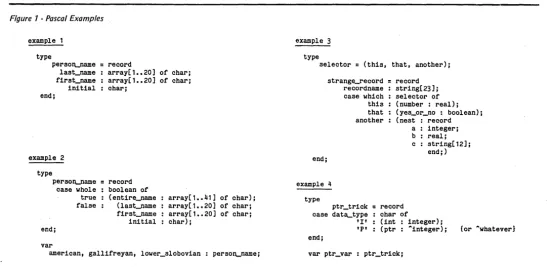
4. Enumeration of all possible actions. 5. Enumeration of all codes for 4. Now the procedures to attack the problem can be logically outlined or flow charted. If the data is in ASCII (it was) the input message can be most conve-niently handled as a STRING, since the built in STRING handling procedures can then be used. The first outline would be for a routine to copy the input data to a Pascal STRING variable.
If fields are not in fixed positions, a routine for scanning the data to
deter-Figure 1 -Pascal Examples
example 1
type
person-name
=
recordend;
last_name array[1 •• 20] of char; first_name array[1 •• 20] of char;
initial : char;
example 2
type
person-name
=
recordmine field positions should then be blocked out, followed by a functional definition for a 'command interpreter.'
Finally, the repertoire of actions to be performed under control of the com-mand interpreter should be outlined.
Start Your Coding
The actual coding can begin at this point. My method is to sequentially de-velop the routines for a 'test case' and then modify/expand to cover all cases. In my example, the STRING conversion routine· is written and debugged using constant input data and a simple calling program before going on to live input data.
In like manner, the field extraction routine is developed first for fixed input, then for variable.
The command interpreter