Collaborative Administration in the Context of
Research Computing Systems
Andreas Schäfer, Marc Reichenbach, Dietmar Fey
Abstract—In this paper we present our experiences with collaboratively administrating research computer systems. While traditional administration focuses on reliability and efficiency, collaborative administration poses the challenge of managing the flow of information between the different administrators. Research systems add a high degree of heterogeneity to the mix as each hardware resource may require its own dedicated software environment.
Our approach makes heavy use of system automation to reduce the effort required to provide basic services, while at the same time remaining flexible enough to allow for unusual system configurations.
Index Terms—DevOps, system administration,
dis-tributed systems
I. INTRODUCTION
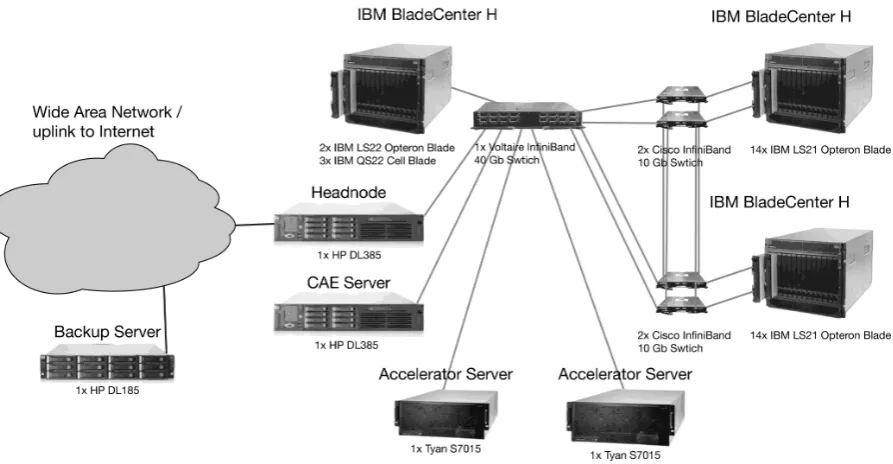
Our chair is concerned with research topics ranging from computer architecture to high performance and grid computing. As diverse as the range of research topics is the range of computing systems required. On the one hand computer architects need fat nodes with lots of memory to carry out synthesis and system simu-lation. On the other hand they require servers to house FPGA boards with direct access to the PCIe bus. The high performance computing folks need servers with lots of PCIe slots suitable for GPUs (Graphics Processing Units), and also medium sized MPI [2] clusters. Those MPI clusters are then again relevant to grid computing research, as they are well suited for high throughput computing jobs. The constellation of our systems is illustrated in Figure 1.
Previously, our approach to system administration was to have one or two experts who would take care of all installed systems. Homogeneity was ensured by running the same Linux distribution (Debian stable) on all nodes. This made it easy to automate basic tasks such as backup and updates via homebrew scripts. But as our chair grew and research interests became more diverse, this approach did not scale: the GPU machines required fre-quent updates to the Nvidia drivers and CUDA libraries while the systems sporting IBM Cell BE did not work well with Debian, but did call for a Redhead based distribution. Additionally, the closed source software for the hardware engineering tasks put the admins under unexpected load, since they were not familiar with the pitfalls of its installation. In other words: users could not work efficiently because they had to wait for the admins, who were feeling their powers spread thin between an increasingly complex range of specialized servers.
A. Schäfer, M. Reichenbach and D. Fey are with Friedrich-Alexander-Universität Erlangen-Nürnberg, Germany. e-mail: {andreas.schaefer, marc.reichenbach, dietmar.fey} @informatik.uni-erlangen.de
The alternative was to move administrative powers to the actual users of the system. Each admin could then use the best operating system and configuration for his use case, and would only have to deal with software and hardware he is used to. The challenge with this mode of operation is to prevent the individual admins from being swamped by having to replicate basic functionality such as login services, home directories and backup. We saw a need to reform our way of system administration. Our goals for this were:
1) high degree of automation, to keep the total work-load low, despite maintaining a steadily increasing number of servers,
2) flexibility, in order to be able to accommodate the heterogeneity of the servers in use,
3) scalability, to share the load among all admins, 4) traceability, which allows admins to track down
who made which changes when and why,
5) don’t repeat yourself, an advice from Hunt et al. [5], teaches the avoidance of redundancy. In our case this means to prevent systems from en-tering an inconsistent state when two databases store different versions of the same data (e.g.
/etc/hosts storing IPs which differ from the actual host addresses),
6) testability, to quickly diagnose and remedy fail-ures,
7) repeatability, for automatically applying the con-figuration to new machines (not just already run-ning ones), too, thereby greatly reducing the de-ployment time – and cost.
Being software developers, we turned to DevOps practices. This allowed us to use tools from software engineering (e.g. a revision control system) together with dedicated administration tools (e.g. Puppet, Na-gios). With respect to network architecture, our basic approach was to outsource basic functionality to a new, central head node, while leaving the details of specific expert hosts to their corresponding admins. The next section describes the basic infrastructure we build, while Sections III and IV describe the DevOps inspired parts. These address the heterogeneity of the systems and the team oriented aspect of our approach.
II. INFRASTRUCTURE
First, we identified a number of common services which each system would require and which could be incorporated by the headnode.
1) shared user database 2) common home directories
Figure 1. Map of the systems in our chair’s HPC laboratory and the network spanning across them. What is most striking is the heterogeneity of the systems involved: while the LS21 blades in thewhistlercluster on the right are with just 8 GB RAM and 4 cores rather lightweight, the CAE server has what constitutes a fat node: 96 GB of RAM and 48 cores. The accelerator servers special pieces of hardware whose cases, board layouts and power supplies have been optimized to provide a maximum number of PCIe 2.0 x16 double width slots (8 in each node). They are used for testing GPU codes and FPGA designs. The backup server is located off-site to increase disaster safety.
4) resource arbitration
5) monitoring of system health and performance 6) documentation of changes to the configuration Afterwards we tried to identify the most suitable tools for each task. Perhaps the crucial point was the network file system for the home directories. Since both, hardware and high performance computing groups work with large datasets easily in the Terabyte range, it needs to be fast. But, because for some of portions of the data our users had to sign NDAs (for industry projects), it also needs to be secure. Also, we wanted POSIX semantics to ensure compatibility with existing software. We chose NFSv4 over InfiniBand, as this is fast enough for our uses, and also allows for encryption. The user database is implemented using Kerberos and LDAP. Thereby we can implement strict access control for NFS shares, while simultaneously being open to other user databases, e.g. in order to import the department’s list of student accounts. PAM plugins (e.g. pam_listfile) allow us to limit the access of users to certain systems, thereby preventing e.g. students from swamping the staff’s CAE (computer aided engineering) server.
In our case resource arbitration refers to the task of automatically allocating pieces of hardware to a given user for a certain period of time. Typically this is done by a batch queuing system. Originally we planned to use this only to manage the flow of jobs on our compute cluster, but soon we realized that we were facing a sim-ilar problem on our PCIe servers: a varying number of users were competing for a significantly smaller number of GPUs and FPGA boards. With a small user base it was sufficient to use IRC to let the colleagues know who was using a certain PCIe device, but as more and more students started using the devices for their projects, we had to come up with an automated method for resource
arbitration.
We chose the Sun Grid Engine1 (SGE, now renamed to Oracle Grid Engine) as a batch scheduler as it is one of the most mature systems freely available and comes with all the features we need. The SGE consists of three types of nodes: the execution hosts are those who run the actual jobs. Submission hosts are used to send jobs to the system. The planning of when to run which job on what machines is done by the host running the central scheduler. For this the scheduler maintains a number of queues. The queues basically function as FIFOs, but with a twist: not just waiting time, but also job priorities and user/project fairness are taken into consideration. This prevents individual users from clogging the queues with a high number of jobs. Administrators can configure the queues to give certain user groups (e.g. staff) prioritized access, while limiting the resource usage of other (e.g. students).
However, setting it up for the PCIe servers was a bit of a challenge: in our installation larger number (up to eight) PCIe devices may be located in a single server, so the batch system should be able to schedule multiple jobs on a single server, as long as their resource allocations permit this. For measurements however the system should also allow jobs to use a node exclusively, e.g. for precise performance measurements. Finally, a job might require multiple accelerators, possibly on multiple nodes, in parallel.
Our initial approach was to create a single queue for the PCIe servers and let them process one job after an-other. While this would allow the jobs to access all PCIe devices exclusively, the resulting resource utilization was poor. Another attempt was to create a queue for each
requestable PCIe device. This would allow us run mul-tiple jobs on each server while still allowing exclusive scheduling where necessary2. However, jobs couldn’t reserve multiple accelerators simultaneously. Our final setup uses a single queue gpu.q and each node has a number ofcomplex values. In the SGE these complex values can be used to model hardware resources which a job can request and (temporarily) block. This is most commonly used to model the available RAM or CPU cores, but can equally be used to arbitrate a guaranteed IO bandwidth or, as in our case, available GPUs and other PCIe devices.
When a job is started by the SGE and has reserved a number of devices, it needs to know e.g. the correspond-ing CUDA device numbers. For this we wrote a custom scriptallocwhich maintains a database of all present and reservable resources. It returns all required IDs for a given device and allocates the device to the current job. Using this mapping, the tool can also free resources if a job has ended but failed to deallocate its devices, so crashed jobs do not place a problem. Figure 2 shows an example of how an interactive session can be obtained and how the required resources are specified. The SGE makes sure that while the session lasts, no other jobs use those resources.
Monitoring needs to satisfy two demands: first of all we need an automated way to check the functionality of our installation, similar to what unit tests are to software. Examples include a working SSH daemon on all nodes or a running SGE execution daemon. For this we chose Nagios, as its architecture allows for custom tests and it is well suited for sending alarm messages on multiple channels.
Second, a metering tool is required to identify possible performance bottlenecks, which may affect system avail-ability in the future, e.g. temporary high load situations or an exhausted network bandwidth on certain servers. Nagios is good at telling if a certain measured value has crossed a certain threshold, but it is bad at reporting how this value has developed across time. Therefore we use Ganglia, which can provide plots of basic performance metrics for all nodes. It may be extended with custom metrics, e.g. to plot the temperature measured by an external probe.
For disaster security our backup server is located in a different server room. We need to ensure security in this context in multiple ways:
• The backups should not be lost if one or two disks fail. Therefore the backup server features a RAID6 device which will only fail if three drives fail simultaneously.
• The WAN connection between both server rooms is not to be trusted, so all access has to be protected. We export storage using CHAP protected ISCSI volumes.
• Multiple systems will store their backups on this system. Some may carry data for which NDAs have been signed. So admins of the different systems
2http://wikis.sun.com/display/gridengine62u3/Configuring+ Exclusive+Scheduling
should not be able to access the backups of other systems. Thus we encrypt all backups using LUKS. Only the servers mounting the shares can decrypt them. To be able to restore data, the corresponding admins keep an offline copy of those keys.
III. CONFIGURATIONMANAGEMENT
This section outlines how we use Puppet3 to auto-mate the installation of packages and changes to the systems’ configurations. The beauty of this approach is that new nodes only need a basic operating system installed, along with the simple Puppet client. All other configuration and installation work is then taken over by Puppet. This greatly reduces our deployment time for new systems. Also, nodes may be migrated from other forms of administration to this one step by step, as Puppet’s configuration catalog may include setups tailored for each node individually (see Figure 4 and Figure 6).
The infrastructure illustrated above requires an exten-sive configuration of each node. If the configuration was static and all nodes would use the same Linux distribu-tion, we could use a system image to fill the node with a suitable initial configuration. Our experience however is that the configuration needs to change frequently (e.g. because new packages are installed) and also different Linux distributions are most suitable for the different machines.
The standardized formulation of system configura-tions and their deployment has gained a lot of attention in the recent years [6], [7], [8]. We chose Puppet, as it is more feature rich than the aging Cfengine, but is simultaneously more mature than Chef. Puppet consists of a central configuration server which is being polled by clients for changes to the configuration. The configu-ration itself is described via a set of scripts written in a domain specific language. It offers a unified interface to tasks like starting system services or handling packages, which may require different actions on each operating system.
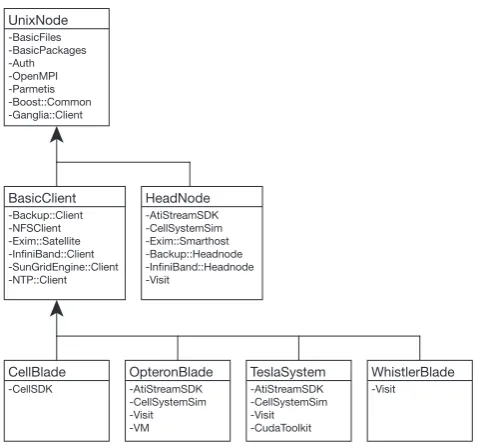
The different roles each of our systems need to play are reflected by a custom class hierarchy as shown in Figure 4. Basic services are defined in modules, which are then included in the classes. For instance the root class UnixNode includes the basic package and config file modules as well as – among others – the module
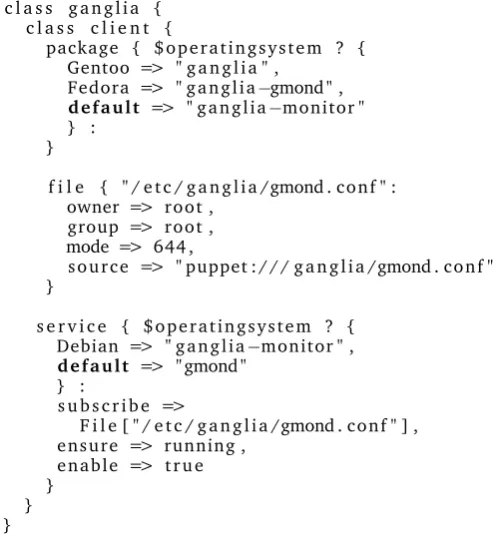
Auth, which sets up LDAP and Kerberos clients and configures PAM to use those. A short example for a custom Puppet module can be seen in Figure 7.
The class CellBlade is specific to our IBM QS22 blades (each with two PowerXCell 8i processors), which run Fedora. OpteronBladerefers to those blades fea-turing two AMD Opteron six-cores, which are a lot beefier than the smallerWhistlerBlades, and are thus suited for a larger range of applications. For instance running VisIt [3] – our tool of choice for visualizing the 3D results of our simulation codes [1], [9]. The classifi-cationTeslaSystemis used by the PCIe servers, which were originally only used to house Nvidia Tesla GPUs,
gentryx@faui36a ~ $ q l o g i n −q gpu . q −l gpu_host=t r u e , t e s l a _ c 2 0 5 0=1 Your j o b 52820 ( " QLOGIN " ) has been s u b m i t t e d
w a i t i n g f o r i n t e r a c t i v e j o b t o be s c h e d u l e d . . .
Your i n t e r a c t i v e j o b 52820 has been s u c c e s s f u l l y s c h e d u l e d .
E s t a b l i s h i n g b u i l t i n s e s s i o n t o h o s t f a u i 3 6 i . i n f o r m a t i k . uni−e r l a n g e n . de . . .
g e n t r y x @ f a u i 3 6 i ~ $ CUDAID=‘JOB_ID=52820 a l l o c t e s l a _ c 2 0 5 0 1 ‘ g e n t r y x @ f a u i 3 6 i ~ $ echo $CUDAID
3
[image:4.595.58.544.226.363.2] [image:4.595.307.547.409.633.2]g e n t r y x @ f a u i 3 6 i ~ $ . / p r o j e c t / my_exe −−cudaid $CUDAID
[ . . . ]
Figure 2. Resource allocation example. In this case an interactive session on a GPU/PCIe server with one free Nvidia Tesla C2050 is requested. Theallocscript returns the corresponding CUDA device ID, which then has to be fed into the executable.
(a) Wiki (b) Timeline (c) Changeset
Figure 3. Example of how Trac can be used to view system documentation in the wiki, activity in the timeline view and configuration patches in the changeset view.
but changed over the time to accommodate all sorts of accelerators, including AMD GPUs and FPGA boards. TheHeadNodehas a dedicated class, which shares some modules with the client classes, but generally needs tweaks to its configuration as it mostly runs the server parts of the services. We found it useful to keep the headnode’s configuration in the Puppet repository, too, even though no other node needs to duplicate it, because this makes it much easier to trace changes.
For some packages, especially those that communicate via the network, we have to have the same version in-stalled on each node. That feature may not be achievable with the stock packages available in the different Linux distributions, as their versions may differ. Therefore cus-tom puppet modules handle the installation of the OFED InfiniBand drivers, our MPI environment Open MPI[4] and the SGE. The class hierarchy allows us to examine new packages and modules selectively on single nodes and only enable them on all nodes after they have been thoroughly tested.
Puppet itself handles the distribution of configuration changes to the nodes, but it does not facilitate the communication and documentation of these changes among a group of administrators. We therefore decided to place our puppet configuration in a Mercurial4 (HG) repository and let a Trac5 installation interface with it. Trac’s integrated Wiki allows the users to maintain system documentation in a single place. We use the ticket system to assign tasks to the different admins. One
4http://mercurial.selenic.com/ 5http://trac.edgewall.org/
UnixNode -BasicFiles -BasicPackages -Auth -OpenMPI -Parmetis -Boost::Common -Ganglia::Client
WhistlerBlade -Visit BasicClient
-Backup::Client -NFSClient -Exim::Satellite -InfiniBand::Client -SunGridEngine::Client -NTP::Client
CellBlade -CellSDK
OpteronBlade -AtiStreamSDK -CellSystemSim -Visit -VM
TeslaSystem -AtiStreamSDK -CellSystemSim -Visit -CudaToolkit HeadNode
-AtiStreamSDK -CellSystemSim -Exim::Smarthost -Backup::Headnode -InfiniBand::Headnode -Visit
Figure 4. Class diagram of our Puppet setup. Each individual class stores the setup of one category of nodes. For this it may inherit settings from another class and include a number of modules.
IV. MAKINGCHANGES
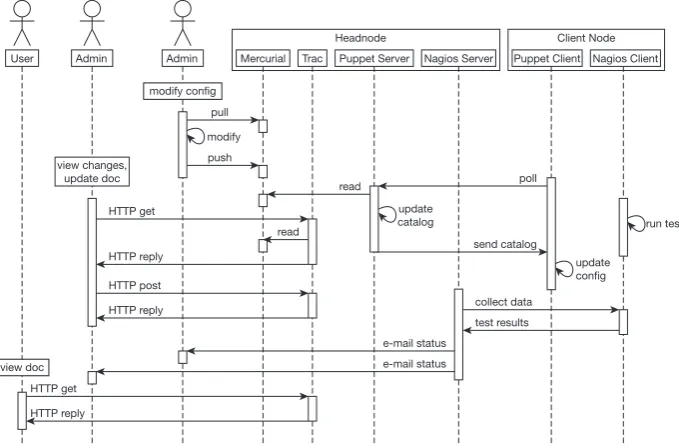
This section is meant to give an overview of how we use our setup to manage the systems’ configurations. Figure 5 shows the main interactions, which focus on the Mercurial repository for storing the configuration data, and the Trac installation for communicating and documenting changes: an admin would first update his local copy of the HG repository by pulling changes from the server. After locally making modifications and committing these changes, he would push them back to the server. The client machines regularly poll the Puppet server and apply the retrieved configuration catalog. Admins can view changes to the repository in Trac’s timeline. Also, after making changes to the configuration, it is often sensible to update the user documentation, which is then accessible to users, too.
Figure 6 shows an excerpt of our
manifests/site.pp file which defines the setup for all client nodes. faui36i is one of the PCIe servers, which we mainly use to house GPUs. Its type is set to
teslasystem, a historical name which stems from the node’s first use. It will – among a variety of other packages – install Nvidia’s GPU drivers (and update them after each kernel update) and additionally the CUDA toolkit and SDK. whistler01 is one of the smaller blade servers. The debian_net_config
passage defines whistler01’s network setup. While this first appears to be inferior to running an DHCP server, we actually found this approach to better fit our needs: by placing the address information within Puppet, we avoid repeating the same data across different databases (e.g. /etc/hosts and the DHCP server) and can furthermore automatically extract the data and reformat it for other uses (e.g. the aforementioned host file). Together with a custom module for Puppet’s facter, we could even feed the automatically generated public IPv6 addresses of the nodes into our hosts file.
Because of the high number of nodes with identical configurations, we wrote a short Ruby script which can generate the manifest from a short template. This means that we have to maintain significantly less code (the manifest is slightly larger than 13 kB while the generator script weights only less than 3 kB) and also adding a new node (with an configuration identical to some previous node) now boils down to adding a single line of code to the generator script.
V. SUMMARY
We presented a tool centric approach to collaborative system administration. It draws ideas from the DevOps movement to transform administration for the most part into writing source code, which can be shared, reviewed and developed in a team. Its heart is a set of scripts written for the Puppet configuration manage-ment system. The Puppet server and clients facilitate the communication of the configuration catalog among the nodes, while Mercurial as a revision control system and Trac are used to share and document changes among the developers/operators and users. The beauty
node " f a u i 3 6 i . i n f o r m a t i k . uni−e r l a n g e n . de " { $remergepackages = " n v i d i a−d r i v e r s " $ o p e n g l i n t e r f a c e = " n v i d i a "
i n c l u d e t e s l a s y s t e m }
node " w h i s t l e r 0 1 . i n f o r m a t i k . uni−e r l a n g e n . de " { i n c l u d e w h i s t l e r b l a d e
d e b i a n _ n e t _ c o n f i g { p r i v a t e : i p _ e t h 0 => " 1 9 2 . 1 6 8 . 1 . 2 0 " , i p _ i b 0 => " 1 9 2 . 1 6 8 . 0 . 3 0 " , i p _ i b 1 => " 1 9 2 . 1 6 8 . 0 . 3 1 " }
[image:5.595.303.551.286.558.2]}
Figure 6. Excerpt from our Puppet installation’s manifest file. Two nodes are configured:faui36iis an accelerator server which mainly houses GPUs, whilewhistler01is an LS21 blade and part of our medium sized cluster computer.
c l a s s g a n g l i a { c l a s s c l i e n t {
package { $ o p e r a t i n g s y s t e m ? { Gentoo => " g a n g l i a " ,
Fedora => " g a n g l i a−gmond " , d e f a u l t => " g a n g l i a−monitor " } :
}
f i l e { " / e t c / g a n g l i a /gmond . c o n f " : owner => r o o t ,
group => r o o t , mode => 644 ,
s o u r c e => " puppet : / / / g a n g l i a /gmond . c o n f " }
s e r v i c e { $ o p e r a t i n g s y s t e m ? { Debian => " g a n g l i a−monitor " , d e f a u l t => " gmond "
} :
s u b s c r i b e =>
F i l e [ " / e t c / g a n g l i a /gmond . c o n f " ] , e n s u r e => running ,
e n a b l e => t r u e }
} }
Figure 7. Example for a Puppet module. In this case we see the client part of our Ganglia installation. It first installs the monitor package, which unfortunately has different names on each Linux distribution, and then ensures that the service is up and running. It gets restarted each time the configuration file (also managed by Puppet) is updated.
of this approach is that it allows us to achieve a high degree of automation, thereby removing the need for dedicated admins. Simultaneously it makes the process of administration scalable and repeatable.
User Mercurial Trac Puppet Server Headnode
Puppet Client Admin Admin
read modify config
view changes, update doc
push modify
pull
HTTP reply HTTP get
poll read
update catalog
send catalog
HTTP reply HTTP post
HTTP reply HTTP get view doc
update config
Nagios Client Nagios Server
Client Node
run test
collect data test results e-mail status
[image:6.595.128.468.55.279.2]e-mail status
Figure 5. Sequence diagram of the interactions which may occur in our administration case. The Mercurial repository forms the hub around which all activities revolve. Human interaction mainly uses Trac as an interface to the repository, while the client nodes will access it via the Puppet server. To ensure the nodes remain in a functional state, Nagios will run automated tests and its server will send status reports to the admins in cases of failures or recoveries.
REFERENCES
[1] A. Schäfer and D. Fey, “Libgeodecomp: A grid-enabled library for geometric decomposition codes,” in Proceedings of the 15th European PVM/MPI Users’ Group Meeting on Recent Advances in Parallel Virtual Machine and Message Passing Interface. Berlin, Heidelberg: Springer, 2008, pp. 285–294.
[2] ——, MPI: A Message-Passing Interface Standard - Version 2.2. Stuttgart, Germany: High-Performance Computing Center Stuttgart, 2009.
[3] H. Childs, E. S. Brugger, K. S. Bonnell, J. S. Meredith, M. Miller, B. J. Whitlock, and N. Max, “A contract-based system for large data visualization,” inProceedings of IEEE Visualization 2005, October 2005, pp. 190–198.
[4] E. Gabriel, G. E. Fagg, G. Bosilca, T. Angskun, J. J. Dongarra, J. M. Squyres, V. Sahay, P. Kambadur, B. Barrett, A. Lumsdaine, R. H. Castain, D. J. Daniel, R. L. Graham, and T. S. Woodall, “Open MPI: Goals, concept, and design of a next generation MPI implementation,” inProceedings, 11th European PVM/MPI Users’ Group Meeting, Budapest, Hungary, September 2004, pp. 97–104. [5] A. Hunt and D. Thomas,The Pragmatic Programmer: From
Jour-neyman to Master. Addison-Wesley, 1999.
[6] T. Delaet and W. Joosen, “Podim: a language for high-level configuration management,” in Proceedings of the 21st conference on Large Installation System Administration Conference. Berkeley, CA, USA: USENIX Association, 2007, pp. 21:1– 21:13. [Online]. Available: http://portal.acm.org/citation.cfm? id=1349426.1349447
[7] B. Vanbrabant, T. Delaet, and W. Joosen, “Federated access control and workflow enforcement in systems configuration,” in Proceedings of the 23rd conference on Large installation system administration, ser. LISA’09. Berkeley, CA, USA: USENIX Association, 2009, pp. 10–10. [Online]. Available: http://portal. acm.org/citation.cfm?id=1855698.1855708
[8] B. Vanbrabant and T. Delaet, “Authorizing and directing configuration updates in contemporary it infrastructures,” in Proceedings of the 3rd ACM workshop on Assurable and usable security configuration, ser. SafeConfig ’10. New York, NY, USA: ACM, 2010, pp. 79–82. [Online]. Available: http: //doi.acm.org/10.1145/1866898.1866912