David F. Brailsford
Electronic Publishing Research Group Department of Computer Science
University of Nottingham NOTTINGHAM NG7 2RD
E-mail [email protected]
Abstract:
Adobe’s Acrobat software, released in June 1993, is based around a new Portable Document Format (PDF) which offers the possibility of being able to view and exchange electronic documents, independent of the originating software, across a wide variety of supported hardware platforms (PC, Macintosh, Sun UNIX etc.). The fact that the imageable objects are rendered with full use of Level 2 PostScript means that the most demanding requirements can be met in terms of high-quality typogra-phy, device-independent colour and full page fidelity with respect to the printed ver-sion
PDF possesses an internal structure which supports hypertextual features, and a range of file compression options. In a sense PDF establishes a low-level multi-platform ‘machine code’ for imageable objects but its notion of hypertext buttons and links is similarly ‘low-level’, in that they are anchored to physical locations on fixed pages. However, many other hypertext systems think of links as potentially spanning multiple files, which may in turn be located on various machines scattered across the Internet. The immediate challenge is to bridge the ‘abstraction gap’ between high-level notions of a link and PDF’s positionally anchored low-level view. More specifically, how can Mosaic, WWW and Acrobat/PDF be configured so that the notions of ‘link’ in the various systems work together harmoniously?
This paper reviews progress so far on the CAJUN project (CD-ROM Acrobat Journals Using Networks) with particular reference to experiments that have already taken place in disseminating PDF via e-mail, Gopher and FTP. The prospects for integrating Acrobat seamlessly with WWW are then discussed.
Keywords:
Acrobat, PDF, FTP, Gopher, WWW, Mosaic, CD-ROM, Electronic Journals 1. INTRODUCTION
Over the past two years Internet publishing has become a reality but it is very clear that over thenexttwo years there will be a big shakeout in terms of ‘electronic’ document formats. Although an increasing amount of material is now available over
networks, and on CD-ROM, the over-riding problem has been the lack of de facto
standards for electronic documents — particularly at the high-quality end of the market. By ‘high quality’ I mean that the electronic format should have all of the richness of the printed document, in terms of typefaces, device-independent colour, full-text search and so on — in other words, the electronic pages must be far more than just ASCII text or scanned-in page images. The quality criterion demands noth-ing more or less than a Display PostScript kind of technology but with lower over-heads than ever before and with significant ‘added value’ in terms of hypertext facili-ties, text search and so on. To these requirements we could also add that the chosen format should be robust with respect to transmission over networks and capable of being viewed with software available onall of the popular computer platforms (IBM PC, Macintosh, UNIX systems etc.).
The next section reviews some of the options currently available for networked distribution of ‘electronic’ journals before we proceed to examine Adobe’s Acrobat solution to the problem of high-quality electronic documents.
2. FORMATS FOR ELECTRONIC DOCUMENTS
2.1. The ASCII ‘jail’
The US ASCII character set acts as a lowest common denominator for the transmission of information around the world. Unfortunately, limitations in network hardware and electronic mail software mean that vital information may be lost, or garbled, unless the characters are restricted to the 7-bit subset of ASCII. This restric-tion is not too onerous for sending computer programs and simple messages, so long as these stick to the unaccented characters of the Western alphabet. ASCII is quite useless for sending diagrams, photographs, oriental characters or any other complex material.
On the other hand ASCII does have the virtue of being searchable for keywords and other text strings. But this is only useful, for typeset material, if the result of that search can be related to a position on the printed journal page. Since ASCII appears as fixed-pitch typewriter-like characters when viewed on screen (and given that very few journals these days are published as typescript) it follows that the ASCII text of an article will generally have completely different line and page breaks to those seen in the printed copy.
For all these reasons John Warnock, the CEO of Adobe Systems Inc., regards ASCII as a ‘jail’ from which we must break free if we are to transmit complex docu-ments to one another.
2.2. Scanned pages
A second possibility for creating ‘electronic’ material is simply to scan in the pages, using a document scanner, and to store the pages in bitmap form (e.g TIFF or Group 4 FAX) as a collection of black and white dots. This approach has been exten-sively used in some first-generation electronic document systems but there are many difficulties. A scanned A4 page at 300 dpi requires almost 1 Mbyte of storage unless compression techniques are used. By dropping the resolution to 150 dpi, as in Group 4 FAX, and applying compression algorithms, such a page can be stored in as little as 2.5 Kbytes but the image quality is poor and colour is out of the question.
2.3. Structured markup systems
These systems adopt a ‘top-down’ approach by concentrating on thestructureof documents as the key to electronic dissemination and the placement of hypertext links. An early system of this sort was Guide [1] which used troff markup and the same kind of approach is used in the Dynamic Book Company’s Dynatextsystem [2] which uses SGML. A more recent system which follows this approach, and a very suc-cessful one, is the World Wide Web [3]; its SGML-like markup, called HTML, allows a document to ‘point’ to another one over the Internet. Viewers for these systems tend to concentrate more heavily on the link structure than on any notion of ‘page fidelity’ with respect to some printed version. Indeed, electronic documents of this sort may have been designed solely for computer-based viewing.
2.4. WYSIWYG ‘page turners’
The problems alluded to in the previous sub-sections have led various vendors to look for an underlying document representation which is more powerful than ASCII text or scanned pages while still retaining a WYSIWYG page-based flavour. The
WorldView system from Interleaf uses a proprietary internal format but accepts
material in a range of graphic formats including CGM (Computer Graphics Metafile),
Common Ground from No Hands Corporation uses Macintosh PICT files while the
Replica system from Farallon Computing uses GDI and Quickdraw primitives from
the PC and Macintosh environments respectively. These last two approaches have the advantage that the use of system primitives from the Macintosh and the PC makes it easy to capitalise on the windowing display software already present in the operating system. On the other hand it also means that they are tied to specific hardware platforms in the first instance.
Late in 1992 Adobe Systems announced a new product called Acrobat which was based around Level 2 PostScript but with many extra features including file compres-sion options, a 7-bit base-85 ASCII representation and hypertext links. This interest-ing development will be discussed more fully in section 4.
3. The EP-odd journal
In 1987 I founded a journal called Electronic Publishing — Origination,
Dissemi-nation and Design (EP-odd for short) and became its Editor-in-Chief. This journal is
published by John Wiley Ltd and it appears four times per year [4]. The articles cover topics ranging from hyphenation to hypertext and from typography to SGML tags. The contributors and subscribers are, in the main, computer scientists interested in Electronic Publishing and professional practitioners from the print and publishing industries.
able to do to plan for a truly electronic journal was to save the source code and PostScript for every published paper in the hope that a suitable electronic format would emerge.
The preliminary announcement of Adobe Acrobat, late in 1992, seemed to satisfy just about all of our requirements and a project was set up (later called CAJUN — see section 5) to use this format for disseminating EP-odd over networks and on CD-ROM.
4. What is Acrobat?
Acrobat is based on a new Portable Document Format (PDF), developed by Adobe, which remains close to Level 2 PostScript but has a range of compression options available to reduce file sizes [5]. At the moment it is a fixed page format, but there is the possibility of a revisable form at some later stage. There is also a pros-pect of being able to include video and audio inserts in release 2.0 which is scheduled for release later this year.
There is an option in Acrobat for LZW compression on text which gives a compression factor of about 2:1 but bigger gains are obtainable on images, particu-larly those in colour, where JPEG compression can achieve some spectacular reduc-tions in the region of 10:1.
PDF has a set of facilities for hypertext links, ‘thumbnail’ icons of pages, chapter outlines and page annotations. The links at the moment are intra-document only but inter-document links are promised for release 2.0 and the availability of an Applica-tion Programmer’s Interface (API) at that stage will allow Acrobat imaging technology to be interfaced into other multi-media and networked systems.
Turning to the ‘chapter outlines’ (or ‘bookmark’) feature we find an ability to create a hypertextual Table of Contents for a book or an article. All sections and sub-sections can be entered into this hierarchical outline, each entry of which is a link to some predefined view of a fixed page within the document.
The thumbnails for the document pages are miniaturised JPEG-compressed bit-maps of the pages — each one is unique and there is enough detail to be able to recognise a page from the layout of its thumbnail. The thumbnails can be optionally displayed down the left-hand side of the screen and they greatly facilitate fast browsing and random access: one can jump from the page displayed on the screen to any distant page by clicking on the appropriate thumbnail for the destination page. Finally, the page annotations are an electronic version of the “yellow stickers” that are commonly attached to paper-based memoranda.
PDF has a set of markers for these new hyperfacilities, which can either be added to the PostScript after it has been produced or can be passed down from ‘front-end’ text-processing packages into the final PostScript. This is effected by means of a new PostScript procedure calledpdfmark.
4.1. Acrobat viewers and the Distiller
use the general phrase ‘viewer’ to mean either of the Reader or Exchange versions. Note that PDF does not, at present, allow the underlying formatted text to be altered in any way — it is a fixed-page format.
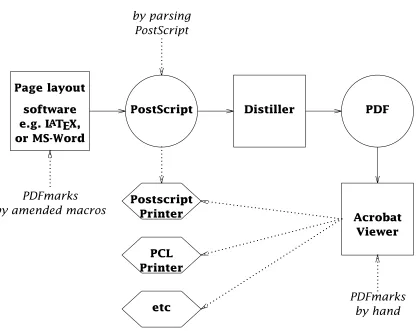
A program called the Distiller converts PostScript into PDF, carefully transform-ing any pdfmarks into the corresponding PDF hyperfeatures as distillation proceeds. However, if the text-processing software in use cannot producepdfmarks directly then they can be added ‘by hand’ during the distillation process or from the Acrobat viewers. Figure 1 shows the stages in creating a PDF document for Acrobat use, starting from any DTP or page-makeup software that can produce PostScript.
software Page layout
e.g. LATEX, or MS-Word
PostScript Distiller PDF
Acrobat Viewer .. .. .. .. .. . Postscript
Printer ...
PCL Printer . . . . . . . . . . . . . . . . . . . . . . . . . . . . . . . . . . . . . . . . . etc . . . . . . . . . . . . . . . . . . . . . . . . . . . . . . . . . . . . . . . . . . . . . . . .. .. .. .. .. . PDFmarks by amended macros
[image:5.594.76.492.205.536.2].. .. .. .. .. . PostScript by parsing PDFmarks .. .. .. .. .. . PDFmarks by hand
Figure 1: From source code to PDF via PostScript
5. THE CAJUN PROJECT
Having decided that Acrobat was a very plausible candidate for disseminating high-quality platform-independent journals, funding was obtained from John Wiley Ltd and Chapman & Hall for a two-year project to be carried out in the Electronic Publishing Group at Nottingham. This project is called CAJUN (CD-ROM ACROBAT™ Journals Using Networks). In addition to the Wiley EP-odd journal, Chapman & Hall have contributed material from their journal Optical and Quantum Electronics(OQE) and have committed themselves to producing a new journal, Collaborative Comput-ing(CC), using PostScript and PDF formats.
One of the tasks of the CAJUN project has been to adapt existingtroffand LATEX
call-out of a reference can automatically pass down apdfmarkfor a PDF ‘hot-link’, into the final PostScript output so that the citation is automatically linked to the Bibliog-raphy page.
5.1. Dissemination on CD-ROM and over networks
The CAJUN project has just released a CD-ROM containing the first 6 volumes of the EP-odd journal in electronic form. A single CD-ROM can hold more than 600 Mbytes of information, making it an excellent archiving medium. The decreasing cost of CD-ROM drives will enable libraries to receive regular updates of ‘electronic’ journals in this form. CD-ROM can act as a useful complement to networked dis-semination, or as an alternative to it, if network bandwidth is limited.
Turning to network dissemination, we can identify two categories which we can denote as ‘push’ and ‘pull’ methods. Pushing is the sending of information by the publishers to subscribers. Pulling describes the acquisition of documents by journal subscribers who log on to a service provided by the publishers.
Various software tools are available to enable a ‘push’ service to be imple-mented and a hierarchy of files to be set up and maintained on the subscriber’s com-puter. The main drawback is that users have to make sure that they possess enough disk space to receive information forced upon them. For this reason we are also experimenting with network information retrieval (NIR) tools to enable users to browse information and download whatever they wish. It is, of course, perfectly pos-sible to use FTP in ‘pull’ mode to acquire information in this way but another tool which is potentially more flexible is Gopher [6] which allows publishers to run a server which can serve individual files to remote clients.
An experimental ‘pull’ service is now available on a journal server at Notting-ham which is available over the Internet. Seven files in PDF form are currently avail-able from the EP-odd journal including one which describes the automated hyperlink techniques developed in the CAJUN project [7]. To make use of this service the user needs an Acrobat viewer of some sort, access to the Internet and a copy of either Gopher or FTP. The details for access over Internet are:
Gopher: quill.cs.nott.ac.uk [128.243.23.12]
FTP: ftp.cs.nott.ac.uk
/ep/pub/pdf
Please report any problems to: [email protected]
My group at Nottingham has been conducting some experiments to answer these questions. We have an experimental system which provides a WWW gateway into a subset of the EP-odd PDF documents [9]. Using suitably generated URLs coupled with some PDF parsing software of our own we are able to use the URL to retrieve a whole paper in PDF form, or to extract just one page from a PDF document. It seems cer-tain that this work will become of increasing importance over the next few months. Release 2.0 of Acrobat, with the API facilities and its new system of ‘typed’ links, will not only implement cross-document links on a given hardware platform but it will also allow the file-opening routine to be intercepted so that cross-network WWW hyperlinks can be intercepted and implemented seamlessly. It is significant that Adobe regard HTML/WWW compatibility as being sufficiently important for them to devote significant efforts towards bringing it about.
5.2. PDF over e-mail
For users whose connection to the Internet will not support any of the protocols mentioned in the previous sub-section it is reasonable to ask what the prospects are for transmitting PDF files safely over e-mail. PDF implements a scheme of mapping all data (including binary material) onto a base-85 subset of ASCII. Moreover PDF will accept any of the combinations CR, LF, CR/LF as a marker for ‘end of line’. On the face of it this should keep all the major platforms — PCs, Macintoshes and UNIX — totally content. Unfortunately there is still too much ‘smart’ e-mail software which regards the censorship of electronic ‘letters’ as one of life’s great pleasures. A typical problem is software which sees CR/LF and says “this is a UNIX box so we won’t need those CRs. Let’s throw them away!”. Since PDF locates its objects via byte offsets within the files this arbitrary discarding of characters is unfortunate to say the least. In practice the Acrobat viewer can easily reconstruct files where simple changes of this sort have occurred but a much bigger problem arises if one’s mail travels via IBM mainframes, on Bitnet, where ASCII/EBCDIC/ASCII character set conversions can cause havoc. The MIME proposals from the electronic mail community address this problem by devising a binary format using a safe ASCII-64 subset. Once all e-mail software is upgraded for MIME compliance then the problem will be solved but in the meantime it has to be accepted that PDF transmission via e-mail is usually all right but cannot be absolutely guaranteed.
6. Conclusions
Acrobat rates as one of the most significant happeningseverin the field of Elec-tronic Publishing. Its potential importance outstrips that of PostScript and yet the attraction of Acrobat as some form of ‘electronic’ standard lies in its very closeness to PostScript and, therefore, to the printed form of a document.
Acrobat also marks a turning point for publishers and librarians. In the next few years the publishing business will change out of all recognition with ‘electronic’ versions of books and journals becoming ever more important. This is not to say that paper documents will go away — it’s doubtful if this will ever occur. But increas-ingly a paper document will come to be seen as a useful two-dimensional snapshot, at a given point in time, of a much richer electronic document. Journal subscrip-tions may soon be taken out for an electronic version of a journal with the material itself being accessed from some local or remote journal-server machine. The printed version may come to be seen as just a glossy adjunct that appears several weeks, or months, later.
concrete and the abstract features needed for electronic documents. But all of us — publishers, librarians, computing companies and computer scientists — need to col-laborate on the next big step forward in electronic publishing which is to bridge the gap between paper documents and electronic documents in a manner which is independent of any particular hardware or operating system. If the paperless office is just a dream it follows that the page model of documents will have to be available for those electronic documents that need it. For all of these reasons it is vitally important that the Acrobat and WWW views of electronic documents become syn-thesised as soon as possible.
References
1. P. J. Brown, ‘‘A Hypertext System for UNIX,’’Computing Systems, vol. 2, no. 1, p. 37–53, 1989.
2. Dynatext — Electronic Book Publishing and Delivery System. Electronic Book
Technologies Inc. Providence R.I.
3. World Wide Web. Further information can be obtained by retrieving a document
with URL http://info.cern.ch/hypertext/WWW/TheProject into a WWW browser (URL = ‘Universal Resource Locator’).
4. D.F. Brailsford and R. J. Beach, ‘‘Electronic Publishing— a Journal and its Produc-tion,’’Computer Journal, vol. 32, no. 6, pp. 482–493, December 1989.
5. Adobe Systems Incorporated, Portable Document Format Reference Manual,
ISBN 0-201-62628-4, Addison-Wesley, Reading, Massachusetts, June 1993.
6. F. Anklesaria, M. McCahill, P. Lindner, D. Johnson, and D. Torrey, F.Y.I on the
Internet Gopher Protocol, March 1993. Memorandum – University of Minnesota
7. Philip N.Smith, David F. Brailsford, David R. Evans, Leon Harrison, Steve G. Pro-bets, and Peter Sutton, ‘‘Journal publishing with Acrobat: the CAJUN project,’’
Electronic Publishing — Origination, Dissemination and Design, vol. 6, no. 4, pp. 482–493, December 1993.
8. Mosaic Viewer. Details can be obtained by retrieving the document with URL
http://www.ncsa.uiuc.edu/SDG/Software/Mosaic/NCSAMosaicHome.html
into a WWW browser.