Honours Project 1991.
Implementing a Datascope on a
Macintosh.
Blair Gorman.
i
I . . 1:-,i·1··.
I
Table of Contents
1. Introduction . ... 2
2. Asynchronous Monitoring ... 3
2.1. The Format of Asynchronous Transmissions ... 3
2.2. The Main Lines used in RS-232C ... .4
2.3. Monitoring Using the Two Macintosh Serial Ports ... 6
2.3.1. Application #1 - A Software Perspective ... 6
2.3.2. Evaluation Of the Two-Port Method ... 9
2.4. Monitoring Using External Hardware ... 10
2.4.1. Hardware Required ... 11
2.4.2. HC11 Simulator Application ... 12
2.4.3 Application #2 - A Software Perspective ... 13
3. Synchronous Monitoring ... : ... 14
3.1. Specification of Software for Synchronous Monitoring ... 15
4. Summary ... 17
1.
Introduction.
A datascope is used for monitoring serial communication lines, both for analysis of correctly functioning communication systems, and for diagnosis of systems that' do not function as they should. The device is electrically connected to communication lines at a particular point in a system, and it monitors these lines to display the information that is being transmitted.
Broadly speaking, the format of data that a datascope analyzes may be divided into two major categories : asynchronous and synchronous data (each of which shall be discussed in more detail below). The uses of a datascope are many, largely depending on whether the data being monitored are transmitted synchronously or asynchronous! y.
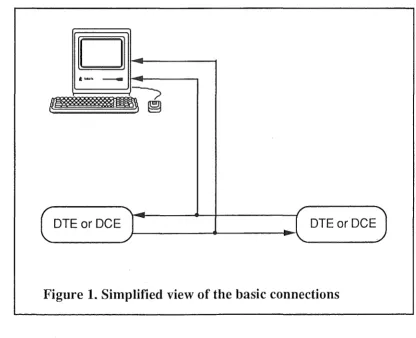
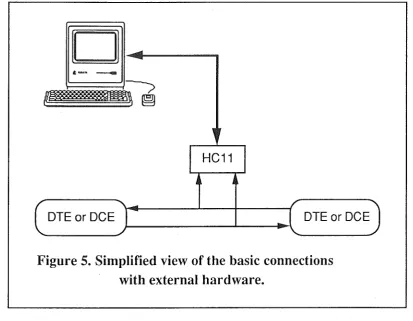
" 'This report documents the design and partial implementation of a datascope that can monitor synchronous data (as is transmitted when communicating via a wide-area network), and well as asynchronous data, up to a maximum line speed of 9600 bps for full-duplex communication. Figure 1 shows a somewhat simplified view of the device connections. ·
[image:3.597.86.503.399.737.2]DTE or DCE DTE or DCE
Figure 1. Simplified view of the basic connections
communication is used for communicating with the network (as well as within the network itself). A typical use for a datascope in such instances would be to monitor . the frames and packets being transmitted if such a communications system is not
performing as expected.
When a computer is connected to a number of peripheral devices over a short distance (either directly or otherwise), where high speed communication is not necessary, and low cost is a more important factor, then it is more common for asynchronous communication to be used. Examples of such devices might be programmable controllers, printers, etc. Here, typical uses for a datascope are examining a communications protocol itself, or for inspecting the data that is being transmitted in the event that a device is not responding.
While this particular use of a datascope may seem somewhat contrived, it is in fact far from that. The task of getting two devices to communicate is often difficult due to poor documentation of a communications protocol, rather than the protocol itself. This is particularly the case for foreign products, when the documentation is written by designers who do not speak English as their native language. If
performing a software upgrade for a device, and no source code for the existing
/ software is available, it is often simplest to launch the old software, and monitor the
line to see exactly how the protocol behaves.
Datascopes already exist to perform the tasks mentioned above, but their prohibitive price denies many potential users the opportunity of using one. At current prices, $5 000 would be a typical value of the peripherals and software for a fairly minimal system (not including the required computer); a stand-alone unit would cost considerably more.
The hardware required for this project is rather minimal, and the cost of such hardware is correspondingly low. For a one-off unit, using a Motorola MC68HC11 Universal Evaluation Board (discussed later), the cost is around $200. If a quantity of units were to be made, printed circuit boards could be constructed, and only the necessary components used, probably halving that cost again.
A major benefit of the hardware defined in this report is the fact that major upgrades can be performed, without the need for any hardware/ firmware alteration. Any changes required are confined to the software for the Macintosh that controls the hardware. Additionally, the user interface of the software, being conformant to the Macintosh user interface guidelines, makes the software intuitive and simple to use, unlike many other systems.
2.
Asynchronous Monitoring
2.1.
The Format of Asynchronous Transmissions
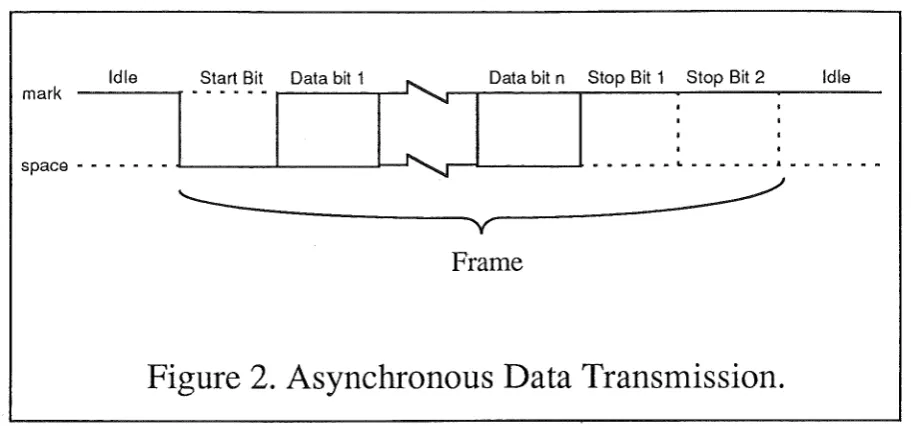
Asynchronous communication is where communicating devices do not share a common timer, and no timing data are transmitted. The time interval between characters transmitted asynchronously can be of any length. Figure 2 shows the
format of asynchronous data communication.
Id le Start Bil Data b;tt
~
I
Dal a b;t nI
S.to-p- B-it· 1- • S-to-p- B-it·2-1
- - Id.le
-::: ... J·-···1 ~. .
'---~~~
v
--~~---~
Frame
Figure 2. Asynchronous Data Transmission.
When a transmitting device is not transmitting, it maintains the transmission line in a continuous state. (This is r~ferred to as the "mark" state, corresponding to binary '1'. Binary 'O' is referred to as the "space" state.) The transmitting device may begin sending a character at any time by sending a
start bit,
which tells the receiving device to prepare to receive a character. The transmitting device then transmits 5, 6, 7 or 8data bits,
optionally followed by aparity bit.
Finally, the device sends 1, 1.5, or 2stop bits, indicating the end of the character.
The possible ways of calculating the parity bit are:
• Even parity - the number of marked data bits and the value of the parity bit add up to an even number
• Odd parity - the number of marked data bits and the value of the parity bit add up to an odd number
• Mark parity - the extra parity bit is always set to 1. • Space parity - the extra parity bit is always set to 0. • No parity - there is no extra parity bit.
2.2.
The Main Lines used in
RS-232C.
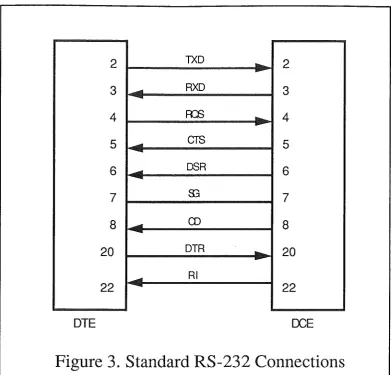
Figure 3 shows the lines used in RS232C, the most common asynchronous communications method.
[image:5.595.73.529.105.318.2]5
2 TXD
-
2-3 ... RXD 3
4 FCS .... - 4
5 ... CTS 5
6 ... DSR 6
7 83 7
8 ... 0) 8
-20 DTR
...
20
-... RI
22
-
22DTE OCE
Figure 3. Standard RS-232 Connections
A brief description of these main lines follows : TXD: Transmitted Data
RXD: Received Data
RQS: Request to Send
- Indicates DTE wants to send data CTS: Clear to Send
- indicates DCE is prepared to accept data DSR: Data Set Ready
- Asserted by DCE upon power-up. SG: Signal Ground
CD: Line Detector
DTR: Data Terminal Ready
[image:6.595.105.497.67.442.2]RI: Ring Indicator
- Indicates that DCE is receiving a ringing signal
For the purposes of asynchronous line monitoring, only lines 2 an 3 (the Transmit Data and Receive Data) are monitored (with reference to line 7, Signal Ground).
2.3. Monitoring Using the Two Macintosh Serial Ports
The Macintosh has two serial ports : one modem port, and one printer port. Both ports are able to transmit and receive asynchronous data. Because of this, it is possible to use each of the two serial ports to monitor the information travelling in each of the two directions. That is, one port will monitor the "transmit" line, and the other port will monitor the "receive" line (only these two lines can be monitored here; any other handshaking lines are ignored).
2.3.1. Application #1 - A Software Perspective.
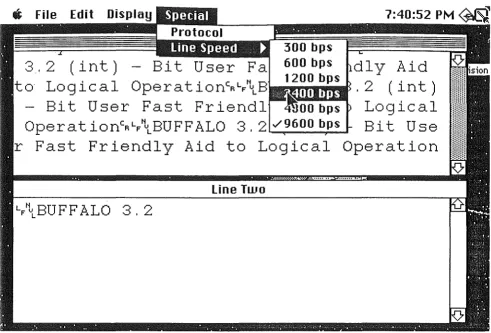
The first Macintosh application to be discussed is the version of the asynchronous datascope that needs no additional hardware. Figure 4 shows a screen dump of this application. Also presented in this section is a brief discussion about developing Macintosh applications in general, which differs somewhat from "traditional" programming.
s
File Edit Display 7:40:52 P M ~ 300 bps3. 2 (int) -
600 bps1dl y Aid
1200 bps
to Logical OperationcRLF\B
. 2 (int)
-
Bit User Fast Friendl
~OObpsLogical
OperationcRL/\BUFFALO 3. 2
./9600 bpsBit Use
r Fast Friendly Aid to Logical Operation
[image:8.597.55.547.162.495.2]Line Two
In all the software developed for this project, windows perform an important part, as they are central to the idea of the Macintosh user interface.
Resources are also an important part of programming on the Macintosh. A program's resources contains various information that can be edited (normally using an application called a "resource editor") without necessarily changing the source code. Resources were originally invented to ease the conversion of software to foreign countries. They were conceived to isolate those aspects of a program's behaviour that could vary from country to country. However, resources were soon realized to be a more powerful, more general mechanism than just for foreign conversion. The standard practice is to separate objects such as menus, windows, dialogues, etc., from the rest of the program.
One result of resources being separate from the rest of the program is that a source listing does not contain all of the relevant information about a program. Therefore, all source listings in the appendices are followed by their corresponding resources, where possible.
/ Appendix A contains the source listing and resources of the Macintosh application
presented in the next section (asynchronous monitoring using external hardware). The code to implement the two-port method is almost identical to this. The only significant differences are that the. data are read in differently, and an extra window is supported in the version in the appendix. As mentioned above, the code is rather different to that of a more "traditional" program. The key difference is that Macintosh applications are, in general, event driven. Such an application basically iterates within a central loop, the event loop, that waits for events. Examples of events are a disk insertion, a keypress, the user clicking the button on the mouse, or the screen needing updating. Some events cause the system to generate other events. For example, a user clicking on a rear window to bring it into the foreground may cause an event saying that the screen needs updating in a particular region.
When an application receives an event, it then decides what type of event has occurred, calls an appropriate routine to handle that event, and returns to the event loop again. This method of operation means that the user is controlling the program,
and not vice versa.
The modus operandi of the application is fairly straightforward, if not the required programming to achieve it. The main program sits in an event loop, and waits for an event it can act on.
At every iteration of the event loop, the serial ports are examined to see if any new data has arrived. If so, the data is read in and is stored in arrays. Indexes are also updated for keeping track of the data. The windows are then updated, and scroll up to make room for new data if necessary. At any time, the user can use the scrolling controls of the windows to view all data that may have scrolled off the screen previously.
The way each character is displayed can also be altered. The characters may be shown in hexadecimal, ASCII with all control characters shown in hexadecimal, or in ASCII with all control characters displayed by their mnemonic (e.g. STX, DEL, etc). For this last method of display, a font had to be edited, so that the mnemonic codes only take up one character "width" - otherwise, characters of different width would
occur, making the display unsightly and hard to follow. (The hex digits were also edited, so that two hex digits takes the space of just one ASCII character.)
The remainder of the software is fairly self-explanatory. The program features pull-down menus and submenus for setting the parameters (i.e. line speed, the number of data bits, display options, etc).
2.3.2. Evaluation Of the Two-Port Method.
The advantage of using this method is that it requires no external hardware. However, this method also has a number of disadvantages. One disadvantage is that both Macintosh serial ports need to be used. This means we cannot connect a printer or any other peripheral device while the application is running in this manner.
Another disadvantage is that if data arrives at both of the two serial ports, it is sometimes impossible to distinguish which message arrived first. To tell which ,port received data first, an application would have to iterate in a tight loop, continuously monitoring both ports. But when a user, for example, selects a menu option, the operating system takes over for the entire period that the mouse button is held down. Adding this to the fact the the Macintosh is really running a basic operating system means that it is often impossible to overcome this problem.
The main disadvantage, however, is that it is possible to lose data in certain circumstances. Most Macintosh models use the CPU to transfer data to and from the hardware device interfaces (e.g. the SCSI port, the floppy disk controller chip, etc.). During the time-critical portions of the transfers, the CPU temporarily disables interrupts, to ensure that the transfer loops are not interrupted.
The serial-port controller chip (SCC) has only a very small on-chip buffer. When data is being received at high speeds, and interrupts are disabled, the SCC can easily overflow, losing data.
The floppy disk controller has come special code which allows it to poll the SCC's
modem-port input registers periodically during a floppy-disk transfer (when interrupts are disabled). If the modem port has data pending, the floppy driver removes it from the SCC and stores it in a buffer (just as the interrupt handler would do if it were able to function). Once the floppy-disk transfer is completed, and interrupts are re-enabled, further data transfers will take place via interrupts. The floppy disk controller does not poll the printer port's registers, however. The consequence of this is that if interrupts are disabled for more than the amount of time than it takes the printer port to receive two or three characters, then the SCC' s on-chip buffer will overflow and data will be lost.
There are two ways of avoiding this happening. If the printer port is set up to allow for flow-control (either XON/XOFF or hardware handshaking), then a program can assert flow-control before performing disk I/0, and can then disassert flow control once the I/0 is complete. This is not an acceptable method for a datascope application, however, as interfering with the communication lines may influence the observed results. Another method is simply not to allow any disk accesses during the period when the lines are being monitored. However, in a multi-process
environment (e.g. Multifinder or System 7), neither of these techniques are very reliable.
The main consequence of all this is that for a datascope application to read in data from the printer port, serious limitations are imposed upon the application itself. To produce a datascope that is free from such limitations, and that conforms to the Macintosh user interface guidelines, requires that all serial data reception be from· the modem port. This implies that, to monitor two communication lines, we need some external hardware, performing multiplexing and other such functions that the Macintosh serial ports are not capable of.
2.4.
Monitoring Using External Hardware
By using a small amount of additional hardware which is connected to the Macintosh's modem port, the problems inherent in the above method can be , avoided. The hardware required for this method has been broadly designed (as will be discussed below), but has not as yet been implemented. Figure 5 shows a simplified view of this.
HC11
DTE or DCE DTE or DCE
Figure 5. Simplified view of the basic connections
with external hardware.
The advantages of using external hardware are :
• only one Macintosh serial port (the modem port) needs to be used, leaving the other port free for connecting to peripheral devices.
[image:11.595.91.505.370.691.2]• No restrictions need to be placed on the user to maintain the integrity of data (i.e. there is no loss of data due to the reasons outlined above in the previous application).
• The hardware required for this method is identical to that required for the monitoring of synchronous data. Therefore, once the hardware is obtained, the user has the potential of a powerful line monitoring tool.
The hardware solution does in fact have one disadvantage, however. When using hardware, the data from the two lines is essentially multiplexed into one line for connection to the Macintosh. Due to this fact, and the existence of other overheads, the maximum line speed that can be monitored using hardware is 9600 bps. Using both Macintosh serial ports as in the application above, however, means that both serial ports are able to receive (and hence monitor) at their maximum speed of 57600 bps.
2.4.1. Hardware Required
The following discussion of the required hardware applies to the monitoring of both asynchronous and synchronous data, because, as mentioned above, the requirements are identical in both cas.es.
The hardware itself is built around the Motorola MC68HC11E9 Microcontroller Unit (MCU). This high-density complementary metal-oxide semiconductor (HCMOS) device is an 8-bit microcontroller unit, having a broad range of on-chip peripheral capabilities. The on-chip memory systems include 12K bytes of ROM, 512 bytes of electrically erasable programmable ROM (EEPROM), and 512 bytes of static RAM. It has a built-in serial communications interface (SCI), and it is through this interface that the device communicates with the Macintosh. The device is programmed using an enhanced M6800/M6801 instruction set.
To ease construction, Motorola produces a board called the 68HC11EBVU, known as a Universal Evaluation Board. This board is produced specifically for development and evaluation of the HC11 microcontroller.
In the HC11E9 microcontroller supplied with the universal evaluation board, the 12K bytes of ROM contain a monitor
I
debugging program. This program communicates with the user via the SCI; a user can interact with the monitor program simply by connecting a terminal to it (or connecting a Mac running a terminal emulation program).Motorola also supplies a cross-assembler that runs on the Macintosh. HC11 assembly programs are entered on the Macintosh (and saved to disk if required), and are then cross-assembled to run on the HC11. The assembled code is then downloaded (using a facility of the monitor program) into the HCll's built-in EEPROM.
When the evaluation board is powered up (and a fabricated "jumper" is in a particular position), the monitor program automatically starts up. However, when the board is powered up with the jumper shifted so that it electrically connects a different pair of pins on the board, the user1
s program resident in the EEPROM is
automatically activated instead. Several small HCl 1 programs were written to test this facility.
The HCl 1 microcontroller does not have the advanced communications facilities required to directly receive dual synchronous
I
asynchronous transmissions. Itneeds to be interfaced with a specialized serial communications controller.
The communications chip to be used is the Signetics SCN26562 Dual Universal Serial Communications Controller (DUSCC). This is a single-chip MOS-LSI communications device that provides two independent, multi-protocol, full-duplex receiver /transmitter channels in a single package. This chip provides all of the communications facilities required for this project, being capable of supporting bit-oriented and character-oriented synchronous data-link protocols, as well as asynchronous protocols. Naturally, only the receivers of the DUSCC shall be used, since only monitoring of the lines is required, and interfering with the data in any way is not acceptable.
The DUSCC is a very versatile device, and includes such options as the monitoring of additional lines (which may be useful, say, for monitoring hardware , 'handshaking lines as well as the transmitted data), as well as features for
synchronous communication, such as automatic CRC generation and checking, bit stuffing, etc. There are also features for character-oriented protocols such as BISYNC, but these are not required for the purpose of this project (even though they can be used just by modifying the Macintosh software, should support of the BISYNC protocol be desired). The DUSCC has a large number of built-in registers, which can be written to for changing the operation of the device, or read from for obtaining status information.
The DUSCC reads data from the communication lines being monitored, and the HCl 1 continuously checks the DUSCC to see if any new data is pending, or if the DUSCC has any new status codes. If so, it passes these directly to the Macintosh. Additionally, the HCl 1 reads commands from the Macintosh, and passes them as required for the DUSCC to act upon.
2.4.2. HCll Simulator Application
Since the required hardware has not as yet been constructed, a method was required to test that the application was working correctly. To solve this, another application was written to
simulate
the transmissions of the completed HCl 1 board. This application was launched while the datascope application was active, running simultaneously under Multifinder. This program simply sends out data via the printer port that the HCll would have sent out (at a line speed of 57600 bps). A cable was constructed that simply connected the printer and the modem ports together, so that whatever is sent out of the serial port is returned directly back to the modem port, and vice versa. The two programs are unaware of each others' existence; there is no reason why the two applications couldn't run on different Macintoshes, connected directly by the same cable, except that using one Macintosh was more convenient. Using this strategy, the application was tested. A source listing of the sample generator is given in appendix B.2.4.3 Application #2 - A Software Perspective.
As mentioned before, the source code for the two-port method and the external-hardware method is almost identical. The main differences here are the support of an extra window showing the order in which data arrives at the two ports, and a slightly different method for receiving the data.
Several modes are available for viewing the data. The data from the two communication lines can be displayed in separate windows so the user can immediately see which device sent which data, or they can be combined into one window so that the user can see how the two devices respond to each other. This latter method is not possible using the two Macintosh serial ports, for the reason that if data arrives at both of the serial ports, it is not always possible to calculate
which message arrived first. As mentioned when discussing the two port method, a program would have to iterate a very tight loop to overcome this problem; this is
precisely what the HCl 1 program actually does.
Ec:i.ch character, when transmitted from the HCl 1 to the Macintosh, is split up into /'two bytes. The first byte contains the 4 most significant bits, and the second byte contains the four least significant bits. One byte is not sufficient, as not only is it possible to have 9-bit characters (8 bits plus parity), but the Macintosh application also needs to be able to distinguish b~tween data bytes and status bytes, as well as distinguishing which of the two channels the data byte was actually read from. The format of the data to be sent to the Macintosh from the HCll (and hence the data format of the transmissions of the simulator application) are :
bit meaning
7 set to O for first byte of the pair sent, or 1 for the second. 6 set to O if the byte is a data byte, or 1 if it is a status byte
5 If the byte is a data byte, set to line that byte is from. If it is a status byte, the value is undefined.
4 Extra parity value if the character length is 8 bits +parity.Undefined otherwise.
3 data bit 7 /3 2 data bit 6/2 1 data bit 5/1
O data bit 4/ 0
If, for a data byte, the line that the data was from (bit 5) is different for the two received bytes, an error occurs. It is assumed that the second byte of a pair is always sent immediately after the first byte (i.e. there is definitely no bytes in between). If
the receiving Macintosh application, upon startup, receives a byte that is the second of a pair, the byte is just discarded, to synchronize the with HCl 1.
The HCl 1 communicates with the Macintosh at a rate of 57600 bps, which is the fastest rate at which the Macintosh serial drivers can receive data. Since each character monitored by the HC11 is transmitted to the Macintosh in two bytes, and since data can be received on two lines simultaneously when monitoring full-duplex communications, the maximum lines speed that can be monitored is under a quarter of 57600 bps, i.e. under 14400 bps. This means that 9600 bps is really the
maximum commonly used line speed that can be monitored.
A source listing of the second datascope application is given in appendix A. Figure 6 shows the relationship between the second datascope application and the message generator application.
Printer
Port ,___....__....,
Event
Modem Port
____
..__..., [image:15.595.94.504.144.605.2]Line Monitor
Figure 6 : Relationship of event generator
to line monitor
3.
Synchronous Monitoring
As mentioned before, the hardware required for this part of the project is identical to that of part I(b). When implemented, no changes will be required either to the external hardware itself, nor to the program resident in the HCl 1 microcontroller. The only changes required are concerning the software used on the Macintosh.
3.1. Specification of Software for Synchronous Monitoring
The row data is read from the serial port, and is composed into bytes (since again, each byte will have to be split into two to convey extra information such as which communications line the data actually came from). This data is then composed into
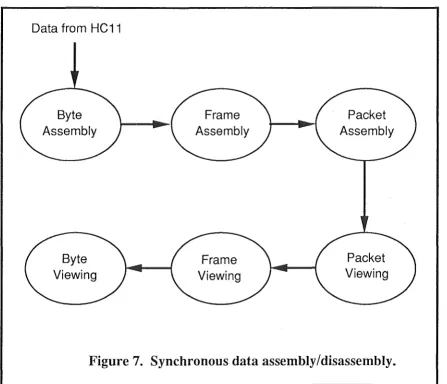
frames (layer 2). These frames are then composed into packets (layer 3), and these packets are to be displayed on a window. The window needs controls so the user can scroll up and down, looking at all packets that have been received. By clicking on a packet (or a number of packets), the corresponding layer 2 information packets will be displayed in an adjacent window. This is shown conceptually in figure 7.
Data from HC11
Packet
Figure 7. Synchronous data assembly/disassembly.
Similarly, by clicking on level 2 frames, the constituent bytes are displayed in yet another window. These may be displayed in ASCII, hexadecimal, or the frame could be more meaningfully decomposed by showing the value of certain fields of the frame format definition.
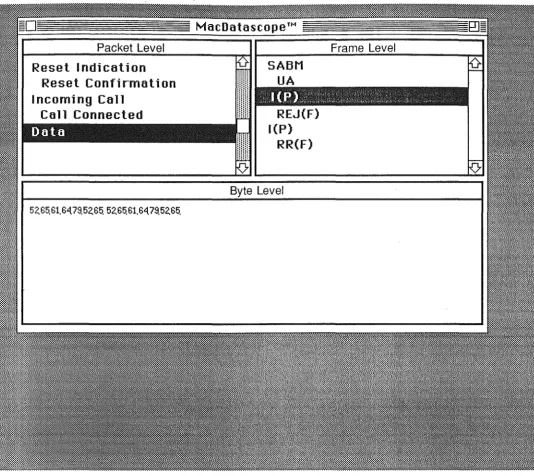
A view of what an actual implementation of this might look like is shown in Figure 8.
[image:16.597.77.525.247.631.2]Packet Level
Reset I ndi cation Reset Confirm all on Incoming Call
Cal 1 Connected REJ(F)
l(P)
RR(F)
Byte Level
[image:17.597.34.568.35.511.2]. Another thing that 'needs to be considered is the concept of
triggers.
Rather than have the user wait for a possibly distant event (e.g. a packet being a particular type, or having particular contents), the program needs to be able to wait for this event before storing data internally. This saves the user the frustration of searching vast amounts of data for a small number of important events. Constructing the program in a similar manner to the applications included with this report would enable this feature to be implemented fairly simply.4.
Summary
This report has documented the design of both asynchronous and synchronous datascopes. A simple asynchronous datascope using the two Macintosh serial ports has been implemented, and other versions requiring the external hardware have been partially implemented. The external hardware has been basically designed, but has not as yet been constructed.
It is seen that while using extra hardware for asynchronous monitoring adds extra versatility, the penalty suffered is that the maximum line speed able to be monitored is 9600 bps (as opposed to 57600 bps when just using the two Macintosh serial ports). When monitoring synchronous data, however, external hardware is obviously required, since the Macintosh serial ports only support asynchronous communications.
There are many future directions in which this project could develop. A main drawback with the applications presented here is the limitation of only being able to monitor lines that are communicating at speeds of 9600 bps or less. The external hardware itself is more than capable of monitoring lines communicating at speeds much higher than this, the bottleneck being the link from the HC11 to the Macintosh. Possibilities for overcoming this include using an Appletalk connection, or even a SCSI connection. The cost of SCSI support would increase the cost of the hardware considerably, but it would still be much less expensive than commercial units.
Alternatively, a card could be designed to slot into the computer. However, this would restrict the application to certain model Macintoshes such as the SE and Macintosh II series, since the other models do not have facilities for adding cards such as this.
There are many other features that could be implemented in a synchronous datascope, just as there are many improvements that could be performed on the asynchronous applications already presented here.
Examples of extra facilities that could be added but are not implemented yet are : • saving of data to disk
• printing data • searching data • triggers
• allowing data to be copied to the Macintosh scrapboard.
1 7
References
Apple Computer, Inc. Inside Macintosh, Volumes I, II, and III. Apple Computer, 1985. Gofton, Peter W. Mastering Unix Serial Communications. California : SYBEX 1991. Harbison, Samuel P., and Guy L. Steele, Jr. C, a Reference Manual (3rd Ed.).
Englewood Cliffs, N.J. : Prentice-Hall, Inc., 1991.
Kernighan, Brian W., and Dennis M. Ritchie. The C Programming Language (2nd Ed.). Englewood Cliffs, N.J.: Prentice-Hall, Inc., 1988.
Motorola Inc. M68HC11 Reference Manual. Phoenix, Arizona: Motorola, 1990.
Motorola, Inc. MC68HC11E9 HCMOS Single-Chip Controller. Phoenix, Arizona: Motorola Inc., 1988.
-'Motorola, Inc. M68HC11EVBU Universal Evaluation Board User's Manual. Phoenix, Arizona: Motorola Inc., 1990.
Motorola, Inc. Microprocessor, Mi~rocontroller, and Peripheral Data, Volumes I and II. Phoenix, Arizona : Motorola, Inc., 1988.
Signetics Corporation. Book IC19 : Data Communication Products. Signetics, 1987. Stallings, William. Data and Computer Communications (2nd Ed.). New York, New
York : Macminnan, Inc., 1989.
Tanenbaum, Andrew S. Computer Networks (2nd Ed.). Englewood Cliffs, N.J. : Prentice-Hall, Inc., 1988.
Zardetto Aker, Sharon, et al. The Macintosh Bible (3rd Ed). Berkeley, Calif.: Goldstein & Blair, 1991.
Appendix A.
Source listing and Resources for
the external hardware method of
main.c
Monday, 7 October 1991 4:35 AM
#include <stdio.h> hnclude <string.h>
#include "CommonDefs.h"
/* pointers to the display windows
* -
used for performing system window operations*/
WindowPtr
/*
*
exit flag*/ Boolean
/*
gWindow[ NUM TEXT WINDOWS];
gDone;
*
flag showing get system function WaitNextEvent' *
is present or not. */Boolean gWNEimplemented;
EventRecord gTheEvent; ·
int gLastDisplayMode; /* i.e. hex, ASCII, etc.
Rect gDragRect, gSizeRect;
/*
*
references to scroll bars on windows (one in each window)*/
Control Handle gScrollBar[ NUM TEXT WINDOWS];
I*
*
handles to the various menus*I
MenuHandle
I*
gAppleMenu, gSpeedMenu, gDisplayMenu, gDataBitsMenu, gParityMenu, gStopBitMenu, gRunMenu;
*/
*
variables remembering various submenu options (parity, speed, etc.)*/
int gSpeed; /* bps
int gNumDataBi ts; /* number of data bits in a character
int gParityBit; /* type of parity bit, if any
int gStopBitLength; /* relative to a data bit
int gTerminalMode; /* is terminal mode active ?
int gRunMode; /* is program currently reading data
I*
Page 1
*/ */
*I
*/ */
main.c
Monday, 7 October 1991 4:35 AM
* references to the serial ports used
*I
int gPortRefin, gPortRefOut;
/*
* flag telling if more buffer space available to read in data
*/
Boolean gMoreBufferSpace;
/*
* intermediate buffer into which data is read
*I
uchar ginBuf[ IN BUFF LENGTH];
/*
* main program
*/
main()
{
I*
ToolBoxinit();
Windowinit () ; SetUpDragRect(); SetUpSizeRect();
MenuBarini t () ;
SerialDriverinit(); SerialVarsinit();
MainLoop () ;
* Initialize the various Macintosh toolboxes
*/
ToolBoxini t ()
{
InitGraf( &thePort ); InitFonts ();
FlushEvents( everyEvent, REMOVE ALL EVENTS); Ini tWindows () ;
InitMenus () ; TEinit ();
InitDialogs( NIL POINTER); InitCursor ();
main.c
Monday, 7 October 1991 4: 35 AM
/*
*Setup the menu bar
*/
MenuBarini t ()
{
Handle myMenuBar;
myMenuBar GetNewMBar( BASE RES ID); SetMenuBar( myMenuBar );
/*
* disable the entire EDIT menu.
* (scrapboard functions are not support in this version.
* The menu has to be present for the sake of desk accessories.
*/
Disableitem( GetMenu( EDIT MENU ID), 0 );
/*
* get submenus from resource fork
*/
gSpeedMenu = GetMenu( SPEED_MENU_ID );
gDataBitsMenu = GetMenu( DATA_BITS_MENU_ID ); gParityMenu = GetMenu( PARITY_MENU_ID ); gStopBitMenu
=
GetMenu( STOP BIT MENU ID);/*
* insert submenus
*/
InsertMenu( gSpeedMenu, NOT_A_NORMAL_MENU ); InsertMenu( gDataBitsMenu, NOT_}\_NORMAL_MENU ); InsertMenu( gParityMenu, NOT_A_NORMAL_MENU ); InsertMenu( gStopBitMenu, NOT A NORMAL MENU);
/*
*setup the initial parameters; and "tick" them * accordingly in the menus.
*/
Checkitem( gSpeedMenu, M_SPEED_9600, TRUE); gSpeed = M SPEED_9600;
Checkitem( gDataBitsMenu, M_7_DATA BITS, TRUE); gNumDataBits = M_7_DATA_BITS;
Checkitem( gParityMenu, M_PARITY_EVEN, TRUE); gParityBit M_PAR+TY_EVEN;
main.c
Monday, 7 October 1991 4:35 AM
/}
Checkitem( gStopBitMenu, M 2 STOP BITS, TRUE);
gStopBitLength = M_2_STOP_BITS;
-gDisplayMenu = GetMenu( DISPLAY_MENU_ID );
Checkitem( gDisplayMenu, M_DISPLAY_ASCII, TRUE);
gLastDisplayMode = M_DISPLAY_ASCII;
gTerminalMode
=
FALSE;gRunMenu = GetMenu ( RUN MENU_ ID ) ;
Checkitem( gRunMenu, M_RUN_GO, TRUE);
gRunMode = M_RUN_GO;
gAppleMenu = GetMHandle ( APPLE_ MENU_ ID ) ;
AddResMenu( gAppleMenu, 'DRVR' );
DrawMenuBar();
/*
*
intialize the serial drivers*I
SerialDriverinit()
{
int refNumin, refNumOut;
if ( OpenDri ver ( "\p, Ain", &refNumin ) ! = noErr )
DrawEventString( LINE_ONE_WINDOW, "\p.Ain open error" );
if( OpenDriver( "\p.AOut", &refNumOut) != noErr)
DrawEventString( LINE_ONE_WINDOW, "\p.AOut open error" );
/*
* Remember the reference to the serial port that we
* will be communicating with.
*/
gPortRefin = refNumin;
gPortRefOut = refNumOut;
/*
* set the buffer where the data will be read into
*/
if SerSetBuf ( gPortRefin, ginBuf, IN_BUFF_LENGTH) != noErr
DrawEventString( LINE_ONE_WINDOW, "\pSerSetBuf failed!" );
main.c
Monday, 7 October 1991 4:35 AM
I*
* constants for serial port configuratio0
*/
#define baud57600 #define stop20 #define noParity #define data8
0
-16384
0
3072
/*
SerReset( gPortRefin, baud57600 +
SerReset( gPortRefOut,baud57600 +
stop20 + noParity + data8 );
stop20 + noParity + data8 );
* main loop
*/
MainLoop ()
{
I*
* see if WaitNextEvent() is implemented */
gWNEimplemented = ( NGetTrapAddress( WNE_TRAP_NUM, ToolTrap) !=
NGetTrapAddress( UNIMPL_TRAP_NUM, ToolTrap) );
gDone FALSE; /* main loop exits when TRUE*/
while ( gDone == FALSE
{
int newDataStatus; HandleEvent();
if ( gRunMode == M__RUN GO)
newDataStatus = DoSerialStuff();
/*
* if no more buffer space, alert user and pause monitoring.
*/
if ( newDataStatus == NO NEW DATA && gMoreBufferSpace == FALSE
{
StopAlert( BUFFER__FULL_ALERT, NIL POINTER); ResetAlrtStage();
gRunMode = M_RUN_PAUSE;
/*
* ensure the "RUN" menu reflects the paused state
*I
main.c
Monday, 7 October 1991 4:35 AM
/*
Checkitem( gRunMenu, M_RUN_GO, FALSE); Checkitem( gRunMenu, M_RUN_PAUSE, TRUE);
else
I*
{
* program is in "pause" mode
* - just keep flushing the buffers
*I
FlushSerialBuffers();
newDataStatus = NO_NEW_DATA;
I*
*
only update windows if new data has arrived.*/
if ( newDataStatus != NO NEW DATA
-
-UpdateCombined.Window();
if ( newDataStatus == CHl_NEW_DATA
I I newDataStatus == BOTHCHANS NEW DATA
UpdateLineOneWindow();
if ( newDataStatus == CH2_NEW_DATA
I I newDataStatus == BOTHCHANS NEW DATA
UpdateLineTwoWindow();
* before exiting, restore serial driver's buffer to the default
*
by specifying zero length parameter.* (Failure to do this may result in horrible crashes).
*/
if ( SerSetBuf ( gPortRefin, giriBuf, 0) != noErr)
Page 6
DrawEventString( LINE_ONE_WINDOW, "\pSerSetBuf restoration failed!");
/*
* handle event
*/
HandleEvent () {
char theChar;
/*
* get the next event from the event queue
main.c
Monday, 7 October 1991 4: 35 AM
if ( gWNEimplemented)
else
/*
WaitNextEvent( everyEvent, &gTheEvent, SLEEP, NIL MOUSE REGION);
SystemTask();
GetNextEvent( everyEvent, &gTheEvent );
* depending on what the event is, perform appropriate action(s)
*/
switch ( gTheEvent.what
{
case nullEvent: break; case mouseDown:
HandleMouseDown(); break;
case mouseUp: break; case keyDown: case autoKey:
/*
* if a key is pressed that is equivalent to a
* menu selection, handle it.
*I
theChar
=
gTheEvent.message & charCodeMask;if (( gTheEvent.modifiers & cmdKey) != 0)
HandleMenuChoice( MenuKey( theChar) ); break;
case keyUp: break; case updateEvt:
/*
* update the window that requires it
*I
BeginUpdate( gTheEvent.message );
if( (WindowPtr)gTheEvent.message RefreshLineOneWindow(); else
if( (WindowPtr)gTheEvent.message RefreshLineTwoWindow(); else
if( (WindowPtr)gTheEvent.message RefreshCombined.Window();
EndUpdate( gTheEvent.message ); J:?reak;
case diskEvt: break;
case activateEvt: break;
case networkEvt: case driverEvt: case applEvt:
gWindow[ LINE ONE WINDOW])
gWindow [ LINE TWO WINDOW ] )
gWindow[ COMBINED WINDOW])
main.c
Monday, 7 October 1991 4: 35 AM
/*
case app2Evt: case app3Evt:
break; case app4Evt:
break;
I* suspend/resume event*/
* handle mouse down event
*/
HandleMouseDown()
{
WindowPtr whichWindow;
short int thePart, thePoint;
long windSize;
GrafPtr old.Port;
long int menuChoice;
/*
* see where the mouse was pressed ...
*/
thePart = FindWindow( gTheEvent.where, &whichWindow );
/*
* ... and perform action(s) accordingly
*/
switch( thePart)
{
case inSysWindow:
/*
* if the mouse was pressed in a system window * (e.g. in a Desk Accessory), pass i t on for the * system to handle
*/
SystemClick( &gTheEvent, whichWindow ); break;
case inMenuBar:
menuChoice = MenuSelect( gTheEvent.where ); HandleMenuChoice( menuChoice );
break;
case inDrag:
DragWindow( whichWindow, gTheEvent.where, &gDragRect ); break;
case inContent:
SelectWindow( whichWindow ); break;
case inGrow:
break; /* windows are of fixed size*/ case inGoAway:
HideWindow( whichWindow ); break;
case inZoomin:
main.c
Monday, 7 October 1991 4:35 AM
case inZoomOut:
break; /* zooming not used*/
/*
* see from what menu an item was chosen, * and pass on for more specific handling.
*/
HandleMenuChoice( menuChoice long int menuChoice; int theMenu; int the Item; if( menuChoice != 0)
{
theMenu theitem
HiWord( menuChoice ); LoWord( menuChoice ); switch( theMenu)
{
case APPLE MENU ID:
HandleAppleChoice( theitem ); break;
case FILE MENU ID:
HandleFileChoice( theitem ); break;
case EDIT MENU ID:
HandleEditChoice( theitem ); break;
case DISPLAY MENU ID:
HandleDisplayChoice( theitem ); break;
case SPECIAL MENU ID:
HandleSpecialChoice( theitem ); break;
case SPEED MENU ID:
HandleSpeedChoice( theitem ); break;
case DATA BITS MENU ID:
HandleDataBitsChoice( theitem ); break;
case PARITY MENU ID:
HandleParityChoice( theitem ); break;
case STOP BIT MENU ID:
HandleStopBitChoice( theitem ); break;
case WINDOW MENU ID:
HandleWindowChoice( theitem ); break;
case RUN MENU ID:
HandleRunChoice( theitem ); break;
main.c
Monday, 7 October 1991 4:35 AM
HiliteMenu( 0 );
HandleAppleChoice( theitem) int theitem;
Str255 int
short int DialogPtr
accName; accNumber; itemNumber; AboutDialog;
switch( theitem)
{
case ABOUT ITEM:
Alert( ABOUT_ALERT, NIL POINTER); ResetAlrtStage();
break; defualt:
Getitem( gAppleMenu, theitem, accName );
accNumber = OpenDeskAcc( accName );
break;
HandleFileChoice( theitem) int theitem;
switch( theitem
{
case QUIT ITEM:
gDone = TRUE;
break; defualt:
break;
HandleEditChoice( theitem) int theitem;
HandleDisplayChoice( theitem) int theitem;
if ( theitem == M_DISPLAY_TERMINAL)
gTerminalMode = !gTerminalMode;
Checkitem( gDisplayMenu, theitem, gTerminalMode );
main.c
Monday, 7 October 1991 4:35 AM
else if ( theitern >= M DISPLAY ASCII && theitern <= M DISPLAY CTRL HEX
-
-&& theitern != gLastDisplayMode)
Checkitern( gDisplayMenu, gLastDisplayMode, FALSE); Checkitern( gDisplayMenu, theitern, TRUE);
gLastDisplayMode = theitern;
/*
* here is the place to call a function
* that re-draws a window that displays the parameters
*/
HandleSpecialChoice( theitern) int theitern;
HandleSpeedChoice( theitern) int theitern;
if ( theitern != gSpeed)
{
Checkitern( gSpeedMenu, gSpeed, FALSE); Checkitern( gSpeedMenu, theitern, TRUE);
gSpeed
=
theitern;I*
*
here is the place to call a function* that re-draws a window that displays the parameters
*/
HandleDataBitsChoice( theitern) int theitern;
if ( theitern != gNurnDataBits)
{
Checkitern( gDataBitsMenu, gNurnDataBits, FALSE); Checkitern( gDataBitsMenu, theitern, TRUE);
gNurnDataBits = theitern;
/*
* here is the place to call a function
* that re-draws a window that displays the parameters
*I
HandleParityChoice( theitern) int theitem;
if ( theitem != gParityBit) {
main.c
Monday, 7 October 1991 4: 35 AM
Checkitem( gParityMenu, gParityBit, FALSE); Checkitem( gParityMenu, theitem, TRUE); gParityBit = theitem;
I*
* here is the place to call a function
* that re-draws a window that displays the parameters
*/
HandleStopBitChoice( theitem) int theitem;
if ( theitem != gStopBitLength)
{
Checkitem( gStopBitMenu, gStopBitLength, FALSE); Checkitem( gStopBitMenu, theitem, TRUE);
gStopBitLength = theitem;
I*
* here is the place to call a function
* that re-draws a window that displays the parameters
*/
HandleRunChoice( theitem) int theitem;
if ( theitem == M RUN CLEARBUFFERS
{
ClearBuffers();
else if ( theitem >= M_RUN GO && theitem <= M RUN PAUSE && theitem != gRunMode)
Checkitem( gRunMenu, gRunMode, FALSE); Checkitem( gRunMenu, theitem, TRUE); gRunMode = theitem;
Page 12
j I
Serial.c
Monday, 7 October 1991 4: 21 AM
#include <stdio.h> #include "CommonDefs.h" #define HIGH MASK OxfO #define LOW MASK OxOf #define FIRST OF PAIR MASK 128 #define rs DATA MASK 64 #define LINE TWO MASK 32 extern int gPortRefin;
extern int gLastDisplayMode; extern Boolean gMoreBufferSpace; /*
* where the received bytes are stored
*I
· 'char gLineData [ NUM CHANS ) [ MAX DATA ) ; /*
* indexes into the stored data blocks.
*
Used to find, say, the nth transmission along*
a particular line.* Generally used for displaying the data
* in the individual lines' windows */
int gindexes [ NUM CHANS ] [ MAX INDEX ) ;
I*
*
total number of (data) bytes received along each line so far* (used for indexing) */
int gCurrentByte[ NUM CHANS ]; /*
* Total number of blocks received on each line so far */
int gCurrentindex[ NUM CHANS );
/*
*
Initialize indexes, etc.*I
Serial Varsini t ()
{
inti;
for ( i=O; i<NUM CHANS; i++) gCurrentindex[ i )
gCurrentByte[ i J
0; 0;
/* no blocks rec'd yet */
/* no byted rec'd yet */
Serial.c
Monday, 7 October 1991 4:21 AM
I*
/*
* need a O in index O (of all channels) to calculate
* length of first block (since length= index[i] [1] -index[i] [OJ
*I
gindexes [ i J [ 0 J = 0;
gMoreBufferSpace TRUE;
* Read any< datal, data2 > pairs waiting in buffer, * and store in data arrays.
* Return NO_NEW_DATA,
* CHl_NEW_DATA,
* CH2_NEW_DATA,
* or BOTHCHANS NEW DATA
* depending on data read.
*
*/
DoSerialStuff()
{
int count;
long 1, nurnToScan, nurnToRead, firstToRead; int startPos;
uchar Cnurnbuf[SJ;
int NewChlData NewCh2Data
FALSE, FALSE;
uchar readBuf[ BUF SIZE+ 1 ];
static Channel previousDataLine LINE ONE;
/*
* see how many bytes are to be read
*/
SerGetBuf( gPortRefin, &l );
/*
* Synchronisation strategy :
* read the first byte. If it is the first of a pair (as it should
* be), then read the rest in, up to an EVEN number of bytes in total *(to ensure continued synchronisation).
* If the first byte is the second of a pair, we are out of synch * (as could happen, for example, upon program startup).
* Discard this byte, and read in an even number of further bytes, * to ensure continued synchronisation again.
*I
/*
* read no more than the size of the buffer, and ensure
* that an EVEN number of bytes are read (to ensure continuation * of <bytel,byte2> pairs.
*/
nurnToRead = ( 1 > BUF SIZE? BUF SIZE ( 1 I 2) * 2 );
Serial.c
Monday, 7 October 19 91 4: 21 AM
nurnToScan numToRead;
/*
* check to see if buffers have room for data.
*I
if ( gCurrentByte[ LINE_ONE] + numToRead >= MAX DATA
I I gCurrentByte[ LINE_TWO] + numToRead >= MAX DATA
I I gCurrentindex[ LINE_ONE] >= MAX INDEX - 1 )
{
gMoreBufferSpace = FALSE; return ( NO NEW DATA ) ;
/*
* only read if bytes waiting. */
if (numToRead == 0)
return NO_NEW_DATA;
/*
* read the first byte to decide further actions
*/
firstToRead = 1;
if ( FSRead( gPortRefin, &firstToRead, readBuf) != noErr
I I firstToRead != 1)
/*
DrawEventString( "\pFSRead error on first byte!" ); sleep ( 3 ) ;
exit ( 1 ) ;
* is the byte the first of a pair? * (as it normally should be)
*I
if ( readBuf[OJ & FIRST OF PAIR MASK
{
else
/* /*
* if so, read in the pairs starting from the next byte */
if (numToRead <= 1)
return NO NEW DATA;
/* only read if there is more data there
-
-numToRead--; /* subtract the first byte already read*/
if ( FSRead( gPortRefin, &numToRead, &readBuf[l] != noErr
{
DrawEventString( "\pFSRead error!" ); sleep ( 3 ) ;
exit ( 1 ) ;
* byte read was second of pair discard,
Page 3
Serial.c
Monday, 7 October 1991 4: 21 AM
{
* and read subsequent pairs
*/
i f (numToRead <= 2) return NO_NEW_DATA;
/* only read if there is more data there
numToRead -= 2; /* subtract the first byte already read, * and subtract 1 again to ensure an even * number of bytes are read in
*I
if ( FSRead( gPortRefin, &numToRead, readBuf
{
DrawEventString( "\pFSRead error!"); sleep ( 3 ) ;
exit ( 1 ) ;
!= noErr)
/*
* step through the data pairs, updating the stored data *I
for (count= 0; count< numToScan; count+= 2) if( readBuf[ count & IS DATA MASK)
{
Channel dataLine;
int dataByte = (( readBuf[count] & LOW_MASK) << 4) ( readBuf[count+l] & LOW MASK);
if ( readBuf[ count] & LINE_TWO_MASK dataLine LINE TWO;
else
dataLine LINE_ONE;
if ( dataLine == LINE ONE NewChlData TRUE; else
NewCh2Data TRUE;
if ( dataLine != previousDataLine
{
previousDataLine
=
dataLine;gindexes[ dataLine] [ ++gCurrentindex[ dataLine] ] = gCurrentByte[ dataLine ];
gLineData[ dataLine] [ gCurrentByte[ dataLine] ++ = dataByte;
else/* is HCll STATUS - not handled as yet*/
Page 4
Serial.c
Monday, 7 October 1991 4: 21 AM
/* needs to be developed after construction of HCll board*/
if ( NewChlData && NewCh2Data) return BOTHCHANS NEW DATA;
-
-else if ( NewChlData) return CHl_NEW_DATA; else if ( NewCh2Data)
return CH2 NEW DATA;
-
-else
return NO_NEW_DATA;
return TRUE;
FlushSerialBuffers()
{
long l;
uchar readBuf[ BUF SIZE+ 1 ];
for (;;) /* keep reading until buffer empty*/
I*
* see how many bytes are to be read */
SerGetBuf( gPortRefin, &l );
I*
* ensure overflow doesn't occur */
if (l>BUF_SIZE) 1 = BUF_SIZE; /*
*
exit when no data left to read*/
i f (1 = 0) return;
if ( FSRead( gPortRefin, &l, readBuf) != noErr)
{
DrawEventString ( "\pFSRead error!" ) ; sleep ( 3 ) ;
exit ( 1 ) ;
Windows.c
Monday, 7 October 1991 4: 48 AM
#include "CommonDefs.h"
extern WindowPtr gWindow [ NUM _TEXT_ WINDOWS ] ; extern int
extern Rect
I*
gLastDisplayMode; gDragRect, gSizeRect;
* references to scroll bars on windows (one in each window)
*I
extern ControlHandle gScrollBar[ NUM TEXT WINDOWS]; /*
* keep track of the last byte displayed in the window
* (used for updataing screen if window is obscured
* and then brought back into view.
'*/
int gLastByteinWindow [ · 2 ] ;
/* number of lines in window */
int gLinesinWindow[ NUM TEXT WINDOWS]; int gCurRow[ NUM TEXT WINDOWS],
gMaxRow [ NUM TEXT WINDOWS l ;
I*
* horizontal position of next character to be printed on
*
each window */int gCumPos[ NUM TEXT WINDOWS]; /*
* Windowinit */
Windowini t ()
{
I*
*
get windows from resource fork */gWindow[ LINE ONE WINDOW l = GetNewWindow( NIL _POINTER, MOVE_ TO _FRONT ) ; gWindow[ LINE_TWO_WINDOW] = GetNewWindow(
NIL_POINTER, MOVE_TO_FRONT ) ; gWindow[ COMBINED WINDOW] = GetNewWindow(
NIL_POINTER, MOVE TO FRONT ) ;
ShowWindow( gWindow[ LINE ONE WINDOW ); ShowWindow( gWindow[ LINE TWO WINDOW );
BASE RES ID +
BASE RES ID +
BASE RES ID +
Page 1
Windows.c
Monday, 7 October 1991 4: 48 AM
SetUpWindowStuff( LINE ONE WINDOW); SetUpWindowStuff( LINE TWO WINDOW); SetUpWindowStuff( COMBINED WINDOW);
SelectWindow( gWindow[ LINE_ONE_WINDOW) );
gLastByteinWindow[ LINE ONE 0;
gLastByteinWindow[ LINE TWO 0;
/*
* SetupWindowStuff
*I
SetUpWindowStuff( whichWin DataWindow whichWin;
/{
Rect scrollRect, eventRect;
SetPort( gWindow[ whichWin J );
eventRect = gWindow[ whichWin J->portRect;
gMaxRow[ whichWin gCurRow[ whichWin
/*
eventRect.bottom - eventRect.top - ROWHEIGHT; STARTROW;
*setup the rectangle that will contain the scroll bar */
scrollRect = gWindow[ whichWin J->portRect;
scrollRect.left = scrollRect.right - 15;
scrollRect.right++; scrollRect.bottom++; scrollRect.top--;
gScrollBar[ whichWin = NewControl( gWindow[ whichWin ), &scrollRect,
"\p", 1, 0, 0, 0, scrollBarProc, OL );
ShowControl( gScrollBar[ whichWin) );
DrawControls( gWindow[ whichWin J ) ;
/*
* switch to the special font that has been edited * and placed in the resource font.
*/
TextFont( 151 );
TextSize( TEXT FONT_SIZE );
MoveTo( LEFTMARGIN, gCurRow[ whichWin l );
Windows.c
Monday, 7 October 1991 4:48 AM
/*
*Setup the screen area in which windows can be dragged.
*I
SetUpDragRect ()
{
gDragRect = screenBits.bounds; gDragRect.left += DRAG_THRESHOLD; gDragRect.right -= DRAG_THRESHOLD; gDragRect.bottom - DRAG THRESHOLD; /***/
SetUpSizeRect ()
{
/*
gSizeRect.top = MIN_WINDOW_HEIGHT; gSizeRect.left = MIN_WINDOW_WIDTH;
gSizeRect.bottom = screenBits.bounds.bottom - screenBits.bounds.top; gSizeRect.right = screenBits.bounds.right - screenBits.bounds.left;
* draw event string - used for reporting any fatal errors */
DrawEventString( whichWin, s ) DataWindow whichWin;
Str255 s;
/*
SetPort( gWindow[ whichWin] ); NewLine( whichWin );
MoveTo( LEFTMARGIN, gCurRow[ whichWin] ); Drawstring( s );
* perform Newline in a specified window */
NewLine( whichWin) DataWindow whichWin;
gLinesinWindow[ whichWin ]++; SetPort( gWindow[ whichWin] );
Page 3
Windows.c
Monday, 7 October 1991 4: 48 AM
/*
/*
* do we need to scroll?
*/
if( gCurRow[ whichWin J > gMaxRow[ whichWin) )
{
/*
* scroll, and make the scroll bar active.
*I
ScrollWindow( whichWin );
SetCtlMin( gScrollBar[ whichWin ], 0 );
SetCtlMax( gScrollBar[ whichWin ), gLinesinWindow[ whichWin) - gMaxRow[ whichWin] );
SetCtlValue( gScrollBar[ whichWin ), gLinesinWindow[ whichWin - gMaxRow[ whichWin J );
HiliteControl( gScrollBar[ whichWin ], 0);
DrawControls( gWindow[whichWin) );
else/* just move cursor position down*/
{
gCurRow[ whichWin] += ROWHEIGHT;
MoveTo( LEFTMARGIN, gCurRow[ whichWin) );
* scroll window
*/
ScrollWindow( whichWin) DataWindow whichWin;
RgnHandle tempRgn;
tempRgn NewRgn();
/*
* reduce size of window so that scrollbar is * not itself scrolled
*/
gWindow[ whichWin J->portRect.right 16;
/*
* perform scrolling
*/
ScrollRect( &gWindow[ whichWin ]->portRect, HORIZONTAL_OFFSET, -ROWHEIGHT, tempRgn );
/*
* Restore size of portRect
*/
gWindow[ whichWin ]->portRect.right += 16;
DisposeRgn( tempRgn );
Windows.c
Monday, 7 October 1991 4:48 AM
HandleWindowChoice( theitem) int theitem;
switch( theitem
{
case M WINDOW ONE:
ShowWindow( gWindow[ LINE ONE WINDOW l );
SelectWindow( gWindow[ LINE ONE WINDOW] ); DrawControls( gWindow[ LINE ONE WINDOW] ); break;
case M WINDOW TWO:
ShowWindow( gWindow[ LINE TWO WINDOW] ); SelectWindow( gWindow[ LINE TWO WINDOW] ); DrawControls( gWindow[ LINE TWO WINDOW] ); break;
case M WINDOW COMBINED:
ShowWindow( gWindow[ COMBINED WINDOW) ); SelectWindow( gWindow[ COMBINED_WINDOW) );
DrawControls( gWindow[ COMBINED_WINDOW l );
break; defualt:
break;
extern char extern int extern int extern int
gLineData[ NUM_CHANS l [ MAX_DATA ];
gindexes[ NUM_CHANS] [ MAX_INDEX ]; gCurrentindex[ NUM_CHANS ];
gCurrentByte[ NUM CRANS];
RefreshAllWindows()
{
RefreshLineOneWindow(); RefreshLineTwoWindow(); RefreshCombined.Window();
RefreshLineOneWindow()
{
int rows= /*(gMaxRow[ LINE ONE WINDOW SetPort( gWindow[ LINE_ONE WINDOW] ); DrawControls( gWindow[ LINE ONE WINDOW
/ ROWHEIGHT)+l;*/ 6;
) ;
if (gCurrentByte[ LINE_ONE_WINDOW] <= NUM COLUMNS* rows /*
* window has not scrolled yet - simply dump all data */
DumpBytes( LINE_ONE_WINDOW, &gLineData[ LINE_ONE J [ 0 ], gCurrentByte[ LINE ONE]);
Windows.c
Monday, 7 October 1991 4: 48 AM
else
I*
* window has scrolled. Just dump what will fit in window
*/
DumpBytes( LINE_ONE_WINDOW, &gLineData[ LINE_ONE)
[ ( (gCurrentByte[ LINE_ONE J / NUM_COLUMNS) * NUM COLUMNS
- (NUM_COLUMNS * ( rows - 1 )) ),
(NUM_COLUMNS * ( rows - 1)
+ (gCurrentByte[ LINE ONE % NUM_COLUMNS) );
RefreshLineTwoWindow() {
.int rows= /*(gMaxRow[ LINE TWO WINDOW SetPort( gWindow[ LINE_TWO WINDOW) ); DrawControls( gWindow[ LINE_TWO_WINDOW
/ ROWHEIGHT)+l;*/ 6;
) ;
if (gCurrentByte[ LINE_TWO_WINDOW) <= NUM COLUMNS* rows /*
* window has not scrolled yet - simply dump all data */
~lse
I*
DumpBytes( LINE_TWO_WINDOW, &gLineData[ LINE_TWO] ['0 ], gCurrentByte[ LINE TWO]);
* window has scrolled. Just .dump what will fit in window
*I
DumpBytes ( LINE_TWO_WINDOW, &gLineData[ LINE_TWO l
[ ( (gCurrentByte[ LINE_TWO] / NUM_COLUMNS) * NUM COLUMNS
- (NUM_COLUMNS * ( rows - 1 )) ],
(NUM_COLUMNS * ( rows - 1)
+ (gCurrentByte[ LINE TWO % NUM_COLUMNS) );
RefreshCombinedWindow()
{
SetPort( gWindow[ COMBINED_WINDOW l );
DrawControls( gWindow[ COMBINED WINDOW] );
UpdateLineOneWindow() {
SetPort( gWindow[ LINE_ONE_WINDOW] );
DisplayBytesAndWrap( LINE_ONE_WINDOW,
&gLineData[ LINE_ONE] [ gLastByteinWindow[ LINE ONE] ],
gCurrentByte[ LINE ONE l - gLastByteinWindow[ LINE ONE );
gLastByteinWindow[ LINE ONE gCurrentByte[ LINE ONE];
Windows.c
Monday, 7 October 1991 4: 48 AM
DrawControls( gWindow[ LINE ONE WINDOW] );
}
UpdateLineTwoWindow()
{
" '}
SetPort( gWindow[ LINE_TWO_WINDOW l );
DisplayBytesAndWrap( LINE_TWO_WINDOW,
&gLineData[ LINE_TWO l [ gLastByteinWindow[ LINE_TWO l ],
gCurrentByte[ LINE_TWO] - gLastByteinWindow[ LINE_TWO );
gLastByteinWindow[ LINE_TWO l = gCurrentByte[ LINE TWO]; DrawControls( gWindow[ LINE TWO WINDOW] );
UpdateCornbinedWindow()
{
SetPort( gWindow[ COMBINED WINDOW] );
if ( gCurrentindex[ LINE_ONE] )
{
DisplayBytes( COMBINED_WINDOW, &gLineData[ LINE_ONE l
[ gindexes[ LINE_ONE J [ gCurrentindex[ LINE_ONE J ] ], gCurrentByte[ LINE_ONE]
- gindexes[ LINE_ONE J [gCurrentindex[ LINE ONE J J );
NewLine( COMBINED WINDOW);
if ( gCurrentindex[ LINE_TWO J )
TextFace( italic);
DisplayBytes( COMBINED_WINDOW, &gLineData[ LINE_TWO l
[ gindexes[ LINE_TWO] [ gCurrentindex[ LINE_TWO) ) ], gCurrentByte[ LINE_TWO l
- gindexes[ LINE_TWO J [gCurrentindex[ LINE TWO J J ); TextFace( 0 ); /* revert to normal text*/
NewLine( COMBINED WINDOW);
DrawControls( gWindow[ COMBINED WINDOW] );
Windows.c
Monday, 7 October 1991 4:48 AM
/*
* display bytes at current position, but don't worry about wrapping
* around. Caller should make sure number of bytes displayed will
* fit in the window
*I
DisplayBytes( whichWin, buf, len) DataWindow whichWin;
uchar *buf; int len;
inti;
int mod= NUM_COLUMNS; char outBuf[ 257 ]; char extraBuf[ 257 ]; char weeBuf[8);
int Pos;
/*
* shouldn't really like this, as doesn't take * scrolling, etc. into account
*/
SetPort( gWindow[ whichWin J );
/* should really keep current port for restoration*/
outBuf[OJ '\0';
for ( i=O i < len i ++)
/*
* add appropriate display representation of char * to end of string to be printed.
*I
if ( gLastDisplayMode M DISPLAY ASCII
{
/*
* ASCII display
*I
outBuf[ strlen( outBuf) + 1 J = '\0';
*I
128 + buf[ i ];
if( buf[ i J < 32) /* ctrl-char
outBuf[ strlen( outBuf) J
else if ( buf[ i J == 127) /*
outBuf[ strlen( outBuf) J
DEL*/ 128 + 33;
else /* normal char*/
outBuf[ strlen( outBuf buf [ i J;
else if ( gLastDisplayMode
/*
M DISPLAY HEX
{
* Hexadecimal display */
int p = strlen( outBuf );
outBuf[ p J 161 + buf[i) I 16;
outBuf[ p + 1] 161 + buf[i] % 16;
outBuf[ p + 2 J = 177; /* a 'mini-seperator' */
Windows.c
Monday, 7 October 1991 4:48 AM
/*
else
/*
outBuf[ p + 3 ] I \0 I;
* CTRL_HEX display - ASCII display, but with * control chars shown in hex
*/ {
}
if ( buf[ i J >= 32 && buf[i) != 127 )
/*
* display as ascii char */
{
outBuf[ strlen( outBuf outBuf[ strlen( outBuf
+ 1 l = I \0 I;
buf [ i J;
else
/*
{
* display */