Using short message service to encourage interactivity
in the classroom
C. Markett
a,*, I. Arnedillo Sa´nchez
a, S. Weber
b, B. Tangney
aaCentre for Research in IT in Education, Trinity College Dublin, Dublin, Ireland b
Department of Computer Science, Trinity College Dublin, Dublin, Ireland
Abstract
Interactivity in the classroom is reported to promote a more active learning environment, facilitate the building of learning communities, provide greater feedback for lecturers, and help student motivation. Var-ious definitions of interactivity exist in the literature, alternately focusing on the participants, structure and technology. ThePLS TXT UR Thoughtsresearch project builds on existing definitions to define interactiv-ity as a message loop originating from and concluding with the student. The authors chose to introduce mobile phones and short message service (SMS) within the classroom due to the ubiquity of mobile phones among students and the interactive potential of SMS. SMS is a low-threshold application used widely by students to quickly send concise, text-based messages at any time. The research presented involved students sending SMS in real-time, in class, via their personal mobile phones. Using a modem interfacing with cus-tomised software to produce SMS files, the lecturer can view the messages and verbally develop the inter-active loop with students during class. The SMS are available online after class, allowing interinter-active loops to further develop via threaded comments.
Ó2005 Elsevier Ltd. All rights reserved.
Keywords: Interactivity; SMS; Mobile phone; Ubiquitous learning
0360-1315/$ - see front matter Ó2005 Elsevier Ltd. All rights reserved. doi:10.1016/j.compedu.2005.11.014
*
Corresponding author. Tel.: +353 8623 100 70.
E-mail address:[email protected](C. Markett).
1. Background
The presence of interactivity in the classroom is reported to yield benefits in relation to the pro-motion of more active learning environments, the building of learning communities, the provision
of greater feedback for lecturers, and it also contributes towards student motivation (Anderson,
2002; Muirhead & Juwah, 2003; Prammanee, 2003). However, determining whether a class is interactive is a difficult exercise in perspective. Lecturers may view their classes as interactive because they ask questions or accept questions, but they frequently fail to examine the quality, content, frequency or duration of the interactions, in addition to the number of students who
par-ticipate. ThePLS TXT UR Thoughtsproject aims to lower the bar to interaction in the classroom,
whereby students can initiate interactivity in class using short message service (SMS) and the project’s customised software/hardware interface.
In many classrooms, the ringing, beeping and vibrating of mobile phones is a continuous nui-sance due to their ubiquity among students. While legitimate concerns exist regarding the place of mobile phones in the classroom, focusing on issues such as ownership, control, intrusion, bullying
and safety, could it be time toencouragetexting in class?
1.1. ICT as an interactive tool
Various definitions of interactivity exist in the literature, focusing on the participants, structure
and technology. In relation to the participants,Moore (1989)defines three key interactions:
lear-ner–content, learner–instructor, and learner–learner. A divergent way of defining interactivity
focuses on the structure – ideas regarding loops, coherence and originator. Yacci (2000)defines
interactivity as a message loop that is initiated and concluded by the student and where the mes-sage content must be ‘mutually coherent’. The previous definitions developed from
communica-tion and educacommunica-tional theories and are technology independent. In contrast, Liu, Wang, Liang,
Chan, and Yang (2002) classify four types of interaction by the medium of communication: face-to-face, computer-mediated, human–computerand simultaneous group.
Considering the above definitions and categorisations, interactivity can be described as a com-plete message loop originating from the student and returning to the student. The reciprocating participant can be instructor or fellow student(s) and the loop occurs irrespective of the technol-ogy or medium of communication.
Numerous researchers have explored the benefits of interactivity. Through interaction with the instructor and other students, the student’s interest and motivation can be stimulated and
maintained (Prammanee, 2003). A key strength of student–instructor interaction is that it puts
the concepts which students develop from the content into context, allowing them to develop
cognitive structures (Liu et al., 2002; Moore, 1989). Interactivity can also allow students to
build their learning environment and influence the learning process, leading to more active
learning while providing instructors with ongoing feedback (Anderson, 2002; Muirhead &
Juwah, 2003).
One factor that encourages interactivity and can be supported via technology is public anonym-ity, where the facilitator knows who sent what, but other students do not. Public anonymity allows all students to be valid contributors to the ensuing discussion – whether they supply ‘right
increases learner–content interaction (Draper & Brown, 2004), promotes classroom accountability
and encourages student interaction (Davis, 2003; Woods & Chiu, 2002).
1.2. ICT implementation with mobile phones
Mobile phones are one of the most successful technologies of the past two decades with
own-ership ranging from 95% among Finnish students (Divitini, Haugalokken, & Norevik, 2002) to
91% among Irish youth (Hegarty, 2004). Within educational environments, students frequently
move venues (Muhlhauser & Trompler, 2002), but their personal mobile phones are
character-istically at hand or in-the-pocket with access rates well beyond the typical study or work day (Cereijo-Roibas & Arnedillo-Sanchez, 2002). In contrast, when students use project-specific handhelds to participate in class, the at-hand rate drops significantly, with studies reporting
on 25–35% of participants failing to bring their devices on a given day (Draper & Brown,
2004). Although Pinkwart, Hoppe, Milrad, and Perez advocate that ‘‘PDAs appear to be a
straightforward solution to mobile applications’’ (2003, p. 384), their purchase prices are much higher and penetration rates among the student population lower than that of mobile phones (Divitini et al., 2002; Savill-Smith & Kent, 2003). Within an education setting, using mobile phones as an interactive tool requires minimal technical and financial support: the majority
of students possess the needed hardware and software (Divitini et al., 2002) and communication
occurs via existing mobile networks, which are maintained independently by mobile service providers.
Due to their small size and familiarity, mobile phones in the classroom can be unobtrusive (Nyiri, 2003), require no technology training, and are not intimidating to most users. Current research has capitalised on these technological and practical advantages: developing public
dis-course in disadvantaged communities (Ananny, Strohecker, & Biddick, 2004), supporting
disad-vantaged youth with literacy and numeracy skills (Mitchell & Doherty, 2003), and delivering
content and promoting discussion with ‘bitesized’ exam revision (Hoppe, Joiner, Milrad, &
Sharples, 2003). Under Papert’s definition, the use of mobile phones/SMS within populations
familiar with the technology would be a ‘low-threshold, high-ceiling’ technology tool (Papert,
1980).
1.3. The use of SMS
SMS has been called the ‘killer’ application of mobile phones, as its usage exceeded all expectations. Reasons contributing to this growth include low cost, asynchronous nature (users
can reflect before sending and reply at their leisure) and potential for private/quiet use (
Mitch-ell, Heppel, & Kadirire, 2002). Studies among student populations report on 80% of students
sending SMS every day (Divitini et al., 2002; Markett, Arnedillo Sa´nchez, Weber, & Tangney,
2004).
Researchers have indicated that SMS is an area for further exploration in education, suggesting
possible areas of investigation such as: in-class discussions (Bollen, Eimler, & Hoppe, 2004),
two-way service interactions, creative ‘free spaces’ for text-based play (Stone, Briggs, & Smith, 2002),
language learning vocabulary and study support (Thornton & Houser, 2004), and learning
1.4. Mobile phone and SMS constraints
While using students’ personal devices for learning appears natural and is cost-effective (
Muh-lhauser & Trompler, 2002), issues can arise over device ownership and control (Savill-Smith & Kent, 2003; Stone, 2002). Allowing the use of primarily social technology such as instant
messag-ing or mobile phones can focus student attention away from the classroom (Roschelle, 2003),
acting as an ‘intruder’ and removing the lecturer’s centrality in communication (Mifsud, 2002).
The almost total ban of mobile phones from schools and formal learning environments has given
rise to the use of simulated mobile phones on PDAs (Bollen et al., 2004).
Furthermore, there are specific limitations and concerns when designing ICT classroom imple-mentations involving mobile phones. Rapid developments in handsets, networks, and mobile
applications can make educational implementations using mobile phones high-risk (Mitchell
et al., 2002). Mobile phones have a small screen size and restricted/time-consuming text input functions. In relation to SMS, the 160-character limit in messages and the cost are still concerns (Divitini et al., 2002; Lehner & Nosekabel, 2002).
Interactivity is a beneficial component of the educational environment and by defining interac-tivity as a loop from the student’s perspective, the researcher is lead to solutions that assist stu-dents and instructors in understanding the idea of a message loop. As the student is the message initiator, the technology used should be known and available to the student. The mobile phone is easily available, low-cost, and pervasive. A pedagogically supported use of SMS within classrooms may allow for low-cost implementation of real-time, text-based interactions and put an end to the familiar refrain of ‘‘turn UR mobiles off’’!
2. Methodology
2.1. SMS message loop
The key design feature of this research is the use of ICT to support students and instructors in understanding and using an interactive message loop. The guiding principles of the interactive message loop are:
The interactive loop originates and concludes with the student.
Interactivity can occur irrespective of technology: involving technology in all, some or none of
the interaction stages.
The originating student ‘owns’ the interaction, determining if the loop is completed.
Yacci (2000) has developed a basic model of interactivity, notable for the loop commencing
with and returning to entity 1 (defined as the student), see Fig. 1.
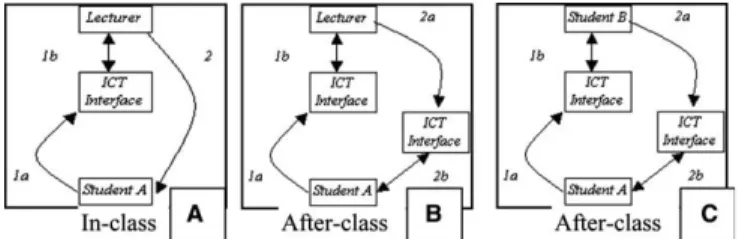
The following interactive loops were developed in thePLS TXT UR Thoughtsproject to
dem-onstrate three possible message paths for a student-initiated SMS message, in-class and after-class. The diagrams indicate the function of Student A, the lecturer, the ICT interface and Student B. In contrast to Yacci’s model, where applicable, the ICT is specifically referenced as a conduit
In all three message loops, the first half of the loop – when the message is sent – is med-iated by ICT before either the lecturer or another student can view the message. However, the second half of the loop may or may not be mediated by ICT. In Message Loop A, where the full interaction is in class, the second half of the loop is not mediated by ICT. In Message Loop B, the lecturer’s after-class reply is mediated by ICT. Finally, in Message Loop C, two students interact after class via the ICT interface. The design shown here allows the
mes-sage loop originated by Student A to be replied to by any and all of the classroom participants.
Key to opening up the interactive potential of SMS is the after-class component that is shown in Loops B and C, which makes the originating SMS and later comments available to all participants.
2.2. In-class and after-class tools
In order to support the project’s interactivity approach and to facilitate students’ learning, two tools were designed to be used in tandem. The first tool is an in-class interface to capture a stu-dent’s initial interactive message. The second is an after-class interface that provides the lecturer and other students alike the possibility to respond to the initial message. The design of both tools is informed in principles extracted from the literature, these include:
Student–instructor, student–student and student–content interaction are facilitated, to allow
interactions to build on one another (Moore, 1989).
All students can ask questions and comment (simultaneously if needed) without interrupting
the in-class activities; interaction can continue after class (Liu et al., 2002).
Fig. 1. A completed message loop between two entities (Source:Yacci, 2000, p. 3).
Student participation is anonymous, to promote greater interaction and student accountability (Davis, 2003; Draper & Brown, 2004; Woods & Chiu, 2002).
The focus is on familiar technology, to achieve a smooth, low-technology threshold for teachers
and students (Muhlhauser & Trompler, 2002; Papert, 1980).
Handhelds are used to achieve low-cost, one-to-one student-ICT device ratio (Roschelle & Pea,
2002) and anytime, anywhere usability (Savill-Smith & Kent, 2003).
The initiation of interactivity is via SMS, the ‘killer’ application of mobile phones and an area
targeted for future educational research: UltraLab (Mitchell & Doherty, 2003) and MediaLab
Europe (Ananny et al., 2004).
Capturing the students’ SMS messages was the first design issue. Following an analysis of com-mercial models (deemed unsuitable due to high cost, lack of mobility, or complex interface), the authors adapted MediaLab Europe (MLE) software interfacing with a Nokia Card Phone 1.0.
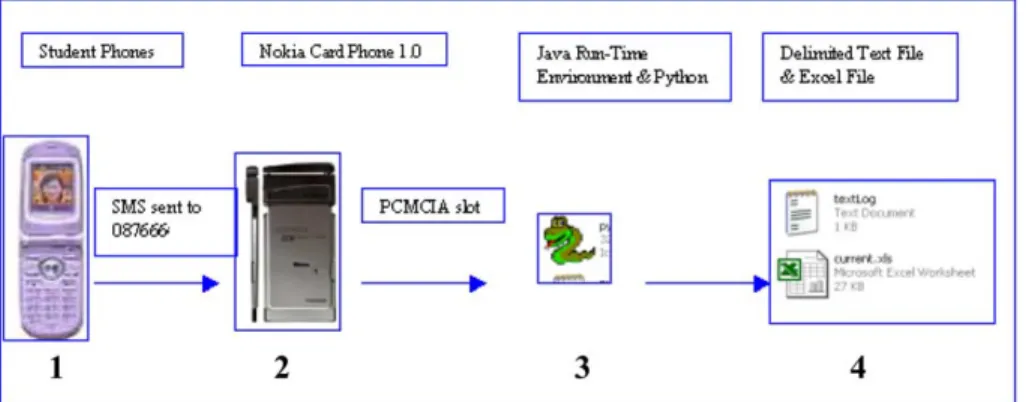
Fig. 3 portrays the functioning of the in-class tool that is initiated when students send their SMS from their own phones to a central class mobile phone number (1). The SIM card for this number is locally hosted on a laptop where a Nokia Card Phone 1.0 is installed in the PCMCIA slot (2). The modified software, using Python scripting within a Java Run-Time environment, cap-tures sent SMS messages (3). The final format is a locally stored delimited text file continuously refreshed into an Excel file for viewing on the laptop (4).
A strength of the in-class tool is that it allows multiple students to initiate interaction using their personal mobile phones and SMS. While mobile phone numbers are recorded in the file log, this is not disclosed to the lecturer or fellow students, ensuring anonymity and supporting greater interactivity. The initial file log is an adaptable text file, which is then displayed in the user-friendly, familiar Excel format. The use of mobile phones, a mobile modem and a laptop
allows for a portable classroom – withanywhere usability. Limitations of the in-class tool relate
to time and user; as interaction is in class, it is not anytime usability. Since the lecturer mediates
this tool, the initial project interaction is student–instructor. The second tool should therefore facilitate broader interaction, to allow for student–student/student–content interaction and for interaction outside of class times.
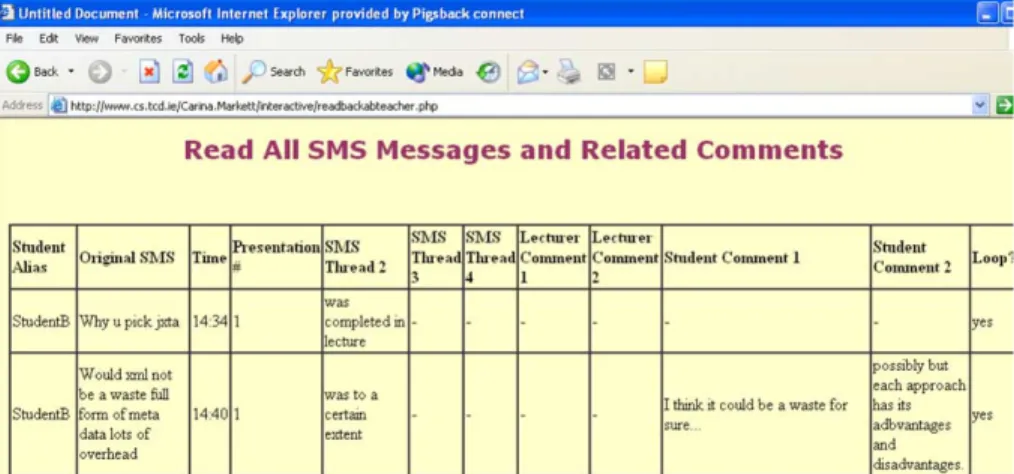
The second tool is a database-driven website, allowing for anytime access to the content of the interactive message loops. Through the use of passwords, different access levels can be set per interaction loop for the message originator, the lecturer and other students. The website supports numerous simultaneous users anytime, allows limitless additions to the thread, ensures anonymity for the originating student, and provides anonymous posting of student comments. In addition, the actual website design is straightforward, providing a simple online user
inter-face (Fig. 4).
The key strength of the after-class tool is the multiple loops of interaction that it encourages: student–instructor, student–student and student–content. An interesting feature is the threaded organisation of the SMS on the website, whereby the original student, the lecturer and multiple
other students can interact around one SMS (Fig. 5).
Fig. 4. Student index page.
2.3. Class selection and preparation
In 2004, Class A (12 undergraduate Computers & Society students) and Class B (18
post-graduate Ubiquitous Computing students) participated in the project. In 2005, Class C (12
differ-ent post-graduate Ubiquitous Computing students) participated. Each class met an average of
four and a half hours, Class A during lectures and Classes B and C during group presentations. Participants in Classes B and C served as both presenter and student during the implementation. All classes were held in rooms with wireless Internet access and mobile phone signals and all the participants had a mobile phone. For all classes, the laptop receiving and displaying SMS mes-sages was next to the facilitator; and its screen visible only to him. The researcher was also visible to students during the class, either taking written notes or filming the lecturer.
The research approach selected is an exploratory case study.Yin proposes case study as a
pre-ferred approach when ‘‘the focus is on a contemporary phenomenon within some real-life con-text’’ (2003, p. 1). The case study approach allows detailed focus on the part of the researcher, ‘‘to concentrate on a specific instance or situation and to identify, or attempt to identify, the
var-ious interactive processes at work’’ (Bell, 1999, p. 11). This small-scale implementation of a new
ICT interface is a very practical and limited instance to study, as the case ends when the classes end. Multiple sources of evidence were gathered and analysed separately, with later comparison of results from the different analyses. The in-class data gathered included: text of messages sent, tim-ing of messages, sender of messages and in-class observations. The after-class data included posted comments to the class website. Finally, students individually completed pre- and post-questionnaires and lecturers were interviewed or submitted their own project reflections.
3. Findings and conclusions 3.1. The interactive loop
As discussed in the previous section, the key feature when designing this project was to support participants in understanding and using an interactive message loop. As a result, the primary eval-uation relates to initiating, acknowledging, responding to and completing the interactive loop. 3.1.1. Initiating
Overall, 47% of students sent SMS, with the highest proportion of participatory students in the post-graduate classes (65% and 58%). The post-questionnaires revealed that 50% of students felt that their own in-class participation was affected by the project. Clarifying comments referred to increased student participation, such as: ‘‘asked more questions’’ and ‘‘ask questions freely’’. 3.1.2. Acknowledging
Once the message is sent, it is received by the in-class ICT tool and displayed to the facilitator (lecturer/presenter). Did students feel that the facilitator acknowledged their SMS in class? 71% of students felt that the facilitator referenced their text in class. One factor to note in relation to facil-itators referencing the SMS in class is that some SMS were spurious and the student may never have expected a reference/response. For example, ‘‘Help I’m trapped inside this laptop. Break it
open to let me out’’. The content of the initial SMS is analysed in Table 1to provide an under-standing of the educational and social function of this interactive medium.
Table 1shows promising data in that just 18% of SMS sent were wholly non-academic. While an additional 6% of SMS sent focused on class administration, such texts have the potential to benefit the entire class, as for example ‘‘We can’t hear u! Speak up’’. Overall, 76% of SMS were content-related.
3.1.3. Response
One interesting finding is that many SMS sent within minutes of each other were similar in con-tent, in one instance four SMS sent within one minute asked the same question. Since the in-class tool displays SMS only to the lecturer, students are effectively composing their SMS in isolation, leading to repetition of questions and comments. One of the lecturers reflected: ‘‘a number of ques-tions were related to the same topic. Some students asked if it would be possible to identify these questions and collect them together to a single question’’. However, the similarity in content is not known to the texter; in the texter’s mind, the facilitator’s response is to the sender alone – ‘‘It allowed people to address issues without interrupting the flow of events in class. Allowing the pre-senter to address issues in good time’’.
The level of response from fellow students is examined solely in relation to the website data, as
fellow students’directinteraction with the initial SMS can only occur after class (interactive Loop
C inFig. 2). The website was used in Classes A and B, with students commenting upon 28% of SMS; leading the researchers to conclude that the level of interaction between students is prom-ising. There were many types of threads, including straightforward question and answer, reference links, conflicting answers among students and confusion. Some threads that developed online are shown below and indicate that the correlation in content within the thread was quite strong:
Straightforward clarification question/answer:
1. Originating SMS:Do files have to be saved as small chunks or are they split up when they asked for download.
Website comment:File fragments are downloaded to different clients they then swap the file fragments.
Table 1
Analysis of SMS content
SMS content categorisation % Sample SMS
Clarifying question 61 Firewall, security?
Has voip any future ?
Content comment 13 These stereotypes don’t just appear from
nowhere they are based on facts and stats So gnutella is more effective
Greeting/joke 7 Bonjour mes amis
Class administration 6 Why are there so many slides?
Direct questions 2 What would you consider yourself.. . .A
socialist or capitalist?
2. Originating SMS:Torrent file small means u cant share avi files. I guess no.
Website comment:No thats missing the point. The torrent file is small and that lets you get the large avi (or whatever type of file).
3. Originating SMS:What does IETF mean?
Website comment:The Internet Engineering Task Force. Clarification question/link to further information:
4. Originating SMS:Is it an open protocol?
Website comment:Yes. Check outhttp://bitconjurer.org/BitTorrent/. Clarification question/conflicting answers:
5. Originating SMS:Why did they need to reverse engineer if it was under gnu? Website comment:They didnt the presenter was wrong.
Website comment: Reverse engineered cos aol would not release it, and the later versions were under gnu.
Unclear comment with no answer: 6. Originating SMS:Wrong! all wrong!
Website comment:Whats wrong? Website comment:Yeah whats wrong?? 3.1.4. Completing the message loop
The authors stipulated at the project’s onset that the individual student would determine if the loop was complete. Again, only website data can be analysed in relation to this, since the website contained a ‘loop completed’ box for the initiating student to tick; 31% of initiators of SMS ticked the ‘loop completed’. The use of the website occurred after class, and required scaffolded support that the authors could only provide for Classes A and B.
Examining these four key areas surrounding the interactive loop – initiating, acknowledging, responding to and completing – and relating them directly to whether the activity occurred in-class (verbally) or after-class (web-based) it appears that the strongest part of the interactive loop is the initial link between student and facilitator. The Class B lecturer agreed that the presenters made good use of the tool: ‘‘The students used the interface to get a feeling for the reception of the material by the class. This feedback through the SMS interface gave the presenters a better feeling if the class followed the presentation’’. The use of the in-class tool to sense students’ understanding, indicates
the possibility of using the tool for contingent teaching, as explored byDraper and Brown (2004).
3.2. Benefits of interactivity
ThePLS TXT UR Thoughtsresearch project aims to encourage interactivity in the classroom to reap benefits in relation to:
a more active learning environment;
provision of greater and ongoing feedback for lecturers;
increased student interest and motivation.
Increased student interaction can directly lead to a more active learning environment; the building of a learning environment depends of both a wide catchment of student involvement
and individual in-depth involvement. Several students expressed ideas relating to how the SMS provision specifically led to interactions that would not have happened otherwise. In the under-graduate class, 38% of students never or rarely ask the lecturer a question in class; according to one student ‘‘It [SMS] gave people who were normally shy the chance to have their say’’. In addition to shyness, fear and embarrassment also play a role in discouraging interaction. One student felt that ‘‘a couple of issues came up via SMS that probably wouldn’t have been asked otherwise, i.e., people wouldn’t want to ask if they think it’s obvious and they should know’’. The final word on an active learning environment belongs to a lecturer who felt that entire con-versations were due to the technology as the comment/impetus for the conversation: ‘‘wouldn’t be made otherwise’’.
With part of the implementation occurring during student group presentations, where there was a set presentation length to include exposition, questions and discussion, the use of SMS certainly provided presenters with feedback that they might otherwise have not received as there usually are not questions until the end of the presentations. As one student explained: ‘‘There were more questions asked, as these were student presentations we usually don’t interrupt’’.
The effect of this implementation on overall student motivation and interest levels is difficult to monitor, as the implementation was only during a portion of a year-long courses. However, dur-ing the implementation itself, there was certainly great student interest.
3.3. Limitations
While the overall implementation produced very positive results and provided interesting SMS and website comments from students and lecturers/presenters alike, limitations were also identified.
Although 100% of student participants had mobile phones, the opportunity to send SMS and interact via the project was only possible when they: brought their mobile to class and had credit on their phone. In relation to technology presence, only one student noted that he had forgotten his phone during class. This correlates with pre-project data suggesting the near ubiquity of mobiles: 58% of students have their mobile with them 100% of the time and 42% have it with them between 75-100% of the time. Data on call credit presents more challenges to researchers, as the vast majority of students in the study use pre-pay mobile phones and therefore can ‘run out of credit’ and be unable to text. Correspondingly, the cost of sending a text is a motivating factor for students with 92% reporting on the use of web-based SMS services. Providing a free SMS number for students to send texts would entirely eliminate the cost factor for students; this is cer-tainly a possibility for larger-scale implementations whose funding can justify the start-up costs of free SMS services.
Students frequently reported on the time required to type an SMS on a mobile phone as a neg-ative aspect of the implementation. The ease of typing text on a computer keyboard is a motivat-ing factor for 73% of the students who use web-based SMS services. Typmotivat-ing out the SMS was the most frequently commented upon problem, as students felt that it: took too long, distracted them from what was being said, made them miss a point entirely, and distracted the lecturer. Students were quite clear in highlighting this concern: ‘‘I found the effort to send an SMS detracted greatly from the lecture. I missed entire points as I focused on keying in the message!’’ and ‘‘You cannot
concentrate on what is being presented while you punch in the question’’. From the presenter’s per-spective at the top of the class, 33% found the focus of students on their phones to be distracting. While researchers suggest that PDAs and mobile phones will merge in form and function over the next 5–10 years and extendable keypads are available for mobile phones, at present the majority
of users write SMS using a 12 button number pad (Naismith, Lonsdale, Vavoula, & Sharples,
2004). What is essential to note in relation to perceived distraction due to texting is that in any
classroom there are distractions for students and lecturers/presenters alike. In class students take notes, raise their hands, wait to be called on and talk among themselves. After class, they may need to take additional time to contact lecturers for clarification on specific issues. Perhaps texting introduces a new distraction, while reducing traditional distractions.
Writing SMS messages on a mobile phone uses T9 technology that suggests words based on the keys typed, the user’s previous texts and the phone dictionary. This avoids the user having to type in every letter of a word. However, in educational environments discipline-specific terminology is widespread and T9 would not pre-empt as frequently as in social settings. The limitations of T9 can be overcome however, via add on programming that builds on a phone’s vocabulary. This is an area identified by the authors and considered as a possible next step in the project.
One barrier to institutional acceptance of the use of SMS in class is the private link that mobile phones give students to outside the classroom. This private link has lead to the design of some new lecture halls that specifically block mobile phone signals. Referring to it as ‘‘the outside world entering the classroom’’, one mature student answered a call from her son’s school. With this in mind, students who had their mobiles on during class were asked three questions to determine
if the mobile phone was used for external contact. The results are shown inTable 2.
3.4. Future work
In light of the research result presented here and the advantages reported in terms of interac-tivity, the authors put forward a number of scenarios in which the above interactive approach, and in particular the use of SMS, might be worthy of investigation. Such scenarios would include larger classes or lectures, seminars, workshops and conferences, induction sections for courses or other activities, training sessions, large parent–teacher meetings, political meetings, to mention but a few. Thus, the authors envisage the use of SMS for interactivity purposes well beyond the walls of formal learning environments.
The primary concern of the analysis was to determine if students used the in-class and after-class tools to understand and participate in interactive loops. The data analysed indicates that students were receptive to using SMS in class, while further analysis of the online thread content indicates that issues raised in class are being examined and responded to after class – an active
Table 2
Percentage of students using SMS for non-class purposes during class
Action %
Send SMS outside of class 16
Send SMS to a classmate 16
interactive loop. With lecturers using the interface in class – referencing students’ SMS and mon-itoring student understanding – broader interaction (anytime, anywhere, simultaneous) with mul-tiple levels (student–student, student–lecturer, student–content) is occurring. For student respondents, the opportunity to: use a new technology, view a variety of comments, respond in multiple mediums and text in class led to some satisfaction. The majority of students would like to see SMS used in class in the future, and suggested additional activities for which it would be appropriate and which the authors have referenced above.
In recent years, researchers in the field of technology-enhanced education have suggested the potential of SMS for communication and content delivery and have engaged in research in these specific areas. Nonetheless, the particular focus on interactivity has not been fully explored. The authors hope that our contribution to the field will encourage other researchers to look beyond the small things and look at the big picture of how we presently interact and how we may interact in the future tks 2 txt.
Acknowledgement
The students at Trinity College Dublin in Computers & Society and Ubiquitous Computing are gratefully acknowledged. James Bligh and Bryan Patten at CRITE for technical and practical assistance. Mike Ananny with the Everyday Learning Group at Media Lab Europe provided the TexTales software, initial hardware loan and support.
References
Ananny, M., Strohecker, C., & Biddick, K. (2004). Shifting scales on common ground: developing personal expressions and public opinions. International Journal of Continuing Engineering Education and Life-Long Learning, 14(6), 484–505.
Anderson, T. (2002).An updated and theoretical rationale for interaction. IT Forum. Retrieved 25 April, 2004, from http://it.coe.uga.edu/itforum/paper63/paper63.htm.
Bell, J. (1999).Doing your research project: A guide to first-time researchers in education and social science(3rd ed.). Buckingham: Open University Press.
Bollen, L., Eimler, S., & Hoppe, H. U. (2004). SMS-based discussions: technology enhanced collaboration for a literature course. In2nd IEEE international workshop on wireless and mobile technology in education 2004, Taiwan. Cereijo-Roibas, A., & Arnedillo-Sanchez, I. (2002). Pathway to m-learning. In European workshop on mobile &
contextual learning, Birmingham, UK.
Davis, S. (2003). Observations in classrooms using a network of handheld devices. Journal of Computer Assisted Learning, 19(3), 298–307.
Divitini, M., Haugalokken, O. K., & Norevik, P. -A. (2002). Improving communication through mobile technologies: which possibilities? InIEEE international workshop on wireless and mobile technologies in education, Va¨xjo¨, Sweden. Draper, S. W., & Brown, M. I. (2004). Increasing interactivity in lectures using an electronic voting system.Journal of
Computer Assisted Learning, 20, 81–94.
Hegarty, S. (2004). Can’t live with them, can’t live without them.Irish Times(p. 17).
Hoppe, H. U., Joiner, R., Milrad, M., & Sharples, M. (2003). Guest editorial: wireless and mobile technologies in education.Journal of Computer Assisted Learning, 19(3), 255–259.
Lehner, F., & Nosekabel, H. (2002). The role of mobile devices in e-learning – first experiences with a wireless e-learning environment. InIEEE international workshop on wireless and mobile technologies in education, Va¨xjo¨, Sweden.
Liu, T. -C., Wang, H. -Y., Liang, J. -K., Chan, T. -W., & Yang, J. -C. (2002). Applying wireless technologies to a build highly interactive learning environment. In IEEE international workshop on wireless and mobile technologies in education, Va¨xjo¨, Sweden.
Markett, C., Arnedillo Sa´nchez, I., Weber, S., & Tangney, B. (2004). ‘‘PLS Turn UR Mobile On’’: Short message service (SMS) supporting interactivity in the classroom. In Kinshuk, Demetrios G. Sampson, & Pedro Isaias (Eds.), Cognition and exploratory learning in digital age(pp. 491–494). Lisbon: International Association for Development of the Information Society.
Mifsud, L. (2002). Alternative learning arenas – pedagogical challenges to mobile learning technology in education. In IEEE international workshop on wireless and mobile technologies in education, Va¨xjo¨, Sweden.
Mitchell, A., & Doherty, M. (2003).M-learning support for disadvantaged youth: A mid-stage review. Anglia: Ultralab. Mitchell, A., Heppel, S., & Kadirire, J. (2002).Technology watch research report. Anglia: UltraLab.
Moore, M. G. (1989). Editorial: three types of interaction.The American Journal of Distance Education, 3(2), 1–6. Muhlhauser, M., & Trompler, C. (2002). Learning in the digital age: paving a smooth path with digital lecture halls. In
IEEE 35th Hawaii international conference on system sciences, Hawaii.
Muirhead, B., & Juwah, C. (2003). Interactivity in computer-mediated college and university education: A recent review of the literature. InInternational forum of educational technology&society. Retrieved 7 December, 2003, fromhttp:// ifets.ieee.org/discussions/discuss_november2003.html.
Naismith, L., Lonsdale, P., Vavoula, G., & Sharples, M. (2004).Literature review in mobile technologies and learning, Nesta Futurelab.
Nyiri, K. (2003).Mobile communication: essays on cognition and community. Vienna: Passagen Verlag. Papert, S. (1980).Mindstorms. New York: Basic Books.
Pinkwart, N., Hoppe, H. U., Milrad, M., & Perez, J. (2003). Educational scenarios for cooperative use of personal digital assistants.Journal of Computer Assisted Learning, 19(3), 383–391.
Prammanee, N. (2003).Understanding participation in online courses: a case study of perceptions of online interaction. IT Forum. Retrieved 29 February 2004, fromhttp://it.coe.uga.edu/itforum/paper68/paper68.html.
Roschelle, J. (2003). Keynote paper: unlocking the learning value of wireless mobile devices. Journal of Computer Assisted Learning, 19(3), 260–272.
Roschelle, J., & Pea, R. (2002). A walk on the WILD side: How wireless handhelds may change CSCL. InComputer Support for Collaborative Learning, Boulder, CO.
Savill-Smith, C., & Kent, P. (2003). The use of palmtop computers for learning: A review of the literature. London: Learning & Skills Development Agency.
Stone, A. (2002). Mobile telephony and learning: Nuisance or potential enhancement? InIEEE international symposium on technology and society: Social implications of information and communication technology, Raleigh, USA. Stone, A., Briggs, J., & Smith, C. (2002). SMS and interactivity – Some results from the field, and its implications on
effective uses of mobile technologies in education. InIEEE international workshop on wireless and mobile technologies in education, Va¨xjo¨, Sweden.
Thornton, P., & Houser, C. (2004). Using mobile phones in education. InProceedings of the 2nd international workshop on wireless and mobile technologies in education (WMTE ’04), Taiwan.
Woods, H. A., & Chiu, C. (2002).Wireless response technology in college classrooms. The Technology Source. Retrieved 25 April, 2004, fromhttp://ts.mivu.org/default.asp.
Yacci, M. (2000). Interactivity demystified: a structural definition for distance education and intelligent computer-based instruction.Educational Technology, 40(4), 5–16.