American Physical Society∗ 1 Research Road, Ridge, NY 11961
(Dated: March 2010)
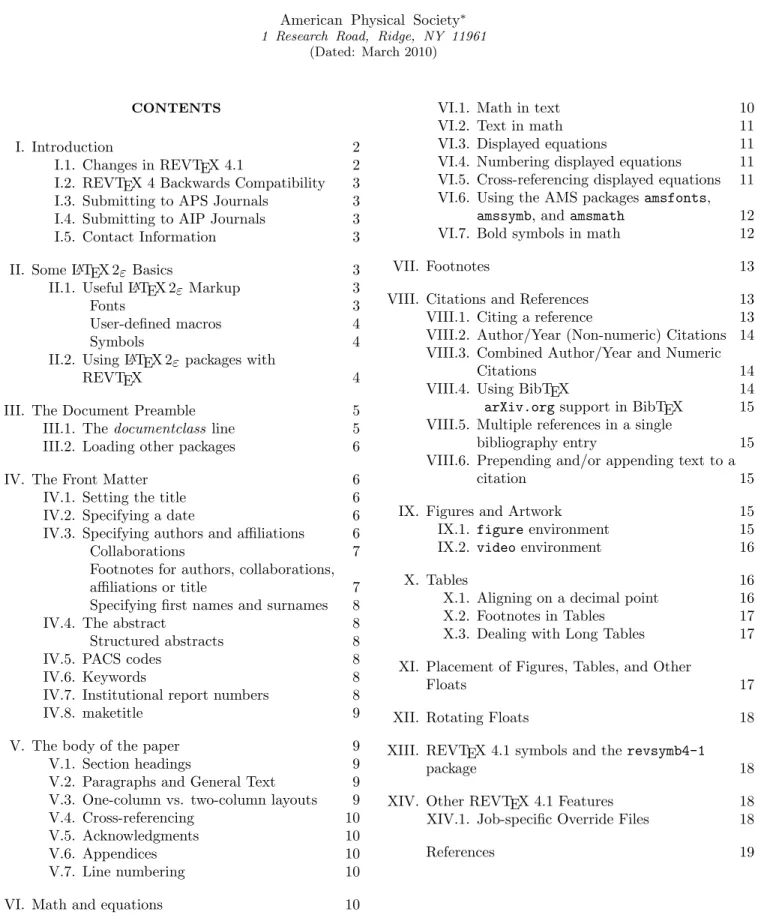
CONTENTS
I. Introduction 2
I.1. Changes in REVTEX 4.1 2 I.2. REVTEX 4 Backwards Compatibility 3 I.3. Submitting to APS Journals 3 I.4. Submitting to AIP Journals 3 I.5. Contact Information 3
II. Some LATEX 2ε Basics 3
II.1. Useful LATEX 2εMarkup 3
Fonts 3
User-defined macros 4
Symbols 4
II.2. Using LATEX 2ε packages with
REVTEX 4
III. The Document Preamble 5
III.1. The documentclass line 5 III.2. Loading other packages 6
IV. The Front Matter 6
IV.1. Setting the title 6
IV.2. Specifying a date 6
IV.3. Specifying authors and affiliations 6
Collaborations 7
Footnotes for authors, collaborations, affiliations or title 7 Specifying first names and surnames 8
IV.4. The abstract 8
Structured abstracts 8
IV.5. PACS codes 8
IV.6. Keywords 8
IV.7. Institutional report numbers 8
IV.8. maketitle 9
V. The body of the paper 9
V.1. Section headings 9
V.2. Paragraphs and General Text 9 V.3. One-column vs. two-column layouts 9
V.4. Cross-referencing 10
V.5. Acknowledgments 10
V.6. Appendices 10
V.7. Line numbering 10
VI. Math and equations 10
VI.1. Math in text 10
VI.2. Text in math 11
VI.3. Displayed equations 11 VI.4. Numbering displayed equations 11 VI.5. Cross-referencing displayed equations 11 VI.6. Using the AMS packagesamsfonts,
amssymb, andamsmath 12 VI.7. Bold symbols in math 12
VII. Footnotes 13
VIII. Citations and References 13 VIII.1. Citing a reference 13 VIII.2. Author/Year (Non-numeric) Citations 14 VIII.3. Combined Author/Year and Numeric
Citations 14
VIII.4. Using BibTEX 14
arXiv.orgsupport in BibTEX 15 VIII.5. Multiple references in a single
bibliography entry 15
VIII.6. Prepending and/or appending text to a
citation 15
IX. Figures and Artwork 15
IX.1. figureenvironment 15 IX.2. video environment 16
X. Tables 16
X.1. Aligning on a decimal point 16 X.2. Footnotes in Tables 17 X.3. Dealing with Long Tables 17 XI. Placement of Figures, Tables, and Other
Floats 17
XII. Rotating Floats 18
XIII. REVTEX 4.1 symbols and therevsymb4-1
package 18
XIV. Other REVTEX 4.1 Features 18 XIV.1. Job-specific Override Files 18
I. INTRODUCTION
This is the author’s guide to REVTEX 4.1, the pre-ferred submission format for all APS and AIP journals. This guide is intended to be a concise introduction to REVTEX 4.1. The documentation has been separated out into smaller units to make it easier to locate essen-tial information.
The following documentation is also part of the REVTEX 4.1 distribution. Updated versions of these will be maintained at the REVTEX 4.1 homepage located at
http://authors.aps.org/revtex4/. • APS Author Guide for REVTEX 4.1
• Author’s Guide to AIP Substyles for REVTEX 4.1 • REVTEX 4.1 Command and Options Summary • What’s New in REVTEX 4.1
This guide assumes a working REVTEX 4.1 installation. Please see the installation instructions included with the distribution.
I.1. Changes in REVTEX 4.1
The REVTEX system for LATEX began its development in 1986 and has gone through three major revisions since then. REVTEX 4 was released in August, 2001. Since that time, many user requests for new features were re-ceived. The main goals for REVTEX 4.1 are to incor-porate this user feedback and provide support for the journals of the American Institute of Physics (AIP) . It incorporates the following changes:
• Added support for APS journal Physical view Special Topics – Physics Education Re-search.
• Added support for AIP journals. There is now an explicit aip society option along with support for AIP journals. Please see the Author’s Guide to AIP Substyles for REVTEX 4.1. In addition, REVTEX 4.1 provides an extensible system for the easy addition of new collections of journals.
• Endnotes now ordered correctly. Endnotes in the bibliography now appear in the correct order, inter-leaved with citations.
• Multiple references in a single citation sup-ported using a special starred (*) argument to the\citecommand. One of the major new features in 4.1 made possible by the joint work onnatbib 8.3. Multiple BibTEX entries can be combined into a single
\bibitemcommand.
• Free form text can be prepended and ap-pended to a bibliographic entry using the spe-cial starred (*) argument to the \cite com-mand. Often a citation in the bibliography will have explanatory text such as See also or and references therein before and after the actual citation. The new REVTEX 4.1 \citecommand allows the specification of both text to precede and follow a citation.
• Structured Abstracts. Use of thedescription en-vironment in abstracts now provides for “structured” abstracts.
• Figures referring to videos now supported. A “figure” may now be labeled as aVideoby using the
video environment. A frame from the video may be included in the figure and a URL to link the caption’s label to the online video also may be included. There is also a \listofvideoscommand.
• Better support for arXiv.org in BibTEX Three more BibTEX fields have been added: SLACcitation,
archivePrefix, andprimaryClassin addition to the existing fieldeprint.
• Improved BibTEX bst files. In addition to the new features above, numerous other improvements to the APS bst files have been made, including sup-port for displaying journal article titles (using the new
longbibliographyoption) and many fixes forReviews of Modern Physics. Also, long author lists are no longer automatically truncated.
• \footnotein\widetextandtable*environments improved. \footnotes in the\widetextor table*
environments are now correctly placed and formatted. • Email addresses no longer print twice on papers
less than one page long. • eqnarray alignment improved.
• \collaboration can be used with the
groupedaddress option now.
• letterpaper now ensured as default paper size. • Table of Contents formatting improved.
• Support for the longtablepackage improved. • reftest restored.
• Compatibility with the geometry, lineno, lscape andcolortblpackages improved. For line numbering, rather than using lineno.sty directly, the linenumbers class option should be used (this will call in lineno.sty with a proper set of default parameters).
• hyperreffixes. Improvements were to make footnotes work better with thehyperrefpackage. In particular, table footnotes were fixed. More anchors forhyperref
were also added (titlepage, abstract, and acknowledge-ments).
• Documents can have more than 256\cite com-mands now.
• \listoffigures and \listoftablesfixed.
• Figure and table labels in captions now reflect proper APS style.
• RMP style files conform better to RMP style guidelines.
• Section heading upper-casing improved.
• Repeated characters at start of affiliation no longer disappear when usinggroupedaddress op-tion.
• There have been many other bug fixes and im-provements to the internal ltxgrid package as well.
I.2. REVTEX 4 Backwards Compatibility
Documents prepared under REVTEX 4 should process correctly under REVTEX 4.1. However, the formatting of the pages and, if using BibTEX, the references may change.
I.3. Submitting to APS Journals
Authors using REVTEX 4.1 to prepare a manuscript for submission to Physical Review Letters, Physical Re-view,Reviews of Modern Physics, or other APS journals must also read the companion document APS Author Guide for REVTEX 4.1 distributed with REVTEX and follow the guidelines detailed there.
The REVTEX 4.1 distribution includes both a tem-plate (apstemplate.tex) and a sample document (apssamp.tex). The template is a good starting point for a manuscript. In the following sections are instruc-tions that should be sufficient for creating a paper using REVTEX 4.1.
Further information about submissions to the Ameri-can Physical Society may be found athttp://publish. aps.org/.
I.4. Submitting to AIP Journals
REVTEX 4.1 includes support for the journals of the American Institute of Physics. The style files and au-thoring guides for these journals are distributed as part REVTEX 4.1 distribution. The distribution includes both a template (aiptemplate.tex) and a sample document (aipsamp.tex). The template is a good starting point for a manuscript. In the following sections are instruc-tions that should be sufficient for creating a paper using REVTEX 4.1.
More information may be found athttp://www.aip. org/pubservs/compuscript.html. Please consult the Author’s Guide to AIP Substyles for REVTEX 4.1 for more information about submissions to AIP journals, AIP styles files, and other AIP-specific information.
I.5. Contact Information
Any bugs, problems, or inconsistencies with REVTEX or the APS journal style files should be reported to REVTEX support at [email protected]. Reports should include information on the error and a small sample document that manifests the problem if possible (please don’t send large files!). Issues related to the AIP journal styles should be sent directly [email protected].
II. SOME LATEX 2ε BASICS
REVTEX 4.1 must sometimes patch the underlying LATEX kernel. This means that REVTEX 4.1 requires a fairly recent version of LATEX 2ε. Versions prior to 2005/12/01 may not work correctly. REVTEX 4.1 will be maintained to be compatible with future versions of LATEX 2ε.
II.1. Useful LATEX 2ε Markup
LATEX 2ε markup is the preferred way to accomplish many basic tasks.
Fonts
Because REVTEX 4.1 is based upon LATEX 2ε, it in-herits all of the macros used for controlling fonts. Of particular importance are the LATEX 2εmacros\textit,
\textbf,\textttfor changing to an italic, bold, or type-writer font respectively. One should always use these macros rather than the lower-level TEX macros\it,\bf, and\tt. The LATEX 2ε macros offer improvements such
TABLE I. LATEX 2εfont commands Text Fonts
Font command Explanation
\textit{htexti} Italics \textbf{htexti} Boldface \texttt{htexti} Typewriter \textrm{htexti} Roman \textsl{htexti} Slanted \textsf{htexti} Sans Serif \textsc{htexti} Small Caps \textmd{htexti} Medium Series \textnormal{htexti} Normal Series \textup{htexti} Upright Series
Math Fonts \mathit{htexti} Math Italics \mathbf{htexti} Math Boldface \mathtt{htexti} Math Typewriter \mathsf{htexti} Math Sans Serif \mathcal{htexti} Calligraphic \mathnormal{htexti} Math Normal
\bm{htexti} Bold math for Greek letters and other symbols
\mathfrak{htexti}a
Fraktur \mathbb{htexti}a
Blackboard Bold a Requiresamsfontsoramssymbclass option
as better italic correction and scaling in super- and sub-scripts for example. Table I summarizes the font selection commands in LATEX 2ε.
User-defined macros
LATEX 2ε provides several macros that enable users to easily create new macros for use in their manuscripts:
• \newcommand{hcommandi}[hnargi][hopti]{hdefi} • \newcommand*{hcommandi}[hnargi][hopti]{hdefi} • \renewcommand{hcommandi}[hnargi][hopti]{hdefi} • \renewcommand*{hcommandi}[hnargi][hopti]{hdefi} • \providecommand{hcommandi}[hnargi][hopti]{hdefi} • \providecommand*{hcommandi}[hnargi][hopti]{hdefi} Herehcommandiis the name of the macro being defined, hnargiis the number of arguments the macro takes,hopti are optional default values for the arguments, andhdefi is the actually macro definiton. \newcommand creates a new macro, \renewcommand redefines a previously de-fined macro, and \providecommandwill define a macro
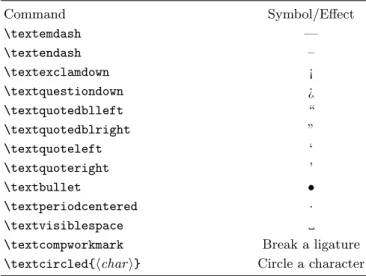
TABLE II. LATEX 2εcommands for special symbols and effects
Command Symbol/Effect \textemdash — \textendash – \textexclamdown ¡ \textquestiondown ¿ \textquotedblleft “ \textquotedblright ” \textquoteleft ‘ \textquoteright ’ \textbullet • \textperiodcentered · \textvisiblespace
\textcompworkmark Break a ligature \textcircled{hchari} Circle a character
only if it hasn’t been defined previously. The *-ed ver-sions are an optimization that indicates that the macro arguments will always be “short” arguments. This is al-most always the case, so the *-ed versions should be used whenver possible.
The use of these macros is preferred over using plain TEX’s low-level macros such as\def,\edef, and \gdef. APS authors must follow the APS Author Guide for REVTEX 4.1 when defining macros.
Symbols
LATEX 2ε has added some convenient commands for some special symbols and effects. These are summarized in Table II. See [3] for details.
LATEX 2ε provides additional symbols in a separate package calledlatexsym. To use these symbols, include the package using:
\usepackage{latexsym}
II.2. Using LATEX 2ε packages with REVTEX
Many LATEX 2ε packages are available, for instance, on CTAN at http://www.ctan.org/tex-archive/ macros/latex/required/ and at http://www.ctan. org/tex-archive/macros/latex/contrib/ or may be available on other distribution media, such as the TEX Live CD-ROM http://www.tug.org/texlive/. Some of these packages are automatically loaded by REVTEX 4.1 when certain class options are invoked and are, thus, “required.” They will either be distributed with REVTEX or are already included with a standard LATEX 2εdistribution.
Required packages are automatically loaded by REVTEX on an as-needed basis. Other packages should be loaded using the\usepackagecommand. To load the
hyperref package, the document preamble might look like:
\documentclass{revtex} \usepackage{hyperref}
Some common (and very useful) LATEX 2εpackages are a priori important enough that REVTEX 4.1 has been designed to be specifically compatible with them. A bug stemming from the use of one of these packages in con-junction with any of the APS journals may be reported by contacting REVTEX support.
AMS packages REVTEX 4.1 is compatible with and depends upon the AMS packages amsfonts, amssymb, and amsmath. In fact, REVTEX 4.1 requires use of
these packages to accomplish some common tasks. See Section VI for more. REVTEX 4.1 requires version 2.0 or higher of the AMS-LATEX package.
array and dcolumn Thearrayanddcolumnpackages are part of LATEX’s required suite of packages. dcolumn is required to align table columns on decimal points (and it in turn depends upon thearraypackage). longtable longtable.stymay be used for large tables
that will span more than one page. REVTEX 4.1 dy-namically applies patches to longtable.sty so that it will work in two-column mode.
hyperref hyperref.sty is a package by Sebastian Rahtz that is used for putting hypertext links into LATEX 2ε documents. REVTEX 4.1 has hooks to al-low e-mail addresses and URL’s to become hyperlinks ifhyperrefis loaded.
lineno REVTEX 4.1 improves compatibility with
lineno.sty. This package should only be loaded via the new linenumbers class option. See Section V.7 for more information.
lscape REVTEX 4.1 improves compatibility with
lscape.sty.
geometry REVTEX 4.1 improves compatibility with
geometry.sty.
colortbl REVTEX 4.1 improves compatibility with
colortbl.sty.
Other packages will conflict with REVTEX 4.1 and should be avoided. Usually such a conflict arises because the package adds enhancements that REVTEX 4.1 al-ready includes. Here are some common packages that clash with REVTEX 4.1:
multicolmulticol.sty is a package by Frank Mittel-bach that adds support for multiple columns. In fact, early versions of REVTEX 4.1 used multicol.styfor precisely this. REVTEX 4.1 incorporates its own sup-port for multiple-column typesetting.
citeDonald Arseneau’s cite.sty is often used to pro-vide support for sorting a\citecommand’s arguments into numerical order and to collapse consecutive runs of reference numbers. REVTEX 4.1 has this function-ality built-in already via the natbibpackage.
mcite REVTEX 4.1 already contains a lot of this func-tionality through its updated syntax for the \cite
command and the latestnatbibpackage.
endfloat The same functionality can be accomplished using theendfloatsclass option.
float float.styprovides a mechanism for creating new float classes with just a few commands. REVTEX 4.1 has limited compatible with float.sty. If attempting to use this package, be sure to put any \newfloat com-mands after the \begin{document}line.
III. THE DOCUMENT PREAMBLE
The preamble of a LATEX document is the set of com-mands that precede the\begin{document}line. It con-tains a \documentclass line to load the REVTEX 4.1 class (i.e., all of the REVTEX 4.1 macro definitions),
\usepackagemacros to load other macro packages, and other macro definitions.
III.1. Thedocumentclass line
The basic formatting of the manuscript is controlled by setting class options using
\documentclass[hoptionsi]{revtex4-1}. The op-tional arguments that appear in the square brackets control the layout of the document. At this point, one only needs to choose:
• Either theaps(default) oraipsociety option
• One of the chosen society’s journal styles such as prl
or apl
• A layout option such as preprint(single-column for-matting), reprint (an approximation to the selected journal’s actual layout which may be one- or two-column depending on the journal), ortwocolumn
Usually, one would want to usepreprint for draft pa-pers. Paper size options are also available as well. In particular,a4paperis available as well as the rest of the standard LATEX paper sizes. A full list of class options is
given in the REVTEX 4.1 Command and Options Sum-mary.
III.2. Loading other packages
Other packages may be loaded into a REVTEX 4.1 doc-ument by using the standard LATEX 2ε\usepackage com-mand. For instance, to load the graphicspackage, one would use\usepackage{graphics}.
IV. THE FRONT MATTER
After choosing the basic look and feel of the document by selecting the appropriate class options and loading in whatever other macros are needed, one is ready to move on to creating a new manuscript. After the preamble, be sure to put in a \begin{document}line (and put in an\end{document}as well). This section describes the macros REVTEX 4.1 provides for formatting the front matter of the article. The behavior and usage of these macros can be quite different from those provided in the LATEX 2ε articleclass.
IV.1. Setting the title
The title of the manuscript is simply specified by using the\title{title}macro. A\\may be used to put a line break in a long title.
IV.2. Specifying a date
The\date{hdatei}command outputs the date on the manuscript. Using\todaywill cause LATEX to insert the current date whenever the file is run:
\date{\today}
IV.3. Specifying authors and affiliations
The REVTEX 4.1 macros for specifying authors and their affiliations are designed to save labor for authors and during production. Authors and affiliations are ar-ranged into groupings called, appropriately enough, au-thor groups. Each auau-thor group is a set of auau-thors who share the same set of affiliations. Author names are spec-ified with the \author macro while affiliations (or ad-dresses) are specified with the\affiliationmacro. Au-thor groups are specified by sequences of\authormacros followed by \affiliation macros. An \affiliation
macro applies to all previously specified\authormacros which don’t already have an affiliation supplied.
For example, if Bugs Bunny and Roger Rabbit are both at Looney Tune Studios, while Mickey Mouse is at Disney World, the markup would be:
\author{Bugs Bunny} \author{Roger Rabbit}
\affiliation{Looney Tune Studios} \author{Mickey Mouse}
\affiliation{Disney World}
The default is to display this as
Bugs Bunny and Roger Rabbit Looney Tune Studios
Mickey Mouse Disney World
This layout style for displaying authors and their affiliations is chosen by selecting the class option
groupedaddress. Journal styles usually default this option, so it need not be specified explicitly. The other major way of displaying this information is to use superscripts on the authors and affiliations. This can be accomplished by selecting the class option
superscriptaddress. To achieve the display
Bugs Bunny,1Roger Rabbit,1,2and Mickey Mouse2 1Looney Tune Studios
2Disney World
one would use the markup
\author{Bugs Bunny}
\affiliation{Looney Tune Studios} \author{Roger Rabbit}
\affiliation{Looney Tune Studios} \affiliation{Disney World}
\author{Mickey Mouse} \affiliation{Disney World}
Note that REVTEX 4.1 takes care of any commas and and’s that join the author names together and font se-lection, as well as any superscript numbering. Only the author names and affiliations should be given within their respective macros. See below for further information re-garding the proper way to add footnotes to author names and affiliations.
There is a third class option, unsortedaddress, for controlling author/affiliation display. The default
groupedaddresswill actually sort authors into the ap-proriate author groups if one chooses to specify an affili-ation for each author. The markup:
\author{Bugs Bunny}
\affiliation{Looney Tune Studios} \author{Mickey Mouse}
\affiliation{Disney World} \author{Roger Rabbit}
will result in the same display as for the first case given above even though Roger Rabbit is specified af-ter Mickey Mouse. To avoid Roger Rabbit being moved into the same author group as Bugs Bunny, use the
unsortedaddressoption instead. In general, it is safest to list authors in the order they should appear and spec-ify affiliations for multiple authors rather than one at a time. This will afford the most independence for choos-ing the display option. Finally, it should be mentioned that the affiliations for thesuperscriptaddressare pre-sented and numbered in the order that they are encoun-tered. These means that the order will usually follow the order of the authors. An alternative ordering can be forced by including a list of\affiliationcommands before the first \authorin the desired order. Then use the exact same text for each affilation when specifying them for each author.
If an author doesn’t have an affiliation, the
\noaffiliation macro may be used in the place of an
\affiliationmacro.
Collaborations
A collaboration name can be specified with the
\collaboration command. This is very similar to the
\authorcommand. In REVTEX 4.1, it can be used with
both the superscriptaddress and groupedaddress
class options. The\collaborationcommand should ap-pear at the end of the list of authors. The collaboration name will be appear centered in parentheses between the list of authors and the list of affiliations. Because col-laborations don’t normally have affiliations, one needs to follow the\collaborationwith\noaffiliation.
Footnotes for authors, collaborations, affiliations or title Often one wants to specify additional information asso-ciated with an author, collaboration, or affiliation such as an e-mail address, an alternate affiliation, or some other ancillary information. REVTEX 4.1 introduces several new macros just for this purpose. They are:
• \email[hoptional texti]{e-mail address}
• \homepage[hoptional texti]{URL}
• \altaffiliation[hoptional texti]{affiliation}
• \thanks{miscellaneous text}
In the first three, the optional text will be prepended before the actual information specified in the required argument. In the APS journal style files, \email and
\homepageno longer have a default value. However, in
the AIP styles, each have a default text for their op-tional arguments (‘Electronic address:’ and ‘URL:’ re-spectively). The \thanks macro should only be used if one of the other three do not apply. Any author name can have multiple occurences of these four macros. Note that unlike the\affiliationmacro, these macros only apply to the \author that directly precedes it. Any\affiliationmust follow the other author-specific macros. A typical usage might be as follows:
\author{Bugs Bunny}
\email[E-mail me at: ]{[email protected]} \homepage[Visit: ]{http://looney.com/} \altaffiliation[Permanent address: ]
{Warner Brothers} \affiliation{Looney Tunes}
This would result in the footnote “E-mail me at:
[email protected], Visit: http://looney.com/, Perma-nent address: Warner Brothers” being attached to Bugs Bunny. Note that:
• Only an e-mail address, URL, or affiliation should go in the required argument in the curly braces.
• The font is automatically taken care of.
• An explicit space is needed at the end of the optional text if one is desired in the output.
• Use the optional arguments to provide customized text only if there is a good reason to.
The\collaboration,\affiliation, or even\title
can also have footnotes attached via these commands. If any ancillary data (\thanks, \email, \homepage, or \altaffiliation) are given in the wrong context (e.g., before any\title, \author, \collaboration, or
\affiliationcommand has been given), then a warning is given in the TEX log, and the command is ignored.
Duplicate sets of ancillary data are merged, giving rise to a single shared footnote. However, this only applies if the ancillary data are identical: even the order of the commands specifying the data must be identical. Thus, for example, two authors can share a single footnote in-dicating a group e-mail address.
Duplicate \affiliation commands may be given in the course of the front matter, without the danger of pro-ducing extraneous affiliations on the title page. However, ancillary data should be specified for only the first in-stance of any particular institution’s\affiliation com-mand; a later instance with different ancillary data will result in a warning in the TEX log.
It is preferable to arrange authors into sets. Within each set all the authors share the same group of affilia-tions. For each author, give the\author(and appropri-ate ancillary data), then follow this author group with the needed group of\affiliation commands.
If affiliations have been listed before the first\author
macro to ensure a particular ordering, be sure that any later \affiliation command for the given institution is an exact copy of the first, and also ensure that no ancillary data is given in these later instances.
Each journal class option has a default behavior for the placement of these ancillary information footnotes. For instance, the prb option puts all such footnotes at the start of the bibliography while theprljournal styles displays them on the first page. One can override a jour-nal style’s default behavior by specifying explicitly the class optionbibnotes(puts the footnotes at the start of the bibliography) ornobibnotes(puts them on the first page). Please consult the documentation for the various journal style files for further information.
Specifying first names and surnames
Many authors have names in which either the surname appears first or in which the surname is made up of more than one name. To ensure that such names are accurately captured for indexing and other purposes, the\surname
macro should be used to indicate which portion of a name is the surname. Similarly, there is a \firstname macro as well, although usage of\surnameshould be sufficient. If an author’s surname is a single name and written last, it is not necessary to use these macros. These macros do nothing but indicate how a name should be indexed. Here are some examples:
\author{Andrew \surname{Lloyd Weber}} \author{\surname{Mao} Tse-Tung}
IV.4. The abstract
An abstract for a paper is specified by using the
abstractenvironment:
\begin{abstract} Text of abstract \end{abstract}
Note that in REVTEX 4.1 the abstract must be specified before the\maketitlecommand and there is no need to embed it in an explicit minipage environment.
Structured abstracts
A new feature in REVTEX 4.1 is support for struc-tured abstracts. A “strucstruc-tured” abstract is an abstract divided into labeled sections. For instance,Physical Re-view C would like authors to provide abstracts with sections summarizing the paper’s Background, Pur-pose, Method, Results, and Conclusions. This can
be accomplished by using thedescriptionenvironment within theabstractenvironment. For example:
\begin{abstract} \begin{description}
\item[Background] This part would describe the context needed to understand what the paper is about.
\item[Purpose] This part would state the purpose of the present paper.
\item[Method] This part describe the methods used in the paper.
\item[Results] This part would summarize the results.
\item[Conclusions] This part would state the conclusions of the paper.
\end{description} \end{abstract}
IV.5. PACS codes
APS and AIP authors are asked to supply suggested PACS codes with their submissions. The\pacsmacro is provided as a way to do this:
\pacs{23.23.+x, 56.65.Dy}
The actual display of the PACS numbers below the ab-stract is controlled by two class options: showpacsand
noshowpacs. In particular, this is now independent of the
preprintoption. showpacsmust be explicitly included in the class options to display the PACS codes.
IV.6. Keywords
A\keywordsmacro may also be used to indicate key-words for the article.
\keywords{nuclear form; yrast level}
This will be displayed below the abstract and PACS (if supplied). Like PACS codes, the actual display of the the keywords is controlled by two classoptions:showkeysand
noshowkeys. An explicitshowkeysmust be included in the\documentclassline to display the keywords.
IV.7. Institutional report numbers
Institutional report numbers can be specified using the
\preprintmacro. If the preprintnumbersclass option is specified, these will be displayed in the upper right cor-ner of the first page. Multiple\preprintmacros maybe supplied (space is limited though, so only three or less may actually fit). Please note that the preprint class option does not automatically invokepreprintnumbers.
IV.8. maketitle
After specifying the title, authors, affiliations, ab-stract, PACS codes, and report numbers, the final step for formatting the front matter of the manuscript is to execute the\maketitle macro by simply including it:
\maketitle
The \maketitle macro must follow all of the macros listed above. The macro will format the front matter in accordance with the various class options that were specified in the \documentclass line (either implicitly through defaults or explicitly).
V. THE BODY OF THE PAPER
For typesetting the body of a paper, REVTEX 4.1 relies heavily on standard LATEX 2εand other packages (partic-ulary those that are part of AMS-LATEX). Users unfamil-iar with these packages should read the following sections carefully.
V.1. Section headings
Section headings are input as in LATEX. The output is similar, with a few extra features.
Four levels of headings are available in REVTEX:
\section{htitle texti} \subsection{htitle texti} \subsubsection{htitle texti} \paragraph{htitle texti}
Use the starred form of the command to suppress the automatic numbering; e.g.,
\section*{Introduction}
To label a section heading for cross referencing, best practice is to place the\label{hkeyi} within the argu-ment specifying the heading:
\section{\label{sec:intro}Introduction}
In some journal substyles, such as those of the APS, all text in the \section command is automatically set uppercase. If a lowercase letter is needed, use
\lowercase{x}. For example, to use “He” for helium in a
\section{htitle texti}command, type H\lowercase{e}
in{htitle texti}.
Use\protect\\to force a line break in a section head-ing. (Fragile commands must be protected in section headings, captions, and footnotes and\\is a fragile com-mand.)
V.2. Paragraphs and General Text
Paragraphs always end with a blank input line. Be-cause TEX automatically calculates linebreaks and word hyphenation in a paragraph, it is not necessary to force linebreaks or hyphenation. Of course, compound words should still be explicitly hyphenated, e.g., “author-prepared copy.”
Use directional quotes for quotation marks around quoted text (‘‘xxx’’), not straight double quotes ("xxx"). For opening quotes, use one or two backquotes; for closing quotes, use one or two forward quotes (apos-trophes).
V.3. One-column vs. two-column layouts
One of the hallmarks of Physical Review and many of the AIP journals is their two-column formatting. REVTEX 4.1 provides the reprint class option that provides for each journal class option a close approx-imation to the journal’s actual production formatting. Note that the reprint option will give either one or two-column formatting as appropriate for the particular journal. For most APS and AIP journals, thereprint
option will take care of formatting the front matter (in-cluding the abstract) as a single column and will type-set the body in two columns. REVTEX 4.1 has its own built-in two-column formatting macros to provide well-balanced columns as well as reasonable control over the placement of floats in either one- or two-column modes. When drafting papers, it is common to use a one-column format. This is best achieved by using thepreprintclass option. Authors may override a particular journal’s for-matting by using the lower level optionsonecolumnand
twocolum, but best practice is to stick with thepreprint
andreprintoptions.
Please note that thereprintclass option is only an ap-proximation of a journal’s final layout. Because of font differences, figure rescaling, and other factors, authors should not expect thereprintoption to give fully accu-rate estimates of an article’s ultimate length after being typeset for the journal.
Occasionally it is necessary to change the formatting from two-column to one-column to better accommodate very long equations that are more easily read when type-set to the full width of the page. This is accomplished using thewidetextenvironment:
\begin{widetext}
long equation goes here \end{widetext}
In two-column mode, this will temporarily return to one-column mode, balancing the text before the environment into two short columns, and returning to two-column mode after the environment has finished. REVTEX 4.1
will also add horizontal rules to guide the reader’s eye through what may otherwise be a confusing break in the flow of text. Thewidetextenvironment has no effect on the output under thepreprintclass option because this already uses one-column formatting.
Use of thewidetextenvironment should be restricted to the bare minimum of text that needs to be typeset this way. However, short pieces of paragraph text and/or math between nearly contiguous wide equations should be incorporated into the surrounding wide sections.
Low-level control over the column grid can be accom-plished with the \onecolumngridand \twocolumngrid
commands. Using these, one can avoid the horizontal rules added bywidetext. These commands should only be used if absolutely necessary. Wide figures and ta-bles should be accommodated using the proper * envi-ronments.
V.4. Cross-referencing
REVTEX inherits the LATEX 2ε features for labeling and cross-referencing section headings, equations, tables, and figures. This section contains a simplified explana-tion of these cross-referencing features. The proper usage in the context of section headings, equations, tables, and figures is discussed in the appropriate sections.
Cross-referencing depends upon the use of “tags,” which are defined by the user. The\label{hkeyi} com-mand is used to identify tags for REVTEX. Tags are strings of characters that serve to label section headings, equations, tables, and figures that replace explicit, by-hand numbering.
Files that use cross-referencing (and almost all manuscripts do) need to be processed through REVTEX at least twice to ensure that the tags have been prop-erly linked to appropriate numbers. If any tags are added in subsequent editing sessions, LATEX will display a warning message in the log file that ends with ... Rerun to get cross-references right. Running the file through REVTEX again (possibly more than once) will resolve the cross-references. If the error message per-sists, check the labels; the same {hkeyi}may have been used to label more than one object.
Another LATEX warning is There were undefined
references, which indicates the use of a key in a \ref
without ever using it in a\labelstatement.
REVTEX performs autonumbering exactly as in stan-dard LATEX. When the file is processed for the first time, LATEX creates an auxiliary file (with the.auxextension) that records the value of eachhkeyi. Each subsequent run retrieves the proper number from the auxiliary file and updates the auxiliary file. At the end of each run, any change in the value of ahkeyiproduces a LATEX warning message.
Note that with footnotes appearing in the bibliogra-phy, extra passes of LATEX may be needed to resolve all cross-references. For instance, putting a\cite inside a
\footnotewill require at least three passes.
Using the hyperref package to create hyperlinked PDF files will cause reference ranges to be expanded to list every reference in the range. This behavior can be avoided by using the hypernat package available from
www.ctan.org.
V.5. Acknowledgments
Use the acknowledgments environment for an ac-knowledgments section. Depending on the journal sub-style, this element may be formatted as an unnumbered section titleAcknowledgmentsor simply as a paragraph. Please note the spelling of “acknowledgments.”
\begin{acknowledgments}
The authors would like to thank... \end{acknowledgments}
V.6. Appendices
The \appendix command signals that all following sections are appendices, so \section{htitle texti} af-ter \appendix will set {htitle texti} as an appendix heading (an empty {htitle texti} is permitted). For a single appendix, use a \appendix* followed by
\section{htitle texti} command to suppress the ap-pendix letter in the section heading.
V.7. Line numbering
REVTEX 4.1 provides thelinenumbersclass option to enable line numbering. While it is possible to directly call in the lineno.sty, using the class option ensures that the default parameters needed to properly typeset the line numbers are set up correctly. It is still possible for authors to override parameters such as\linenumbersep
as usual, however.
VI. MATH AND EQUATIONS
VI.1. Math in text
Not surprisingly, REVTEX uses the TEX math$ delim-iters for math embedded in text. For example,$a^{z}$
give az. Within math mode, use ^{hmathi} for
super-scripts and_{hmathi}for subscripts. If the braces after the ^ are omitted, TEX will superscript the next token
(generally a single character or command). Thus it is safest to use explicit braces{}.
As with text, math should not require extensive ex-plicit vertical or horzontal motion commands, because TEX calculates math spacing itself automatically. In particular, explicit spacing around relations (e.g., =) or operators (e.g., +) should be unnecessary. These suggestions notwithstanding, some fine-tuning of math is required in specific cases, see Chapter 18 in the TEXbook[1].
VI.2. Text in math
There are times when normal, non-italic text needs to be inserted into a math expression. The \text{htexti}
command is the preferred method of accomplishing this. It produces regular text and scales correctly in superscripts: $y=x \text{ for } x_{\text{e-p}}$
gives “y = xforxe-p”. To use the \text com-mand, the amsmath package must be loaded: include a \usepackage{amsmath} command in the document preamble or use the class option amsmath. Please note that REVTEX 4.1 requires version 2.0 or higher of
amsmath.
Other common alternatives may be less desirable. Us-ing the standard LATEX 2ε \mbox{htexti} will give nor-mal text, including a hyphen, but will not scale correctly in superscripts: $x_{\mbox{e-p}}$ gives “xe-p”. The
\rmcommand only switches to Roman font for math let-ters. It does not, for example, handle hyphens correctly:
$$x_{\rm{e-p}}$gives “xe−p”. But note that\textrm, it does work: $x_{\textrm{e-p}}$gives “xe-p”.
VI.3. Displayed equations
Equations are set centered in the column width or flush left depending on the selected journal substyle.
For the simplest type of displayed equation, a num-bered, one-line equation, use theequationenvironment. REVTEX takes care of the equation number—the number will be set below the equation if necessary. Use\[. . .\]
for a single, one-line unnumbered display equation. Use the eqnarray environment when more than one consecutive equation occurs, putting each equation in a separate row of the environment, and using \nonumber
before the row end (\\) to suppress the equation number where necessary. If the equations are related to each other, align each on the respective relation operator (such as =).
When an equation is broken over lines or is continued over multiple relation operators, it is called a multi-line or continued equation, respectively; here, too, use the
eqnarrayenvironment.
For a continued equation, align each row on the rela-tion operator just as with multiple equarela-tions, and use the\nonumbercommand to suppress auto-numbering on broken lines. Also, use the starred form of the row end (\\*) to prevent a pagebreak at that juncture.
Short displayed equations that can appear together on a single line separated by\qquadspace may be placed in a singleequationenvironment.
As explained in Section V.3, occasionally in two-column mode a long equation, in order to fit it in the narrow column width, would need to be broken into so many lines that it would affect readibility. Set it in a wide column using thewidetextenvironment. Then return to the normal text width as soon as possible.
The sample fileapssamp.texillustrates how to obtain each of the above effects.
VI.4. Numbering displayed equations
REVTEX 4.1 automatically numbers equations. For single-line and multi-line equations, use the equation
and eqnarray environments as described above. For unnumbered single-line equations, use the \[. . .\] con-struction. The command \nonumber will suppress the numbering on a single line of aneqnarray. For a multi-line equation with no equation numbers at all, use the
eqnarray*environment.
A series of equations can be a labeled with a lettered sequence, e.g., (3a), (3b), and (3c), by putting the re-spective equation or eqnarray environment within a
subequationsenvironment. The amsmathpackage (can be loaded with theamsmathclass option) is required for this.
Use the command \tag{hnumberi}to produce an id-iosyncratic equation number: (10), for example. Num-bers assigned by \tag are completely independent of REVTEX’s automatic numbering. The packageamsmath
is required for using the\tagcommand. Please note that the use of thetag command may conflict with the use of thehyperrefpackage due an incompatibility between
amsmathandhyperref.
To have REVTEX reset the equation numbers at the start of each section, use the eqsecnum class option in the document preamble.
See the sample file apssamp.texfor some examples.
VI.5. Cross-referencing displayed equations
To refer to a numbered equation, use the
\label{hkeyi} and \ref{hkeyi} commands. The
\label{hkeyi} command is used within the referenced equation (on the desired line of the eqnarray, if a multi-line equation):
\begin{equation} A=B \label{pauli} \end{equation}
... It follows from Eq.~(\ref{pauli}) that this is the case ...
\begin{eqnarray} A & = &B,\label{pauli2}\\ A’& = &B’ \end{eqnarray} gives A=B (1)
... It follows from Eq. (1) that this is the case ...
A=B, (2)
A0=B0 (3)
Please note the parentheses surrounding the\ref com-mand. These are not provided automatically and, thus, must be explicitly incorporated.
Numbers produced with \tag can also be cross-referenced by adding a\labelcommand after the\tag
command.
Using a \label after \begin{subequations} to ref-erence the general number of the equations in the
subequationsenvironment. For example, if
\begin{subequations}
\label{allequations} % notice location \begin{eqnarray} E&=&mc^2,\label{equationa} \\ E&=&mc^2,\label{equationb} \\ E&=&mc^2,\label{equationc} \end{eqnarray} \end{subequations}
gives the output
E=mc2, (4a)
E=mc2, (4b)
E=mc2, (4c)
thenEq.~(\ref{allequations})gives “Eq. (4)”. Note: incorrect cross-referencing will result if\label
is used in an unnumbered single-line equation (i.e., within the\[and\]commands), or if\labelis used on a line of an eqnarray that is not being numbered (i.e., a line that has a\nonumber).
VI.6. Using the AMS packagesamsfonts, amssymb, andamsmath
The American Mathematical Society’s AMS-LATEX packages provided extra fonts, symbols, and math
markup that are quite convenient. REVTEX 4.1 sup-ports the use of these packages directly. To use the
amsfonts, amssymb, and amsmath class options, AMS-LATEX (and perhaps the additional AMS fonts) will need to be installed. Please note that REVTEX 4.1 requires version 2.0 or higher of AMS-LATEX. These packages can be downloaded fromhttp://www.ams.org/tex/.
There are two class options for accessing the AMS fonts: amsfontsandamssymb. Theamsfontsoption de-fines the \mathfrak and \mathbb commands to switch to the Fraktur and Blackboard Bold fonts, respectively. These fonts are selected with the\mathfrakand\mathbb
font-switching commands: ${\mathfrak{G}}$ gives a Fraktur “G” and ${\mathbb{Z}}$ gives a Blackboard Bold “Z”. REVTEX does not currently support the use
of the extra Euler fonts (the AMS fonts starting witheur
oreus) or the Cyrillic fonts (the AMS fonts starting with
w).
The amssymb class option gives all the font capabil-ities of the amsfonts class option and further defines the commands for many commonly used math symbols. These symbols will scale correctly in superscripts and other places. See the AMS-LATEX documentation for the complete list of symbols available.
VI.7. Bold symbols in math
REVTEX 4.1 uses the standard LATEX 2ε Bold Math (bm) package as the basis for creating bold symbols in math mode. As usual, this requires an explicit
\usepackage{bm}in the document preamble. The com-mand \bm{hsymboli} makes {hsymboli} bold in math mode, ensuring that it is the correct size, even in super-scripts. If the correct font in the correct size is not avail-able then result is the{hsymboli}set at the correct size in lightface and a LATEX 2εwarning that says “No boldmath
typeface in this size. . . ”. Most bold special charac-ters will require that the AMS fonts be installed and the
amsfontsclass option be invoked.
\bmis the proper means to get bold Greek characters— upper- and lowercase—and other symbols. The following will come out bold with \bm: normal math italic let-ters, numbers, Greek letters (uppercase and lowercase), small bracketing and operators, and \mathcal. Frak-tur characters will come out bold in a \bm; however, Blackboard Bold requires using the \mathbb command rather than\bm. Theamsfontsoption adds support for bold math letters and symbols in smaller sizes and in superscripts when a \bm{hsymboli} is used. For exam-ple,$\pi^{\bm{\pi}}$ gives a bold lowercase pi in the superscript position: ππ.
Note that\bm{hmathi}is a fragile command and, thus, should be preceded by\protectin commands with mov-ing arguments.
VII. FOOTNOTES
LATEX’s standard \footnotecommand is available in REVTEX 4.1. The footnote text can either appear at the bottom of a page or as part of the bibliography. This choice can be controlled by two class options: footinbib
and nofootinbib. REVTEX 4.1 defaults to the former.
Specific journal options may select a different value than the default.
Please note that even if BibTEX is not being used for the references, you may have to run BibTEX if you are using footnotes without the nofootinbib option. The log file will contain errors about missing references such asNote1in this case and a file ending inNotes.bibwill have been produced during the processing of the TEX file. Note that in the latter case, the argument of the
\footnotecommand is a moving argument in the sense of the LATEX User’s Guide & Reference Manual,
Ap-pendix C.1.3: any fragile command within that argument must be preceded by a\protectcommand.
The\footnotemacroshould not be used in the front matter for indicating author/affiliation relationships or to provide additional information about authors (such as an e-mail address). See Section IV.3 for the proper way to do this.
Finally, footnotes that appear in tables behave differ-ently. They will be typeset as part of the table itself. See Section X.2 for details.
VIII. CITATIONS AND REFERENCES
REVTEX 4.1 adds significant new functionality to REVTEX 4’s typesetting of citations and references. The new functionality is designed to make it easier to use BibTEX and produce the desired output in the reference section without having to edit BibTEX’s output. The new features include:
• Endnotes created with the \footnote command are automatically interleaved with the bibliographic refer-ences. REVTEX 4 would typeset all endnotes at the end of the bibliography.
• Combining multiple references automatically into a single entry in the bibliography. REVTEX 4 required by-hand editing of BibTEX output. This is achieved by prepending an asterisk (*) to the reference’skeyin the
\citecommand. \cite{{key1,*key2}would make a single entry in the bibliography by combining into one
\bibitemthe entries from the.bibfile with keyskey1 andkey2. See Section VIII.5 for more details.
• Text can be prepended or appended to an entry in the bibliography. REVTEX 4 required by-hand editing of the BibTEX output. See Section VIII.6 for an example of how to do this.
Proper formatting of references requires Patrick Daly’s
natbib citation package. BibTEX style files for APS and AIP journals are created using hiscustom-bib tool kit. From an author’s point of view, all this means is that a proper REVTEX 4.1 installation requires having
natbib(version 8.31a or higher) installed. It also means that the full set ofnatbibfunctionality is available from within REVTEX 4.1 (but see theAPS Author Guide for REVTEX 4.1 and Author’s Guide to AIP Substyles for REVTEX 4.1 for restrictions if submitting to an APS or AIP journal). The natbib documentation contains many examples; see in particular thenatnotes.tex file for a convenient summary. Please also note thatnatbib 8.3and later now gives an error (rather than merely a warning as in earlier versions) if you try to use a BibTEX file that isn’t compatible with author-year style citations with a journal style that requires author-year citations (such asReviews of Modern Physics).
VIII.1. Citing a reference
As in standard LATEX, references are cited in text using the\cite{hkeyi}command and are listed in the bibliog-raphy using the\bibitem{hkeyi}command. The\cite
macro enables REVTEX 4.1 to automatically number the references in the manuscript.
A typical example might be:
String theory\cite{GSW} attempts to provide a theory of everything.
The corresponding\bibitemwould be:
\bibitem{GSW} M.~Greene, J.~Schwarz, and E.~Witten, \textit{Superstring Theory: Introduction}, (Cambridge University Press, London, 1985).
Journals differ in how the \cite will be displayed. Most APS journals display the citation in-line, as a num-ber, enclosed in square brackets,e.g., “String theory[1] attempts. . . .” Other journals (most notablyPhysical Re-view B) instead use a number in a superscript: “String theory1 attempts. . . .” Selecting the journal substyle us-ing a class option (such as prb) will invoke the appro-priate style. In journal substyles using superscripts, the macro the \onlinecite{hkeyi} is necessary to get the number to appear on the baseline. For example, “String theory (see, for example,Ref.~\onlinecite{GSW})” will give the output “String theory (see, for example, Ref. 1).” The \onlinecite command has the same semantics asnatbib’s\citealpcommand.
A \cite command with multiple keys is format-ted with consecutive reference numbers collapsed; e.g., [1,2,3,5] will be output as [1–3,5]. To split the list over more than one line, use a % character immediately fol-lowing a comma:
. . . \cite{a,b,c,d,e,f,%
g,h,i,j,k,l,m,n,o,p,q,r,s,t,u,v,w,x,y,z}
The%avoids unwanted spaces.
VIII.2. Author/Year (Non-numeric) Citations
Reviews of Modern Physics uses a citation style based on the first author’s last name and the year of the refer-ence rather than a simple number. Support for this style of citing references is the primary reason REVTEX 4.1 uses thenatbibpackage. natbibuses an optional argu-ment to the\bibitemmacro to specify what text to use for the\citetext:
\bibitem[hshort-namei(hyeari)hlong-namei]
where hshort-namei is the author name used in a par-enthetical citation, hlong-namei that used in a textual citation, and hyeari is the year. More concretely, the
\bibitemexample above would appear as
\bibitem[Greene et al.(1985)Green, Schwarz, and Witten]{GSW}
M.~Greene, J.~Schwarz, and E.~Witten, \textit{Superstring Theory},
(Cambridge Press, London, 1985).
When the citation constitutes part of the grammar of the sentence, the \textcite{hkeyi} command may be used (analogous to the \onlinecite command above). Both \textcite and \onlinecite are built upon
natbib’s rich repertoire of macros (\citep, \citet, etc.). These macros are available in REVTEX 4.1; how-ever, APS authors must follow the APS Author Guide for REVTEX 4.1 guidelines regardingnatbib’s macros.
VIII.3. Combined Author/Year and Numeric Citations
AIP’s Journal of Mathematical Physics uses a combined author/year and numerical citation style. REVTEX 4.1 supports this referencing style. Please see the Author’s Guide to AIP Substyles for REVTEX 4.1 for more information about this style.
VIII.4. Using BibTEX
The\bibitementries can be coded by hand as above, of course, but the use of BibTEX with the new style files provided with REVTEX 4.1 makes it particularly simple to generate marked-up references that can, for instance, take advantage of packages like hyperref for linking. They also save the trouble of having to specify format-ting like the italics for the book title in the above exam-ple. And, for those wishing to use author/year citations,
BibTEX will automatically generate the appropriate op-tional arguments for the\bibitemcommands.
BibTEX is an adjunct to LATEX that aids in the prepa-ration of bibliographies. BibTEX allows authors to build up a database or collection of bibliography entries that may be used for many manuscripts. A BibTEX style file then specifies how to transform the entries into a proper
\bibitemfor a particular journal. Here we give a brief summary of how to get started with BibTEX. More de-tails can be found in the LaTeX books listed in the ref-erences.
Selecting a journal style by using an appropriate class option will automatically select the correct BibTEX style file from those included in REVTEX 4.1. Four ba-sic BibTEX style files are included: apsrev4-1.bst
(APS journals using a numeric citation style, i.e., all but RMP),apsrmp4-1.bst (author/year style citations for RMP), aipauth4-1.bst (AIP journal using an au-thor/year citation style), andaipnum4-1.bst(AIP jour-nals using a numeric citation style). In addition, there are “long” versions for each of these that add the ti-tles of cited articles to the bibliography. The selec-tion can be overridden by specifying an alternative.bst
file using the standard LATEX 2ε\bibliographystyle macro. This must appear in the preamble before the
\begin{document}line in REVTEX 4.1 (this differs from
standard LATEX).
The BibTEX database files will contain entries such as:
@Book{GSW,
author=‘‘M. Greene, J. Schwarz, E. Witten’’, title=‘‘Superstring theory: Introduction’’, publisher=‘‘Cambridge University Press’’, address=‘‘London’’, year=‘‘1985’’ }
There are entry formats for articles, technical reports, e-prints, theses, books, proceedings, and articles that ap-pear in books or proceedings. The styles provided with REVTEX 4.1 also allows URL’s and e-print identifiers to be specified for any of the different entry types. There is also an additional “collaboration” field that can be used in addition to “author’.’
To actually create the bibliography in the manuscript, the \bibliography{hbib filesi} macro is used. Here hbib filesi is a comma-separated list of BibTEX bibliog-raphy database files, each with the.bibextension. The
\bibliographymacro should be placed at the location where the references are to appear (usually after the main body of the paper). When the manuscript is processed with LATEX for the first time, the keys corresponding for the\citemacros used in the manuscript are written out to the .aux file. Then BibTEX should be run (if the
manuscript is calledpaper.tex, the command would be
bibtex paper. This will produce a .bbl file contain-ing all of the\bibitem’s for the manuscript. Subsequent runs of LATEX 2ε will call this file in to resolve the refer-ences. LATEX 2ε should be run repeatedly until all refer-ences are resolved.
The BibTEX-produced \bibitem’s created using the REVTEX style files appear considerably more complex than the example given above. This is because the style files add in\bibinfo,\bibnamefont,\eprint, and\url
macros for specifying additional formatting and tagging. The\bibinfomacro is mostly a do-nothing macro that serves merely to tag the information with the field infor-mation from the original entry in the BibTEX database. The\eprintand\urlmacros can be used to create the appropriate hyperlinks in target formats such as PDF.
For more information on using BibTEX with LATEX, see Sections 4.3.1 and C.11.3 of the LATEX User’s Guide &
Reference Manual[2], Section 13.2 of [4], or the online BibTEX manual btxdoc.tex from http://www.ctan. org/tex-archive/biblio/bibtex/distribs/doc/.
arXiv.orgsupport in BibTEX
REVTEX 4.1 has better support for citing e-prints from
arXiv.orgFor instance, the.bib entry
@Unpublished{Ginsparg:1988ui, author = "Ginsparg, Paul H.",
title = "{Applied Conformal Field Theory}", year = "1988",
eprint = "hep-th/9108028", archivePrefix = "arXiv",
SLACcitation = "%%CITATION=HEP-TH/9108028;%%" }
will include the arXiv.org e-print identifier as
arXiv:hep-th/9108028 and hyperlink it (if using
hyperref). The newer format for arXiv identifiers with primary classificiations will produce output such as
arXiv:0905.1949 [hep-ph].
VIII.5. Multiple references in a single bibliography entry
One of the most frequently requested features since the release of REVTEX 4 has been to allow more than one reference to appear in a single bibliography entry when using BibTEX. This can now be done in REVTEX 4.1 by using a starred (*) argument to the\citecommand. This requires the latest version of natbib, developed in conjunction with REVTEX 4.1, and the new bst files that come with REVTEX 4.1. To combine multiple refer-ences into a single\bibitem, precede the second, third, etc. citation keys in the\citecommand with an asterisk
(*). For example\cite{bethe, *feynman, *bohr}will combine the\bibitems with keys bethe, feynman, and
bohrinto a single entry in the bibliography separated by semicolons.
VIII.6. Prepending and/or appending text to a citation
The expanded syntax for the \cite command argu-ment can also be used to specify text before and/or after a citation. For instance, a citation such as:
[19] A similar expression was derived in A. V. Andreev, Phys. Rev. Lett. 99, 247204 (2007) in the context of carbon nanotube p-n junctions. The only difference is that no integration over ky is present there.
may be created by the following\citecommand:
\cite{*[{A similar expression was derived in }] [{ in the context of carbon nanotube p-n junctions. The only difference is that no integration over ky is present
there.}]andreev2007]
Please note the use of curly braces to enclose the text within the square brackets.
IX. FIGURES AND ARTWORK
IX.1. figure environment
Figures may be included into a REVTEX 4.1 manuscript by using the standard LATEX 2ε macros. It should be noted that LATEX 2ε includes sev-eral powerful packages for including the files in various formats. The two main packages are
graphics and graphicx. Both offer a macro called
\includegraphics[hargsi]{hfilenamei}; they mainly differ in how arguments for controlling figure scal-ing, translation, and orientation are specified. For more information on the enhancements of thegraphicx
package, see [5] or the guide grfguide.pdf avail-able at http://www.ctan.org/tex-archive/macros/ latex/required/graphics/. REVTEX 4.1 no longer has the epsf class option, though the epsfig package provides a similar interface.
Thefigureenvironment should be used to add a cap-tion to the figure and to allow LATEX to number and place the figures where they fit best. LATEX will label and au-tomatically number the captions FIG. 1, FIG. 2, etc. For example:
\begin{figure}
\caption{\label{fig1}Text of first caption.} \end{figure}
Note how the\label{hkeyi}command is used to cross-reference figures in text. The \label{hkeyi} command should be inserted inside the figure caption. As usual, the\ref{hkeyi}macro can then by used to refer to the label: “As depicted in FIG.~\ref{fig1}. . . ”.
Figures are normally set to the width of the column in which they are placed. This means that in two-column mode, the figure will be placed in a single, narrow col-umn. For wide figures, the\figure*environment should be used instead. This will place the figure across both columns (the figure usually will appear either at the top or the bottom of the following page).
Captions less than one line long are centered under the figure, otherwise they span the width of the figure.
Note that is unnecessary (and undesirable) to use ex-plicit centering commands inside the float environments.
IX.2. video environment
Papers often refer to multimedia material such as videos. Thevideoenvironment is identical to thefigure
environment, but the caption will be labeled as aVideo (with its own counter independent of figures). A URL can also be specified so that the caption label can be linked to the online video (if using the hyperref pack-age). The included graphic (using \includegraphics
from thegraphicsorgraphicxpackage) would be a rep-resentation frame from the video. A \listofvideos is also provided. For example:
\begin{video} \includegraphics{videoframe.jpg} \setfloatlink{http://some.video.com/fun.mov} \caption{\label{vid:interest}This is a video of something fun.} \end{video}
There is also a corresponding\listofvideoscommand.
X. TABLES
Tables are very similar to figures. They should be in-put using thetableenvironment as detailed below, and LATEX will label and number the captions TABLE 1, TA-BLE 2, etc. (or in whatever format required by the cho-sen journal substyle). Tables without captions won’t be numbered.
Each table must begin with\begin{table}, end with
\end{table}. A caption can be specified using the
\caption{htexti}command. Captions less than one line long are centered under the figure, otherwise they span
the width of the figure. To refer to the table via cross-referencing, a \label{hkeyi} command should appear within the\caption. Use the\ref{hkeyi}command to cite tables in text. The table environment will set the table to the width of the column. Thus, in two-column mode, the table will be confined to a single column. To set a table to the full width of the page, rather than the column, use thetable*environment.
The heart of the table is the tabular environment. This will behave for the most part as in standard LATEX 2ε (please refer to Section 3.6.3 and Appendix C.10.2 of the LATEX User’s Guide & Reference Manual for
more details about the tabular environment). Note that REVTEX 4.1 no longer automatically adds double (Scotch) rules around tables. Nor does thetabular en-vironment set various table parameters for column spac-ing as before. Instead, a new environmentruledtabular
provides this functionality. This environment should sur-round thetabularenvironment:
\begin{table} \caption{\label{<key>}....} \begin{ruledtabular} \begin{tabular} ... \end{tabular} \end{ruledtabular} \end{table}
A basic table looks as follows:
\begin{table}
\caption{\label{tab:example}Text of table caption.} \begin{ruledtabular}
\begin{tabular}{ll} Heading 1 & Heading 2\\ Cell 1 & Cell 2\\ \end{tabular} \end{ruledtabular} \end{table}
The quasitable environment is no longer in REVTEX 4.1. The standard tabular environment can be used instead because it no longer puts in the double rules.
X.1. Aligning on a decimal point
Numerical columns should align on the decimal point (or decimal points if more than one is is present). This is accomplished by again using a standard LATEX 2ε pack-age,dcolumnwhich must be loaded in the manuscript’s preamble:
\usepackage{dcolumn}
Once this package is loaded, the column specifier ‘d’ can be used in the table’s tabular{hpreamblei}enviroment
preamble. The ‘d’ should be used for simple numeric data with a single decimal point. The entry of a d col-umn is typeset in math mode; do not insert any $math delimiters into a ‘d’ column. Items without a decimal point are simply set in math mode, centered. If text is required in the column, use\textor\mboxas appropri-ate. If multiple decimal points are present then the last is used for alignment. To escape from the ‘d’ column use
\multicolumnas usual. See the sample fileapssamp.tex
for examples.
X.2. Footnotes in Tables
Footnotes in a table are labeleda,b,c, etc. They can be specified by using the LATEX \footnote command. Furthermore, \footnotemark and \footnotetext can be used so that multiple entries can to refer to the same footnote. The footnotes for a table are typeset at the bottom of the table, rather than at the bottom of the page or at the end of the references. The arguments for
\footnotemarkand \footnotetextshould be numbers 1, 2, . . . . The journal style will convert these to letters. See sample fileapssamp.tex for examples and explana-tions of use.
X.3. Dealing with Long Tables
By default, tables are set in a smaller size than the text body (\small). The \squeezetable declaration makes the table font smaller still (\scriptsize). Thus, putting the\squeezetablecommand before the\begin{table}
line in a table will reduce the font size. If this isn’t suffi-cient to fit the table on a page, the standard LATEX 2ε
longtable package may be used. The scope of the
\squeezetable command must be limited by enclosing it with a group: \begingroup \squeezetable \begin{table} [...] \end{table} \endgroup
Tables are normally set to the width of the column in which they are placed. This means that in two-column mode, the table will be placed in a single, narrow column. For wide tables, the\table*environment should be used instead. This will place the table across both columns (the table usually will appear either at the top or the bottom of the following page).
To break tables across pages, REVTEX 4.1requires adding to the table a float placement option of [H] (mean-ing put the table “here” and effectively “unfloat(mean-ing” the table) to the\begin{table}command. The commands
\\*and\samepagecan be used to control where the page breaks occur (these are the same as for theeqnarray en-vironment).
Long tables are more robustly handled by using the
longtable.sty package included with the standard LATEX 2ε distribution (put \usepackage{longtable}in the preamble). This package gives precise control over the layout of the table. The REVTEX 4.1 package contains patches that enable the longtable package to work in two-column mode. Of course, a table set in two-column mode needs to be narrow enough to fit within the column. Otherwise, the columns may overlap. REVTEX 4.1 provides an additional environ-mentlongtable* which allows a longtable to span the whole page width. Currently, the longtable* and
ruledtabularenvironments are incompatible. In order to get the double (Scotch) rule, it is necessary to add the \hline\hline manually (or define \endfirsthead
and \endlastfoot appropriately). For more documen-tation on thelongtableenvironment and on the package options of thelongtable package, please see the docu-mentation available at http://www.ctan.org/macros/ latex/required/tools/longtable.dtxor refer to [4].
XI. PLACEMENT OF FIGURES, TABLES, AND OTHER FLOATS
By default, figures and tables (and any other “floating” environments defined by other packages) float to the top or bottom of the page using the standard LATEX float placement mechanism. Initially, each figure or table
environment should be put immediately following its first reference in the text; this will usually result in satisfac-tory placement on the page. An optional argument for either environment adjusts the float placement. For ex-ample:
\begin{figure}[hplacementi]
. . .
\end{figure}
wherehplacementican be any combination ofhtbp!, sig-nifying “here”, “top”, “bottom”, “page”, and “as soon as possible”, respectively. The same placement argument may be added to a \begin{table}. For more details about float placement, see the instructions in theLATEX
User’s Guide & Reference Manual, Appendix C.9.1. In two-column mode, a page may contain both a
widetext environment and a float. REVTEX 4.1 may not always be able to automatically put the float in the optimal place. For instance, a float may be placed at the bottom of a column just before thewidetextbegins. To workaround this, try moving the float environment be-low thewidetextenvironment. Alternativehplacementsi may also alleviate the problem.