through UI-Oriented Computing
Florian DanielUniversity of Trento
Via Sommarive 9, I-38123, Povo (TN), Italy [email protected]
Abstract. This paper proposes a new perspective on the problem of data integration on the Web: the one of the Surface Web. It introduces the concept of UI-oriented computing as a computing paradigm whose core ingredient are the user interfaces that build up the Surface Web, and shows how a sensible mapping of data integration tasks to user interface elements and user interactions is able to cope with data integration sce-narios that so far have only be conceived for the Deep Web with its APIs and Web services. The described approach provides a novel conceptual and technological framework for practices, such as the integration of data APIs/services and the extraction of content from Web pages, that are common practice but still not adequately supported. The approach targets both programmers and users alike and comes as an extensible, open-source browser extension.
Keywords: Data integration, UI-oriented computing, mashups
1
Introduction
Data integration is the problem of “combining data residing at different sources,
and providing the user with a unified view of these data” [12]. The traditional fo-cus of data integration has been on databases, most notably relational databases, and on the problem of (re)writing queries over integrated views. With the ad-vent of the World Wide Web, which as a matter of fact is a worldwide database, the focus has shifted toward the Web and data whose formats range from well structured (e.g., relational databases) to semi-structured (e.g., XML data) to unstructured (e.g., data inside Web pages) [3].
The most notable technologies today to publish and access these kinds of data over the Web are SOAP/WSDL Web services [1], RESTful Web services [10], RSS/Atom feeds, or static XML/JSON/CSV resources. Alternatively, data may be rendered in and scraped from HTML Web pages, for example, using tools like Dapper (http://open.dapper.net) or similar that publish extracted content again via any of the previous technologies.
All these technologies (except the Web pages) are oriented toward program-mers, and understanding the underlying abstractions and usage conventions re-quires significant software development expertise. This makes data integration a
prerogative of skilled programmers, turns it into a complex and time-consuming task (even for small integration scenarios), and prevents less skilled users from getting the best value out of the data available on the Web.
Namoun et al. [13] studied the domain of end-user development (EUD) with a specific focus on the Web and Web services. Their findings clearly show that people without programming skills simply don’t know what services or data formats are and that they lack the necessary understanding of how software is developed. What they know is how to operate user interfaces (UIs). These findings confirm our own experience with the development of mashups, mashup tools, and EUD, where we tried to simplify the use of services, data sources, UI widgets, and similar: insisting on abstracting APIs or services that were invented for programmers does not mitigate enough the identified conceptual gap.
However, these findings also inspire a new perspective on the problem of in-tegration on the Web, that of the Surface Web, and a novel computing paradigm that we callUI-oriented computing(UIC). The underlying observation is that on the Web almost everything that can be done via APIs, Web services and similar (the Deep Web) can also be done via the UIs of the respective Web applications. For instance, we are all accustomed to book our trips to conferences, including train tickets, hotel reservations, flight tickets and car rentals, without having to issue Web service calls ourselves and, hence, abandon the Surface Web. All functionalities we need are available through the UIs of the applications.
The research question UIC poses is thus if and, if yes, which of the
con-ventional Web engineering tasks can be achieved if we start from the UIs of applications, instead of from their APIs or services. In our prior work [7], we al-ready investigated how to turn UIs into programmable artifacts and introduced the idea of interactive APIs (iAPIs), that is, APIs users can interact with via suitable UIs. In this paper, we focus on the case of data integration following the UIC paradigm and show that the benefits that can be achieved are not only for users but also for programmers. Concretely, this paper makes the following contributions to the state of the art:
– Aconceptual model for UI-oriented data integration;
– Amicroformat for HTML able to turn UIs into interactive APIs;
– The implementation of a runtime middleware for UI-oriented computing applications;
– The implementation of design time support for UI-oriented computing for both programmers (aUIC JavaScript library) and common users (an inter-active, visual editor); and
– Acase study of UI-oriented data integration in practice, demonstrating the
philosophy and viability of the approach.
Next, we describe the scenario we have in mind, we identify its requirements and outline how we approach the design of a UI-oriented computing paradigm for the specific instance of data integration. We introduce the microformat for iAPIs, their runtime and design time support, and apply the UI-oriented computing paradigm to the example scenario. Then we compare the proposed paradigm with the state of the art and discuss benefits, limitations and future work.
2
Scenario and approach
Let’s imagine we would like to integrate the publications by two different authors into one list of publications, for example, to assemble a research group’s publica-tions starting from the individual group members’ personal websites. Both source lists of publications are published via regular HTML Web pages and rendered as tables, itemized or numbered lists, or paragraphs. In order to group publications into topics, we would also like to filter publications based on given keywords (e.g., “iAPI”) and eliminate possible duplicates if the two authors published a paper together. Eventually, we would like to be able to embed the integrated list of publications into the group’s website in a permanent, yet dynamically updated fashion. That is, we do not want to extract and statically store the list of publications, but we would like the integrated list to dynamically fetch and integrate data on the fly each time we access the group’s website.
Implementing the described scenario by starting from the UIs of the source pages is not possible with the current state of the art: integrating data on the Web still means either writing code to extract content from Web pages (which we want to prevent) or writing code to interact with Web services or APIs (which we do not have). UIs are still only interfaces toward applications and do not provide users with fine-grained access to backend APIs or services.
2.1 Assumptions
Theassumptions to approach the scenario from a UI perspective are that (i) all
data we are interested in are rendered inside common Web pages (at least part thereof), (ii) pages are encoded in HTML and rendered inside a Web browser, (iii) the developers integrating data are either programmers or users, and (iv) we do not want to directly manipulate any API or Web service of the Deep Web.
2.2 Requirements
The core requirements for a data integration paradigm based on UIs and UI interactions only can thus be summarized as follows:
– Infrastructure requirements
1. UI elements, such as tables, lists, paragraphs and similar, must be turned into artifacts that can be programmed to enable data reuse.
2. A suitable runtime environment is needed to execute programs.
3. A UI-oriented computing middleware is needed to manage network com-munications among UI elements distributed over different applications.
– User requirements
4. UI constructs and usage conventions are needed to enable the user to ex-press data integration operations, such as data access, formatting, unions and similar via UI elements.
5. Since users are not able to modify the source of pages, a persistent storage of UI-oriented data integration logics for repeated execution is needed.
– Programmer requirements
6. Programmers must be enabled to programmatically integrate data start-ing from the abstractions of requirement 1.
7. Programmers that have full access to the source of their Web pages may want to embed their integration logic directly into their pages.
2.3 Approach
In line with the UI orientation pushed forward in this paper, the approach to satisfy these requirements proposes a new kind of “abstraction”: no abstrac-tion. The intuition is to turn UI elements into interactive artifacts that, besides their primary purpose in the page (e.g., rendering data), also serve to access a set of operations that can be performed on the artifacts (e.g., reusing data). Operations can be enacted either interactively, for example, by pointing and clicking elements, choosing options, dragging and dropping them, and similar – all interaction modalities that are native to UIs – or programmatically.
A first version of the necessary technology we have already introduced in [7], i.e., interactive APIs (requirement R1); we refine them in this paper and equip them with the necessary runtime support. iAPIs come as a binomial of a
micro-formatfor the annotation of HTML elements with data structures and operations
and aUIC engineable to interpret the annotations and to run UI-oriented data integrations (R2). The engine is implemented as a browser extension. A dedi-catediAPI editor injects into the pagegraphical controls that allow the user to specify data integration logics interactively (R4). The UIC engine maps them to a set of iAPI-specificJavaScript functions implementing the respective runtime support. The library of JavaScript functions can also be programmed directly by programmers (R6), without the need for interacting with UI elements. To users, the UI elements act as proxies toward the features of the library. A UI-oriented computing middleware (R3) complements the library; both are part of the browser plug-in. It takes care of setting up communications among inte-grated applications (e.g., to load data dynamically from third-party pages) and of storing interactively defined integration logics in the browser’s local storage
(R5). Programmers with access to the source code of a page can inject their JavaScript code directly into it (R7).
3
Publishing data
In principle, each type of content accessible via the Surface Web can be ex-tracted and reused as is for the development of new, composite applications. In practice, there are however several limitations to this approach, which makes content extraction not robust if not properly supported by the providers of the data. For instance, HTML has been invented to describe documents with con-tent, layout and styles and less for the description of data. As a consequence, data structures are not always clearly identifiable from the HTML markup of a page, for example, because inconsistent markup elements are used for similar
data structures. That is, HTML markup may be ambiguous when it comes to understanding data structures. Next, the layout and style of applications typ-ically evolve over time, e.g., to stick to changing tastes of their users. Some modifications do not affect the structure of the HTML markup and, hence, do not affect possible data extraction logics; other modifications however alter the HTML markup and extraction methods may fail to adapt. Finally, big datasets may be published either inside one page using the vertical extension of the page or they may be paginated, that is, split over multiple pages interlinked by data navigation controls. Data spread over multiple pages is again hard to extract.
A UI-oriented approach to publishing data must take these issues into account and devise a technique that allows the provider of the data to describe and advertise available data sources and the consumer to rely on a robust interface toward them, so as to be able to build dependable software on top of it. The solution we propose in this paper is equipping the HTML markup of pages with suitableannotations that (i) identify interactive APIs inside Web pages, (i) guide the access to data, and (ii) act as a contract between provider and consumer.
3.1 Identifying data sources
Data on the Web are structured into Web pages and rendered by the browser us-ing a variety of different visualization elements in function of the data structures to be rendered: tables, itemized or enumerated lists, paragraphs, divelements, or similar can all be seen as proxies toward the data they render. Which exact elements inside a page in fact do provide access to reusable data can be identified by suitably annotating them. For instance, the following code fragment identifies a table as an iAPI (h-iapi) that provides access to data that can beextracted
from the page, specifically a dataset of publications (e-data:Publications): <table id="1" class="h-iapi e-data:Publications"> ... </table> The annotation follows the conventions of themicroformats 2proposal (http:
//microformats.org/wiki/microformats2). The convention is based on CSS
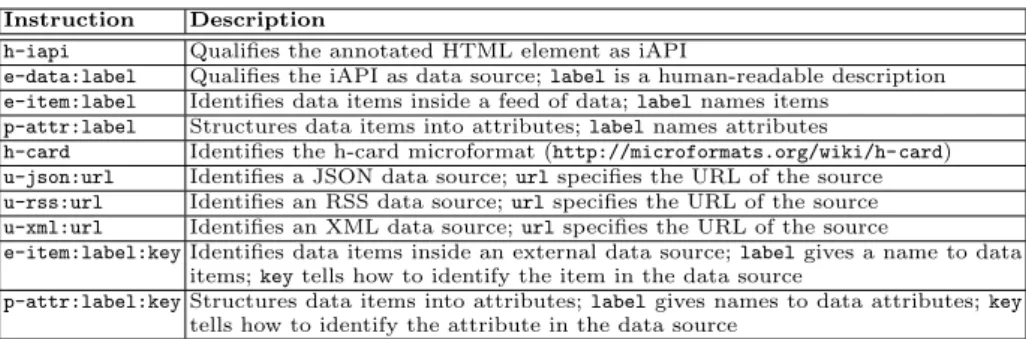
class names and makes use of prefixes to facilitate the implementation of parsers. Specifically, the prefixes used in the proposed iAPI microformat are (Table 1 summarizes the instructions used in this paper and introduced in the following):
h-*for the root classname that identifies the microformat,e-*for elements to be parsed as HTML,p-*for text properties, andu-*for URLs.
The previous annotation of the table did not provide any link to external resources. This means the data published through the iAPI can be extracted from the HTML markup. If the provider of the data in addition wants to link the table with an external data source, such as an RSS feed, a JSON file, or a RESTful or SOAP/WSDL Web service, this can be done by adding a u-json,
u-rssor u-xmlinstruction as shown in the following code lines:
<table id="1" class="h−iapi e−data:Publications u-json:http://source"> ... </table>
Instruction Description
h-iapi Qualifies the annotated HTML element as iAPI
e-data:label Qualifies the iAPI as data source;labelis a human-readable description
e-item:label Identifies data items inside a feed of data;labelnames items
p-attr:label Structures data items into attributes;labelnames attributes
h-card Identifies the h-card microformat (http://microformats.org/wiki/h-card)
u-json:url Identifies a JSON data source;urlspecifies the URL of the source
u-rss:url Identifies an RSS data source;urlspecifies the URL of the source
u-xml:url Identifies an XML data source;urlspecifies the URL of the source
e-item:label:keyIdentifies data items inside an external data source;labelgives a name to data items;keytells how to identify the item in the data source
p-attr:label:keyStructures data items into attributes;labelgives names to data attributes;key
tells how to identify the attribute in the data source
Table 1.Summary of the microformat instructions to annotate data source iAPIs
If no external link is provided, data is mandatorily extracted from the HTML markup. If an external link is provided, data can either be extracted from the markup or fetched from the linked resource. The external resource is particularly helpful when data are paginated, and it would not be possible to extract the complete dataset from one page. In this case, the external resource can provide direct access to the full dataset with one single query.
3.2 Describing data structures
The structure of rendered data is typically not evident on the Web. Some HTML elements are self-evident, such as tables, which have attributes (columns) and items (rows), while others are less able to express structural information, such as lists, paragraphs, div elements or plain text. Supporting the reuse of data therefore means equipping standard HTML elements with additional semantics that express the necessary structural information. Again, this can be achieved with sensible annotations of the HTML markup.
There are two ways to annotate iAPIs, in order to describe data structures: If data already comply with any of the microformats proposed bymicroformats. org, such as h-adr for addresses or h-card for business cards, the respective microformat can be used. If instead a custom data structure is needed, it is possible to annotate the iAPI with iAPI-specific instructions.
A data iAPI based on amicroformat is annotated as shown in the following for the case of an h-card:
<div id="1" class="h−iapi e−data:Contact h-card"> <span class="p-name">Florian Daniel</span> <span class="p-org">University of Trento</span> </div>
The instructionh-iapiqualifies thedivas iAPI,e-data:Contacttells that the data published by the iAPI is a contact, while the instruction h-card is the standard annotation of the h-card microformat, which proposes a set of pre-defined instructions, e.g.,p-name and p-org, to identify the name and the organization of the contact, respectively.
<table id="1" class="h−iapi e−data:Publications"> <tr class="e-item:Publication">
<td class="p-attr:Authors">F. Daniel and A. Furlan</td> <td class="p-attr:Title">The Interactive API (iAPI)</td> <td class="p-attr:Event">ComposableWeb 2013</td>
</tr> ... </table>
The annotation of the root node of the iAPI is as before. The
instruc-tion e-item:label marks up data items of type label (Publication), while
p-attr:label structures items into attributes of type label (Author, Title,
Event).
If the data iAPI provides access to an external data source, it is generally not possible to derive the structure of the external data from the structure of the HTML elements inside the iAPI. In fact, it is not only necessary to describe the structure of the data, but also to specify how to identify the structure inside the external data source. The following code provides an example of how to annotated a JSON resource:
<table id="1" class="h−iapi e−data:Publications u−json:http://source
e-item:Publication:pubs
p-attr:Author:auth
p-attr:Tile:title
p-attr:Event:event">
... </table>
The instructionse-item:label:keyandp-attr:label:keydefine data items and their attributes (Publication and Author, Title, Event) and how to identify them inside the data source using akeythat can be looked up (pubs, auth, title, event). If no keys are defined for the data items, per default a flat structure of the data source is assumed: an array of structured items. That is, each first-level entry of the data source (be it JSON, RSS or XML) is interpreted as a data item, and the second-level entries are interpreted as attributes.
It is important to note that the described approach to annotate data fo-cuses on two aspects of the data: structure (the nesting of elements) and mean-ing (the human-readable labels). For simplicity, the proposed microformat does not yet feature data types, such as date, integer, string, or similar. This has as a consequence that all data fields are interpreted as strings. The micor-format does not provide for machine-readable semantics either, e.g., using Se-mantic Web standards like RDF (http://www.w3.org/RDF/) or RDFa (http:
//www.w3.org/TR/xhtml-rdfa-primer/). The current target are humans.
4
Integrating data
Expressing a data integration logic is usually achieved by coding the logic in some programming language equipped with constructs that enable fetching data, stor-ing them in variables, modifystor-ing data structures, and so on. Startstor-ing from UIs, the constructs we have are, however, UI elements like tables or lists (identified
by the iAPI annotations),user interactions like clicking, selecting, dragging and dropping, and input forms that can be used to ask for user inputs needed to configure the integration logic. In this section, we show how we use these UI constructs to enable an interactive, visual data integration paradigm. Then, we explain the functions of the underlying code library that (i) enables program-mers to code UI-oriented data integrations and (ii) serves as target language to map the UI-oriented data integration logic into an executable format.
4.1 Interactive, visual data integration
Following a UI-oriented perspective, we do not want to deal with technical as-pects (the how); instead, we want to concentrate our focus on what we want to achieve. For instance, given a source page with a dataset x that we want to reuse and a target page that contains an empty table y, the problem is rather how to specify interactively that we want to “reuse the data of table/list x in the source page inside table y of the target page.” That is, we want to express the data integration logic declaratively, without having to specify how this logic is executed.
In this respect, it is important to note that there does not exist one single correct mapping of data integration operations to UI constructs. Specifying that one wants to reuse a given dataset found inside a Web page can be done by filling a form with the necessary details, drawing a table and linking it to the dataset, copying and pasting the table from the source page to the target page, etc. All of these modalities may be suitable metaphors. Which one is best (if any) is an HCI question that is out of the scope of this paper.
Accessing data.The first step toward the integration of different data sources
is accessing and loading data. Given the types of data iAPIs described earlier, accessing data means either extracting data from the markup of annotated Web pages or fetching data from a JSON, RSS or XML resource. Loading the data then means visualizing them somehow inside a new page (the target page) – note that in a UI-oriented paradigm the “memory” is the UI space, in that what is not visible is not available for interaction and manipulation.
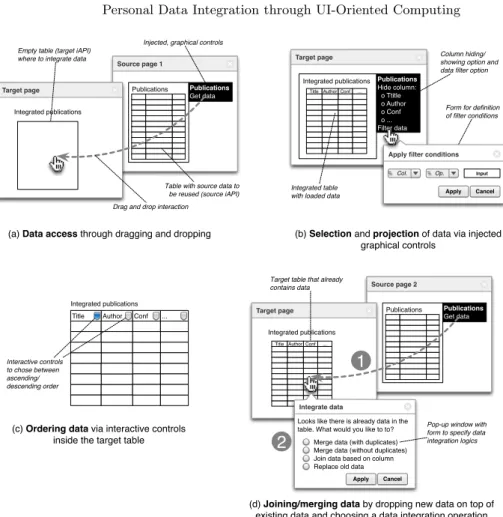
The mapping of the data access operation we propose in this paper is illus-trated in Figure 1(a): a drag and drop user interaction of the identified dataset from the source page to the target page, more specifically from a source iAPI to a target iAPI. Dragging and dropping is a commonly used technique in modern software systems to copy or move objects or content. The assumption is that iAPIs inside a page are made visible to users via the graphical controls that allow the users to interact with the iAPIs.
Selecting, projecting, ordering data. Once data are loaded into the target
page, these can be manipulated by the user. The basic operations in this respect are selection and projection, the former specifying which characteristics data items should satisfy in order for them to be included, the latter specifying which attributes of the items should be included.
Source page 2 Publications Get data Target page ... Conf Title Author Target page
Apply filter conditions Source page 1 Publications Get data Target page Integrated publications Publications
Drag and drop interaction
Table with source data to be reused (source iAPI) Empty table (target iAPI)
where to integrate data
... Conf Title Author
Integrated publications Publications
Hide column: o Ttitle o Author o Conf o ... Filter data Column hiding/ showing option and data filter option Injected, graphical controls
Integrated table with loaded data
Form for definition of filter conditions Input Apply Cancel Op. Col. Author Title Conf ... Interactive controls to chose between ascending/ descending order Integrated publications Publications Target table that already
contains data Integrated publications Integrate data Apply Cancel
1
2
Pop-up window with form to specify data integration logics
(a) Data access through dragging and dropping (b) Selection and projection of data via injected graphical controls
(c) Ordering data via interactive controls inside the target table
(d) Joining/merging data by dropping new data on top of existing data and choosing a data integration operation
Looks like there is already data in the table. What would you like to to?
Merge data (with duplicates) Merge data (without duplicates) Join data based on column Replace old data
Fig. 1.Basic data integration operations mapped to UI elements and user interactions.
One way of mapping these operations to UI constructs is illustrated in Figure 1(b): apop-up window and aninput formfor the specification of filter conditions (selection) andcheckboxes for hiding/showing attributes (projection). Both fea-tures are accessible via the graphical controls injected into the iAPI rendering the data fetched from the source page.
The order of data (typically ascending vs. descending vs. no order) can also be specified via suitable graphical controls. The typical solution to express the order of data in a table today is addingorder icons to the heading of the table, such as illustrated in Figure 1(c). The order of data rendered using other visualizations, such as lists or simple paragraphs, can be specified by injecting similar icons when highlighted or via suitable entries in the respective iAPI’s context menu.
Joining and merging data.Finally, the key to integration is bringing together
different data sources. This means either joining or merging data (union), the latter with or without keeping possible duplicates in the integrated dataset.
Mapping these two operations into UI concepts asks for a whole process of user interactions, not only for a single one. For instance, Figure 1(d) illustrates the interpretation implemented in this paper: given a target page with an iAPI that already contains data fetched from one data source,dragging and dropping
another data source on it allows the user to integrate the datasets of the two sources. Upon dropping the second source on the first, a pop-up window asks the user, given that there are already data rendered in the target iAPI, which operation he wants to perform among merging data with/without duplicates, joining data on a given attribute (column), or replacing the former data with the new one.
4.2 Programmatic data integration
The previous UI-oriented data integration operations leverage on a library of pre-defined,UI-oriented programming abstractions for their internal implementation. The abstractions come in the form of a dedicatedJavaScript modulecallediapi
and consist in a set of functions that provide programmatic access to UI-oriented abstractions. The choice of JavaScript comes with two key benefits: (i) it makes the data processing logic instantly executable inside the browser without re-quiring any additional runtime support, and (ii) it provides programmers with powerful programming abstractions based on standard Web technologies that can easily be integrated into existing Web development projects.
The library internally adopts acanonical data formatfor all data loaded from remote and processed inside the target page. The canonical format represents all data as objects that store eitherkey-value pairs orarrays of key-value pairs. Each value can again be a key-value pair or an array of key-value pairs, and so on. The keys serve as identifiers of data items or attributes, the values are the actual data.
The functions of the library for UI-oriented data integration are (we discuss the details of how to visualize data in the next section):
– iapi.fetchData(URL,id,callback(result)): loads data from iAPIidin
pageURL;callback(result)names the callback function to be called once
the fetched data (result) are available for use.
– iapi.filter(data,filters,callback(result)): filters items indata(data
object in canonical format) according to the conditions expressed infilters
in terms of common comparators, e.g., =,<,>, etc.
– iapi.hide(data,options,callback(result)): hides the attributes ofdata
specified inoptions.
– iapi.order(data,attribute,logic,callback(result)): orders the items
in data according to logic (“asc” or “desc”) applied to attribute. If no order is specified, data are rendered in the order they are loaded.
– iapi.unionAll(data1,data2,callback(result)): computes the union of
data1anddata2and keeps possible duplicates in the result set.
– iapi.unionWithout(data1,data2,callback(result)): computes the union
– iapi.join(data1,data2,attr1,attr2,condition,callback(result)): joinsdata1anddata2based on the join conditioncondition(syntactically similar to filter conditions) applied to attributesattr1andattr2.
All functions are asynchronous and make use of callback functions, so as not to block the regular processing of the host page while data are integrated.
5
Visualizing data
Target page
... Conf Title Author
Integrated publications Publications
Format: o Table o List o Numb. list o ...
Available data formatting options
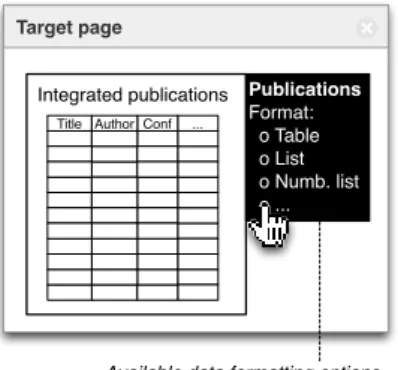
Fig. 2. Formatting data interac-tively by choosing templates. Also for the formatting and rendering of data
we distinguish the two paradigms illustrated before: interactive, visual vs. programmatic. Interactive, visual data visualization. From a UI perspective, the problem is the same as before for the data integration oper-ations, that is, a mapping of data formatting operations to UI constructs is needed. Figure 2 illustrates the solution proposed in this paper: the user simply selects the preferred visualiza-tion format from a list of formats. For simplic-ity, the list of available formats is pre-defined in the visual editing mode, and new formats are added programmatically. The iAPI adapts its appearance on the fly.
Programmatic data visualization.The rendering of data visualizations can
be achieved via dedicated HTMLtemplatesthat, given a data object in canonical format, expand the template with the given data values. The design of templates is again based on the use of suitable annotations that specify the structural properties of the template as well as the iAPI annotations to be added to the data iAPI to be rendered. The following markup, for example, specifies a template for a table:
<table id="tbl" class="h-iapitemp h−iapi e−data:Publications"> <tr> <td>Title</td> <td>Author</td> <td>Conf</td> </tr> <tr class="e-itemtemp e−item:Publication">
<td class="e-attrtemp p−attr:Title"></td> <td class="e-attrtemp p−attr:Author"></td> <td class="e-attrtemp p−attr:Conf"></td> </tr>
</table>
The template fixes the header of the table (Title, Author and Conf) as well as the three td elements that will host the actual data values. The
instruc-tionh-iapitempmakes the table a template. The instructionse-itemtempand
e-attrtemp identify the markup to be repeated for data items and attributes.
The attributes to be rendered are specified by the p-attr:label instruction that specifies the respective key inside the canonical data object to be rendered.
The Web i Browser window UIC engine (background script) UIC engine (content script) Target page P2 <ul class= "iapi"> … </ul> <table class="iapi"> … </table>
Browser extension logo
Graphical iAPI controls iAPI annotation iAPI annotations HTML augmenter Loader HTML 5 messages loads resources injects content Event handlers interprets annotations HTML augmenter iapi JS library Local storage Extension lifecyle manager Annotation parsers iAPI parser RSS parser h-card parser JSON parser injects controls manages data HTML templ. HTML templ. HTML templ. Storage manager Chrome messages manages icon RSS XML iAPI editor (injected script) iAPI parser
react to user interactions
uses
JS augmenter
injects JavaScript code
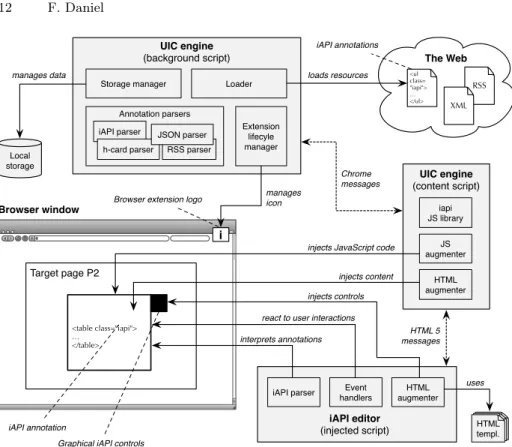
Fig. 3.Architecture of the UI-oriented computing environment as browser extension.
Given such a template, the programmatic visualization of a data object is achieved using the JavaScript instruction $(selector).renderData(data,
template). The function is a plug-in of jQuery (http://jquery.com), which
is particularly powerful for the manipulation of DOM elements. Theselector
identifies the iAPI in which data are to be rendered; data and template(the HTML identifier) are the data object and template to be used. If no template is specified, a default visualization format is chosen, e.g., a table for bi-dimensional data or a list for uni-dimensional data (an array).
6
UI-oriented computing infrastructure
In line with the UI orientation of the former sections, so far we did not concen-trate on how to actually turn the described concepts into a running application. In fact, neglecting these aspects is the very idea of UI-oriented computing and the driver underlying the idea. However, enabling the introduced data integration paradigm requires the availability of a suitable UI-oriented computing infras-tructure. The description of this infrastructure is the purpose of this section.
Figure 3 shows the internal architecture of the current prototype, which comes as a Google Chrome browser extension. The extension provides the browser
with support for iAPIs and UI-oriented computing. The infrastructure comes with two core elements: a UIC engine for the execution of UI-oriented data inte-gration logics and an iAPI editor for visual, interactive development. TheUIC
engine is split into two parts: Thebackground script provides core middleware
services, such as extension management (via its icon and pop-up menu), remote resource access, data parsing, and local storage management. Thecontent script
implements theiapi JavaScript library for programmatic UIC (the implemen-tation is based onhttp://toddmotto.com/mastering-the-module-pattern), injects JavaScript code into the page under development, and provides for the rendering of data (using the jQuery plug-in). Content and background script communicate via Chrome system messages. The separation into the two scripts is imposed by Chrome’s protection logic: only the background script has access to system features like local storage or extension management, while the content script is able to access and modify the DOM of the page shown in the browser.
The iAPI editor comes as JavaScript code that is injected into the Web page
under development. It parses the annotations of the iAPIs inside the page, aug-ments them accordingly with graphical controls, and injects the event handlers necessary to intercept user interactions that can be turned into JavaScript data integration logics (in turn, injected into the page by the content script). Editor and content script communicate via standard HTML 5 messages.
One of the key features of the editor is the abilityto pre-rendertemplates for data visualization. In fact, there are two types of templates, depending on their flexibility: static templates and dynamic templates. The former are templates whose structure is known at design time of the template, e.g., if the programmer wants to implement a data visualization for data whose structure is known (we discussed this case in the previous section). The latter are templates whose structure is only partially known at design time, since the structure of the data to be rendered is only known at rendering time of the data. This is the case of the visual, interactive development in which the structure of the data to be rendered is only known when actually interacting with a data iAPI. Static templates, instead, suit development scenarios in which the programmer embeds a purposefully tailored template in an own Web page.
The following markup implements, for example, the dynamic table template that could be used to generate the static template of the previous section:
<table id="tbl" class="h-iapitemp h−iapi e−data:[label]"> <tr> <td class="e-attrtemp>[label]</td> </tr>
<tr class="e-itemtemp e−item:[label]">
<td class="e-attrtemp p−attr:[label]"></td> </tr>
</table>
The[label] strings are replaced by the iAPI editor at runtime with keys
inside the canonical data object to be rendered; which key is used is determined by the preceding instruction. HTML elements with the instructione-attrtemp
are repeated for all attributes, elements with the instruction e-itemtemp are repeated for all items in the data object. The iAPI editor relies on a library of
dynamic templates, which it pre-renders on the fly into static templates, which it hands over to the HTML augmenter of the UIC engine. The HTML augmenter of the engine provides support for the rendering of static templates as specified either by the editor or the programmer.
Operationally, the infrastructure supportsvisual, live data integrationas fol-lows: Upon loading a new page into the Web browser, the browser extension looks for the presence of iAPIs inside the page. If one or more iAPIs are found, the extension parses their annotations and injects the respective graphical con-trols and event handlers into the HTML markup of the page. Now the user is able to visually identify the iAPIs in the page by simply moving the mouse over the page, which shows or hides available graphical controls. If the user expresses a data integration logic using these controls and the respective user interactions, the iAPI editor turns the logic into JavaScript code that is injected into the page and automatically executed by the browser, providing the user with a vi-sual and live development experience. All modifications applied to a page are automatically stored by the extension in the browser’s local storage, using the page’s URL as identifier. This allows the user to close a modified page and to re-open it at a later stage without loosing applied modifications. When a page is loaded into the browser, before enacting the iAPI editor the extension checks if the local storage already contains modifications to be applied. If yes, it loads them and injects them, restoring the state of the page as it was when the user abandoned the page the last time.
Programmatically developed data integrations are inserted by the
program-mer directly into the source markup of the page and contain both the JavaScript code of the integration logic and possible static HTML templates. This kind of integration is thus automatically executed by the Web browser when loading the page, thanks to the availability of theiapiJavaScript library, and does not require further interventions by the UIC runtime environment unless the user of the page decides to modify the page interactively.
Note that the clear separation of the visual, interactive development paradigm (the iAPIs with their graphical controls) from the programmatic development paradigm (JavaScript abstractions) also provides for a clear separation of the visual iAPI editor from the runtime environment. While the execution logic of data integrations always boils down to the operations discussed earlier in this paper, the interpretation of how these are best expressed via UI elements and user interactions is a matter of taste as well as of effective HCI. The implemented architecture makes it easy to develop different visual editors with different con-ventions than described on top of the current runtime environment.
The browser extension is available as open source onhttps://github.com/
floriandanielit/interactive-apis. The code is currently being refactored.
7
Case study
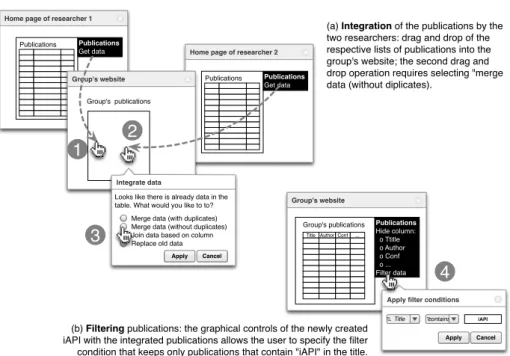
We are now ready to come back to our initial data integration scenario and to show how it can be solved following the UIC approach. Figure 4 illustrates the
Home page of researcher 1 Publications Get data
Publications
Group's website
Apply filter conditions Home page of researcher 2
Publications Get data Group's website Group's publications Publications ... Conf Title Author
Group's publications Publications Hide column: o Ttitle o Author o Conf o ... Filter data iAPI Apply Cancel contains Title Integrate data Apply Cancel
(a) Integration of the publications by the two researchers: drag and drop of the respective lists of publications into the group's website; the second drag and drop operation requires selecting "merge data (without diplicates).
Looks like there is already data in the table. What would you like to to?
Merge data (with duplicates) Merge data (without duplicates) Join data based on column Replace old data
1
2
3
4
(b) Filtering publications: the graphical controls of the newly created iAPI with the integrated publications allows the user to specify the filter condition that keeps only publications that contain "iAPI" in the title.
Fig. 4.UI-oriented computing solution to the initial data integration scenario.
steps that are necessary to develop the described data integration following the visual, interactive development paradigm. The whole process consists of four dif-ferent steps: (1) dragging and dropping the list of papers of the first researcher into the group’s website, (2) dragging and dropping the publications of the sec-ond researcher, (3) specifying that the two lists are to be merged without keeping duplicates. This produces an iAPI inside the group’s website that contains all publications. In order to show only the publications on the specific topic “iAPIs,” it is enough to configure a suitable filter through the iAPI’s graphical controls (4). This ends the data integration process. Throughout all these steps, the user always experiences live the effect of his modifications, which allows him to easily understand whether the applied operations achieve the effect he expected or not. The video available athttp://www.floriandaniel.it/demo/uic.mp4gives a more concrete feeling of the user experience of data integration as supported by the current prototype implementation of the iAPI editor and UIC engine. The showcased scenario is similar to the one of this paper, makes use of an auxiliary page for intermediate data formatting, and also uses the projection feature.
The JavaScript code that corresponds to the above scenario is as follows: iapi.fetchData("http://researcher1.edu/pubs", 1, function(pubs1) {
iapi.fetchData("http://researcher2.edu/pubs", 1, function(pubs2) {
iapi.unionAll(pubs1, pubs2, function(pubs) {
iapi.filter(pubs, "’Title’ contains ’iAPI’", function (pubs) {
$("#targetiAPI").renderData(pubs, "tbl");
The code is automatically injected by the iAPI editor into the page of the group. However, it could also be written by a programmer of the group and embedded in the page, producing exactly the same result.
8
Related work
The idea pushed forward in this paper proposes a novel perspective on the field of Web engineering in general. To the best of our knowledge, this is the first paper that interprets standard UI elements – as already in use for the implementation of Web UIs – as constructs to express generic computation logics. Traditionally, computation logic for the Web is expressed either via programming languages, such as Java, Python, PHP, JavaScript, and similar, or via model-driven develop-ment formalisms [5]. Orthogonally to these paradigms, Web services [1, 10] have emerged over the last decade as one of the most prominent Web technologies that influenced integration on the Web in general. Their focus, however, is on the application logic layer, not the presentation layer (the UIs) of applications.
Research on the reuse of UIs has mostly focused on the identification and def-inition of UI-centric component technologies, such as standard W3C widgets [14] and Java portlets [11] or proprietary formats [15], and the development of suit-able integration environments [4, 6]. The former essentially apply the traditional programmer perspective to UIs and still require integration at the application logic layer, e.g., via Java or JavaScript. The latter generally follow a black-box approach in the reuse of UIs: components are small, stand-alone applications and they are either included or excluded in a composition/workspace. The Web augmentation approach by Diaz et al. [9] is a partial exception: it allows for a fine-grained reuse of data among websites, starting from their UIs. The approach extracts data elements of limited size (individual labels or small fragments) with-out requiring additional annotations; on the downside, the approach still requires programming knowledge. None of these UI-centric approaches are however able to implement the data integration scenario approached in this paper.
Mashups [8] are the approach that comes closest to the described scenario; in fact, the discussed group website can be seen as a mashup, in particular, a data mashup. It could, for instance, be approached with the help of Yahoo! Pipes, JackBe Presto, or similar data mashup tools. Pipes (http://pipes.yahoo.com), for example, proposes a model-driven paradigm that starts from the assumption that the data to be integrated are available as RSS/Atom feeds or XML/JSON resources. This is not supported in our scenario, but can be achieved using content extraction tools like Dapper. The two lists of publications can then be merged, duplicates eliminated, and the final filter condition applied by selecting and configuring dedicated built-in constructs. The result is accessible as RSS feed via Yahoo! Pipes. Although the described logic is very similar to the one of our scenario, it still lacks the embedding of the result into the group’s website, a task that requires manual development.
To aid both the extraction of content from HTML markup and the trans-parent invocation of backend Web services, this paper proposes the use of
ex-plicit annotations, similar to microformats (http://microformats.org). The approach does not yet focus on the annotation of data with semantics, as pro-posed by the Semantic Web initiative [2]. The goal of the annotations in this paper is to provide functional benefits to the consumers of data: annotations allow the injection of graphical controls that actually enable the UIC paradigm.
9
Discussion and future work
The goal of this paper is to propose a completely new perspective on a rele-vant problem in modern Web engineering, i.e., lightweight data integration. It does so from an original perspective, that of the UIs of applications, and in a holistic fashion. In fact, the proposed UI-oriented computing approach comes with all the ingredients that are necessary to turn it into practice: (i) a micro-format for the annotation of data published inside Web pages or via common Web APIs/services, (ii) a UI-oriented development paradigm oriented toward users without programming skills (the interactive APIs), (iii) a UI-oriented de-velopment paradigm oriented toward programmers (the iAPI-specific JavaScript library), and (iv) a functioning runtime environment for UI-oriented data inte-grations (the browser extension).
On the one hand, UI-oriented computing raises the level of abstraction to programmers, who are provided with high-level, UI-specific constructs for data integration that allow them to neglect the technicalities of data access and ma-nipulation. On the other hand, itlowersthe level of abstraction to users, who are enabled to express data integrations by manipulating familiar UI constructs and do not have to learn programmer-oriented concepts that are abstract to them (e.g., Web services or database queries).
The approach further comes with a set of beneficial side effects: The deploy-ment of iAPIs is contextual to the deployment of their host application, and they do not require separate deployment or maintenance. The documentation
of iAPIs comes for free; the UI and the injected graphical controls already tell everything about them. Theretrieval of iAPIs does not ask for new infrastruc-ture or query paradigms; since iAPIs are an integral part of the Surface Web, it is enough to query for desired data via common Web search. All these make iAPIs and UI-oriented computing a natural integration paradigm for the Web with huge potential for fast prototyping, client-side customization, and EUD. The key difference of the proposed iAPI annotation from Semantic Web anno-tations is that they can immediately be turned into readily usable functionality, while generic semantic annotations lack clear target use cases and require clients to provide own implementations for their uses cases.
Thelimitations of UI-oriented computing as of today are the relatively low
performance (UIs need to be instantiated locally), the missing support for more advanced uses cases beyond data integration, the lack of standardization, and, of course, the lack of annotated Web pages in general.
With our future work, we aim to address some of these limitations and to develop an iAPI annotation tool that allows one to “extract” iAPIs from
third-party websites, to apply the UI-oriented computing approach also to forms (providing access to remote application logic) and sequences of user interac-tions (processes), and to propose an approach to clone complete iAPIs includ-ing their own UI. We aim to develop the respective iAPI microformat with the help of the community via the W3C Interactive APIs Community Group
(http://www.w3.org/community/interative-apis).
Acknowledgements. My thanks go to A. Nouri and A. Zucchelli for their
criticism and help with the implementation of the Google Chrome extension.
References
1. G. Alonso, F. Casati, H. Kuno, and V. Machiraju. Web Services: Concepts,
Ar-chitectures, and Applications. Springer, 2003.
2. T. Berners-Lee, J. Hendler, and O. Lassila. The semantic web.Scientific American, pages 34–43, May 2001.
3. M. J. Cafarella, A. Halevy, and N. Khoussainova. Data Integration for the Rela-tional Web. Proc. VLDB Endow., 2(1):1090–1101, Aug. 2009.
4. C. Cappiello, M. Matera, M. Picozzi, G. Sprega, D. Barbagallo, and C. Francalanci. DashMash: A Mashup Environment for End User Development. In ICWE 2011, pages 152–166, 2011.
5. S. Ceri, P. Fraternali, A. Bongio, M. Brambilla, S. Comai, and M. Matera.
De-signing Data-Intensive Web Applications. Morgan Kauffmann, 2002.
6. O. Chudnovskyy, T. Nestler, M. Gaedke, F. Daniel, J. I. Fern´andez-Villamor, V. I. Chepegin, J. A. Fornas, S. Wilson, C. K¨ogler, and H. Chang. End-user-oriented telco mashups: the OMELETTE approach. InWWW 2012 (Companion Volume), pages 235–238, 2012.
7. F. Daniel and A. Furlan. The Interactive API (iAPI). In ComposableWeb 2013
(ICWE 2013 Workshops), pages 3–15. Springer, July 2013.
8. F. Daniel and M. Matera.Mashups: Concepts, Models and Architectures. Springer, 2014.
9. O. D´ıaz, C. Arellano, and M. Azanza. A Language for End-user Web Augmenta-tion: Caring for Producers and Consumers Alike. ACM Trans. Web, 7(2):9:1–9:51, May 2013.
10. R. Fielding. Architectural Styles and the Design of Network-based Software
Archi-tectures. Ph.d. dissertation, University of California, Irvine, 2007.
11. S. Hepper. Java Portlet Specification, Version 2.0, Early Draft. Technical Report JSR 286, IBM Corp., http://download.oracle.com/otndocs/jcp/portlet-2. 0-edr-oth-JSpec/, July 2006.
12. M. Lenzerini. Data Integration: A Theoretical Perspective. InPODS 2002, pages 233–246, 2002.
13. A. Namoun, T. Nestler, and A. D. Angeli. Service composition for non-programmers: Prospects, problems, and design recommendations. In A. Brogi, C. Pautasso, and G. A. Papadopoulos, editors, ECOWS, pages 123–130. IEEE Computer Society, 2010.
14. Web Application Working Group. Widgets Family of Specifications. Technical report, W3C,http://www.w3.org/2008/webapps/wiki/WidgetSpecs, May 2012. 15. J. Yu, B. Benatallah, R. Saint-Paul, F. Casati, F. Daniel, and M. Matera. A
Framework for Rapid Integration of Presentation Components. In WWW 2007, pages 923–932, 2007.