Firewall Vulnerability
and
Network Protection
for
Streaming and Emerging
UDP Applications
Networking Systems Laboratory
NEC USA, Inc.
Copyright © 2000, NEC USA, Inc. All rights reserved.
This document is for informational purposes only. NEC USA makes no warranties, expressed or implied. Information in this document is subject to change without notice and does not represent a commitment on the part of NEC USA. No part of this document may be reproduced or retransmitted in any form or by any means, electronically or mechanically, for any purpose other than the purchaser's personal use, without the express written permission of NEC USA.
Trademarks
NEC and SOCKS5® are registered trademarks of NEC Corporation. e-Border is a trademark of NEC USA, Inc.
QuickTime is a trademark of Apple Computer, Inc
BLOOMBERG PROFESSIONAL is a registered trademark Bloomberg L.P. RealPlayer is a registered trademark of RealNetworks®, Inc.
RealServer is a trademarks of RealNetworks®, Inc.
AOL Instant Messenger and ICQ are service marks, trademarks, or registered trademarks of America Online, Inc. Microsoft and NetMeeting are registered trademarks of Microsoft Corporation.
MediaPlayer is a trademark of Microsoft Corporation.
1.
Introduction
Streaming applications deliver the audio and video that invigorate Internet content and enrich the Internet experience. These applications play a major role in transforming the Internet from an information-sharing medium to a foundation for advanced applications including distance learning, marketing, training, customer support, and commerce.
Companies seeking to use these applications face significant challenges. Streaming media data requires significantly more bandwidth than other applications require because of the exponentially larger amount of data required to deliver smooth video and audio. Until recently, sufficient bandwidth has been cost prohibitive and not widely available.
Supply and demand have solved the bandwidth issue. The demand for increased bandwidth to handle emerging streaming media application data, has resulted in greater availability at lower cost. As bandwidth increases, the use of streaming media applications and the number of applications requiring the increased bandwidth has increased. Now that bandwidth is more reasonably priced, and more readily available, more and more companies are developing streaming media applications, and the number of companies that need to use these applications to communicate using audio and video are increasing exponentially.
Many new streaming applications are emerging as Internet telephony and chat applications gain popularity. Microsoft®'s MediaPlayer™, RealNetworks®' RealPlayer®, and Apple®’s QuickTime™ Player are streaming media players that deliver most types of media on the Internet. NetMeeting® is Microsoft’s multimedia conference application. Bloomberg Professional® is the first streaming financial data service through the Internet.
The most significant challenge remains in protecting the corporate network when using streaming media applications. A variety of streaming applications have recently come to market, and with them come significant challenges when attempting to securely deploy them. Streaming applications use UDP (User Datagram Protocol) as their core communication protocol. Providing security with UDP is complex because UDP is well known as a protocol that easily creates security holes when used carelessly. Corporate network environments that use UDP and are protected by border control devices such as firewalls, virtual private network (VPN) devices, and packet filtering routers present the most difficult challenges. e-Border provides the solution to securing the corporate network while allowing streaming media communication.
2.
UDP Popularity Increases
UDP provides more timely data delivery at the expense of reliability. UDP packets do not store the necessary information to retransmit dropped packets. With streaming media, receiving data as it changes, in real-time, has a higher priority. For example, continuously receiving new financial data, updated every second, has higher priority than re-transmitting old data that dropped. UDP satisfies this priority.
Adding error checking adds overhead to TCP packets. The additional overhead consumes precious bandwidth in low bandwidth environments, such as wireless and thin wire applications. Because of UDP's smaller packet size, WAP (Wireless Applications Protocol) uses UDP to send frequent bursts of small amounts of data on non-persistent connections.
UDP is the ideal solution for streaming application data that require more bandwidth, and in low bandwidth environments supporting wireless applications.
3.
Streaming Applications and Network Policy Management
Audio and video applications use streaming technology because it more efficiently delivers the snippets of video and audio in a continuous manner, avoiding long download delays between snippets. Streaming technology keeps packets flowing smoothly between the application server and client, instead of ensuring that every packet arrives. In an audio stream, users probably won't notice a few missing packets. However, even the small delay caused by re-transmitting a packet would be obvious. Similarly, delays make video jerky, but missing a frame or two may not be noticeable.
3.1.
Internet Connection Scenarios for Streaming Applications
Internet applications, including streaming applications, use ports for client and server communication. Ports provide a generic means to make and use network connections. When a client application wants to connect to a server application, it requests the server application's port. This port identifies exactly to which server application the client application wants to connect. Data written to an outgoing port (on the sender's computer) arrives at the receiving program's incoming port. The receiving application reads the data.
Streaming applications usually use TCP and UDP ports for communication. The application client in the corporate network communicates with the application server on the Internet using a TCP port. The application server sets up a TCP port to exchange control information with the application client. Control information includes file-related and control information about the data stream. The server uses a single UDP channel to transmit the data stream to the client. The data channel accepts inbound communication from the Internet to the corporate network.
3.2.
Emerging Streaming Applications
'high' ports, for example ports numbered 1024 and higher. UDP's low overhead and use of multiple communication channels, allow the highest possible throughput for transmitting streaming data.
Real Networks' RealPlayer and RealServer communicate control information using TCP on ports 7070 and 7071. These applications transmit the actual media stream using the UDP protocol, potentially on multiple ports between 6770 and 7170. Similarly, Microsoft's NetShow application uses TCP port 1755 for control information and potentially uses UDP ports 1024 through 5000 for streaming data.
Another emerging trend for streaming applications is using IP multicast to allow multiple receivers to listen to a single transmission. Multicasting, though not yet widely enabled on today’s corporate networks, saves bandwidth by reducing multiple data streams to a single data stream.
3.3.
Policy Management Challenges When Deploying Streaming
Applications
Internet streaming applications present a number of challenges for effective and unified policy management in corporate networks because they use UDP protocol and are bandwidth-intensive. Most corporate networks use firewalls as border control devices to implement and enforce network access policies. Firewalls face these challenges in supporting secure, effective policy enforcement for Internet streaming applications:
1) Nature of UDP
UDP protocol treats each packet as an isolated event, and does not track request-response relationships. Routers and packet-filtering firewalls can easily determine when TCP packets were generated in response to an internal request. In contrast, it is difficult to filter UDP application data with packet filtering or routing policy techniques. The only policy choice has been to eliminate UDP sessions or to open a large UDP port range to bi-directional communication, and expose the internal network.
2) Private IP addresses and NAT
Using private IP addresses (RFC1918) in a corporate network requires using a firewall with Network Address Translation (NAT) functionality. The private IP is not routable on the Internet. Therefore, all Internet access, that is all IP packets, must go to the firewall to replace any private IP address with a global IP address. Some streaming applications establish a connection from a server on the Internet to a client behind the firewall. However, the server can not route its IP packets to the client using the client’s private IP. The firewall must pretend to be the client to receive the connection from the server with application-specific knowledge. Without that knowledge, the only alternative is to open a large port range and expose a security risk.
3) Dynamic port assignment
protocol stream, and then use those addresses and ports in another protocol stream, without notifying the firewall. Many NAT firewalls have difficulty recognizing that they need to adjust the port range. NAT firewalls that can recognize the adjustment requirement have difficulty correctly modifying port and address numbers within these streams, and doing so may break policy restrictions. Communication fails when the firewall fails to adjust the port range in real-time.
4) Applications behave differently
Application proxy firewalls only enforce policies for supported applications. To support a specific streaming protocol requires developing a specific application proxy or getting the application proxy from the vendor. It is difficult to reliably proxy connectionless UDP-based application protocols. Securing a range of multimedia applications may require a different application proxy server for each application.
5) Private proprietary protocol
When streaming applications use standard protocols, it is simpler to add a solution to a firewall. However, private protocols with unpublished specifications require that firewall developers analyze the protocols and attempt to guess the protocol behavior. It is difficult to develop fully compatible application proxies and to make protocol interpretation scripts to use in stateful packet inspection firewalls.
6) Enforcement of existing firewall restrictions
To overcome dynamic port assignment problems with firewalls, some streaming applications, for example RealAudio and RealVideo, include options to enable TCP or HTTP-based streams. However, using these options requires significant compromises in application functionality and efficiency, and in audio and video playback quality. The high-overhead nature of TCP makes TCP and HTTP-based streaming a less than optimal option compared to UDP-HTTP-based streaming.
7) Consistent policies
Varying levels of application-specific intelligence in application proxy firewalls, varying levels of streaming application support in firewalls, and the various proxy server and different management interfaces make unified policy management support for streaming applications across all border control devices a complex undertaking.
4.
SOCKS Support of UDP Applications
SOCKS offers unique advantages in the complex and difficult area of UDP streaming application policy management and security. SOCKS v5's (RFC1928) securely and simply handles UDP. See Figure 1.
• When a socks-enabled client application wants to receive or send UDP packets, the client initiates a TCP-based control connection with the SOCKS v5 server.
• Through the control connection, the client and server exchange information that might include user authentication, domain name, IP address, and port number. Using this information and the network management policies defined by the network administrator, the SOCKS v5 server determines if it should accept or deny the client's request.
• If the SOCKS v5 server allows the request, it temporarily, dynamically opens a UDP port on the server to receive incoming UDP packets for the client from the application server. The SOCKS v5 server relays these packets to the client.
4.1.
Benefits the of SOCKS UDP Implementation
SOCKS addresses each of the challenges.1) Static configuration for UDP ports
Challenge: Packet filters and routers entirely eliminate UDP sessions or open a large UDP port range for bi-directional communication, based on static configuration.
SOCKS Solution: SOCKS opens channels for streaming applications dynamically, only when requested by an authenticated user.
mypc.A.com
10. 1.1.2
Application Server appserver.B.com
(1) The SOCKS Library emulates the socket interface. When the application makes a socket function call, the equivalent SOCKS library function perform the request. The SOCKS library refers to the SOCKS configuration to locate the SOCKS server.
(2) After locating the SOCKS server, the SOCKS library and SOCKS server initiate SOCKS protocol for SOCKS negotiation. This first TCP channel is a control channel for the SOCKS protocol.
(3) When the SOCKS server receives a UDP proxy request to a destination server, the SOCKS server consults the access policy to determine if it should make the connection.
(4) When the access policy permits the connection, the SOCKS server reserves the communication channel to the destination, and return it to the SOCKS library at the client.
To reserve the channel, i f the client waits for incoming UDP packets from the destination at the port Pc, the SOCKS server dynamically reserves an associated port (Pc’) on the SOCKS server to receive all UDP packets. And, after examining them with the access policy, only trusted UDP packets are relayed to the client.
When the client receives the return value indicating success, the SOCKS server has reserved an end-to-end communication channel on which the application transmits data. All SOCKS negotiation is between the SOCKS library and the SOCKS server,
independent of the application . The application receives the result of the SOCKS server’s proxy channel set up as a socket function call’s return value.
Figure1. Basis of SOCKS UDP Proxy Behavior
1080
Ps
SOCKS5 socks.A.com permit N ANY mypc ANY
... Application Client
SOCKS
Library Socket/Winsock Library
SOCKS Server
Pc Pc’
SOCKS Configuration SOCKS Configuration
(3) (1)
(2)
(4)
10.1.1.1 1.1.1.1 2.1.1.2
2) Address translation problems
Challenge: NAT firewalls have difficulty modifying port and address numbers correctly with the multiple protocol streams that streaming applications use.
SOCKS Solution: SOCKS hides internal addresses without translating each address. Users outside the protected network see only the address of the SOCKS server, not internal addresses on the protected network. Users outside the network never use the wrong address because they always use the SOCKS server address.
3) Application dependencies
Challenge: Application proxy firewalls only support policies for supported applications.
SOCKS Solution: SOCKS is application-independent, operating entirely at the TCP and UDP levels. As new streaming applications become available and as existing streaming applications evolve, SOCKS supports the applications, without requiring changes to the SOCKS server or clients.
4) Security dependencies
Challenge: Application proxies and packet filters are nontransparent to tunneling or encryption methods.
SOCKS Solution: SOCKS UDP support is independent of the security model and transparent to encryption, independent of VPN tunneling protocols, such as IPSec or PPTP. SOCKS simply relays TCP and UDP traffic.
5) Complex, disjointed policy management
Challenge: With application proxy firewalls, unified policy management for streaming applications across all border control devices is complex.
SOCKS Solution: Because SOCKS is application and security architecture inclusive, it is the best approach to providing unified, consistent policy management and security for all border control devices in an enterprise. A broad range of border control devices support SOCKS.
4.2.
SOCKS and Next-Generation Streaming
Intel Architecture Labs has proposed a UDP extension to SOCKS v5 to allow the SOCKS v5 server to control who can join a multicast group and what they can do after joining, that is who can receive a multicast data stream and if they can listen, or listen and transmit. The SOCKS v5 server could allow a user to listen to some multicast channels but not others. It could also limit the bandwidth that a multicast data stream uses. For increased security, the SOCKS server could also convert the multicast to multiple unicast streams.
5.
e-Border Extends SOCKS & Streaming Application Support
Establishing trusted, end-to-end communication channels is a standard SOCKS feature. The e-Border product family extends the standard to satisfy real-world streaming application and user requirements.
5.1.
e-Border and SOCKS
The e-Border extensions to the SOCKS protocol provide flexible expandability, reliability and stability, maximize performance and scalability, and simplify managing and using the protocol. e-Border extensions include:
• Scalability to support thousands of users
• Stability to keep running around the clock, without down time
• Efficient memory and operating system use
• Dual servers for fail-safe configuration and load balancing
• Expandability to add a variety of authentication methods
• Easier, administration including remote administration, dynamic configuration, real-time traffic monitoring, GUI, and automation
• Compatibility with new applications including proprietary applications
e-Border’s Client library, used in the e-Border Client, is available as the e-Border SDK. It includes the SOCKS protocol and other features, and works well with any TCP or UDP application. The e-Border SDK is the fastest way to add SOCKS support to new applications that must traverse firewalls.
One distinct advantage to using e-Border is that all applications benefit from the intelligence added to the e-Border products. It isn't necessary to add that intelligence to every application. For example, because of improved TCP/IP stack limitation handling, all applications have more stable and scalable communication channels. Better load balancing capability helps all applications work more efficiently. By adding encryption capability, all applications can send and receive encrypted data. Insecure applications instantly become secure.
backup, customer support, and remote maintenance, are considering SOCKS as the key to extend their Internet business.
The e-Border Client and Server do not require physical proximity. They only need guaranteed IP packet reach-ability to establish communication channels. e-Border benefits transcend physical distance. For example, it is easy to arrange e-Border Clients at offices in Europe and Asia and use an e-Border Server in the New York City office to access the Internet and subscribe to a financial information service.
In some cases, physical distance may impose restrictions on physical networks or organizational administration boundaries. Establishing communication channels across these boundaries may require more gateways between the e-Border Client and Server. Any SOCKS-aware gateway can serve as the intermediate gateway because SOCKS establishes channels. Since it uses a standard protocol, it simplifies designing a wide-area gateway installation and migration scenario.
The migration design and implementation are much easier at the SOCKS layer, drastically reducing the number of devices (computers) and organizations (administrators) required to re-configure the existing network environment. See Figure 2.
5.3.
e-Border With a Firewall & VPN
It is difficult for rigid firewalls to quickly implement new requirements as they emerge. Today's issues are UDP-based streaming applications, voice and video conferencing applications with complex protocols, and demands to access internal networks from the Internet by mobile workers. It is time to reconsider better network border configuration that matches the new Internet requirements. e-Border provides a new part of the firewall and VPN roles with or without the existing firewalls.
Another new situation is the rapid increase of Internet access from home. Cable TV and ADSL lines are gaining popularity over traditional dial-up links. These lines have
User Application
e-Border Server
Figure2. e-Border provides IP layer independent communication foundation
User
User & Application Communication Layer
e-Border Server
e-Border Server
Application Server
Basically independent , or just needs minimum arrangement to guarantee IP reachability between e-Border servers.
IP routers
an essential difference from dial-up links: the Internet connection is always on and exposed. As many companies in the early ’90s started using dedicated Internet connections, internal networks were exposed to the Internet.
Home networks now experience the same security threat. However, most home users cannot afford expensive firewall devices and do not need a rich set of security features. Many home users use UDP-based entertainment applications. Address translation and proxy features compatible with these applications are sufficient. e-Border satisfies all of these requirements.
RealPlayer with e-Border Client
(1) SOCKS-enabled RealPlayer tries to connect to the RealServer. SOCKS protocol negotiation begins at the SOCKS layer, between the e-Border Client and the e-Border Server.
(2) The Border Server establishes a TCP channel to the RealServer. To the RealServer, the e-Border Server appears to be the RealPlayer. After establishing the channel, chained TCP channels serving as a control channel are ready for the RealPlayer and RealServer to use.
(3) After the RealServer creates the control channel, RealPlayer creates a data port to receive audio data. The RealPlayer randomly determines a port number. The Border Server and e-Border Client transparently prepare the port. The e-e-Border Server opens the port, 7001 in this example. RealPlayer sends the port information to the RealServer through the control channel.
(4) Using the information from RealPlayer, the RealServer starts sending UDP data to the e-Border Server. The e-e-Border Server is already waiting for UDP packets from the RealServer.
(5) The e-Border Server relays UDP packets from the RealServer to the RealPlayer.
(6) When another e-Border Client requests another RealPlayer channel, the e-Border Server uses a different port number, 7003 in this example.
e-Border (SOCKS Server)
TCP(Bi-direction)
UDP(Uni-direction)
Figure3. Multiple and Dynamic Channel Establishment through e-Border
RealServer
eBorder.A.com
7070
pns.B.com
2.1.1.2
1.1.1.1 7001
7003
1080
(2)
(4) (3)
(1)
(5)
(6)
10.1.1.3 10.1.1.2
any
any
any
any
mypc.A.com
xpc.A.com
5.4.
e-Border for Streaming Media Applications
A key for ensuring secure UDP communication is to handle on-demand UDP communication requests appropriately. That includes opening the channels only when necessary, and closing the channels when the application’s communication completes. Since UDP packets do not include connection status, border devices between the client and server fail to detect accurate client-server associations from the packets.
Figure 3 shows how e-Border achieves this requirement. SOCKS tracks the channel association with the application because the SOCKS protocol always executes with each UDP communication request. The e-Border Server manages multiple channels, avoiding security holes. When the application exits, the Server closes all associated channels.
5.5.
e-Border for Business Critical Applications
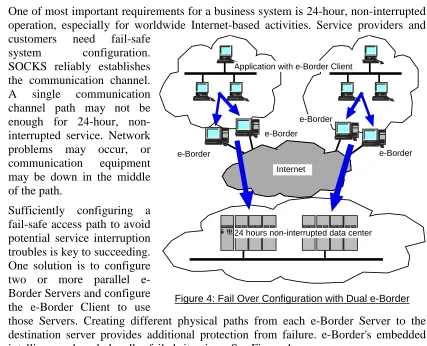
One of most important requirements for a business system is 24-hour, non-interrupted operation, especially for worldwide Internet-based activities. Service providers and customers need fail-safe
system configuration. SOCKS reliably establishes the communication channel. A single communication channel path may not be enough for 24-hour, non-interrupted service. Network problems may occur, or communication equipment may be down in the middle of the path.
Sufficiently configuring a fail-safe access path to avoid potential service interruption troubles is key to succeeding. One solution is to configure two or more parallel e-Border Servers and configure the e-Border Client to use
those Servers. Creating different physical paths from each e-Border Server to the destination server provides additional protection from failure. e-Border's embedded intelligence cleverly handles failed situations. See Figure 4.
5.6.
e-Border and Next-Generation Streaming
[image:13.612.107.534.268.614.2]One e-Border extension includes handling UDP proxy more accurately and with higher stability than RFC1928 defines. The IETF Authenticated Firewall Traversal (AFT) working group has discussed handling multicast communication. Intel
Figure 4: Fail Over Configuration with Dual e-Border
Application with e-Border Client
e-Border e-Border
e-Border
e-Border
Internet
Architecture Laboratory and NEC USA Networking Systems Laboratory have developed prototypes of the proposal. The proposal has proved to work well. As new applications create new demands, software products will evolve to solve real world issues, including an easy-to-use GUI, scalability, and realistic scenario to manage multicast group participants.
6.
Summary
With the dynamic and real-time communication behavior that streaming applications use, they will continue to present policy management and security challenges, requiring security solutions to include new features. Various border control devices contribute to addressing these challenges. The e-Border product family easily, instantly provides unique, generic secure communication features to emerging streaming applications, and simpler management features to application users and network administrators. With e-Border, the solutions are more unified, more secure, and easier to manage. e-Border simplifies using streaming media and maintaining compatibility for existing applications.