Exploring Low-fidelity Prototyping Methods for Augmented Reality Usability Tests I-Wen Huang
Faculty of Behavioral, Management and Social sciences, University of Twente Human Factors and Engineering Psychology
Supervisors: 1st: Dr. Martin Schmettow 2nd: Dr. Simone Borsci
Mirabeau B.V.
Abstract
Augmented reality has been getting attention in recent years because of the improvement of the technology development. More and more people are interested in designing AR products. Conducting usability tests is one of the key points that develop a successful product. However, making low-fidelity prototype for AR usability test is a big challenge because most low-fidelity prototyping tools nowadays are for 2D digital products such as websites, or apps. In the current study, we explored two low-fidelity prototyping methods (physical and digital prototypes) which are commonly applied to current 2D digital products in the industry and transferred them to AR. Similar usability problems were found from these two low-fidelity prototypes, which can be seen as using low-fidelity for AR usability test is a possible solution for finding usability problems at the beginning of the AR development. We would suggest that further improved methods for AR low-fidelity prototype such as finding proper materials or combining physical and digital prototyping methods need to be studied in the future as well.
Table of Contents
Introduction ... 1
Motivation ... 1
Augmented reality ... 1
Iterative design process ... 4
Usability test ... 4
Low-fidelity prototypes ... 5
The aim of this study ... 5
The AR design concept of item searching in retail stores ... 6
The design of AR item searching function ... 8
Method ... 10
Participants ... 10
Materials and equipment ... 10
Study design ... 11
Usability tasks ... 11
Procedure ... 13
Analysis... 13
Results ... 15
Usability problems ... 15
Additional observations ... 18
The difference of the two prototypes ... 19
Discussion ... 22
Usability test reflection and limitation ... 22
When to use physical and when to use digital prototyping method for AR usability test? . 23 Reminders of conducting a usability test with AR low-fidelity prototypes ... 25
Conclusion ... 26
References ... 27
Introduction Motivation
Nowadays, more and more people are interested in augmented reality and the technical development has been improving in the last few years. This technology makes people have richer experiences in the real world. However, compared to traditional mobile applications (e.g. websites, and apps), AR devices encounter much more difficulties in developing stage because of its inherent characteristic such as lighting conditions, use of sensors, user position, and a huge amount of computations in real-time interaction etc. In addition, both time and costs of developing AR products are high consumable than other mobile applications. Thus, in order to avoid wasting resource of development, a usability test is particularly important for finding potential problems as early as possible before directly into the building phase. Yet, only a few discussion of the methods for conducting low-fidelity prototype and usability evaluations for AR has been published (e.g. Dünser, Grasset, & Billinghurst, 2008; Endsley et al., 2017; MacWilliams, Reicher, Klinker, & Bruegge, 2004). A low-fidelity prototype (i.e. prototypes created without programming) is a valuable tool for usability test in early developing stage with users. To the best of our knowledge, there currently exists no standard on how to make low-fidelity prototypes of AR-products and how to test the usability of these. Before defining a design standard for such a new technology, different methods need to be explored to know the field better. The goal of this project, therefore, is to discover potential low-fidelity prototyping methods for AR usability test and get insights for future recommendations. Augmented Reality
in a virtual environmental setting (Milgram & Kishino, 1994; Figure 1). Thus, when it comes to enhancing real time interactions in a real environment, augmented reality has its own advantages in comparison to virtual reality. On the other hand, in order to capture real time interaction between the physical and the virtual projected objects, some technical demands (e.g. the tracking and sensing system) of augmented reality are higher than virtual reality (Billinghurst, Clark, & Lee, 2014). Although we mentioned that augmented reality is not limited to sight, the visual augmentation is indeed an area that has been enormously developed and has its own potential for different applications from both academic and industrial perspectives, which would also be our focus in the current study.
Figure 1. Mixed Reality Continuum. Augmented reality is between real environment and virtual environment which adds digital elements to the real world. (Adapted from Milgram & Kishino, 1994)
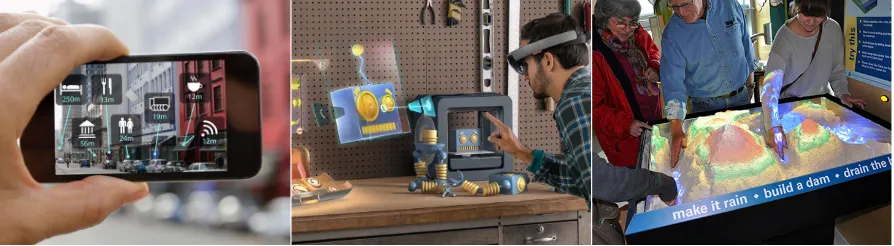
Typically, researchers classify the visual display device of augmented reality into three different positions: handheld, head-worn, and spatial, which depends on the display view between the user and the environment (Bimber & Raskar, 2005; Figure 2). There are also three kinds of projecting methods of AR: video see-through, optical see-through and projective (Azuma, 1997; Azuma et al., 2001; Mohring, Lessig, & Bimber, 2004). Handheld AR devices such as mobile phones or tablets usually apply video see-through method that users can see the augmented objects combined with camera capturing video images on the screen of the device (e.g. Mohring et al., 2004). Head-worn AR devices (e.g. Microsoft HoloLens), on the other hand, usually apply optical see-through method that users can see the augmented objects map into the real environment via projecting the virtual features on the optical lens (e.g. Hua & Javidi, 2014). In this way, users can see the real environment instead of camera capturing video streams. Spatial AR devices, however, mostly apply projective method that users see the augmented objects which directly project on the physical environment or a transparent display (e.g. in-vehicle information system) without wearing any devices (e.g. Medenica, Kun, Paek, & Palinko, 2011).
81
Figure 2.3:Milgram’s Mixed Reality continuum. [Milgram and Kishino, 1994]
Figure 2.4: Mann’s Mediated Reality. [Mann, 1994]
Figure 2. AR display positions. Left: handheld device, Middle: head-worn, Right: spatial.
Handheld and head-worn AR devices both have their own advantages and disadvantages when it comes to developing augmented reality and have been considered in the common daily use more often than spatial AR devices. Barba, MacIntyre, & Mynatt (2012) discussed that the easy access of smartphones, high-quality internet and wireless connections leads to a new phase of AR development. However, they also mentioned that “the smartphone is capable of many things, but ideal for none of them, and so embodies a series of tradeoffs that make it a useful, but not ideal, platform for ARMR (Augmented reality and Mixed reality) research.” In contrast, head-worn devices have their potentials for boosting the augmented reality experience in terms of hands-free operating and true immersion of real environment. Serubugo, Škantárová, Kjærsgård Nielsen, & Kraus (2017) compared wearable optical see-through and handheld devices for augmented reality museum guide in order to find out which device is more suitable for their AR design. The users reported that handheld device was more intuitive to use, but head-worn device created more engagement when interacting the system. Although, from the expert’s point of view, handheld device is easier to access compared to the wearable one at least in the current technical setting. Given that situation, it is hard to say what device is better for AR product, we believe it should depend on the goal of the AR development in different projects.
hardware improve the development of AR and more and more people are interested in innovating AR user experience.
Iterative Design Process
As one can assume that it is less likely to design a perfect user human computer interface or system without any problems in a single shot, testing and evaluating the design concept in order to fit the end users becomes important in the product development (Buxton & Sniderman, 1980; Nielsen & Landauer, 1993). Iterative design process is a cyclic approach that includes (user) research, ideation, prototyping, development, user testing, and evaluation (Dow et al., 2005). The core concept in this process is that designers learn from testing or evaluations to make an adjusted prototype which fixes the previous problems and start the whole process or some parts of it again until the product meet the best possibility for release to the end users. Designing a human computer interface is time consuming and needs huge investment. It would be ineffective if the problems can only be found at the late stage of development or when it has already been released to the commercial market. For example, a study has discussed that “finding and fixing a software problem after delivery is often 100 times more expensive than finding and fixing it during the requirements and design phase” (Boehm & Basili, 2001). Through the iterative design process, development team is able to find problems from the beginning of the project and improve the design progressively, which can save cost and avoid wasting time for reconstructing the whole system all over again.
Usability test
Low-fidelity prototype
Low-fidelity prototype is a solution for testing usability at the beginning of the product development when the end-product has not been built and even shaped. In general, features for low-fidelity prototypes are, quick to make, inexpensive, disposable, easy to adjust, and easy to share (Buxton, 2007). Even though having the low fidelity, they still serve great for software or website interactions. There are different ways to define the fidelity of prototype such as aesthetic refinement, breadth of features, degree of functionality and similarity of interaction (Virzi, Sokolov, & Karis, 1996). The main definition of low-fidelity prototype in the current study is that the designers or students can easily make without any further learning of 3D model design tools or any help such as coding from the developers. One of the common low-fidelity prototype is paper prototype which has been greatly used at the beginning of design projects in the industry (Vijayan, 2011). Designers also use several prototyping tools such as Sketch or Invision to make interactive prototypes to collaborate among people within the design process (Silva, Hak, Winckler, & Nicolas, 2017). It should be noted that the fidelity of prototypes which are made with these computer tools is usually from low to high for screen-based design. However, in our study for Augmented reality, since designers can make prototypes independently, for example without coding, we then consider these prototypes are still fidelity prototyping method. Wizard of Oz method is commonly used when operating low-fidelity prototypes for the usability tests (Maulsby, Greenberg, & Mander, 1993). The main point is that the facilitator use role playing to simulate how the system works based on the users’ interaction. The end user may know or may not know someone is playing behind the scene. In this way, a design concept can be easily tested before into complex coding process to make the system work (Molin, 2004).
The aim of this study
usability test with those prototypes and to learn the advantages and disadvantages of the low-fidelity prototypes. It should be noted that the purpose is not to choose which prototyping method is better than another one, but to explore the low-fi prototyping methods and what the difference is between the two methods when it comes to making, conducting, and evaluating in the AR usability test.
To be more specific, two kinds of prototypes have been made based on our AR design concept: physical prototype and digital prototype. Physical prototype is similar to paper prototype of the screen-based products, digital prototype is similar to interactive prototypes which are made through prototyping tools such as Sketch, Invision or even simple power point slide show. To be clearer, the aim of this study is to learn and explore whether interaction designers or psychological students, especially who has no AR or 3D programming skills, can easily make low-fidelity prototypes for conducting AR usability tests. The reason for making these two kinds of prototype for augmented reality is twofold. One is the fidelity of real environment. For example, the physical prototype, we can have the reality to use, which is like users are using the AR in the real environment. However, for digital prototype, we lose the real environment to test since we simulate the real environment on the flat screen. The other reason is the fidelity of digital interaction. For physical prototype, since everything is made with low-fidelity, testers need to manipulate the interactions step by step manually. On the other hand, for digital prototypes, the interactions can be made through interactive prototyping tools. It is common that designers use interactive tools as mid-fidelity or high-fidelity prototypes for screen-based products compared to paper prototype. In our case, it is hard to tell which one of the fidelity is higher than the other one since both of them have their advantages and disadvantages in each dimension. The results would provide initial insights for future recommendations of conducting AR usability test using low-fidelity prototypes.
The AR Design Concept of Item Searching in Retail Stores
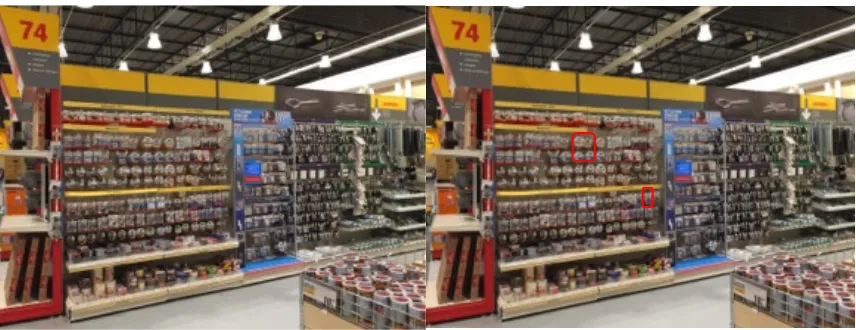
unfamiliar and complex environment (i.e. hospital in this experiment). Users have difficulties of identifying important information such as where I am or the references and recalling the learned information on those aids while they are finding their way. Thus, the researchers suggested that augmented reality has great potential to supplement the traditional wayfinding aids through providing continuous customized and clearer information for each user. In this way, users do not need to take an effort to recall the information and the spatial accuracy would be much higher because the augmented visualization matches to the real world. After coming up with the wayfinding AR concept, we then conducted observations and interviews (with both customers and employees) at a Dutch DIY store to better understand not only customers’ wayfinding process but also their shopping experience and problems in the store. A customer journey has been made based on the field research in the store (see appendix A). We observed that wayfinding is indeed a challenge in this kind of big store in some situations (e.g. when customers are hard to find employees to ask). However, an interesting finding that we also observed was customers actually spent more time on item searching process when they were standing in front of a specific shelf and seemed confused about how to choose the items they were looking for compared to our first AR concept of wayfinding problem in the store. In this situation, there are too many items in the store, and they might share some features such as shape, color, or functions, which is similar to serial visual search that customer takes time on searching for the right item. One of the important things is that there is only one order of the items that the store can offer in the reality, which might not meet the expectations of each customer’s visual search process. Each customer has their own goal which are all different, there is no a perfect order can fit it. That is why we then developed an AR item filter function for solving this problem. Users can filter the items based on their personal goal on the AR device and see the selected items in the reality (see Figure 3 for illustration).
The Design of AR Item Searching Function
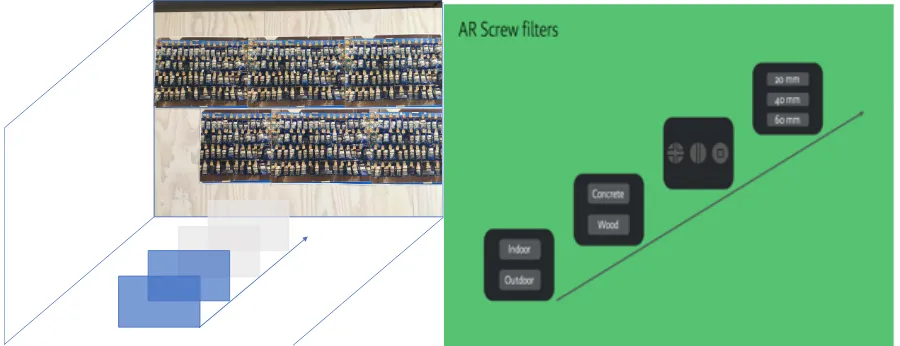
In this section, we would introduce the design of AR item searching function based on our concept. This includes the user flow of overall design and the minimal viable flow that we would make the low-fidelity prototype and conduct the usability test in our study. Apart from the user flow, the way that how the users interact with the AR system would also be descripted. The user flow of using AR in the Dutch DIY store from preparation to searching for items is designed. There are three main possibilities that the customers might prepare before coming to the store, which will be connected to the searching process later in the store: bringing own samples, using wish list while browsing the store’s website, and taking notes or keeping the needs in mind. When they arrive the store, they pick up the AR device that the store provides and wear it. Then they might use the wayfinding function on AR to get to a specific area (i.e. the screw area in our design). Once they arrived, they can use different functions to find what they want. There are three functions: scanning own sample, retrieving wish list, and searching function. Scan sample means that customers can scan their own sample which they bring from home on AR. When the AR system identified which sample the users want, it will show the matches in the real environment through the AR device. The wish list function is similar to the scan sample function. The customers can retrieve their wish list which they have already saved when they were browsing the website. The items on the wish list will be indicated on the AR device. The third function, searching items, is the main design in our study, which users can either adjust the screw model to define or use filter functions to find what they need. The screw model is a 3D screw, which users can modify different features of the screw such as screw head, lengths, or material. The matched screw based on their adjustments will be shown in the reality through AR device. Another way to find the screws which meet users’ needs is to use filter function on the AR device. The filter is a goal oriented function that users can narrow down the options based on their needs. For example, four kinds of filters are included in our design in order: 1. Outdoor or Indoor; 2. Wood or Concrete; 3, Screw head, Screw head, or Screw head; 4. Length 20mm, Length 40mm, or Length 60mm.
filter function, they will see the first filter interface “indoor or outdoor” in front of them. If the users want to select indoor (gazing the indoor selection), then they will see the next filter interface “wood or concrete” is behind the first filter interface. They have to step forward to get to the next filter interface. The filter function for searching screws on AR device is our minimal viable flow which would be made for low-fidelity prototypes. We would then conduct usability test based on the flow and the low-fidelity prototypes we made.
Method Participants
In total of 20 participants were recruited in the experiment. All participants do not have interaction design background (most of them are non-design employees at Mirabeau). They all were given informed consent (Appendix B) prior to participation with regard to the rights of joining the usability test such as they can freely drop out at any moment during the test and the data will be processed anonymously. Details of the background survey can be found in appendix C and D.
Materials and Equipment
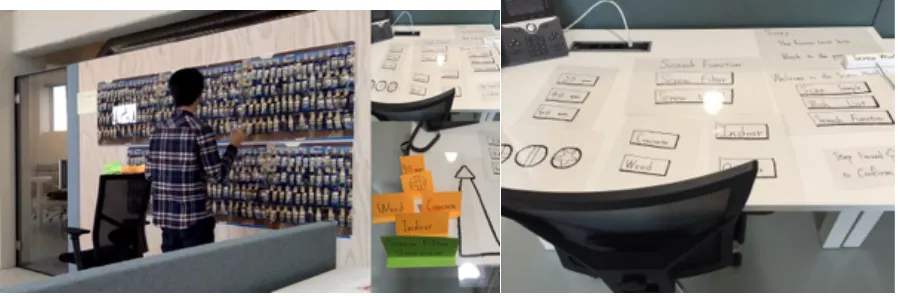
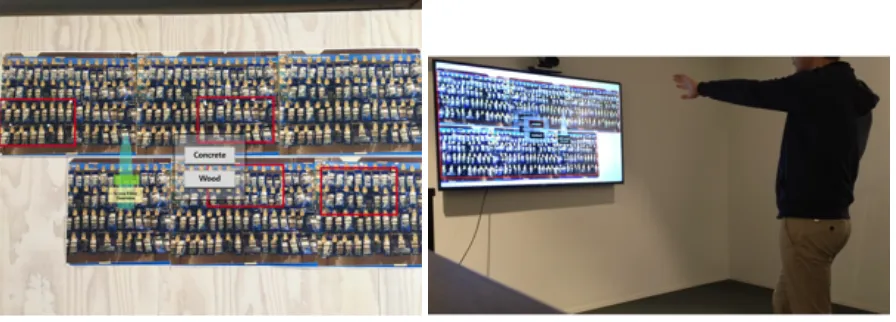
[image:13.595.74.523.487.635.2]As mentioned in the introduction, we developed an AR screw search function in the retail store for usability testing of the low-fidelity prototypes. The low-fidelity prototypes are physical prototype and digital prototype. We used different materials such as paper, poster, transparent plastic sheet, and cardboard to make the physical prototype (Figure 5-1). On the other hand, we use a common design tool “Sketch” and the presentation tool “Keynote” to make the digital prototype (Figure 5-2). We then presented the prototype on a big TV screen, so the users can interact with the digital prototype. The main difference between these two prototypes are twofold (which has been mentioned in the introduction): the fidelity of operating environment and the fidelity of user interactions. We also provided glasses for the participants who do not wear their own glasses as the AR device for the usability test. If the participants who worn their own glasses, we then asked them to image that they are wearing an AR device.
Figure 5-2. Digital prototype
Study design
There are two conditions in this study: physical prototype condition and digital prototype condition. The between-subject design was applied, which means that each participant would only experience one condition. The main reason to apply between-subject design was to avoid learning effect. We used a novel way (step forward and step backward) to proceed the filter function in our design, which was one of the main observation in the usability test. Once the participant learned this interaction, they would already know how to perform if we then ask them to use another prototype. Thus, we assumed there was no much value to compare the usability problems within subjects. The participants were randomly assigned to each condition. However, we also asked a few participants to experience two prototypes to know their perceived difference of these two prototypes, which would also be examined in the results.
Usability tasks
It should be noted that the tasks are sequential in order to test the step backward interaction. Even in the situations that the participants select a wrong set of screws, they are still asked to perform task 2 and the failure of task 1 would not stop the participants to perform it. During the test, if the participants feel stuck at some moments, the facilitator would give some hints or discuss with the participants to help them reach the goal. As the goal at the current stage is to learn how the users interact with the system for exploring, we did not extremely ask the participants to finish the tasks on their own.
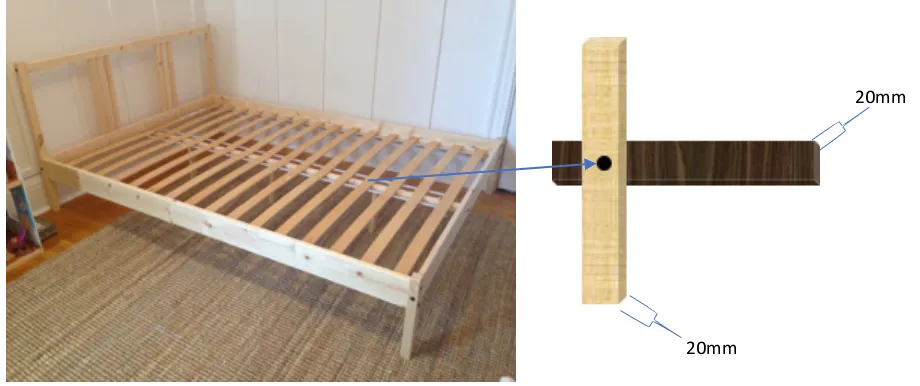
[image:15.595.69.529.300.493.2]Task 1: Please see the picture 1 (Figure 6), your IKEA bed frame needs to be fixed. The thickness of the upper wood and the lower wood is 20 mm each. You have a screw driver, which is like the one shown on “tool” picture (Figure 7). Now, please use our AR system to find the screws which you think would match your needs in this situation.
Figure 6. Usability task 1
Figure 7. Usability task screw driver tool sample
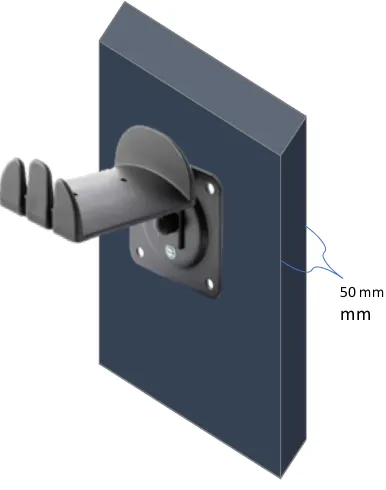
Task 2: You have found the screws for task 1. Now, you also need some screws for fixing a hanger on the wall (Figure 8, please see the picture 2). The thickness of the wall is 50mm, which you already measured before you came to the store. The screw driver you have is the same as the task one. I would like you to use our AR system again to find screws which you think would match your needs in this situation. However, this time, please start task 2 from the end point where you finish task 1.
20mm
Figure 8. Usability task 2
Procedure
The following procedure applies to every participant for both conditions in our study. First, the participants were invited to the testing environment which was at the Mirabeau office. We then gave them consent form and explained the usability test. After the instruction (Appendix E) and making sure that the participants understood their rights, what the tasks were and how the system works, the usability test then started. We recorded all the testing sessions with participants’ permission, which we analyzed later for the results. During the test, we also asked participants to think aloud and asked questions when needed to clarify their thoughts. After the test, the facilitator would ask some follow-up questions based on what she observed during the test. The test took around 30 to 40 minutes for each participant.
Analysis
Only the data of the participant who has finished the usability test was included in the data analysis. All the recordings were reviewed for marking observed incidents which were filled in the incident coding form for each participant. An observed incident is a brief behavior description with a code that note critical events such as difficulties that the participant encountered, or any other comments the participants made, and the discussion with the facilitator during the test. It should be noted that the observed incidents are not usability problems yet, but will be matched across all participants and tasks to define usability problems later in the analysis.
50 mm
After noted all the observed incidents per participant, we followed the matching process method which was purposed by Lavery, Cockton, & Atkinson (1997) to cluster the incidents into usability problems. In their study, they defined that “A usability problem is an aspect of the system and/ or a demand on the user which makes it unpleasant, inefficient, onerous or impossible for the user to achieve their goals in typical usage situations.” They then distinguished four components for a usability problem, which included a cause, a breakdown, an outcome, and a context. In their model, there was another component “design change”. A design change is not part of the usability problem, but it is related to other components in the model, which thus would be included in our analysis.
Results Usability problems
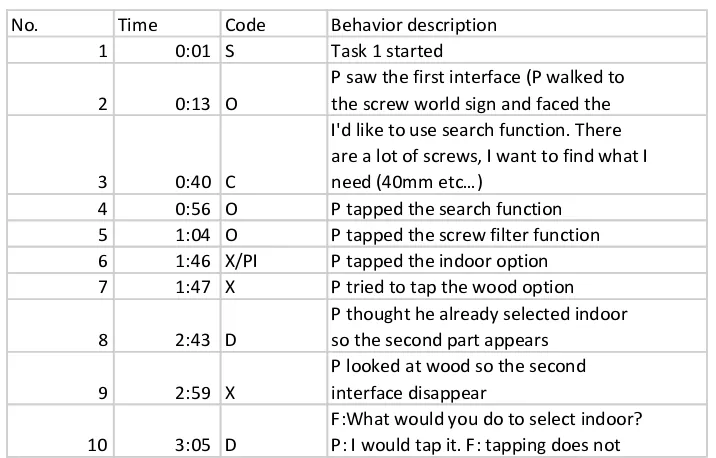
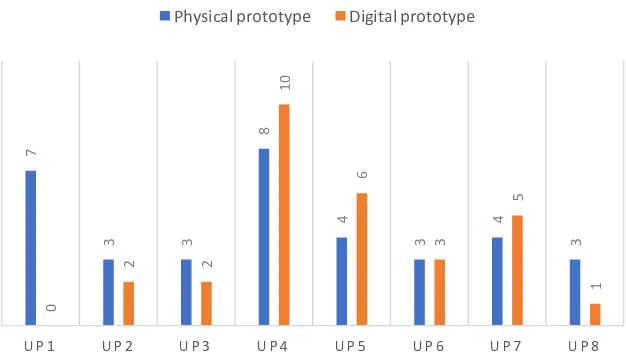
The total of 1270 observed incidents were recorded. The detail of the incidents of the participants which matched to the usability problems can be seen in appendix F and the example of the incidents can be seen in Figure 9. As using the physical prototype, the 10 participants revealed in total of eight usability problems. In contrast, another 10 participants who used digital prototype revealed seven usability problems. There was only one usability problem which was not found through using digital prototype because of the limitation of the prototype itself. Despite of this particular usability problem, both prototypes revealed the same usability problems, which showed no big difference when using these two prototypes for user tests. More importantly, the frequency of the match between the two methods is similar as shown in figure 10 (Schmettow, Bach, & Scapin, 2014).
The incident sample from participant 1
No. Time Code Behavior description
1 0:01 S Task 1 started
2 0:13 O
P saw the first interface (P walked to the screw world sign and faced the
3 0:40 C
I'd like to use search function. There are a lot of screws, I want to find what I need (40mm etc…)
4 0:56 O P tapped the search function
5 1:04 O P tapped the screw filter function
6 1:46 X/PI P tapped the indoor option
7 1:47 X P tried to tap the wood option
8 2:43 D
P thought he already selected indoor so the second part appears
9 2:59 X
P looked at wood so the second interface disappear
10 3:05 D
[image:18.595.137.495.336.565.2]F:What would you do to select indoor? P: I would tap it. F: tapping does not
Figure 9. The examples of the incidents. Code explanation: S – task started, O – participants’ operations, C – participants’ comments, X – usability problems or the wrong actions that participants take, PI –
Figure 10. frequency of the usability problems found from both prototypes
Two main usability problems categories Design concept problems UP2: The concept of scan sample function
UP3: The concept of screw model and screw filter
AR interaction problems UP1: Unclear starting point of the screw world sign (only applied to physical prototype)
UP4: The unclear interaction of stepping forward to select UP5: The confusion of selecting the final filter
UP6: Limited view and unintended backward when get close to the wall
UP7: Confusion about looking at and selecting and option UP8: No using unselecting function
Table 1. Table of the two usability problems categories
We grouped the usability problems into two main categories (Table 1). One is design concept problem and the other is AR interaction problem. Design concept problems are the problems that participants showed difficulties of understanding the terms or descriptions when using the prototype or the mismatch between participants’ thoughts and the initial design concept. AR interaction problems are the problems that the participants showed difficulties of interacting with the AR prototype to perform the tasks.
Design concept problems
Unclear concept of scan sample function (#UP2) and confusion between screw model and screw search function (#UP3) were the main problems that participants encountered in this
7
3 3
8
4
3
4
3
0
2 2
10
6
3
5
1
U P 1 U P 2 U P 3 U P 4 U P 5 U P 6 U P 7 U P 8
UPS FROM BOTH PROTOTYPES
category. The idea of scan sample function in our design is to let users scan their own samples they bring to the store from home and the AR can show the matched item on the shelves. In this way, users do not need to take much effort to search. However, some participants in our study thought that it is a function they can scan the items on the shelves in the store to get further information about a particular product. For example, physical prototype user #6 tried to tapped the scan sample function and said “I want to scan the screws on the wall to see the detailed information”. Another problem is that participants were confused about the screw model and screw search function. The screw model is a function that participants can search for a specific type of screw when they know what exactly they are searching for. On the other hand, the screw search function allows users to use filters to narrow down the selections even though they do not know the exactly items they are looking for. In the usability tests, some participants had no idea what the difference between the two functions is and there was no further description presented to them, which is also need to be improved in the next stage. AR interaction problems
The main interaction usability problem was that most participants had difficulty of figuring out to step forward to select a filter when they saw the first filter interface (#UP4). This might because before they entered the filter stage, they used the action “tap” to select options. The unexpected changed interaction might lead to the usability problem. For example, physical prototype user #7 tried to tap the indoor option when he saw the first filter interface and said “I do not know. I am confused about it. It seems not working”. Moreover, there was no additional instruction for participant to be aware that they need to change their interaction at the filter stage. However, when the participants learned they need to step forward to select a filter either by been given a hint from the facilitator or figuring out by themselves, they can apply to the next filters to complete the search task. Furthermore, most of them can even figure out that they need to step backward to unselect a filter in the task 2. Physical prototype user #8 stepped backward when he started task 2 and said “Naturally, I step forward to select things, I will think if I step back, the menus will come back again”. It should be noted that although most participants know the step backward interaction, it was still unclear for a few participants to know they can step backward to unselect a filter without any instructions (#UP8). For example, physical prototype user #7 tried to swipe a filter on the screw overview to change it when he started task 2.
first one when they are looking at a filter option and they know they need to step forward to arrive the next interface as selecting the first filter option. However, when they arrived the final filter interface, there was no next interface will show behind the final one. Some participants then thought they need to change to tap the final option for selecting instead of stepping forward to select. This misunderstanding was due to the participants did not realized the stepping forward to select an option exists in the whole filter stage but not only exists when they see a second filter interface shows up, which can be seen as one of the most serious usability problems in our test.
Unclear starting point of the screw world sign is another interaction problem. Based on the item search design concept, user needs to walk to a specific (screw world) sign and face the screw wall at the same time then the first interface will show up. However, because of the unclear starting point that the sign only says “screw world” without any further information, participants did not know it is a starting point (#UP1). This might result in users failing to start using the system. It should be noted that this starting point problem has only been revealed when using physical prototype.
Additional observations
Apart from the formal usability problem report, the researcher also noted observations from the usability tests. These observations did not impact the system’s usability, but were helpful for understanding the results (AR design) and two kinds of prototype better.
1. Users’ previous experience of AR, VR, and digital products
During the tests, the researcher observed that some participants tend to use HoloLens gestures to interact with our AR prototype. Some participants also tend to look at an option for 5 seconds to select it (VR interaction). When the researcher asked the participants why they preferred such interactions, they all said because they have prior experience with those products, which also have been revealed when they were doing the background survey (see Appendix D). The previous experience of AR or VR seemed to influence the way that the users interacted with our AR design. Thus, it is important to conduct a background survey or try to observe and discuss with users about their behavior.
2. Most participants check the item before they take it.
3.Most participants focus on using the interface first.
We presented the AR interface in front of the users. Most users focused on how to select a filter when they saw the first interface showed up even though we also presented screw filter overview and highlighted the selected area at the same time. For the participants who were using digital prototype, it might happen that they tried to interact with screw filter overview or other things on the screen compared to physical prototype. Some participants also mentioned that they did not notice background or the screw filter overview changed until task 2, in which they already learned how to interact with the AR system and had more time and attention to other details of the system.
4. AR device (glasses)
We provided glasses for the participants who do not wear glasses in daily life and asked them to imagine it is a AR device during our tests (see appendix D). It happened that they took off the glasses after they finished searching their targeted screw because wearing glasses is not common for them. When they finished searching, they would like to act in their comfortable way. In general, it is not a big problem since the users already knew where the targeted screw is. However, it should be clear for them to know that once they take off the glasses (AR device), all the information on AR device will be gone.
The difference between the two prototypes
It should be noted that we are not trying to classify usability problems here but more examine the difference of the limitations, making, operating, test results that the researcher noted during conducting the whole study, and the discussion with a few participants about their perceived differences between these two prototypes, which is the main result to reach our research goal.
1. Limitations due to the prototypes’ characteristics Starting point.
For the physical prototype, we had a facilitator who held the screw world sign at a specific starting point. The starting point is around 3m away from the screw wall. Participants needed to walk to the sign and face the screw wall then they can see the first AR interface showed up in front of them. However, this was not feasible to be achieved when applying a 2D digital prototype that everything was on the screen because the starting point cannot be shown out of the screen.
Animations.
understand what they have chosen. However, for physical prototype, it is hard to make such animations.
The first highlighted area.
For the physical prototype, we could not find a proper material to highlight all the screws for giving the users an overview of all the possible screws when the users choose the screw filter function.
Moveable objects.
A big difference between our physical and digital prototype is that interfaces and screw filter overview can move along the participants when using physical prototype. For example, if a participant move to the left side to see the targeted screw, the screw filter overview would always be presented on the left side of the participant. However, for digital prototype, all the interfaces are fixed on the screen. If a participant move, the interface would stay still at the original location, which is a drawback of the digital prototype to simulate the AR experience. Eye-movement point.
We gave an eye-movement point for the participants when they were testing with the physical prototype. We ask them to use the point to let the facilitator know where they are looking at. Based on the eye-movement point, the facilitator can adjust the prototype and the AR system. However, there was not such tracking point with our digital prototype. We can only ask the participants where they are looking at during the test and need to clarify with them very often to avoid misunderstanding.
The size and resolution of the background.
We printed out a real size of the screw shelves for our physical prototype, which makes the participants feel they are shopping in the store. However, although we tried to project our digital prototype to a big screen, the best testing environment and screen we used this time were still not big enough. Some participants who used the digital prototype mentioned that it is hard to see the detail information of the screws, but this did not impact the way they interact with the AR prototype to finish the tasks.
2. Making the prototypes for the usability test and operating the prototypes during the usability test
Materials for physical prototype
last section. On the other hand, it was very easy to highlight the big area in our digital prototype. The difficulty of finding proper materials for physical prototype is one thing that designers should keep in mind when making prototypes for AR usability tests.
The flexibility of operations for digital prototype
One of the advantages of the digital prototype is that all the flows are made automatically, which means the facilitator only needs to click and the next step will show up immediately. However, if the participants are trying to repeat an action again and again, the digital prototype is not flexible for the operation. For example, in our task 1, when the participants tried to figure out how to select a filter, then tend to look at an option to see the second interface shows up and look away again to understand that the interface would disappear. It was not like operating a physical prototype that the facilitator can manually show the interface based on the participants’ eye-movements. The operation for our digital prototype in this situation was more difficult because the facilitator needed to click on a specific area to make the interface disappear.
Resource of operating a physical prototype
An AR physical prototype is a large prototype in a real environment, which means that if the researchers want to run the prototype smoothly, it should be better to have more people to operate it. One of the biggest difficulties when the researcher was doing the physical prototype usability test in this study was that she needs to pay attention to every single operation and the participant needs to wait for her to adjust the prototype based on their actions. In order to run the test by one facilitator, which is a common case in the industry, some details of design need to be scarified. Also, it was hard to take notes at the same time to ask follow-up questions during the tests. All of these were the challenges for using the physical prototype. 3. During the usability tests
Physical prototyping interface as a real object
Discussion
The main goal of this study was to explore potential low-fidelity prototyping methods for augmented reality and to learn the advantages and disadvantages of the two methods. We aimed at learning if these methods are sufficient for AR usability tests which can be executed at the early stage of the product development especially when the final product has not been built. The overall findings of the current study showed that both the physical and digital prototypes we made were sufficient for finding usability problems based on applying to our AR design concept. The physical prototyping method can be seen as a transformation from paper prototype of 2D products to 3D AR products, which has also been used in the studies of Albertazzi, Okimoto, & Ferreira (2012) and Hunsucker, McClinton, Wang, & Stolterman (2017). The digital prototype, which used a common presentation tool “Keynote”, is to test if AR usability problems can been found through 2D prototypes. More importantly, we found the similar usability problems from both physical and digital prototypes, which showed no big difference when using these two prototypes for our AR design concept and usability tests. In addition to the usability problems, the low-fidelity prototypes were also useful for observing how the users are going to interact with the AR system and discussing with users their feelings of interacting in our design case.
Usability test reflection and limitation 1.Usability test versus academic experiments
In the industry, the aim of usability test is to find usability problems. If anything wrong happened during the test, the facilitator should fix it before the next test in order to achieve the goal of the test (Nørgaard & Hornbæk, 2006). However, for our study, if the test changes across participants, the results might be different due to these changes but not the prototyping method itself. Thus, we tried to keep the same procedure and setting for all usability tests in our study even though we found some points can be improved or fixed for better operating the usability test.
2. Limitations of visual field or technical issues on AR
The wearable AR development is still not mature in the commercial market which means that there are some limitations such as the tracking accuracy and limited visual field when using current products. In this study, we ignored these limitations when developing our AR concept and prototypes. However, considering the technical issues when developing AR is important to know whether the design is feasible or not (Buenaflor & Kim, 2013), which needs well communication with AR developers in the future studies.
The AR design in our study needs participants to step forward and step backward to select or unselect a filter. During the test, it happened that the participants unintentionally stepped backward to avoid the facilitator or adjusting the distance between the interface and him/her. They did not take these actions to unselect a filter in this situation. Although the system should adjust based on these actions while participants were doing the usability tests, we did not execute that in the current study to avoid confusing the participants during the tests. Adjusting these unintentionally interactions also needs more operating time, which might influence the test process. We would suggest to note these interactions for discussion within the design team and evaluate the impact in the next phase.
When to use physical and when to use digital prototyping method for AR usability test? Combining with the usability tests results, the observations, the reflections, the limitations and the participants’ perceived differences of both prototyping methods, there are some ideas that the designers can consider when they need to choose one prototyping method for conducting a low-fidelity prototype AR usability test.
Touchable actions versus non-touchable actions
Touchable actions might be an index for using physical or digital prototype from our observation. If the AR design needs users to touch the interface such as tapping or long pressed, we would suggest to use physical prototype to test. When participants were interacting with our physical prototype, they tend to touch it since it was presented just in front of them. Another reason for this is that we presented our digital prototype on a big screen, although nowadays people are getting used to touch screens, it still not that intuitive to touch a big (TV) screen for most people. However, if the AR design needs users to use gestures or voice control to interact with the system, we would suggest to use digital prototype.
Single flow or multi-flows
For people who would like to test multi-flows for their AR design, digital prototype is a preferred option. It is easier to build multi-flows on a digital prototype because the links can be automatically set up. If using physical prototype for multi-flows, first needs more materials to build and it would be more complicated when operating multi-flows on a physical prototype. Interactions (e.g. swipe)
This idea is similar to interactions that mentioned in the last point. A slightly difference is that the last is regard to users’ own movements and interaction but here is regard to the objects that is fixed in a specific location to the user. For example, an information mark will always be presented on the left side of the user. It is easier to manipulate through a physical prototype but hard to achieved through a digital prototype when everything is fixed on the screen.
Precise object locations
If the AR design needs to present objects in a precise location, it would be better to use physical prototype. Wayfinding design concept is an example for this point that the AR system needs to provide clear direction for the users to let them know where to go.
Time and cost
In the industry, especially for agency companies, it is common that the company has limited budget and might only recruit five participants to do the usability tests in the early phase of the product development. Making a physical prototype might take longer time and more resource than a digital prototype. In addition, running a physical prototype needs more people compared to a digital prototype as well. In contrast, making digital prototype is easier for designers and this is what they are already familiar with. Thus, digital prototype could be used when the design team has limited budget and would like to rapidly make a low-fidelity prototype in order to get initial AR design feedback from the users.
Operation of big scenes
If the AR design comes to operating big scenes, we would suggest to use digital prototype. Using physical prototype for big scenes might have some limitations. For example, a big background needs to change but the facilitator is not tall enough to do it. In contrast, this can be easily achieved when using digital prototype that the background would be automatically changed.
The design concept
Reminders of conducting a usability test with AR low-fidelity prototypes Consider all the possible interactions and the corresponding responses
Compared to using website or mobile applications, there are different ways that the users might prefer to interact with the AR system. For the exploring purpose of the usability test, it is important to make sure all the possible interactions and how to react to it before the test. Otherwise, it might happen that the facilitator does not know how to take a reaction and would be confused the participants and further influence the usability test results.
Discuss the limitations and possibilities of using AR with developers
As mentioned that we ignored the limitations of current wearable AR in the current study, however, it is important to discuss such limitations and possibilities of using AR with developers when designing the AR user experience. After all, the goal of making AR prototypes to conduct the usability test is to improve the developed product, which should be a feasible end-product in the market.
User background (experience) survey
The user background survey can be helpful for understanding your users better, which is a key when designing the user experience (Law, Roto, Hassenzahl, Vermeeren, & Kort, 2009). During our usability tests, different participants used different ways to interact with the AR prototype. For example, users who have virtual reality experience used to looking at an option for a while to select it. Conducting a background survey before the test can help designers to analyze and examine the user behavior in the test better.
Make sure the users can distinguish the reality and the AR technology
Physical Digital
Touchable interactions Multi-flows
Interactions (ex. swipe) Precise locations Moveable objects Time and cost
It happened several times in our tests that participants had over imagination for AR on our prototype. For example, we projected the screw wall on the big screen and a few participants thought the screws were virtual on the AR device like using virtual reality but not real in the physical environment. Another situation was that a participant who were using physical prototype overly imaged that the screws are all over the environment but not just the printed screws on the wall. All of these needs facilitator’ s classifies with participants and better to make clear distinguish on the low-fidelity AR prototype.
Conclusion
References
Albertazzi, D., Okimoto, M. L., & Ferreira, M. G. G. (2012). Developing an usability test to evaluate the use of augmented reality to improve the first interaction with a product. Work, 41(SUPPL.1), 1160–1163. http://doi.org/10.3233/WOR-2012-0297-1160 Azuma, R. T. (1997). A Survey of Augmented Reality. Presence, 6(4), 355–385. Azuma, R. T., Baillot, Y., Behringer, R., Feiner, S., Julier, S., & MacIntyre, B. (2001).
Recent Advances in Augmented Reality, (December), 1–13. http://doi.org/10.1378/chest.10-0188
Barba, E., MacIntyre, B., & Mynatt, E. D. (2012). Here we are! where are we? Locating mixed reality in the age of the smartphone. In Proceedings of the IEEE (Vol. 100, pp. 929–936). http://doi.org/10.1109/JPROC.2011.2182070
Billinghurst, M., Clark, A., & Lee, G. (2014). A Survey of Augmented Reality Navigation. Foundations and Trends in Human-Computer Interaction, 8(2–3), 73–272.
http://doi.org/10.1561/1100000049
Bimber, O., & Raskar, R. (2005). Spatial Augmented Reality Merging Real and Virtual Worlds. SpatialAR.com (Vol. 6). AK Peters/CRC Press.
http://doi.org/10.1260/147807708784640126
Blokša, J. (2017). Design Guidelines for User Interface for Augmented Reality, 67. Retrieved from https://is.muni.cz/th/410072/fi_m/
Boehm, B., & Basili, V. R. (2001). Top 10 list [software development]. Computer, 34(1), 135–137. http://doi.org/10.1109/2.962984
Buenaflor, C., & Kim, H. C. (2013). Six human factors to acceptability of wearable
computers. International Journal of Multimedia and Ubiquitous Engineering, 8(3), 103– 114. http://doi.org/10.1.1.307.215
Burnett, G. E., & Ditsikas, D. (2006). Personality as a criterion for selecting usability testing participants. Information Processing in the Service of Mankind and Health,
00(December), 487–497. http://doi.org/10.1109/ITICT.2006.358235
Buxton, W. (2007). Sketching user experience : tting the design right and the right design / Bill Buxton. Elsevier Science. Retrieved from
https://books.google.nl/books?id=2vfPxocmLh0C
Cabrilo, I., Bijlenga, P., & Schaller, K. (2014). Augmented reality in the surgery of cerebral aneurysms: A technical report. Neurosurgery, 10, 252–261.
http://doi.org/10.1227/NEU.0000000000000328
Dow, S., MacIntyre, B., Lee, J., Oezbek, C., Bolter, J. D., & Gandy, M. (2005). Wizard of Oz support throughout an iterative design process. IEEE Pervasive Computing, 4(4), 18–26. Dünser, A., Grasset, R., & Billinghurst, M. (2008). A survey of evaluation techniques used in
augmented reality studies. In ACM SIGGRAPH ASIA 2008 courses on - SIGGRAPH Asia ’08 (pp. 1–27). http://doi.org/10.1145/1508044.1508049
Endsley, T. C., Sprehn, K. A., Brill, R. M., Ryan, K. J., Vincent, E. C., & Martin, J. M. (2017). Augmented reality design heuristics: Designing for dynamic interactions. In Proceedings of the Human Factors and Ergonomics Society (Vol. 2017–Octob, pp. 2100–2104). http://doi.org/10.1177/1541931213602007
HALL, R. R. (2001). Prototyping for usability of new technology. International Journal of Human-Computer Studies, 55(4), 485–501.
http://doi.org/https://doi.org/10.1006/ijhc.2001.0478
Hua, H., & Javidi, B. (2014). A 3D integral imaging optical see-through head-mounted display. Optics Express, 22(11), 13484. http://doi.org/10.1364/OE.22.013484 Hunsucker, A. J., McClinton, K., Wang, J., & Stolterman, E. (2017). Augmented Reality
Prototyping For Interaction Design Students. In Proceedings of the 2017 CHI
Conference Extended Abstracts on Human Factors in Computing Systems - CHI EA ’17 (pp. 1018–1023). http://doi.org/10.1145/3027063.3053684
Jaya Vijayan, G. R. (2011). A New approach to Requirements Elicitation Using Paper Prototype. International Journal of Advanced Science and Technology, 28, 9–16. Retrieved from http://www.earticle.net/article.aspx?sn=147406
Kim, M. J., Wang, X., Han, S., & Wang, Y. (2015). Implementing an augmented reality-enabled wayfinding system through studying user experience and requirements in complex environments. Visualization in Engineering, 3(1).
http://doi.org/10.1186/s40327-015-0026-2
Lavery, D., Cockton, G., & Atkinson, M. P. (1997). Comparison of evaluation methods using structured usability problem reports. Behaviour & Information Technology, 16(4–5), 246–266.
international conference on Human factors in computing systems - CHI 09 (p. 719). http://doi.org/10.1145/1518701.1518813
Lee, M., Billinghurst, M., Baek, W., Green, R., & Woo, W. (2013). A usability study of multimodal input in an augmented reality environment. Virtual Reality, 17(4), 293–305. http://doi.org/10.1007/s10055-013-0230-0
Liarokapis, F., Petridis, P., Lister, P. F., & White, M. (2002). Multimedia Augmented Reality Interface for E- learning (MARIE). World Transactions on Engineering and Technology Education , 1(2).
MacWilliams, A., Reicher, T., Klinker, G., & Bruegge, B. (2004). Design Patterns for Augmented Reality Systems. In MIXER. http://doi.org/10.1.1.3.8477
Maulsby, D., Greenberg, S., & Mander, R. (1993). Prototyping an intelligent agent through Wizard of Oz. In Proceedings of the SIGCHI conference on Human factors in
computing systems - CHI ’93 (pp. 277–284). http://doi.org/10.1145/169059.169215 Medenica, Z., Kun, A. L., Paek, T., & Palinko, O. (2011). Augmented reality vs. street views:
a driving simulator study comparing two emerging navigation aids. Proceedings of the International Conference on Human-Computer Interaction with Mobile Devices and Services (MobileHCI ’11), 265–274. http://doi.org/10.1145/2037373.2037414 Milgram, P., & Kishino, F. (1994). A Taxonomy of Mixed Reality Visual-Displays. Ieice
Transactions on Information and Systems, E77d(12), 1321–1329.
Mohring, M., Lessig, C., & Bimber, O. (2004). Video see-through AR on consumer cell-phones. In Third IEEE and ACM International Symposium on Mixed and Augmented Reality (pp. 3–4). http://doi.org/10.1109/ISMAR.2004.63
Molin, L. (2004). Wizard-of-Oz prototyping for co-operative interaction design of graphical user interfaces. In Proceedings of the third Nordic conference on Human-computer interaction - NordiCHI ’04 (pp. 425–428). http://doi.org/10.1145/1028014.1028086 Narzt, W., Pomberger, G., Ferscha, A., Kolb, D., Müller, R., Wieghardt, J., … Lindinger, C.
(2006). Augmented reality navigation systems. Universal Access in the Information Society, 4(3), 177–187. http://doi.org/10.1007/s10209-005-0017-5
Nørgaard, M., & Hornbæk, K. (2006). What do usability evaluators do in practice? In Proceedings of the 6th ACM conference on Designing Interactive systems - DIS ’06 (p. 209). http://doi.org/10.1145/1142405.1142439
Rhienmora, P., Gajananan, K., Haddawy, P., Dailey, M. N., & Suebnukarn, S. (2010). Augmented reality haptics system for dental surgical skills training. In Proceedings of the 17th ACM Symposium on Virtual Reality Software and Technology - VRST ’10 (Vol. 1, p. 97). http://doi.org/10.1145/1889863.1889883
Schmettow, M., Bach, C., & Scapin, D. (2014). Optimizing Usability Studies by
Complementary Evaluation Methods. Proceedings of BCS HCI 2014 - Sand, Sea and Sky - Holiday HCI, 110–119. http://doi.org/10.14236/ewic/hci2014.12
Serubugo, S., Škantárová, D., Kjærsgård Nielsen, L., & Kraus, M. (2017). Comparison of Wearable Optical See-through and Handheld Devices as Platform for an Augmented Reality Museum Guide. In Proceedings of the 12th International Joint Conference on Computer Vision, Imaging and Computer Graphics Theory and Applications (pp. 179– 186). http://doi.org/10.5220/0006093901790186
Shoaib, H., & Jaffry, S. W. (2015). A survey of augmented reality. Interactions, 24, 34. Silva, T. R., Hak, J., Winckler, M., & Nicolas, O. (2017). A Comparative Study of
Milestones for Featuring GUI Prototyping Tools. Journal of Software Engineering and Applications, 10(06), 564–589. http://doi.org/10.4236/jsea.2017.106031
Sutherland, I. E. (1968). A head-mounted three dimensional display. In Proceedings of the December 9-11, 1968, fall joint computer conference, part I on - AFIPS ’68 (Fall, part I) (p. 757). http://doi.org/10.1145/1476589.1476686
Van Krevelen, D.W.F., Poelman, R. (2010). A Survey of Augmented Reality Technologies, Applications and Limitations. The International Journal of Virtual Reality, 9(2), 1–21. http://doi.org/10.1155/2011/721827
Appendix B: Usability test consent form
Goal
The goal of this evaluation is to test the usability of an augmented reality (AR) prototypes used for searching items, in order to improve this tool in terms of user-friendliness.
Procedure
You will carry out activities with the prototype, which will be provided by the facilitator. While carrying out the activities, you are asked to think aloud and the facilitator might ask questions. After completing the activities, the facilitator will ask you some follow-up questions. The evaluation will take around 45 minutes.
You may stop, take a break, or ask questions at any moment.
Recording
To facilitate the analysis of the evaluation results, we ask for your permission to record the evaluation. The recording will only be used by the design team to improve the prototype, and by the researcher to present the results in her master’s thesis. The results will not be shared with anyone outside the team.
Participation does not have any risks or consequences for you.
• Your answers and details will be processed anonymously.
• We judge the quality of the prototype, not your performances.
Informed consent
By signing this form, you acknowledge to have read and understood the information in this document, and to agree with this information.
Do you agree with recording?
Yes, video- and sound recording. Yes, only sound recording. No, rather not.
Name:
Date:
Signature:
Contact Information
Researcher: I-Wen Huang
(Interaction Design Intern)
Email: [email protected]
Phone: +31629478169
Supervisor:
Lennart Overkamp (Interaction Designer)
Email: [email protected]
Phone: +31653980425
Appendix C: Background survey (demographic questionnaire)
AR usability test survey
Hi, thank you for participating the AR usability test!
I would like to collect some of your personal information to analyse the data better. All of your personal information will be processed anonymously and will only be shared within the research team. By filling this survey, you agree that we can use the information for the project "usability testing of low-fidelity augmented reality (AR) prototypes".
If you have any questions, you can always ask the researcher via [email protected]
Thanks again for your cooperation.
*
Name
*
Age
*
Gender
*
Male Female Other
Prefer not to say
Occupation
*
Do you usually wear glasses?
*
Yes No
Are you familiar with Augmented Reality (AR)?
*
I don't know what AR is.
I have heard about AR but never used it before.
I have some experience in using AR. (Please fill in next question!) I have a lot of experience in using AR. (Please fill in next question!)
I am super familiar with AR and also developing it. (Please fill in next question!)
What kinds of AR did you use before?
Appendix E: Usability test instruction
First of all, thanks for taking time to help us.
Today I am going to show you a prototype of a new augmented reality experience. This prototype is a rough mock up that is not yet built.
The reason I’m showing you this is to get feedback before the team builds the real version. It is a low-fidelity prototype which means that every time you take an action, the operator will make some changes based on that action manually (which also means the operator needs some time to make changes after each action). These manual changes are not part of the testing system. It is just because of this low-fidelity prototype. You will get a signal when everything is ready for the next action.
Please don’t worry about breaking anything and you can freely interact with the prototype in the way you would like.
We’ll be providing you with a few activities to use the prototype. Please think out loud as you use the prototype.
Explaining your thought process.
You are free to point out anything you like or you do not like.
The most important thing is that there is no correct or incorrect way to do these activities, just do what you think you should be able to do in the way that you would like to do it. We are not testing you, we are testing the prototype, so this is all about the prototype and what the system works and what doesn’t.
If you ever feel stuck, please let me know and we can talk about how you would expect to be able to proceed, a hint first
If you ask questions, I might respond with some form of “Well what do you think it should do?”
Also, I might ask you what you are thinking at various stages This might get a little annoying so I apologize in advance :)
Our goal is to see how you are trying to interact with the system and how you think about things
If you would like to stop at any point or take a break, please let us know Is it okay if we begin?
I am going to tell you some detail information before we start to do the activities. Imagine, you are renovating your house. You found that you need some screws to fix you bed frame and fix a hanger on the wall. You know that you can go to store to buy some screws. You go to the store and at the entrance you find that they provide the AR headset to help
Appendix F: Usability problems raw data
Problem #1 Unclear starting point of the screw world sign (only applied to physical prototype)
Incidents
Cause
(design issue)
Users do not know they need to stand right under the sign and face the screw wall and then the first interface would show up
P01_3-6 P02_2-6 P04_11, 12 P05_7, 8 P06_4, 5 P07_5, 6 P10_3, 4 Breakdown
(resulting behavior)
Users look at the sign and turn around (walk) to the wall
Outcomes
(expected loss)
Users think the system is broken and do not use the system to achieve their goals.
Design change
(how can the problem be solved)
The sign should be clear to let users know this is where they can start or give them instructions on AR
Discovery Matrix
P01 P02 P03 P04 P05 P06 P07 P08 P09 P10 Sum 1 1 0 1 1 1 1 0 0 1 7 D01 D02 D03 D04 D05 D06 D07 D08 D09 D10 Sum
Problem #2 The concept of scan sample function Incidents Cause
(design issue)
Users do not understand this function is for people who bring their own samples and thought they can scan in-store screws for details
P05_17, 18 P06_8, 9 P10_11
D01_6 D05_5, 6 Breakdown
(resulting behavior)
Users tried to scan the samples in the store to get further details
Outcomes
(expected loss)
The system will show where the sample is which does not fit users’ expectations
Design change
(how can the problem be solved)
Add clear instructions such as “bring your own sample from home? Scan it here and we’ll find it for you”
Discovery Matrix
Problem #3 The concept of screw model and screw filter Incidents Cause
(design issue)
Users are confused about screw model and screw filter functions
P01_14 P03_8, 51, 54 P05_13-15
D01_3 D07_10 Breakdown
(resulting behavior)
Users want to use screw model function to achieve a specific goal, which does not fit our usability tasks
Outcomes
(expected loss)
Users cannot find out what they want if they do not know the distinctions or the concepts of the functions
Design change
(how can the problem be solved)
Change to common terms (based on user research) or add additional information
Discovery Matrix
Problem #4 The unclear interaction of stepping forward to select Incidents Cause
(design issue)
Users need to step forward to select filter options which is different from the previous two interfaces that they can tap it, so most of them cannot figure it out
P01_16, 17, 19, 24, P03_14, 15, 22, P04_22, 24, 31, 34, 39-41 P05_26, 29, 30, 32, 36 P06_13, 14, 17, 20, 23, 25 P07_15, 20, 25, 29 P08_6, 7, 9, 11, 13, 17, P10_15 (DH)
D01_9, 10, 12-15, 23, 27 D02_11, 14-16, 18, 19, 24, 26
D03_16, 33-35 D04_12, 14, 20, 25, 27 D05_17, 23, 25, 26 D06_10, 24, 25, 32, 34, 36 D07_17, 20 ,22, 24, 28, 30, 39, 44, 47
D08_12, 15, 22, 33, 38, 41, 43, 48, 52
D09_14, 15, 27, 30, 31, 39, 48, 53, 58, 66, 79
D10_15, 22, 34, 36, 38-44, 58, 59, 67
Breakdown
(resulting behavior)
Users tried different interactions to select the option (tap, voice control, swipe, enlarge, shrink, wired actions) Outcomes
(expected loss)
Users can not select the filter to achieve their goal and feel frustrated (annoying)
Design change
(how can the problem be solved)
Providing clear instruction to step forward to select or change another interaction to select the filter in the system
Discovery Matrix
Problem #5 The confusion of selecting the final filter Incidents Cause
(design issue)
Users do not know they have to step forward to select the final filter (they do not see an interface shows up behind the final filter
P04_51, 52 P06_33, 34 P07_33, 36 P08_24, 25
D05_37-39 D06_49 D07_60, 61 D08_56,57, 60 ,61 D09_57, 58 D10_75 Breakdown
(resulting behavior)
Users tend to tap, swipe, or try other interactions that different from stepping forward
Outcomes
(expected loss)
Users do not know how to select the final filter, so they might give up to use the system
Design change
(how can the problem be solved)
Give clear instruction that what the users need to do in order to select the final filter or providing final check option to proceed the filter function
Discovery Matrix
P01 P02 P03 P04 P05 P06 P07 P08 P09 P10 Sum 0 0 0 1 0 1 1 1 0 0 4 D01 D02 D03 D04 D05 D06 D07 D08 D09 D10 Sum 0 0 0 0 1 1 1 1 1 1 6
Example of looking at a first filter option, the second interface shows up behind the first one
Problem #6 Limited view and unintended backward when get close to the wall
Incidents
Cause
(design issue)
Some users get too close to the shelves at the last two filters, which results in they can only see limited views and step backward to see the scene
P03_29 P04_65 P10_30
D08_54 D09_55 D10_73 Breakdown
(resulting behavior)
When users step backward to get space, they will unintentionally unselect a filter
Outcomes
(expected loss)
Users need to reselect the filter and they cannot see options outside of their view, which they might not be able to find what they want
Design change
(how can the problem be solved)
The distance between the user and the wall should be designed well (based on how much filters). It is also possible to give directions and hints to let users know where they can look at of walk to
Discovery Matrix