1541
~~
PI
, ,
PUBLISHED BY PELTIER INDUSTRIES,INC735 N. Doris Wichita, Kansas 67212 Copyright 1984 by MICHAEL G. PELTIER
All rights reserved. Printed in the United States of America. No part of this publication may be reproduced, stored in a retrieval system or transmitted in any form or by any means, electronic, mechanical, photocopying, recording or otherwise, without the prior permission of the publisher.
The information in this manual has been reviewed and is believed to be entirely correct. No responsibility, however, is assumed for any personal or property damage incurred from the use of this manual. The material in this manual is for information purposes only, and is subject to change without notice.
Commodore Business Machines, Inc., and the author of this manual advise that any attempt to repair the VIC-1541 or the 1541 disk drives during the warranty period will void the factory warranty.
WARNING:
HIGH VOLTAGE EQUIPMENT
THIS EQUIPMENT CONTAINS CERTAIN CIRCUITS AND/OR COMPONENTS OF
EXTREMELY HIGH VOLTAGE POTENTIALS, CAPABLE OF CAUSING SERIOUS
BODILY INJURY OR DEATH. WHEN PERFORMING ANY OF THE PROCEDURES
CONTAINED IN THIS MANUAL. HEED ALL APPLICABLE SAFETY PRECAUTIONS.
RESCUE OF SHOCK VICTIMS
1.
00 NOT ATTEMPT TO PULL OR GRAB THE VICTIM
2. IF POSSIBLE, TURN OFF THE ELECTRICAL POWER.
3. IF YOU CANNOT TURN OFF ELECTRICAL POWER. PUSH. PULL OR LIFT
THE VICTIM TO SAFETY USING A WOODEN POLE. A ROPE OR SOME
OTHER DRY INSULATING MATERIAL.
FIRST AID
1. AS SOON AS VICTIM IS FREE OF CONTACT WITH SOURCE OF
ELECTRICAL SHOCK. MOVE VICTIM A SHORT DISTANCE AWAY FROM
SHOCK HAZARD.
2. SEND FOR DOCTOR AND/OR AMBULANCE.
3. KEEP VICTIM WARM. QUIET AND FLAT ON HIS/HER BACK.
4. IF BREATHING HAS STOPPED. ADMINISTER ARTIFICIAL
Para. No.
TABLE OF CONTENTS
Title
FRONT MATTER
Title Page Copyright Page Warning Page Table of Contents
1-1 1-2 1-3 2-1 2-2 2-3 2-4 2-5 2-5-1 2-5-2 2-5-3 2-5-4 2-6 2-6-1 2-6-2 2-6-3 3-1 3-2 4-1
Section l-INTRODUCTION
General
VIC-1541 vs. 1541
Warnings, Cautions and Notes
Section 2-CALIBRATION
General
Equipment Required
Preparation for Calibration Calibration
Head Alignment General
Equipment Required
Preparation for Mechanical Alignment Head Alignment
Mechanical Alignment of Track #1 Stop General
Preparation for Mechanical Alignment Mechanical Alignment
Section 3-TROUBLESHOOTING
General
TROUBLESHOOTING-PART 1
Section 4-SCHEMATICS AND PARTS LAYOUT
General
APPENDICES
Appendix A Appendix B
Video Detector Fabrication Timing Strobe Fabrication
Section 1-INTRODUCTION
1-1. General
The 1541 Maintenance Guide is produced to give a brief, concise source of pertinent information necessary for maintenance of the
VIC-1541 and the 1541 disk drives. Most of the information in
this Guide has come from the 1541 Maintenance Manual, which is
also published by Peltier Industries. For those persons desiring
more thorough coverage of the 1541 series of disk drives, the 1541 Maintenance Manual is available through authorized dealers.
1-2. VIC-1541 vs. 1541
The VIC-1541 (also known as the 1540) was the first generation of
the 1541 disk drive. Basically, COMMODORE selected certain
discrete components which were present on the VIC-1541 Disk
Controller PC Board and combined them in custom IC's. When they
did this, they renamed the disk drive the 1541 and changed the reference designators (schematic identification of parts). Functionally, there is very little difference between the two
versions. Text in this Guide refers to the VIC-1541. Section 4
contains the 1541 Disk Controller Schematic and Disk Controller PC
Board Parts Layout. For a complete discussion of the differences
between the two versions, the 1541 Maintenance Manual may be
consulted. For the purposes of this Guide, the following table
and close inspection of the 1541 Disk Controller Schematic will enable 1541 owners to calibrate and troubleshoot their units. 1541 owners must cross-reference all test points before attempting any of the procedures in this Guide.
Jack/Plug Numbers
VIC-1541 1541
Jl/Pl is Jl/Pl
J2/P2---''_is J8/P8
J3/P3 - _
is·--,
J2/P2J4/P4" i-s -. ·---~J3/P3
J5/P5
'--'is
J5/P5J6/P6{~ J6/P6
J7/P7 / is __ J7/P7
J8/Pg/ i s ' - - J 4 / P 4
J9 is J9
1-3. Warnings, Cautions and Notes
Throughout this Guide are a number of Warnings, Cautions and
Notes. A warning means that there is a possibility of serious
injury, or even death, to the technician if the Warning is not
heeded. A Caution means that there is a possibility of damage to
the VIC-1541 if the Caution is not heeded. A Note is intended to
Section 2-CALIBRATION
2-1. General
r
14q
I'l
c
T~tion "contains step-by-step p:t;"ocedures for calibrating the
/"-\71(:-154)J Only one calibration adjustment, to adjust the speed of
--iL-tl"'le"""""Clisk to 300 rpm, is provided in the VIC-1541. Perform the
calibration procedure at the following intervals:
1. Every 6 months.
2. During the process of troubleshooting.
3. After a repair action.
2-2. Equipment Required
1. Small slotted screwdriver
2. Phillips screwdriver
3. Timing light (Refer to Appendix B)
[Nont
• Any strobe light with an accurate
frequency of 50 Hz 1%) or 60 Hz
(+/-1%) may be used in place of the timing light.
4. Blank floppy disk (5 1/4 inch, single sided)
2-3. Preparation for calibration (Detailed disassembly/assembly
instructions can be found in the 1541 Maintenance Manual.)
1. Remove top cover.
2. Remove RFI shield.
3. Disconnect
pi
fromJ1.
4. Reinstall RFl shield.
5. Remove bottom cover.
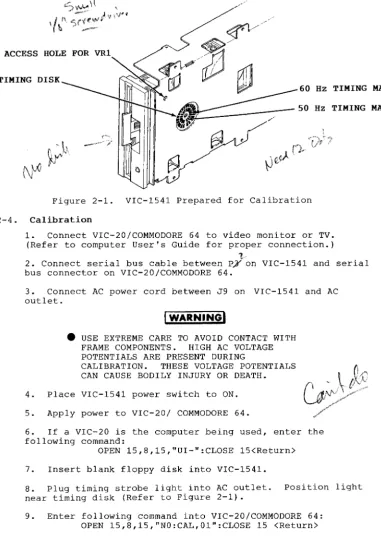
6. Place disk drive on left-hand side. Use a thin book or
ACCESS HOLE FOR VRl
TIMING DISK
Hz TIMING MARKS
Hz TIMING MARKS
Figure 2-1. VIC-1541 Prepared for Calibration
2-4. Calibration
1. Connect VIC-20/COMMODORE 64 to video monitor or TV.
(Refer to computer User's Guide for proper connection.) 1
2. Connect serial bus cable between P;yon VIC-1541 and serial bus connector on VIC-20/COMMODORE 64.
3. Connect AC power cord between J9 on VIC-1541 and AC
outlet.
4.
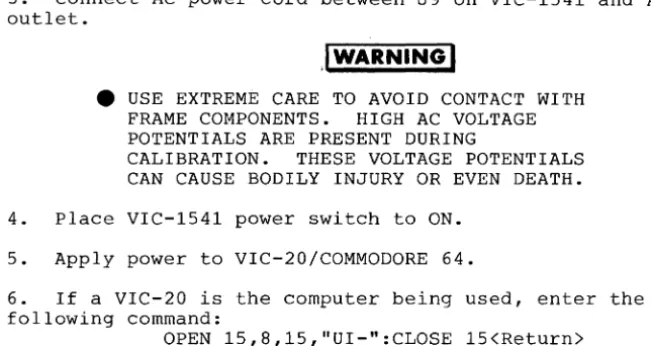
IWARNINGI
• USE EXTREME CARE TO AVOID CONTACT WITH
FRAME COMPONENTS. HIGH AC VOLTAGE
POTENTIALS ARE PRESENT DURING
CALIBRATION. THESE VOLTAGE POTENTIALS
CAN CAUSE BODILY INJURY OR DEATH.
Place VIC-1541 power switch to ON.
5. Apply power to VIC-20/ COMMODORE 64.
6. If a VIC-20 is the computer being used, enter the
following command:
OPEN 15,8,15,"UI-":CLOSE 15 <Return>
7. Insert blank floppy disk into VIC-1541.
8. Plug timing strobe light into AC outlet. position light
near timing disk (Refer to Figure 2-1).
9. Enter following command into VIC-20/COMMODORE 64:
OPEN 15,8,15,"NO:CAL,OI":CLOSE 15 <Return>
[image:14.453.35.416.51.596.2]10. Adjust VR1 (Refer to Figure 2-1) until timing disk appears to stop.
• If 60 Hz AC is being used, calibrate with
the outer set of timing marks on the timing disk.
• If 50 Hz AC is being used, calibrate with
the inner set of timing marks on the timing disk.
• If further time is required to adjust
VR1, go back to Step 9 and re-enter command given.
11. After drive motor has stopped, place VIC-1541 power
switch to OFF.
12. Remove serial bus cable and AC power cord.
2-5. Head Alignment
2-5-1. General
This procedure aligns the read/write head to the physical tracks
on a floppy disk. A truly accurate alignment requires the use of
an alignment reference disk and a test program disk. The
procedure which follows allows the user to "get by" without such
software. However, the degree of success achieved will depend on
the accuracy of the disk which is used. Consequently, the
alignment may cause compatibility problems when using software recorded on other drives or when using other drives to read disks
recorded on a drive aligned with this procedure. This problem may
be reduced by selecting a pre-recorded disk which has not been
written to since it was recorded at the factory. Although this
procedure is not 100% accurate, i t will usually suffice for the
home user. For an accurate alignment of the drive unit, one of
the following alignment systems is recommended:
1. COMMODORE System
This system is available from: Commodore Business Machines,Inc. Customer Service Dept.
1200 Wilson Dr.
Westchester, Pa. 19380
Alignment disk
Test program disk Service manual
970160-01 970154-01 9900445
Total=
$130
$ 26
$ 25
$181
The above items, plus a dual trace oscilloscope, are required to align a disk drive using the COMMODORE system.
2. Peltier Industries System
This system is available from: Peltier Industries,Inc.
735 N. Doris
Wichita, Ks. 67212
Disk Alignment System (DAS-1541) The system includes:
Alignment reference disk Control disk
Instruction manual Video detector
$39.95
2-5-2. Equipment Required
1. Alignment standard-use a factory recorded disk which has
not been written to since purchase, or a disk which has been formatted on a VIC-1541 which is known to be in proper
alignment.
2. Digital Voltmeter
3. Video detector-see Appendix A
2-5-3. Preparation for Mechanical Alignment (Detailed
disassembly/assembly instructions can be found in the 1541 Maintenance Manual.)
1. Remove all external cables from VIC-1541
2. Remove upper cover.
'0-~\ "
3. Remove RFI Shield.
~ ~ !
\ '. "
4. Remove Disk Controller PC Board.
5. Remove Drive Unit.
(2
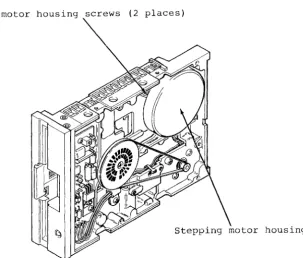
!c6. Reconnect J1 to PI, Ji to Pt, J5 to P5, J6 to P6 and J7
to P7 in such a manner that access is still allowed to the stepping motor mount screws (See Figure 2-2).
DO NOT ALLOW PATHWORK ON DISK CONTROLLER PC BOARD TO CONTACT THE FRAME OR DRIVE
UNIT ASSEMBLIES. USE AN INSULATING
RUBBER MAT, IF NECESSARY, TO INSULATE THE DISK CONTROLLER PC BOARD FROM THESE
ASSEMBLIES.
---'~~
7. Connect, video detector between DVM and pins/7 arid 8 oj::
I " .
)JH'r:' .
U
:-f
8 . '-Remove any Glyptol or other substance from stepping motor mount screws (See Figure 2-2).
2-5-4. Head Alignment
1. Connect VIC-20/COMMODORE 64 to video monitor or TV.
(Refer to computer User's Guide for proper connection.)
2. Connect serial bus cable between P3 on VIC-1541 and
3. Connect AC power cord between J9 on VIC-1541 and AC outlet.
.I
WARNINGI
4t
USE EXTREME CARE TO AVOID CONTACT WITHFRAME COMPONENTS. HIGH AC VOLTAGE
POTENTIALS ARE PRESENT DURING
CALIBRATION. THESE VOLTAGE POTENTIALS
CAN CAUSE BODILY INJURY OR EVEN DEATH.
4. Place VIC-1541 power switch to ON.
5. Apply power to VIC-20/COMMODORE 64.
6. If a VIC-20 is the computer being used, enter the
following command:
OPEN 15,B,15,"UI-":CLOSE 15<Return>
7. Insert disk which will be used as the alignment standard
into the VIC-1541.
B. Enter the following program into the computer. This
program will place the head on track 16 and will leave the drive motor running.
9. 10 20 30 40 50 60 70 BO
OPEN 15,8,15,"U+":OPEN 2,B,2,"#":OPEN B,B,B,"#" PRINT #15,"B-P:";8;0:PRINT #15,"UA:";2;0;16;1 FOR X=l TO 9:READ Y
PRINT #8,Y; NEXT X
PRINT #15,"M-E"+CHR$(0)+CHR$(5) STOP
DATA 173,O,28,9,4,141,0,2B,96
Type RUN<Return>.
10. Loosen two screws (See Figure 5-2) securing stepping
motor housing to drive unit. Do not remove screws. Screws
should be just loose enough to permit rotation of the stepping motor housing.
11. Rotate stepping motor housing while observing DVM
display. Voltage reading on DVM will increase or decrease
while rotating stepping motor housing. Correct position for
stepping motor housing is the position which produces the
largest voltage reading on DVM. Tighten the two screws when
this position is reached.
12. Turn off DVM, disk drive and computer.
13. Disconnect all cables and test accessories from disk
[image:18.449.43.369.68.241.2]14. Apply small amount of Glyptol or fingernail polish to the two screws securing stepping motor housing to keep them from coming loose.
15. Reassemble the VIC-1541.
Stepping motor housing ~W' (2 places)
Stepping motor housing
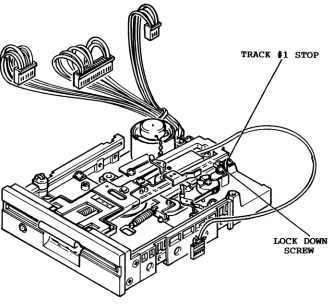
[image:19.449.81.385.190.448.2]2-6. Mechanical Alignment of Track
'1
Stop2-6-1. General
This procedure adjusts the Track #1 Stop. The Track #1 Stop is
used by the computer in the VIC-1541 for only two purposes:
1. Formatting a blank floppy disk ("New" command).
2. Soft error recovery.
The procedure that follows should only be used after carefully verifying that the rest of the VIC-1541 is properly operating.
(Complete coverage of proper operation is given in Troubleshooting-Part 2, in the 1541 Maintenance Manual.)
2-6-2. Preparation for Mechanical Alignment (Detailed
disassembly/assembly instructions can be found in the 1541 Maintenance Manual.)
1. Remove all external cables from VIC-1541.
2. Remove upper cover.
3. Remove RFI Shield.
4. Remove Disk Controller PC Board.
5. Remove Drive Unit.
6. Reconnect
to P7 in s'uch Track #1 Stop
(I'
'6
J1 to P1, J~ to
pi,
J5 to P5,a manner that access is still
adjustment. (See Figure 2-3)
@AUTION!
J6 to P6 and J7 allowed to the
• DO NOT ALLOW PATHWORK ON DISK CONTROLLER
PC BOARD TO CONTACT THE FRAI'IE OR DRIVE
UNIT ASSEMBLIES. USE AN INSULATING
RUBBER MAT, IF NECESSARY, TO INSULATE THE DISK CONTROLLER PC BOARD FROM THESE
ASSEMBLIES.
2-6-3. Mechanical Alignment
1. Connect serial bus cable between P3 and VIC-20/COMMODORE
2. Connect AC line cord between J9 and AC outlet.
I
WARNING
I
• DO NOT CONTACT THE FRAME ASSEMBLY OR
WIRING. THE VOLTAGE POTENTIALS PRESENT
ON THESE PARTS COULD CAUSE SEVERE INJURY OR DEATH.
3. Place VIC-1S41 power switch to ON and place power switch
on computer being used to ON •
• If the VIC-20 is the computer in use, enter the following command:
OPEN lS, 8, lS, "U-": CLOSE lS <return>.
4. Load the Display T&S program into the computer. This
program may be loaded from the Test Demo disk or i t may be manually entered from the keyboard (The Display T&S program is listed in Appendix C of the VIC-1S41 Single Drive Floppy Disk User's Manual.).
S. Place a factory recorded floppy disk into the VIC-1S41.
6. Enter "RUN" <return> into the computer.
7. When the Display T&S program asks for a Track and Sector,
enter Track 1, Sector 1.
8. After the head settles and the Display T&S program begins
displaying Track information, adjust the Track #1 Stop
adjustment in the following manner (See Figure 2-3)~
a. Loosen the adjustment lock-down screw.
b. Place .006 inch feeler gauge between Stop and
potrusion on the stepping motor hub. Carefully adjust
the Stop until feeler gauge just touches the potrusion on the stepping motor hub and the Stop .
• 00 not disturb position of the stepping
motor shaft.
c. Tighten the adjustment lock-down screw.
9. Place VIC-1S41 and VIC-20/COMMODORE 64 power switches to
OFF.
SECTION 3
Section 3-TROUBLESHOOTING
3-1. General
This section requires only a Mul timeter (digital type is
recommended) and will isolate a problem down to the sub-assembly
level. It is set up so that even an electronics novice can
perform the procedures. Troubleshooting consists of step~by-step
procedures with accompanying illustrations. Each step either asks
a question or refers to the following step. When a question is
asked, answer the question with a "Yes" or "No". Below each
question are two blocks labeled "Yes" and "No". Follow the
instructions in the appropriate block. The instructions will
either lead to another step or will isolate the problem to a
particular sub-assembly. At this point, the faulty sub-assembly
8-2. TROUBLESHOOTING-PART 1
STEP PROCEDURE
1 Remove AC line cord and serial
bus cables. Remove top cover.
Remove fuse from fuseholder. Measure resistance of the fuse as follows:
1. Set DMM (Digital
Multimeter) to Ohms x 10 or Ohms x 100.
2. Connect common lead of DMM
to one end of fuse (A).
3. Connect positive lead of
DMM to other end of fuse (B).
Does DMM display less than 10 ohms?
YES
Install fuse and proceed with Step 2.
NO
Replace fuse with a new fuse of proper rat-ing & size. Then proceed with Step 2.
Page 3-2
STEP PROCEDURE
2 Determine proper operation of
the frame assembly as follows:
1. Disconnect J1 from Pl.
2. Set DMM to measure Volts
AC.
3. Connect negative lead of
DMM to pin 1 of J1 (A).
4. Connect positive lead of
DMM to pin 4 of J1 (B).
5. Connect AC line cord
'between J9 (the AC power
receptacle) and an AC outlet.
IWARNINGI
DO NOT CONTACT ANY AC DISTRIBUTION LINES.
6. Place power switch to ON.
Does DMM display between 15 and 21.5 Vrms?
YES
'Proceed to Step 3.
NO
Place power switch to OFF. Remove AC line
cord. Fault
lies in Frame
Assembly.
Re-pair or replace Frame Assembly.
ILLUSTRATION
Pi
STEP PROCEDURE
3 (Continue testing Frame Assembly
,as follows:
1. Place power switch to OFF.
2. Connect negative lead of
iDMM to pin 2 of J1 (A) •
3. Connect positive lead of
.DMM to pin 3 of J1 (B) •
4. Place power sw;itch to ON.
Does DMM display between 9.5 and 13.5 Vrms?
YES
Frame Assembly appears to be ·working
pro-perly.
Pro-ceed to Step 4.
NO
Place power switch to OFF. Remove AC line
,cord. Fault
lies in Frame
Assembly.
Re-pair or replace Frame Assembly.
4 Place power switch to OFF.
Remove AC line cord. q.j.Remove 'b
shield. Disconnect Jf from
pi,
,J5 from P5, J6 frpm P6, J7 from
P7 and
Jj{
from P~..1 Proceed to$tep 5.
'1
V\5 Reconnect J1 to Pl. Connect AC
line cord to VIC-1541. Connect
common lead of DMM to (-) side
of C52 (A). Set DMM to 20 VDC
range. Proceed to Step 6.
Page 3-4
ILLU~T~TION
STEP PROCEDURE
6 Place power switch to ON.
Measure tests points in table
below. Touch positive lead of
DMM to indicated test point. Verify that each measurement is within the minimum and maximum
limits given.
Test Point Min. Max.
PS,pin1(A) +4.6V +5.25V
P7,pin1(B) +11.4V +12.6V
P7,pin2(C) +11.4V +12.6V
P5,pin2(D) +11. 4V +12.6V
P6,pinS(E) +4.75V +5.25V
P6,pin2(F) +4.6V +5.25V
Are all measurements above within limits specified?
YES NO
Place power Place power
switch to OFF. switch to OFF. Proceed to
Step 7.
Remove AC line
cord. Fault
lies in Disk Controller PC
Board. Repair
or replace.
7 Connect J~ to Pj. Place power
swi tch tofON.
'1
Is green LED illuminated?
YES
Place power switch to OFF. Proceed to Step S.
NO
Place power switch to OFF. Remove AC line
cord. Fault
lies in Case Assembly. Repair or replace.
Page 3-5
STEP PROCEDURE
8 Connect J6 to P6. Place power
switch to ON.
Does red LED come on momentarily?
YES
Place power switch to OFF. Proceed to Step 10.
NO
Proceed to Step 9.
9 Using a short piece of wire,
carefully short pin 10 of UF2E
(A) to pin 1 of P6 (B) while
observing the red LED (Error/Access LED).
Does red LED illuminate?
YES
Place power switch to OFF. Fault lies in Disk Control-ler PC Board. Repair or replace.
NO
Place power switch to OFF. Fault lies in Drive Unit. Repair or replace.
10 Connect JS to PS. Place power
switch to ON.
Does drive motor turn while red LED is on?
YES
Place power switch to OFF. Proceed to Step 12.
NO
Place power switch to OFF. Proceed to ,Step 11.
Page 3-6
STEP PROCEDURE
11 Connect positive lead of DMM to
pin 3 of J5 (A). Observe DMM
while placing power switch to ON.
Does DMM indicate 0.0 to +0.8 V when the red LED is
illuminated?
YES
Place power switch to OFF. Fault lies in Drive Unit PC
Board. Repair
or replace.
NO
Place power switch to OFF. Fault lies in Disk Control-ler PC Board Repair or replace.
12 Using two short lengths of
wire, carefully connect pins 1 and 2 of J7 to pin 1 of P7. Place power switch to ON. Using a third piece of wire, short sequentially between pin 1 of P6 and each of the test points indicated below. Observe read/write head while shorting each test point.
1. J7, pin 4 (A)
2. J7, pin 5 (B)
3. J7, pin 3 (C)
4. J7, pin 6 (D)
Verify that the read/write head moves toward the front of the
VIC-1541. Repeat the procedure
in reverse order and verify that the read/write head moves toward the rear.
Does the read/write head move in the proper direction?
YES NO
Place power Place power
switch to OFF. switch to OFF.
Proceed to Fault lies in
Step 13. Drive Unit.
ILLUSTRATION
STEP PROCEDURE
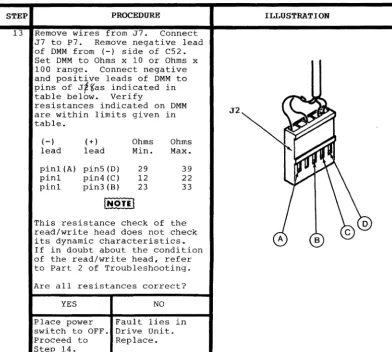
13 Remove wires from J7. Connect
J7 to P7. Remove negative lead
of DMM from (-) side of C52. Set DMM to Ohms x 10 or Ohms x
100 range. Connect negative
and positive leads of DMM to
pins of J,~as indicated in
table below. Verify
resistances indicated on DMM are within limits given in table.
(-) (+) Ohms Ohms
lead lead Min. Max.
pin1(A) pin5(D) 29 39
pin1 pin4(C) 12 22
pin1 pin3 (B) 23 33
[ ... 9n!
This resistance check of the read/write head does not check its dynamic characteristics. If in doubt about the condition of the read/write head, refer to Part 2 of Troubleshooting.
Are all resistances correct?
YES NO
Place power Fault lies in
switch to OFF. Drive Unit.
Proceed to Replace.
Step 14.
Page 3-8
ILLUSTRATION
[image:32.448.30.422.80.431.2]STEP
14 Connect J~
Calibration Section 2.
PROCEDURE ,
to
vi.
Performpro~edure in Is drive motor rotating at ,correct speed?
YES NO
At this point Fault lies in
the problem Drive Unit.
lies in the
Dis k Con tro 1- a...R.e.p.l.a_c.e •• _"",!" _ _ _ , ,
ler PC Board or in the Drive
Unit. To determine which of
the two sub-assemblies is bad, refer to Part 2 of Troubleshooting in the 1541
Maintenance Manual. Part 2
requires an oscilloscope and some technical
exper-ience. If you do not wish to
attempt Part 2, try swapping the Disk Controller PC Board or the Drive Unit with a known good assembly and see if the problem is solved. Also, check assemblies for obvious signs of wear or damage.
ILLUSTRATION
SECTION 4
SCHEMATICS
AND
Section 4-SCHEMATICS AND PARTS LAYOUTS
4-1. General
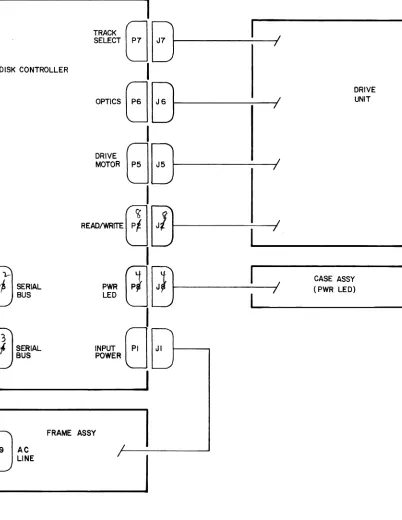
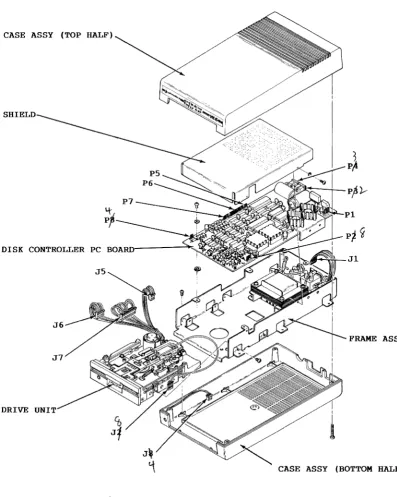
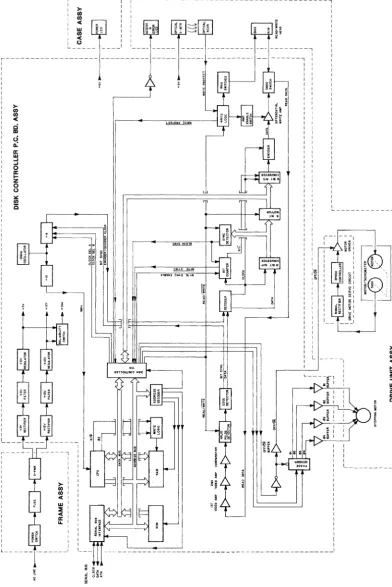
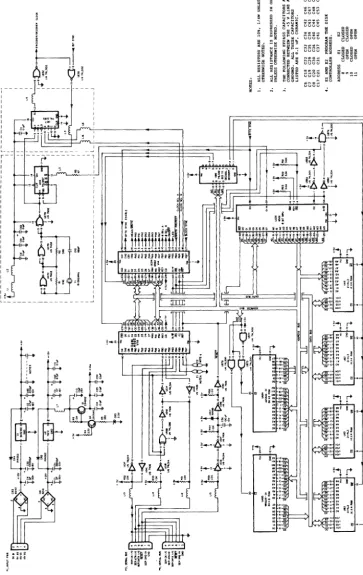
This section contains Schematics, Parts Layout Drawings, a
Functional Block Diagram and an Interconnect Diagram. These
figures are provided for reference purposes. The following index
is provided for user convenience:
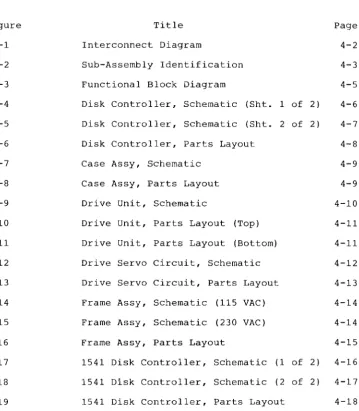
Figure Title Page
4-1 Interconnect Diagram 4-2
4-2 Sub-Assembly Identification 4-3
4-3 Functional Block Diagram 4-5
4-4 Disk Controller, Schematic (Sht. 1 of 2 ) 4-6
4-5 Disk Controller, Schematic (Sht. 2 of 2 ) 4-7
4-6 Disk Controller, Parts Layout 4-8
4-7 Case Assy, Schematic 4-9
4-8 Case Assy, Parts Layout 4-9
4-9 Drive Unit, Schematic 4-10
4-10 Drive Unit, Parts Layout (Top) 4-11
4-11 Drive Unit, Parts Layout (Bottom) 4-11
4-12 Drive Servo Circuit, Schematic 4-12
4-13 Drive Servo Circuit, Parts Layout 4-13
4-14 Frame Assy, Schematic (115 VAC) 4-14
4-15 Frame Assy, Schematic (230 VAC) 4-14
4-16 Frame Assy, Parts Layout 4-15
4-17 1541 Disk Controller, Schematic (1 of 2) 4-16
4-18 1541 Disk Controller, Schematic (2 of 2) 4-17
[image:37.447.50.410.148.560.2]DISK CONTROLLER
Ip~~~
BUSI
I
J
)SER~
BUSI
I
TRACK
0E]
SELECT
0
J7---1/
I
~~
G
8,..---,....---1/
I
~~ ~~~---I/
I
DRIVE UNIT
R~t!J 0f---~/
I
~---~CASE ASSY (PWR LED)
r:
eJ
~r---f/
I
~---~INPUT
0
JIPOWER
LJ
I
EJ
9 ACFRAME ASSY
LINE
I
[image:38.444.19.421.31.551.2]CASE ASSY (TOP HALF)
SHIELD
P7
DISK CONTROLLER PC
Jl J5
FRAME ASSY
J~
~ CASE ASSY (BOTTOM HALF)
[image:39.445.23.420.65.562.2]g
~
iIi .... .... o II: I-Z o o l.: (/) i3~ -~ - - - --1 ---1
)0, I
I/) I
~
f: .
f"·
~
".
~ ~;
:
~~~~ ~! ~ ~ ~« I I
o I I
_ _ _ _ _ _ _ _ I 1 _ _ _ _ _ _ _ _ _ _ _ _ _ _ -I I I I I I I I I
" - - - " 1
Figure 4-3. Functional Block Diagram
I )0,
'"
'"
« I-Z :::I W>
a:
o
1 _ _ _ _ _ _
[image:41.449.34.427.23.611.2]r r I I r I I I I , I . I ~
L _ _ _ _ _ _ _ _ _ _ _ _ _ _ _ _
;: A;.;:
i
l l l i <Figure 4-4.
== ""'C.
I
tJUUU~=
~~~ uuuu
5
~ ~="~ 0.~U tio~~ Q
=0
(5+:;~
~~III
~ =i
~~a
55~B ~~;!
~.~i
=E~ "'lOla .... ~~;II!I
~.~ ~tH:n:l "'",,00.-1 .~:;
~S §o .... "' ... ..,
~i !~ ~= 2~i
.
UUUUa"'<I\~:::
~~ ~~ ~U UUuu
~5
~uuuu
~ ~ ~ ~
~
:+-1tl
... ~'~I
i II
II. "I''4 ;;. ,
~:r .. ~
iiiii
H
llniiiillm~
... v=!!'!:I:'II.!::I
..
.
.
[image:42.455.39.403.31.607.2]!:::>;l~
It
-'Q"""~ ::~
~2 ~... ..I_ t
[image:43.445.39.404.83.574.2]'u,
"':I
"'.
<.0 C 1-1 CD"'"
I0"', 0
"'.
en ~ .... 0 ~ ()~ 0
D :J rT
,.
1-1~l
I 0
0 I-' I-'
rn
ill
r - ,
1-1
'1j
OJ
1-1 I I L;::J I C52 rT en t'" OJ '< 0 C rT ' 0 325302-01 22XE
I I us£>
0 0 0 0 0 0 0
UCD5
N~:::.l
"".
U-~i{~-
.. _]
t U D D
"", '0
UA84[~::::~~~:=:~:]c
V l ' - " - " - -
i~O
Uo,0
0'.-'E3
0 ..Os
~8"
m.O
£~~ ~;ij=~
nn
0'
lO°
00,
uYr5~~~y ~~
.yy'
UUHY.~oOO
·0
~~O~O~O"o~ ~;"7
0
~ if ~ ~ 08 09
CSCS·
'6lffi)c
UOU un; (jI (jI
,,-:i '"
C2:30
1 0 0 °0 00 0 V
I u ' . _ . • • I ( ) ( ) 010
ou.QO
a
lU.
~. 0
~
1
nnn
N~ "Uy~~y
.'0o:O~"
010 ,;,
E:::::I'O
~QO~OP~OP~
UH4~OD
~ ~"7
PCuO
",p",O~O
U lM ....
8150 :311N ~
11(;">;
:>0<
Q
~::::::::: I~O
: ::::::::
II
~O
"o~o~o-u-o-o-o-'I ~I o';'Cu~-o~o~o-o-o
%o~~;?M
""
'88' 0 P5 ~R31 P6
!~ q~ <I 1;1 0 <I 1;1 1;1 <I I) <I <I a 0 <I 01
" C~
P7 (J @ @ rtZ C62
0
,~
000'0
d
o
~ ~,,~
DSl
"\, r
-JJi.
PWR LEDI
- - - -
-,
PWRLEO
~
I OSI POWERI
N/C 3
-b
(GN)I
GNO 2
r - - -
~I
I
I
CASE ASSY- -,
I
L _ _ _ _
-.J
____ J
Figure 4-7 . Case Assy , Schematic
Figure 4-8 . Case Ass y, Parts L ayout
[image:45.449.33.426.86.582.2]h:j f-'. LQ C i"i CD .I:> I \0
to t::1
Pl i"i LQ f-'.
CD <:
.I:> CD
I c::
t-'
:::l
0 f-'.
rt (/) 0 ::r CD 3 III rt f-'. 0
J5, DRIVE MOTOR
OFFION
+t2V GND
OR ; - - - ,
BK EI +12V I
E3 GND DRIVE MOTOR
g-9R ~ E2 OFFION I
1111 ac'lI.n/WI:NTe UI:'Aft : SERVO CIRCUIT
o E6.M+
N/C HEAD A
BIAS
BiAS
HEADB
J6. OPTICS
+5V
N/C 3
N/C 4
RD
ERRO~/~ED : J.;"9K"-_ _ _ _ _ _ ....
WRITE PROTECT LED 2 ~L¥:B~~RD::---,
DSI ACCESSI
ERROR LED
WRITE PROTECT 12 1-"''-''''---...,
NIC 7 QI
Nle 6 WRITE
NIC 10
Nle II Nle 14 Nle "
GND GND
J7; TRACK SELECT
+12V +12V e3 el 02 04 RO !b. JlR .!!!!. 9R CRI
r - - - itcfTORITACHOMETEft - - - ..,
I - BI ~ :
I
I
19K
1 , ' - I
I I / I
I L _ _ _ _ _ _ _ _ _ J I
L __________________ J
WRITE PROTECT EMITTER
B2 STEPPING MOTOR
,---00
E5, TACH, - - - _ , E4.TACH I
J7 J5
~~~~---J6
Q1
CR1
Figure 4-10. Drive unit, Parts Layout (Top)
B2
DS1
DRIVE MOTOR SERVO CIRCUIT
[image:47.448.39.414.19.592.2]"'l f-'. LQ C 11 (I) 0I>-I I-' tv tJ 11 f-'. <:
'U (I)
OJ
LQ en
(I) (I)
11
01>- <:
I 0
I-'
IV \.)
f-'. 11 0 C f-'. rT ~ en 0 ::r (I) :3 OJ rT f-'. 0
---l
I
I
I
' I
I EI. +OV Q'
+ CI
I
IO~FI
E3,GND 35V0
-I ....
I
E4,TACHI
E5,TACHI
I
I
I
I
I
I
I
I
_
CR3 CR2 IN4148
....
RI 10K 7 I Vee ICI FB SPEED CTLRSONY 2463 FIL RI GND
J-
I I3 4
~
1
I
l
4~~1
-RIO
C3 R2
J
OUTI-5~ R2.,.
8 \ \ \ \ \ \ 0VRI SPEED ADJUST....
R5 C7
2.7K O.47pF 35V
C8 O.063pF
E6.M+ I
+
I E2,ON/OFF
I
R7 CR5 ' 0 ( QI r - - -J
L _ _ _ _ _
10K IN4148*
I DRIVE MOTOR SERVO CKT·II~
::r: ::r:> ... 0 0 0
+
~ z z
~
~+- 0 (!) ::E
W N I1J I1J ~ q-I1J ui I1J
..;
I1J0
O~O0 0
Z o IIlIll (!) >- a:
~
~@[
w.i)
0 0 0I
~ CO ....O~m ~1~trJ~
o~
[image:49.448.170.318.55.628.2]J9,AC LINE AC HI
GND
AC LO
SI,POWER
OFF
ON
JI,AC INPUT 16V 1211 16V 02 9V 01 9V 02
Figure 4-14. Frame Assy, Schematic (For use with P.C.Bd. 1540048-xx)
J9,AC LINE AC HI
GND
AC LO
SI,POWER
OFF
ON
TI JI,AC INPUT 16V 01 16V 02 9V 01 9V 02
Figure 4-15. Frame Assy, Schematic (For use with P.C.Bd. 1540001-xx)
[image:50.447.39.417.90.209.2] [image:50.447.34.416.338.456.2]Jl
[image:51.457.29.422.80.541.2]- - - -,
I
"'~t.lZZ
~§ij~
0 " 0 " -....l0..10 U U
-- ---~---~
-r-- -- - - ,
I r> I
:
:~l"':
I
~
Ii
.~ ffi~·
:
Q:l; !: ~ _ ~,E "'-41' :
~' ~~ ~
Hg !
H I
I I I I I I I I I
I"; I
L _ _ _ _ _ _ _ _ _ _ _ _ _ _ _ _ _ ~
[image:52.452.46.394.30.604.2]Figure 4-18.
,
,
1··-.,
I"· ,4';
~.; [image:53.447.46.396.49.556.2]"J f-'. 1..j:C ,: r: (I) ~ I f-' '-!.) r-' I.J1 ~ ... t:' f-'. Ul
'tJ A
OJ
n
'.:j 0 (l) :J ,t-,':. r: I 0 f~ 0) I--' (1) r: 'tJ UJ r: (T Ul t" CJ '< 0 c: rt
.,
10 0
~O-I0.0.
,~'
~ '2 P3l14G-
L13G-~
G=
UAIpG
D
u~~
O
~
1'--- .. Iouooooo
U8.
901229- 03
365AA6 - 3<:1
O[==t=I~'M~OOO'
luuuuuuuuuuuul ~_ ~
us,
B~P9
325302-01
o UB2 ~ U C 2 c n
~ H.:~:P"
OfOOOOOOOO~~fOOOOOOOOOI
0,00000
00'
~
~ ~
LU~UUUUI.Jl.J1,.;7~~
325572- 01 64ftI05U 8:508 COO
uc'
--c5-~<p
.,
~ ~"
.'4
E!3 E::!::!] I a a a 0 a a ., a a a a a a a a I 10 a 0. a a 01
0'8
O~15
~n
OQ'
Y
d
2g~QO
C~~
...0.~
_ _ _., W
~OOdQt\-~-J--?~
?m
~
0
'
-L;,?,.~
Bk
"'~Y~
cS'
+ POAPPENDIX A
Fabrication of Video Detector
Materials Required:
One set of meter leads
One capacitor .oluF,50V
One resistor lK,10%,1/4 W
One diode IN4148 or equivalent
Equipment and Supplies:
Knife
Soldering iron Wire cutters
Needle nose pliers
Heat shrink tubing, 1/2 inch Heat shrink tubing, 3/16 inch Solder, 60/40 resin core Scale (ruler)
Ohmmeter
String or two wire ties
Preparation:
1. Cut meter leads as shown below:
cut here
2. Prepare diode as shown below:
Strip off insulation 3/16" from both sides of cut.
3. Prepare resistor as shown below:
4. Tin all leads on resistor, diode and meter leads
Assembly:
1. Slide 1 1/2 inch length of 1/8 inch heat shrink tubing
onto red meter lead as shown below. Do not shrink the tubing at
this time.
Heat shrinkable tubing (3/16")
3" length of red meter lead
2. Solder diode, resistor and remaining end of meter lead
together as shown below. Note proper polarity of diode.
Cathode marking
3. Slide heat shrink tubing over diode and resistor, leaving one lead of resistor exposed, and then shrink the tubing.
4. Solder capacitor and black meter leads as shown below.
Tie meter leads where shown.
Solder here
Tie here
Tie here
5. Slide a 2 inch length of 1/2 inch heat shrink tubing over
capacitor and then shrink the tubing .
APPENDIX B
Fabrication of Timing Light
Materials Required:
One neon bulb
One lamp cord with appropriate plug
One resistor 22K,10%,1/4 W (for 115 VAC)
47K,10%,1/4 W (for 220 VAC)
Equipment and Supplies:
Knife
Soldering iron Wire cutters
Needle nose pliers
Heat shrink tubing, 1/8 inch Heat 9hrink tubing, 3/16 inch Solder, 60/40 resin core Scale (ruler)
Ohmmeter
Preparation:
1. Prepare lamp cord as shown below:
2. Prepare resistor as shown below:
3. Prepare neon lamp as shown below:
11/16n~
I
1/4"
.:::-1
~
c(~!It.f====t
4. Tin all leads on lamp cord, resistor and neon lamp.
Assembly:
1. Slide 1 inch lengths of 1/8 inch heat shrink tubing onto
each of the prepared leads of the lamp cord. Do not shrink the
tUbing at this time.
HEAT SHRINKABLE TUBING (1/8R)
4DTIt===lll=/f~~
2. Solder components as shown below. Either lead of the line
cord may be soldered to the resistor as long as the other lead is soldered to the neon lamp.
RESISTOR (22K FOR 11SV, 47K FOR 220V)
3. Slide both pieces of heat shrink tubing toward the base of the neon lamp and then shrink the tubing.
4. Slide a 2 inch length of 3/16 inch heat shrink tubing over
neon lamp. Position the end of the heat shrink tubing 3/16 inch
up from the base of the neon lamp and then shrink the tubing.
IWARNING'
• BEFORE PLUGGING IN TIMING LIGHT, USE