Abstract—When designing an interface component (i.e
button) for mobile device, many designers tend to use proportional approach against the screen size. They do not consider the ergonomic factor of the users’ hand dimension. This study investigated the effectiveness of button size (small, medium and large). Usability test was conducted to 26 university students who used mobile device regularly. They were given several typing tasks using different button sizes. Result found that button size and hand dimension affect the numbers of errors typed and typing completion time.
Index Terms—button size, ergonomics, interface design,
mobile device
I. INTRODUCTION
HE fast development of technology has driven various innovations in mobile devices such as different sizes of screen (small, medium, phablet, small tablet and tablet). Undeniably it also impacted the way user interacting with their devices. Nowadays, there seems to be a trend toward larger screens. Kim & Sundar [1] found that large screen compared to a small screen is likely to lead to higher smartphone adoption by users. However, larger screen means bigger devices, along with certain aspects of their design may have been linked to both fatique [2][3] and musculoskeletal disorders [4], especially during typing.
Most mobile devices are now using virtual keyboard taking advantage of the touch screen interfaces. A number of studies on the effect of interface design (including button size and spacing) affects user performance [5][6][7]. On large screen, such as information kiosks or ATM, researcher found that keyboard spacing had no measurable effects [5], but there are not much studies conducted on smaller screen such as those used in mobile device.
Our goal is to develop guidelines for interface designer for effective button size based on the hand dimension of the users. We have therefore designed and conducted experiment to investigate the effectiveness of different button sizes for different gestures (one hand and two hands).
II. PREVIOUS STUDY
Interface design has great impact on the user experience,
Manuscript received January 6, 2017; revised January 16, 2017. Restyandito is with the Dept. of Information Technology, Duta Wacana Christian University, Yogyakarta, INDONESIA (phone: +62-274-563929 ext 309; fax: +62-274-513235; e-mail: [email protected]). Kristian Adi Nugraha is with the Dept. of Information Technology, Duta Wacana Christian University, Yogyakarta, INDONESIA (phone: +62-274-563929 ext 325; fax: +62-274-513235; e-mail: [email protected]).
it even considered as one of the main factors behind the wide adoption of modern mobile devices [8]. User Interface on
mobile devices allows users to use and interact with the mobile devices [9]. The interface includes content, screen, windows, menus, control, and any part that user interact with [10]. A good interface design should be as user-friendly as possible. Additionally, good user interface should meet the ergonomic criteria [11][12]. Using mobile devices imposes physical and intellectual demands on user. Input accuracy is critical to usability, however a number of input errors can occur when users manipulate small touch targets [13]. Input accuracy can be determined by the size of the mobile device, the target size, and the human factor.
Mobile size and user interface are two main concerns in designing mobile device [9]. Researchers have studied the effect of screen size on the user’s experience. Findlater & McGrenere [14] found that screen size impacts user behavior. This finding is supported by Kim et. al [15] that showed screen size has effect on the user’s psychology based on the communication modality. There was empirical evidence that high accuracy adaptive menus may have a larger positive benefit on small screen displays [14]. Furthermore, Kim et. al [15] found that smaller screen-size elicited greater perceived mobility while larger screen-size was key to greater enjoyment.
There have been studies that consider appropriate target sizes for touchscreen use [16][17][18][19]. However the researches were conducted using stylus. The results were also drawn different conclusions on whether target size affects performance. Moreover, these studies were consistent with Fitts’ model for motor movement. Parhi et al. [20] studied one handed thumb of a touchscreen device on different target size. They concluded that while speed generally improved as targets grew, there were no significant differences in error rate in discrete tasks and targets. They also found based on the subjective ratings, user prefer different size for discrete tasks/targets and serial tasks.
The human factors also play important roles in the successful of completing a task. The condition of user when using the mobile device (sitting, standing or walking) may influenced the results of accuracy as well [18][20]. There are many ways user can interact using a touch screen, such as touching, tapping, swipping, and pinching [21][22]. Researchers found different ways of interacting with a touch screen are suitable and more intuitive for different age group of users. Despite many researches have been carried on the human factor, there has not many researches being held to investigate the effect of hand size on the
The Effectiveness of Button Size on
Mobile Device Based on Hand Dimension
Restyandito, Kristian Adi Nugraha, Member, IAENG
effectiveness of operating a mobile device.
Ergonomics related to the optimization, the efficiency of health safety and comfort of humans [23]. Anthropometric is used to consider the level of ergonomics in designing a product or interface that required human interaction. Therefore anthropometry should be considered when designing virtual keyboards on a mobile device. In his book, Nurmianto [23] provide 20 measurements for hand dimensions as seen on Figure 1.
Fig.1. Hand anthropometry based on Nurmianto [23].
III. METHOD
A. Participants
Twenty six university students (14 male, 12 female) participated in this study. Their mean age was 20.77 years old (SD=1.79). They all were familiar with using mobile phones on daily basis.
Based on the hand anthropometry measurement [23], participants thumbs and hand length average length were 7.16 cm (SD=0.69 cm) and 18.49 cm (SD=0.88 cm) respectively.
B. Materials
The experiment was conducted in a university laboratory using Sony Xperia E1. The mobile phone has 4.0 inches display with 480x800 pixels resolution (~233 ppi pixel density). The dimension of the mobile phone is 11.76 x 6.25 x 1.19 cm. It ran on Android OS, v 4.3 (Jelly Bean). The mobile phone’s specification was using Qualcom Snapdragon 200 chipset,with Dual-core 1.2 GHz Cortex A7 CPU and Adreno 302 GPU. Sony Xperia E1 was chosen because it is a medium phone size. Based on the report from Flurry Mobile (part of Yahoo’s mobile analytic division), in 2015 medium phones still dominates the market, even though phablet phones are beginning to pick up (Sullivan, 2016).
C. Design
The experiment aimed at evaluating the effects of button size on typing effectiveness. There were three different sizes (key height) of keyboard being tested: small buttons (40dp/53px/6.28mm), medium buttons (50dp/67px/7.94mm) and large buttons (60dp/80px/9.48mm). The virtual keyboard layout can be seen in Figure 2.
Fig.2. Three different sizes of virtual keyboard used in this research.
The author adopted a within-subject design. The factors and levels studied were the button size (small, medium and large) and hand grip (single-handed and two-handed grip). There were two sets of texts consisting of 8 characters and 15 characters. To reduce the bias of comprehension effect and to enable the use of all alphabets in the keyboard, participants were asked to type three different sets of text (Indonesian text, English text, and text containing arbitrary alphabets). The texts were presented in random order. Table I shows example of the texts used in this experiment.
TABLEI
EXAMPLES OF THE DIFFERENT SET OF LENGTHS AND TYPE OF TEXTS. Text Length Text Type Text
8 characters
Indonesian English Arbitrary
sengsara ; karyawan ; potasium ; obesitas ; wartawan
computer ; annoying ; december ; employee ; withdraw
zkjednci ; alsoqurj ; keaojerb; bugktsch ; pikhgdte
15 characters (including space)
Indonesian English Arbitrary
delapan harimau ; yayasan mahatma ; bandung eksotis drawing article ; useless chicken ; morning sunrise
broajv rkvmrla ; kevebjf eroatzd ; zimotik xilonit
D. Procedure
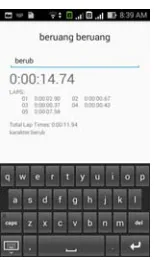
Prior to taking the test, participants were asked to undergo practice. The purpose of this practice was to help them familiarize themselves with the test procedure, and to make sure they did not have difficulties utilizing the mobile phone used in this experiment to type. Figure 3 shows the practice screen. If participants can complete the practice test within the time limit, only then they can proceed to take the real test.
Fig.3. Participants were asked to type the practice texts within the time limit (3seconds per character/alphabet).
An error score was recorded for each key pressed that is not in accordance with the text. The time needed to type the text was also recorded.
IV. RESULTS AND DISCUSSION
A one-way Anova was conducted to compare effect of button size on the number of typing errors and completion time. An analysis of variance showed that the effect of button size on the number of typing errors was significant both for one hand and two hands gesture. However, there was no significant effect of button size on the typing completion time. (Table II)
TABLEII
P-VALUES OF THE SINGLE FACTOR ANOVA. Gesture /
Text Length
One hand Two hands Error Time Error Time 8 char 0.03402* 0.49094 0.02953* 0.16690 15 char 0.03941* 0.70653 0.04393* 0.63518
A further look at the descriptive table (Table III and Table IV), it can be seen that the largest button (Button 3) has the least average number of errors, while smaller button (Button 1) tend to cause more typing errors regardless the gesture used to type the text.It can also be seen that the largest button (Button 3) has the longest average typing time. This result is not surprising as this is in accordance with the Fitts’s Law [24]. Eventhough when using two hands gesture, button 2 yield the fastest average typing time, instead of button 1, it does not mean that target size (button) and distance did not affect typing time. As MacKenzie and Soukoreff [25] found that Fitts’ law prediction model maybe too conservative and the slope coefficient of observed rates can exceeded or slower than the predictions.
These results were different from research conducted by Park & Han [14]. They studied target size for one-handed thumb use on small touchscreen devices, and found that small target selection more accurate. In their observation they found participants were likely to press small touch keys more carefully than large touch keys. Moreover, many subjects tended to change their touching method depending on touch key size. They used oblique touch for a large target, but vertical touch for a small target. The vertical touch has a smaller contact area than the oblique touch, and it can make target selection more accurate.
TABLEIII
NUMBER OF TYPING ERRORS AND TIME NEEDED TO COMPLETE TASKS
TYPING 8CHARACTERS
Gesture / Button Size
One hand Two hands Error (Avg) Time (Avg) Error (Avg) Time (Avg) Button 1 1.01 598.48 ms 1.16 461.36 ms Button 2 0.72 615.22 ms 0.73 474.94 ms Button 3 0.69 628.60 ms 0.54 507.82 ms
TABLEIV
NUMBER OF TYPING ERRORS AND TIME NEEDED TO COMPLETE TASKS
TYPING 15CHARACTERS
Gesture / Button Size
One hand Two hands Error (Avg) Time (Avg) Error (Avg) Time (Avg) Button 1 2.55 594.75 ms 2.80 483.98 ms Button 2 1.51 611.20 ms 2.96 468.26 ms Button 3 1.35 612.82 ms 2.75 489.48 ms
Nevertheless, the design of our experiment is different from Park & Han [13]. They used numeric keypad on the upper right side of the screen for their task, which is not natural for participants who are familiar and use mobile device in daily basis. The button size varied from 3.8 to 11.5 mm. Furthermore, they did not time the task hence participants may focus more on hitting the target correctly. On top of that, the task given to our participants was typing, a task that is common for people who has used mobile device regularly. Therefore, they may already develop automatic responses and less careful when typing. Fitts’s law predict that the time required to rapidly move to a target area is a function of the ratio between the distance to the target [24]. An additional issue in characterizing performance is incorporating success rate: an aggressive user can achieve shorter movement times at the cost of experimental trials in which the target is missed [26].
The average hand dimension can be seen on Table V. Four measurements (i.e. measurement 1,3,13 and 18) with highest variation dimension (standard deviation) were chosen to be analyzed.
TABLEV
PARTICIPANT’S HAND DIMENSION
BASED ON NURMIANTO’S [23]MEASUREMENT
1 2 3 4 5 6 7 8 9 Avg. 17.32 11.53 7.01 7.49 8.20 7.29 5.59 2.0 1.40
STD 0.89 0.66 0.99 0.61 0.61 0.48 0.60 0.0 0.30
10 11 12 13 14 15 16 17 18 Avg. 1.80 1.39 7.39 9.40 NA 2.01 4.49 NA 20.2
STD 0.41 0.30 0.58 0.74 NA 0.69 0.64 NA 1.65 A multiple linear regression was also calculated to predict numbers of typing errors (15 characters) on age, button size, gesture, hand dimensions (palm length, thumb length, palm width and maximum distance from thumb to pinkie) and text type. A significant regression equation was found (F(8,693)= 3.542, p<0.000 ), with an R2 of 0.83.
[image:3.612.310.550.56.200.2] [image:3.612.313.544.481.589.2]Age, gesture, thumb length and palm width were significant predictors of typing errors.
A multiple linear regression was calculated to predict typing completion time (8 characters) on age, button size, gesture, hand dimensions (palm length, thumb length, palm width and maximum distance from thumb to pinkie) and text type. A significant regression equation was found (F(8,693)= 84.404, p<0.000 ), with an R2 of 0.69.
Participants’ predicted number of typing errors is equal to -57.024 + 9.445 (age) - 19.146 (button size) + 132.730 (gesture) – 11.793 (palm length) + 9.068 (thumb length) + 30.719 (palm width) + 27.198 (maximum distance from thumb to pinkie) + 139.893 (text type), where button size is measured in millimeters and hand dimensions is measured in inches. Age, gesture, palm width, maximum distance from thumb to pinkie and text type were significant predictors of typing errors.
Finally, a multiple linear regression was calculated to predict typing completion time (15 characters) on age, button size, gesture, hand dimensions (palm length, thumb length, palm width and maximum distance from thumb to pinkie) and text type. A significant regression equation was found (F(8,693)= 89.892, p<0.000 ), with an R2 of 0.70.
Participants’ predicted number of typing errors is equal to -75.661 + 18.943 (age) - 2.329 (button size) + 125.743 (gesture) – 10.538 (palm length) + 10.629 (thumb length) + 38.978 (palm width) + 15.194 (maximum distance from thumb to pinkie) + 126.787 (text type), where button size is measured in millimeters and hand dimensions is measured in inches. Age, gesture, palm width, maximum distance from thumb to pinkie and text type were significant predictors of typing errors.
The summary of the multiple regression analysis can be seen in Table VI. It can be seen that typing error were affected by button size and thumb length, while typing time were affected by age, gesture, palm width, maximum distance from thumb to pinkie and text type. As for the predictors that most influence both typing error and typing time were age, palm width and text type.
TABLEVI
SIGNIFICANT PREDICTORS OF THE REGRESSION ANALYSIS
IV1 IV2 IV3 IV4 IV5 IV6 IV7 IV8
Typing Error
DV1 (8 char) - + +
DV1 (15 char) + - + +
Typing Completion Time
DV2 (8 char) + + + + +
DV2 (8 char) + + + + +
Legends : IV=Independent Variables ; DV=Dependent Variables IV1=Age ; IV2=Button size ; IV3=Gesture ; IV4=Palm length ; IV5=Thumb
length ; IV6=Palm width ; IV7=Maximum distance from thumb to pinkie ;
IV8=Text type
Larger button size provide larger target area, thus it is not surprising if participants made less error. In our experiment, button 3 reduced the typing error by 39% and 30% for one hand and two hands respectively. Using Fitt’s Law (1), the Index Difficulties (ID) of button 1, button 2 and button 3 is 1.92, 1.86 and 1.82 respectively. Hence the result of this experiment is in correspond to the index difficulties of the button.
C
W A
ID log2 2 (1)
Where A is the distance (or amplitude) of movement from start to target center, W is the width of the target which corresponds to accuracy, and C is a constant of 1.
Error was also impacted by thumb length. Longer thumb cause more errors because it may hinder keyboard visibility. Participant’s thumb length can be categorized into three groups (6 cm, 7 cm and 8 cm) and the average error made by participants of each group in specific case was 0.69, 0.77 and 0.94. However, a detailed look at Tabel VII revealed that maximum numbers of typing errors occurs on different button for different thumb length. It can be concluded that the effectiveness of button size was also caused by the measurement of thumb length.
TABLEVII
AVERAGE NUMBERS OF WRONG KEYPRESSED
Thumb length Button 1 Button 2 Button 3 6 cm
7 cm 8 cm
17
21 23
18 21
20
15 15 17
Palm width and max distance from thumb to pinkie were positive predictors of typing completion time. Participants’ palm width varies from 8.66 to 10.14 cm (Table V) while the mobile phone width and thickness was 6.25 and 1.19 cm respectively. In this experiment, participants’ palm width were bigger than mobile phone’s width. It became harder for participants to type buttons located on the bottom right side of the screen, thus slowing down the completion time. Mobile device that is unfit to user’s palm size (too small or too big) may cause user to grip and interact with the device in unnatural way causing a musculoskeletal disorders [27][28].
V. CONCLUSION
This experiment has successfully showed the effect of hand dimension and button size on the usage of mobile device. Larger device with bigger screen may be more preferable by some users because it can display more information. However, if they have small hands it may not be effective in doing task such as typing. Moreover, it can cause a musculoskeletal disorder when used in a long time. Larger button size can reduce typing error, however it will also lessen the display space for the content. Thereupon, an interface designer should consider these tradeoffs when designing an interface for mobile device. Further study can be conducted on the effectiveness of the size of mobile device based on user’s hand dimension.
ACKNOWLEDGMENT
REFERENCES
[1] K. J. Kim and S. S. Sundar, "Does screen size matter for smartphones? Utililitarian and hedonic effects of screen size on smartphone adoption," Cyberpsychology, Behavior, and Social Networking, vol. 17, no. 7, pp. 466-473, 2014.
[2] M. J. Gerard, T. J. Armstrong, J. A. Foulke and B. J. Martin, "Effects of key stiffness on force and the development of fatigue while typing," American Industrial Hygiene Association Journal, vol. 57, no. 9, pp. 849-854, 1996.
[3] G. Y. Kim, C. S. Ahn, H. W. Jeon and C. R. Lee, "Effects of the use of smartphones on pain and muscle fatigue in the upper extremity,"
Journal of Physical Therapy Science, vol. 24, no. 12, pp. 1255-1258, 2012.
[4] J. E. Gold, J. B. Driban, N. Thomas, T. Chakravarty, V. Channell and E. G. Komaroff, "Postures, typing strategies, and gender differences in mobile device usage: An observational study," Applied ergonomics,
vol. 43, no. 2, pp. 408-412, 2012.
[5] H. A. Colle and K. J. Hiszem, "Standing at a kiosk: Effects of key size and spacing on touch screen numeric keypad performance and user preference," Ergonomics, vol. 47, no. 13, pp. 1406-1423, 2004. [6] Z. X. Jin, T. Plocher and L. Kiff, "Touch screen user interfaces for
older adults: button size and spacing," in International Conference on
Universal Access in Human-Computer Interaction, Berlin, 2007.
[7] M. Schedlbauer, "Effects of key size and spacing on the completion time and accuracy of input tasks on soft keypads using trackball and touch input," in Proceedings of the Human Factors and Ergonomics Society Annual Meeting, Baltimore, 2007.
[8] G. Vitiello, G. Tortora, P. Di Giovanni and M. Sebillo, "Practicing Mobile Interface Design Principles Through the Use of HCI Design Patterns—A Training Strategy," Empowering Organizations, pp. 187-198, 4 October 2015.
[9] P. H. J. Chong, P. L. So, P. Shum, X. J. Li and D. Goyal, "Design and implementation of user interface for mobile devices," IEEE Transactions on Consumer Electronics, vol. 50, no. 4, pp. 1156-1161, 2004.
[10] I. Zamzami and M. Mahmud, "User satisfaction on smart phone interface design, information quality evaluation," in Advanced
Computer Science Applications and Technologies (ACSAT), Kuala
Lumpur, 2012.
[11] J. C. Bastien and D. L. Scapin, "Evaluating a user interface with ergonomic criteria," International Journal of Human‐Computer Interaction, vol. 7, no. 2, pp. 105-121, 1995.
[12] W. Karwowski, Handbook of human factors and ergonomics, Hoboken, NJ, USA: John Wiley & Sons, Inc., 2006, p. 3.
[13] Y. S. Park and S. H. Han, "One-handed thumb interaction of mobile devices from the input accuracy perspective," International Journal of Industrial Ergonomics, vol. 40, no. 6, pp. 746-756, 2010.
[14] L. Findlater and J. McGrenere, "Impact of screen size on performance, awareness, and user satisfaction with adaptive graphical user interfaces," in Proceedings of the SIGCHI Conference on Human Factors in Computing Systems, Florence, Italy, 2008.
[15] K. J. Kim, S. S. Sundar and E. Park, "The effects of screen-size and communication modality on psychology of mobile device users," in
CHI'11 Extended Abstracts on Human Factors in Computing Systems,
Vancouver, BC, Canada, 2011.
[16] S. Brewster, "Overcoming the lack of screen space on mobile computers," Personal and Ubiquitous Computing, vol. 6, no. 3, pp.
188-205, 2002.
[17] I. S. MacKenzie and S. X. Zhang, "An empirical investigation of the novice experience with soft keyboards," Behaviour & Information Technology, vol. 20, no. 6, pp. 411-418, 2001.
[18] S. Mizobuchi, M. Chignell and D. Newton, "Mobile text entry: relationship between walking speed and text input task difficulty," in
Proceedings of the 7th international conference on Human computer interaction with mobile devices & services, Salzurg, Austria, 2005. [19] A. Sears and Y. Zha, "Data entry for mobile devices using soft
keyboards: Understanding the effects of keyboard size and user tasks," International Journal of Human-Computer Interaction, vol.
16, no. 2, pp. 163-184, 2003.
[20] P. Parhi, A. K. Karlson and B. B. Bederson, "Target size study for one-handed thumb use on small touchscreen devices," in Proceedings of the 8th conference on Human-computer interaction with mobile devices and services, Espoo, Finland, 2006.
[21] C. Stößel and L. Blessing, "Tap, swipe & pinch: Designing suitable multi-touch gestures for older users," in DS 60: Proceedings of
DESIGN 2010, the 11th International Design Conference, Dubrovnik,
Croatia, 2010.
[22] N. A. A. Aziz, F. Batmaz, R. Stone and P. W. H. Chung, "Selection of touch gestures for children's applications," in Science and Information
Conference (SAI), London, United Kingdom, 2013.
[23] E. Nurmianto, Ergonomi konsep dasar dan aplikasinya, Jakarta: Guna Widya, 1996.
[24] P. M. Fitts, "The information capacity of the human motor system in controlling the amplitude of movement," Journal of Experimental Psychology: General, vol. 121, no. 3, p. 262, 1992.
[25] I. S. MacKenzie and R. W. Soukoreff, "Text entry for mobile computing: Models and methods, theory and practice," Human– Computer Interaction, vol. 17, no. 2-3, pp. 147-198, 2002.
[26] R. W. Soukoreff and I. S. MacKenzie, "Towards a standard for pointing device evaluation, perspectives on 27 years of Fitts’ law research in HCI," International journal of human-computer studies,
vol. 61, no. 6, pp. 751-789, 2004.
[27] S. Berolo, R. P. Wells and B. C. & Amick, "Musculoskeletal symptoms among mobile hand-held device users and their relationship to device use: A preliminary study in a Canadian university population," Applied Ergonomics, vol. 42, no. 2, pp. 371-378, 2011. [28] C. Lozano, D. Jindrich and K. Kahol, "The impact on musculoskeletal
system during multitouch tablet interactions," in Proceedings of the
SIGCHI Conference on Human Factors in Computing Systems,
Vancouver, BC, Canada, 2011.