CallPilot
About the CallPilot Programming Record
Use this guide to record how you program your CallPilot Mini, CallPilot 150 or Business Communications Manager 2.5
system. You can also use this guide as a reference when you make changes to CallPilot programming.
This guide includes:
•
a list of programming tasks for setting up your CallPilot system
•
tables you can use to record CallPilot programming
•
tables you can use to record CallPilot Fax and Message Networking programming, if you have these options
installed. To record Call Center programming use the Nortel Networks Call Center Set Up and Operation
Guide
•
system defaults for CallPilot Mini, CallPilot 150 and Business Communications Manager 2.5
For these programming tasks
refer to
Record Greetings “CallPilot Greetings” on page 6
Set up the Greeting Tables:
• record custom Automated Attendant Menu prompt or use default • assign Greetings
• assign Greeting Table features
• assign business hours for each day of the week
“Greeting Tables” on page 7
Assign lines answered by CallPilot “CallPilot line answering” on page 8
Enter custom Class of Service values “Class of Service” on page 9
Record Mailbox values “Mailboxes” on page 10
Create Group Lists “Voice Group Lists” on page 11
Create a Caller ID Routing Table “Caller ID Routing Table” on page 12
Design CCR Tree nodes “CCR Trees” on page 13
Create CCR Trees “CCR Tree programming template” on page 14
Set Dialing Translation parameters “Dialing Translation parameters” on page 15
Record Dialing Translation Table entries “Dialing Translation Table” on page 15
Record Restrictions and Permissions (CallPilot Mini only) “Restriction Permission List” on page 16
Assign return to Automated Attendant setting “Automated Attendant settings” on page 17
Assign CallPilot system settings “CallPilot system settings” on page 17
For these CallPilot Message Networking tasks
refer to
Create Digital Networking sites “Digital Networking site table” on page 18
Create AMIS sites “AMIS site table” on page 19
Set up AMIS Call Blocking periods “AMIS Call Blocking periods” on page 20
Create Network Site Mailboxes “Network Site Mailboxes” on page 21
Create Network AMIS mailboxes “Network AMIS mailboxes” on page 22
For these CallPilot Fax tasks
refer to
Create Fax Overflow mailboxes “Fax Overflow mailboxes” on page 23
Create Fax On Demand mailboxes “Fax On Demand mailboxes” on page 24
Create Fax Group Lists “Fax Group Lists” on page 25
For these CallPilot defaults
refer to
Class of Service “Class of Service default values” on page 26
CallPilot system properties “System properties” on page 27
“Feature codes” on page 27 “Line answering” on page 27 “Greeting Tables” on page 28 “Automated Attendant” on page 28
“Operator and Business Status” on page 28
Use these tables to assist you with CallPilot programming.
To use these tables:
•
Determine which options apply to your system.
•
Refer to the task and page number shown on page 3.
•
Decide if you want to change or keep a default setting. The defaults are shown in bold.
•
If you change the default, write information in the space provided, or circle an option.
Customer information
Pre-installation
Unit Address and Identification
Note
: This table does not apply to a Business Communications Manager system.
Customer/Company: Installation date:
Address: Notes:
Telephone:
System Administrator:
Number of mailboxes to be installed Number of external lines to be answered
IP Address Subnet Mask Primary DNS Secondary DNS Default Gateway
CallPilot Greetings
Greeting number (1-40)
Recorded Greeting
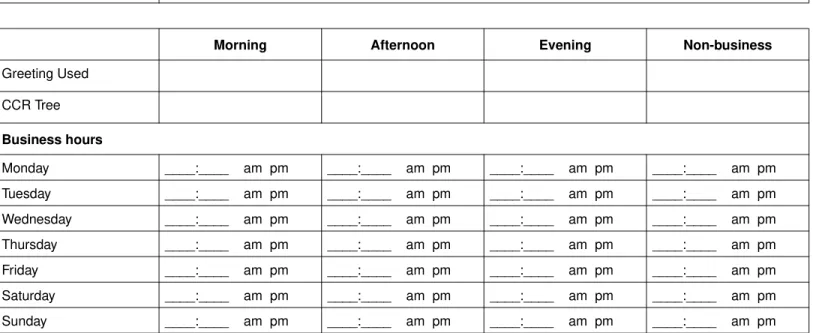
Greeting Tables
Greeting Table number: 1 2 3 4
Morning Afternoon Evening Non-business
Greeting Used CCR Tree Business hours Monday ____:____ am pm ____:____ am pm ____:____ am pm ____:____ am pm Tuesday ____:____ am pm ____:____ am pm ____:____ am pm ____:____ am pm Wednesday ____:____ am pm ____:____ am pm ____:____ am pm ____:____ am pm Thursday ____:____ am pm ____:____ am pm ____:____ am pm ____:____ am pm Friday ____:____ am pm ____:____ am pm ____:____ am pm ____:____ am pm Saturday ____:____ am pm ____:____ am pm ____:____ am pm ____:____ am pm Sunday ____:____ am pm ____:____ am pm ____:____ am pm ____:____ am pm
Note: Enter times in hh:mm format.
Circle a.m. or p.m. if you use a 12-hr clock.
Custom Automated Attendant Menu
Primary Language prompt
Alternate Language prompt
Table options
Target Attendant extension
Language preference Primary Alternate Menu Repeat Key
CallPilot line answering
Line number Telephone number
(reference only)
Answered by CallPilot Number of rings
(0 to 12)
Greeting Table number (1 to 4) Y N Y N Y N Y N Y N Y N Y N Y N Y N Y N Y N Y N Y N Y N Y N Y N Y N Y N Y N Y N Y N Y N Y N Y N Y N Y N Y N Y N Y N Y N
Class of Service
You can edit Class of Service values if you use CallPilot Manager. Use this table to record Class of Service values. For the
default Class of Service values refer to
“Class of Service default values” on page 26
.
Class of Service 1 2 3 4 5 6 7 8
Name
Max Mailbox Message time (in minutes) Max Message Length (in minutes) Message Retention Period (in days) Max Greeting Length (in minutes) Enable Off-premise Message Notification Retry Intervals (in minutes)
Max Number of Attempts Enable Outbound Transfer Max Incorrect Password Attempts Password Expiry (in days) Enable Networking*
Enable Personal Target Attendant Enable Call Record
Prompt Language User Interface Style Restriction Permission List
Class of Service 9 10 11 12 13 14 15 16
Name
Max Mailbox Message time (in minutes) Max Message Length (in minutes) Message Retention Period (in days) Max Greeting Length (in minutes) Enable Off-premise Message Notification Retry Intervals (in minutes)
Max Number of Attempts Enable Outbound Transfer Max Incorrect Password Attempts Password Expiry (in days) Enable Networking*
Enable Personal Target Attendant Enable Call Record
Prompt Language User Interface Style Restriction Permission List
Mailbo
x
es
*
F
o
r mor
e i
n
fo
rmat
io
n se
e pa
ge 9
and
page
26.
**
If
th
is
C
all
P
ilo
t op
ti
o
n
is
e
n
ab
le
d
o
n
yo
u
r s
y
st
em
.
†S
u
b
sc
rib
er
m
ail
bo
x
es
on
ly
.
Ma ilbo x # E x t # C la ss of Se rv ic e* (1 to 1 6 ) Na m e (1 -1 6 lette rs ) T y pe (c he c k on e Alt Ex t 1 # † Alt Ext 2 †# Ex pr ess M ess agi ng lin e # † In com p an y direc tory M ess age Wa iting Noti ficat ion Auto Log in Ca ll Sc reen ing O u td ial R o ute L = li n e R = ro u te P = po ol N o ne = de fau lt Info rm atio n Subsc riber AMIS** Fax On Dema nd** Fax Ov erflow ** Network Delive ry** Y N Y NY N Y N L _ _ P _ _ R None Y N Y NY N Y N L _ _ P _ _ R None Y N Y NY N Y N L _ _ P _ _ R None Y N Y NY N Y N L _ _ P _ _ R None Y N Y NY N Y N L _ _ P _ _ R None Y N Y NY N Y N L _ _ P _ _ R None Y N Y NY N Y N L _ _ P _ _ R None Y N Y NY N Y N L _ _ P _ _ R None Y N Y NY N Y N L _ _ P _ _ R None Y N Y NY N Y N L _ _ P _ _ R None Y N Y NY N Y N L _ _ P _ _ R None Y N Y NY N Y N L _ _ P _ _ R None Y N Y NY N Y N L _ _ P _ _ R None Y N Y NY N Y N L _ _ P _ _ R None Y N Y NY N Y N L _ _ P _ _ R None Y N Y NY N Y N L _ _ P _ _ R None Y N Y NY N Y N L _ _ P _ _ R None Y N Y NY N Y N L _ _ P _ _ R None Y N Y NY N Y N L _ _ P _ _ R None Y N Y NY N Y N L _ _ P _ _ R None Y N Y NY N Y N L _ _ P _ _ R None Y N Y NY N Y N L _ _ P _ _ R NoneVoice Group Lists
Use this table to record voice Group Lists. You can create fax Group Lists if you have the Fax option enabled. To record fax
Group Lists use the table
“Fax Group Lists” on page 25
.
* The Group List leading digit can be changed from the default of 9. This can be done during initialization or by the System Administrator.
Group List number* (901 to 999) Spoken name
Display name (maximum 16 letters)
Group List members
Caller ID Routing Table
Telephone number
Destination type Greeting Table Extension Mailbox
CCR CCR Tree
Path
Telephone number
Destination type Greeting Table Extension Mailbox
CCR CCR Tree
Path
Telephone number
Destination type Greeting Table Extension Mailbox
CCR CCR Tree
Path
Telephone number
Destination type Greeting Table Extension Mailbox
CCR CCR Tree
Path
Telephone number
Destination type Greeting Table Extension Mailbox
CCR CCR Tree
CCR Trees
CCR Tree number 1 2 3 4 5 6 7 8 Enabled: Y N
Home node type
Menu Information
Primary message
Alternate message
Fax On Demand
(available if you have the CallPilot Fax option enabled)
Primary message
Alternate message
Call method: one two Line or pool number
Mailbox number
Transfer Internal Extension #
External Line or pool #
Telephone #
Destination applies to Mailbox and Information nodes
CCR
T
ree p
ro
g
ram
m
in
g t
e
mp
late
Use th is te mp la te to d e si g n CCR T re e s . E a c h b o x re p re s e n ts a n o d e o n t h e C CR T re e . T o u s e th is te mp la te : • • in th e bo xe s rec o rd the P a th n u m b e r, no de t y p e an d G re e tin g . N o de ca n be M e n u s , Inf o rm ati o n , M a ilbo x or T ran sf er • • f o r M e n u a nd I n fo rm ati on n o d e s , rec o rd a des cr ip tio n i n th e b o x • • dr a w lin es bet w e en the bo xe s t o f o rm the P a ths • U s e th e ta b le “CCR T re e p ro g ra m m in g te m p la te ” o n p a g e 1 4 to re co rd th e d e tai ls f o r e a c h no de Ho m e M e n u Pa th Node type Pa th Node typ e Pa th Nod e ty pe Pa th Node type Pa th Node type Pa th Node typ e Pa th Nod e ty pe Pa th Node type Pa th Node type Pa th Node typ e Pa th Nod e ty pe Pa th Node type CCR T re e n u m b e rDialing Translation parameters
Dialing Translation Table
For each Dialing Translation Table entry enter an Input value and an Output value.
The Input value can be a maximum of 14 digits. The Output value can be a maximum of 15 digits.
Long Distance Access Code Area Code
Access Code
Reply Translation Y N
Note: CallPilot sorts the entries in ascending numerical order.
Longer, more specific entries appear before shorter, more generic entries.
Restriction Permission List
The Restriction Permission List is available for CallPilot Mini only.
A list can have up to 100 Restrictions and 100 Permissions. A Restriction or Permission can be a maximum of 26 digits.
Restriction List ID Restrictions
Automated Attendant settings
CallPilot system settings
Operator and Business Status
Return to Automated Attendant Y N
Touchtone Gate None Standard Custom _________________
Max Outcalling Channels 1 2 3 4 5 6 7 8
Enable Voicemail Y N
Enable Group List Y N
Group List Leading Digit 1 2 3 4 5 6 7 8 9
Enable External Initialization Y N
Make Directory Available Y N
Enable General Delivery Mailbox Y N
Enable Bilingual Y N
Primary Language Secondary Language
Canadian Pronunciation Y N
Directory Search By First name Last name Both
Enable Outdialing Y N
Line number Pool number Route code
Enable CallPilot User Interface Y N
Name Prefix Special Prefix Country
Companding Law M-Law A-Law
Time Zone
Password OPERATOR (67372867)
Answer lines Y N
Receptionist or Operator extension
CallPilot options
Digital Networking site table
Use this table to record the properties for the Digital Networking sites you create.
Site name Site prefix
Host name (FQDN) Mailbox prefix
Site name recorded Y N
Site name Site prefix
Host name (FQDN) Mailbox prefix
Site name recorded Y N
Site name Site prefix
Host name (FQDN) Mailbox prefix
Site name recorded Y N
Site name Site prefix
Host name (FQDN) Mailbox prefix
Site name recorded Y N
Site name Site prefix
Host name (FQDN) Mailbox prefix
AMIS site table
Use this table to record the properties for the AMIS sites you create.
Site name
Site prefix
Site name recorded Y N
Destination site phone number
Outdial route Line number
Pool number Route code
Site name
Site prefix
Site name recorded Y N
Destination site phone number
Outdial route Line number
Pool number Route code
Site name
Site prefix
Site name recorded Y N
Destination site phone number
Outdial route Line number
Pool number Route code
Site name
Site prefix
Site name recorded Y N
Destination site phone number
Outdial route Line number
Pool number Route code
AMIS Call Blocking periods
Use this table to record your AMIS Call Blocking periods.
Day Period Call Blocking time from Call Blocking time to
Monday 1 2 3 4 Tuesday 1 2 3 4 Wednesday 1 2 3 4 Thursday 1 2 3 4 Friday 1 2 3 4 Saturday 1 2 3 4 Sunday 1 2 3 4
Network Site Mailboxes
Use this table to record the details of the Network Site Mailboxes you create.
Network Site Mailbox number
Network Site Mailbox name
Include in Directory Y N
Mailbox Name recorded Y N
Destination Site Prefix
Destination Remote Mailbox number
Network Site Mailbox number
Network Site Mailbox name
Include in Directory Y N
Mailbox Name recorded Y N
Destination Site Prefix
Destination Remote Mailbox number
Network Site Mailbox number
Network Site Mailbox name
Include in Directory Y N
Mailbox Name recorded Y N
Destination Site Prefix
Destination Remote Mailbox number
Network Site Mailbox number
Network Site Mailbox name
Include in Directory Y N
Mailbox Name recorded Y N
Destination Site Prefix
Network AMIS mailboxes
Use this table to record the details of the Network AMIS mailboxes you create.
* does not apply to CallPilot Mini
Network AMIS mailbox number
Network AMIS mailbox name
Include in Directory Y N
Mailbox name recorded Y N
Outdial* Line number
Pool number Route code
Destination site phone number
Network AMIS mailbox number
Network AMIS mailbox name
Include in Directory Y N
Mailbox name recorded Y N
Outdial* Line number
Pool number Route code
Destination site phone number
Network AMIS mailbox number
Network AMIS mailbox name
Include in Directory Y N
Mailbox name recorded Y N
Outdial* Line number
Pool number Route code
Fax Overflow mailboxes
Mailbox number
Fax machine extension number Mailbox name
Spoken name Fax retries (1-99) Fax interval (1-60 min) Mailbox number
Fax machine extension number Mailbox name
Spoken name Fax retries (1-99) Fax interval (1-60 min) Mailbox number
Fax machine extension number Mailbox name
Spoken name Fax retries (1-99) Fax interval (1-60 min) Mailbox number
Fax machine extension number Mailbox name
Spoken name Fax retries (1-99) Fax interval (1-60 min) Mailbox number
Fax machine extension number Mailbox name
Spoken name Fax retries (1-99) Fax interval (1-60 min)
Fax On Demand mailboxes
* A caller can request a maximum of 8 faxes. A mailbox can store as many faxes as space permits.
Mailbox number Mailbox name Class of Service
Display in Directory Y N
Spoken name
Outdial type Line number
Pool number Route code
Fax retries Fax interval
Delivery method One-call Two-call
Maximum number of faxes* 1 2 3 4 5 6 7 8
Mailbox number Mailbox name Class of Service
Display in Directory Y N
Spoken name
Outdial type Line number
Pool number Route code
Fax retries Fax interval
Delivery method One-call Two-call
Maximum number of faxes* 1 2 3 4 5 6 7 8
Mailbox number Mailbox name Class of Service
Display in Directory Y N
Spoken name
Outdial type Line number
Pool number Route code
Fax retries Fax interval
Delivery method One-call Two-call
Fax Group Lists
*The Group List leading digit can be changed from the default of 9. This can be done during initialization or by the System Administrator.
Group List number* (901 to 999) Spoken name Display name (1 - 16 characters)
Group List members
CallPilot defaults
Class of Service default values
* If the Message Networking option is installed. 0 = indefinite; never expire, P = Primary Language, A = Alternate Language
Class of Service 1 2 3 4 5 6 7 8
Maximum Mailbox Message time (in minutes) 15 15 15 15 5 5 20 20
Maximum Message Length (in minutes) 3 3 7 7 3 3 2 2
Message Retention Period (in days) 30 30 0 0 7 7 15 15
Maximum Greeting Length (in minutes) 1 1 1 1 1 1 10 10
Enable Off-premise Message Notification Y Y Y Y N N Y Y
Retry Intervals (in minutes) 5 5 10 10 15 15 30 30
Maximum Number of Attempts 3 3 5 5 7 7 9 9
Enable Outbound Transfer Y Y Y Y N N Y Y
Maximum Incorrect Password Attempts 9 9 9 9 6 6 4 4
Password expiry (in days) 90 90 90 90 60 60 30 30
Enable Networking* Y Y Y Y N N Y Y
Enable Personal Target Attendant Y Y Y Y N N Y Y
Enable Call Record N N N N N N N N
Prompt language P A P A P A P A
User Interface Style The interface selected from the Installation Wizard as the primary interface. Restriction Permission List (CallPilot Mini only)
Class of Service 9 10 11 12 13 14 15 16
Maximum Mailbox Message time (in minutes) 10 10 30 30 120 120 120 120
Maximum Message Length (in minutes) 3 3 7 7 10 10 2 2
Message Retention Period (in days) 365 365 60 60 90 90 45 45
Maximum Greeting Length (in minutes) 1 1 2 2 3 3 5 5
Enable Off-premise Message Notification Y Y N N Y Y Y Y
Retry Intervals (in minutes) 5 5 10 10 15 15 30 30
Maximum Number of Attempts 3 3 5 5 7 7 9 9
Enable Outbound Transfer Y Y N N Y Y Y Y
Maximum Incorrect Password Attempts 9 9 9 9 6 6 4 4
Password expiry (in days) 90 90 90 90 60 60 30 30
Enable Networking* Y Y N N Y Y Y Y
Enable Personal Target Attendant Y Y N N Y Y Y Y
Enable Call Record N N N N N N N N
Prompt language P A P A P A P A
User Interface Style The interface selected from the Installation Wizard as the primary interface. Restriction Permission List (CallPilot Mini only)
CallPilot system defaults
System properties
Maximum number of outcalling channels No default
Voicemail Enabled
Group Lists Enabled
Group List leading digit 9
External initialization Not enabled
Company Directory Enabled
General Delivery Mailbox Enabled
Redirect DN (not available for CallPilot Mini) Enabled Bilingual operation Primary language Alternate language Not enabled No default No default
Canadian Pronunciation Not enabled
Search Company Directory By Last name
CallPilot User Interface (not available for CallPilot Mini) Not enabled
Name Prefix 11
Special Prefix 19
Primary UI (not available for CallPilot Mini)
Country (not available on BCM) Depends on location Companding Type (CallPilot Mini only) Depends on location Timezone (not available on BCM) Mini, 150
Daylight Savings Time (not available on BCM) Not enabled
Feature codes
Leave Message
≤
980
Open Mailbox
≤
981
Operator Status
≤
982
System Programming
≤
983
Call forward to CallPilot
≤
984
CallPilot extension
≤
985
Transfer≤
986
Interrupt≤
987
Call Record≤
989
Line answering
Skillset number 0 Answered by CallPilot NGreeting Table number 1
Greeting Tables
Return to Automated Attendant N
Automated Attendant Menu Prompt Y
Morning Greeting 1
Afternoon Greeting 2
Evening Greeting 3
Non-business Greeting 4
Language Preference PRI
Attendant extension No default
CCR Tree None
Business Hour start times Morning 12:00 am (midnight)
Afternoon 12:00 pm (noon) Evening 6:00 pm
Non-business 6:00 pm
Automated Attendant
Return to Automated Attendant N
Operator and Business Status
Receptionist or Operator available N
Business open Y
Answer lines Y