93
ScoutBot: A Dialogue System for Collaborative Navigation
Stephanie M. Lukin1, Felix Gervits2∗, Cory J. Hayes1, Anton Leuski3, Pooja Moolchandani1, John G. Rogers III1, Carlos Sanchez Amaro1, Matthew Marge1, Clare R. Voss1, David Traum3
1 U.S. Army Research Laboratory, Adelphi, MD 20783 2 Tufts University, Medford MA 02155
3 USC Institute for Creative Technologies, Playa Vista, CA 90094
[email protected], [email protected], [email protected]
Abstract
ScoutBot is a dialogue interface to phys-ical and simulated robots that supports collaborative exploration of environments. The demonstration will allow users to is-sue unconstrained spoken language com-mands to ScoutBot. ScoutBot will prompt for clarification if the user’s instruction needs additional input. It is trained on human-robot dialogue collected from Wizard-of-Oz experiments, where robot responses were initiated by a human wiz-ard in previous interactions. The demon-stration will show a simulated ground robot (Clearpath Jackal) in a simulated en-vironment supported by ROS (Robot Op-erating System).
1 Introduction
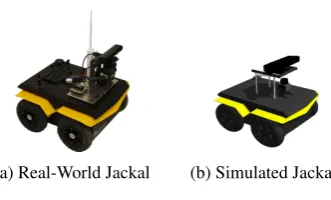
We are engaged in a long-term project to create an intelligent, autonomous robot that can collab-orate with people in remote locations to explore the robot’s surroundings. The robot’s capabili-ties will enable it to effectively use language and other modalities in a natural manner for dialogue with a human teammate. This demo highlights the current stage of the project: a data-driven, auto-mated system, ScoutBot, that can control a simu-lated robot with verbally issued, natural language instructions within a simulated environment, and can communicate in a manner similar to the in-teractions observed in prior Wizard-of-Oz experi-ments. We used a Clearpath Jackal robot (shown in Figure 1a), a small, four-wheeled unmanned ground vehicle with an onboard CPU and iner-tial measurement unit, equipped with a camera and light detection and ranging (LIDAR) mapping that
∗
Contributions were primarily performed during an in-ternship at the Institute for Creative Technologies.
readily allows for automation. The robot’s task is to navigate through an urban environment (e.g., rooms in an apartment or an alleyway between apartments), and communicate discoveries to a hu-man collaborator (the Comhu-mander). The Com-mander verbally provides instructions and guid-ance for the robot to navigate the space.
The reasons for an intelligent robot collabora-tor, rather than one teleoperated by a human, are twofold. First, the human resources needed for completely controlling every aspect of robot mo-tion (including low-level path-planning and nav-igation) may not be available. Natural language allows for high-level tasking, specifying a desired plan or end-point, such that the robot can figure out the details of how to execute these natural lan-guage commands in the given context and report back to the human as appropriate, requiring less time and cognitive load on humans. Second, the interaction should be robust to low-bandwidth and unreliable communication situations (common in disaster relief and search-and-rescue scenarios), where it may be impossible or impractical to ex-ercise real-time control or see full video streams. Natural language interaction coupled with low-bandwidth, multimodal updates addresses both of these issues and provides less need for high-bandwidth, reliable communication and full atten-tion of a human controller.
We have planned the research for developing ScoutBot as consisting of five conceptual phases, each culminating in an experiment to validate the approach and collect evaluation data to inform the development of the subsequent phase. These phases are:
(a) Real-World Jackal (b) Simulated Jackal
Figure 1: Jackal Robot
The first two phases are described in Marge et al. (2016) and Bonial et al. (2017), respec-tively. Both consist of Wizard-of-Oz settings in which participants believe that they are interact-ing with an autonomous robot, a common tool in Human-Robot Interaction for supporting not-yet fully realized algorithms (Riek,2012). In our two-wizard design, one two-wizard (the Dialogue Man-ager or DM-Wizard) handles the communication aspects, while another (the Robot Navigator or RN-Wizard) handles robot navigation. The DM-Wizard acts as an interpreter between the Com-mander and robot, passing simple and full instruc-tions to the RN-Wizard for execution based on the Commander instruction (e.g., the Commander in-struction,Now go and make a right um 45 degrees
is passed to the RN-Wizard for execution as,Turn right 45 degrees). In turn, the DM-Wizard informs the Commander of instructions the RN-Wizard successfully executes or of problems that arise during execution. Unclear instructions from the Commander are clarified through dialogue with the DM-Wizard (e.g., How far should I turn?). Additional discussion between Commander and DM-Wizard is allowed at any time. Note that be-cause of the aforementioned bandwidth and relia-bility issues, it is not feasible for the robot to start turning or moving and wait for the Commander to tell it when to stop - this may cause the robot to move too far, which could be dangerous in some circumstances and confusing in others. In the first phase, the DM-Wizard uses unconstrained texting to send messages to both the Commander and RN-Wizard. In the second phase, the DM-Wizard uses a click-button interface that facilitates faster messaging. The set of DM-Wizard messages in this phase were constrained based on the messages from the first phase.
This demo introduces ScoutBot automation of the robot to be used in the upcoming phases: a simulated robot and simulated environment to sup-port the third and fourth project phases, and initial automation of DM and RN roles, to be used in the
fourth and fifth phases. Simulation and automa-tion were based on analyses from data collected in the first two phases. Together, the simulated envi-ronment and robot allow us to test the automated system in a safe environment, where people, the physical robot, and the real-world environment are not at risk due to communication or navigation er-rors.
2 System Capabilities
ScoutBot engages in collaborative exploration di-alogues with a human Commander, and controls a robot to execute instructions and navigate through and observe an environment. The real-world Jackal robot measures 20in x 17in x 10in, and weights about 37lbs (pictured in Figure1a). Both it and its simulated counterpart (as seen in Fig-ure1b) can drive around the environment, but can-not manipulate objects or otherwise interact with the environment. While navigating, the robot uses LIDAR to construct a map of its surroundings as well as to indicate its position in the map. The Commander is shown this information, as well as static photographs of the robot’s frontal view in the environment (per request) and dialogue responses in a text interface.
Interactions with ScoutBot are collaborative in that ScoutBot and the Commander exchange in-formation through dialogue. Commanders issue spoken navigation commands to the robot, request photos, or ask questions about its knowledge and perception. ScoutBot responds to indicate when commands are actionable, and gives status feed-back on its processing, action, or inability to act. When ScoutBot accepts a command, it is carried out in the world.
Figure2shows a dialogue between a Comman-der and ScoutBot. The right two columns show how the Commander’s language was interpreted, and the action the robot takes. In this dialogue, the Commander begins by issuing a single instruction,
re-Move forward
You can tell me to move a certain distance or to move
to an object. 1.
2.
3. Go forward 3 feet move forward 3 feet
Moving… 4. (starts moving)
Done. 5. (stops moving)
6. Pivot right about 45 degrees turn right 45 degrees
Turning… 7. (starts turning)
Done. 8. (stops turning)
9. What do you see? send image (takes and sends image)
[image:3.595.87.502.64.239.2]Commander ScoutBot Interpreted Action Robot Action
Figure 2: Dialogue between a Commander and ScoutBot
quest for a picture from the robot’s camera, which is taken and sent to the Commander.
ScoutBot accepts unconstrained spoken lan-guage, and uses a statistical text classifier trained on annotated data from the first two phases of the project for interpreting Commander instruc-tions. Dialogue management policies are used to generate messages to both the Commander and interpreted actions for automated robot naviga-tion. Our initial dialogue management policies are fairly simple, yet are able to handle a wide range of phenomena seen in our domain.
3 System Overview
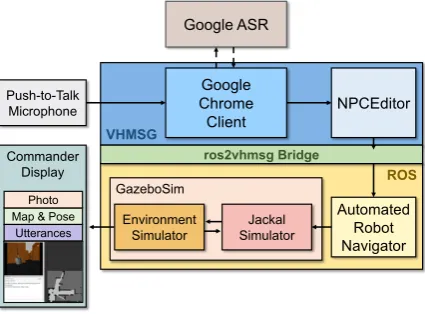
ScoutBot consists of several software systems, running on multiple machines and operating sys-tems, using two distributed agent platforms. The architecture utilized in simulation is shown in Fig-ure 3. A parallel architecture exists for a real-world robot and environment. Components pri-marily involving language processing use parts of the Virtual Human (VH) architecture (Hartholt et al., 2013), and communicate using the Virtual Human Messaging (VHMSG), a thin layer on top of the publicly available ActiveMQ message pro-tocol1. Components primarily involving the real or simulated world, robot locomotion, and sens-ing are embedded in ROS2. To allow the VHMSG and ROS modules to interact with each other, we created ros2vhmsg, software that bridges the two messaging architectures. The components are de-scribed in the remainder of this section.
The system includes several distinct
worksta-1
http://activemq.apache.org
2http://www.ros.org
VHMSG
ROS
GazeboSim Push-to-Talk
Microphone
Google Chrome Client
NPCEditor Google ASR
Automated Robot Navigator
Jackal Simulator Environment
Simulator Commander
Display
Map & Pose Photo
Utterances
ros2vhmsg Bridge
Figure 3: ScoutBot architecture interfacing with a simulated robot and environment: Solid arrows represent communications over a local network; dashed arrows indicate connections with external resources. Messaging for the spoken language in-terface is handled via VHMSG, while robot mes-sages are facilitated by ROS. A messaging bridge, ros2vhmsg, connects the components.
[image:3.595.310.523.276.433.2]3.1 VHMSG Components
VHMSG includes several protocols that imple-ment parts of the Virtual Human architecture. We use the protocols for speech recognition, as well as component monitoring and logging. The NPCEd-itor and other components that use these proto-cols are available as part of the ICT Virtual Hu-man Toolkit (Hartholt et al., 2013). These proto-cols have also been used in systems, as reported by
Hill et al.(2003) andTraum et al. (2012, 2015). In particular, we used the adaptation of Google’s Automated Speech Recognition (ASR) API used in Traum et al. (2015). The NPCEditor (Leuski and Traum,2011) was used for Natural Language Understanding (NLU) and dialogue management. The new ros2vhmsg component for bridging the messages was used to send instructions from the NPCEditor to the automated RN.
3.1.1 NPCEditor
We implemented NLU using the statistical text classifier included in the NPCEditor. The classi-fier learns a mapping from inputs to outputs from training data using cross-language retrieval mod-els (Leuski and Traum, 2011). The dialogues collected from our first two experimental phases served as training data, and consisted of 1,500 pairs of Commander (user) utterances and the DM-Wizard’s responses. While this approach lim-its responses to the set that were seen in the train-ing data, in practice it works well in our domain, achieving accuracy on a held out test set of 86%. The system is particularly effective at translat-ing actionable commands to the RN for execu-tion (e.g.,Take a picture). It is robust at handling commands that include pauses, fillers, and other disfluent features (e.g., Uh move um 10 feet). It can also handle simple metric-based motion com-mands (e.g.,Turn right 45 degrees,Move forward 10 feet) as well as action sequences (e.g.,Turn 180 degrees and take a picture every 45). The system can interpret some landmark-based instructions re-quiring knowledge of the environment (e.g.,Go to the orange cone), but the automated RN compo-nent does not yet have the capability to generate the low-level, landmark-based instructions for the robot.
Although the NPCEditor supports simultane-ous participation in multiple conversations, exten-sions were needed for ScoutBot to support multi-floor interaction (Traum et al., 2018), in which
two conversations are linked together. Rather than just responding to input in a single conversation, the DM-Wizard in our first project phases often translates input from one conversational floor to another (e.g., from the Commander to the RN-Wizard, or visa versa), or responds to input with messages to both the Commander and the RN. These responses need to be consistent (e.g. trans-lating a command to the RN should be accom-panied by positive feedback to the Commander, while a clarification to the commander should not include an RN action command). Using the di-alogue relation annotations described in Traum et al.(2018), we trained a hybrid classifier, includ-ing translations to RN if they existed, and negative feedback to the Commander where they did not. We also created a new dialogue manager policy that would accompany RN commands with appro-priate positive feedback to the commander, e.g., response of “Moving..” vs “Turning...” as seen in #4 and #7 in Figure2.
3.1.2 ros2vhmsg
ros2vhmsg is a macOS application to bridge the VHMSG and ROS components of ScoutBot. It can be run from a command line or using a graph-ical user interface that simplifies the configura-tion of the applicaconfigura-tion. Both VHMSG and ROS are publisher-subscriber architectures with a cen-tral broker software. Each component connects to the broker. They publish messages by delivering them to the broker and receive messages by telling the broker which messages they want to receive. When the broker receives a relevant message, it is delivered to the subscribers.
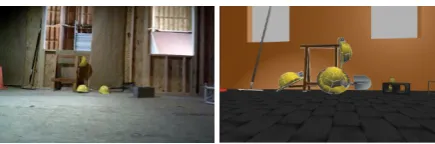
Figure 4: Real-world and simulated instances of the same environment.
3.2 ROS Components
ROS provides backend support for robots to oper-ate in both real-world and simuloper-ated environments. Here, we describe our simulated testbed and mated navigation components. Developing auto-mated components in simulation allows for a safe test space before software is transitioned to the real-world on a physical robot.
3.2.1 Environment Simulator
Running operations under ROS makes the tran-sition between real-world and simulated testing straightforward. Gazebo3 is a software package compatible with ROS for rendering high-fidelity virtual simulations, and supports communications in the same manner as one would in real-world en-vironments. Simulated environments were mod-eled in Gazebo after their real-world counterparts as shown in Figure4. Replication took into con-sideration the general dimensions of the physical space, and the location and size of objects that populate the space. Matching the realism and fi-delity of the real-world environment in simulation comes with a rendering trade-off: objects requir-ing a higher polygon count due to their natural ge-ometries results in slower rendering in Gazebo and a lag when the robot moves in the simulation. As a partial solution, objects were constructed starting from their basic geometric representations, which could be optimized accordingly, e.g., the illusion of depth was added with detailed textures or shad-ing on flat-surfaced objects. Environments ren-dered in Gazebo undergo a complex workflow to support the aforementioned requirements. Objects and their vertices are placed in an environment, and properties about collisions and gravity are en-coded in the simulated environment.
3.2.2 Jackal Simulator
Clearpath provides a ROS package with a simu-lated model of the Jackal robot (Figure 1b) and
3http://gazebosim.org/
customizable features to create different simu-lated configurations. We configured our simusimu-lated Jackal to have the default inertial measurement unit, a generic camera, and a Hokuyo LIDAR laser scanner.
As the simulated Jackal navigates through the Gazebo environment, data from the sensors is re-layed to the workstation views through rviz4, a vi-sualization tool included with ROS that reads and displays sensor data in real-time. Developers can select the data to display by adding a panel, se-lecting the data type, and then sese-lecting the spe-cific ROS data stream. Both physical and simu-lated robot sensors are supported by the same rviz configuration, since rviz only processes the data sent from these sensors; this means that an rviz configuration created for data from a simulated robot will also work for a physical robot if the data stream types remain the same.
3.2.3 Automated Robot Navigator
Automated robot navigation is implemented with a python script and theROSPYpackage5. The script runs on a ROS-enabled machine running the sim-ulation. The script subscribes to messages from NPCEditor, which are routed through ros2vhmsg. These messages contain text output from the NLU classifier that issue instructions to the robot based on the user’s unconstrained speech.
A mapping of pre-defined instructions was cre-ated, with keys matching the strings passed from NPCEditor via ros2vhmsg (e.g., Turn left 90 de-grees). For movement, the map values are a ROS
TWIST message that specifies the linear motion and angular rotation payload for navigation. These
TWIST messages are the only way to manipulate the robot; measures in units of feet and degrees cannot be directly translated. The mapping is straightforward to define for metric instructions. Included is basic coverage of moving forward or backward between 1 and 10 feet, and turning right and left 45, 90, 180, or 360 degrees. Pictures from the robot’s simulated camera can be requested by sending a ROSIMAGEmessage. The current
map-ping does not yet support collision avoidance or landmark-based instructions that require knowl-edge of the surrounding environment (e.g., Go to the nearby chair).
4
http://wiki.ros.org/rviz
4 Demo Summary
In the demo, visitors will see the simulated robot dynamically move in the simulated environment, guided by natural language interaction. Visitors will be able to speak instructions to the robot to move in the environment. Commands can be given in metric terms (e.g., #3 and #6 in Figure2), and images requested (e.g., #9). Undecipherable or incomplete instructions will result in clarifica-tion subdialogues rather than robot moclarifica-tion (e.g., #1). A variety of command formulations can be accommodated by the NLU classifier based on the training data from our experiments. Visual-izations of different components can be seen in:
http://people.ict.usc.edu/˜traum/
Movies/scoutbot-acl2018demo.wmv.
5 Summary and Future Work
ScoutBot serves as a research platform to support experimentation. ScoutBot components will be used in our upcoming third through fifth develop-ment phases. We are currently piloting phase 3 using ScoutBot’s simulated environment, with hu-man wizards. Meanwhile, we are extending the automated dialogue and navigation capabilities.
This navigation task holds potential for collab-oration policies to be studied, such as the amount and type of feedback given, how to negotiate to successful outcomes when an initial request was underspecified or impossible to carry out, and the impact of miscommunication. More sophisticated NLU methodologies can be tested, including those that recognize specific slots and values or more de-tailed semantics of spatial language descriptions. The use of context, particularly references to rel-ative landmarks, can be tested by either using the assumed context as part of the input to the NLU classifier, transforming the input before clas-sifying, or deferring the resolution and requiring the action interpreter to handle situated context-dependent instructions (Kruijff et al.,2007).
Some components of the ScoutBot architecture may be substituted for different needs, such as dif-ferent physical or simulated environments, robots, or tasks. Training new DM and RN components can make use of this general architecture, and the resulting components aligned back with ScoutBot.
Acknowledgments
This work was supported by the U.S. Army.
References
Claire Bonial, Matthew Marge, Ashley Foots, Felix Gervits, Cory J Hayes, Cassidy Henry, Susan G Hill, Anton Leuski, Stephanie M Lukin, Pooja Moolchandani, Kimberly A. Pollard, David Traum, and Clare R. Voss. 2017. Laying Down the Yellow Brick Road: Development of a Wizard-of-Oz Inter-face for Collecting Human-Robot Dialogue. Proc. of AAAI Fall Symposium Series.
Arno Hartholt, David Traum, Stacy C Marsella, Ari Shapiro, Giota Stratou, Anton Leuski, Louis-Philippe Morency, and Jonathan Gratch. 2013. All Together Now Introducing the Virtual Human Toolkit. InProc. of Intelligent Virtual Agents, pages 368–381. Springer.
Randall Hill, Jr., Jonathan Gratch, Stacy Marsella, Jeff Rickel, William Swartout, and David Traum. 2003. Virtual Humans in the Mission Rehearsal Ex-ercise System.KI Embodied Conversational Agents, 17:32–38.
Geert-Jan M Kruijff, Pierre Lison, Trevor Benjamin, Henrik Jacobsson, and Nick Hawes. 2007. Incre-mental, Multi-Level Processing for Comprehending Situated Dialogue in Human-Robot Interaction. In
Symposium on Language and Robots.
Anton Leuski and David Traum. 2011. NPCEditor: Creating virtual human dialogue using information retrieval techniques. AI Magazine, 32(2):42–56.
Matthew Marge, Claire Bonial, Kimberly A Pollard, Ron Artstein, Brendan Byrne, Susan G Hill, Clare Voss, and David Traum. 2016. Assessing Agree-ment in Human-Robot Dialogue Strategies: A Tale of Two Wizards. In Proc. of Intelligent Virtual Agents, pages 484–488. Springer.
Laurel Riek. 2012. Wizard of Oz Studies in HRI: A Systematic Review and New Reporting Guidelines.
Journal of Human-Robot Interaction, 1(1).
David Traum, Priti Aggarwal, Ron Artstein, Susan Foutz, Jillian Gerten, Athanasios Katsamanis, An-ton Leuski, Dan Noren, and William Swartout. 2012. Ada and Grace: Direct Interaction with Museum Visitors. InProc. of Intelligent Virtual Agents.
David Traum, Kallirroi Georgila, Ron Artstein, and Anton Leuski. 2015. Evaluating Spoken Dialogue Processing for Time-Offset Interaction. InProc. of Special Interest Group on Discourse and Dialogue, pages 199–208. Association for Computational Lin-guistics.