Microsoft SQL Server 2012
Deploying New Technologies
to Optimize Data Analysis
and Keep Pace with Big Data
White Paper September 2012
By: Lyza Latham, Product Marketing Manager and Lorraine Herrera, Product Manager
www.peer1.com
Contents
Introduction: A huge leap forward in data management 3
Wrangling Big Data 3
Data volume management optimization with SQL Server 2012 4
Data management features 4
Data quality features 5
Data performance features 5
The PCI DSS compliance story 5
BI for users at all levels 6
Power View 6 PowerPivot 7 A cloud-ready platform 9 Conclusion 10 Further reading 11 Endnotes 12
3 The Big Data explosion resulting from recent, ongoing proliferation of technol-ogy has increased data management requirements for businesses of every size and nature. As more and more data is gathered and stored in their environ-ments, knowledge workers and IT users alike increasingly scramble to find the best ways to capitalize on the data and make it serve their business needs. Microsoft® SQL Server® 2012 incorporates the tools and capabilities that busi-nesses need to address these emerging data challenges. SQL Server has been a market standard for many years. This latest version of the technology rep-resents an evolutionary step forward, not only for Microsoft but for businesses everywhere that require reliable data management in order to remain nimble and competitive in their operations. This huge leap combines an understanding of the Big Data surge with new considerations of how business users work with their data, and how they can be empowered to do so without engaging IT or other specialized resources.
Additionally, IT roadmap best practices tell us that any data management solution that a company creates today must include plans for portability to the cloud. A January 2012 Gartner press release reported that “nearly one-third of organizations either already use or plan to use cloud or Software-as-a-Service (SaaS) offerings to augment their core business intelligence (BI) functions.”1 The report cited as drivers for this phenomenon the enhanced time to value, cost savings and resource optimization that hosted (off-premises) solutions can provide.
The biggest threat to satisfactory business intelligence is also the key reality that SQL Server 2012 is designed to address: the onslaught of Big Data. As the world of data control, management and usage grows in complexity and as data volumes grow at all types and sizes of companies worldwide, progressive IT organizations are recognizing that BI is a true competitive differentiator and are looking to technologies like SQL Server 2012 to help them stem the tide. Upgrading to SQL Server 2012 now is a golden opportunity for many busi-nesses, and hosting options—such as those offered by Peer 1 Hosting, a Microsoft Gold Certified Partner—make it easier than ever to afford. This paper describes some new features of SQL Server 2012 in the following contexts:
• Wrangling Big Data
• Enhanced visual data exploration and discovery • A cloud-ready platform
Rapid changes in technology bring with them new processes that must be learned and absorbed by the businesses the technology is designed to serve. This entails the many IT activities with which businesses are now familiar: upgrading infrastructure, refreshing hardware, training users and support per-sonnel, and customizing new software to serve a company’s requirements. But in recent years, it has been necessary to manage the impact of new technology on a company’s data operations. New software implementations with revolu-tionary data capabilities seek to optimize every area of the business, and the sheer amount of data this produces grows exponentially. The more granular the business, the more granular the data—causing data to proliferate at a rapid rate. All this data requires not only storage and maintenance, but also mean-ingful application of the data to the business as well.
Introduction: A huge leap forward in data management
Wrangling Big Data
White Paper
Gartner reports that the total world-wide volume of data is growing at 59% per year, with 70-85% of that data as unstructured data. (Source: Gartner Symposium Presentation “Information Management Goes Extreme”: The Biggest Challenges for 21st-Century CIOs, Mark Beyer, October 2011
And as data piles up, companies can’t afford to let it go to waste. The value of this new data to your business is potentially very high, and if you don’t have the right plan for making use of it, you put one of the greatest assets of your business at risk of being underutilized.
The technology area of BI promotes the efficient planning, capture, verification and delivery of data through whatever modes and methods are most useful to business users. But as data volumes grow, the opportunities to seize and use the data diminish rapidly. Valuable data that can directly inform business oper-ations, either programmatically or through human analysis, risks going unused if there is no technology capable of making it available. In this way, the advent of superior technologies actually poses a threat to businesses if their data management systems are unprepared to harvest and present data from new systems in a helpful way.
IT organizations facing these challenges understand the threat of Big Data to their company’s success. Failing to keep pace with their technology can lead to sub-optimal data quality and hamper the gathering of timely, insightful business intelligence. The business as a whole suffers as a result, limiting its chances to operate and grow using the best information, to say nothing of the IT invest-ments they’ve made previously in order to get the data in the first place. The re-engineering of SQL Server for the 2012 release was focused in large part on championing the Big Data challenge. Realizing that “more is bet-ter” only if data quantity and quality are managed to best suit your needs, Microsoft included several new tools and technologies in the 2012 design to help companies keep pace with, and make the most of, the data they receive. These include data management, data quality and data performance features.
Data management features
Data management in SQL Server 2012 starts with effective data warehousing techniques. Both SQL Server 2012 and the SQL Server Fast Track Data Warehouse provide a scalable platform for storing and analyzing data sets in a traditional data warehouse. In addition, SQL Server 2012 supports large sliding window scenarios through enhanced features such as Remote BLOB Storage and support for up to 256 logical cores, enabling high performance for very large workloads and consolidations. Enhanced data compression in SQL Server 2012 accelerates the performance of I/O intensive workloads by compressing growing data volumes by 50%-60%.
Also new in 2012 is the expansion of table partitioning support from 1k up to 15k. This ability extends the length of time that large data sets captured over short periods of time can remain in SQL Server before they are replaced by other data. This extends the useful life of the data by enabling applications to make better use of it while it is in the tables and generally makes it easier to manage these large data sets overall, including data sets within file groups that require maintenance via the data warehouse.
Other data management features include the built-in ColumnStore Index (for-merly called Apollo) which in the new SQL Server 2012 architecture achieves 10x~100x performance gains over previous solutions. ColumnStore uses in-mem-ory capacity and ports data to the SQL Server OLTP engine, enabling very fast query and cycle time for a variety of queries, including full text search.2 According to IDC, data is predicted to
grow 44 times over the next decade, while the number of IT professionals is only growing at 1.4 times. (IDC: 2010 Digital Universe Study)
Also new in 2012 is the expansion of table partitioning support from 1k up to 15k. This ability extends the length of time that large data sets captured over short periods of time can remain in SQL Server before they are replaced by other data. Data volume management optimization with SQL Server 2012
5 High-quality data is crucial to both the efficiency and efficacy of an organiza-tion. As Big Data grows and grows in your environment, attention to quality is more critical than ever before.
Data Quality Services (DQS) is a new SQL Server service that provides knowl-edge-driven tools for data stewards to create and maintain a Data Quality Knowledge Base, helping to improve data quality and simplify data man-agement tasks. By collating both organizational knowledge and third-party reference data in order to profile, cleanse and match data, DQS helps you gain confidence in your overall data quality and end-to-end data management for your organization.
You can run DQS as a stand-alone tool, or you can integrate it using SQL Server Integration Services (SSIS). With SSIS, you can also shore up your SQL Server 2012 data validation and cleansing efforts with third-party data you access via cloud-based data marketplaces.
DQS functionality is also integrated with another built-in SQL Server 2012 service called Master Data Services (MDS). As in previous SQL Server releases, MDS provides a user interface for easy management of data integration struc-tures, including object mapping, reference data, and dimensions and hier-archies. MDS has been improved in SQL Server 2012 to include Entity Based Staging, a feature that lets you load all members and attribute values for an entity at one time. A Silverlight® look and feel has been added to the Explorer and Integration Management MDS functional areas, making it easier to add and delete members and move them into hierarchies.3
Beyond the performance enhancements already built in to features like ColumnStore Index, enhanced data compression and increased support for logical cores, SQL Server also includes xVelocity, a revolutionary data manage-ment technique that boosts performance while providing agility when working with massive data sets. xVelocity uses the in-memory ColumnStore Index and applies in-memory compression algorithms and a new vector-oriented SQL query execution paradigm to provide huge increases in speed when querying your largest data stores—up to 400x gains in performance for some customers and query types.
xVelocity works by adding a secondary index to an existing row-based table, then storing each column of the table as a separate group of pages in a highly compressed format. Rows-per-second scan rates in the tens of billions on typical industry hardware provide unprecedented ability for timely discovery and analysis of valuable data. By eliminating manual hand query optimization and reducing overall solution administration time, xVelocity also provides a significant “bang for the buck” to IT budgets.
Additionally, SQL Server 2012 includes improvements to its Full-Text Search functionality. In the new version, you can run property-scoped searches without having to maintain file properties separately in the database (such as Author Name or Title). Developers can also use the improved NEAR operator to specify the distance between words in a search, and the order of words as they appear in a results string.4
When it comes to BI, businesses have widely differing needs. Some build appli-cations to consume and process data; some view data in reports; and some use data to evaluate their processes and measure business performance. A Data Quality Services (DQS) is
a new SQL Server service that provides knowledge-driven tools for data stewards to create and maintain a Data Quality Knowledge Base, help-ing to improve data quality and simplify data manage-ment tasks.
xVelocity uses the in-memory ColumnStore Index and applies in-memory compression algorithms and a new vector-oriented SQL query execution paradigm to provide huge increases in speed when querying your largest data stores—up to 400x gains in performance for some customers and query types. Data quality features
Data performance features
growing number of businesses do some combination of all of these, and there-fore look to their data management operations to support business agility by analyzing data sets using different parameters and expressing them via multi-ple endpoints. Most important, many businesses have only a preliminary sense of their BI requirements at the point when they start to quantify them, and so the solution they derive must be flexible to accommodate and support future BI enhancements as needs arise.
One outcome of the advancement in a company’s relationship to its data is the need for users at every level of the organization to have easy access in order to perform the data analysis necessary for their specific work. This means that no matter how powerful and granular your mechanisms are for harvesting data, the data must be presented in a way that users can easily view it and manip-ulate it for their purposes. The notion of managed self-service as it applies to data management addresses this dichotomy: How does an IT organization best (and most efficiently) prepare users to work independently on the valuable, day-to-day business data that the IT systems produce?
SQL Server 2012 supports a flexible range of BI delivery styles, including:5
• Self-service reporting and analysis
Users, including those lacking specialized skills, can readily explore data sets, discover insights and share their analysis in professional and persuasive ways. • Self-service data mashups
Users combine data from data warehouses, existing reports, spreadsheets, websites and other sources, drilling down into it as part of their daily duties without having to engage IT.
• Professional reporting
Users run rigorously formatted and highly detailed reports from the data managed in SQL Server.
• Performance monitoring
Users, particularly executives, view a real-time dashboard to monitor the per-formance of business activities they rely on or oversee.
• Scorecarding
Users view summaries of business key performance indicators (KPI) calcu-lated by SQL Server 2012 and scored against established targets. The following sections describe two key SQL Server components, the new Power View and the updated PowerPivot, that are designed to address these BI scenarios.
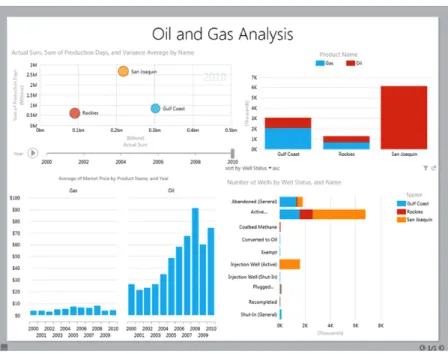
Power View is a new interactive, browser-based SQL Server 2012 Reporting Services tool that provides flexibility for self-service users to visualize and pres-ent the data they discover. Using Power View’s highly visual design interface, users can access and analyze information in a web-based authoring envi-ronment that exhibits a familiar, Microsoft Office-like look and feel. A variety of tables and charts built in to Power View let users visualize data in ways that best suit their needs. All this can be done by any user, from a business executive to information worker, where previously the skill set of a professional report developer was required.
For each visualization that you want to create in Power View, you start by cre-ating a table, either by clicking a table or field in the field list, or by dragging a field from the field list into the view. Then you convert the table to other visual-izations until you find the ones that best suit your report. Power View draws the A variety of tables and charts
built in to Power View let users visualize data in ways that best suit their needs. All this can be done by any user, from a business executive to information worker, where previously the skill set of a professional report developer was required.
BI for users at all levels
7 table in the view and adds your data automatically, displaying it in real time and formatting it with column headings (see Figure 1).6
As you select more fields, Power View adds those fields to the table in the view. You can enrich the report further by adding slicers, filters, tiles, timed anima-tions, or “small multiples”—nested subcharts that reveal hidden relationships in a larger visualization. To further analyze the data, you can add more visual-izations to the view, or you can add more views to the report, with interactive filtering enabled across all visualizations that the report contains.
With Power View, any user can easily create a report in a few seconds and transform the shape of the data with a single click. The full screen presentation mode allows users to deliver the report as a slide deck at any time without any additional preparation of the data or its format—a far cry from the days of exporting data to a series of stand-alone, unmanaged spreadsheets.
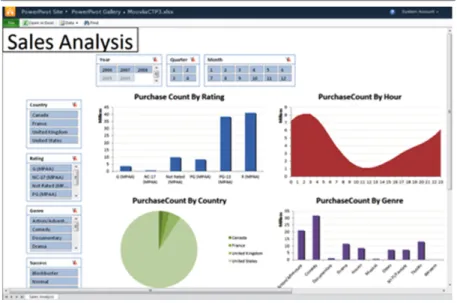
PowerPivot is a proven SQL Server technology that enables self-service users to deftly navigate and connect data sets from varying sources simultaneously, including both corporate data and external sources, and then share the reports they create with other users via SharePoint Server collaboration tools (see Figure 2). The ability to perform this type of analysis dynamically is instrumen-tal to the success of any business group, and SQL Server has historically shown leadership in providing superior tools to help users accomplish it without special training.
With the SQL Server 2012 release, PowerPivot includes new advanced analytic capabilities, including:
• Diagram View
This is a new built-in view that helps you visually organize other views and easily add or change their relationships and hierarchies.
Fig. 1. Example of a Power View data visualization in SQL Server 20127
• Perspectives
Perspectives are metadata layers that track different data slices in order to ease the management of large data sets.
• Hierarchies
Hierarchies are lists of child nodes that you create from columns and place into any order you choose to facilitate reader navigation.
• KPIs
KPIs provide evaluation data that lets you establish and track base perfor-mance measurements against target values based on the goals or SLAs of groups within your organization.
• Enhanced Data Analysis Expressions (DAX)
New statistical and information functions have been added to DAX, a business logic enhancement within SQL Server 2012 that features an Excel-like user interface.
SQL Server 2012 integrates PowerPivot with Power View to drive powerful self-service BI capabilities to users throughout any size organization with zero configuration and minimal IT oversight. Both technologies operate using SQL Server 2012’s new, tabular BI Semantic Model, which provides consistent viewing across data sources to facilitate seamless BI operations and scale to virtually any size BI solution (see Figure 3). This model also allows users to launch Power View directly from the browser without downloading software on their own computers.
9 In its design for SQL Server 2012, Microsoft ensured that the new technology would already be cloud-enabled for whenever your business was ready to use it there.
Key aspects of the SQL Server 2012 architecture make it a cloud-ready investment for IT:
• Web-based tools
The SQL Server 2012 Data Tools include a unified database development environment to help to streamline BI, data warehousing and web solution authoring of both cloud-based and on-premises applications.
• Enterprise-level security and clustering support
SQL Server 2012’s Contained Database Authentication model increases data access security, while SharePoint and Active Directory security mod-els protect access to end-user reports. Meanwhile, a new SQL Server 2012 high-availability technology called AlwaysOn provides a single toolset for maintaining SQL Server clusters and supporting failover for disaster recovery. • Granular administrative control in the cloud
Unlike many hosted solutions, SQL Server 2012 implementation can be con-figured to assign physical servers to remotely hosted SQL Server instances, affording your IT team complete administrative control at the “physical” box level, even if that box happens to be a virtual machine (VM).
• Flexible licensing models
Using cloud-optimized licensing with the ability to license just the VM, you can move your VMs from server to server, to hosters or to the cloud.
This means that at the same time you upgrade your data operations environ-ment to include all of the capabilities described in this paper, you can also radically reduce the IT footprint of those operations by choosing a hosted SQL Server 2012 provider and taking those operations into the cloud. You can grad-uate from an outmoded solution that costs more to maintain to a streamlined, cloud-based system with minimal infrastructure costs and easier scalability. SQL Server 2012 integrates
PowerPivot with Power View to drive powerful self-ser-vice BI capabilities to users throughout any size organi-zation with zero configuration and minimal IT oversight. Both technologies operate using SQL Server 2012’s new tabular BI Semantic Model, which provides consistent viewing across data sources to facil-itate seamless BI operations and scale to virtually any size BI solution.
Client Tools
Analysis, Reports, Scorecards, Dashboards, Custom Apps
Data Sources
Databases, LOB Applications, Odata Feeds, Spreadsheets, Text Files
BI Semantic Model
Data model Business logic and queries Business logic and queries
Fig. 3. SQL Server 2012 BI Semantic Model9
At the same time you upgrade your data operations environment to include all of the capabilities described in this paper, you can also radically reduce the IT footprint of those operations by choosing a hosted SQL Server 2012 provider and taking those operations into the cloud. A cloud-ready platform
Peer 1 Hosting, a trusted leader in the web hosting community and a Microsoft Gold Certified partner, offers the infrastructure, design consulting and network support you need to start tailoring and implementing your hosted SQL Server 2012 solution right away. For more information, visit the Peer 1 Hosted Microsoft SQL Server 2012 page at http://www.peer1.com/managed/ microsoft-sql-server-2012.
Big Data is here, and businesses can’t afford to fall behind. The greatest IT rewards will come to those organizations that plan ahead and embrace nimble management of massive data volumes. Both will be necessary for any business seeking a competitive advantage.
With its smart self-service BI visualization and analysis features and its Big Data-ready, cloud-ready design, SQL Server 2012 is destined to be the new standard for data management systems at companies of every size. These powerful BI features, along with SQL Server 2012’s ease of portability to the cloud, provide a timely and affordable opportunity to upgrade your data man-agement capabilities while simultaneously taking advantage of a lower-cost, off-premises solution.
To contact a sales consultant or connect now via live chat to learn more about how Peer 1 Hosting and SQL Server 2012 can enhance your business, visit www.peer1.com.
11 Further reading In addition, for further reading about SQL Server 2012 capabilities, see the
following resources: SQL server web sites
• SQL Server Website: http://www.microsoft.com/sqlserver/
• SQL Server TechCenter: http://technet.microsoft.com/en-us/sqlserver/ • SQL Server DevCenter: http://msdn.microsoft.com/en-us/sqlserver/ Other web sites
• For more information about the Microsoft BI tools, see http://www.microsoft.com/bi.
• SQL Server PowerPivot 2012 is available as a free add-in to Excel 2010. Managed self-service BI is enabled with PowerPivot for SharePoint. For more information, see http://www.microsoft.com/en-us/bi/powerpivot.aspx. • Microsoft SQL Server 2012 Reporting Services provides a complete,
server-based platform designed to support a wide variety of reporting needs. For more information, see http://www.microsoft.com/sqlserver/en/us/solu-tions-technologies/business-intelligence/reporting-services.aspx.
• Microsoft SQL Server 2012 Reporting Services Power View enables all users to easily explore data and create sophisticated reports. For more information, see http://social.technet.microsoft.com/wiki/contents/articles/3726.pow-er-viewoverview.aspx.
• The PerformancePoint Services component of Microsoft SharePoint Server 2010 is a performance management service that is used to create dashboards and scorecards. For more information, see http://technet.microsoft.com/ en-us/library/ee661741.aspx.
Case studies Great Western Bank:
http://www.microsoft.com/casestudies/Case_Study_Detail aspx?CaseStudyID=4000011340 Chevron: http://www.microsoft.com/casestudies/case_study_detail. aspx?casestudyid=4000007043 Charlotte-Mecklenburg Schools: http://www.microsoft.com/casestudies/Case_Study_Detail. aspx?CaseStudyID=4000002234 Schumacher: http://www.hitachiconsulting.com/files/pdfRepository/CS_SchumacherGroup.pdf
Endnotes 1 “Gartner Says Nearly One Third of Organizations Use or Plan to Use Cloud Offerings to
Augment Business Intelligence Capabilities” (January 2012) www.gartner.com/it/page.jsp?id=1903814
2 “What’s New in SQL Server 2012 Whitepaper” (March 2012) download.microsoft.com/
download/E/9/D/E9DBB1BB-89AE-4C70-AF02-AAFC29451A85/SQL_ Server_2012_ Whats_New_White_Paper.pdf
3 “Introducing Data Quality Services” technet.microsoft.com/en-us/library/ff877917 4 What’s New/2012 ibid.
5 “How to Choose the Right Reporting and Analysis Tools to Suit Your Style” (April 2012)
technet.microsoft.com/en-us/library/jj129615.aspx
6 “Data Visualizations in Power View” technet.microsoft.com/en-us/library/
hh213577(v=sql.110).aspx
7 What’s New/2012 ibid. 8 What’s New/2012 ibid.
9 “Gartner Says Nearly One Third of Organizations Use or Plan to Use Cloud Offerings to
Augment Business Intelligence Capabilities” (January 2012) www.gartner.com/it/page.jsp?id=1903814