Dell™ Desktop Authority™ 9.3
Release Notes
January 2016
These release notes provide information about the Dell™ Desktop Authority™ release.
About Desktop Authority 9.3 About ExpertAssist 8.6 New Features
Enhancements Resolved issues Known issues
System requirements Product licensing
Getting started with Desktop Authority 9.3 Globalization
About Dell
About Desktop Authority 9.3
Desktop Authority enables admins to proactively provision and manage the complete Windows user environment. Using Validation Logic, a patented targeting engine, Desktop Authority can tailor the
environment to the user based on over 40 criteria. Admins can map drives, manage printers, configure web browsers, Outlook profiles and much more. Customize settings based on Active Directory information, network information, or whether the user is connecting from a physical, virtual or published desktop. Desktop Authority lets admins eliminate login scripts, simplify and streamline group policies and add powerful new configuration options to traditional client management systems.
Desktop Authority 9.3 is a minor release, with enhanced features and functionality. SeeNew featuresand
Enhancements.
Desktop Authority incorporates ExpertAssist version 8.6.
About ExpertAssist 8.6
ExpertAssist is the perfect choice for anyone who has ever needed to access and control a PC or server
frombelsewhere, be it from down the hall or from halfway around the world. All that is required to control a PC orbserver is a web browser or WAP-enabled wireless device.
ExpertAssist is a remote administration tool that lets you control and administer Microsoft® Windows®-basedbcomputers over a local area network or the Internet. Originally designed for network administrators, thebExpertAssist has evolved to offer a wide variety of remote computing solutions for an equally wide variety ofusers. Today, the ExpertAssist provides many useful capabilities such as Java-based desktop remote control, file transfer protocol (FTP) for downloading and uploading of files, configuration of the host computer,
remoteto-local printing, advanced scripting, and dozens of other features.
ExpertAssist acts as the host software on the machine that is to be controlled or accessed. The client (the remote computer that is used to access the host) requires no special software. The client software is any Java enabled web browser, such as Internet Explorer (IE version 11) and others. Many Remote Control features can also be accessed and controlled using such client software as that found in handheld PDAs and WAP-enabled mobile telephones.
New Features
New features in Desktop Authority 9.3:
l Added support for Windows® 10 client l Added support for SQL Server® 2014 l Added support for Exchange 2013
See also:
l Resolved issues
Enhancements
The following is a list of enhancements implemented in Desktop Authority 9.3. Table 1: General enhancements
Enhancement Issue ID
Enhanced license tracking for terminal server connections 487 Enabled USB Port Security feature for all Standard and Pro licenses 506 Restored support for MSI Packages feature in Standard and Evaluation licenses 511 Enhanced UBM/CBM platform detection 514 Upgraded OpenSSL to most recent version (addresses POODLE and other vulnerabilities) 10847 Enable full hardware and software inventory for all standard edition customers 10897
Resolved issues
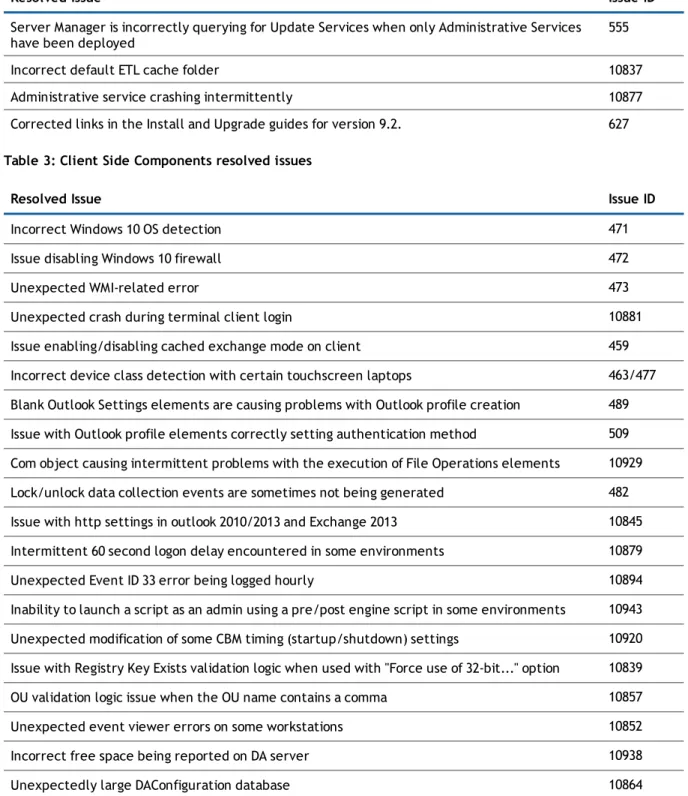
Table 2: Server Services resolved issues
Resolved Issue Issue ID
Server Manager is incorrectly querying for Update Services when only Administrative Services have been deployed
555 Incorrect default ETL cache folder 10837 Administrative service crashing intermittently 10877 Corrected links in the Install and Upgrade guides for version 9.2. 627 Table 3: Client Side Components resolved issues
Resolved Issue Issue ID
Incorrect Windows 10 OS detection 471 Issue disabling Windows 10 firewall 472 Unexpected WMI-related error 473 Unexpected crash during terminal client login 10881 Issue enabling/disabling cached exchange mode on client 459 Incorrect device class detection with certain touchscreen laptops 463/477 Blank Outlook Settings elements are causing problems with Outlook profile creation 489 Issue with Outlook profile elements correctly setting authentication method 509 Com object causing intermittent problems with the execution of File Operations elements 10929 Lock/unlock data collection events are sometimes not being generated 482 Issue with http settings in outlook 2010/2013 and Exchange 2013 10845 Intermittent 60 second logon delay encountered in some environments 10879 Unexpected Event ID 33 error being logged hourly 10894 Inability to launch a script as an admin using a pre/post engine script in some environments 10943 Unexpected modification of some CBM timing (startup/shutdown) settings 10920 Issue with Registry Key Exists validation logic when used with "Force use of 32-bit..." option 10839 OU validation logic issue when the OU name contains a comma 10857 Unexpected event viewer errors on some workstations 10852 Incorrect free space being reported on DA server 10938 Unexpectedly large DAConfiguration database 10864
Table 4: DA Console resolved issues
Resolved Issue Issue ID
Unexpected Business Logic Error encountered in the console 10867 The download link for the discontinued MSI Studio product should no longer be present 10884 Cancel button does not cancel any unsaved changes in main profile definitions tab. 10849 Error occurs when trying to change local administrator account password. 10862 Can't add validation logic rule to multiple IP printer elements 10930 Data Collection (CBM and UBM) disabled for standard eval, standard term and standard
perpetual license
10935 Business Logic Error encountered when trying to use the Frequency Validation Logic option 10958 Connect to Exchange using HTTP and Use Cached Mode checkboxes are not independent of
each other
479 Changes to a Message Box’s cycle date are not always committed to the database 10889 Table 5: Group Policy Templates resolved issues
Resolved Issue Issue ID
Group Policy Template elements are separately listing identical items from different ADM files 10878 Unexpected “Not Loaded” Group Policy Template error being encountered 10903 Unexpected errors in Group Policy Template element when pasting multiple admx files into
the template files folder
10871 Group Policy Template settings are getting lost when certain admx files are added to an
existing element
10840 Unexpected error when attempting to import certain adm/admx files into a Group Policy
Template element
10861 Some Group Policy Template elements are being corrupted after an upgrade from 8.12 10981 Table 6: ExpertAssist resolved issues
Resolved Issue Issue ID
"Shift" key doesn't work after pressing "CapsLock" key in Remote Control 10973 Outdated OpenSSL version is still being used which contains POODLE and other vulnerabilities 10848
Known issues
The following is a list of issues, including those attributed to third-party products, known to exist at the time of release.
Table 7: Group Policy Templates (User Management) known issues
Known Issue Issue ID
Incorrect values set for GPO Templates for certain policies. 10313
Table 8: Logging (User Management) known issues
Known Issue Issue ID
The Logging viewer does not show more than 10 records. 10387
Table 9: USB/Port Security (User Management) known issues
Known Issue Issue ID
Issue where MP3 Players are not accessible if the USB storage settings are set to read only. 9695 Issue where the end-user can read, write and synchronize data using iTunes on all Apple
devices when the USB/Port Security Storage is set to Deny.
9786 & 9793 Issue where the end-user can access, read, write and manipulate data on Motorola tablet
with Android OS when the USB/Port Security Storage is set to Deny.
9798 & 9803
Table 10: DA Console known issues
Known Issue Issue ID
Issue where the column width in the Desktop Authority Manager is not behaving properly when using Internet Explorer 11.
Workaround: Use Mozilla Firefox, Google Chrome (version 44 or earlier) or Internet Explorer 11.
10700
Table 11: Global Options known issues
Known Issue Issue ID
Issue with configuring the Debug Mode setting in the User Management Global Options caused the DA Manager service to periodically time out during the replication process.
Workaround: Retrying replication attempt eventually resolved the issue
Table 12: ExpertAssist known issues
Known Issue Issue ID
(For Windows 7 and Windows 2008 R2) If logging on without providing domain name on login page, the user will be logged into the remote management session as domain user only in case
the local user with the same user name and password isn’t found on the remote computer. The defect is caused by the Windows behavior described in the 1st paragraph of the Microsoft’s KB article: http://support.microsoft.com/kb/245683
1581 & 409
Connection to a target machine containing underscores “_” in the name renders an error message.
98 & 2080 (For Windows Internet Explorer 8 with Java versions 1.5.0.5 through 1.5.0.11 and 1.6.0 through
1.6.1) When starting an ExpertAssist File Transfer, the ExpertAssist browser window stops responding.
408 & 3114
(For Windows 2000) The "Ask for permission from interactive user" window appears even if there is no interactive user logged on target computer.
407 & 4320 (For ExpertAssist client computers running Microsoft Windows XP 86- or 64-bit edition) The
remote printing function doesn't work during the remote control session (Preferences-> Remote Control, enable the Remote Printing function).
406 & 4967
(For Microsoft’s Windows Vista, Windows Server 2008, Windows 7 with User Account Control enabled) The “Cannot write <PATH>. Access is denied.” message shown in File Transfer when copying files from remote computer to the root of the local hard drive, if the browser has been initially started without elevated privileges.
100 & 4983
(Applicable only for Microsoft Windows 7 and Windows Server 2008 R2 with the “change wallpaper” function enabled) The slide show mode in wallpaper is deactivated after Remote Control management.
101 & 4984
System requirements
Before installing Desktop Authority,ensure that your system meets the following minimum hardware and software requirements.
Operating system requirements
NOTE:Microsoft no longer supports Windows Server 2003, Windows XP, Exchange 2003, or Office
2003/XP. This means that while systems running these products may work with Desktop Authority, these configurations are no longer actively tested or supported by Dell. Although Microsoft no longer supports Windows 8 Dell Technical Support will make their best to offer limited support for Desktop Authority with Windows 8 until the next release. References to these products are retained in the documentation and still appear in the UI for the convenience of customers still transitioning from these products. All references will be removed in the next release of Desktop Authority. Although Desktop Authority may be able to manage desktops with these unsupported products the Management Console can no longer be installed on Windows 2003 Server.
Table 13: Operating system requirements Requirement Details
Web Console (Manager) Microsoft Windows Server 2008 Standard/Enterprise (including 64-bit) Microsoft Windows Server 2008 R2 Standard/Enterprise
Microsoft Windows Server 2012
Microsoft Windows Server 2012 R2 Standard/Enterprise
Client side components Microsoft Windows Vista Service Pack 1 (SP1) or greater (including 64-bit) Microsoft Windows 7 (including 64-bit)
Microsoft Windows 8 (including 64-bit) (limited support) Microsoft Windows 8.1 (including 64-bit)
Microsoft Windows 10 (including 64-bit)
Microsoft Windows Server 2008 Standard/Enterprise (including 64-bit) Microsoft Windows Server 2008 R2 Standard/Enterprise
Microsoft Windows Server 2012
Microsoft Windows Server 2012 R2 Standard/Enterprise
Hardware requirements
Table 14: Hardware requirements
Requirement Details
Processor Minimum 2.0 GHz dual core equivalent Memory 4 GB
Software requirements
NOTE:The following applications are required and will be installed as part of the Desktop Authority installation. Installation of these applications may require a system reboot.
Table 15: Software requirements Requirement (Server side)
Microsoft .NET Framework version 3.5 SP1 Microsoft Visual C++ 2005 Redistributable Package Microsoft SQL Server 2005 Backward Compatibility
Microsoft SQL Server 2008 R2 Express – Installed if an existing SQL Server instance is not selected. Desktop Authority will prompt to start the Computer Browser Service (if disabled)
Requirement (Server side) Microsoft Windows Installer 4.5
Installed for Microsoft Windows XP x86 SP3, Microsoft Windows XP x64 SP2, Microsoft Windows Server 2003 SP1/SP2 (x86/x64), Microsoft Windows Vista, Microsoft Windows Vista SP1, Microsoft Windows Server 2008 (x86/x64)
Microsoft Internet Information Services (IIS) 7, 7.5, 8 based on the Operating System of the server
l IIS 7 will be installed to 2008 servers l IIS 7.5 will be installed to 2008 R2 servers l IIS 8.0 will be used on 2012 servers l IIS 8.5 will be used on 2012 R2 servers
Browser requirements
Table 16: Browser requirements
Requirement Details
Minimum Internet Explorer 11, Firefox 3.6, or Chrome 44 or earlier
Recommended Internet Explorer 11, Firefox latest version, Chrome version 44 or earlier (Expert Assist requires Java plugin-enabled browsers)
ExpertAssist System requirements
Table 17: ExpertAssist Operating system requirements Requirement
Microsoft Windows Server 2012 Microsoft Windows Server 2012 R2
Microsoft Windows Server 2008 (32-bit or 64-bit) any Service Packs Microsoft Windows Server 2008 R2 any Service Packs
Microsoft Windows 8 (32-bit or 64-bit) (limited support) Microsoft Windows 8.1 (32-bit or 64-bit)
Microsoft Windows 7 (32-bit or 64-bit) Service Pack 1 or later Microsoft Windows Vista (32-bit or 64-bit) Service Pack 2 or later Table 18: ExpertAssist Web Browser system requirements
Requirement
Requirement
Mozilla Firefox latest desktop version (Java-enabled)
Google Chrome 44 or earlier (Expert Assist requires Java plugin-enabled browsers) Table 19: ExpertAssist additional system requirements
Requirement
Latest Java Runtime Environment
Upgrade and compatibility
Desktop Authority 9.3 supports upgrades from Desktop Authority 8.12 and greater.
Product licensing
NOTE:Beginning with version 9.3, Desktop Authority does not phone home for product licensing.
To activate a trial license
When required, during installation, enter your User Name and Company Name in the appropriate fields. Users evaluating Desktop Authority should leave the serial set to the default value (30-Day Evaluation).
To activate a purchased commercial license
To activate Desktop Authority during installation:
During the installation process, a dialog will appear requesting the User Name, Company Name and Serial Number. Enter the required license information Name, Company and Key or click on the Browse button to locate the supplied Register.ini file. Once the registration file is selected the User Name, Company Name and Serial number will be filled in with the information from the registration file.
To activate Desktop Authority following installation:
Once Desktop Authority licenses are purchased, you must register them with the software. Registering the licenses will remove the evaluation time period shown on the Desktop Authority client side splash screen and in the Desktop Authority Manager.
1. Click the Registration link in the lower right corner of the Desktop Authority Manager. 2. In the Registration dialog, click the Add new license link.
3. Once on the registration dialog, enter the required license information Name, Company and Key or click on theImportbutton to browse out to the supplied Register.ini file.
4. ClickRegisterwhen finished.
5. Once the registration information is saved, be sure to logout of the Manager and then back in to see the newly licensed features.
Getting started with Desktop Authority
9.3
Upgrade and installation instructions
Complete upgrade and installation instructions can be found in the Installation Guide.
Additional resources
Additional information is available from the following:
l DA Administrator Guide l DA Getting Started Guide l DA Reporting Guide l DA Data Dictionary l DA Data Diagram l EA User Guide l Support Portal
Globalization
This section contains information about installing and operating this product in non-English configurations, such as those needed by customers outside of North America. This section does not replace the materials about supported platforms and configurations found elsewhere in the product documentation.
This release supports any single-byte or multi-byte character set. In this release, all product components should be configured to use the same or compatible character encodings and should be installed to use the same locale and regional options. This release is targeted to support operations in the following regions: North America, Western Europe and Latin America, Central and Eastern Europe, Far-East Asia, Japan. It supports bidirectional writing (Arabic and Hebrew). The release supports Complex Script (Central Asia – India, Thailand). This release has the following known capabilities or limitations: There are no known limitations running the product in any of the supported markets.
About Dell
Dell listens to customers and delivers worldwide innovative technology, business solutions and services they trust and value. For more information, visitwww.software.dell.com.
Contacting Dell
For sales or other inquiries, visithttp://software.dell.com/company/contact-us.aspxor call 1-949-754-8000.
Technical support resources
Technical support is available to customers who have purchased Dell software with a valid maintenance contract and to customers who have trial versions. To access the Support Portal, go to
http://software.dell.com/support/.
The Support Portal provides self-help tools you can use to solve problems quickly and independently, 24 hours a day, 365 days a year. In addition, the portal provides direct access to product support engineers through an online Service Request system.
The site enables you to:
l Create, update, and manage Service Requests (cases) l View Knowledge Base articles
l Obtain product notifications
l Download software. For trial software, go toTrial Downloads. l View how-to videos
l Engage in community discussions l Chat with a support engineer