The Importance of Proactive Network
Management in Skype for Business
Michael F. Finneran
July
15
UC
Str
How customers should consider Nectar’s UC Management Platform components to support Skype for Business deployments
Skype for Business (formerly known as Microsoft Lync) is about productivity. The powerful combination of communication and collaboration tools it incorporates can allow users to be more efficient, more effective and more connected. All of that is predicated on the assumption that all of the network capabilities from voice and video to presence, text and collaboration will work consistently and reliably for all of your users and allow them to complete their work without glitches or hassles. No one is “productive” when they’re talking to the help desk. The nature of a Skype for Business deployment makes the job of delivering a consistent, enterprise-‐grade user experience (UX) a challenge. Unlike the legacy business telephone systems, Skype for Business is a new type of unified communications environment. Developed out of the Microsoft productivity suite, Skype for Business is truly a software-‐based
communications and collaboration platform. While Microsoft provides the software to drive it, Skype for Business depends on servers, endpoints, and network infrastructure from a number of Microsoft partners.
The ongoing quality of the UX will depend on all of those elements working together to consistently deliver the level of service users need and expect. If the Skype for Business network doesn’t deliver the reliable functionality users need to do their jobs, they will quickly abandon it and seek out other solutions that will enable them to be effective. For IT, that will mean wasted resource investment, dwindling ROI and a badly bruised reputation with users. Nectar’s UC Management Platform (UCMP) with its in-‐depth quality analysis and correlation capabilities allow IT administrators to proactively manage your Skype for Business deployment to ensure your users’ get the quality service they need every hour of every day.
Given the number of elements involved and the penalties for poor performance, one of the most important investments in a Skype for Business deployment will be monitoring tools that allow IT administrators to proactively manage service quality, recognize problem areas in real time, identify the root cause and restore the service regardless of what element is at fault. The key word is ‘speed.’ The longer it takes to identify, isolate and resolve service problems, the less trust users will place in the platform, and the greater incentive they will have to search out alternative solutions.
This paper will look at the nature of the Skype for Business platform, the challenges it brings in network maintenance and operations, and the types of capabilities IT departments should be looking for to ensure that the network meets user expectations and the organization reaps the full productivity benefits of the investment.
Figure 1. UCMP Framework for Skype for Business Deployments
The Nature of a Skype for Business Deployment
A Skype for Business deployment is the aggregation of Microsoft provided software running on an array of servers with cabling, switches, routers, gateways, WLANs, session border controllers (SBCs), and a variety of endpoints (desk sets, headsets, laptops, smartphones, tablets, video devices, etc.) which are interconnected to network services from one or more service providers. Beyond those obvious elements, a Skype for Business network is also a unique design and is comprised of a considerable amount of configuration that interconnects all of the various elements to ensure that they interoperate flawlessly to deliver the service users expect. Anyone who has been involved in networking knows the infinite variety of things that can go wrong and lead to a service problem. Servers crash, cables get cut, failures occur in network services, antennas get knocked off WLAN access points, and any number of highly complex components can be misconfigured leading to quality degradation or hard outages. The dynamic nature of network traffic can also lead to bandwidth bottlenecks that can be exacerbated by
‘configuration drift’ which can lead to incorrect quality of service (QoS) settings. Two or three of these problems might pop up simultaneously making the job of diagnosing the problem that much more complex.
The goal for the IT administrators should be to identify the problem and isolate its cause before the user calls the help desk, possibly while the user is still on the call. With real time monitoring, powerful correlation capabilities and the ability to monitor multi-‐vendor deployments, IT
administrators can see the path of a call all the way through the network and quickly associate user problems with events occurring in the network. That functionality derives from a network and platform management solution that can understand the network topology, recognize key dependencies, monitor server health, identify network problems in real time, and provide root cause analysis to get to the source.
Demonstrating ROI
Network and platform management is as much a business issue as it is a technical one. Businesses invest in UC solutions like Skype for Business for what they can contribute to the organization in the way of efficiency and productivity; all of the elements of the solution must be functioning to deliver on that promise. Typically that investment is justified by means of an ROI analysis. Business and IT managers agree on a set of key performance metrics in terms of user adoption and the value of the efficiency gains that are achieved (e.g. value of time saved, additional work units produced, value of delivering work product sooner, etc.).
Network and platform diagnostic and monitoring systems are a critical part of that investment, and a platform that automatically correlates network events with user experience in real time can speed up recovery and deliver the lowest total cost of ownership (TCO). If the UC services are not working or are not being used, no value is being generated from the investment. If users lose faith in the solution, usage will taper off, and the expected payoff will not materialize. The investment in network management is essentially the insurance that the organization will be able to achieve the objectives of its UC investment.
While much of the focus of network management is on finding and fixing problems, proactive network and platform management must look beyond that to monitor actual user adoption and identify the features and functions being used. Low adoption could signal the need for
additional training or it may be the result of users trying the solution, having an unsatisfactory experience and losing faith in the platform. The result is that they find another (and likely “less efficient”) way to do their jobs. In the end, the goal is productivity and making the organization
function better and faster in this highly competitive environment. Network and platform management, monitoring and real-‐time diagnostics is a key element in that equation.
Proactive Project Lifecycle
Network and platform management are wound through the entire lifecycle of a Skype for Business deployment. That would include:
• Pre-‐Deployment Network Assessment • Pilot Deployment
• Full Scale Rollout • Ongoing Operations
• Monitoring User/Department/Business Unit Feature Adoption
• Business Process Integration
Pre-‐Deployment Network Assessment, Pilot and Rollout
Ironically, proactive network and platform management starts even before the UC solution is implemented. The first step in any successful Skype for Business deployment is to ensure that the network and server infrastructure are capable of supporting the traffic that will be
produced. To accomplish that, organizations typically run a network stress test that injects synthetic traffic equivalent to or in excess of what the actual deployment will produce while monitoring the results. Nectar’s Perspective tool provides a form of stress testing, allowing you to confirm the capabilities of the underlying infrastructure, and validates that the quality of service markings (i.e. DSCP settings) are not being stripped off in error.
It is also critical to understand dependencies within the network-‐ You need to be able to answer the question, “If this goes down, what else will be affected?” Nectar addresses this by offering its UC Foundation module that can auto-‐discover your network inventory, determine the network topology and identify those key network dependencies. The UC Foundation module creates dependency trees that are critical in providing root cause analysis in troubleshooting network problems later on.
One of the key advantages of UC Foundation is that it can inventory equipment from a number of different vendors. Most Skype for Business deployments will be in multi-‐vendor
environments at least for some period of time, so it is important to interface with equipment from the likes of Cisco, Avaya, Sonus and Audio Codes. With its unique Vendor Knowledge
Modules, the tool can capture such things as system type, software release, trunks, sets and even card inventory. UC Foundation plays a key role during this phase and also plays a role in a
Perspective deployment.
While referred to as “pre-‐assessment”, many organizations continue to run Perspective throughout the pilot and the UC rollout. The synthetic call generation function allows
administrators to monitor the quality and stability of the network as they continue to ramp up. The tool also allows you to recognize configuration drift and problem conditions like QoS marking being stripped. Perspective can even allow you to keep increasing the synthetic traffic so you can see the volume at which call quality starts to drop off.
Ongoing Operations
Ongoing operations involves monitoring and reporting on the health of networks and servers and troubleshooting any problems that may occur. The goal is to ensure that users consistently receive an enterprise-‐grade experience on all of the Skype for Business services they choose to use.
Microsoft provides some tools for monitoring the Skype for Business software, however they realize that other network and server management systems will be needed to monitor and maintain the end-‐to-‐end environment. To that end, Microsoft certified three vendors including Nectar to participate in its IT Pro Tools program, the goal of which is to extend the reach of the
built-‐in management and monitoring capabilities in Skype for Business Server, and to help customers successfully plan, deploy and operate a Skype for Business communication environment.
Nectar’s UC Management Platform (UCMP) stands out among the IT Pro Tools partners as it is the only platform that can apply all three techniques for assessing network health while ensuring that the user’s experience is of high quality.:
1. Analytics-‐based Assessment 2. Synthetic Transactions Assessment 3. Real Time Media Analysis
Most UC analysis tools utilize post-‐call analytics-‐based assessment. This process makes use of two important pieces of data provided by Skype for Business Server: the Call Data Record (CDR) and the Quality of Experience (QoE) data. The CDR provides a detailed look at each individual call and includes nearly all the QoE metrics and statistics collected by Monitoring Server, such as:
• Call Information
• Caller/callee Device and Signal Metrics • Caller/callee Client Event
• Audio Stream (Both directions) • Video Stream (Both directions)
Quality of Experience (QoE) data is based on a post-‐call average report that is generated by each endpoint at the termination of the call. That report provides information on the overall quality of the media exchange and includes such metrics as jitter, packet loss, and round-‐trip delay, and it provides an overall assessment of the average performance throughout the call. IT administrators can set thresholds to differentiate what they consider ‘good calls’ from ‘poor calls.’ Analytics based assessment tools then sort those poor calls by call type (cellular, VPN, WLAN remote, WLAN in-‐house), internal or external, by region, by site, even by individual user and attempt to identify network elements they have in common in an attempt to identify network elements that are creating problems.
While it does analytics on past calls, Nectar’s patented UC Diagnostics (UCD) module also provides real-‐time visibility into the actual voice/video quality. This is made possible by UCD’s unique integration with the Microsoft Skype for Business Software-‐Defined Networking (SDN) API that allows real-‐time visibility into the overall quality and performance of the user
UCD monitors the network topology as well as media and session data via passive taps or span ports (port mirrors). It learns network topologies and the status of available network resources by monitoring network and IP routing protocols. The module also collects session information by listening to control traffic and by interacting with application servers and session control nodes. The UCD module automatically correlates that information and allows IT administrators to associate network events to specific user-‐reported complaints instantaneously.
Nectar’s Perspective takes those analytics a step further by
incorporating a proactive element. Perspective can generate synthetic transactions (i.e.
simulated calls) and use the results of those calls to measure
performance. IT
administrators configure the frequency of the calls and then use the QoE data from those calls to recognize problems developing in the network before users experience them and start calling the help desk.
All of these tools offer dashboards and extensive reporting capabilities that can give IT
administrators a detailed ongoing view of how the network is performing and what areas may need closer inspection.
Proactive Troubleshooting
There are two significant problems with the post-‐call analysis approach that most network monitoring systems rely on exclusively. The first is that we are looking at the past rather than the present. Effectively, the network has already failed in some way and what we are trying to do is sort through a bunch of data, hopefully identify a cause, and keep it from failing again. “Proactive” means you are dealing with the present, not the past.
The second is that the Microsoft QoE data provides a measure of the average quality the user experienced during the call. The problem there is that the call could run perfectly for a long
period of time and then fail abruptly causing the user to disconnect. When the analytics look at the long period of good performance, the “average” call quality reported to IT appears to be good, while the user had a decidedly different view.
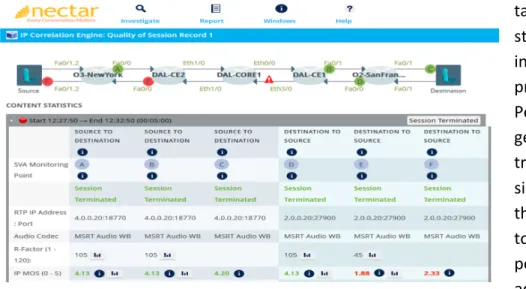
Nectar’s UC Diagnostics tool adds a number of capabilities that allow IT administrators to troubleshoot problems proactively. First off, UCD can monitor, in real time, session information, SIP signaling, router control messages and RTCP data as well as the after-‐the-‐fact QoE data. RTCP (the Real Time Control Protocol ) works in conjunction with the Real Time Transport Protocol (RTP) that is used to carry voice and video traffic. While RTP carries the media (i.e. the encoded voice or video), throughout the call each endpoint periodically sends an RTCP packet that provides information about the number of packets sent and received. Nectar’s UCD make use of that RTCP information to determine in real time such things as packet loss and delay. That information enables UCD to calculate MOS while the call is still in progress.
The other big differentiator in network monitoring solutions is where the monitoring is
performed. Analytics-‐based monitoring systems collect call performance data at the endpoints; that is the information collected and stored in the QoE database. That approach allows you capture the performance of the entire path, but if a problem does crop up, how do you bracket or isolate the source? To isolate what portion of the path is creating the problem, you need the ability to monitor the performance at multiple points along the path and note the monitoring point where the performance drops.
Figure 4. Skype for Business – Pre/Post Network Assessment
With the Nectar Platform, you can insert media analyzers at strategic points in the network and monitor the traffic as it passes through. That could be at the interface between the LAN and the WAN, or between core and distribution switches in the local network. Being able to monitor traffic at multiple points along the path allows IT administrators to quickly bracket a problem so it can be resolved.
As a certified Microsoft Depth Partner under the SDN API program for Skype for Business, Nectar’s UCD integrates directly with the Microsoft Software-‐defined Networking (SDN) API. In effect, the Skype for Business server reports the identifying parameters (signaling) of each call (e.g. endpoint addresses, bandwidth requirements, codec type, etc.) directly to the Nectar Platform allowing it to identify a specific call that is experiencing problems even though
hundreds of simultaneous calls might be running through that media analyzer. The combination of multi-‐point real time monitoring and the network dependencies allow for
real time root cause analysis of network problems even before the user finishes the call.
Presently, Nectar is the only Microsoft certified IT Pro Tools Partner that integrates with the SDN API, and is the only Partner making use of real time
media analyzers in a Skype for Business environment. And Nectar has just introduced its next level of functionality. The Experience Assurance Module (EAM), jointly developed with
SecureLogix for added call security, supports multi-‐vendor UC and integrates UC Management Platform (UCMP) with Cisco’s Applications Policy Infrastructure-‐ Enterprise Module (APIC-‐EM). The EAM will work across Skype for Business, Cisco Unified Communications Manager (CUCM) and Avaya UC platforms as well as SIP-‐based solutions and SBCs.
Cisco’s APIC-‐EM allows centralized control of all Cisco networking infrastructure. When using Skype for Business over a Cisco infrastructure, Nectar’s EAM will provide “self-‐healing” capabilities to improve users’ quality of experience. By integrating Microsoft’s SDN-‐API capabilities with Cisco’s APIC-‐EM, Nectar’s EAM can:
• Automatically configure QoS policy for both the network and the Skype for
Business end-‐points
• Detect calls with poor voice quality and take corrective action in real-‐time
• Remark verified calls by actively monitoring end-‐point registrations
• Adjust QoS policy for a specific call based on pre-‐defined call characteristics
In effect, the EAM can automatically detect problems and take corrective action without the necessity of the help desk to take any action.
Business Process Integration
The Skype for Business capabilities can have general benefits across many parts of the enterprise, however, the real payoff comes when those communication and collaboration capabilities can be integrated into business processes. That is a level of functionality that enterprises evolve to, but it depends on the adoption of these capabilities across the organization.
One of the key capabilities in ongoing proactive management of a Skype for Business deployment is the ability to measure user adoption for different media or services. So, for example, if IT administrators can see sites, departments or user groups that are using
enterprise voice but not using IM, conferencing or content sharing that insight can be used to better focus training. This capability can also bolster the ROI confirmation, as one of the big savings in a Skype for Business deployment is moving conferencing in-‐house thereby reducing the use of outside conferencing services. Every Skype for Business conference is a direct savings off the conferencing services bill.
Conclusion
Skype for Business has the potential to revolutionize how organizations communicate and collaborate, while boosting efficiency, productivity and business agility. But the key word is “potential.” All of those benefits depend on users adopting these capabilities in their day-‐to-‐day work processes. That adoption hinges on IT’s ability to effectively manage the Skype for
Business environment and consistently deliver a user experience that meets user needs and expectations.
Given the nature of the Skype for Business platform, delivering that experience will involve managing and coordinating equipment, software and network services from Microsoft and a number of its Skype for Business partners. Users have choices in the tools they use to do their jobs, and if the IT-‐provided tools don’t measure up to their expectations, they will likely seek out something else that does.
That reality reinforces the message that IT administrators must stay on top of the entire system including the network and servers and in front of any problems that will inevitably will occur.
Proactive management with tools that will allow problems to be recognized and addressed in real time will be key to accomplishing that goal. Skype for Business is a superlative platform for enterprise communications and collaboration, but ensuring the quality of the user experience it delivers will be a key responsibility for IT. Nectar is a trusted Microsoft IT Pro Tools Partner that is ready to take the call.
Nectar, a global market leader in providing the most comprehensive monitoring and diagnostics software solution for Unified Communication services enables IT and operation organizations to proactively ensure the end-‐user experience. Nectar’s flagship offering, the Unified
Communications Management Platform (UCMP) improves visibility and service delivery across integrated voice, video and data application solutions by providing unique and critical
performance information. Nectar provides monitoring and diagnostics for millions of enterprise endpoints to over 1,100 enterprises in over 86 countries—including some of the largest global banking, search engine, service provider, healthcare, and manufacturing organizations in the world. Visit www.nectarcorp.com for more information.