Technical
Information
Safety Instrumented System
ProSafe-RS
System Overview
TI 32R01B10-01E
TI 32R01B10-01E ©Copyright Jun. 2008 (YK) 7th Edition Sep. 2013 (YK) Yokogawa Electric Corporation
2-9-32, Nakacho, Musashino-shi, Tokyo, 180-8750 Japan Tel.: 81-422-52-5634 Fax.: 81-422-52-9802
i
TI 32R01B10-01E
Introduction
ProSafe-RS is a safety instrumented system conforming to IEC 61508. This manual explains the various features and functions of safety instrumented systems that ProSafe-RS provides.
Structure of This Manual
This manual provides an overview of the ProSafe-RS system. After reading this manual, see the other documents, such as General Specifications, Instruction Manuals, and so forth, for more detailed coverage of various topics.
This manual consists of 7 chapters. Chapter 1 explains Safety Instrumented System, from Chapter 2 to Chapter 7 explains respectively Features, System Configuration, Safety Control Station (SCS), Test Functions, Related Packages and HIS Operation and Monitoring of ProSafe-RS.
Reference Documents
As for the configuration of whole system, refer to the following document.
• Integrated Production Control System CENTUM VP System Overview (General Overview) (TI 33K01A10-50E)
• 2, “System Configuration” in CENTUM CS 3000 Integrated Production Control System System Overview (TI 33Q01B10-01E)
Target Readership for This Manual
This manual is mainly intended for:
• Managers who are planning to purchase a new safety instrumented system.
• Instrumentation, Power and Computer Engineers who are evaluating ProSafe-RS for purchase or who will be in charge of installation.
Representation of Drawings in This Manual
• Drawings are represented in this manual as illustrations; some features may be emphasized, and some simplified or omitted.
• The drawing illustrations are to help you understand the functions; dimensions, labels and visible features may differ slightly from those of actual drawings.
Trademarks
• ProSafe, CENTUM and Vnet/IP are registered trademarks of Yokogawa Electric Corporation.
• All other company and product names mentioned in this document are trademarks or registered trademarks of their respective companies.
• We do not use TM or ® mark to indicate those trademarks or registered trademarks in this document.
Toc-1
TI 32R01B10-01E
Safety Instrumented System
ProSafe-RS
System Overview
Sep. 30, 2013-00
CONTENTS
TI 32R01B10-01E 7th Edition
1.
Safety Instrumented System (ProSafe-RS) ... 1-1
2.
Features of ProSafe-RS ... 2-1
3.
System Configuration of ProSafe-RS ... 3-1
3.1 Hardware Configuration Devices ...3-4 3.2 Safety Communication ...3-94.
Safety Control Station (SCS) ... 4-1
4.1 Hardware Configuration of SCS ...4-1 4.2 Dual-redundant SCS and Reliability of SCS ...4-5 4.3 Operation at SCS Errors ...4-7 4.4 States and Operations of SCS ...4-8 4.5 SOER ... 4-11 4.6 Connection with Other Systems (Modbus) ...4-135.
Test Functions ... 5-1
6.
ProSafe-RS Related Packages ... 6-1
7.
HIS Operation and Monitoring Functions ...7-1
1. Safety Instrumented System (ProSafe-RS)
1-1
TI 32R01B10-01E
1.
Safety Instrumented System
(ProSafe-RS)
This chapter explains the positioning of safety instrumented system, safety lifecycle and safety evaluation.
Protection Layers of Plant and Safety Instrumented System
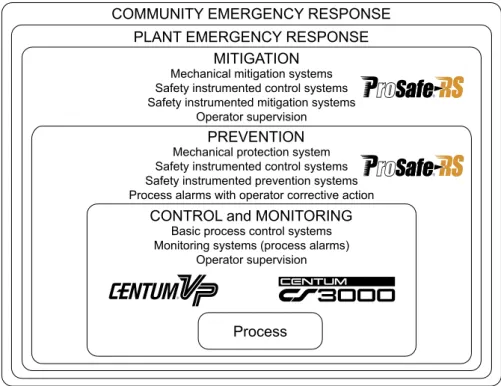
IEC 61511 utilizes the concept of protection layers in order to achieve safety, freedom from unacceptable risk. Each protection layer is required to set quantitative risk reduction goals as well as means of achieving these goals independently without interfering with other layers. According to this idea of protection layers, safety instrumented system is positioned within the mitigation and prevention layers.
COMMUNITY EMERGENCY RESPONSE
Process
PLANT EMERGENCY RESPONSE MITIGATION
F010001.ai Mechanical mitigation systems
Safety instrumented control systems Safety instrumented mitigation systems
Operator supervision PREVENTION Mechanical protection system Safety instrumented control systems Safety instrumented prevention systems Process alarms with operator corrective action
CONTROL and MONITORING Basic process control systems Monitoring systems (process alarms)
Operator supervision
Figure Protection Layers and Positioning of Safety Instrumented Systems
1. Safety Instrumented System (ProSafe-RS)
1-2
TI 32R01B10-01E
Safety Life Cycle
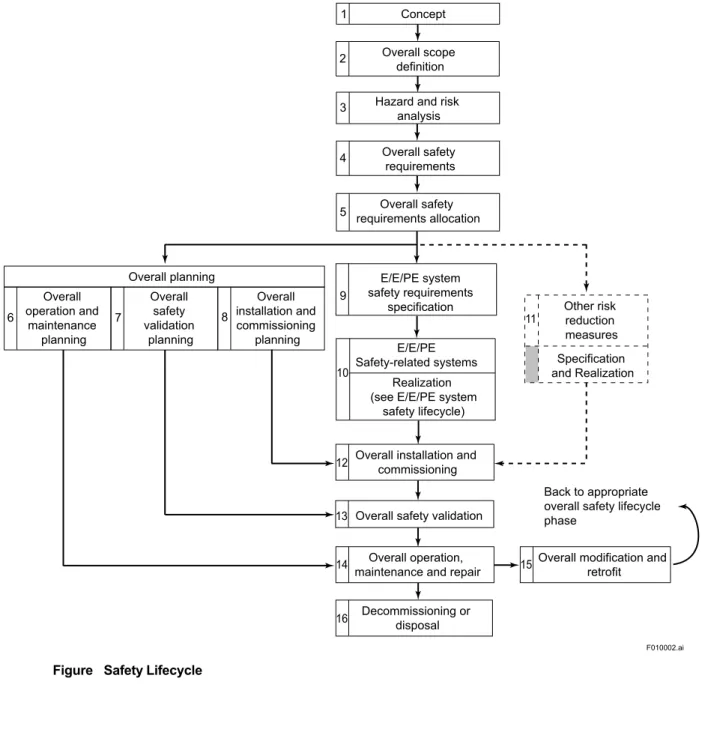
IEC 61508 specifies the management of safety-related systems in terms of lifecycles. In the safety lifecycle, the tasks involved, from the conceptual stage in which a basic safety instrumented system is designed to the decommissioning of the system, are divided into 16 phases as shown in the figure below, and the required tasks to be achieved in each phase are defined. The purpose of these definitions is to minimize the likelihood of human-induced errors. For example, “Hazard and risk analysis” shown in the third frame sets requirements to clarify the hazards and hazardous events that may occur in a plant and its control devices (e.g., DCS).
F010002.ai Concept 1 Overall planning Overall safety requirements 4
Hazard and risk analysis 3 Overall safety requirements allocation 5 Overall scope definition 2
Overall installation and commissioning 12 Decommissioning or disposal 16 Overall operation, maintenance and repair
14 Overall modification and retrofit
Back to appropriate overall safety lifecycle phase
15 Overall safety validation 13 Overall installation and commissioning planning 8 Overall safety validation planning 7 Overall operation and maintenance planning 6 E/E/PE system safety requirements specification E/E/PE Safety-related systems 9 10 Realization (see E/E/PE system
safety lifecycle) Other risk reduction measures 11 Specification and Realization
Figure Safety Lifecycle
1. Safety Instrumented System (ProSafe-RS)
1-3
TI 32R01B10-01E
Scales of Safety Evaluation
IEC 61508 introduces the concept of Safety Integrity Level (SIL) as a method for showing the safety integrity requirements. The safety integrity level is classified into four levels according to the value of Probability of Failure on Demand (PFD). PFD is the malfunction probability of a safety instrumented system due to a failure when actuation of the system is requested. The higher the SIL level, the higher the risk reduction level of the plant.
Table Safety Integrity Level (SIL)
SIL PFD
4 ≥10-5 to <10-4
3 ≥10-4 to <10-3
2 ≥10-3 to <10-2
1 ≥10-2 to <10-1
For example, specifying SIL3 as the safety integrity requirement for a safety instrumented system means requiring the safety instrumented system to ensure that the frequency of risk occurrence is reduced to less than 1/1000 under the current conditions.
2. Features of ProSafe-RS
2-1
TI 32R01B10-01E
2.
Features of ProSafe-RS
ProSafe-RS is a safety instrumented system conforming to safety rating SIL3 as defined by IEC 61508. It not only satisfies requirements to be used in safety instrumentation by itself, but also achieves higher efficiency of operations through integration with CENTUM VP or CENTUM CS 3000 R3 (hereinafter, “CENTUM VP/CS 3000”).
Implementation of Control System Technologies
ProSafe-RS employs the CENTUM VP/CS 3000 architecture in its base technologies. Because of this, the following advantages can be expected.
• Basic concepts, such as hardware installation and maintenance methods, can be shared with CENTUM VP/CS 3000.
• Since connection via Vnet/IP or V net is possible, system construction and interface design are made simpler, allowing an improvement of the total engineering efficiency, including design and installation costs.
Achievement of Safety Rating SIL3 with Single Configuration
ProSafe-RS has built-in dual-redundant system matching and self-diagnosis mechanisms embedded within one CPU module and one input/output module, thus making it conform to SIL3 as defined by IEC 61508 in a single component. This allows implementing SIL3 safety loop in a single configuration together with the CPU module and input/output module.
Achievement of High Availability by Redundancy
ProSafe-RS allows selecting dual-redundant module configurations in order to achieve high availability. Since it achieves SIL3 with a single configuration, the safety level of SIL3 can be maintained even if a CPU module or input/output module on one side fails in the dual-redundant configuration.
Security Measures
ProSafe-RS is equipped with the security functions described below.
• Security by using a password for a project database and/or SCS (Safety Control Station) • The IT security function based on Windows security feature (Revision R2.01 or later) • Security by giving the control access permission to the user in the CENTUM VP/CS 3000
integration
Integrated Monitoring with CENTUM VP/CS 3000
ProSafe-RS realizes integration with CENTUM VP/CS 3000 and provides a communication to establish access with ProSafe-RS’s SCS via Vnet/IP or V net from HIS and FCS. This function allows monitoring SCS operation using the same interface (view or window) as of monitoring FCS from HIS. FCS can read data of SCS. This can be done by the same interface (tag name) as of reading data of one FCS from other FCS.
2. Features of ProSafe-RS
2-2
TI 32R01B10-01E
Integrated Monitoring with FAST/TOOLS
By using FAST/TOOLS, ProSafe-RS safety control stations dotted in a wide area can be operated and monitored.
ProSafe-RS realizes integration with FAST/TOOLS and provides a communication interface to establish access with ProSafe-RS’s SCS via Vnet/IP-Upstream from the FAST/TOOL’s HMI. Vnet/IP-Upstream is a control network to integrate ProSafe-RS and FAST/TOOLS. When integrating ProSafe-RS and FAST/TOOLS, please be sure to physically separate Vnet/IP-Upstream network from the Vnet/IP network of ProSafe-RS and CENTUM VP/CS 3000 integrated system. The physical separation means that the two networks should not be linked either directly, through a network switch, or a router.
SEE ALSO For the functional overview, refer to ProSafe-RS Safety Instrumented System Overview (for Vnet/IP-Upstream)
(GS 32Q01B30-31E).
Connection with Other Systems
It is possible to read data of SCSs from the host computer using OPC and SOE-OPC. It is also possible to connect to other DCSs and sequencers via subsystem communication (Modbus communication method).
3. System Configuration of ProSafe-RS
3-1
TI 32R01B10-01E
3.
System Configuration of ProSafe-RS
ProSafe-RS is comprised of SENGs (safety engineering PCs) equipped with engineering and maintenance functions and controller SCSs (safety control stations) for safety. The available configurations are described below.
• The configuration in which ProSafe-RS is integrated with CENTUM VP/CS 3000
• The configuration in which ProSafe-RS is connected to systems other than CENTUM VP/CS 3000 via Modbus
System Overview
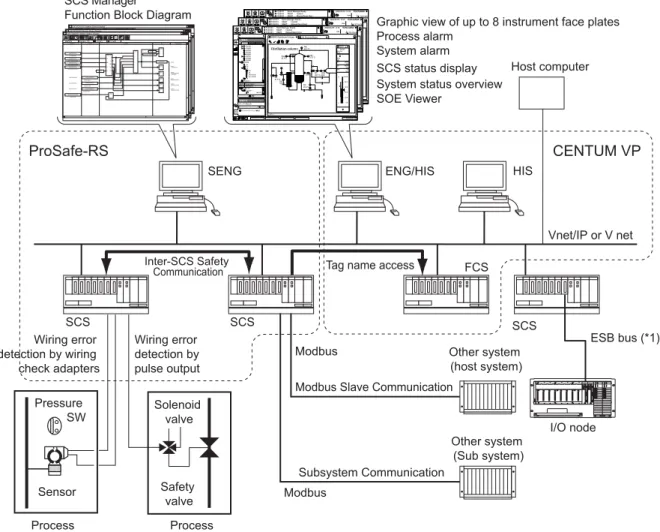
In ProSafe-RS, CPU modules and input/output modules comprising an SCS are placed in single configuration and can be applied to applications of up to IEC 61508 SIL3. If it is desired to improve the availability, modules in required areas are made dual-redundant.
By using inter-SCS safety communication, it is possible to configure SIL3 safety loops across multiple SCSs via Vnet/IP or V net.
.SF FCS0101 Station Status Display BKDCS Domain : 01 V net1 V net2
FCS IOM FCS
Inputs From Logics To Outputs xxxxxxxxxxx xxxxxxxxxxx xxxxxxxxxxx xxxxxxxxxxx xxxxxxxxxxx xxxxxxxxxxxxxxxx xxxxxxxxxxx xxxxxxxxxxx xxxxxxxxxxx xxxxxxxxxxx xxxxxxxxxxx xxxxxxxxxxx xxxxxxxxxxx xxxxxxxxx xxxxxxxxx xxxxxxx xxxxxxxxx xxxxxxxxx xxxxxxxxxxx xxxxxxxxxxx xxxxxxxx xxxxxxxx xxxxxxxx xxxx xxxx xxxx xxxx xxxx xxxx xxxx xxxx xxxx xxxx xxxx xxxx xx xx xx xx xx xx xx xx xx x x xx x x x x x xx xx xx xxxx xxxx xxxxxx xxxxxxxxxxxxxx xxxxxxxxxxxxxx xxxxxxxxxxxxxx xxxxxxxxxxxxxx .SF FCS0101 Station Status Display BKDCS Domain : 01 V net1 V net2
FCS IOM FCS
Inputs From Logics To Outputs xxxxxxxxxxx xxxxxxxxxxx xxxxxxxxxxx xxxxxxxxxxx xxxxxxxxxxx xxxxxxxxxxxxxxxx xxxxxxxxxxx xxxxxxxxxxx xxxxxxxxxxx xxxxxxxxxxx xxxxxxxxxxx xxxxxxxxxxx xxxxxxxxxxx xxxxxxxxx xxxxxxxxx xxxxxxx xxxxxxxxx xxxxxxxxx xxxxxxxxxxx xxxxxxxxxxx xxxxxxxx xxxxxxxx xxxxxxxx xxxx xxxx xxxx xxxx xxxx xxxx xxxx xxxx xxxx xxxx xxxx xxxx xx xx xx xx xx xx xx xx xx x x x x x x x x x xx xx xx xxxx xxxx xxxxxx xxxxxxxxxxxxxx xxxxxxxxxxxxxx xxxxxxxxxxxxxx xxxxxxxxxxxxxx .SF FCS0101 Station Status Display BKDCS Domain : 01 V net1 V net2
FCS IOM FCS
Inputs From Logics To Outputs xxxxxxxxxxx xxxxxxxxxxx xxxxxxxxxxx xxxxxxxxxxx xxxxxxxxxxx xxxxxxxxxxxxxxxx xxxxxxxxxxx xxxxxxxxxxx xxxxxxxxxxx xxxxxxxxxxx xxxxxxxxxxx xxxxxxxxxxx xxxxxxxxxxx xxxxxxxxx xxxxxxxxx xxxxxxx xxxxxxxxx xxxxxxxxx xxxxxxxxxxx xxxxxxxxxxx xxxxxxxx xxxxxxxx xxxxxxxx xxxx xxxx xxxx xxxx xxxx xxxx xxxx xxxx xxxx xxxx xxxx xxxx xx xx xx xx xx xx xx xx xx x xx x x x x x x xx xx xx xxxx xxxx xxxxxx xxxxxxxxxxxxxx xxxxxxxxxxxxxx xxxxxxxxxxxxxx xxxxxxxxxxxxxx Vnet/IP or V net F030001.ai SENG
System status overview SOE Viewer
SCS status display
Graphic view of up to 8 instrument face plates Process alarm System alarm SCS SCS Host computer FCS ENG/HIS HIS Other system (Sub system) Subsystem Communication Other system (host system) Modbus Slave Communication
Modbus Modbus Process Process SCS ESB bus (*1) I/O node ProSafe-RS CENTUM VP
Tag name access
Solenoid valve Safety valve Pressure SW Sensor Wiring error detection by pulse output Wiring error detection by wiring check adapters Inter-SCS Safety Communication SCS Manager
Function Block Diagram
LICA 48.9 FIC 45.7 % FIC 25.4 % LICA 38.9 ℃ RC-10 23.4 % TRC 49.2 ℃ FIC 41.4 % TDT 53.8 ℃ TDA 37.5 ℃ 51.3 ℃PAC Distillation column 100.0 0.0 20.0 40.0 60.0 80.0 Reactor flow AUT NR PV M3/H 55.3 SV M3/H 50.0 MV % 65.1 FIC200 FIC001 GR001 Distilation Column .AL Process Alarm ?
Copy
2008/03/03 14:35 TESTUSER ◆ FCS0101 Batch Manager Ready
◆ FCS0101 RIGHT Control ◆ FCS0101 RIGHT Manual Reset Start
17 0 0 NAME 名前入力 一覧表示 トレンド プラント 検索 TG0701 TG0801 GR0003 GR0004 GR0005 TG0901 GR0006 GR0007 ? ウィンドウ名入力 Call デフォルトステーション情報(I) ビュー コメント アドレス /SYSTEM/.ALProcess Alarm
お気に入り favorite-1 MYPJT1 PP SYSTEM PRODUCT .AL .OG .SO .SH .SA .SF FCS0101 .SF FCS0102 .PR 03/31/2008 19:06 レディ LICA 48.9 FIC 45.7 % FIC 25.4 % LICA 38.9 ℃ RC-10 23.4 % TRC 49.2 ℃ FIC 41.4 % TDT 53.8 ℃ TDA 37.5 ℃ 51.3 ℃PAC Distillation column 100.0 0.0 20.0 40.0 60.0 80.0 Reactor flow AUT NR PV M3/H 55.3 SV M3/H 50.0 MV % 65.1 FIC200 FIC001 GR001 Distilation Column .AL Process Alarm ?
Copy
2008/03/03 14:35 TESTUSER ◆ FCS0101 Batch Manager Ready
◆ FCS0101 RIGHT Control ◆ FCS0101 RIGHT Manual Reset Start
170 0 NAME 名前入力 一覧表示 トレンド プラント 検索 TG0701 TG0801 GR0003 GR0004 GR0005 TG0901 GR0006 GR0007 ? ウィンドウ名入力 Call デフォルトステーション情報(I) ビュー コメント アドレス /SYSTEM/.ALProcess Alarm
お気に入り favorite-1 MYPJT1 PP SYSTEM PRODUCT .AL .OG .SO .SH .SA .SF FCS0101 .SF FCS0102 .PR 03/31/2008 19:06 レディ LICA 48.9 FIC 45.7 % FIC 25.4 % LICA 38.9 ℃ RC-10 23.4 % TRC 49.2 ℃ FIC 41.4 % TDT 53.8 ℃ TDA 37.5 ℃ 51.3 ℃PAC Distillation column 100.0 0.0 20.0 40.0 60.0 80.0 Reactor flow AUT NR PV M3/H 55.3 SV M3/H 50.0 MV % 65.1 FIC200 FIC001 GR001 Distilation Column .AL Process Alarm ? Copy
2008/03/03 14:35 TESTUSER ◆ FCS0101 Batch Manager Ready
◆ FCS0101 RIGHT Control ◆ FCS0101 RIGHT Manual Reset Start
17 0 0 NAME 名前入力 一覧表示 トレンド プラント 検索 TG0701 TG0801 GR0003 GR0004 GR0005 TG0901 GR0006 GR0007 ? ウィンドウ名入力 Call デフォルトステーション情報(I) ビュー コメント アドレス /SYSTEM/.ALProcess Alarm
お気に入り favorite-1 MYPJT1 PP SYSTEM PRODUCT .AL .OG .SO .SH .SA .SF FCS0101 .SF FCS0102 .PR 03/31/2008 19:06 レディ
*1: The maximum distance of ESB bus can be extended using fiber optic cable.
Figure ProSafe-RS System Configuration (Example of CENTUM VP Integration Structure)
• In a CENTUM VP/CS 3000 integration structure, it is possible to monitor operations of both FCS and SCS with HIS.
3. System Configuration of ProSafe-RS
3-2
TI 32R01B10-01E
• SCS engineering is performed from SENG. FCS and HIS engineering are performed from ENG (engineering station for CENTUM VP/CS 3000). Engineering of CENTUM VP/CS 3000 integration function is performed from both SENG and ENG.
SENG, ENG and HIS software can be installed together in a single PC or separately in several PCs. (*1)
• Host computer that performs production control can access data of FCSs and SCSs via an OPC interface by installing the Exaopc OPC interface package of CENTUM VP or CS 3000 (for HIS).
By using the SOE OPC interface package of ProSafe-RS, it is also possible to access SOE information of SCS from a host computer.
• In a CENTUM VP/CS 3000 integration structure on V net, it is necessary to connect SENG, ENG and HIS via Ethernet during the engineering.
• In a CENTUM VP/CS 3000 integration structure, it is possible to connect only HIS to ProSafe-RS. In this case, the configuration is the same as the above system configuration without FCS.
• Using the external communication function blocks prepared in ProSafe-RS, it is possible to communicate with external devices without interfering the safety functions of an SCS. In case of a CENTUM VP/CS 3000 integration structure, it is possible to write data in an SCS from HIS and FCS.
Note that external communication function blocks are required when writing data to an SCS from external devices.
• It is possible to connect an SCS with other systems using Modbus communication functions. SCSs support subsystem communication functions that allow the SCS side to connect to other systems as a communication master, and Modbus slave communication functions that allow other systems to establish connections as Modbus communication masters. In both cases, communication modules are mounted on SCS nodes and used to connect with other systems.
Note that Modbus communication functions cannot be used in safety loops. They shall be used as interference-free applications.
*1: When ProSafe-RS R2.xx and CENTUM VP R4.02 or later software are installed in the same PC, ProSafe-RS must be R2.03 or later. In the integration of ProSafe-RS R3 and CS 3000, SENG functions and ENG functions, or SENG functions and HIS functions cannot be installed in the same PC. For more detail, please contact our sales representative or your local distributor.
3. System Configuration of ProSafe-RS
3-3
TI 32R01B10-01E
System Scale
The following conditions on system scale apply to ProSafe-RS systems.
Number of Stations
The maximum number of stations that can be connected in the entire system is as follows for both ProSafe-RS single system configuration and CENTUM VP/CS 3000 integration structures.
• Number of connectable domains: 16
• Number of connectable stations in a domain: 64 • Number of connectable stations: 256
For V net, the maximum number of HIS per domain is limited to 16. When using multiple domains, a bus converter (BCV) and CENTUM VP/CS 3000 ENG functions are required. To connect V net domain to Vnet/IP domain, V net routers (AVR) and CENTUM VP/CS 3000 ENG functions are required.
For system configuration for Vnet/IP, refer to “ProSafe-RS Safety Instrumented System Overview (for Vnet/IP)” (GS 32Q01B10-31E).
For system configuration for V net, refer to “ProSafe-RS Safety Instrumented System Overview (for V net)” (GS 32Q01B20-31E).
Number of SENGs
At least one SENG is required.
Number of SCSs
The number of SCSs needs to be within the limitation of the number of stations.
3. System Configuration of ProSafe-RS
3-4
TI 32R01B10-01E
3.1
Hardware Configuration Devices
This section explains the hardware configuring the system of ProSafe-RS.
Safety Engineering PC (SENG)
SENG is a device used for performing engineering tasks such as editing, downloading and testing applications as well as carrying out maintenance tasks on safety control stations (SCSs). General-purpose PC is used for an SENG. It is also possible to use a PC with HIS operation and monitoring functions implemented for performing the SENG functions.
Safety Control Station (SCS)
SCS is comprised of a safety control unit (CPU node) and a safety node unit (I/O node). The basic configuration of them is as follows.
• Safety control unit - CPU module
- Power supply module (dual-redundant configuration) - Input/Output module
- ESB bus coupler module (dual-redundant configuration)
- Devices related to Vnet/IP or V net communication (dual-redundant configuration) • Safety node unit
- Power supply module (dual-redundant configuration) - Input/Output module
- ESB bus interface module (dual-redundant configuration)
Implementation Requirements of Safety Control Station
The following requirements apply to the implementation of SCS hardware. See 4.1, “Hardware Configuration of SCS.”
• An SCS can connect I/O nodes to the CPU node to expand inputs and outputs.
Using SEC402 ESB bus coupler module, up to 13 I/O nodes can be connected to the CPU
node (SSC60). To connect 10 or more I/O nodes, CFS1350/CFS1330 Node Expansion
Package is required.
Using SEC401 ESB bus coupler module, up to 9 I/O nodes can be connected to the CPU
node (SSC60/SSC50/SSC10).
• When expanding inputs and outputs, it is necessary to duplicate ESB bus coupler modules and mount them.
• In addition to the requirements above, implementation requirements due to power supply capacity and operation ambient temperature conditions (60 to 70 °C) apply to the implementation of input/output modules.
• Up to four communication modules (two pairs in case of dual-redundant configuration) can be mounted per SCS as communication master modules (ALR111 and ALR121) and up to two modules as Modbus slave communication modules (ALR111, ALR121, and ALE111). Note that it is not allowed to perform both subsystem communication and Modbus slave communication in the same communication module.
3. System Configuration of ProSafe-RS
3-5
TI 32R01B10-01E
Input/Output Modules
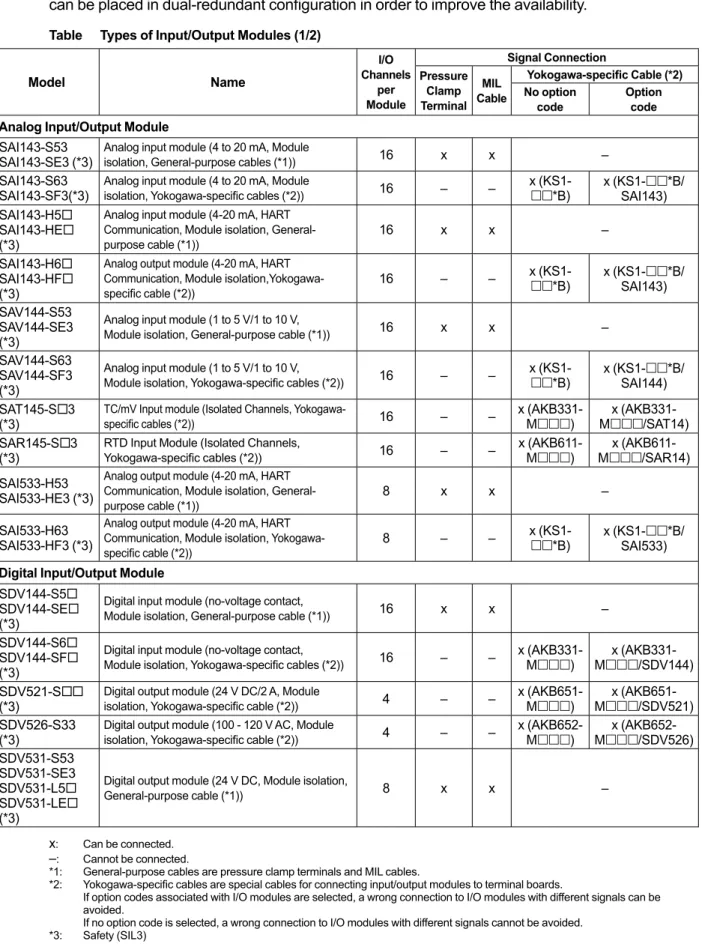
ProSafe-RS provides the input/output modules shown in the table below. Input/output modules can be placed in dual-redundant configuration in order to improve the availability.
Table Types of Input/Output Modules (1/2)
Model Name I/O Channels per Module Signal Connection Pressure Clamp Terminal MIL Cable Yokogawa-specific Cable (*2) No option
code Option code
Analog Input/Output Module SAI143-S53
SAI143-SE3 (*3) Analog input module (4 to 20 mA, Module isolation, General-purpose cables (*1)) 16 x x –
SAI143-S63
SAI143-SF3(*3) Analog input module (4 to 20 mA, Module isolation, Yokogawa-specific cables (*2)) 16 – – x (KS1-*B) x (KS1-SAI143)*B/ SAI143-H5
SAI143-HE (*3)
Analog input module (4-20 mA, HART Communication, Module isolation,
General-purpose cable (*1)) 16 x x –
SAI143-H6 SAI143-HF (*3)
Analog output module (4-20 mA, HART Communication, Module
isolation,Yokogawa-specific cable (*2)) 16 – – x (KS1-*B) x (KS1-SAI143)*B/ SAV144-S53 SAV144-SE3 (*3)
Analog input module (1 to 5 V/1 to 10 V,
Module isolation, General-purpose cable (*1)) 16 x x –
SAV144-S63 SAV144-SF3 (*3)
Analog input module (1 to 5 V/1 to 10 V,
Module isolation, Yokogawa-specific cables (*2)) 16 – – x (KS1-*B) x (KS1-SAI144)*B/ SAT145-S3
(*3) TC/mV Input module (Isolated Channels, Yokogawa-specific cables (*2)) 16 – – x (AKB331-M) Mx (AKB331-/SAT14) SAR145-S3
(*3) RTD Input Module (Isolated Channels, Yokogawa-specific cables (*2)) 16 – – x (AKB611-M) Mx (AKB611-/SAR14) SAI533-H53
SAI533-HE3 (*3)
Analog output module (4-20 mA, HART Communication, Module isolation,
General-purpose cable (*1)) 8 x x –
SAI533-H63 SAI533-HF3 (*3)
Analog output module (4-20 mA, HART Communication, Module isolation,
Yokogawa-specific cable (*2)) 8 – –
x
(KS1-*B) x (KS1-SAI533)*B/ Digital Input/Output Module
SDV144-S5 SDV144-SE (*3)
Digital input module (no-voltage contact,
Module isolation, General-purpose cable (*1)) 16 x x –
SDV144-S6 SDV144-SF (*3)
Digital input module (no-voltage contact,
Module isolation, Yokogawa-specific cables (*2)) 16 – – x (AKB331-M) Mx (AKB331-/SDV144)
SDV521-S
(*3) Digital output module (24 V DC/2 A, Module isolation, Yokogawa-specific cable (*2)) 4 – – x (AKB651-M) Mx (AKB651-/SDV521) SDV526-S33
(*3) Digital output module (100 - 120 V AC, Module isolation, Yokogawa-specific cable (*2)) 4 – – x (AKB652-M) Mx (AKB652-/SDV526)
SDV531-S53 SDV531-SE3 SDV531-L5 SDV531-LE (*3)
Digital output module (24 V DC, Module isolation,
General-purpose cable (*1)) 8 x x –
Apr. 1, 2013-00 x: Can be connected.
–: Cannot be connected.
*1: General-purpose cables are pressure clamp terminals and MIL cables.
*2: Yokogawa-specific cables are special cables for connecting input/output modules to terminal boards.
If option codes associated with I/O modules are selected, a wrong connection to I/O modules with different signals can be avoided.
If no option code is selected, a wrong connection to I/O modules with different signals cannot be avoided. *3: Safety (SIL3)
3. System Configuration of ProSafe-RS
3-6
TI 32R01B10-01E Model Name I/O Channels per Module Signal Connection Pressure Clamp Terminal MIL Cable Yokogawa-specific Cable (*2) No optioncode Option code
Digital Input/Output Module SDV531-S63
SDV531-SF3 (*3)
Digital output module (24 V DC, Module isolation,
Yokogawa-specific cables(*2)) 8 – – x (AKB331-M) – SDV531-L6
SDV531-LF (*3)
Digital output module (24 V DC, Module isolation,
Yokogawa-specific cable (*2)) 8 – – x (AKB331-M) (AKB651-M) x (AKB331-M/SDV53L) (AKB651-M/DV53L) SDV53A-S3
(*3) Digital output module (48 V DC, Module isolation, Yokogawa-specific cable (*2)) 8 – –
x (AKB331-M) (AKB651-M) x (AKB331-M/SDV53A) (AKB651-M/DV53A) SDV541-S5 SDV541-SE (*3)
Digital output module (24 V DC, Module
isolation, General-purpose cables (*1)) 16 x x –
SDV541-S6 SDV541-SF (*3)
Digital output module (24 V DC, Module
isolation, Yokogawa-specific cables (*2)) 16 – –
x (AKB331-M) (AKB651-M) x (AKB331-M/SDV541) (AKB651-M/DV541) Communications Module
ALR111 (*4) Serial communication module (RS-232C, 2-port) portsTwo – – x (D-Sub 9-pin connector) (*5) ALR121 (*4) Serial communication module (RS-422/ RS-485, 2-port) portsTwo – – x (M4-terminal block, 10 poles) (*5)
ALE111 (*4) Ethernet communication module One port – – x (RJ-45) (*6)
x: Can be connected. –: Cannot be connected. *1: General-purpose cables are pressure clamp terminals and MIL cables.
*2: Yokogawa-specific cables are special cables for connecting input/output modules to terminal boards.
If option codes associated with I/O modules are selected, a wrong connection to I/O modules with different signals can be avoided.
If no option code is selected, a wrong connection to I/O modules with different signals cannot be avoided. *3: Safety (SIL3)
*4: Interference-free (not safety)
*5: A Yokogawa-specific cable can be connected directly without using terminal block. *6: ALE111 can be mounted on SSC60 or SSC50 in R3.02.00 or later.
Products Related to Input/Output Modules
Pressure Clamp Terminal Blocks
Pressure clamp terminal blocks are used when wiring input/output modules to field devices directly. They come in two types: for single and dual-redundant configurations.
• For single configuration
STA4S: Pressure clamp terminal block for analog signals (16-channel with ISA Standards G3)
STB4S: Pressure clamp terminal block for digital signals (16 or 8-channel with ISA Standards G3)
• For dual-redundant configuration
STA4D: Pressure clamp terminal block for analog signals, dual-redundant use (16-channel with ISA Standards G3)
STB4D: Pressure clamp terminal block for digital signals, dual-redundant use (16 or 8-channel with ISA Standards G3)
Apr. 1, 2013-00
3. System Configuration of ProSafe-RS
3-7
TI 32R01B10-01E
Dedicated Cable
The following types of dedicated cable are available. • Signal Cable (40-40 pin) (KS1)
Used to connect SAI143, SAV144 and SAI533 to SEA4D and SBA4D. • Signal Cable (50-50 pin) (AKB331)
Used to connect SAT145 to SBT4D.
Used to connect SDV144 to SED4D, SBD4D, SRM53D and SRM54D. Used to connect SDV531 to SED4D, SBD3D and SRM53D.
Used to connect SDV53A to SED3D and SBD3D.
Used to connect SDV541 to SED4D, SBD4D, SRM53D, SRM54D and SBM54D. • Signal Cable (AKB651)
Used to connect SDV521 to SED2D and SBD2D. Used to connect SDV531-L to SBD3D.
Used to connect SDV541 to SBD4D. Used to connect SDV53A to SBD3D. • Signal Cable (AKB652)
Used to connect SDV526 to SWD2D. • Signal Cable (AKB611)
Used to connect SAR145 to SBR4D.
Terminal Boards
There are the following five types of terminal boards are available. They support both single and redundant configurations.
• SEA4D: Analog terminal board for single/dual-redundant configuration (16-channel x 2)
SEA4D is connected with SAI143, SAV144 or SAI533 by using KS1 cable.
• SED2D: Digital terminal board for single/dual-redundant configuration (4-channel x 4)
SED2D is connected with SDV521 by using AKB651 cable.
• SED3D: Digital terminal board for single/dual-redundant configuration (8-channel x 4)
SED3D is connected with SDV53A by using AKB331 cable.
• SED4D: Digital terminal board for single/dual-redundant configuration (16-channel x 2)
SED4D is connected with SDV144, SDV531 or SDV541 by using AKB331 cable.
• SWD2D: Digital terminal board for single/dual-redundant configuration (4-channel x 4)
SWD2D is connected with SDV526 by using AKB652 cable.
• SBA4D: Terminal board for analog input/output: DIN rail mount type
(Single and Dual-redundant, 16-channel x 1)
SBA4D is connected with SAI143, SAV144 or SAI533 by using KS1 cable.
• SBT4D: Terminal board for TC/mV: DIN rail mount type
(Single and Dual-redundant, 16-channel x 1)
SBT4D is connected with SAT145 by using AKB331 cable.
• SBR4D: Terminal board for RTD input: DIN rail mount type
(Single and Dual-redundant, 16-channel x 1)
SBR4D is connected with SAR145 by using AKB611 cable.
• SBD2D: Terminal board for digital output: DIN rail mount type
(Single and Dual-redundant, 4-channel x 1)
SBD2D is connected with SDV521 by using AKB651 cable.
• SBD3D: Terminal board for digital output: DIN rail mount type
(Single and Dual-redundant, 8-channel x 1)
SBD3D is connected with SDV531 or SDV53A by using AKB331 or AKB651
cable.
3. System Configuration of ProSafe-RS
3-8
TI 32R01B10-01E
• SBD4D: Terminal board for digital input/output: DIN rail mount type
(Single and Dual-redundant, 16-channel x 1)
SBD4D is connected with SDV144 or SDV541 by using AKB331 cable.
SBD4D is connected with SDV541 by using AKB651 cable.
Relay Boards
Relay boards for dry contact outputs that are equipped with safety relays are provided. They support both single and redundant configurations.
They allow reading back outputs by connecting with digital input modules for SRM53D and SRM54D.
• SRM53D: 8x2 dry contact output (safety relay built-in, M4 terminals) • SRM54D: 16x1 dry contact output (safety relay built-in, M4 terminals) • SBM54D: Relay board for Digital output: DIN rail mount type
(Single and Dual-redundant, 16-channel x 1, for SDV541)
Wiring check Adapters
Wiring check adapters are used to detect disconnection and short-circuit failures in field wiring between digital input modules and field devices.
The following two types of wiring check adapters are available. • SCB100: For detecting disconnection failures
By mounting this adapter in parallel with a sensor switch, it is possible to detect disconnection failures that occur while inputting OFF signals.
• SCB110: For detecting short-circuit failures
By mounting this adapter in series with a sensor switch, it is possible to detect failures due to short-circuit with a power supply line that occur while inputting ON signals and failures due to short-circuit with other channels.
The figure below shows the shapes of SCB100 and SCB110.
F030101E.ai
Figure Shapes of SCB100 and SCB110
3. System Configuration of ProSafe-RS
3-9
TI 32R01B10-01E
3.2
Safety Communication
ProSafe-RS allows constructing systems in which both safety communication and CENTUM VP/CS 3000 control communication can be performed on V net or Vnet/IP. This section explains overview of inter-SCS safety communication and SCS link transmission.
Inter-SCS Safety Communication
An SCS can perform inter-SCS safety communication with other SCSs in the same domain or different domains. This allows creating safety loop across two SCSs.
The inter-SCS safety communication function is achieved by dedicated function blocks. It is necessary to use these function blocks to perform inter-SCS safety communication.
Mechanism of Inter-SCS Safety Communication
Function blocks on the sending side (producing side) add data to be written as well as data for guaranteeing the communication quality, which is then sent to the communicating SCS via Vnet/IP or V net. The communication is not limited to communication routes between SCSs in the same domain; routes between SCSs in different domains can also be used. Function blocks on the receiving side (consuming side) perform various inspections for checking the validity of received data and output only data whose quality can be guaranteed. If data received from the network is judged incorrect as a result of these inspections, the function blocks on the receiving side output the pre-determined fail-safe values.
SCS Link Transmission (*1)
SCS link transmission function makes it possible to bilaterally transmit and receive data in stations in the same domain by broadcasting.
Communication between two SCS is called SCS Link Transmission Safety Communication, and communication between SCS and FCS is called SCS Global Switch Communication.
*1: Supported by ProSafe-RS R1.03.00 or later.
SCS Link Transmission Safety Communication
BOOL-type data can be safely communicated from one SCS to many other SCS by using dedicated I/O function block.
SCS Global Switch Communication
Interference-free communication can be done between SCS and FCS by using dedicated function block.
4. Safety Control Station (SCS)
4-1
TI 32R01B10-01E
4.
Safety Control Station (SCS)
This chapter explains the hardware and software of a safety control station (SCS).
4.1
Hardware Configuration of SCS
SCS is configured with one safety control unit (CPU node) and safety node units (I/O node).
Safety node units are connected by ESB buses.
If Optical ESB Bus Repeater Module is mounted on CPU node, I/O node or Unit for Optical Bus Repeater Module, the maximum distance of ESB bus can be extended using fiber-optic cable.
SEE ALSO For the connecting method of Optical Bus Repeater Module, refer to ProSafe-RS Installation Guidance
(TI 32S01J10-01E) F040101E.ai M S P M S P 11 4T N S 11 4T N S M S P M S P 11 5T N S 11 5T N S M S P M S P M OI M OI M OI M OI M OI M OI M OI M OI 10 4 B S S 10 4 B S S M S P M S P M OI 10 4 B S S 10 4 B S S 10 4 C E S 10 4 C E S M OI M OI M OI M OI M OI M OI M S P M S P U P C U P C Vnet/IP ESB bus SSC60D SNB10D SNT10D SNT10D SNB10D ESB bus ESB bus Fiber-optic cable M OI M OI M OI M OI M OI M OI M OI I/O nodes (SNB10D)
Can be expanded up to 13 nodes (*1) per controller using SEC402 or up to 9 nodes per controller using SEC401
• PSM (always duplicated) • SSB401 (always duplicated) • IOM (up to 8 can be mounted) CPU node
1 CPU node per controller • PSM (always duplicated) • CPU (single or duplicated)
• SEC402/SEC401 (always duplicated; used when connecting I/O nodes) • IOM (up to 6 or 8 can be mounted)
PSM: Power supply module
SSC60D: Safety Control Unit
CPU: Processor module
SEC401: ESB bus coupler module SNB10D: Safety Node Unit
IOM: Input/output module
SSB401: ESB bus interface module SNT10D: Unit for Optical Bus Repeater
Module
SNT411: Optical ESB Bus Repeater Master Module
SNT511: Optical ESB Bus Repeater *1: To connect 10 or more I/O nodes, CFS1350/CFS1330 Node Expansion Package is required.
Slave Module
Unit for Optical Bus Repeater Module (SNT10D) Not counted as an I/O node
Up to 10 SNT411, SNT511, SNT401 or SNT501 can be mounted
• PSM (always duplicated)
• SNT411/SNT401 (always duplicated) • SNT511/SNT501 (always duplicated)
Figure Example of SSC60D, SNB10D and SNT10D Hardware Configuration
4. Safety Control Station (SCS)
4-2
TI 32R01B10-01E
Configuration of Safety Control Units (SSC60S, SSC60D, SSC50S,
SSC50D, SSC10S, SSC10D)
Safety control units come in two types: standard type (ambient temperature for SSC60S/ SSC60D/SSC50S/SSC50D: -20 to 40°C, ambient temperature for SSC10S/SSC10D: -20 to 50°C) and wide range temperature type (ambient temperature: -20 to 70°C).
The figure below shows a standard type safety control unit in dual-redundant configuration. In the case of single configuration, processor module is mounted in a slot on the left side and dummy cover is mounted on the right side. Power supply modules are always used in dual-redundant configuration. When connecting a safety node unit, ESB bus coupler modules are used in dual-redundant configuration.
Processor
module Power supply module
Utility unit Base unit
External interface unit Grounding
terminal
Cable tray
Slots for input/output modules Slots for input/output modules or ESB bus coupler modules
F040114E.ai Note: The same figure can be applied to SSC50D Safety Control Unit for Vnet/IP (Standard type). Figure Configuration of SSC60D Safety Control Unit for Vnet/IP (standard type)
Base unit F040102E.ai Processor module GPS interface unit (optional)
V net coupler unit
Power supply module Slots for input/output modules
or ESB bus coupler modules
Utility unit External interface unit
45 6 1 2 3 RX+ RX- SG Grounding terminal Cable tray
Slots for input/output modules
Figure Configuration of SSC10D Safety Control Unit (standard type)
4. Safety Control Station (SCS)
4-3
TI 32R01B10-01E
Wide range temperature type safety control units are configured in the same way as the standard type units, but are equipped with an additional node fan unit in order to support a wider range of ambient temperatures (-20 to 70°C).
The figure below shows a utility unit and node fan unit that comprise a wide range temperature type safety control unit. The base unit is omitted in the figure.
F040105E.ai
Power supply unit for fan unit Power supply Fan unit
input terminal
Node fan unit Utility unit
External interface unit
Figure Configuration of Utility Unit and Node Fan Unit for SSC60/SSC50 Safety Control Unit for Vnet/IP (wide range temperature type)
F040104E.ai 4 5 6
1 2 3 RX+ RX- SG
Node fan unit Utility unit
Fan unit Power supply
input terminal Power supply unit for fan unit
GPS interface unit (optional)
V net coupler unit External interface unit
Figure Configuration of Utility Unit and Node Fan Unit for SSC10 Safety Control Unit for V net (wide range temperature type)
4. Safety Control Station (SCS)
4-4
TI 32R01B10-01E
Configuration of Safety Node Units (SNB10D)
The figure below shows a safety node unit.
Power supply modules and ESB bus interface modules are always used in dual-redundant configuration.
F040106E.ai
Grounding terminal
Power supply modules ESB bus interface modules
Slots for input/output modules
Cable tray
Figure Configuration of Safety Node Unit
Unit for Optical Bus Repeater Module (Rack Mountable Type) (SNT10D)
The figure below shows a Unit for Optical Bus Repeater Module (Rack Mountable Type). Power supply modules are always used in dual-redundant configuration.
IO1 IO2 IO3 IO4 IO5 IO6 IO7 IO8 B1 B2
F040107E.ai
Grounding terminal
Power supply modules Slots for optical ESB bus repeater modules
Cable tray
Figure Configuration of Unit for Optical Bus Repeater Module (Rack Mountable Type)
4. Safety Control Station (SCS)
4-5
TI 32R01B10-01E
4.2
Dual-redundant SCS and Reliability of SCS
Dual-redundant SCSs are provided. A dual-redundant SCS contains a full set of duplicate components such as processor modules, V net couplers (*1) and power supply modules. When connecting additional safety node units, ESB bus coupler modules need to be mounted. ESB bus coupler modules are always used in dual-redundant configuration. The dual-redundant processor modules (one active, the other standby) can switch from active to standby module without any interruption to control when active module breaking down.
*1: Only SSC10S and SSC10D have V net couplers.
Vnet/IP or V net
ESB bus
<Left processor module>
CPU2 CPU1
<Right processor module>
F040201E.ai Main memory (with ECC) Main memory (with ECC) CPU2 CPU1 Main memory (with ECC) Main memory (with ECC) Non-volatile memory for storing application programs Non-volatile memory for storing application programs Vnet/IP or V net Interface SEN Bus Interface Vnet/IP or V net Interface SEN Bus Interface
ESB Bus Interface ESB Bus Interface
Comparator 1 Comparator 2 Comparator 1 Comparator 2
Figure Configuration of Dual-redundant Processor Modules (SCS)
SEE ALSO For the information about SCS hardware configuration, refer to 4.1, “Hardware Configuration of SCS.”
4. Safety Control Station (SCS)
4-6
TI 32R01B10-01E
How an SCS is made dual-redundant is explained below.
CPU
• Each processor module has two CPUs and two main memories. Each CPU module (CPU1 and CPU2) performs the same operation and the operation results are compared by two comparators for each operation cycle. If the operation results of both CPUs match, the operation is regarded as normal and the data is sent to the main memory and bus interface modules. If either one of the comparators detect inconsistency, it is considered an “operation error” and the control right is passed to the processor module on the standby side.
The main memory modules are equipped with ECC (Error Correcting Code); these codes are used to correct temporary bit-reverse errors that occur in the main memories. The main memory modules with ECC are dual-redundant as well, and if their values are different, a matching error occurs and the control right is passed to the processor module on the standby side.
• Each processor module is equipped with a WDT (Watch Dog Timer) and monitors that the safety functions are operating normally. If it detects that the safety functions are not working normally, the control right is transferred to the standby side as well.
• The processor module on the standby side synchronizes with the processor module on the control side to ensure that the same operations are performed. The control right can thus be switched without interrupting the operation. When the processor module obtains the control right, it immediately starts sending operation data to the bus interface modules.
• A processor module conducts self-diagnosis if an operation error occurs. If there is no abnormality in CPU hardware as a result of diagnosis, it regards the error as a temporary operation error and recovers from the abnormal status to the standby status.
• A processor module is equipped with communication interfaces that can support dual-redundancy on CPUs. Vnet/IP or V net interfaces are connected to dual-redundant control buses.
ESB Bus
Each processor module has dual-redundant ESB-bus interface. Normally, the ESB-bus interface on the active processor module is used as active side, and the other ESB-bus on the standby processor module is waiting as standby side. In case ESB bus error happens on active processor module, the standby processor module will be active.
The active ESB-bus interface communicates with safety node units as ESB bus master. Normally, the dual-redundant ESB buses are used alternately, however, in case ESB bus error happens to one of them, only the other bus will be used for communication. The recovery of ESB bus error is periodically tested. In case some error happens to all extended safety nodes, it is recognized as ESB bus error.
4. Safety Control Station (SCS)
4-7
TI 32R01B10-01E
4.3
Operation at SCS Errors
There are three error levels for SCSs: fatal errors, major errors and minor errors. SCSs are able to recover from errors by conducting recovery tasks corresponding to each error level.
Operations at Fatal Error Occurrence
At this error level, hardware and software are unable to function. CPU (both sides for redundancy) stops and output values of all output modules are set to fail-safe values.
Operations at Major Error Occurrence
At this error level, some hardware is unable to function. Operations to be performed at abnormality, which are defined by users in advance, are performed for the failed areas. It is necessary to define such operations at occurrence of major errors individually for a given application.
Operations at Minor Error Occurrence
At this error level, there is no impact on the application logic execution functions themselves. Such situations include when one side of dual-redundant hardware modules fails.
If one hardware side in a dual-redundant configuration fails, the control right is switched to the standby side to continue processing. Such errors are treated as minor errors. The hardware continues to operate in the same way as if it were placed in a single configuration.
4. Safety Control Station (SCS)
4-8
TI 32R01B10-01E
4.4
States and Operations of SCS
Depending on the operating mode and security level, SCS can be in one of several states. Operations of SCS include forcing, override, output enable operation and download.
The figure below shows a rough overview of the relations among these states and operations.
SENG HIS
Security level
1 : (Level 1: For maintenance) 2 : (Level 2: For safety operation) 0 : (Level 0: For engineering)
SCS (Operating mode: Waiting mode) Offline download 1 2 0 Application logic execution functions Application logic Process data input/output function Inter-SCS safety communication function SCS link transmission function Communication data input/output function Diagnostic function Forcing
Online-change download Override Output enable operation
If all output channels of safety output modules are “Output Enabled,” the operating mode shifts from the waiting mode to running mode regardless of the security level.
F040401E.ai
SCS (Operating mode:Running Mode)
Figure States and Operations of SCS
4. Safety Control Station (SCS)
4-9
TI 32R01B10-01E
Operating Modes
Operating modes indicate the different running states of an SCS. The operations carried out by the system program of an SCS are determined by the operating mode.
There are five operating modes of an SCS: stop mode, loading mode, initial mode, waiting mode and running mode.
F040302E.ai Loading
Mode
Stop
Mode ModeInitial
The SCS starts upon a start request.
SCS power ON SCS stopped
Finish of Off-line Download notified from SCS Manager The request of
Off-line Download start from SCS Manager
Can be transferred from all other modes
All output channels of safety output modules are
“Output Enabled”. At least one output channel of a safety output module is “Output Disabled”. The application-logic execution
function starts upon completion of diagnosis.
Waiting
Mode RunningMode
Figure Transition of Operating Mode
Security Levels
An SCS is equipped with a function to protect internal data from being overwritten by external devices. It always monitors attempts to write data from outside and judges whether user operations should be enabled or disabled according to the security level of the SCS. One SCS has one security level. The security level indicates to what degree the SCS memory is protected from data writing attempts from outside.
There are two levels for the security level: a level (online level) used during constant operation of an SCS and a level (offline level) used when the SCS is not operating.
Security level is protected by password and can be changed when an authorized user enters a password.
The status of the security level changes as shown below.
F040303E.ai Online Levels
SYS_SEC_CTL check (*1)
SCS restart, offline download, master database offline download
Password check for level 1 and SYS_SEC_CTL check
Password check for level 0 and SYS_SEC_CTL check
Password check for level 0 and SYS_SEC_CTL check
Offline Level
Level 2 Level 1 Level 0
*1: Using SYS_SEC_CTL (Security Level Protection) block, it can be decided whether security level is changeable or not by discrete input of a foreign key switch. Regardless of the security level change permission status set by SYS_SEC_CTL, it is always possible to shift from security level 1 to security level 2 by entering an RST input in a SYS_SECURE (Security Level Management) block.
Figure Transition of Security Level
4. Safety Control Station (SCS)
4-10
TI 32R01B10-01E
Forcing and Override
Overview of Forcing Function
The forcing function provides a user interface for fixing channel inputs and outputs of input/output modules and variables in application logic to constant values (variable lock), forcibly changing variable values (variable value setting) and so forth for the purpose of SCS maintenance and debugging I/O loop check applications. This function is used by an SENG to forcibly fix input/ output variables and internal variables of an SCS and allows fixing all input/output values of each input/output module at the same time as well.
Additionally, it is possible to use SYS_FORCE (Forcing State Management) blocks to monitor the lock status within the application logic and forcibly cancel locking. The forcing function can also be used when performing maintenance tasks.
Overview of Override
Override is a function used to temporarily overwrite values of variables of application logic in an SCS from an HIS in case of CENTUM VP/CS 3000 integration structure. When performing system maintenance and similar, it is used for performing tasks in states where variable values of application logic are temporarily changed. Override can be performed at all security levels.
Differences between Forcing and Override
The table below shows differences between forcing and override.
Table Differences between Forcing and Override
Item Forcing Override
Purpose Maintenance of SCS and debugging applications from SENG Maintenance of SCS from HIS in CENTUM VP/CS 3000 integration structure SCS security
level Can be performed at level 1 or 0 Can be performed at level 2 as well Necessity of
programming No need for programming
Necessary to use override function block (hereinafter referred to as override FB) to create application logic
Specification of
output value Possible to specify values to be output using the I/O Lock window and so forth
If override is performed while executing an application, pre-programmed values are output as override values.
Requirement for setting variable values
Whether or not forcing can be
performed depends on the security level of SCS
Possible to create application logic that allows switching override permission with a mechanical key switch, etc.
Grouping
Override (*1) –
More than one override FB are managed as a logical group and only one override FB in the group can be overridden.
*1: Supported by ProSafe-RS R1.03.00 or later.
4. Safety Control Station (SCS)
4-11
TI 32R01B10-01E
4.5
SOER
SOER (Sequence of Events Recorder) is a function for acquiring and saving analog inputs, discrete inputs, discrete outputs and variables of application logic as event information. This event information can be viewed using SOE Viewer.
A time synchronization function is provided in order to maintain the accuracy of the time at which an event occurs.
Event Acquisition
It is possible to acquire not only discrete inputs (DI) but also changes of discrete outputs (DO) and analog input values as event information. By creating function blocks for SOER, changes in application logic can be acquired as event information as well. This also allows registering changes in communication data with other SCSs.
Saving Events
Event information is saved in an SCS, which eliminates the need to prepare a PC for storing events or keeping the power supply to an SENG turned on at all times.
Event information before and after trip signals, which is particularly important, is saved in the storage location. This information is notified to users without fail.
Viewing Events with SOE Viewer
• Event logs (SOE event information and diagnostic information messages) saved in an SCS are uploaded to an SENG via Vnet/IP or V net and displayed as event messages by means of the SOE Viewer function of the SENG.
• Event logs of up to eight SCSs can be displayed at the same time.
• It is possible to filter event messages so that only desired messages are displayed. • Trip reports are generated. Generated trip reports can be exported to printers and CSV
format files.
• In the case of CENTUM VP/CS 3000 integration structure, SCS process alarm messages can be displayed together by using the HIS historical information.
Time Synchronization Function
An SCS has a function to synchronize time information among SCSs as well as between CPUs and discrete input modules in order to maintain a high accuracy of the event generation time records.
Time Synchronization Method of SCSs Connected to V net
ProSafe-RS allows selecting from two synchronization methods: V net time master method (default), where all stations synchronize to the V net time, and GPS time master method (optional), where the time is acquired from an external source via the IRIG-B interface.
V net Time Master Method (Default)
The V net time is determined by an SENG or HIS, and it becomes the time master. Each of the device time connected with V net is synchronized with the time master.
4. Safety Control Station (SCS)
4-12
TI 32R01B10-01E GPS Time Master Method (Optional)
In this method, a commercially available GPS receiver is used to acquire time information of the IRIG-B format and use this in an SCS designated as the time master. The standard time (date, hour, minute, second) and the synchronization timing are delivered to each connected SCS. Synchronization among individual SCSs is achieved at this synchronization timing. Since GPS is used, it is possible to acquire events with high time accuracy.
Time Synchronization Method of SCSs Connected to Vnet/IP
The Vnet/IP time is determined by an SENG or HIS, and it becomes the time master. Vnet/IP-connected SCS adopts Vnet/IP time for time synchronization. If an SNTP server is installed, the devices’ time connected with Vnet/IP synchronizes with Coordinated Universal Time (UTC).
4. Safety Control Station (SCS)
4-13
TI 32R01B10-01E
4.6
Connection with Other Systems (Modbus)
An SCS supports a subsystem communication function that allows the SCS side to become the communication master and connect to other systems, and a Modbus slave communication function that allows another system to become the Modbus communication master and connect to the SCS. In both functions, communication modules are mounted in SCS nodes in order to allow connections with other systems. Note that Modbus communication cannot be used for safety loops. They shall be used as interference-free modules.
There are the following three types of communication modules. • RS-232C serial communication module (ALR111)
• RS-422/RS-485 serial communication module (ALR121)
• Ethernet communication module (ALE111, Modbus Slave Communication only) (*1)
*1: ALE111 can be mounted on SSC60 or SSC50 in R3.02.00 or later.
Subsystem Communication Function
The subsystem communication function is used for reading and writing input/output data within subsystems from an SCS that acts as a Modbus master. SCSs support the Modbus communication protocol.
It is possible to connect to LED outputs and sequencers by accessing data of other systems via subsystem communication from SCSs.
Modbus Slave Communication Function
With this function, an SCS is able to function as a Modbus slave device. The Modbus slave connection function of an SCS allows the Modbus master (external device) to read and write data in the SCS via the Modbus protocol. The Modbus master requests to access data in the SCS using the Modbus device name as the interface. Not only FCSs of CENTUM VP/CS 3000, but also DCSs made by other manufacturers can connect to an SCS as the Modbus master.
5. Test Functions
5-1
TI 32R01B10-01E
5.
Test Functions
The test functions of ProSafe-RS are used for effective debugging of applications, and useful in debugging when you create or change applications.
There are three types of tests, target tests, SCS simulation tests and logic simulation tests.
Target Tests
In a target test, an application is executed on an actual SCS.
It is possible to execute tests in a status where inputs/outputs are disconnected, i.e., without any input/output modules connected, using the forcing function.
In a target test, the test according to each SCS security level can be executed.
SENG Application SCS Execution environment (SCS) F050102E.ai Result display Vnet/IP or V net Test operation SCS Manager(*1)
*1: A function that controls system engineering and maintenance tasks of an SCS, such as definition of applications to be executed on the SCS, database generation test functions, etc.
Figure Target Test
SCS Simulation Tests
In an SCS simulation test, an application is executed on an SCS simulator on an SENG. The integrated operation environment for CENTUM VP/CS 3000 is required.
If you use two or more SCS simulators, the test for inter-SCS safety communication can be executed. In an SCS simulation test, the test according to each SCS security level can be executed. SENG2 Ethernet SCS Manager(*1) SCS2 Simulator F050003.ai Start/Stop
SCS Simulation Test Start/StopSCS Simulation Test
SENG1
SCS Manager(*1)
SCS1 Simulator HIS Simulator
*1: A function that controls system engineering and maintenance tasks of an SCS, such as definition of applications to be executed on the SCS, database generation test functions, etc.
Figure SCS Simulation Tests
5. Test Functions
5-2
TI 32R01B10-01E
Logic Simulation Tests
In a logic simulation test, an application is executed using a logic simulator on an SENG, which allows debugging application logic of each SCS. In a logic simulation test, the test regardless of each SCS security level can be executed.
SCS Manager(*1) SENG Application Execution environment (logic simulator) F050101E.ai Result display Test operation
*1: A function that controls system engineering and maintenance tasks of an SCS, such as definition of applications to be executed on the SCS, database generation test functions, etc.
Figure Logic Simulation Test
6. ProSafe-RS Related Packages
6-1
TI 32R01B10-01E
6.
ProSafe-RS Related Packages
Various packages are provided in order to improve the integration with CENTUM VP/CS 3000 and systems made by other manufacturers as well as efficiency in operations/ monitoring via integration.
SOE Viewer Package
The SOE Viewer Package provides functions to display event logs (event information, diagnostic information) acquired in an SCS with the sequence of event recorder (SOER) function using a CENTUM VP/CS 3000 HIS or PC (with V net or Vnet/IP interface card). SOE Viewer allows viewing event logs of specified SCSs. It also provides event log filtering, trip report generation and other functions.
T T
ProSafe-RS SOE Viewer
File Action View Help
Event Mode Query at 18/06/08 19:20:41
Sorted by Timestamp Events 116 to 133 of 270
Query
Event Filter Clear Prev Next Up Trip Trip Print Export E
Trip T
F060001E.ai
No Filt
Timestamp Quality Type ID Resource Reference Message
18/06/08 19:19:46.094 BSYS 0083-2 SCS0101 SCS0101 SCS0101 IOM Configuration Error FI...
18/06/08 19:19:43.963 BSYS 0081-1 SCS0101 SCS0101 SCS0101 IOM Fail FIO NODE 01 SL...
18/06/08 19:19:43.963 BSYS 0083-2 SCS0101 SCS0101 SCS0101 IOM Configuration Error FI...
18/06/08 19:19:43.963 SOER EVT_TRUE SCS0101 Tank-A Level LLL
18/06/08 19:19:43.963 SOER EVT_TRUE SCS0101 Tank-A Press... LLL
18/06/08 19:19:43.963 BSYS 4129-2 SCS0101 SCS0101 SCS0101 GPS Interface Unit Error
18/06/08 19:19:43.963 BSYS 0047-2 SCS0101 SCS0101 SCS0101 LEFT Battery Alarm
Setup
Figure SOE Viewer (Event Mode)
Integration with CENTUM VP/CS 3000
This package runs on SENG and is used to integrate ProSafe-RS and CENTUM VP/CS 3000. In CENTUM VP/CS 3000 integration structure, it is possible to perform the following tasks on SCS from HIS and FCS.
• It is possible to use tag names to operate and monitor the data of SCS from HIS using the same interface as for FCS. It is also possible to read data of SCS from FCS.
• It is possible to manage generation/recovery of process alarms and annunciator alarms detected by SCS in the CAMS for HIS message monitor or process alarm view on HIS. • It is possible to monitor system alarms generated on SCS in the CAMS for HIS message
monitor or system alarm view on HIS.
• It is possible to display the status of SCS in the SCS status display view on HIS.
Access Control and Operation History Management Package
This package is used to set the operation rights of engineers who operate the safety engineering PC (SENG), as well as to record the operation history.
It is useful to prevent engineers from making unintended changes by performing a wrong operation. The recorded operation history can be used for engineer job handover, and troubleshooting and analysis.
6. ProSafe-RS Related Packages
6-2
TI 32R01B10-01E
Integration with FAST/TOOLS
This package runs on SENG and is used to integrate ProSafe-RS and FAST/TOOLS. In FAST/ TOOLS integration structure, it is possible to operate and monitor the data of SCS from FAST/ TOOLS.
SOE OPC Interface Package
This package provides functions for installing an OPC server on an HIS of CENTUM VP/CS 3000 or SENG and notifying event logs (event information and diagnostic information) acquired by the SOER function of the SCS to OPC clients via the OPC interface.