Micro-typographic extensions
to the TEX typesetting system
H`an Thˆe´ Th`anh
Dissertation
Masaryk University Brno
Faculty of Informatics
October 2000
This thesis is dedicated to my parents and my sister who have been always hoping in me.
Acknowledgments
In the first place, my work could have never been done without TEX and META
-FONT. I am thankful to professor Donald Knuth for the wonderful work he has done on digital typography, as well as for his comments and suggestions for my work.
I would like to thank my supervisor, professor Jiˇr´ı Zlatuˇska, for his original idea of extending TEX to pdfTEX, for his guidance during the development and for his support not only related to scientific research.
I am also thankful to professor Hermann Zapf for his interest and remarks on my work. His encouragement was extremely important for me to get my work up to this point.
My special thank belongs to Hans Hagen, who did an enormous amount of work for the pdfTEX project. His experiments, comments and and suggestions for further de-velopment as well as his assistance during writing the thesis are invaluable to me.
Many people have helped me to improve the thesis by proof-reading and giving comments. My very appreciations belong to: Barbara Beeton, Nelson H. F. Beebe, Michal Koneˇcn´y and his wife Sylvia Wong, Karel Pala, Petr Mejzl´ık, Damien Wyart.
I also would like to thank people who have contributed to the development of pdfTEX and/or supported me during writing the thesis in too various ways to detail: Sebastian Rahtz, Bernd Raichle, Thierry Bouche, Fabrice Popineau, Jiˇr´ı Osoba, Pavel Jan´ık, Petr Sojka, Karel Skoup´y, Chris Rowley, Eddie Kohler, Edward Cashin.
Abstract
This thesis investigates the possibility to improve the quality of text composi-tion. Two typographic extensions were examined: margin kerning and composing with font expansion.
Margin kerning is the adjustments of the characters at the margins of a typeset text. A simplified employment of margin kerning is hanging punctuation. Margin kerning is needed for optical alignment of the margins of a typeset text, because mechanical justification of the margins makes them look rather ragged. Some characters can make a line appear shorter to the human eye than others. Shifting such characters by an appropriate amount into the margins would greatly improve the appearance of a typeset text.
Composing with font expansion is the method to use a wider or narrower vari-ant of a font to make interword spacing more even. A font in a loose line can be substituted by a wider variant so the interword spaces are stretched by a smaller amount. Similarly, a font in a tight line can be replaced by a narrower variant to reduce the amount that the interword spaces are shrunk by. There is certainly a potential danger of font distortion when using such manipulations, thus they must be used with extreme care. The potentiality to adjust a line width by font expansion can be taken into consideration while a paragraph is being broken into lines, in order to choose better breakpoints.
These typographic extensions were implemented in pdfTEX, a derivation of TEX. Heavy experiments have been done to examine the influence of the extensions on the quality of typesetting. The extensions turned out to noticeably improve the ap-pearance of a typeset text. A number of ‘real-world’ documents have been typeset using these typographic extensions, including this thesis.
Contents
1 Introduction 13
2 Issues of composition 17
2.1 Line breaking and hyphenation . . . 17
2.2 Interletter spacing and kerning . . . 20
2.3 Optically even margins and margin kerning . . . 21
2.4 Color . . . 22
2.5 Rivers . . . 22
2.6 Evaluation of composition . . . 23
3 Micro-typography 24 3.1 Gutenberg and the 42-line Bible . . . 24
3.2 The TEX program . . . 25
3.3 Thehz-program . . . 31
3.4 Adobe InDesign . . . 33
3.5 Typesetting with varying letter widths . . . 35
4 Motivation for micro-typographic extensions to TEX 36 5 Margin kerning 39 5.1 The concept of character protruding . . . 39
5.2 Integration to text composition . . . 41
5.3 Choosing appropriate settings . . . 43
5.4 Output samples . . . 44
6 Composing with font expansion 52 6.1 A brief description of TEX’s font concept . . . 52
6.2 The concept of font expansion in pdfTEX . . . 53
6.3 Making expanded fonts . . . 54
6.3.1 METAFONT . . . 55
6.3.2 Type 1 fonts . . . 59
6.3.3 Multiple Master fonts . . . 61
6.4 Integration to the box/glue/penalty model . . . 65
6.5 Integration to text composition . . . 68
6.5.1 Level 1 font expansion . . . 69
6.5.2 Level 2 font expansion . . . 70
6.6 Choosing appropriate settings . . . 73
6.7 Selected expansion . . . 74
6.8 Interletter spacing . . . 76
7 Discussion 91
7.1 On margin kerning . . . 93
7.2 On composing with font expansion . . . 95
8 Conclusions and further developments 107 8.1 Conclusions . . . 107
8.1.1 Margin kerning . . . 107
8.1.2 Composing with font expansion . . . 108
List of Samples
5.1 Left character protruding factor . . . 40
5.2 Right character protruding factor . . . 40
5.3 Justified text without margin kerning . . . 45
5.4 Justified text with margin kerning . . . 46
5.5 Comparison between level 1 and level 2 character protruding . . . 47
5.6 Character protruding with font Computer Modern Roman . . . 48
5.7 Character protruding with font Times Roman . . . 49
5.8 Margin kerning with ragged-right text . . . 50
5.9 Margin kerning with ragged-left text . . . 51
6.1 Expansion of font cmr12 (shown at 36pt) . . . 56
6.2 Expansion of font vnr12 (shown at 36pt) . . . 57
6.3 Expansion of font csr12 (shown at 36pt) . . . 57
6.4 Expansion of font Palatino Roman (shown at 36pt) . . . 59
6.5 Expansion of font Minion (shown at 36pt) . . . 62
6.6 Expansion of font Garamond (shown at 36pt) . . . 62
6.7 Expansion of font Minion with Czech letters (shown at 36pt) . . . 65
6.8 Font Computer Modern Roman, expansion limit 20 . . . 79
6.9 Font Computer Modern Roman, expansion limit 30, selected expansion 80 6.10 Font Computer Modern Roman, expansion limit 20, scale factor 500 . . 81
6.11 Font Computer Modern Roman, expansion limit 20, scale factor 0 . . . 82
6.12 Font Palatino Roman, expansion limit 20 . . . 83
6.13 Font Palatino Roman, expansion limit 30, selected expansion . . . 84
6.14 Font Palatino Roman, expansion limit 20, scale factor 500 . . . 85
6.15 Font Palatino Roman, expansion limit 20, scale factor 0 . . . 86
6.16 Font Minion Roman, expansion limit 30 . . . 87
6.17 Font Minion Roman, expansion limit 50, selected expansion . . . 88
6.18 Font Minion Roman, expansion limit 30, scale factor 500 . . . 89
6.19 Font Minion Roman, expansion limit 30, scale factor 0 . . . 90
7.1 Selective use of font expansion . . . 100
7.2 Font expansion applied to typesetting Latin . . . 101
7.3 A page fromBrno – M ˚uj Amarcord II by Vojtˇech Jestˇr´ab . . . 103
7.4 A page fromRozhovoryby Alexandr Kramer . . . 104
7.5 A page fromPr ´avo na odpor a obˇcansk ´a neposluˇsnostby Jan Kysela . 105 7.6 A page fromZena st´ın ˚uˇ by Thomas Perry . . . 106
List of Tables
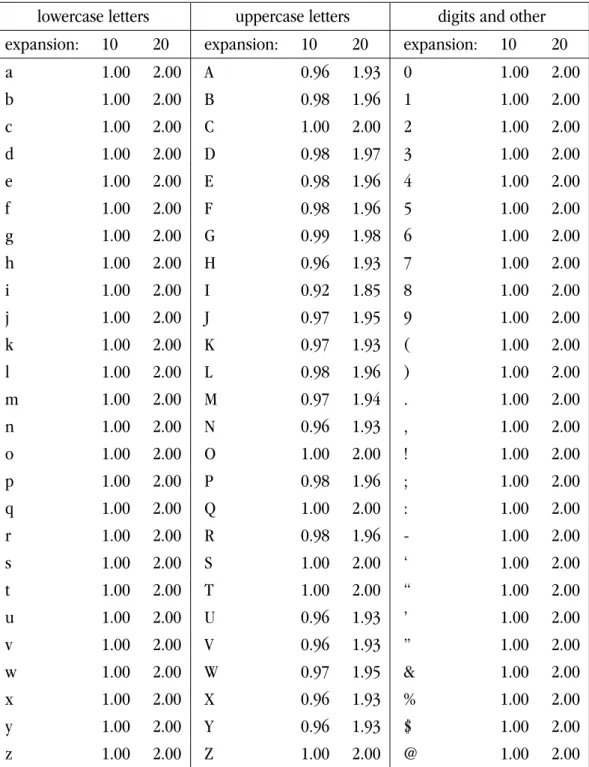
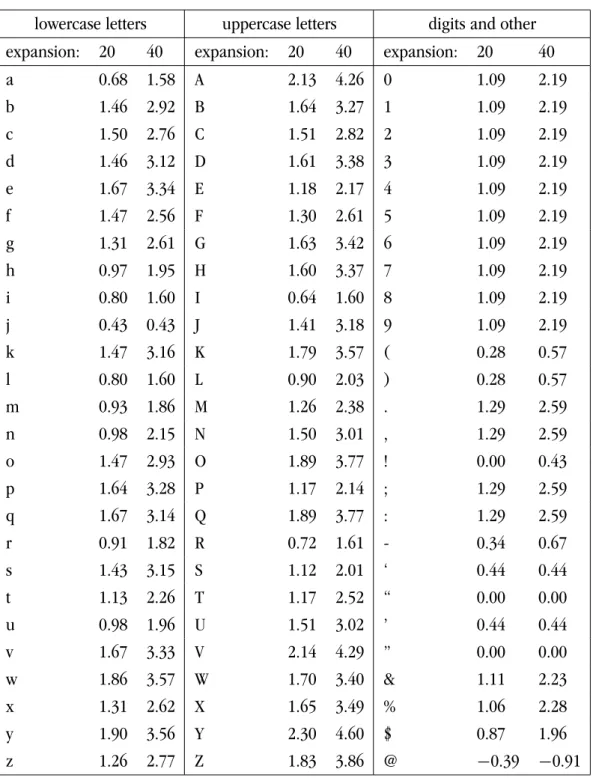
5.1 Common settings of character protruding factors . . . 43 6.1 Variance in character widths of expanded Computer Modern fonts . . . 58 6.2 Variance in character widths of expanded Type 1 fonts . . . 60 6.3 Variance in character widths of expanded Minion MM fonts . . . 63 6.4 Variance in character widths of expanded ITC Garamond MM fonts . . 64 6.5 Common settings of character expansion factors . . . 75
1
Introduction
The need for book production has existed longer than it might seem. In the days be- HANDWRITING
fore printing was invented, books were made by handwriting (therefore these books are called manuscripts). While writing the beautiful old-time manuscripts, the scribes had a tendency to keep the right-hand margin of the written text as straight as possible. Also, the spaces between individual words could not be very large. Certainly, uniform greyness of page and straight margins were generally treated as the standard of high-quality books. Such demands are, of course, very difficult to fulfil by handwriting. Book production at that time was certainly very elaborate and time-consuming. It required much skill and patience [6].
The most important impact on typography belongs to Gutenberg, who made print- PRINTING
ing practical by achieving “the art of multiplication of books” [6, 7]. Gutenberg was not the first who came up with the idea of either movable type or the printing presses. The principle of printing was invented about 500 years before Gutenberg’s time, when the Chinese had printed from movable type. However, they discarded the idea of print-ing with movable type afterwards, evidently because of the difficulty of usprint-ing it with thousands of Chinese characters. Gutenberg was the one who brought printing to the western world. He introduced two main concepts of modern printing, movable pieces of metal type that could be reused, and a printing press for fast and high-quality impres-sion on paper or parchment. Even though it is not entirely sure that Gutenberg was the original inventor of both ideas, it is clear that his experiments made printing practical. The concepts of printing perfected by Gutenberg did not change much for nearly five centuries, until the widespread use of computer-controlled typography.
The main matter of typography consists in making letterforms and combining them into words, lines and pages to form a book. Thanks to the invention of movable type and printing press of Gutenberg, letterforms could be made once and reused many times, which greatly reduced the time and cost of book production. The placement of letterforms, however, could not be automated or reused, so it had remained to be always an elaborate and demanding task. Books are made for reading, so special attention and effort was paid to make the typeset text easy to read. To make a high-quality book, not only nice letterforms were needed, but also proper placement of the letterforms onto pages was demanded.
In traditional printing, the preparation of books consists in two main stages: compo- COMPOSITION AND PAGINATION
sition and pagination. Composition is the task of arranging letters into lines of a certain width. A series of such lines is often called galley or galley proof. The second stage, pag-ination, is the placement of lines from the galley onto individual pages. Pagination also involves the placement of other elements of a book. Such elements can be, for example, footnotes, illustrations, headings, etc. While composition is horizontal arrangement of letters into words and lines, pagination is vertical arrangement of lines together with other elements onto pages or columns of pages. Since the beginning of printing history, text had been the main matter of typography, so it is obvious that the task of
composi-tion had been the most time-consuming and difficult one in tradicomposi-tional printing. With the evolution of typography over time, pagination has become more important than in the beginning, because today’s books contain more non-textual elements like illustra-tions, tables, and the like. The involvement of those elements requires more attention to pagination. However, text composition still remains the basic component of book preparation, as the aim of books to be read does not change at all.
The task of text composition consists of two main components: choosing where to LINE BREAKING AND
JUSTIFICATION end individual lines and how to justify the lines. The first component also involves the
task of word division, which is called hyphenation. As the objective of the first compo-nent is to find convenient places tobreaklines, this is often calledbreaking paragraph into lines or paragraph formatting or line breaking. Line justification is the task of fitting a line into a given width. Usually it is done by distributing the extra space into interword spaces in the line. Line justification is strongly dependent on line breaking. When line breaking is done properly, justification can be done without the need to change the interword spaces too much and thereby avoiding holes between words that would distress the eye of the reader.
Printing technology has changed much since computers were applied to book pro-COMPUTER
-CONTROLLED COMPOSITION
duction. Today nearly everyone is using computers to produce all kinds of printing. However, the basic principle of printing remains unchanged: to produce text, one needs letterforms (called fonts) and needs a program that does the arrangement of letterforms onto pages, i.e. composition and pagination. In today’s computer word processors (often called DTP – Desktop Publishing – systems), the engine for doing the composition task is called H & J, which stands for hyphenation and justification. This naming originated from traditional printing, when the job of line-justification was rather elaborate. Choos-ing line breaks was a minor point of composition. However, with the use of computers, line-justification is quite a simple task and line breaking has become more important to the quality of composition.
The research on the problem of line breaking took place a long time ago. An ex-OPTIMAL LINE
BREAKING cellent overview of line-breaking algorithms is available in [20]. There existed a few
line-breaking algorithms that considered more than a single line at a time. However, the algorithm designed by Knuth and Plass in [20, 31] became the most well-known one, often called theoptimum-fitortotal-fitalgorithm. The main idea of the algorithm is to provide a way to break a paragraph into lines so that the interword spacing is bal-anced betweenall the linesof the paragraph. This is attained by choosing the sequence of breakpoints with the minimal total “cost” over all lines. The cost of a line depends on many factors that can effect the visual appearance of the line, such as the measure of interword space changing, the division of the last word of the line, etc.
The time complexity of the total-fit algorithm is min(O(n2),O(mn)), where n is the number of input words andmis the maximal number of words in a line. In practice, the average value ofmis often quite small, so the algorithm runs in nearly linear time. It was integrated it into the typesetting system TEX [22, 24], which has been widely used for many years. Practical results have shown that this algorithm is not only efficient,
but also general-purpose and flexible enough to handle most of the typographic aspects needed for practical use. After 20 years of existence, TEX line breaking is still among the most sophisticated H & J engines available nowadays. In fact, there are only a few typesetting systems which use a similar algorithm of line breaking like TEX does.
There is also further research on the problem of line breaking, mainly focusing on FURTHER RESEARCH ON LINE BREAKING
reducing the time complexity. Recent results of algorithm designers proved that it is possible to break a paragraph in linear time O(n), independently on the number of words in a line [1, 8, 10, 11, 15, 16, 42]. To achieve a linear time complexity, these algo-rithms introduced a rather complicated construction and assume certain properties of the cost function of line breaking. They also omitted many implementation details that are important to practical typesetting. Therefore, these algorithms remain mainly an abstract presentation. Until now, I do not know of any typesetting systems with a linear line-breaking algorithm.
Apart from the study on an improvement of the line breaking problem (mostly THEhz-PROGRAM
concerning time complexity), an effort has also been put to thevisual improvementof composition. The most significant work in this direction is undoubtedly thehz-program, named after its inventor Hermann Zapf. This program was developed at URW, and there are several papers available that describe the conception of the program as well as its capabilities and output samples [26, 40, 43].
The essential aim of thehz-program is to bring Gutenberg’s standard of high-quality typography to today’s typesetting. The authors went back to the earliest days of printing and examined the “secrets” of Gutenberg which made his books a masterpiece of the art of printing even up to today. The development of thehz-program investigated the use of the techniques of Gutenberg’s composition into today’s technology to examine their effect and practicability. The output samples of thehz-program, as shown by various re-ports and the brochure on thehz-program by URW, look very promising. The program itself, however, was not accessible to the public for purchasing, testing or reviewing. In addition, no information about the implementation was available and the development was limited to inside URW only. It seems that thehz-program was no longer developed since 1993.
An attempt to apply the techniques used by Gutenberg and thehz-program to TEX TYPESETTING WITH VARYING LETTER WIDTHS
was done by Miroslava Mis´akov´a [27]. The author demonstrated the potential of a simple method that allows typesetting with varying letter widths implemented by font expan-sion to attain better interword spacing of composition. The results were very interesting, even though the method was not flexible enough for practical use.
This thesis describes my work on some typographic extensions to the TEX program. PDFTEX
An extension of TEX, namely pdfTEX [33, 38, 39], was used as the development environ-ment. This research originated in modifying the TEX program to produce PDF output directly from TEX source without passing through the intermediate steps of DVI (the original TEX output format) and PS, which is reflected in the name of the project. The first stage of the pdfTEX development was to implement features needed for a PDF back-end. This means providing capabilities that are needed for generating PDF files, like
font downloading, graphics inclusion, etc. The second stage consisted in experiment-ing with typographic improvements accordexperiment-ing to the hz-program. The first published work about experimentation with typographic extensions in pdfTEX was in 1998 [39]. The pdfTEX program was extended in such a way that the improvements could easily be applied to any TEX document. The extensions embodying the ideas of thehz-program are supposed to be used with PDF output, however they can also be applied for DVI output. The result is not only a prototype, but a fully functional program that has been used in practical typesetting.
The development of thehz-program did not entirely disappear. Some modules of the INDESIGN
hz-program were sold to Adobe and several functionalities of thehz-program have been made available in InDesign, a recent DTP product by Adobe. InDesign was introduced as “the next generation of the professional publishing software.” In particular, InDesign is claimed to set the new standards for text composition. The paragraph builder of In-Design provides many advanced features for text composition, like multi-line composer (a H & J engine based on the total-fit line-breaking algorithm), optical margin kerning control, etc. InDesign got immediately great success, as it offers exactly what has been missing in the world of DTP systems. InDesign is a very recent product: the first ver-sion (1.0) of InDesign was released in September of 1999, and second verver-sion (1.5) was released in March of 2000. The release of Adobe InDesign brings the quality of micro-typography to the world of DTP systems. This is a good sign for the direction of further development in computer typography, especially for low and medium cost publishing systems.1
This thesis is supposed to be read continuously. Section 1 (this section) is a short ORGANIZATION OF
THE THESIS introduction to the context. Section 2 describes some main issues of composition that
affect the quality of typesetting. Section 3 is an overview of related works. Section 4 is about the motivation for doing the work. Sections 5 and 6 are the main part of the thesis, which describes in detail the design and implementation of the typographic extensions in pdfTEX, as well as appropriate running settings. Section 7 evaluates the chosen imple-mentation. Section 8 contains conclusions and suggestions for further work.
1High-end industrial systems are often advertised to do everything and offer the highest quality of
typesetting. Such systems, however, are available only to professional publishers due to very high prices. I do not have access to any such systems and I would like to make clear that all remarks in this thesis do not necessarily hold for that class of software.
2
Issues of composition
In this section we will discuss some essential issues of composition that influence the quality of a typeset text. The judgment of a good composed text is often a matter of human perception and thus cannot be defined very precisely by some formulae. On the other hand, typography is a long-time craft and after hundreds years of printing, certain factors are known that they influence the look and readability of a typeset text.
The main objective of text composition is to place letterforms together to form words and lines. While the objective sounds rather simple and straightforward, its implemen-tation is not trivial at all. Composition is a difficult task, because it has to obey many rules. Some rules are easy to fulfil, because they are a fixed part of the typographic design, like line length, type size or line leading. Other rules, however, are difficult to follow, because their achievement requires decision based on human vision and thus cannot be precisely described. Examples are interword spacing, hyphenation, detection of rivers or spacing around punctuation.
The most important requirement of good composition is the harmony of the typeset text. It is often said that “typography should be invisible,” i.e. well typeset text should not call attention to itself and distract the reader from the textual contents. The quality of composition depends on two main factors: the visual appearance of the text and the order of letters, words and spaces that form individual lines. Therefore, sometimes the rules governing composition are calledspacing rulesandrules of orthography[34]. Is-sues that may have an effect on the uniformity of spacing and legibility of typeset text must be considered carefully during composing. While issues related to spacing and arrangements of letterforms are a matter of human vision, issues of orthography also require the understanding of the meaning of the text which is being typeset.
2.1
Line breaking and hyphenation
The basic operation of composing is choosing places to break text into individual lines and justify them to a fixed width. In order to set a line to a given width, there must be some variable factor to increase or decrease the line width. Usually this factor is inter-word spacing. The interinter-word space must be elastic, that is, its width can be increased or decreased continuously with respect to a maximal and minimal amount. The main object of line breaking is to split text into lines so that the interword spaces are changed as little as possible. Either too loose or tight interword spacing disturb the appearance of a text.
In traditional printing, usually a compositor (the person who composed individual HAND COMPOSITION
letters into lines in the printing process) worked with a single line at a time. He put, in sequence, words and interword spaces onto the current line until he considered the length of line to be nearly equal to the desired width. Then he tried to justify the line to the margins. Justification was usually done by increasing or decreasing the interword spaces, according to a maximum and minimum allowed amount. The extra space was
usually distributed equally between interword spaces in the line, i.e. all interword spaces in a line were increased or decreased by the same amount.
Apart from changing the interword spaces, the compositor might use other tech-niques to adjust the line width. Such techtech-niques could be, for example, using abbrevia-tions or ligatures to make a line a little longer or shorter, in order to achieve a better fit. Sometimes the compositor had to hyphenate the last word in the line because he could not fit the line in a reasonable way without changing the interword spaces too much. Hyphenation is not trivial and must be done with respect to many rules concerning the relevant language and custom. The compositor also had to deal with the dilemma of whether to prefer less-frequent hyphenation, or even extra interword spacing. Again, this is a matter of custom, expectation and personal choice.
The most common way to break lines by computers, as implemented in the H & J LINE BREAKING BY
COMPUTERS engines of most today’s word processors, is similar to the manner that a human
com-positor operated in traditional printing: words are added in sequence into a line until the line width is equal or longer than the desired amount. If the line can be fit to the desired width by shrinking the interword spaces to no more than the minimal amount, then the line is accepted as it is and a next line is started. Otherwise, the last word is moved to the next line, and interword spaces are expanded to fit the line to the desired width. A line is justified to the desired width by distributing the extra space equally be-tween interword spaces in the line. This is certainly a trivial task for computers that can be done in a flash, in comparison with the amount of time a human compositor would spend to align the margins of a typeset text.
Similar to a human compositor, computers can also use hyphenation to improve interword spacing. When the last word does not fit in a line, not the entire word needs to be moved to the next line but only a part of the word (called segment). To find appro-priate places to hyphenate words is not easy at all. Human compositors do it by hand. It is certainly not a mechanical task but requires much skill and knowledge. Comput-ers help to speed up and simplify the job of hyphenation very much, but it is still a challenge to attain perfect hyphenation by computers. All current typesetting systems use a dictionary of possible hyphenations and a dictionary of exceptions for missing or incorrect hyphenations. After years of use of computer typesetting, hyphenation sys-tems have become more and more reliable, although, sometimes, human intervention is still needed.
Another way to make interword spacing better is to use a paragraph-level line break-PARAGRAPH-LEVEL
LINE BREAKING ing approach, that is, to consider more than a single line at a time during line
break-ing. This way, the interword spacing is balanced better over the whole paragraph. The line-by-line algorithm does not take into consideration the dependency between the composed lines. When considering a single line at a time, the compositor (or the H & J engine) tries to find the best way to break the current line without looking at the effect it might have on breaking the next lines. However, sometimes it might be desirable not to break at the best place for the current line but at a sub-optimal place, because it would
result in a better breaking of the following lines. In general, the result of composing each line might have an effect on all others as well.
In traditional typography, it was impossible for a compositor to look ahead to the potential results of the next lines when composing the current line. He could only work line by line in the forward direction when composing a paragraph. However, when he had finished a paragraph, he could see how the paragraph was typeset and if needed, he could go backward and apply further adjustments to attain a more satisfactory re-sult. This is certainly very labour-intensive and slows down the composing process very much. A human compositor adjusted a typeset text at the paragraph level very rarely, mainly only when the high quality was the most important requirement of composi-tion. On the other hand, with the use of computers, it is feasible to look at more than just one single line at a time. Here the benefit of the use of computers is clear. A hu-man compositor cannot check hu-many possibilities to break a paragraph, so he has to work mostly with a single line at a time. A computer, however, can have the text of the whole paragraph stored in memory and compare all possible variants of line breaking to choose the best one.
The most important result of research on the line-breaking problem was the total-fit algorithm, which was implemented in the TEX program. Compared to line-by-line com-position, the total-fit algorithm produces much more even interword spacing. A few of today’s typesetting systems use a paragraph-level approach to line breaking based on the total-fit algorithm.
Theoretically it is possible to improve the time complexity of the total-fit line-breaking algorithm. Later development on the line-line-breaking problem has shown that a paragraph can be broken into lines in a linear time. However, all of the linear algorithms have a rather complicated construction and only work under certain assumptions about the cost function. Furthermore, they omit many aspects that are important to practical typesetting. Such constraints make practicability of those algorithms rather limited. In order to implement such an algorithm into a real typesetting system, many problems have to be solved. Therefore, even though it is possible to extend these linear algo-rithms to handle requirements of practical typography, in fact it is rather a challenging task for the implementors of typesetting systems. So far, none of these algorithms has been implemented into a ‘real’ typesetting system.
In this place it is necessary to stress that Knuth did not only design the total-fit PRACTICABILITY OF THE TOTAL-FIT ALGORITHM
algorithm, but also implemented it in TEX and therefore made its use practical. Until now, there is no known typesetting system with an H & J engine that can do a similar job as the total-fit line-breaking approach with a better time complexity. Another important point to consider is that the time complexity of Knuth’s line breaking is already very close to linear. The performance of the line-breaking algorithms with linear time com-plexity is better than the total-fit algorithm only for the case of rather long lines (over 90 characters, according to [8]). Such long lines occur rarely in typesetting because they are hard to read. More common are the cases of narrow columns. For these considera-tions, there is no point to improve the line-breaking algorithm implemented in TEX, as
the improvement in time complexity is not worthwhile in comparison with the effort needed to extend the implementation of the algorithm.
So far, most of the existing algorithms investigate the aspect of finding places to FURTHER
TECHNIQUES USED IN COMPOSITION
break lines in composition, where the criteria to estimate the quality of line-breaking result is the amount of how much the interword spaces in individual lines must be adjusted for line-justifications. The only variable factor for choosing places to end the lines is the interword space. A paragraph is considered optimal when all interword spaces over all lines are set as close as possible to the ideal interword spaces. There-fore, an optimum paragraph is in fact a paragraph composed in such a way that the total contrast of interword spaces set in all lines with the ideal interword spaces can-not be reduced anymore. However, in practice it happens quite often that an optimally formatted paragraph is far fromvisually pleasant, mainly because the paragraph had to be composed under some difficult typographic requirements like a narrow column width, a limitation or prohibition of hyphenation, etc. Under such circumstances, an optimally-formatted paragraph still may have very loose interword spacing that would look awful to the reader. Even with use of a sophisticated line-breaking approach like the total-fit algorithm, better interword spacing is still demanded. In traditional printing, the interword spaces were not the only variable factor for composing. It appears that in Gutenberg’s composition, heavy use of abbreviations and ligatures was allowed to facilitate line justification. Some letters were available in several alternatives in a single font so that the compositor could select the variant that would make the current line look better. Such techniques are however rarely used in computer typesetting.
There is always a conflict between favouring uniformity of interword spacing and the number of hyphenations in a paragraph. Prohibition or elimination of hyphen-ation results in worse interword spacing and vice versa. A reasonable typesetting sys-tem should allow user to specify certain constraints, as the number of hyphenations in a paragraph, or the desirability of consecutive hyphenations. There should also be the possibility to choose a compromise between favouring interword spacing and less-frequent hyphenation.
2.2
Interletter spacing and kerning
Spacing between adjacent letters in a word is usually part of font metrics. Letterforms are not the only object of typeface design, but also the space around individual letters, called sidebearings. The sidebearings of all letters should be set to make any combina-tion of letters look good, i.e. no pair of letters should be set too tightly or too loosely to each other. Normally no adjustment of spacing is needed between pairs of letters. Nev-ertheless, for certain combinations of letters, the sidebearings of letters do not “fit,” so fine adjustments of spacing are needed. This technique is calledkerning. In traditional printing, kerning was done by hand. Computer-controlled typesetting systems maintain kerning data as part of the font metrics, often called kerning table.
Interletter spacing consists of two components: letter sidebearing and kerning. Nor-mally they are determined from the used font, and thus the quality of interletter spacing depends mainly on the quality of the used font. They should not be changed unless there is a good reason to do so. Some sophisticated typesetting systems can calculate kerning data depending on the character shapes, in order to attain better interletter spacing. For example, new kerning data can be added for pairs of letters that need kern-ing but are not present in the kernkern-ing table. Or certain original kernkern-ing data can be overridden.
Some typesetting systems can change interletter spacing to prevent bad interword spacing. This technique certainly has its potential dangers, as interletter spacing belongs to the design of a typeface and even a slight change in interletter spacing can damage the appearance of the typeset text. Variable interletter spacing is widely used and often misused in today’s printing. However, with careful and conservative use, it can help to reduce bad interword spacing.
2.3
Optically even margins and margin kerning
When looking at most typesetting products, it is obvious that when a text is typeset to a block, simple justification to both margins is not enough to attain optically straight margins. It often happens that some characters at the margins cause a line to look a little bit shorter than the others, because they give the impression that there are some “holes” at the margins. Characters that make such optical illusions are usually the hy-phen character or punctuation marks. In general, characters that have dark strokes that are small in proportion to the white areas in their shapes cause this effect. The opposite effect can happen when certain characters appearing at the margins make a line look longer, e.g. the character ‘f’ in some italic fonts may cause this effect. This phenomenon often causes a typeset text to look ragged rather than justified. This does not apply only to a justified text, but also to the left margin of a ragged-right text.
Margin kerning is the task to optically align the margins of a typeset text by a slight shifting of certain letters at the margins that make the margin look ragged. In tradi-tional composition, margin kerning could be applied by the compositor if the rules of composition required so. As all operations of composition were done manually, the compositor could see whether the margins were optically even and applied finer adjust-ment for the margins if needed. This technique is often calledhanging punctuation,
because mostly punctuation marks need such fine adjustment when they end up at the HANGING PUNCTUATION
beginning or the end of a line. Hanging punctuation makes the task of composition more time-consuming and demanding, and probably it more or less disappeared for economic reasons. Production needs to be faster and cheaper, so the pressure of time and cost of printing does not allow the compositor to pay attention to such fine details of composition.
In computer-aided automated composition, achievement of optically even margin is often ignored, though margin kerning is very similar to traditional kerning: it deals
with fine adjustment of certain letters in order to attain better visual appearance of type-set text. Kerning in today’s typetype-setting is often a matter of font design. Most fonts are provided with an associated table of kerning data that can be used by automated com-position. Margin kerning, however, is completely ignored in most of today’s typesetting systems because of technical difficulties.
Recently designers of typesetting systems are more and more aware of these issues. In recent versions of a few sophisticated typesetting systems like InDesign or 3B2, sup-port for automated hanging punctuation has been added.
2.4
Color
Color (or greyness) is the term used for the overall darkness of a block of text. Color depends on four factors: interline spacing, interword spacing, interletter spacing and the font design. The font and interline spacing used in a book (or a document) is given by the layout design and therefore is pre-determined for composing. On the contrary, in-terword (and sometimes interletter) spacing depends on how line breaking is done and how extra spaces are distributed into interword spaces. The greyness of a paragraph therefore strongly depends on the uniformity of interword spacing. Even greyness of typeset text is difficult to achieve, as to attain even interword spacing is always a chal-lenging demand. Moreover, the interword spaces in all lines must be optically rather than mechanically equal, which cannot be done without human vision yet. The inter-word space can appear wider or narrower than its mechanical width, depending on the shapes of the adjacent characters on either side. For example, a space after a period will look wider than it is, because there is a lot of white space in the shape of the period. For this reason, sometimes no interword space is needed between a period and some capital letters like T, V, etc.
All current systems try to make interword spaces to be mechanically equal, but there is also some effort to compensate the effect of such optical illusions. Some high-quality fonts can contain kerning data with respect to the space character for certain characters that need adjustment when ending up next to an interword space. Common cases of such characters are comma, period, quotes, etc.
However, there is no known typesetting system that tries to compensate interword space according to the shape of characters onbothsides. So far this can be only achieved by hand composition.
2.5
Rivers
Rivers are vertical alignments of interword spaces in typeset text. This phenomenon dis-turbs the uniformity of typeset text and distracts the reader’s attention from text contents. Usually rivers appear in typeset text with loose interword spacing, as larger interword spaces can easily form vertical “white strips” in typeset text. When text is typeset with tight and uniform interword spacing, there is less chance for rivers to appear.
Improve-ment of interword spacing therefore helps to avoid an appearance of rivers. However, even in the case that interword spaces are tight and uniform, rivers can arise, as there is no guarantee that interword spaces will never be aligned vertically. So far, none of automated composing systems provides the ability to prevent rivers, as their appearance can be only easily detected by human eyes. This is still a challenge for implementors of typesetting systems to provide a “river detector” for automated composing.
A problem similar to rivers is the alignment of identical or similar words in consec-utive lines. This effect is most disturbing at the margins of text, that is, when the first or the last word in consecutive lines are identical. Unlike rivers, this happens indepen-dently of interword spacing.
2.6
Evaluation of composition
Evaluation of most of the issues described above cannot be done very well without interaction of a skilled human composer. Moreover, when there are conflicts between the rules of composition, the human intervention is always needed to choose a reason-able compromise. For this reason, until now the highest quality of typesetting can be achieved only by craft typography [29].
3
Micro-typography
By micro-typography we understand the concern about very fine details of composition in order to attain better appearance of typeset text. Micro-typography deals with issues like skilful interword and interletter spacing, proper spacing around punctuation, op-tical scaling, etc. The object of micro-typography is to attain the uniformity of typeset text in all details so that nothing would distract reader’s attention from the meaning of the composition itself.
In this section we take a brief look at important works in the area of micro-typography. The first one is the oldest piece of printing, the Gutenberg 42-line Bible [7, 41]. The following ones are computer typesetting systems with the most sophisticated composing engines: the TEX program, thehz-program and Adobe InDesign. An interest-ing experiment based on TEX is also mentioned in the end of this section.
3.1
Gutenberg and the 42-line Bible
When Gutenberg invented printing, his goal was to achieve a faster production of the books that had been made by handwriting. Therefore, his books had to look similar to the manuscripts made by the famous scribes at that time. The key to Gutenberg’s success of printing was not only his enormous effort to experiment with techniques of printing and to put them into practice in book production. In order to compete with the scribes and put across his ideas about printing, Gutenberg had to persuade the readers that his art could make “the multiplication of books” not only faster, but also produce books that are no less beautiful than the most avowed books of that time. Probably he had to analyze the best features of the manuscripts in order to bring them into his books. This is not only a technical matter, but also an artistic challenge.
Gutenberg exhibited his talent of a technologist as well as an artist in his 42-line Bible, the height of Gutenberg’s art of printing. This is also known as the Mazarine Bible because the first print described by bibliographers was located in the Paris library of Cardinal Mazarine. Today it is commonly referred to as the Gutenberg 42-line Bible, because most of its pages have 42 lines. Apart from its historical value, this is one of the most admired masterpieces of typography until today.
Closer examinations show that the key factors that make the Gutenberg Bible a fascinating typographic accomplishment are the design of page layout and the composi-tion. While the principles used in Gutenberg’s page layout design have been studied and can be repeated today, the essence of composition of the Bible often remains ignored in today’s typography: it is composition that makes the pages of the Bible look so har-monic with optically straight margins and perfectly even greyness of columns. The right margin was justified carefully to have the appearance of a straight edge. Unlike nearly everywhere in today’s printing, there are no wide holes between the words in the Guten-berg Bible that are distressing to the reader’s eyes. In order to obtain the compensation
of the right margin and the uniform color of columns, Gutenberg employed a number of tricks that are uncommon in latter printing.
Gutenberg probably noticed that the margin of his composition would not look MARGIN COMPENSATION
straight when all characters were right-justified. He achieved margin compensation by positioning certain characters a little bit out of the right margin when they appeared at the end of a line. Characters that were shifted into the right margin in Gutenberg Bible were hyphen, period, comma and some kind of ‘s’ (which does not have any textual meaning; they were used to ensure optical sharpness at the end of lines).
The uniformity of interword spacing was treated as a very important issue in com- EVEN INTERWORD SPACING
position of the Gutenberg Bible. Interword spaces are set very evenly and close to the width of the letter ‘I’. To achieve this difficult requirement, Gutenberg used two methods for justification: punctuation spacing and multiple variants of glyphs. The first method consisted in changing the spaces around punctuation. Spaces can be put before as well as after punctuation. However, there seems to be no case of a punctuation with more space before it than after it. Spaces around punctuation changed rather freely, from cases when punctuation was used without any space around to cases where the spaces around were as large as other interword spaces. The second method to adjust lines was the use of multiple variants of glyphs for some letters, some words or combinations of some letters. Gutenberg had prepared a large set of abbreviations and ligatures that could be used to replace certain words or combinations of letters. Apart from that, a letter in his composition could be typeset using several variants of a glyph with differ-ent width, depending on the requiremdiffer-ents of typesetting a line. The alphabet used for typesetting the Bible contained about 290 characters, many of them were ligatures and multiple glyphs of certain characters. The main intention of use of multiple glyphs was most likely to achieve the constant distance between the vertical strokes of characters. The compositor therefore could select the glyph of a letter that seemed to be the best variant according to the position of the letter in the word or the line. The result is the “woven” or “grid” appearance of pages with perfectly uniform greyness. The multiple glyphs might also have been used for the adjustment of line width. However, this seems to be a minor effect.
Not all of Gutenberg’s techniques can be used for today’s printing, simply because the technology and the custom has changed so much. However, the masterpiece Guten-berg Bible remains the standard of high-quality typography that today’s typesetting sys-tems should aim to.
3.2
The TEX program
Unlike most other typesetting systems, TEX was created by one man, Donald Knuth, pro- A BRIEF HISTORY OF
TEX fessor of Computer Science at Stanford University. A short, but excellent, history of TEX
comes from [12]:
TEX (= tau epsilon chi, and pronounced similar to “blecch,” not to the state known for ‘Tex-Mex’ chili) is a computer language designed for use
in typesetting; in particular, for typesetting math and other technical (from greek “techne” = art/craft, the stem of ‘technology’) material.
In the late 1970s, Donald Knuth was revising the second volume of his multivolume opus The Art of Computer Programming, got the galleys, looked at them, and said (approximately) “bleccch”! He had just received his first samples of the new computer typesetting, and its quality was so far below that of the first edition of Volume 2 that he couldn’t stand it. He thought for awhile, and said (approximately), “I’m a computer scientist; I ought to be able to do something about this,” so he set out to learn what were the traditional rules for typesetting math, what constituted good ty-pography, and (because the fonts of symbols that he needed really didn’t exist) as much as he could about type design. He figured this would take about 6 months. (Ultimately, it took nearly 10 years, but along the way he had lots of help from some people who should be well known to readers of this list – Hermann Zapf, Chuck Bigelow, Kris Holmes, Matthew Carter and Richard Southall are acknowledged in the introduction to Volume E, “Computer Modern Typefaces,” of the Addison-Wesley “Computers & Type-setting” book series.)
. . .
To produce his own books, Knuth had to tackle all the paraphernalia of academic publishing – footnotes, floating insertions (figures and tables), etc., etc. As a mathematician/computer scientist, he developed an input language that makes sense to other scientists, and for math expressions, is quite similar to how one mathematician would recite a string of nota-tion to another on the telephone. The TEX language is an interpreter. It accepts mixed commands and data. The command language is very low level (skip so much space, change to font X, set this string of words in para-graph form, . . . ), but is amenable to being enhanced by defining macro commands to build a very high level user interface (this is the title, this is the author, use them to set a title page according to AMS specifications). The handling of footnotes and similar structures are so well behaved that “style files” have been created for TEX to process critical editions and legal tomes. It is also (after some highly useful enhancements in about 1990) able to handle the composition of many different languages according to their own traditional rules, and is for this reason (as well as for the low cost), quite widely used in eastern Europe.
As the main object of TEX was to get high-quality typesetting, special care was paid to very fine details of composing that had been secrets of typographers. TEX was among the first computer typesetting systems with support for advanced typography like ligatures, kerning, control of spacing around punctuation, hyphenation, etc. Moreover, Knuth in-troduced the most significant principle of line breaking in computer typesetting. The concept of considering a paragraph as a whole while breaking it into individual lines,
i.e. the “total-fit” algorithm, in fact has become the fundamental algorithm for para-graph formatting by computers.
Here we will briefly describe the algorithm of line breaking used by TEX. We omit many of the technical details of the process because they are rather compli-cated. Only the concepts and terminology that are relevant to our interest will be ex-plained. (For more detailed information about the algorithm and its implementation, see [20, 22]).
The model of TEX line breaking is based on three elements, namelybox, glueand THE
BOX/GLUE/PENALTY MODEL
penalty. Therefore this model is also called the box/glue/penaltymodel.
• Aboxrepresents some material that should be typeset. A box can be a character BOX
or a sequence of characters from a font, but it can also be a much more complex object, e.g. a mathematical formula or a line or a composition of other boxes. The contents of a box, however, is not important for the line-breaking algorithm. The only relevant information about a box for the line breaking process is its width. We can simply think of a box as a word (or a segment of a hyphenated word), where its width is the sum of the widths of the associated letters.
• A glue represents a blank space whose width can vary. Glue has natural size, GLUE
standing for the normal width of the glue. Apart from natural size, glue may have stretchability, which is the maximum extra amount that the glue can be increased by. Similarly, glueshrinkability stands for the maximum amount that the glue can be decreased by. The natural size, stretchability and shrinkability together are called theglue specification. In the context of line breaking, the interword space is represented as glue with its specification depending on the selected font.
• Apenaltyis the cost we pay or the reward we gain for breaking a line at a certain PENALTY
place. Using penalties allows the control of line breaking in a flexible way by spec-ifying appropriate values of the penalty at the desired places. For example, when we wish to limit breaking at a certain place, we can insert a high penalty. An in-finite penalty means prohibition of breaking at its location. Similarly, a negative penalty indicates a desirable place for breaking and an infinite negative penalty forces breaking at its location.
A paragraph is represented by a sequence of items, each of which can be a box, BREAKPOINT
glue or a penalty. Abreakpointis a place where it is possible to end a line. A breakpoint usually occurs at a glue, a penalty or adiscretionary break, i.e. the place where a word can be hyphenated. A sequence of breakpoints defines a way that the paragraph can be broken by dividing the paragraph into sequences of items, where each such sub-sequence represents an eventual line. Line breaking can be then understood as the pro-cess of finding a “desirable” sequence of breakpoints. The total-fit algorithm examines “desirability” of all possible sequences of breakpoints and chooses the best ones.
In order to evaluate the desirability of a sequence of breakpoints, we need to define DESIRABILITY
of breakpoints, a line is represented by a sequence of items between two consecutive breakpoints, which correspond to the beginning and the end of the line. The natural widthof a line is the total width of all items in the line, where the width of each glue NATURAL WIDTH
item is counted from the natural size of the glue only. We call the difference between the natural width and the desired width of a line as the excess widthof the line. The EXCESS WIDTH
total stretchability of the line is the sum of the stretchability of all glue items in the TOTAL
STRETCHABILITY AND SHRINKABILITY
line. Thetotal shrinkability is defined similarly. A line is justified to the desired width by stretching or shrinking the glue items in the line to compensate for the width excess of the line. When the natural width of a line is smaller than the desired width, the glue items are stretched in order to increase the total width of the line to be equal to the desired width. Similarly, shrinking is done for a line with natural width longer than the desired width. The amount that the glue items in a line are stretched or shrunk by is defined as theadjustment ratioof a line. Let us consider a line with the natural width ADJUSTMENT RATIO
L and the desired widthl. The excess width is defined asl−L. The glue items in the line are x1, . . . ,xn where each gluexi has stretchability yi and shrinkabilityzi. Then the total stretchability is denoted as Y = y1+ · · · + yn and the total shrinkability as Z = z1+ · · · +zn. The adjustment ratio of the line is calculated as:
r =
0, if L =l(a perfect fit, no need of stretching or shrinking); (l−L)/Y, if(l−L >0)∧(Y >0)(a short line, stretching needed); (l−L)/Z, if(l−L <0)∧(Z >0)(a long line, stretching needed); 3, undefined otherwise.
(1)
If the excess width is zero (l−L =0) , we get a perfect fit: the natural width is the same as the desired width and no stretching or shrinking is needed. When a line cannot be stretched or shrunk because the total stretchability or shrinkability is zero, the adjust-ment ratio is undefined. Otherwise, it is calculated as the proportion of the width excess and the total stretchability or shrinkability, depending on whether the width excess is positive or negative. The value of the adjustment ratio is positive in case of stretching, and is negative in case of shrinking.
Glue items in a line are stretched or shrunk by amounts proportional to stretchabil-ity and shrinkabilstretchabil-ity of individual glue items. Stretching or shrinking glue according to an adjustment ratio is calledglue setting. In case of stretching, a line is justified to the desired width by adding an amount r yi to the width of each glue item xi in the line. The line width is increased by an amountr(y1 + · · · +yn) = r Y. According to the above definition, we haver =(l−L)/Y; thus, the line is stretched byl−L, which is exactly the amount needed to justify the line to the desired width (i.e. the excess width). Likewise, addingr zi to the width of each glue itemxi adjusts the line by an amount of r(z1+ · · · +zn) =r Z = l −L, i.e. the excess width again.
Thebadnessof a line is a non-negative function depending on the ratio adjustment BADNESS
b=
(
∞, ifr is undefined orr <−1;
b100|r|3+0.5c, otherwise (2)
Roughly speaking, the badness represents the quality of interword spacing of a line. The higher the badness, the worse the interword spacing is. When a line is too short or too long, the excess width may be larger than the total stretchability or shrinkability of the line. However, a line is allowed to be stretched by more than its total stretchability, but it cannot be shrunk by more than its total shrinkability. That is the reason why bad-ness is treated as∞whenr <−1. Whenr >1 the value of badness may be very high, but it is still treated as finite. A sequence of breakpoints that would result in any line with infinite badness should never be chosen if there is another choice of breakpoints that would avoid having an occurrence of infinite badness.
Apart from badness, the desirability of a line depends also on the penalty of the line. DEMERITS
A line takes the penalty from the ending item if it is a penalty item; otherwise the penalty of the line is treated as zero. The cost of a potential line is defined as thedemerits, which is roughly the sum of the squares of the badness and the penalty of the line. Given a line with badnessband penalty p, the exact formula for demerits calculation is:
d =
(k+b)2+ p2, if 0≤ p<∞; (k+b)2− p2, if−∞< p <0; (k+b)2, if p≤ −∞.
(3)
Here k is a constant that can be used to adjust the demerits of each line indepen-dently of the associated badness and penalty. This number can be increased to minimize the total number of eventual lines.
The basic principle of the line-breaking algorithm is to generate all possible se- THE BASIC PRINCIPLE
quences of breakpoints of a paragraph and examine the corresponding total demerits. The best sequence of breakpoints is the sequence with least total demerits. The algo-rithm introduced a rather complicated construction to gain a time complexity that is reasonable for practical use.
In fact the algorithm does not examine all sequences of breakpoints, but onlyfea- FEASIBLE BREAKPOINTS
siblebreakpoints are considered. A feasible breakpoint is a place where the text of the paragraph from the beginning to this point can be broken into lines whose badness does not exceed a given value, calledtolerance. The number of feasible breakpoints of a paragraph is much smaller than the number of all breakpoints. Therefore, consider-ing only feasible breakpoints helps to eliminate examination of lines whose badness is higher than the given tolerance. It is not necessary to take into account sequences of breakpoints which would result in such lines.
The algorithm works by constructing an oriented network whose nodes are feasible SHORTEST PATH
nodes) is the number of demerits corresponding to the line determined by the break-points represented by the nodes. According to the definition of feasible breakbreak-points, there is no edge with cost larger than the tolerance. Thus the higher the value of tol-erance, the larger the network is, as there are more feasible breakpoints. The object of the algorithm is to find theshortest path in this network, where the start node rep-resents the beginning of the paragraph and the target node reprep-resents the end of the paragraph.
The problem of finding the shortest path in a network is solved using a general al-DYNAMIC
PROGRAMMING gorithm, called dynamic programming. Its fundamental principle, called theprinciple of optimality, is:
If the shortest path from 1 tok passes through j, then the part up to that point is the shortest path from 1 to j.
Its application to the line-breaking problem is then restated in [42]:
If the best way of breaking words 1 throughk causes a break after word j, then the part up to that breakpoint is the best way of breaking words 1 through j.
Time complexity of the algorithm for seeking the shortest path is n(n2+1), where n TIME COMPLEXITY
is the number of words of the whole paragraph. However, the number of outing edges from a node is limited by the number of words on a line, so time complexity of the line-breaking algorithm can be reduced to min(O(n2),O(mn)), where m is the maximal number of words in a line. In practice, the value ofm is rather small, which results in a fairly reasonable running time.
After the sequence of breakpoints have been chosen, the paragraph is divided into individual lines and each line is justified to the desired width. The extra space is dis-tributed into the glue items according to glue stretchability or shrinkability as described above. Thus, glue with larger stretchability will be stretched more than glue with smaller stretchability. However, in most cases, the glue items in a line (representing the inter-word spaces) are the same and therefore they are stretched or shrunk alike. This phase is similar to the justification part of composition. It is a trivial task when it is done by computers, compared to the work that a compositor would have to do in traditional printing.
TEX line breaking produces excellent output and text typeset by TEX is generally better in comparison to composition by most other typesetting systems. The algorithm implemented in TEX is very flexible and allows the control of line breaking in nearly every detail. The algorithm also handles other complicated elements for line breaking like math, hyphenation of ligatures, or the change of spelling of some compound words when they are hyphenated.
However, it is not true that TEX line breaking is perfect and always produces sat-isfactory output. There are still cases when TEX fails to get the best quality of compo-sition [28, 29]. Examples of possible improvements of TEX compocompo-sition are: avoiding
rivers, better control on justification of the last line, number of hyphenations in a para-graph, better handling of ragged-right text, compensation of interword spaces according to the shapes of boundary characters, etc. Most of these issues have not been handled in any other typesetting systems yet. Until now such problems can only be solved man-ually.
Another important aspect of TEX is that Knuth made its source code fully available AVAILABILITY
to the public at no cost, thus not only the possibility to use but also to extend TEX is open to everyone.2 Knuth has frozen his work on TEX and will not do any further development. There are several ongoing developments that extend TEX, namely[30], ε-TEX [35–37] and pdfTEX. Each project aims at a somewhat different goal of extension.3 A more radical project, NTS, is to rewrite TEX to another programming language which is more suitable for further extensions.
3.3
The
hz-program
Thehz-program is the result of the research on “micro-typography for advanced typeset-ting” by Hermann Zapf in conjunction with URW.4 The developers returned to printing in Gutenberg’s days [40] to find out the keys to success of the typographic masterpiece, i.e. the 42-line Bible. Some techniques used by Gutenberg, like the use of ligatures and abbreviations, were examined and later discarded. The reason is that reading habits and customs have changed from Gutenberg’s time and the use of many ligatures and abbreviations that were common at that time is not acceptable today. Other techniques like multiple glyphs with varying widths or hanging punctuation turned out to be very worthwhile. The hz-program, however, does not only simply follow the techniques in Gutenberg’s composition. In order to gain Gutenberg’s typographic standard of even interword spacing and optically straight margins, the developers introduced the “ten typographic commandments,” concerning three areas of typesetting: kerning, scaling and composing [40]:
1. Every beginning character in a line should receive a special left side bearing and KERNING
each last character, a special right side bearing.
2. Lines running short should receive only positive kerning, and those too long, only negative kerning.
3. Spacing should be dependent upon type body size. Inter-character spacing should be wider in proportion than character spacing for larger type sizes.
4. Letterforms should fit their pointsize. Optical scaling should be applied. SCALING
2
However, any extension of TEX should use other name than TEX if it does not pass the “trip” test that Knuth made for testing TEX compatibility.
3
pdfTEX andε-TEX have been merged into a single program called pdfε-TEX.
4URW Software & Type GmbH (former URW Unternehmensberatung Karow Rubow Weber GMBH) of
5. When working within a short line and setting in a specific pointsize, any expan-sion of characters should be approached very carefully.
6. Likewise, within long lines, any character condensing should be done sparingly. 7. Expansion or condensing should not be used overall, but rather to selected
char-acters.
8. When hyphenation is used, justification should be applied to an entire paragraph COMPOSING
rather than line by line.
9. The adjustments made here should be applicable to single master fonts.
10. Displays permitting grayscaling should be used to give greater typographic con-trol during typesetting.
The hz-program introduced three new variables for composition: improved letter spacing (kerning), typographically acceptable expansion or condensing of characters (scaling) and improved applied programming (composing). Thehz-program is a set of modules for text composition that can bring these features into the H & J engine of DTP systems. The modules can be used together or separately.
The module to deal with kerning is called the kf-program. Kerning by the kf-THEkf-PROGRAM
program is used to improve interletter spacing as well as to obtain optically straight margins of typeset text. The most significant feature of thekf-program is the capability to calculate kerning on the fly instead of using a static kerning table.
In most of the current typesetting systems, kerning is handled using the data from the kerning table. The kerning table says which pairs of characters should be kerned, as well as the kern amount to be applied. The kerning table is usually a part of a font and is prepared by the font creator. The main flaw of this approach is that the same kerning data is used for different sizes. It has been known that kerning should depend on the pointsize in order to attain proper interletter spacing. The kerning data of a font, however, is often optimized only for a certain size (often for 12 pt).
With thekf-program, the kerning table only specifies which pairs of characters need kerning. The kern amount, however, is calculated on the fly, accordingly to the shape of the characters and the used size. Thekf-program can be used to get optically-even interletter spacing at an arbitrary size, as well as for skilful spacing adjustment of a line by changing interletter spacing. Kerning can be negative as well as positive, depending on the line-justification demand.
Thekf-program also calculates new sidebearings for the first and the last characters on a line. An artificial character “left white edge” is placed to the left of the beginning character in the line, and the kern between them is calculated on the fly to produce a new left side bearing for the beginning character. Similarly, the new right sidebearing for the last character on a line is calculated using a “right white edge.” These two arti-ficial characters do not exist in a font; they are used only inside the program and are not visible in the output.
Scaling is controlled via two modules, theK%-program and the
ε
k-program. In tra- THEK%-PROGRAMditional typography, different fonts were designed for a single typeface at different sizes. With the advent of digital typography, this approach was abandoned and nowadays a typeface is often available as a single font that was designed for a certain pointsize (usu-ally 12 pt). Use at other sizes is provided by scaling the font to the requested size. This method, however, does not give good results. Fonts for smaller size should have wider letterforms and heavier strokes.
TheK%-program was designed to eliminate this shortcoming. It calculates true op-tical scaling of character forms according to typographic requirements at various sizes. With theK%-program a single font will look good even at very different sizes.
The companion
ε
k-program handles font expansion and condensing for adjustment needed during text composition. It can modify a font to vary the width of individual characters without visible distortion. Theε
k-program does not expand or condense all characters proportionally. Characters that are more sensitive to deformation should be left unchanged or should be changed very slightly.The last module,jp-program, is roughly a sophisticated H & J engine based on a sim- THEjp-PROGRAM
ilar algorithm to TEX line breaking. The most important advantage of the jp-program over TEX line breaking is that it can cooperate with the other modules of thehz-program. These modules provide new variable factors that can be used to adjust lines and there-fore provide more flexibility for thejp-program to compose a paragraph. However, from the available documentation about thehz-program it is not clear how thejp-program uses other modules to choose breakpoints for a paragraph. There are two possibilities that can come into consideration. The first approach can be understood as post line-breaking adjustment, that is, thejp-program first breaks a paragraph in a similar man-ner like TEX without taking into consideration the potentiality of expanding/condensing by kerning or scaling. After the breakpoints are chosen, other modules are applied to improve interword spacing. The second approach, certainly more sophisticated, is to consider the potentiality of kerning and scaling, in order to find better breakpoints.
Not much documentation about the hz-program is available. A few reports about THE CURRENT STATE OF THE
hz-PROGRAM
the program were published by the developers and a production brochure by URW was released. Thehz-program itself, however, was not available even for reviewing or testing purposes. In addition, it is also unknown whether there exist further developments of the program or its state.
3.4
Adobe InDesign
InDesign is an advanced DTP system by Adobe. InDesign has support for much more sophisticated text composition in comparison with other DTP systems. The most ad-vanced features of text composition in InDesign are the multi-line composing engine, automatic optical kerning and optical margin alignment.
The multi-line composer of InDesign is a composing engine based on the algorithm MULTI-LINE COMPOSER