Nash Networks Inc.
Serious about technology. Serious about your business.
Pros, Cons and Costs of the Major
Operating Systems
"Making every IT dollar count!"
Part 5, May 2009
Virtualization: A
Small Business
Contents
Executive Summary ... 3
What is Virtualization?... 4
Is It Just Another Fad?... 4
Types of Virtualization ... 5
Advantages of Virtualization ... 7
Disadvantages of Virtualization ... 8
Pros and Cons of Desktop Virtualization ... 9
Does Virtualization Make Sense For Small and Medium Businesses?... 10
Sources ... 12
Executive Summary
What is Virtualization?
Virtualization means splitting up a single physical computer into several “virtual” computers.
Server virtualization is the most common, and involves splitting up a single physical server into several virtual servers.
In desktop virtualization, a central server is divided up into multiple virtual desktop computers that are accessed remotely.
Main Pros
Savings on hardware, energy usage, management and co-location.
Faster and cheaper backup and disaster recovery.
Ability to set up test computers without disrupting live ones.
Main Cons
Single point of failure. No virtualized system should be put in place without proper contingency planning.
Higher costs for individual servers, higher bandwidth costs.
Because of economies of scale, hardware and other savings may not materialize for small and medium businesses.
Does Virtualization Make Sense for Small and Medium
Businesses?
Expert opinion is divided as to whether virtualization can pay for itself in environments with fewer than 20 servers.
The biggest benefits are faster and cheaper backup and disaster recovery, scalability and greater technical potential and flexibility.
Benefits are most likely to be in TCO rather than direct, immediate savings in, say, hardware and energy costs.
What is Virtualization?
Virtualization means splitting up a single physical computer into several “virtual” computers.
Imagine the average single-application server as a single employee kicking around in a huge office. This person does his or her specific work effectively, but most of the office space is wasted. Next-door is another huge office, with another employee performing another specialized function. Each office is managed and organized separately.
That’s how most companies run their conventional servers.
Some brave souls try to improve resource utilization by running several applications on one server. But having ten people doing different jobs in a single huge office is awkward and causes problems with space utilization, boundaries and resource allocation.
Now, imagine the typical office that’s divided into cubicles. Each cubicle worker has a specific job, clearly demarcated space and resources, and is separately managed. The entire office benefits from unified management – heating, cooling, security and so on.
That’s virtualization.
Is It Just Another Fad?
No. Virtualization is a very hot technology and there is certainly a lot of hype around it – but there seems little doubt that it’s here to stay. It makes huge sense for data centres and large companies in particular, and continues to gain ground. In its "Top 10 Strategic Technologies for 2009", the Gartner IT research group put virtualization at number one.
Types of Virtualization
There are quite a few types of virtualization, and some are conceptually complex. For small and medium businesses, though, the most important types are server and desktop virtualization.
Server virtualization
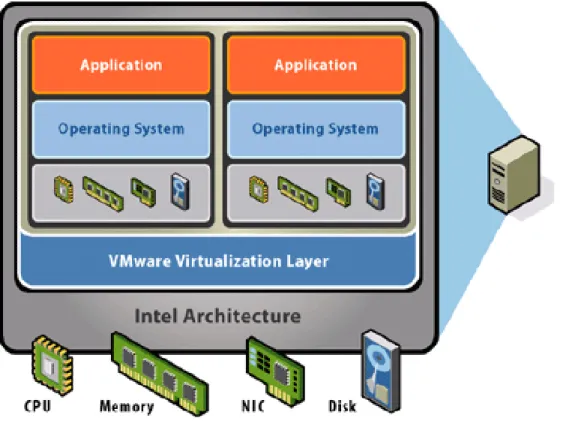
This is the most common, and involves splitting up a single physical server into several virtual servers.
Diagram of a virtualized server
Desktop virtualization
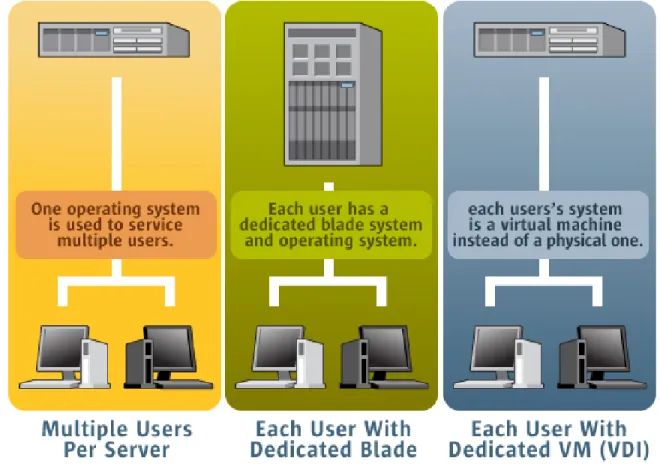
Here, a central server is divided up into multiple virtual desktop computers. Users remotely access the central server. From the user’s perspective, the look and feel is that of a normal desktop. Conceptually, it’s like the old mainframe model with “dumb” terminals.
Diagram of virtualized desktop servers (Source: Sun Inner Circle
Advantages of Virtualization
Efficient use of hardware. The typical conventional server runs only one major application (e.g. Exchange) and might be using only 10-15% of its processing capacity. Virtualized hardware works hard and is more cost-effective, particularly if it is running many virtual servers.
Better and cheaper backup and disaster recovery. A virtual computer can
be backed up very easily as an “image” - unlike conventional backups, which require complex and often expensive software. The images can be restored onto dissimilar hardware, unlike conventional backups, which often can’t. The image can be brought up almost instantly. This provides a working service while the primary computer is restored, and dramatically reduces downtime. It’s also very fast and easy to roll back a computer to a previous version, instead of having to fix it in, say, the case of a virus infection.
Better management. Virtual computers can be centrally and efficiently
managed. Central administration and “locked-down” desktop environments dramatically reduces support costs. Software can be installed and updated quickly and automatically across a virtual network. Virtual test machines can be created almost instantly so that testing can be done without any disruption of live machines.
Ability to set up and test new machines. This can be done easily and with
no disruption to live services.
Less network infrastructure. Fewer physical machines mean less physical
infrastructure – meaning lower purchase costs and less maintenance.
Lower power and cooling costs. This is particularly relevant to data centres
or organizations with many servers.
Lower co-location costs. Fewer physical servers take up less space,
slashing co-location costs. This has allowed the hosted application industry (e.g. hosted Exchange, hosted QuickBooks) to fly.
Better security. Virtualization can provide centralized and secured computing
environments. Desktop virtualization takes data off individual workstations and laptops, removing the risk of data loss through physical theft or loss of desktop machines.
Disadvantages of Virtualization
Single point of failure. If a virtualized server fails, the entire organization can be paralyzed. If a company uses virtualized desktops and the central hosting server goes down, users can literally do nothing on their desktops – compared with conventional desktops where users can keep functioning even if the network is down, and a single desktop failure doesn’t impact anyone else. This is a significant downside and no virtualized system should be put in place without proper contingency planning.
More powerful hardware needed. Virtualization uses fewer servers, and
uses them better, but because they need to be more powerful, the reduction in total hardware costs may not be as dramatic as expected.
Greater demands on the network. Network and bandwidth requirements will
be greater. If the virtualized server is hosted remotely, adequate and redundant bandwidth are needed, and this can push up running costs.
Complexity. Virtualization increases complexity on a computer, making it
harder to manage and troubleshoot, particularly if it is not properly set up and documented. Without good automation tools, a virtual server can be almost impossible to manage.
Potential security problems. Some sources feel that security can be more
difficult to manage on a virtualized system. New forms of attack could target the virtualization software itself – though so far this has not happened.
Third-party support issues. Some vendors may not be willing or able to
support their software if it is running on a virtual server.
Lower tolerance for poor management. Operators of virtualized systems
have to manage and document virtual environments properly. If they don’t, they could end up with a messy jumble of virtual machines that can be costly in terms of time and unnecessary licences.
Pros and Cons of Desktop
Virtualization
Aside from the general pros and cons of virtualization, some factors are particularly relevant to desktop computing:
Pros
Centralized management. Desktop virtualization solutions let administrators
manage user desktops centrally, making it easier to keep desktops updated and secure. Desktops are standardized, hardware-independent and controlled.
Improved uptime. In the virtualized desktop environment, a user with a virus
infection doesn’t have to wait days for the infection to be cleaned out. Instead, a new clean image can simply be installed and the user can be up and running almost instantly.
Cons
One down, all down. The most significant downside of a central “master
computer” is this: If the central server or the network goes down, users are 100% computerless. In the conventional environment, users can still work offline during an Internet outage, or other users can continue to work when one desktop is down. In this situation, there is simply nothing anyone can do until the server or network is back up.
Loss of flexibility. The downside of that is that users lose their flexibility and customization – much of the reason that the computing world moved from mainframes to PC in the first place.
Does Virtualization Make Sense For
Small and Medium Businesses?
Yes, no, and maybe.
It all depends on the specifics of the situation, and on which expert you ask.
For large data centres and companies with more than 50 servers, virtualization has become pretty much a no-brainer, offering significant cost reductions and rapid ROI.
It’s less clear whether virtualization can pay for itself in environments with less than 20 servers, let alone the more typical small business environment with perhaps 1 to 6 servers.
If a company is starting a network from scratch, it might well make financial sense to virtualize rather than buying multiple conventional servers that will each run at 10-15% capacity. In most cases, though, there’s an existing network, and the cost of replacing it is high.
Whether or not virtualization will be of benefit depends very much on the specifics of the business - its needs, plans, budget and situation.
In our view, the major potential benefits of virtualization for small businesses are:
Better and cheaper disaster recovery. Not to belabour the point, but this is
probably the biggest advantage of virtualization for the typical small business.
Scalability. More servers can be added without extra hardware costs.
Flexibility. Servers can be added and removed, test servers can be created,
Cost implications of virtualization for small businesses
Item Effect Comments
Hardware Same or down
Fewer computers needed, but they need to be more powerful. Less network infrastructure needed.
Licences Same or up
Small business virtualization software is usually free or inexpensive but can be costly. Minimal to no savings can be expected for other software.
IT support Same or down Some extra skills are needed, but management is easier and faster.
Bandwidth Same or up
Bandwidth has to be more robust and with redundant connections if the servers are in a data centre.
Disaster
recovery Down Planning, implementation and recovery are much cheaper and faster.
Data centre
co-location space Down or up
Fewer computers mean less space to pay for – but many businesses might not have needed data centre space at all prior to virtualization.
Power and
cooling Down
Savings are only significant if costs were high in the first place.
Sources
3 Reasons to Virtualize Your Small Business Steve Norris
http://ezinearticles.com/?3-Reasons-to-Virtualize-Your-Small-Business&id=2116982
Can Virtualization Help My Small Business? Clint Eschberger
http://blog.cretec-web.com/index.php?/archives/109-Can-Virtualization-Help-My-Small-Business.html
Cheap or free virtualization tools that work wonders for small firms Paul Venezia, 2009
http://www.itbusiness.ca/it/client/en/home/News.asp?id=52295 Microsoft blog on Hyper-V versus VMware pricing
Steve Kaplan, 2009
http://roidude.typepad.com/
Obtaining maximum ROI from virtualization Greg Shields, 2008
http://searchservervirtualization.techtarget.com/generic/0,295582,sid94_gci13148 19,00.html
ROI Analysis: Virtualization Tom Kaneshige, 2008 http://www.informationweek.com/news/storage/virtualization/showArticle.jhtml?art icleID=208403469 Server Virtualization Oscar Cwajbaum, 2008 http://www.oscarc.net/blog/2008/08/server-virtualization/
http://technology.inc.com/security/articles/200904/virtualization.html The Hidden Costs of Virtualization
Dave Leonard, Infocrossing, 2007
http://www.virtual-strategy.com/Features/The-Hidden-Costs-of-Virtualization.html The Pros and Cons of Virtualization
Business Trends Quarterly, 2007
http://www.btquarterly.com/?mc=pros-cons-virtualization&page=virt-viewresearch The security benefits and risks of virtualization
Bill Brenner, SearchSecurity.com, 2008
http://searchsecurity.techtarget.com/news/article/0,289142,sid14_gci1302706,00. html
The tricky math of server virtualization ROI. Virtualization is a good thing, but it's not a slam dunk when it comes to saving money
Tom Kaneshige, 2008
http://www.infoworld.com/d/virtualization/tricky-math-server-virtualization-roi-192 Virtualization Comes to Small and Midsize Businesses
Alan Radding, 2009
http://www.accelerateresults.com/category/5/article/152-virtualization-comes-to-small-and-midsize-businesses/1
Virtualization fits in small business Walter Scott, 2007
http://news.zdnet.com/2100-3513_22-151936.html What Gartner Didn't Say About Client Virtualization Bernard Golden, CIO.com, 2008
http://pcworld.about.com/od/softwareservices/What-Gartner-Didn-t-Say-About.htm
What is Virtualization, and Why Should You Care? Laurie McCabe, 2009
http://www.smallbusinesscomputing.com/biztools/article.php/3819231 What Virtualization Means for Small Business
Drew Robb, 2008
About Nash Networks
What we doWe manage and maintain IT networks for small businesses. Philosophy
We understand that every business is unique, with unique technology needs. We provide and support the mix of technology that’s right for each client.
We aren’t a one-solution shop. There’s no such thing as one-size-fits-all in technology (or socks). Skills
We know a lot about a lot: Windows, Unix, Macintosh, programming, connectivity, VoIP, virtualization, security, disaster prevention … and much more.
People
Our consultants are all university-educated, experienced, highly skilled and excellent problem-solvers.
Vendors & subcontractors
We recommend and use only quality vendors whom we know and trust. Technology Core Team Paul Nash President [email protected] (416) 848-3335 x 402 Jacques Lauzon Senior Consultant [email protected] (416) 848-3335 x 403 Susan Fazekas IT Consultant [email protected] (416) 848-3335 x 405 Linda Jacobson General Manager [email protected] (416) 848-3335 x 401 Website http://www.nashnetworks.ca