AN EMPIRICAL STUDY OF CSS CODE SMELLS IN WEB FRAMEWORKS
A Thesis presented to
the Faculty of California Polytechnic State University, San Luis Obispo
In Partial Fulfillment
of the Requirements for the Degree Master of Science in Computer Science
by Tobias Bleisch
c
2018
COMMITTEE MEMBERSHIP
TITLE: An Empirical Study of CSS Code Smells in Web Frameworks
AUTHOR: Tobias Bleisch
DATE SUBMITTED: March 2018
COMMITTEE CHAIR: Motahareh Bahrami Zunjani, Ph.D. Assistant Professor of Computer Science
COMMITTEE MEMBER: Foaad Khosmood, Ph.D. Professor of Computer Science
COMMITTEE MEMBER: Franz Kurfess, Ph.D.
ABSTRACT
An Empirical Study of CSS Code Smells in Web Frameworks Tobias Bleisch
Cascading Style Sheets (CSS) has become essential to front-end web development for the specification of style. But despite its simple syntax and the theoretical advantages attained through the separation of style from content and behavior, CSS authoring today is regarded as a complex task. As a result, developers are increasingly turning to CSS preprocessor languages and web frameworks to aid in development. How-ever, previous studies show that even highly popular websites which are known to be developed with web frameworks contain CSS code smells such as duplicated rules and hard-coded values. Such code smells have the potential to cause adverse effects on websites and complicate maintenance. It is therefore important to investigate whether web frameworks may be encouraging the introduction of CSS code smells into websites.
ACKNOWLEDGMENTS
I give my utmost thanks to:
• Dr. Sara Bahrami, for teaching me what it means to do research and sticking it through with me to the end. Thanks for believing in me!
• Dr. Foaad Khosmood, for his excellent mentorship and advice. Our brainstorm-ing sessions were a real pleasure!
• Dr. Axel Böttcher at the Munich University of Applied Sciences, for his patience and feedback. This thesis truly started with you, and I’m grateful for that!
• Dr. Gudrun Socher at the Munich University of Applied Sciences for facilitating my research stay at MUAS! I sincerely hope the partnership between Cal Poly and MUAS continues to flourish.
• Dr. Franz Kurfess, for his continued support. You’ve been a fantastic mentor to me throughout my time at Poly, thank you!
• Mr. Elbert Alias at Wappalyzer, for the extremely valuable dataset. You truly helped make this thesis what it is.
• Andrew Guenther, for providing this wonderful LATEXtemplate. I almost used Word for this...
• Mike Ryu, for his feedback and words of encouragement. You should know that your opinion, like your friendship, is highly valuable to me, thank you!
• My Oma Liana, for her love and support. All the times I complained to you on my way to the lab helped more than you know.
TABLE OF CONTENTS
Page
LIST OF TABLES . . . x
LIST OF FIGURES . . . xi
CHAPTER 1 Introduction . . . 1
1.1 Overview . . . 1
1.2 Chapter Outline . . . 5
2 Background . . . 7
2.1 Web Technologies . . . 7
2.1.1 HTML and XML . . . 7
2.1.2 The Document Object Model . . . 8
2.1.3 Cascading Style Sheets . . . 8
2.1.4 JavaScript . . . 9
2.1.5 Uniform Resource Locators & Website Domains . . . 9
2.1.6 AJAX - Static vs Dynamic Websites . . . 10
2.1.7 Web Frameworks & Content Management Systems (CMS) . . 10
2.2 Software Engineering Principles . . . 11
2.2.1 Code Smells . . . 11
2.2.2 Coupling & Cohesion . . . 11
2.2.3 Separation of Concerns . . . 12
2.3 Machine Learning & Analysis Techniques . . . 12
2.3.1 Supervised Learning - Classification . . . 13
2.3.2 Unsupervised Learning - Clustering . . . 13
2.3.3 Neural Network . . . 14
2.3.4 Euclidean Space & Distance . . . 14
2.3.5 K-Means Clustering . . . 14
2.3.6 Hierarchical & Agglomerative Clustering . . . 15
3 Cascading Style Sheets & Code Smells . . . 16
3.1.1 CSS Rules . . . 16
3.1.2 CSS Selectors . . . 17
3.1.3 Pseudo-Classes & Pseudo-Elements . . . 18
3.1.4 Code Location . . . 19
3.1.5 Specificity . . . 19
3.1.6 Importance . . . 20
3.1.7 Inheritance . . . 21
3.1.8 Cascading . . . 21
3.1.9 @Rules . . . 22
3.2 CSS Code Smells . . . 23
3.2.1 Inlined Rules . . . 23
3.2.2 Embedded Rules . . . 23
3.2.3 Too Long Rules . . . 23
3.2.4 Empty Catch Rules . . . 24
3.2.5 Too Specific Selectors Type I (Too Much Cascading) . . . 24
3.2.6 Too Specific Selectors Type II (High Specificity Values) . . . . 25
3.2.7 Universal Selectors . . . 25
3.2.8 Selectors with ID and at Least One Class or Element . . . 26
3.2.9 Selectors with Erroneous Adjoining Pattern . . . 26
3.2.10 Too General Selectors . . . 27
3.2.11 Properties with Hard-Coded Values . . . 27
3.2.12 Properties with Value Equal to None or Zero (Undoing Style) 27 3.3 CSS Metrics . . . 28
3.3.1 External Rules . . . 29
3.3.2 Total Defined CSS Rules . . . 29
3.3.3 Total Defined CSS Selectors . . . 29
3.3.4 Ignored CSS Selectors . . . 29
3.3.5 Undefined Classes . . . 29
3.3.6 Matched Selectors . . . 29
3.3.7 Unmatched Selectors . . . 30
3.3.8 Effective Selectors . . . 30
3.3.10 Total Defined CSS Properties . . . 30
3.3.11 Unused Properties . . . 30
3.3.12 Ignored Properties . . . 31
3.3.13 Files with CSS Code . . . 31
3.3.14 Lines of Code (LOC) . . . 31
4 Separation of Concerns in Cascading Stylesheets . . . 32
4.1 Overview . . . 32
4.2 Motivation . . . 34
4.3 Separation of Concerns & Coupling . . . 34
4.4 Co-occurence Coupling . . . 35
4.5 Structural Coupling . . . 36
4.6 Syntactic Coupling . . . 38
4.7 Coupling - The Reality . . . 40
5 Related Work . . . 41
5.1 Web Crawling . . . 41
5.2 CSS Metrics . . . 42
5.3 CSS Code Smells & Defects . . . 43
5.4 CSS Refactoring & Tool Support . . . 43
5.5 Contributions of this Work . . . 45
6 Empirical Study . . . 47
6.1 Overview . . . 47
6.2 Data Collection . . . 48
6.2.1 Collecting Websites . . . 50
6.2.2 CSSNose . . . 50
6.2.3 Code Smell Collection . . . 51
6.3 Analysis Methods . . . 52
6.3.1 Predictive Model . . . 52
6.3.2 Clustering Model . . . 53
7 Results and Discussion . . . 55
7.1 Metrics . . . 55
7.2 RQ1 - Code Smell Prevalence in Web Frameworks . . . 57
7.4 RQ3 - Correlation Between Code Smells . . . 67
8 Threats to Validity . . . 76
9 Conclusion & Future Work . . . 77
9.1 Conclusion . . . 77
9.2 Future Work . . . 78
BIBLIOGRAPHY . . . 80
LIST OF TABLES
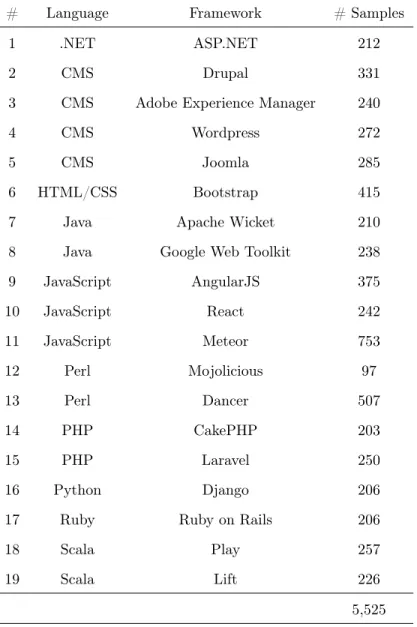
6.1 The frameworks under consideration in this study as well as the lan-guage of development and the number of code smell samples collected for each. “CMS” stands for Content Management System. . . 49
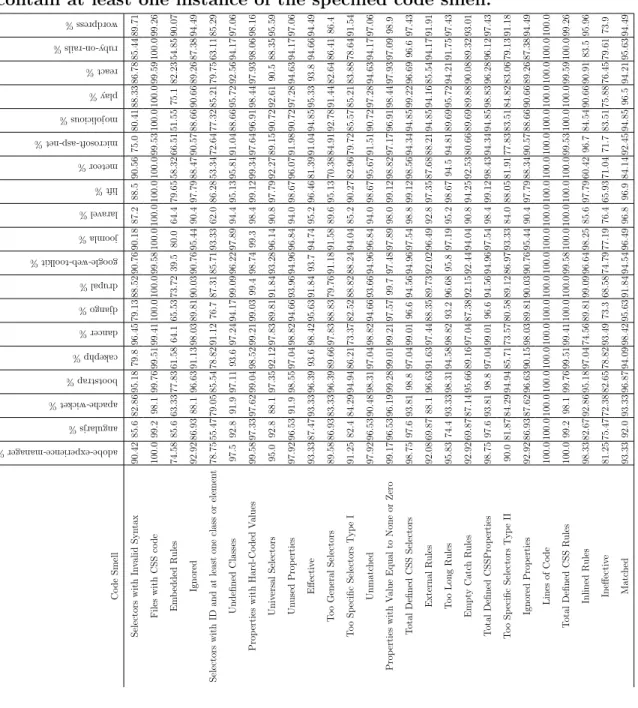
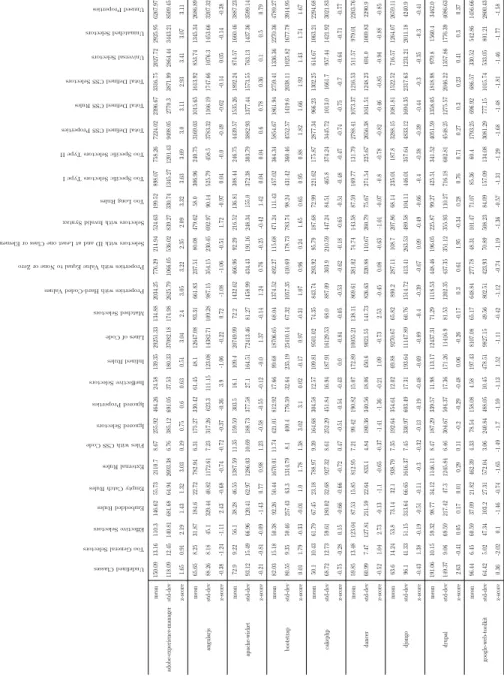
7.1 The percentages of the websites for a specific framework that contain at least one instance of the specified code smell. . . 60 7.2 The mean, standard deviation, and z-score mean for each code
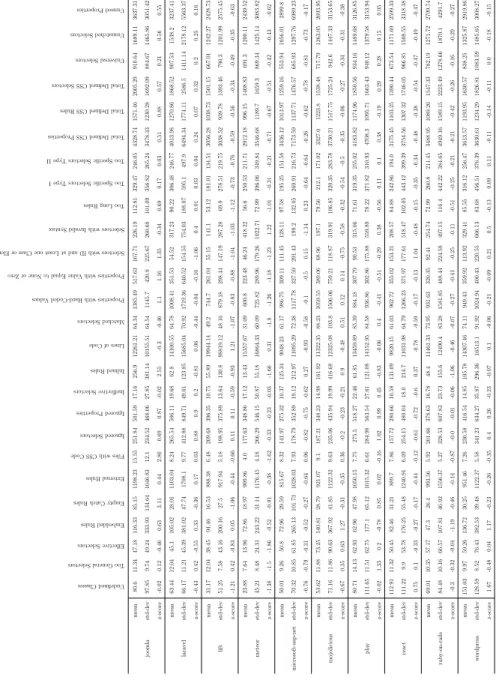
smell/-metric across frameworks 1-9. . . 61 7.3 The mean, standard deviation, and z-score mean for each code
smell/-metric across frameworks 10-19. . . 62 7.4 The full set of CSS code smells and metrics collected from websites
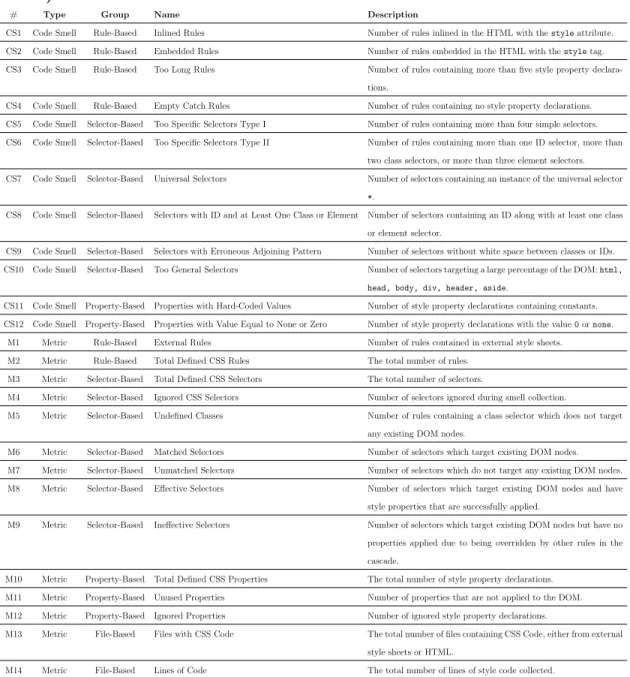
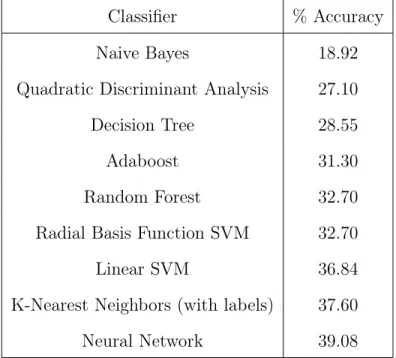
using CSSNose along with their descriptions and the functional group they belong to (rule-based, selector-based, property-based, or file-based). . . 63 7.5 The accuracies of various classifiers tested during framework prediction. 65 7.6 The precision, recall, F1-score, and support on a neural network
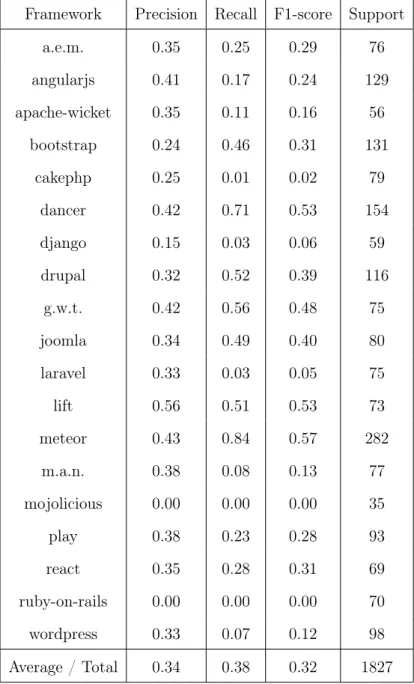
classifier. . . 66 7.7 The number of features and accuracies for each functional group of
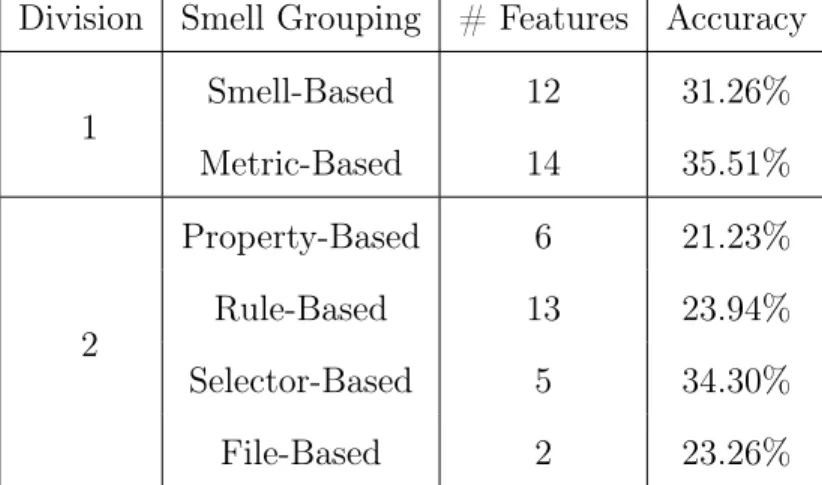
smells and metrics trained on a classifier with 10-fold cross validation. 67 7.8 Example feature sets of two websites along with the actual and
LIST OF FIGURES
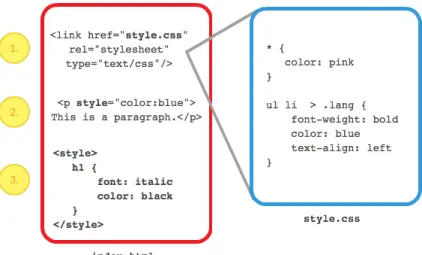
3.1 An example of (1) CSS linked via an external stylesheet using the HTMLlinktag, (2) CSS inlined in an HTMLptag using thestyle attribute, and (3) CSS embedded in the HTML using the HTML styletag. . . 20
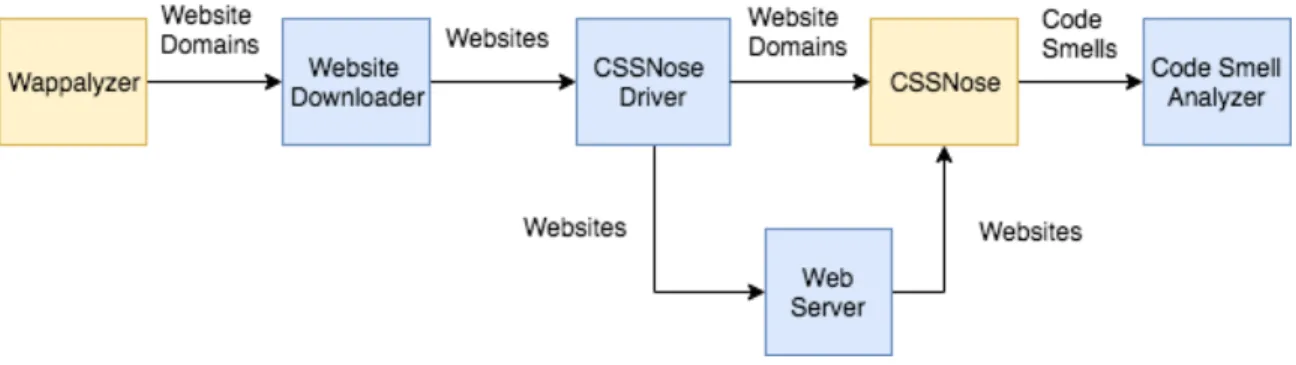
6.1 The software architecture setup for the experiment. . . 48
7.1 The website clusters produced by K-Means. The units of the axes represent a linear combination of the feature set produced by Prin-ciple Component Analysis (PCA). . . 69 7.2 Clusters based on (a) code smell/metric and (b) framework. Each
color/number represents a unique cluster. The units of the axes rep-resent a linear combination of the feature set produced by Principle Component Analysis (PCA). . . 70 7.3 The dendrogram produced by agglomerative clustering of code smells
Chapter 1 INTRODUCTION
1.1 Overview
Modern front-end web development consists of the specification of content, behav-ior, and style. These separate concerns are addressed respectively by the Hyper-text Markup Language (HTML), JavaScript, and Cascading Style Sheets (CSS) and together along with XML/JSON comprise the Asynchronous JavaScript and XML (AJAX) web development paradigm. CSS in particular has a relatively simple syntax and was adopted by the World Wide Web Consortium (WC3) as a way to separate presentation from HTML [49]. This separation of concerns led to reduced effort in content-authoring [37], the ability for designers to work independently from develop-ers, and, most importantly, code reuse on the file level.
many of which typically allow one to specify style abstractly and simply generate CSS code for interpretation by the browser. While these tools have their advantages and attempt to solve some identified problems in CSS, they often do so at the cost of quality in the actual generated CSS code. Some examples of this are style sheets with duplicated CSS rules, highly specific selectors, hard-coded property values, etc. Important to note, however, is that these and other code smells in CSS aren’t simply bad for maintenance [32] (should the CSS still be authored by hand) but can also have other adverse affects on websites, including increased load on the network and server in transferring website files to the browser [48], increased browser rendering time of the page layout [20], and negatively impacted accessibility, device independence, ubiquity, and mobility [55].
The likely prevailing school of thought allowing for the introduction of these code smells is that the codebase being actively manipulated and maintained by the de-veloper is of sole importance, such that the quality and maintainability of generat-ed/transpiled code need not be considered. The result is that many front-end web frameworks and development tools such as preprocessors introduce unnecessary code smells into the generated CSS code being served to the browser, inviting the negative effects mentioned earlier. In one study, Gharachorlu found that 99.8% of the web-sites studied contain at least one type of CSS code smell [32]. Nguyen et al. found that, for six PHP-based web applications, 89-100% of a certain set of six code smells that violate various software engineering principles on the client side can be mapped back to code smells embedded in PHP string literals [50]. Mazinanian et al. found that an average of 66% of style declarations are repeated at least once in a CSS file [46]. Keller and Nussbaumer found that CSS generated by Adobe Fireworks CS4 and WuarkXPress 8 are much less abstract than those authored by hand [37].
although developers have the most control when designing a website “from scratch” -writing custom HTML, CSS, and JavaScript code paired with some server-side lan-guage such as PHP or JavaScript - they are willing to sacrifice control for the sake of speed, scalability, and ease of maintenance. These frameworks make certain design decisions on their behalf in order to build websites in a semi-automated way - of-ten using scripts that are following a design template to generate the resulting site’s files. Even though a web framework may not enforce style decisions on the devel-oper, they may encourage the introduction of code smells through their development process. It’s important, then, that developers have as much information as possible when making the decision to adopt a framework over a custom solution in order to combat any hidden consequences in the selection, such as the quality of the resulting CSS code. We attempt to provide some of this information to developers through descriptive statistics and, more importantly, pave the road for future investigations into the development practices of web frameworks.
Establishing a correlation between individual CSS code smells and metrics could provide insight into which smells tend to follow each other and how the introduction of smells can be influenced by some practices in CSS. This would allow for the de-velopment of analysis tools that suggest possible problems in dede-velopment practices and help framework developers and website developers fix code smell issues.
In order to gain insight into the types and prevalence of code smells generated by certain web frameworks, we pose the following research questions:
RQ1 How prevalent are code smells in websites built with different web frameworks? RQ2 Can we recognize a pattern of CSS behavior in certain web frameworks? Can a set of CSS code smells and metrics collected from a website be used as a unique identifier for the web framework used to develop the website?
RQ3 Does there exist a correlation between CSS code smells and metrics collected from a website?
To answer these research questions, we collect a dataset of thousands of websites produced from 19 different web frameworks, utilize the CSS code smell detection tool CSSNose [32] to extract code smells and other CSS metrics, and train a classifier to predict the framework of a website based on its code smells, as well as perform a clustering analysis on the extracted code smells. Our results show that code smells are highly prevalent in websites produced with web frameworks, CSS code smells and metrics can be used to predict one of 19 frameworks with up to 39% accuracy, and a useful correlation does appear to exist between code smells.
development and they’re intended to provide a mental model and terms for discussion to developers within the community.
1.2 Chapter Outline
The rest of this thesis is structured as follows:
• In Chapter 2, Background, we provide background information on web tech-nologies, Software Engineering principles, and machine learning and analysis techniques.
• In Chapter 3, Cascading Style Sheets & Code Smells, we present an overview of the CSS language and introduce the code smells and metrics relevant to the empirical study.
• In Chapter 4, Separation of Concerns in Cascading Stylesheets, we ex-pand the notion of Separation of Concerns in CSS by formally defining three types of coupling between HTML and CSS and identify the code smells and metrics which have tracked Separation of Concerns in CSS thus far.
• In Chapter 5, Related Work, we introduce work in the field relevant to web crawling, CSS metrics, CSS code smells and defects, and CSS refactoring and tool support.
• In Chapter 6, Empirical Study, we introduce the setup and approach of the study including the software architecture and tools, the data collection process, and the models used for analysis of the data.
• In Chapter 8, Threats to Validity, we discuss issues which may affect the validity of the findings.
Chapter 2 BACKGROUND
This chapter details some web technologies, software engineering principles, and ma-chine learning and analysis techniques that are important for understanding the con-cepts presented in following chapters.
2.1 Web Technologies
Before introducing the specifics of code smells and metrics in Cascading Style Sheets, it is important that the reader has an understanding of the basics of the technologies used in modern front-end web development.
2.1.1 HTML and XML
adherence lacking in most web browsers [12].
2.1.2 The Document Object Model
The document object model (DOM) is a logical representation of the structure of doc-uments that specifies how a document may be accessed and manipulated - essentially, a programming API for HTML and XML documents. Documents are broken down into ’objects’ which are organized into a tree-like structure and given functions and identity. In the context of web development, the HTML file represents the specific instance of a document, the browser constructs the DOM after parsing the HTML tags (turning them into objects), and the JavaScript file contains functionality to locate and manipulate the structure and content of the DOM objects. Thus, the DOM identifies: (1) the interfaces and objects used to represent and manipulate a document, (2) the semantics of these interfaces and objects - including both behavior and attributes, and (3) the relationships and collaborations among these interfaces and objects [1].
2.1.3 Cascading Style Sheets
Cascading Style Sheets (CSS) is a style sheet language2 primarily used for describing the presentation of HTML documents on the web. CSS was created by Lie in 1994 [41] and adopted as an official standard by the W3C in 1996 [49]. CSS allows developers to specify style in the form ofrule blocks containingstyle properties which are applied to a certain subset of DOM elements determined by a selector.
2.1.4 JavaScript
JavaScript (JS) is a general-purpose programming language primarily used for speci-fying dynamic behavior in web applications through client-side interactions with the DOM. It was originally developed in 1995 by computer scientist Brendan Eich at Netscape and taken to the European Computer Manufacturers Association (ECMA) in 1996 for standardization in the form of ECMAScript [6]. The EMCAScript stan-dard allows web browsers to implement JavaScript engines3 for the local execution of JavaScript code. Thanks to JavaScript engines such as V8 and Rhino, JavaScript has applications outside of the web browser such as for client-side scripting, video-game development, and desktop/mobile application development.
2.1.5 Uniform Resource Locators & Website Domains
A Uniform Resource Locator (URL) is a string reference to a web resource that specifies its location on a computer network and a mechanism for retrieving it (usually HTTP) [11]. A URL is a specific type of Uniform Resource Identifier (URI) which is simply any string reference to a resource. The host component of the URL specifies the type of service being requested and the host computer of the resource on the internet. Domain names are most often used as the identifier of that host to preclude the need to memorize IP addresses. For example, in the URL http://www.tobiasbleisch.com, HTTP is the protocol for accessing the internet resource, www is the type of service (web server), andtobiasbleischandcomare the second and top level domain names respectively which together can be called the domain of the website being accessed. Domain names are used in this study when communicating which websites are to be downloaded and analyzed.
2.1.6 AJAX - Static vs Dynamic Websites
Asynchronous JavaScript and XML (AJAX) is a collection of technologies and tech-niques for the development of highly interactive websites. HTML is used for specify-ing the content, CSS for the presentation, JavaScript in combination with the DOM for dynamically altering the website content and layout, and the XMLHttpRequest (XHR) object in JavaScript for transferring data between a web browser and a web server to avoid full page reloads. The invention of these technologies allowed for a shift from the development of static websites to the development of dynamic web applica-tions [47]. Traditional static websites are based on a multi-page interface paradigm consisting of multiple unique web pages, each having a unique URL and hypertext link. Dynamic web applications using AJAX are able to alter the state of the DOM in real-time through the execution of JavaScript code, and it’s therefore possible to represent unique web pages without a corresponding hypertext link [47].
2.1.7 Web Frameworks & Content Management Systems (CMS)
consideration in this study were selected based primarily on popularity and language distribution [29]. See Table 6.1 for a complete list of the frameworks under consider-ation.
2.2 Software Engineering Principles
The following terms are important ideas in Software Engineering which are applied to front-end web development in both the empirical study and the presentation of ideas related to coupling between CSS and HTML.
2.2.1 Code Smells
Code smells are structures in software that indicate the violation of fundamental design principles and negatively impact design quality. Though these structures may produce functionally correct results in the software and are not themselves bugs, they often contribute to bugs later in development as the size or complexity of the software grows [53].
2.2.2 Coupling & Cohesion
maintainable software project tends to demonstrate low coupling and high cohesion. Stevens et al. invented these notions of coupling and cohesion [59].
2.2.3 Separation of Concerns
Separation of concerns is a general principle of Software Engineering that seeks to control complexity in software projects by separating a program into distinct sec-tions, such that each section addresses a separate concern [62]. In a broader sense, a program is simply the implementation of a solution to a complex problem. Thus, separation of concerns can be defined more intuitively as the decomposition of a com-plex problem into manageable “concerns”, solving these concerns individually without detailed knowledge of the other parts, and then combining them into one result. The result of applying separation of concerns to a program is modular code that also demonstrateslow coupling and high cohesion. The term was originally introduced by Dijkstra [25]. One very typical example that demonstrates the concepts of the Sepa-ration of Concerns is the Model-View-Controller (MVC) design pattern. A software application which has a need for a user interface, internal data representation in the form of data models, and logic for the presentation of that data is best organized in such a way that these three distinct concerns are separated.
2.3 Machine Learning & Analysis Techniques
2.3.1 Supervised Learning - Classification
Supervised learning is the process of approximating a mathematical function that maps some set of inputs (independent variables) to some set of outputs (dependent variables) in a dataset [39]. These outputs are calledlabels and are typically manually collected and associated with the set of inputs called features. Each set of features and its corresponding label is referred to as an example. Once a mapping between features and labels has been established through a process called training, the devel-oped model can be used forclassification, the task of deriving labels on new (unseen) data points. There are a variety of supervised learning algorithms which all differ in their approach to the function approximation and which may perform better or worse on a dataset depending on the properties of the dataset they are trying to exploit and the assumptions they are making about the dataset. Supervised learning can be seen as having two main uses: (1) building a model for decision-making which depends on the accurate derivation of a data point’s label and (2) establishing correlations between variables of interest within the dataset.
2.3.2 Unsupervised Learning - Clustering
Unsupervised learning is the process of approximating a mathematical function which maps some set of inputs to some set of inferred outputs in a dataset [31]. These in-ferred outputs are usually the result of some discovery of hidden structure in the dataset which can be achieved through various methods. One such method is
clus-tering, in which the discovery of hidden structure is based on a notion of similarity
properties of the dataset they are trying to exploit and the assumptions they are mak-ing about the dataset. There is typically no notion of performance in unsupervised algorithms due to the lack of knowledge about the outputs. Unsupervised learning is mostly used for exploratory data mining and discovering interesting relationships in a dataset.
2.3.3 Neural Network
An (artificial) neural network is a learning algorithm which leverages a unique struc-ture in its function approximation that is inspired by the strucstruc-ture of neurons and synapses in biological systems [51]. The function to be approximated is implicitly stored in the weights of the network. There are applications of neural networks for both supervised and unsupervised tasks, though supervised learning is more common.
2.3.4 Euclidean Space & Distance
Euclidean space is a finite-dimension real vector space RN described by the axioms of Euclidean geometry and usually represented by Cartesian coordinates [34]. In essence, it’s a system which facilitates the notion of points and provides methods for expressing the relationships between them such as lines, angles, and distances. Euclidean distance is the straight-line distance between two points in this space.
2.3.5 K-Means Clustering
K-Means is a clustering algorithm which aims to partition n observations into k
2.3.6 Hierarchical & Agglomerative Clustering
Chapter 3
CASCADING STYLE SHEETS & CODE SMELLS
This chapter presents an overview of the CSS language and its features as well as describes the code smells and metrics collected and used in the empirical study.
3.1 Overview of CSS
This section presents an overview of the CSS language and its features.
3.1.1 CSS Rules
A rule is a block of CSS code which specifies the style to be applied to specific parts of the document object model (DOM). A rule is composed of aselector and adeclaration
block in which a list ofstyle declarations is placed. The selector specifies the locations
in the DOM to which the rule block will apply. A single style declaration is composed
of astyle property to be altered and the value that the property should hold. Examples
of common style properties are color, font, width, height, etc. The collection of declaration blocks specified in a style sheet will determine the appearance and layout of a page once rendered by the browser. The following snippet shows the typical structure of a CSS rule:
selector {
property : value; ...
3.1.2 CSS Selectors
A selector is a collection of identifiers which correspond to locations in the tree struc-ture composing the DOM. Selectors which share styling can even be grouped together so that the style properties only need be specified once. There are five types of basic selectors [10]:
Type Selector - A type selector (referred to in this thesis as anelement selector) targets the nodes in the DOM that correspond to HTML elements sharing the same name. For example, the h1 selector will target all <h1></h1> tags.
Class Selector - A class selector targets DOM nodes associated with aclass at-tribute in the HTML document. Class selectors are preceded with a dot ‘.’ and mirror the name of the class value that should be selected. For example, the .intro selec-tor will target all nodes corresponding to HTML elements containing the attribute class="intro".
ID Selector - An id selector targets all DOM nodes associated with an ID at-tribute in the HTML document. ID selectors are preceded with a pound symbol ‘#’ and mirror the name of the ID that should be selected. For example, the#launch se-lector will target all nodes corresponding to HTML elements containing the attribute id="launch".
Universal Selector - The universal selector ‘*’ will select all nodes in the DOM, or all remaining nodes if used in combination with other selectors that have narrowed down the searchable space of the DOM.
Combinators - Combinators are symbols placed between selectors that narrow the search space of the remaining nodes of the DOM. They allow for simple selectors to be joined intocombined selectors (referred to in this thesis ascomplex selectors) that target more specific parts of the DOM. Mesbah and Mirshokraie define them best [48]:
• A B - Descendent Combinator - A space ‘ ’ between selectors A and B targets all elements selected by B which are descendents of A on the DOM.
• A > B- Child Combinator - A ‘>’ between selectors A and B targets all elements selected by B which are direct children of the elements selected by A on the DOM.
• A ˜ B - General Sibling Combinator - A ‘˜’ between selectors A and B targets all elements selected by B which have an element selected by A as a sibling on the DOM.
• A + B- Adjacent Sibling Combinator - A ‘+’ between selectors A and B targets all elements selected by B which are directly preceded by a sibling eleemnt selected by A.
3.1.3 Pseudo-Classes & Pseudo-Elements
correspond to a specific part of a DOM element’s content rather than to the entire content of a DOM element [9]. For example, the pseudo-elementp::first-lineadds style to the first line of a selected paragraph’s text. Pseduo-classes are specified with a keyword preceded by a single colon ‘:’ while pseudo-elements are specified with a keyword preceded with two colons ‘::’, and they are each appended to the element selector to which they are intended to apply.
3.1.4 Code Location
There are three main ways for developers to include CSS:
• external stylesheets linked to an HTML document via the <link> element or@import rule
• inlinedin HTML elements using the style attribute
• embedded in HTML using the<style> element
See Figure 3.1 for a visual of the various ways to include CSS in HTML. External stylesheets allow style code to be applied to multiple document instances. Although there are some valid uses for inlined and embedded CSS code, they are generally considered bad practice because they apply CSS to a specific document instance, therefore inhibiting code reuse and complicating maintenance.
3.1.5 Specificity
Figure 3.1: An example of (1) CSS linked via an external stylesheet using the HTML link tag, (2) CSS inlined in an HTML p tag using the style attribute, and (3) CSS embedded in the HTML using the HTML style tag.
are considered more relevant and therefore hold more weight over others in being ap-plied. Specificity is measured as the concatenated counts of simple selectors contained in a complex selector in the following order: inlined, ID,
class/attribute/pseudo-class, element/psuedo-element. For example, the complex selector .intro [title]
p would have specificity 0,0,2,1 and the selector #launch would have specificity 0,1,0,0. In this case, the latter has a higher specificity than the former.
3.1.6 Importance
3.1.7 Inheritance
Inheritance is a CSS language feature that applies style properties to descendent nodes of a styled DOM node until overridden by another rule. The DOM is hierarchical in nature and inheritance takes advantage of this, the result being that the developer need not specify style for every node and all its children - only those which differ. Not all properties are inherited - only those which reasonably should be applied will be. For example, a style rule containing properties border:solid; color:pink; with selectorp will also be applied to a<span></span> should it be present in the text of the paragraph selected by p. However, border would not be applied to <em></em> inside the same <p></p> because it’s unreasonable to expect emphasized words in a paragraph to have a border [49].
3.1.8 Cascading
Cascading is a CSS language mechanism that determines which style rules are applied to the DOM. When a node has no style rules targeting it, it will simply inherit its style properties. When a node has a single rule targeting it, it will adopt that rule’s style properties and inherit any leftover properties not specified in that rule. When a node has multiple rules targeting it, the characteristics of those rules are considered and resolved based on the importance (presence of the importance attribute on the style property), the origin of the CSS code, the specificity, and, lastly, the location of the CSS code. Important to note is that cascading only comes into effect whenmore
than one of the same type of property is specified for a DOM element. This means
• Importance - the presence of the important attribute on the style property
• Origin - the origin of the CSS code:
1. author - style specified by the developer
2. user - style specified by the user, given to the browser 3. user-agent - style specified by the browser (defaults)
• Specificity - the specificity of the style property’s selector
• Location - the closeness of the style code to the HTML elements. Rules at the same level of closeness to the HTML but which are specified later in the document are prioritized: inlined, embedded, then external.
• Inheritance - style properties specified for parent elements which inherit by default. Note that properties with the inherit value would not fall into this category.
3.1.9 @Rules
3.2 CSS Code Smells
This section introduces CSS code smells collected in the empirical study, gives a brief explanation of why they’re classified as smells, and provides short code snippets to demonstrate. Figure 7.4 lists and gives a brief summary of these code smells. The smells in this list are those collected by the tool CSSNose [32].
3.2.1 Inlined Rules
Inlined Rules are those contained in the style attributes of HTML elements. See Figure 3.1 for a visual example. Inlined style rules apply only to the HTML docu-ment in which they are included, which limits code reuse, and they can increase the complexity of CSS development by overriding styles defined in external stylesheets.
3.2.2 Embedded Rules
Embedded Rules are those contained between the <style> tags in an HTML docu-ment. See Figure 3.1 for a visual example. Embedded style rules apply only to the HTML document in which they are included, which limits code reuse, and they can increase the complexity of CSS development by overriding styles defined in external stylesheets.
3.2.3 Too Long Rules
body {
font: 1em/150\% Helvetica, Arial, sans-serif; padding: 1em;
margin: 0 auto; max-width: 33em;
background-color: blue; color: red;
}
3.2.4 Empty Catch Rules
An Empty Catch Rule is simply a CSS rule which contains a selector but no properties. Empty rules add bloat to CSS code in terms of file size and maintenance without any style benefit.
.button {
}
3.2.5 Too Specific Selectors Type I (Too Much Cascading)
Too Much Cascading occurs when a complex selector has a high number of simple selector units and therefore targets a highly specific part of the DOM. In this way, it relies too heavily on the structure of the DOM and becomes inflexible to changes in DOM structure. Gharachorlu conducted a small-scale study on 20 websites and computed averages to conclude that rules containing more than four simple selectors is considered too specific.
color: red; }
3.2.6 Too Specific Selectors Type II (High Specificity Values)
Similar to Too Much Cascading, selectors with high specificity values indicate a high reliance on the structure of the DOM but from the point of view of the types of simple selectors used rather than simply the number of units. Gharachorlu analyzed the impact levels of different selector types on the specificity number (a,b,c,d) (ignoring inlined rules) and concluded that a complex selector is too specific if the number of id selectors is greater than one, number of class selectors is greater than two, or the number of element units is greater than three.
#listA #listB {
border-style: dotted; }
.example1 .example2 .example3 { font-size: large;
}
html body span div { color: pink; }
3.2.7 Universal Selectors
inherited values have no inheritance [49].
* .desktop {
display: block }
3.2.8 Selectors with ID and at Least One Class or Element
Selectors containing an ID already reference a single unique HTML element, so adding a class or element to the selector adds unnecessarily to cognitive load and to rendering time. If HTML elements below a certain element needs to be selected on the DOM, classes alone or in conjunction with element selectors should be used, or an ID should be placed directly on the element to be targeted.
span #block { top: 50\%;
margin-top: -5.5px; }
3.2.9 Selectors with Erroneous Adjoining Pattern
Two selectors are considered to be erroneously adjoined when the white space between two simple selectors is removed. The result is that these selectors are not parsed correctly by the browser and constitute bloat in the code without any style properties being applied.
spandiv {
3.2.10 Too General Selectors
Selectors are too general when they target too much of the DOM to be of any real use, often resulting in undoing style (essentially changing a style attribute back to its original or default value after its been changed once already). Gharachorlu proposed the following simple selectors to be too general when used as standalone selectors: html, head, body, div, header, aside.
html {
border: none; padding: 0px; }
3.2.11 Properties with Hard-Coded Values
Properties with Hard-Coded values are those which use constants (“magic numbers”) to specify values. Property values are better specified relatively using CSS functions like calc() or units like ems orpercentages.
body h4 {
font-size: 16px; padding: 3px 20px; }
3.2.12 Properties with Value Equal to None or Zero (Undoing Style)
Style as defined by Punt et al. are properties applying to an HTML element that have been set or defaulted to some initial value, overridden any number of times to different values (as expected), and then subsequently changed back to the initial value [54]. This is harmful because more CSS is written to effectively reduce the styling and it works against the cascade because properties only need to be overridden when they should be adopting some new value, not reverting back to the original.
The definition used by CSSNose produces false positives because a none value for property displays is a standard way for web developers to hide an element and reset styles are used to remove inconsistencies in the presentation defaults used by browsers. It also produces false negatives because a style can also be undone by any valid value for a property, whereas CSSNose only looks at 0 or none values. The definition used by CSSNose was kept in the analysis, however, because it still serves its purpose in providing information as a feature in differentiating CSS behavior.
.chart {
border: none; margin : 0;
text-shadow : none; }
3.3 CSS Metrics
3.3.1 External Rules
External Rules is the number of rules contained in an external stylesheet and linked to from an HTML document. See Figure 3.1 for a visual example.
3.3.2 Total Defined CSS Rules
Total Defined CSS Rules is the number of all defined CSS Rules including inlined, embedded, and external. The inlined style properties extracted from a single DOM element counts as a single rule.
3.3.3 Total Defined CSS Selectors
Total Defined CSS Selectors is the number of all CSS selectors defined in all CSS external or embedded rules. Inlined CSS rules do not contain selectors and aren’t counted here.
3.3.4 Ignored CSS Selectors
Ignored CSS Selectors is the number of selectors that were ignored when extracting code smells and metrics from CSS code due to errors in parsing the selector.
3.3.5 Undefined Classes
Undefined Classes are the number of classes used in selectors which do not successfully target a corresponding class included in a DOM node.
3.3.6 Matched Selectors
3.3.7 Unmatched Selectors
Unmatched Selectors is the number of selectors that do not target any DOM elements. Note that unmatched selectors are not considered code smells because it’s perfectly reasonable for selectors to become matched in successive DOM state changes. It’s simply the rules with selectors that never become matched that should be removed for being unnecessary.
3.3.8 Effective Selectors
Effective Selectors is the number of selectors that target existing DOM nodes and have style properties that are successfully applied.
3.3.9 Ineffective Selectors
Ineffective Selectors are those which do apply to a target DOM element but which are overridden by other rules in the cascade. Note that ineffective selectors are not considered code smells because it’s perfectly reasonable for selectors to become effec-tive in successive DOM state changes. It’s simply the rules with selectors that never
become effective that should be removed for being unnecessary.
3.3.10 Total Defined CSS Properties
Total Defined CSS properties is simply the number of properties defined in all CSS rules, whether external, embedded, or inlined.
3.3.11 Unused Properties
natural result of the cascade as property values override each other.
3.3.12 Ignored Properties
Ignored Properties is the number of properties that were ignored when extracting code smells and metrics from CSS code due to errors in parsing the property.
3.3.13 Files with CSS Code
Files with CSS code is the total number of files containing CSS code, either from external style sheets or HTML containing embedded CSS code (but not inlined).
3.3.14 Lines of Code (LOC)
Chapter 4
SEPARATION OF CONCERNS IN CASCADING STYLESHEETS
This chapter introduces three types of coupling between HTML and CSS and identifies the relevant code smells and metrics which have tracked Separation of Concerns in CSS thus far. The ideas presented in this chapter can be considered the result of applying Separation of Concerns as a software engineering principle to CSS.
4.1 Overview
CSS was originally designed to remove the responsibility of style authoring from HTML [41] [49]. Ideally, one or more separate style sheets in a web project are linked to from an HTML file to specify style. The original line of thinking was that both HTML and CSS documents could utilize the semantic, standardized HTML elements 1 (such as <p> for paragraph, <ul> for an unordered list, etc.) as an agreed-upon interface between content and style and thus have CSS documents be interchangeable with any other HTML documents. The major benefit from this approach is that individual style sheets can be reused to supply style for a variety of different HTML documents.
side language features and leniency practiced by browsers enables the violation of well-established software engineering principles [50]. For example, the <style> and <script>elements in HTML are capable of supporting embedded CSS and JavaScript code snippets respectively which violates Separation of Concerns. Another example is that CSS and HTML are not always strictly required to conform to the current language standards maintained by W3C, which sometimes results in HTML code with missing closing tags or CSS code with unmatched selectors [32].
4.2 Motivation
Given that CSS was designed to separate style authoring from HTML and given that there are features and common practices in modern front-end web development which currently facilitate the violation of well-established Software Engineering principles such as Separation of Concerns, solutions concerning these language features or devel-oper practices must be investigated. However, although there exist code smells and metrics which track various facets of Separation of Concerns, they aren’t sufficient in providing a holistic view of the principal applied to CSS.
In order to promote the active awareness of Separation of Concerns as a Software Engineering principle and encourage discussions on the topic in the web development community, it’s important to give developers the proper mental model and terminol-ogy to discuss Separation of Concerns as it applies to front-end web development and, more specifically, to CSS. We attempt to provide this mental model and terminology by classifying and formally defining three types of coupling between CSS and HTML that can be present in a web project. An excessive amount of any of these three types of coupling can be considered violations of Separation of Concerns. Although cohesion is also an important element of separation of concerns, expressing the viola-tions purely in terms of coupling is much more convenient and leads to a more easily understood classification.
4.3 Separation of Concerns & Coupling
and high cohesion. Coupling and cohesion are two general principles of Software En-gineering that are concerned respectively with the level of dependency and the level of semantic or logical consistency between two software modules. Coupling is usually contrasted with cohesion - that is, low coupling often correlates with high cohesion and vice versa. Coupling is considered to be high when, given two software modules A and B, a change to module A necessitates a change to module B. (See Chapter 2, Background, for more information).
4.4 Co-occurence Coupling
Co-occurence coupling can be defined as the dependency of two or more software components on each other due to the interchanging of code between components. Ideally, code used to define a particular software component is allocated its own file or section of a file and therefore not mixed with code that is used to define other software components. However, some software paradigms allow or even encourage the mixing of code from different software components, thus breaking separation of concerns.
In modern front-end web development, HTML allows co-occurence coupling with CSS in two forms: inlined and embedded CSS.Inlined CSS utilizes thestyleproperty of an HTML element to specify the style of that particular element (and, due to inheritance in CSS, of all descendent elements) within a particular HTML document.
Embedded CSS, also called an Internal Style Sheet, utilizes the <style> HTML tag
and CSS selectors to specify style of an arbitrary number of HTML elements within a particular HTML document. Otherwise, CSS is included in anExternal Style Sheet
CSS code in the HTML documents. Low co-occurence coupling occurs when nearly all of the style code is included in external style sheets and linked to from the HTML. The above definition of co-occurence coupling is consistent with the earlier def-inition of coupling in that, given two HTML files A and B which share a block of inlined/embedded style code C, a change to the style code C necessitates a change to files A and B for as long as the two are intended to remain stylistically similar. Impor-tant to note is that the “concern” under consideration here when applying separation of concerns is content vs style rather than the concern of one page vs another page within a website. High co-occurence coupling can negatively impact maintainability in CSS because changes to the style code of one HTML documents requires changes to the style code of all HTML documents that are intended to remain stylistically similar.
Co-occurence coupling is currently kept account of through the amount of Inlined Rules, Emedded Rules, and External Rules included in a web project. These metrics are sufficient to measure co-occurence coupling especially when they’re represented as percentages of the total defined number of rules because they show the distribution of style code co-occurring with HTML code and existing in external stylesheets.
4.5 Structural Coupling
makes the call to a function openFile() under the assumption that it will return a Fileobject, it can be considered to rely on the structure of theopenFile()function. Should the openFile() function change its return type to instead be a file descrip-tor, the loadData() function much also be changed to accommodate the new return type. Although necessary to a degree, a software component ideally relies as little as possible on the structure of other components, abstracting when possible.
In modern front-end web development, HTML and CSS allow structural coupling in the form of complex selectors. Complex selectors can be used to select highly specific sections of the DOM that are not likely to appear in many other content doc-ument instances. In a web project, high structural coupling occurs when a majority of the selectors rely on the structure of the DOM through highly specific selectors. Low structural coupling occurs when a majority of the selectors rely less on structure by utilizing less specific selectors and class/ID selectors in cases when highly specific targeting is needed.
The above definition of structural coupling is consistent with the earlier definition of coupling in that, given an HTML document A and an external style sheet B where B provides style for A, a change to the structure of file A necessitates a change to file B. A web project demonstrates a high level of structural coupling when the CSS selector is highly complex, referring to a deeply nested document tree structure. High structural coupling can negatively impact the reusability of style sheets because a style sheet tied too closely to the structure of any one HTML document cannot be easily applied to other HTML documents. However, low structural coupling creates another set of problems in the form of an over-reliance on identifiers, which can be called syntactic coupling (described in the next section).
former two describe selectors that contain either too many simple selectors or more than a specified amount of one of the four types of simple selectors. The latter describes selectors that are one of a set of element selectors with a very wide scope in the HTML document. (See Section 3.2 for descriptions of these code smells.) Although they consider the specificity or generality of individual selectors, they fail to consider coupling at the file-level. However, the Average Scope metric defined by Keller and Nussbaumer can be used to effectively track structural coupling on the file level because it measures the average number of DOM nodes that are targeted with the selectors in a stylesheet [37].
The full definition of Average Scope is defined below:
AverageScope=
Pm
i=1# of elements in scope of selector i
m·n (4.1)
where m= # of selectors
and n = # of elements in the document tree
4.6 Syntactic Coupling
smaller, modular functions in that a higher degree of decomposition results in higher saturation of identifiers. Ideally, a software component balances the decomposition of code into function calls (and therefore the use of identifiers) of other components with explicit code blocks.
In modern front-end web development, CSS and HTML allow syntactic coupling in form of class and ID attributes/selectors. Class and ID attributes specified in HTML tags can be used in CSS as selectors to target specific DOM nodes bearing the corresponding class or ID identifier. In a web project, high syntactic coupling occurs when selectors are composed entirely of class or ID identifiers, targeting highly specific DOM nodes. Low syntactic coupling occurs when selectors rely only on DOM
structure and are composed entirely of element selectors joined by combinators.
The above definition of syntactic coupling is consistent with the earlier definition of coupling in that, given an HTML document A and an external style sheet B where B provides style for A, change to the class or ID attribute identifier in A necessitates a change to the corresponding selector identifier in B. High syntactic coupling can negatively impact maintainability as identifiers must be appropriately synced and updated for each HTML document to which a style sheet applies.
The full definition of Universality is defined below:
U niversality= # element selectors in SSel
# selectors (4.2)
where SSel is the set containing all osolated simple selectors and the last simple selector from each combined selector
4.7 Coupling - The Reality
In theory, one would do well to reduce the amount of co-occurence coupling as much as possible and simply balance the semantic and syntactic coupling. Ultimately, the concerns of content, style, and behavior specification are connected, and some degree of semantic and syntactic coupling will always be necessary. Keller and Nussbaumer put it best when they say, “Although content and presentation can be separated physically in different files, in a logical way they are closely connected” [37]. This line of reasoning applies to front-end web development as whole as well: although HTML, CSS, and JavaScript were designed to separate the concerns of web development, they must still interact with each other in order to achieve the end goal of creating a website.
Chapter 5 RELATED WORK
Although CSS has historically not been given much attention in academia [13] [20] [30] [42] [48] [55], there are some works that explore CSS metrics, code smells, and refactoring opportunities. The works in these areas admittedly do not fall clean-cut into these categories, so we place them according to where we feel the priorities of the papers lie.
5.1 Web Crawling
Mesbah et al. develop a tool called Crawljax for crawling 1 AJAX web applications [47]. Traditional static websites assign a hypertext link and URL for each unique state of the user interface. However, the state of the user interface in AJAX applica-tions is determined dynamically though changes to the DOM as a result of executing JavaScript code. Thus, Crawljax creates a state-flow graph to represent the various possible states of a web application, detects a list of clickable elements from the DOM of the current application state, recursively navigates the website to build the graph by executing the JavaScript code associated with those clickable elements, and, fi-nally, generates a static HTML document of each state from a saved snapshot of the DOM. This website navigation is achieved through the use of Selenium WebDriver [26], a browser driver2 used for automated web testing. A case study by the authors confirms that Crawljax performs well on six sample AJAX web applications. The pri-mary tool used for data collection in this work, CSSNose, performs dynamic crawling using Crawljax.
1web crawlingis the programmatic accessing of content and functionality on the web
5.2 CSS Metrics
Software metrics are measures of the extent to which a particular piece of software possesses some property [27]. Metrics are important for quantifying the quality of software for maintenance purposes in software engineering. Adewumi et al. define and implement a tool to collect complexity metrics for CSS such as Rule Length and Number of Cohesive Rule Blocks and validate them against the Kaner Framework for Software Engineering Metrics [13] [14]. Mesbah and Mirshokraie build a tool, Cilla, which detects unmatched and ineffective selectors, overridden declaration properties, and undefined class values in CSS code, finding that an average of 60% unused CSS se-lectors in deployed applications [48]. Cilla’s metrics are included in the tool CSSNose [32], which is used in this study.
5.3 CSS Code Smells & Defects
Nguyen et al. detect and analyze embedded server-side code smells in dynamic web applications [50]. They establish a negative correlation between these code smells and code maintainability metrics. Gharachorlu defines and aggregates a set of 26 CSS code smells, integrating the tools CSSNose [48], CSS Lint [7], and W3C CSS
Validator [61] into a single smell-detection framework [32]. The framework is used
to dynamically crawl 500 random websites in order to inspect their CSS practices and analyze the prevalence, the extent, and the correlation between code smells and various CSS metrics. Gharachorlu’s experimental setup and codebase served as an inspiration and basis for this work. Gharachorlu finds that 99.8% of the websites studied contain at least one type of CSS code smell [32]. In order to obtain an understanding of CSS behavior, the scope of this study is expanded to include 5,525 websites. Serdar Biçer and Diri collect some CSS metrics at the rule level in order to train multiple machine learning classifiers for defect prediction on CSS code [57]. Geneves et al. implement a static debugging tool that’s able to identify defects in CSS code without being applied to a specific document instance.
5.4 CSS Refactoring & Tool Support
Bosch et al. develop a tool to detect and delete redundant CSS rules [20]. They do so by developing equivalence relations via tree logic through the static analysis of CSS selectors. The result is that masked rules, those that remain inactive due to the presence of equivalent rules which have preference, and verbose rules, those that may be active at times but don’t apply any additional styling, are removed from the style sheet and the size of the file is thereby reduced. They demonstrate an average size reduction of single CSS files from well-known sites of 7.75% with a maximum of 17.83%, and show that some information about HTML documents that use multiple style sheets can increase size reduction on any one CSS file up to 30%.
Punt et al. investigate the undoing style code smell in CSS and develop a tool to detect and automatically refactor varying patterns of undoing style. Undoing style refers to style properties that are initially set to a value A (either explicitly by the author or implicitly via a language feature), then overridden to a value B, possibly multiple times, and then set back to the original value of A. The authors refer to this as the A?B*A pattern, and they check for this pattern by analyzing the cascade of the style applied to a single HTML element, observing when a property is overriden multiple times. They can then guarantee that the style semantics for this element are preserved on any proposed refactor that fulfills the following two preconditions: (1) the most specific part of the selector is an ID or class and (2) the elements that the reset rule (the last undoing rule) applies to are the subset of the elements the initial rule applies to. On a dataset of 41 well-known websites, they found the ratio of undoing style detections to the number of style rules to be 25% with 2060 occurrences of undoing style on average, an average of 11 opportunities for automatic refactoring per webapp with a high of 62, and only 38 out of 8789 semantic changes caused by refactoring.
seman-tically equivalent values for given properties, and a set of individual-property decla-rations which are equivalent to a single shorthand-property declaration, and develop a static analysis tool to automatically refactor them [46]. Their approach consists of parsing and normalizing CSS rules, extracting refactoring opportunities through the use of association rule mining algorithms, ranking the resulting refatorings by their computed file reduction potential, and ensuring semantic preservation on refactorings by preserving the order dependencies of rules through the expression of a constraint satisfaction problem. An experimental run on 38 web applications finds that on aver-age 66% of style property declarations are repeated at least once, there are on averaver-age 62 refactoring opportunities associated positively with file size reduction, and on av-erage an 8% reduction in file size of examined CSS files can be achieved by applying refactorings.
Hague et al. present an abstraction of HTML5 applications based on monotonic tree-rewriting and proceed to study its "redundancy problem" in order to detect redundant CSS rules [33]. Unlike dynamic analysis techniques, their technique will only report rules which are definitely redundant, but as such will not report rules that may be redundant based on a particular DOM state. In a case study of 8 real and invented web pages, TreePed correctly identified all definitely redundant rules.
5.5 Contributions of this Work
Chapter 6 EMPIRICAL STUDY
This chapter details the empirical study setup in order to answer the proposed research questions. The following research questions are under consideration:
RQ1 How prevalent are code smells in websites built with different web frameworks?
RQ2 Can we recognize a pattern of CSS behavior in certain web frameworks? Can a set of CSS code smells and metrics collected from a website be used as a unique identifier for the web framework used to develop the website?
RQ3 Does there exist a correlation between CSS code smells and metrics collected from a website?
In order to investigate the CSS behavior patterns of various frameworks and ob-serve correlations between code smells and metrics, we collect a sample of websites from various frameworks, collect code smells and metrics from the CSS code of each website (see Table 7.4), train a model to predict the framework from a feature set of CSS code smells from a website, and perform various clustering tasks on the code smells and metrics.
6.1 Overview
Figure 6.1: The software architecture setup for the experiment.
gives an overview of the software architecture. The pipeline can be explained as followed:
First, lists of website domains built with 19 different web frameworks are obtained from the web platform analysis tool Wappalyzer [16]. These lists of domains are fed to a Website Downloader script which downloads local copies of several hundreds of websites from each web framework. The downloaded websites are passed to a CSSNose Driver script, which for each website instructs a Web Server to serve the website on localhost and passes the domain of the website to an instance of CSSNose [32]. CSSNose dynamically crawls the website, aggregates CSS code from each new DOM state it encounters, and outputs a set of CSS code smells and metrics collected for that website in the form of a report. The code smell reports for all websites across all frameworks are then parsed and analyzed by a Code Smell Analyzer script which outputs descriptive statistics (RQ1), a classification model (RQ2), and several clustering models (RQ3).
6.2 Data Collection
Table 6.1: The frameworks under consideration in this study as well as the language of development and the number of code smell samples collected for each. “CMS” stands for Content Management System.
# Language Framework # Samples
1 .NET ASP.NET 212
2 CMS Drupal 331
3 CMS Adobe Experience Manager 240
4 CMS Wordpress 272
5 CMS Joomla 285
6 HTML/CSS Bootstrap 415
7 Java Apache Wicket 210
8 Java Google Web Toolkit 238
9 JavaScript AngularJS 375
10 JavaScript React 242
11 JavaScript Meteor 753
12 Perl Mojolicious 97
13 Perl Dancer 507
14 PHP CakePHP 203
15 PHP Laravel 250
16 Python Django 206
17 Ruby Ruby on Rails 206
18 Scala Play 257
19 Scala Lift 226
6.2.1 Collecting Websites
Local copies of hundreds of websites from each of the 19 frameworks were collected. Lists of website domains that were built using different frameworks were acquired from the web analytics platform Wappalyzer [16]. Frameworks were selected primar-ily based on popularity and language distribution [29]. See Table 6.1 for the full list of frameworks. Collecting local copies of websites was important to ensure reproduca-bility of the experiment, as the live version of a website can change. A recursive crawl was restricted to a depth of 3, as that should be enough to provide a representative sample of the CSS used on the website. A random wait between 20-40 seconds was introduced between the download of each resource to show mercy to web servers and to attempt to avoid throttling from websites detecting high download frequency. Most files deemed unnecessary for crawling were rejected, including images, pdfs, archives, etc. Robots.txt was obeyed in these calls for the ethical collection of data. For further explanation of technical details and problems encountered during collection, see the repository released for this study.
6.2.2 CSSNose
Although some of the smells described in [32] may be considered “controversial” in the web development community, as mentioned briefly by Mazinanian [43], they are still useful to this study because they still help to characterize CSS behavior, which is the ultimate goal.
CSSNose required some adjustment initially to get running, however. We invested some effort in bringing the tool to a state in which it could be used to collect the eight code smells proposed in the CSSNose paper as well as an additional four code smells and 14 descriptive statistics included in the resulting tool from Cilla. Most code smell collections were left as they were originally implemented and some bugs and errors were corrected. See Appendix A for a list of code smells that were renamed from CSSNose’s original paper [32]. However, the code smells and metrics obtained from W3C Validator and CSS Lint were not used in the final study. Aside from initial refactors to get the tool running, important changes made include:
1. altering the “Lines of Code” (LOC) calculation
2. ensuring that URLs referring to a site’s index.html are not counted twice
3. adding a feature to collect inlined CSS (as previously only embedded rules were collected from HTML and counted as non-external CSS)
6.2.3 Code Smell Collection
CSS-Nose output files from each framework and collect the values of the CSS code smells and metrics. See Table 7.4 for a list of the code smells and metrics for 2 collected websites. Table 7.8 shows example values for code smell and metrics. Any CSSNose output file with 0 lines of CSS code or an invalid address is counted as unsuccessful and ignored. The code smell and metric values are then aggregated and assigned a label based on the framework of the website they came from.
6.3 Analysis Methods
This section describes the analysis methods used in the empirical study for answer-ing the proposed research questions. Statistical and machine learnanswer-ing models from scikit-learn [56] are used for aggregating and displaying descriptive statistics (RQ1), predicting framework from CSS code smells and metrics (RQ2), and code smell clus-tering (RQ3).
6.3.1 Predictive Model
training data along with their predicted and actual frameworks.
Features are normalized by transforming each feature’s value to the z-score (see Section 7.1). The accuracies of following classifiers were all assessed on the training data:
• K-Nearest Neighbors (with labels)
• Linear SVM
• RBF SVM
• Decision Tree
• Random Forest
• Neural Network
• Adaboost
• Naive Bayes
• Quadratic Discriminant Analysis
6.3.2 Clustering Model
objects but instead generates successive clusters in a hierarchical fashion - begin-ning with each object as its own cluster and recursively joibegin-ning neighboring clusters together.
Chapter 7
RESULTS AND DISCUSSION
In this chapter, we introduce some metrics used for aggregating data and proceed to address each research question and discuss the results of the empirical study. See Table 7.4 for a quick reference to code smell and metrics definitions.
7.1 Metrics
The following definitions of precision, recall, and F1-score typically apply in the con-text of binary classification - predicting whether an object either belongs or does not belong to a class.
• True Positive (TP)- an object correctly identified as belonging to a class.
• False Positive (FP) - an object incorrectly identified as belonging to a class (when it actually does not belong)
• False Negative (FN) - an object incorrectly identified as not belonging to a class (when it actually does belong)
negative), (where i 6= j and |F| is the cardinality of F). Based on this explanation we can define precision, recall, accuracy, and F1-score of each framework fiF where 1≤i≤ |F| as follows:
Precision is a measure of a classifier’s correctness when claiming that an object belongs to a class.
P recision(fi) =
wii wii+wij
(7.1)
Recall is a measure of a classifier’s completeness in identifying objects which belong to a class.
Recall(fi) =
wii wii+wji
(7.2)
F1-Score is a combined measure of classifier’s precision and recall.
F1(fi) =
2·precisioni·recalli precisioni+recalli
(7.3)
Accuracy is a measure of a classifier’s overall ability to correctly identify belong-ing and non-belongbelong-ing objects.
Accuracy =
|F|
X
i=1
wii+wjj wii+wjj +wij +wji
(7.4)
Support is simply the number of positive objects included in the test. For exam-ple, in a binary classification task containing 100 objects, if 25 objects are actually positive and 75 are actually negative, then the support is 25.
Population Standard Deviation is a measure of the amount of variation in a dataset. It’s either zero, in which case all points carry the same value, or it’s an unbounded positive value. [{x1, x2, ..., xN} are the values of the population items,x is the
mean value of these items, N is the size of the population.]f
StandardDeviation=σ =
s
PN
i=1(xi−x)2