Approved:
Hye-Chung Kum IMPLEMENTING MOBILE HEALTH RECORDS IN LOW-RESOURCE SETTINGS
By
Gautam Sanka
Honors Thesis
Computer Science
University of North Carolina
Introduction
The gradual adoption of electronic medical records (EMR) in resource rich nations has
been a challenging task but one that has improved the quality of health care and reduced medical
errors[1]. Creating large scale EMR systems is still difficult for medical facilities in developed
nations but even more of a lofty goal for developing countries where resources are scarce and the
infrastructure is still in its infancy [2]. In developed countries, there is no one correct
implementation of EMR systems and they were built to suit the needs of specific medical
facilities. Likewise, it is impossible to suggest a single EMR system that would fit all contexts in
developing countries [1]. Thus, this paper focuses on low resource settings in developing
countries where there is limited infrastructure and resources.
Recent advancements in technology have greatly helped reduce the costs in setting up
complicated information systems. The availability of an internet connection as well as 3G data
connection services have become widely available in many developing countries. Furthermore,
developing countries now have close to 40% market share in shipments of smartphones and this
figure is expected to grow in the triple digits in countries like India and Brazil by 2017[3]. With
the technological leap that has happened in developing countries, there is increasing pressure to
solve social and developmental issues using smartphones. The real challenge is then to
incorporate a simplified medical records system with smartphones that can handle the constraints
of a dearth in technical and medical resources. In this paper, we propose a Mobile Health
Records system that utilizes smartphones and an online database. Furthermore the paper provides
guidelines on how to develop and deploy the proposed system in low resource settings. A case
study details how the proposed model was then successfully implemented at the CARE Rural
Healthcare in a Low Resource Setting
An efficient healthcare system, regardless of low or high resource setting, requires a high
degree of infrastructure, highly skilled workforce and affordable treatments. These requirements
are at many times difficult to satisfy in a high resource setting; in low resource settings with their
limitations and obstacles, a proper healthcare system becomes even more difficult to achieve. A
low resource setting can be broadly defined as a geographic location that lacks basic resources
and contains multiple barriers that prevent the population from being part of a functioning health
care system. The necessary resources can be divided into three categories of physical capital,
consumables and human resources. Physical capital is the infrastructure crucial for a healthcare
system such as the hospital buildings, clinics, vehicles and medical equipment as well as the
roads, electricity and telecommunications. Consumables are the treatment options that are
provided to the patients which can range from prescribed medications to operations and surgical
procedures. The last category of human resources is the medical personnel who run the hospitals
and health clinics.
To get a better understanding of what a low resource setting entails, let us exemplify
various aspects of a low resource setting. The location of a low resource setting is generally in a
rural setting and lends itself to be isolated geographically from a major economic hub. The
geographical isolation creates a lack of access to many services due to the difficulties of travel
and transportation. These difficulties create a greater cost for specialized medical personnel to
access these locations as well as a higher price for treatment options which compounds to a
higher cost for healthcare [4]. In addition, studies have identified the economic instability and the
In terms of physical capital, a low resource setting is plagued by infrastructure challenges
from the medical facilities to general amenities such as electricity, roads and phone coverage. A
low resource setting does not have a hospital or multitudes of medical equipment but has a health
care facility that is a clinic with limited bed facilities and necessary medical equipment to
diagnose the patient. It has the capability to provide a general diagnosis for the patient and if a
more in-depth diagnosis is needed, the patient is referred to a “higher resource” health care
facility [1].
The geographical isolation of many low resource settings is a reason for the lack of some
amenities such as electricity. The electrification of geographically isolated areas is an ongoing
process in many developing countries. A recent WHO study shows that 1.5 billion people are
without any form of electricity with the 80% of these people being located in developing
countries and least developed countries [5]. Furthermore, some locations that are connected to
the electric grid are often marginalized and only provided with electricity for a portion of the
day. For example, in India, rural areas are often afflicted with power cuts of more than 12 hours
a day during periods of increased power demand [6]. The current state of access to electricity in
low resource settings creates a situation where most health clinics are forced to rely on
techniques that do not use electricity extensively.
In contrast, the penetration of mobile phones in developing countries has been
significantly quicker than electricity with the total number of mobile subscribers in the world
reaching 6 billion at the end of 2011 [7]. The increasing usage of mobile phones has allowed for
improvements in healthcare in low resource settings by allowing for health clinics to efficiently
India to remind pregnant women about vaccination appointments. Some facilities have even used
mobile phones and laptops to allow for telemedicine capabilities. Healthcare facilities have been
able to effectively reach out to more patients and provide better care through mobile phones.
In terms of consumables, a low resource setting has facilities that can provide limited
treatment such as medication for common ailments but for serious treatments and operations, the
patient is referred to a more distant health care facility. The lack of full treatment options stems
from limited testing and prescription facilities [8]. Health clinics are capable of preliminary
examinations such as blood sugar or blood pressure readings but is not equipped for more
complex tests such as urine sample analysis or MRI scans. The treatment options are limited due
to the health clinic only carrying basic medicines. Likewise, no major operations are conducted
at the health clinics as the equipment and resources are not available for such a task.
The human resources in a low resource setting are also constrained with the health care
facility being run by a health worker and the availability of a doctor is restrained to only several
days in a week. The education of the health worker is such that he/she has finished 10th to 12th
grade and is capable of effectively reading and writing in the local language and has limited
knowledge of English. The health worker records the patient visits and is also capable of
performing preliminary health exams such as those for blood pressure, blood glucose and
eyesight. The clinic has alternate forms of access to a doctor such as telemedicine where the
doctor is contacted remotely through a cell phone or computer. The doctor may also only be
available for certain number of days of the week and is most likely a general practitioner and not
High Resource Setting Low Resource Setting Physical Capital Hospitals, Ambulances
Proper bed facilities
Small health clinic
Limited bed facility
Infrastructural challenges
Consumables Most diagnosis capabilities
Access to all prescribed treatments
Conduct operations
Preliminary testing capabilities
Access to limited prescription treatments
No operations conducted
Human Resources Specialized doctors
Nurses
Health worker
Limited availability to a general physician Table 1 Resource Differences between a High Resource and Low Resource Setting
Mobile Health Records System Architecture
The data model is the center of a medical records system by showing the design of the
database tables and their interdependencies. There are multiple factors that should be taken into
account when designing a data model as it will dictate the scalability and flexibility of the
system. As mentioned earlier, the wide availability of a data connection for smartphones in both
urban and rural areas signifies the potential to use a cloud based database service.
A cloud based service is significantly different from the typical healthcare model as it
allows the hospitals, medical practitioners and research facilities to collaboratively use
information to provide better healthcare. A cloud environment facilitates the sharing of medical
records among health clinics, physicians in hospitals and researchers from various geographical
locations [9]. By providing a venue for the data to be accessible to as many health players as
possible, it improves the ability to analyze and track information. With increased analysis of
indicators such as treatments, costs and demographics, the effectiveness of health clinics can be
better improved. In addition, a cloud environment serves as a backup utility by constantly
[9], a cloud based service is a seemingly effective choice to implement for low resource health
clinics.
The actual storage options for the cloud environment are varied but the major categories
are a spreadsheets tool or a SQL database. A spreadsheet is a computerized application that
interacts with a tabular data format and it is a prevalent way to organize data. In contrast, a
database is a self-describing collection of integrated records. There are advantages and
disadvantages to both and the following is an analysis of them.
Spreadsheets SQL Database
Focus on particular patient visits Focus on changes in the specific health
indicators of patient
Column and row basis format Dynamic tool with entity relationships
Cheaper to implement and lower learning curve
More expensive to implement and higher learning curve
Table 2 Comparison of Spreadsheets and SQL Database
One of the major benefits of using an online spreadsheet tool is that it is a relatively
simple tool to use as it mimics the tabular format that many learn to use in their secondary
studies. Spreadsheets require a lower learning curve as it is simpler for people to become
accustomed to the user interface of a spreadsheet. Furthermore, spreadsheets are simple to set up
and does not require much maintenance and administration. But, it only allows for the storage of
records in a column and row basis which tend to focus on an occurrence of a particular event. A
database is a dynamic and interactive tool that creates relationships between entities. There is
more focus on a particular entity and its changes in relation to time. The main disadvantage is
that it is more difficult to set up and it often requires a database administrator to maintain. Both
databases and spreadsheets have specific benefits and this allows them to be advantageous for
Spreadsheets would be most advantageous for primary care health clinics where records
are kept based on the event of a patient visit. The patient can come in sporadically and there is
not necessarily a schedule with which a patient is expected to come. The focus of the records is
on the particular patient visit and the diagnosis and treatment of the patient. It is not on the
patient and his/her progression with a particular illness.
Databases focus on the patient and would be best utilized for chronic care health clinics.
At such clinics, it is crucial for a patient to follow up on his/her chronic condition. Indicators for
that specific chronic condition are consistently checked and the patient’s clinical data needs to be
tracked chronologically for it to provide meaningful information for the health practitioner. For
example, a patient with diabetes needs to come in weekly to check their blood sugar levels as
well as to list dietary information. This information taken over a period of time gives an
indication for the progress of the patient. Thus, chronic care necessitates the usage of a database
and open source options such as mySQL database provide the functionality that is required.
The Proposed Smartphone Application
A smartphone application is present for the health worker to interact with the cloud
database and to add or remove entries. A web based client is available for administrators to
control the data and the structure of the database. The choice of mobile operating system (OS) is
a crucial decision that affects the reach, cost and feasibility of the mobile application. The most
popular mobile OS in the world is the Android OS with around 78% of global market share [10].
range of phones from $80 to $700. The nearest competing operating system is the Apple iOS
with around 13% of market share and iPhones that cost on average $600 [10].
The smartphone application is the main tool through which the health worker
communicates with the database and as such it is tailored to the needs and abilities of the health
worker. The workers’ proficiency in English, level of education, and comfort with using
smartphones are factors taken into account. To ensure that the application is useful for the widest
range of people as possible, conservative estimates of assumptions are taken. The health worker
is assumed to have a below average proficiency in English and has not had significant prior
experience with a smartphone.
The usability of the smartphone is of particular importance and multiple researchers have
conducted studies regarding the particular heuristics that are taken into account for mobile
applications. An adaptation of the Nielsen heuristics are used in providing guidelines for the
proposed system [11]:
1. The mobile application will communicate messages and interactions in a language
that is understood by the user as well as with concepts and ideas that are known to the
user. These messages mostly encompass the application instructions and any form of
questions that are asked for user input. The language limitations vary based on the
health worker and the application needs to be customized for the specific language
comprehension capabilities of the health worker.
2. User Control and Freedom The mobile application is a tool to be used by health
workers and requires the user to be in full control of what is being entered to the
application and what is being transmitted from the application. The application will
of mistakes. The application can lend itself to user control by allowing the user to
scroll forward and backward between their actions, undo and redo their actions as
well as “emergency exits” to leave the unwanted state. The availability of these
actions are present at all states of the application. Some functions such as scrolling
between states are inbuilt within the iOS and Android OS.
3. Error Prevention For the sake of preventing errors, the application should contain a
graphical user interface that is simple to use for the users. But when the user does
make errors such as in typing, the application must notify the user of the error.
4. Aesthetic and Minimalist Design: The design of the application must be simple and
convey the information in a concise manner. The information and sequences of
actions in the application is presented in an easy to understand manner. The
sequences of actions is logical and intuitive. The application should not display
irrelevant or unnecessary information that will confuse the user.
5. Visibility of System Status: The device should keep the user informed about all the
processes and state changes that are happening on the phone. The specific feedback
methods for such things are either messages, vibrations or sounds. These processes
will loosely encompass the finishing of the synchronization of information to the
online database.
The heuristics described above are an overview of how an application can be designed to
ensure the best user interaction and experience. Figure 1 describes the process of a patient visit at
the health clinic and the mobile application plays a role in each aspect of this process in terms of
data-entry. So, the subsequent discussion is an explanation of how the application is customized
Figure 1 Process of patient visitation in terms of the application
The first step of the process is to identify the patient who walks into the health clinic.
When initially identifying the patient, the patient is either an existing patient in the database or
requires a new entry to be created for him/her. Each patient record is distinguished by a unique
identifier which can be used to track the patient throughout the database. This unique identifier is
a number composed of a certain length of digits that is decided upon by the number of expected
patients at the clinic. The composition of the digits is random but portions of the identifier such
as the first two or three digits can be designated to correspond to a particular village or region
where the patients are from. With the usage of some sort of identification system, an existing
patient can be located on the database by using the identifier.
After the patient is found, the details of the visit are then able to be recorded. For patients
with no prior visits, a new account is created and basic demographic and identification
information are entered for the patient. The exact entries regarding the demographic information
vary based on the requirements of the clinic. So a series of questions ranging from the gender,
age to birthplace can be asked and a new patient entry will be created. The particulars of what is
to be recorded as part of the patient visit will be dependent on the organization but the three
crucial items to be recorded are the patients’ symptoms, the doctor’s diagnosis and assigned
treatment. These items must be placed into the mobile application as a sequence of questions in
the style of a form.
Patient
Identification Diagnosis
Medical
Service Treatment
A simple form features a question with a text box through which the user can type up the
response or a list of choices from which the user can select a choice. As typing is often more
time-consuming than a selection of an existing choice, a hybrid format of drop-down lists, radio
buttons and text boxes is used. For entries that are not predefined such as name, a text box is the
best option for data entry. But, in order to enter the village a patient is from, a text box is
unnecessary and a drop down list or radio buttons are more straight-forward options to be used.
A Baymard Institute study analyzed the usability of drop down lists and at what number of
options in their list they become less optimal [12]. Their recommendation for short lists such as
five entries is radio buttons. Radio buttons display all the entries in plain view right below a
question and doesn’t require the extra action of viewing the options form a drop down list. Radio
buttons are especially useful for questions such as gender where only two options are available.
The study recommends a drop-down list for larger lists of entries but not to exceed fifteen or
twenty entries. The study claims that large drop-down lists are confusing and many users became
annoyed at the amount of scrolling that had to be done to find their required choice. For lists
encompassing more than twenty entries, an advanced auto complete field can be implemented.
As a user begins to type the needed word, the field automatically brings choices that contain the
typed word to the top. In the Android SDK, the tool Auto Complete Text View is used to create a
text box that can autocomplete the user’s input dynamically with the list of data as the source.
Such an implementation makes it easier to find the needed choices in a drop down list and also
does not require the user to type the whole word and saving time in the process.
The data entry for the patient visit contains a list of symptoms that the patient has come
in with to be diagnosed. There are many ways to describe symptoms and thus there must be a
of symptoms to be placed in the advanced auto-complete fields, the International Classification
of Primary Care 2nd Edition (ICPC-2) is utilized. The ICPC-2 is a classification of primary care
encounters from patient’s reason for encounter to diagnosis and general health care interventions.
The classification was developed by the WONCA International Classification Committee and
was accepted by the World Health Organization as a standardized classification system for
primary care. It contains close to five hundred entries for classification ranging from the general
“headache” and “overweight” to more complicated classifications such as “neoplasm endocrine”.
Many of these classification might not be treated by the clinic and a more accurate list can be
created by thoroughly analyzing the previous records or consulting with the doctors present at
the clinics. As this list of symptoms and diagnosis is much larger than twenty entries, it is
implemented as an advanced auto-complete field.
Transmission of Data to online database
The final step in the process is to submit the collected information to the database to be
updated. The process of submission is performed in a series of steps that will ensure the integrity
and least likeliness of loss of data. While the submission of the data to an online database is
paramount, there are particular instances and reasons that access to offline data is equally
important. The infrastructural challenges in developing countries are quite large and a reliable
3G data connection cannot always be guaranteed. The 3G coverage area in developing nations is
increasing but even in locations where there is coverage, the coverage is often sparse and the
speeds are inconsistent [13]. Since the health clinic cannot afford to stop registering and
recording patient visits at times when the data connection becomes inconsistent, an offline
clinics are able to access the database even when contact to an online server is impossible to
achieve. Furthermore, the offline database can subsequently be edited to add new patient visits
and correct existing information. To ensure data integrity among the offline and online database,
the edited offline database is synced with the online database. Thus, it is important to implement
a local storage of medical records as part of the proposed system to ensure the proper running of
operations during sparse data connections.
The local storage of the data is located on the smartphone hard drive and there are
multiple options for its implementation. The storage size of the database is dependent on the
number of attributes and number of records being stored but as the database is purely a text
based repository lacking any images or multimedia, it requires low amount of storage space. One
record for a single visit for primary care purposes translates to a size of 400 bytes. As the
average internal storage of most phones ranges from 2GB to 16GB with the option of adding
additional storage through external SD cards, the phone is capable of storing a large database in
its internal storage. As noted earlier, the type of database implementation will be based on the
health clinic’s decision to have a focus on primary care or chronic care. For a primary care
focused application, a spreadsheet file is sufficient to store the records. In contrast, a SQLite
database can be used to store the records for a chronic care focused application. A SQLite
database functions as a smaller and faster MySQL database that is compatible for smartphone
applications to use and manipulate [14]. It provides a simple framework that will allow for the
Figure 2 Example of a spreadsheet implementation of a system
Figure 2 provides an example of the various data structures the data is stored in as it
proceeds from being typed in by the user to being written in an online database. Initially, the data
is typed by the user into the application and it is stored in a temporary java array. Once the user
has finished typing for the specific patient visit, the data is written into a local storage which for
this example is a spreadsheet. Subsequently, the temporary java array is erased for a new patient
visit record. The record in the local storage is then uploaded to an online database.
The security of the local storage is important as it contains sensitive patient-identifying
data and unauthorized access to this data is can cause harm. Mobile security is in its infancy and
the built in mechanisms for securing local files on an Android phone are limited [15]. Android
offers a crypto API plugin in its standard codebase that allows for the encryption of files using
the AES (Advanced Encryption Services) or RSA encryption technique [16]. Both of these are
well established techniques in which the AES technique utilizes symmetric algorithms and uses
one encryption key to encrypt the file as well as to decrypt the device. In contrast the RSA
technique utilizes asymmetric algorithms, integer factorization and uses distinct passwords to
encrypt and decrypt the device. AES is generally more efficient and for the sake of encrypting
mobile data, AES is best suitable [16]. In addition to providing an encryption mechanism such
that only the application accesses the local files, education of health workers in protecting and
securing the smartphone will decrease vulnerabilities. The smartphone is always protected with a
passcode or pattern lock to ensure only authorized people have access to the phone. Likewise,
User Selections or
Entries
Java Array Spreadsheet
the health workers need to ensure that the smartphone is not used for purposes not related to the
organization. Such precautions help to ensure that the local files are not misused.
The final goal of the application is to synchronize the locally stored data with the
database on the cloud server. Since the availability of a constant data connection is difficult to
ensure, the synchronization of the data is done in a periodic and systematic manner. The length
of the periodic synchronizations can range from daily to weekly synchronizations but a daily
cycle would be preferred for the sake of guaranteeing an up to date cloud database. The health
worker can then locate a reliable data connection most likely from a certain geographical
location that has adequate reception. From this location, the new data can then be uploaded to the
cloud database. Initially a data connection will be established between the smartphone and the
cloud database via a secure protocol.
The following section discusses two possible protocols that can be used for the
transmission of the data: Secure File Transfer Protocol (SFTP) and Google OAuth 2.0. Both of
these protocols utilize a form of authentication and encryption to provide proper security for the
data being transmitted. Authentication is the act of verifying the identity of the system uploading
or downloading a file whereas encryption is the act of securing the actual transmitted data such
that unauthorized parties cannot read or write to the data [17]. SFTP accomplishes authentication
by requiring a username and password to establish a secure channel [18]. SFTP provides
encryption by utilizing the SSH protocol to encrypt data packets using various encryption
algorithms such as AES to transmit the data [19]. SFTP is the suggested choice of transmission
to a MySQL database as it is compatible with Android and an accessible protocol to use for the
mobile application. For the transmission of the data from local spreadsheet files, Google OAuth
2.0 accomplishes authentication by keeping a client_id and client_secret hard coded into the
application package. But it further requires the user to login to the specified google account and
accept an access token and a refresh token to validate the applications’ access to the Google
Drive account [20]. OAuth 2.0 then creates a secure channel ensuring the application has proper
access to the Google Drive account and allows for the transmission of data.
After a connection is established for transmitting data, a check must be done to make sure
only data that has not been uploaded yet will be sent to the database. This will ensure that
duplicates do not arise on the cloud database and it will decrease the transmission time by not
uploading all the data from the local storage. Once the data has been uploaded, a notification
alerts the health worker that the job has been completed.
Case Study
Overview of Organization
The system outlined in this paper was implemented at the CARE Rural Health Mission
(CRHM) in Hyderabad, India during the summer of 2012. CRHM is an NGO that provides
healthcare to over 150 villages in three states of India through a combination of telecare and
on-site doctor visits. The projects’ main focus was on the villages in the state of Andhra Pradesh
where around 86% of all villages had access to an on-site doctor. This doctor visits the village
clinic for three days of the working week (six days in India) and for the other three days, a
primary care physician is available for consultation from Hyderabad and can be contacted via
phone. Furthermore, a gynecologist is available once a week for a Skype consultation for
maternal and child health cases. All of these consultations were recorded by the health worker at
every month. A primary care mobile application was to be developed for the purposes of health
care workers in the village to record the patient visits and allow for this data to be available
simultaneously for the administration and doctors at CRHM in Hyderabad. For the purposes of
this project, five villages were selected to test the application in tandem with the development of
the application.
Implementation of the Proposed System
As per the proposed system, the appropriate steps were taken to implement a records
system powered by a mobile application. The following details the steps taken in implementing
the system.
- Selection of a Data Management System
To select between a MySQL or spreadsheet style database, an analysis of the type of care
offered by CRHM was conducted. Of the 150 villages that CRHM serves, chronic care was
offered in fifteen but primary care was offered in 100% of the villages. Primary care was by far
the most crucial service being provided and it thus seemed best for an application to be
developed for the primary care service. As mentioned in the proposed system, a spreadsheet
model would be the most applicable for a primary care setting. Google Spreadsheets was chosen
as the platform for its simplicity to integrate into an Android application, familiarity and ease of
usability.
- Composition of the Spreadsheet System
The spreadsheet had two possibilities to be set up for which included using one large
sheet that contained all the records information including a field for the village each record arose
for the fact that it would be easier to synchronize the data from the smartphone. In the first
option, multiple synchronization actions for the same spreadsheet might corrupt the spreadsheet.
As there was only one smartphone being allocated for each village, there would only be one
synchronization action taking place for each spreadsheet at any given time. In addition to the
sheets that contained records, a second sheet was created for tracking patient information. This
second sheet contained all the unique patients from a village and was also uploaded to the
database where this patient master-list was kept.
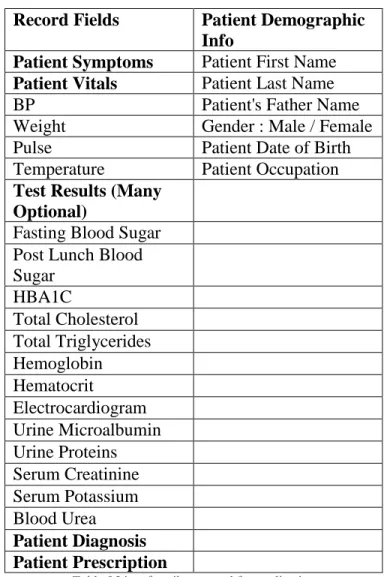
The fields for the records were specified by analyzing the existing hand-written records.
It was important to make sure the fields were similar to those of the written records in order to
make sure there was an easy learning curve for the health workers. As some of the fields in the
written record books were unnecessary and long, the fields were consolidated by a group of
doctors and a list was finalized for the smartphone. The fields that were specified for the patient
master-list were demographic information as well as unique identifiers to properly identify the
Record Fields Patient Demographic Info
Patient Symptoms Patient First Name
Patient Vitals Patient Last Name
BP Patient's Father Name
Weight Gender : Male / Female
Pulse Patient Date of Birth
Temperature Patient Occupation
Test Results (Many Optional)
Fasting Blood Sugar Post Lunch Blood Sugar HBA1C Total Cholesterol Total Triglycerides Hemoglobin Hematocrit Electrocardiogram Urine Microalbumin Urine Proteins Serum Creatinine Serum Potassium Blood Urea Patient Diagnosis Patient Prescription
Table 3 List of attributes used for application
-Selection of OS and Mobile Smartphone
The major selection factors for the smartphone were the cost and usability of the phone.
The abundance of Android smartphones in the Indian smartphone market as well as their
relatively low cost in comparison with the Apple iPhone made an Android smartphone the most
logical choice. The phone that was selected was the Idea 3g Smartfone running Android 2.2
Gingerbread OS with a 3in display and the capability of a 3G data connection. It was physically
a small phone but it was powerful enough to ensure that a record taking app would run properly
on the phone.
The mobile application was developed as the tool for the health workers to submit entries
to the Google Spreadsheets database. As the health workers were the primary users for the
application, it was pertinent to ensure that the application was accessible to them in terms of
usability. The major usability concern became that of language and the high probability of
recording errors during typing. All the health workers were native speakers and writers of Telugu
but had a limited working proficiency of English. The possibility of the application being
developed in Telugu was explored but the Android operating system on the phones were Android
2.2 which does not have the capability of rendering Indic scripts (writing scripts of Indian
languages). The current operating system of Android 4.3 (Jellybean) has the capability to render
Indic Scripts but it was deemed too costly to upgrade the phones to a newer operating system.
So, English was settled as the language to be used throughout the application. The difficulties
encountered in understanding the English could be reduced by proper instructive classes. We
tested the usability of the application with five health workers and four of the five had difficulty
typing descriptions for symptoms and treatments. There were multiple errors being typed and it
was taking the health workers approximately more time to type up responses than write them in
the records booklet. It was then decided that the best alternative approach would be where most
of the responses would selection based answers as described above. The doctors at CRHM
analyzed existing records and provided lists of the most submitted responses for symptoms and
treatments. For cases, where the listed responses did not suit the condition or diagnosis of the
patient, the health worker would have the ability to type in the response.
The development of the Android application was done in Java using the Eclipse IDE and
multiple external libraries such as the Google Spreadsheets and JExcel were utilized. The flow of
worker. The progression of the data entry through the application followed the proposed system
quite well as each entry was placed into a temporary Java array. At the end of a particular patient
visit record, the entries were then written on the local spreadsheet stored on the phone using the
JExcel API. Since each new patient visit required writing to the local spreadsheet, multiple
copies of the spreadsheet were made in the local storage to make sure that the data would be safe
even if one file became corrupted. The application was designed to work during times of no data
connection with a protocol where each health worker would synchronize the spreadsheet on their
local phone with the Google Spreadsheet on a daily basis.
Conclusion
What we have been able to demonstrate through the implementation with CRHM is that
the proposed system can in fact be a viable option for providing digital patient-visit records in a
low-resource setting. The health worker was able to successfully transmit the data that she
entered from her village and the data was accessible from a computer in Hyderabad. This is a
promising start to a future of well documented record taking at the health clinics. Yet, there
needs to be further development of the program through systematic evaluations of the strengths
and weaknesses of the application. With the availability of more timely and accurate patient-visit
data, the doctors and administrators are well equipped to make more educated and informed
decisions for the improvement of patient care services at health clinics.
Hinging on the success and adoption of mobile health records systems, there are many
other advancements that can be made in fields such as drug supply management and proper
monitoring of chronic health patients. As it is hard to manage drug supplies in remote villages
case of interest would be to have chronic health patients monitor their needed health indicators
using smartphones on a consistent basis. The growth in smartphone usage will only increase and
improved knowledge about technology will help in making health monitoring in low resource
settings a reality. The major challenge is to ensure that well-designed and effective infrastructure
References
1. Fraser, Hamish SF, et al. "Implementing electronic medical record systems in developing countries." Informatics in primary care 13.2 (2005): 83-96.
2. Fraser, Hamish SF, et al. "An information system and medical record to support HIV treatment in rural Haiti." Bmj 329.7475 (2004): 1142-1146.
3. International Data Corporation. Smartphones Expected to Outship Feature Phones for First Time in 2013. Framingham, MA: 2013. Web. <http://www.idc.com/getdoc.jsp?cont ainerId=prUS2398 2813>.
4. Brems, Christiane, et al. "Barriers to healthcare as reported by rural and urban interprofessional providers." Journal of Interprofessional Care 20.2 (2006): 105-118. 5. World Health Organization, UNDP. Energy Access Situation in Developing Countries, A
Review Focusing on the Least Developed Countries and Sub-Saharan Africa. 2009. Print. 6. Bharadwaj, Anshu, and Rahul Tongia. "Distributed Power Generation: Rural India-A
Case Study." IEEE (2003).
7. International Telecommunication Union. ICT Facts and Figures. Geneva: 2011. Web. <http://www.itu.int/en/ITU-D/Statistics/Documents/facts/ICTFactsFigures2011.pdf>. 8. Brems, Christiane, et al. "Barriers to healthcare as reported by rural and urban
interprofessional providers." Journal of Interprofessional Care 20.2 (2006): 105-118. 9. Cloud Standards Customer Council. Impact of Cloud Computing on Healthcare. 2012.
Web. <http://www.cloudst andardscustomercouncil.org/cscchealthcare110512.pdf>. 10.International Data Corporation. Worldwide Quarterly Report 2013. Framingham, MA:
2013. Web. <http://ww w.idc.com/getdoc.jsp?containerId=prUS23982813>.
11.Nielsen, J., and Molich, R. (1990). Heuristic evaluation of user interfaces, Proc. ACM CHI'90 Conf. (Seattle, WA, 1-5 April), 249-256.
12.Holst, Christian. "Drop-Down Usability." . Baymard Institute, 05 Aug 2010. Web. 12 Sep 2013.
13.Gupta, Nitin Navish, and Smriti Singh. EvaluServe. Growth Phase of 3G in India. 2012. Web. <http://sandhill.com/wp-content/files_mf/evalueservewhitepaperthegrowthphaseof3 ginindia.pdf>.
14.Hipp, Richard. "Appropriate Uses for SQLite." SQLite. Hwaci - Applied Software Research. Web. 22 Sep 2013.
15.Hartsfield, Jared. "Storing Encrypted Plain Text Files Using Google Android ." University of Louisville Technical Papers. (2010): n. page. Web. 22 Sep. 2013. 16.Liu, Chunyen. "Android Encryption with the Android Cryptography API."
Developer.com, 20 May 2013. Web. 22 Sep. 2013. <http://www.developer.com/ws/andro id/encrypting-with-android-cryptography-api.html>.
17.Goldreich, Oded. Foundations of Cryptography: Volume 2, Basic Applications. Vol. 2. Cambridge university press, 2004.
18.Berube, David. "Transferring Files Securely with net-sftp." Practical Ruby Gems (2007): 145-148.
19.Panneerselvam, John, et al. "Securing Authentication and Trusted Migration of Weblets in the Cloud with Reduced Traffic." Emerging Intelligent Data and Web Technologies (EIDWT), 2012 Third International Conference on. IEEE, 2012.