Casey J. Emerson. Automating Disk Image Redaction. A Master’s Paper for the M.S. in I.S. degree. April, 2014.62 pages.Advisor: Christopher A. Lee
In order to comply with best preservation and curation practices, collecting institutions must ensure that private and sensitive information contained in born-digital materials has been properly redacted before the materials are made available. Institutions receiving donor media in the form of hard disks, USB flash drives, compact disks, floppy disks, and even entire computers, are increasingly creating bit-identical copies called disk images. Redacting data from within a disk image currently is a manual, time-consuming task. In this project, I demonstrate the feasibility of automating disk image redaction using open-source, forensic software. I discuss the problems encountered when redacting disk images using automated methods and ways to improve future disk image redaction tools.
Headings:
Disk image redaction
Information redaction
Data sanitization
Data recovery (Computer science)
AUTOMATING DISK IMAGE REDACTION
by
Casey J. Emerson
A Master’s paper submitted to the faculty of the School of Information and Library Science of the University of North Carolina at Chapel Hill
in partial fulfillment of the requirements for the degree of Master of Science in
Information Science.
Chapel Hill, North Carolina
April 2014
Approved by
_______________________________________
Table of Contents
Automating Disk Image Redaction ... 2
Introduction ... 2
Background ... 3
Related Work ... 24
Project Design ... 28
Limitations ... 40
Discussion ... 42
Implications... 45
Future Work ... 45
Conclusion ... 47
Bibliography ... 48
Introduction
As collecting institutions receive born-digital material from donors, they must
mitigate any private or sensitive material from within the material before making it
available. The consequences of not properly protecting donor data could ultimately result
in the institution appearing to be not trustworthy or incompetent, resulting in fewer
donations. To ensure personal or sensitive information is not disseminated in the
collection, digital material must be sanitized. When receiving donor media in the form of
hard disks, USB flash drives, compact disks, and floppy disks, collecting institutions are
increasingly creating bit-identical copies of the media called disk images. Collection
professionals are then responsible for ensuring that private or sensitive material, referred
to as target data, are not accessible on the disk image. However, redacting target data
from within a disk image currently is a manual task that can add a substantial amount to
curatorial workflows. Increasing curatorial processing time can delay processing existing
backlogs, allowing them to grow larger.
To improve the speed at which disk images can be redacted, I investigate the
feasibility of redacting sensitive material from disk images while maintaining the
provenance of the disk image using open-source, forensic software. I demonstrate that
disk image redaction can be accurately automated and discuss methods of improving
sections: Background, Related Work, Project Design, Limitations, Results, Discussion,
Implications, Future Work, and finally the Conclusion.
Background
To understand how disk image redaction works, a general understanding of digital
storage media, computer file systems, and disk images is needed. I will touch on each
topic in the following subsections.
Digital Storage Media
Digital storage media are used to store digital information. Common storage
media include random access memory, hard disk, USB flash, Solid State Disk (SSD),
floppy disk, compact disk, and tape. Each medium type has advantages and
disadvantages.
The most common type of storage medium, the hard disk, is used for both
short-term and long-short-term storage of digital information. Hard disks are usually comprised of
several stacked, round, magnetic platters spun by a motor.1 A small read/write head
mounted to an arm passes over the top and bottom surface of each platter and detects
magnetic variations on the surface of the platter.2 Each side of each platter is divided into
concentric rings called tracks.3 Tracks are numbered, starting with zero on the outside
and increasing toward the center of the platter.4 Each circular track is divided into
sectors.5 A sector is where data is stored and is the smallest unit of storage on a hard
1 Brian Carrier, File System Forensic Analysis, Vol. 3 (Reading: Addison-Wesley, 2005). 2 Carrier, File System Forensic Analysis, 22.
3
Ibid.
4
Ibid.
disk.6 The typical size of a sector is 4,096 bytes on a modern hard disk and 512 bytes on
older hard disks.7 The hard disk maintains an internal map of which sectors are in each
block. If a sector goes bad, the hard disk automatically reassigns an unused sector to the
block.8 Blocks are sequentially numbered and often referred to as offsets.
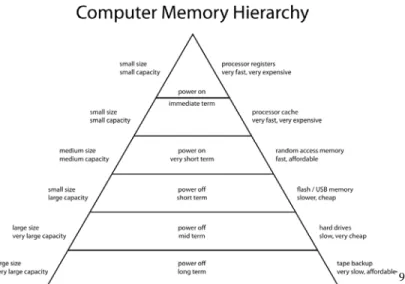
9
Figure 1. Storage volatility. Source: http://en.wikipedia.org/wiki/File:ComputerMemoryHierarchy.svg
Random access memory (RAM) is typically used as a temporary storage space for
data that the central processing unit (CPU) is processing. The most common form of
memory is Dynamic Random Access Memory (DRAM) and is comprised of billions of
transistor capacitor pairs that each store a single bit of information.10 The capacitors are
either charged or discharged, thus representing the two values of a bit: one (charged) or
zero (discharged).11 The transistor acts as a switch that can either charge or discharge the
6 Ibid, 22.
7 Matthew Kirschenbaum et al., “Digital Forensics and Born-Digital Content in Cultural Heritage
Collections,” CLIR Publication No. 149 (Council on Library and Information Resources, 2010).
8 Carrier, File System Forensic Analysis, 23. 9 “ComputerMemoryHierarchy,” 2010, Wikipedia,
http://en.wikipedia.org/wiki/File:ComputerMemoryHierarchy.svg.
10
Random-Access Memory, n.d. http://en.wikipedia.org/wiki/Random-access_memory (accessed February 11, 2014).
capacitor.12 However, because all capacitors leak electricity, the charge stored in each
capacitor is periodically refreshed by transferring and amplifying the existing charge into
another capacitor transistor pair.13 As a result of this process, DRAM is considered
volatile since all data will be lost shortly after power is removed. The primary advantage
of RAM is its fast read/write speed compared to hard disks.
Optical storage disks such as compact disks (CD) or digital video disks (DVD)
are also common media for distributing software and user files; however, as new
computing devices get smaller, fewer new devices include optical disk drives. This
medium is currently being supplanted by other forms of storage like flash memory or
network-based cloud storage. The optical disc is a round, thin plastic disc with one or
more layers of metallic film sandwiched between two polycarbonate discs.14 The surface
of the metallic film alternates between lands and pits.15 A narrow laser beam is directed
at the disk and the metallic film reflects the beam from the surface of the disk.16 Pits
scatter the light, whereas lands reflect light back to a detector.17 The detector is a
light-sensing diode that produces a small electrical voltage each time light is reflected back
from a land.18 The pits and hills etched into the metallic film on an optical disk are stored
in a continuous spiral path starting at the center of the disk, moving outward.19
Transitions between pits and lands or lands and pits represent an optical 1 bit, whereas
12 Ibid. 13 Ibid. 14
“Compact Disk,” n.d., Wikipedia, accessed February 11, 2014, http://en.wikipedia.org/wiki/Compact_disc.
15 Ron White and Timothy Downs, How Computers Work (Que Corp., 2007), 186. 16 “Compact Disk.”
17
White, How Computers Work, 186.
18
Ibid.
the lack of a transition represents an optical 0 bit.20 Optical bits are not the same as data
bits; the former are demodulated by grouping several optical bits together to form a data
bit.21 The exact number of optical bits that constitute a data bit depends on the type of
disc format, e.g., CD, DVD, HD-DVD, Blu-Ray.22 Optical disks also use error correction
to ensure that sectors damaged from dust, scratches, and smudges do not cause
irreversible damage.23
The now obsolete floppy disk has been superseded by the hard disk, optical disc,
the USB flash disk, and network storage systems. Floppy disks were created in three
main sizes: 8 inch, 3.5 inch (pronounced three and a half), and 5.25 inch (pronounced
five and a quarter). All three types of floppy disk were constructed with a thin circular
plastic disc, coated with magnetic oxide, and enclosed in a rectangular plastic case.24
Similar to hard disks, some floppy disks can store data on both sides of the plastic disk.
Each side can be divided into concentric rings called tracks. Tracks are numbered,
starting with zero on the outside and increasing toward the center of the disk.25 Each
circular track is divided into sectors. Sectors are where the data is stored and are the
smallest unit of storage on a floppy disk. The typical size of a floppy disk sector is 512
bytes; however, different disk manufacturers used different sector sizes.26 Both 8 inch
and 5.25 inch floppy disk drives require special controllers that are not included on
20
White, How Computers Work, 193.
21 Ibid. 22 Ibid, 192.
23 Malcolm Stitch, Laser handbook (1972), 1787-l788. 24
“Floppy Disk,” n.d., Wikipedia, accessed February 11, 2014, http://en.wikipedia.org/wiki/Floppy_disk.
25
Ibid.
modern motherboards.27 Specialized equipment can be used to connect a floppy
controller to a USB floppy controller, which can then be read by a modern computer.
Magnetic tape cassettes are commonly used to back up servers because of their
low cost per gigabyte. The cassettes, sometimes referred to as cartridges, consist of a hard
plastic enclosure containing two reels with a continuous span of flexible magnetic-coated
plastic.28 Like hard disks and floppy disks, data is written to sectors contained in tracks.
However, the tracks are not circular, and instead, are written parallel to the length of tape,
perpendicular to the length of tape, or in short diagonal stripes on the tape.29 Tape drives
require special controllers to interface with the host computer.
The Solid State Disk (SSD) is a newer digital storage medium than the others
discussed above and is poised to supersede hard disks for many purposes. SSDs operate
in a similar fashion to RAM, in that data is stored in integrated circuits. However, the
storage is non-volatile and unlike RAM, can hold data long after power has been
removed. Data in an SSD is stored in sectors comprised of many logical NOT AND
(NAND) transistors, referred to as registers. The typical size of a sector is 4,096 byte, but
this varies between manufacturers. The SSD maintains an internal map of which NAND
gates are in each sector and which sectors are in each block. If a register fails, the SSD
automatically reassigns an unused register to the sector. Unlike electromechanical storage
media like hard disks, floppy disks, and tapes, SSDs have no moving parts and therefore
are not susceptible to mechanical failure. But data can only be written to each chip within
27 Ibid. 28
“Magnetic Tape Data Storage,” n.d., Wikipedia, accessed April 4, 2014,
http://en.wikipedia.org/wiki/Data_cartridge_%28tape%29#Cartridges_and_cassettes.
the SSD a limited number of times.30 The SSD performs a process called wear-leveling
where it moves data to different registers throughout the drive based on the number of
times data has been written to the register. This movement of data is transparent to the
operating system. Blocks in an SSD are sequentially numbered and often referred to as
offsets. Due to wear-leveling, block location assignments are dynamic and change
without notice; however, the data in the blocks remains the same.
SSDs have a unique quality that directly affects anyone attempting to recover data
from the disk. SSDs can irrevocably erase data on the disks with unprecedented speed.
500 gigabyte SSD drives have been shown to erase all of the data on the disk in less than
six minutes when performing a disk format.31 This is important to note because it is very
easy to permanently delete data when working with SSDs.32
A cloud network storage system is simply storage to which users can connect via
a network. Typically, cloud storage refers to a system that can be reached over the
commodity Internet, but can also refer to a private enterprise networked storage system.
Cloud or network storage systems are comprised of redundant physical storage media like
hard disks, SSDs, tapes, etc., arranged in such a way that provides end users with storage
space.33 Cloud storage systems usually co-locate different users’ data within storage
nodes. They use authentication and file permissions to co-locate user data on a given
storage medium. The primary reason to reference cloud network storage in a redaction
context is that the data is usually backed up in multiple locations. Redacting information
30 Matthew Levendoski, “Solid State Drives and the Forensic Process” (Master’s thesis, Purdue University,
2013).
31 Ibid. 32
Ibid.
33
from cloud storage can be difficult because it involves overwriting the same data in
different locations. Complicating the matter further is that most cloud storage systems are
owned and operated by third party vendors.
File Systems
File systems organize data on a storage medium in a hierarchy of files and
directories. Every file system has a boot sector at the beginning of the disk in sector zero
that contains information about the file system and instructions for what the processor
should do to boot or start up the computer.34 The file system also contains metadata
describing each file and directory. Since redaction usually involves overwriting data, it is
necessary to understand how file systems work and the differences in how each file
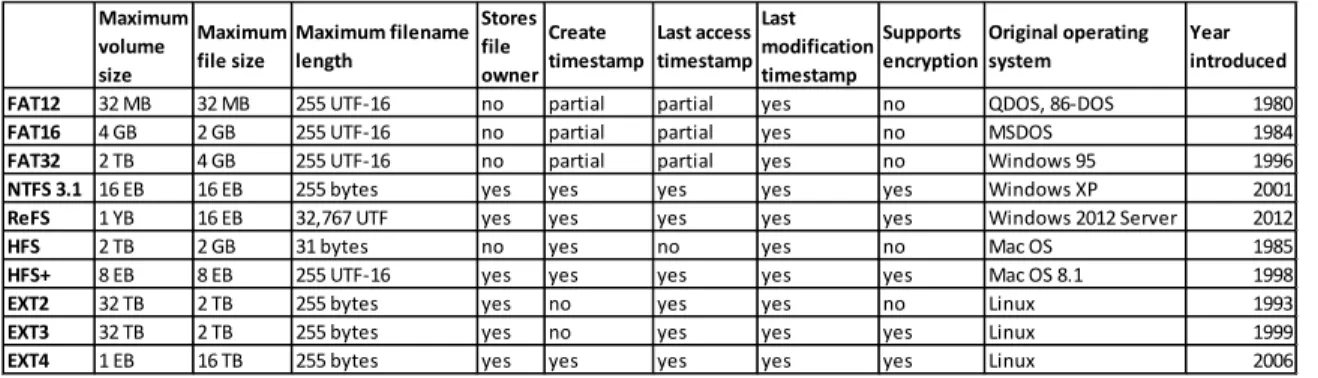
system refers to data. As shown in Table 1 below, there are many different file systems
with different features and attributes.35
Table 1. File System Comparison Table. Source: http://en.wikipedia.org/wiki/Comparison_of_file_systems
In the context of data redaction, it is important to understand how each file system
refers to data and stores metadata. The metadata describing the presence of a file or
directory can sometimes be as important as the file itself. Because file systems are
designed to save and track the locations of data, many file systems duplicate the file
34
Carrier, File System Forensic Analysis, 155.
35
A comprehensive table detailing more file systems and can be found: http://en.wikipedia.org/wiki/Comparison_of_file_systems
Maximum volume size
Maximum
file size Maximum filename length Stores file owner
Create
timestamp Last access timestamp Last modification timestamp
Supports
encryptionOriginal operating system Year introduced FAT12 32 MB 32 MB 255 UTF-16 no partial partial yes no QDOS, 86-DOS 1980
FAT16 4 GB 2 GB 255 UTF-16 no partial partial yes no MSDOS 1984
FAT32 2 TB 4 GB 255 UTF-16 no partial partial yes no Windows 95 1996
NTFS 3.1 16 EB 16 EB 255 bytes yes yes yes yes yes Windows XP 2001
ReFS 1 YB 16 EB 32,767 UTF yes yes yes yes yes Windows 2012 Server 2012
HFS 2 TB 2 GB 31 bytes no yes no yes no Mac OS 1985
HFS+ 8 EB 8 EB 255 UTF-16 yes yes yes yes yes Mac OS 8.1 1998
EXT2 32 TB 2 TB 255 bytes yes no yes yes no Linux 1993
EXT3 32 TB 2 TB 255 bytes yes no yes yes yes Linux 1999
tables. In the event a table is corrupted or lost, the locations of files and directories can be
recovered from the duplicate table. As a result, it is more difficult to sanitize all
descriptive metadata from within file systems. Even popular whole-disk sanitization tools
struggle with eliminating all metadata.36
When redacting data, the original file system will not likely be used to remove the
sensitive data. Instead, external programs will likely search the data on the disk and
overwrite the data directly, bypassing the file system.
The File Allocation Table (FAT) file system was originally developed in the late
1970s by Microsoft for use on floppy disks; however, it was soon adapted for use on hard
disks and became the ubiquitous file system for computers worldwide.37 FAT stores the
cluster addresses of each file and directory in a table.38 The table and root directories are
stored at a fixed location at the beginning of the volume.39,40 The table is comprised of
data structures for each file and directory on the disk. Each data structure contains the file
name, the starting cluster location of the file, the file size, and related file attributes. File
attributes are additional metadata that describe each file. The FAT file system supports
the following four file attributes: read-only, hidden, system, and archive.41
FAT stores files starting in the first available cluster. If the file size exceeds the
size of a cluster, the remainder of the file is split over remaining clusters until the entire
file has been written to the volume. As files are deleted, clusters are marked available and
36 Simson Garfinkel and David Malan, "One Big File is Not Enough: A Critical Evaluation of the Dominant
Free-Space Sanitization Technique," Privacy Enhancing Technologies (Springer Berlin Heidelberg, 2006): 135-151.
37 FAT has since been supplanted by NTFS as the default file system for Windows operating systems. 38 “Overview of FAT, HPFS, and NTFS File Systems,” 2007, Microsoft: Support
http://support.microsoft.com/kb/100108/EN-US.
39
“Overview of FAT, HPFS, and NTFS File Systems.”
40
FAT32 and FAT64 allow the root directory to be stored anywhere within the volume.
new files are written to them. As a result, clusters in the first part of the storage medium
are written more often than clusters at the end of the medium. The biggest disadvantage
of the file system starting with the first available cluster is that files become fragmented
across the disk. Fragmentation decreases disk performance, because the read/write heads
have to spend time seeking to several areas of the disk to read the full contents of a file.
There are four FAT versions: FAT12, FAT16, FAT32, and FAT64 (ExFAT). The
primary difference between the versions is the maximum file and volume sizes that each
can support. FAT12 limits cluster addresses to 12 bits in length and does not support
hierarchical directories.42 It has a maximum file size of 32 megabytes and a maximum
volume size of 256 megabytes.43 FAT12 was primarily used on floppy disks and was
compatible with the MS-DOS operating system. FAT16 was an improvement over
FAT12, in that it used 16 bits for addressing clusters.44 As a result the maximum file and
volume size for FAT16 is 2 gigabytes.45 FAT16 increased the number of entries in the
root directory to 512 and enabled hierarchal directories.46 FAT32 improved several
shortcomings of the previous FAT versions. First, it increased the cluster addressing size
to 32 bits which increased the maximum file size to 4 gigabytes and the maximum
volume size to 2 terabytes.47,48 The second improvement was that the root folder could be
located anywhere on the volume and therefore was not constrained to a specific number
42 “What is FAT File System,” HDD Tool, http://www.hdd-tool.com/hdd-basic/what-is-fat-file-system.htm. 43 “Comparison of File Systems,” n.d., Wikipedia, accessed February 18, 2014,
http://en.wikipedia.org/wiki/Comparison_of_file_systems.
44 “What is FAT File System.” 45 “Comparison of File Systems.”
46 “FAT16 vs. FAT32,” n.d., Microsoft: TechNet,
http://technet.microsoft.com/en-us/library/cc940351.aspx.
47
“Comparison of File Systems.”
of entries.49 The third improvement was that the file system stored a copy of the boot
sector in sector six that could be used if the primary table became corrupted.50,51 FAT64
or Extended FAT (ExFAT) is optimized for removable media and uses 64 bits for
addressing clusters.52 As a result, the maximum file size is 127 petabytes and the
maximum volume size is 64 zeta bytes.53 ExFAT is not commonly used in user operating
systems but rather in appliances where the simplicity of a FAT structure is needed for file
sizes greater than 4 gigabytes.
FAT is supported by Windows, Macintosh, and most flavors of Linux.54 Because
of its simplicity, FAT is commonly used on removable media such as memory cards and
portable electronic devices, e.g., cameras and voice recorders.55
The New Technology File System (NTFS) was developed by Microsoft as a
secure and scalable file system for use on large storage volumes.56 It has replaced FAT as
the standard file system for use in the majority of Microsoft Windows operating systems.
Windows NT, Windows 2000, Windows XP, Windows Server, Vista, and Windows 7 all
use the NTFS file system.57 NTFS can also be used on Mac and on many Linux operating
systems.58
The first sector of an NTFS volume is a boot sector that contains the cluster size
for the storage medium, volume information, a pointer to the start of the Master File
49 “FAT16 vs. FAT32.” 50 Ibid.
51 Carrier, File System Forensic Analysis, 156. 52
“NTFS vs FAT,” 2010, HDD Tool, http://www.hdd-tool.com/pic/FAT-NTFS.png.
53 “Comparison of File Systems.”
54 Carrier, File System Forensic Analysis, 154. 55 Ibid.
56
Ibid, 199.
57
Ibid.
Table (MFT), and the size in bytes of entries in the MFT.59 NTFS stores file and
directory entries in the MFT.60 Each MFT record contains a header, several standard
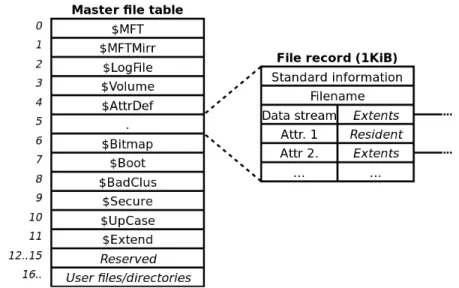
attributes, and unstructured space for additional attributes.61 As shown in Figure 2 below,
the first 24 entries in the MFT are reserved for standard files that are used by the file
system. Unlike the FAT file allocation tables that simply point to the location of the data,
the MFT is a file itself and each entry within the MFT contains metadata and file data.62
Because the boot sector of the NTFS volume contains a pointer to the start of the MFT
file and no additional information about the size and layout of the MFT file, the first
entry in the MFT describes the size and layout of the rest of the MFT file.63 The
operating system must process the first entry in the MFT file simply to understand how to
read the rest of the MFT file. The only information describing the size and layout of the
MFT is in this initial entry.64 The advantage of this design is the NTFS boot sector for the
volume doesn’t need to change as the MFT increases in size.
59 “Overview of FAT, HPFS, and NTFS File Systems.” 60 Carrier, File System Forensic Analysis, 200.
61 Ibid, 206. 62
Ibid.
63
Ibid, 202.
The second entry in the MFT is $MFTMirr, which points to a backup copy of the
MFT.65 The third entry in the MFT is $LogFile, which contains a record for all metadata
transactions.66 The seventh entry in the MFT is $BITMAP, which contains an allocation
status for every cluster in the file system.67 In terms of digital redaction and file
sanitization, it is important to note that MFT entries are not immediately overwritten
when a file is deleted. Instead the entry is marked as unallocated in the $BITMAP
attribute and the data may be overwritten if a new file entry is written into that entry
address.68 As a result, deleted files and their file attributes can be recovered after they
have been marked as “deleted” and if another file has not been written into the address.
From a redaction perspective, there are several attributes within an MFT entry
that are important to understand. The first is the $DATA attribute because it contains raw
file content.69 Information contained within the $DATA attribute is the primary file
content data that will be targeted for redaction. Because MFT entries are typically fixed
65 Ibid, 220. 66 Ibid, 281. 67
Ibid, 203.
68
Ibid, 201.
69 Ibid, 264.
at 1,024 bytes each, the $DATA attribute can only contain 700 bytes of file contents
within a given MFT entry.70 For files that are larger than 700 bytes, the $DATA attribute
points to external clusters on the volume that contain the file contents.71 Attributes with
data stored within the MFT entry are called resident attributes.72 Attributes with data
stored in clusters external to the MFT are called non-resident attributes. Depending on the
size of the file, target data will be located either in the MFT in a resident $DATA
attribute or elsewhere on the volume in a non-resident $DATA attribute. The second
important attribute from a redaction perspective is $FILE_NAME, because it contains the
name of the file or directory, its size and its timestamps for when it was created, written,
and last accessed.73 The metadata contained within the $STANDARD_INFORMATION
attribute is also important as it contains the security ID and owner of a file or directory.74
Both the $FILE_NAME and the $STANDARD_INFORMATION attributes could
contain additional sensitive information describing data to be redacted from the $DATA
attribute. The fourth and fifth important attributes are the $INDEX_ROOT resident
attribute and its child attribute, the $INDEX_ALLOCATION non-resident attribute.75
Both attributes are only assigned to directories and contain information about the files
and subdirectories within a given directory, which is useful when redacting entire
directory structures.76 For example, to redact the contents within a Windows My
Documents directory, the contents of the My Documents directory can be derived from
information stored within these two attributes.
70
Ibid, 204.
71 Ibid, 264. 72 Ibid. 73 Ibid, 205. 74
Ibid.
75
Ibid, 267.
When NTFS is first installed on a volume, the MFT starts out small and grows
larger as needed.77 As a result, the MFT can be fragmented over many different clusters
as it grows.78 In Windows environments, the MFT will never shrink in size, even if all
user files are deleted.79 As previously mentioned, this “deleted” data is not actually
overwritten on the storage medium and is recoverable.
One of the security improvements NTFS supports is file encryption, which can
present problems for finding and redacting sensitive data. Encrypted attribute content
would need to be decrypted before the data could be searched or redacted. NTFS uses a
symmetric encryption algorithm called DESX to encrypt attribute content.80 In Windows
operating systems, the encryption keys are generated by combining a random key issued
to the MFT entry with the user’s password.81
Disk Images
A disk image is a bit-identical copy of a storage medium’s data clusters.82 A disk
image can be stored in one or more files.83 Creating a disk image is different from simply
copying files from one location to another. When copying files from one file system to
another, descriptive metadata may be replaced or omitted when the file is copied to the
destination file system. Because imaging a disk preserves the data on the entire storage
medium, it also saves files marked as deleted and file-fragments located in slack space.
Slack space refers to unused sectors within a data cluster. It occurs when a file segment
77 Ibid, 201. 78 Ibid. 79
Ibid.
80 Ibid, 210. 81 Ibid.
82 Kirschenbaum, Digital Forensics and Born-Digital, 17. 83
assigned to a cluster is smaller than the total size of the cluster. 84 Because most file
systems do not immediately overwrite file clusters when a file is deleted, fragments from
previously deleted files can be found in unassigned sectors within a cluster.85
Disk images have many uses, including forensic examination, data rescue, and the
preservation of information. In Information Technology (IT) communities, disk images
are used to rapidly deploy operating system and software configurations to computers.86
In a preservation context, a disk image allows the information from a given storage
medium to be transferred to a new medium while preserving the original structure of the
data.87 In forensic contexts, imaging a disk can help to establish a trustworthy chain of
custody of the data.88 In a preservation setting, a cardinal rule is to minimize irreversible
transformations to the data. By creating a disk image of a medium, it is possible to
perform transformations on copies of the disk image without affecting the original data.
Disk Image Formats
Disk images can be created in several formats by a variety of different programs.
Common programs for imaging disks are Data Dump (dd) included with Linux,
Guymager, FTK Imager, and EnCase. The most common image formats are RAW, EWF,
AFF, and ISO.89,90 Each format is designed for specific use-cases.
84 Kirschenbaum, Digital Forensics and Born-Digital, 43-44. 85
Kirschenbaum, Digital Forensics and Born-Digital, 43.
86 Simson Garfinkel, "Digital forensics XML and the DFXML toolset," Digital Investigation 8, no. 3
(2012) 162.
87 Kam Woods and Christopher A. Lee, "Acquisition and Processing of Disk Images to Further Archival
Goals," Archiving Conference, vol. 2012, no. 1, pp. 147-152. Society for Imaging Science and Technology, (2012): 148.
88 Woods, Extending Digital Repository, 57. 89 Garfinkel, Digital Forensics XML, 162-163. 90
The RAW image format produces an uncompressed and unencrypted, bit-for-bit
duplicate of data on a disk.91 The RAW format does not add metadata about the original
storage medium or the operating system. Originally used by the Linux Data Dump (dd)
program, the RAW format was designed to allow the simple duplication of disk drives.92
It is important to note that because the RAW format is uncompressed, the disk image will
be the same size as the original disk.93 A 300 gigabyte disk will produce a single 300
gigabyte disk image file. Split-RAW allows large disk images to be divided by size over
multiple files. This makes it easier to transfer disk images on smaller storage media like
compact disk or flash disk.
As computer forensics began using disk images to gather evidence, additional
metadata describing the case and file compression were added to the image formats. As a
result, several forensic disk image formats emerged. The Expert Witness Format (EWF)
is a proprietary, forensically packaged imaging format created by Guidance Software for
use with their commercial forensic examination software, EnCase.94 The name was later
changed to the EnCase Image File format and used the “.E01” file extension.95 The EWF
format is arguably the most popular image format used in forensics and archives.96 EWF
uses file compression to reduce the size of disk images.97 The EWF format also stores
metadata about the original media, as well as information about the case and the person
creating the image.98 The proprietary EWF format was reverse-engineered by Joachim
91 Carrier, File System Forensic Analysis, 43 92
Kirschenbaum, Digital Forensics and Born-Digital, 15.
93 Carrier, File System Forensic Analysis, 43 94 Carrier, File System Forensic Analysis, 43 95 Garfinkel, Digital Forensics XML, 162. 96
Ibid.
97
Woods, Extending Digital Repository Architectures, 58.
Metz, who created libewf, a code library that allows other programs to read and write
EWF format files.99
Data within the EWF format is organized into a header, followed by disk image
data, and then by a one-way hash of the file.100 The file header contains information
about the disk image, including “Case Number, Evidence Number, Unique Description,
Examiner Name, and Notes”.101 The disk image itself is compressed and divided into
32-kilobyte data blocks.102 At the end of each data block is an Adler32 checksum which is
used for error correction.103 The disk image data is followed by a one-way hash of the
disk image data.
Because the EWF disk image format was designed for use in forensics, it was
created with safeguards to identify if any part of the file is altered. If any chunk of data
within the disk image is changed, the checksum at the end of the data block has to be
recomputed, as does the one-way hash at the end of the file. One can test the validity of a
EWF disk image by computing the checksum of each data block and the hash for the file.
According to Joachim Metz, the open source libewf library cannot edit EWF files.104 To
protect disk images from unauthorized access, EWF includes the ability to encrypt the
disk image as well as require passwords to access the file.105
The Advanced Forensic Format (AFF), developed by Simson Garfinkel and Basis
Technology, is an open format for storing disk images and associated forensic
99 “Libewf,” Forensics Wiki, last modified February 16, 2014, http://www.forensicswiki.org/wiki/Libewf. 100 “Encase Image File Format,” Forensics Wiki, last modified July 15, 2013,
http://www.forensicswiki.org/wiki/Encase_image_file_format.
101 “ASR Data's Expert Witness Compression Format,” Forensics Wiki, last modified March 29, 2013,
http://www.forensicswiki.org/wiki/ASR_Data%27s_Expert_Witness_Compression_Format.
102 “Encase Image File Format.” 103
“Encase Image File Format.”
104
Joachim Metz, e-mail message to author, January 3, 2014.
metadata.106 The primary advantage that AFF has over EWF is that it contains a hash of
the disk image in the metadata section within the file. This allows edits to be made to the
metadata without changing the hash of the imaged data and thus casting doubt on the data
within the disk image portion of the file.107 All transformations performed on the disk
image can be detailed in Digital Forensic XML (DFXML) metadata. DFXML is an XML
(Extensible Markup Language) implementation designed for the exchange of structured
forensic information.108
The latest AFF version called AFF4 was developed by Michael Cohen, Simson
Garfinkel and Bradley Schatz and added features like multiple data streams within one
file and links between archives.109 There is still no complete, publicly available
implementation of AFF4. Many forensics tools support AFF, but its adoption does not
appear to be as widespread as the adoption of EWF.
Viewing Disk Images
Disk images can be read and interpreted by several different software packages.
Most commercial forensic tools can read and interpret all of the major image formats. But
there are also a number of open-source tools that can view the contents of disk images.
The bulk_extractor tool is an open-source forensic triage application that can
parse and extract text from storage media and disk images.110 It extracts forensic features
consisting of email addresses, Uniform Resource Locators (URLs), search terms
(extracted from URLs), credit card numbers, and phone numbers, EXIF (Exchange Image
106 “AFF,” Forensics Wiki last modified January 29, 2014, http://www.forensicswiki.org/wiki/AFFLIB. 107 “AFF.”
108 Garfinkel, Digital Forensics XML, 161. 109
“AFF.”
110
File Format) from JPEG images, Global Positioning System (GPS) coordinates, and other
types of information.111 Although it was designed to be used as a command line tool,
there is also a graphic user interface (GUI) for bulk_extractor called Bulk Extractor
Viewer (BEViewer), which can be used to run the scanners, and view and search
extracted features.112 When bulk_extractor parses a disk image, it splits the image file
into 16 megabyte chunks called pages and allocates each page to an available computer
processing core.113 By leveraging the multi-threading capabilities of most modern
computer processors, bulk_extractor has been shown to process disk images up to 10
times faster than single-threaded forensic tools.114
The fiwalk tool is an open source forensics batch analysis application that
interrogates the file system(s) on a disk image and outputs the contents in DFXML
objects corresponding to allocated, deleted, and orphaned files and directories.115 In
addition to the file system data, fiwalk can also extract forensic metadata (e.g., examiner
name, examiner notes) from the EWF and AFF packaged disk image formats.116 Even if
the disk image contains multiple file systems on multiple partitions, fiwalk can analyze
and parse the different file systems and produce the contents in DFXML objects.117
Digital Redaction
A common definition of the word redaction in a digital context is the obscuring or
removing of sensitive information. For this paper, I will use the following definition: the
111 Garfinkel, Digital Media Triage, 60. 112 Garfinkel, Digital Media Triage, 67. 113
Garfinkel, Digital Media Triage, 59.
114 Garfinkel, Digital Media Triage, 66. 115 Garfinkel, Digital Forensics XML, 171.
116 Simson Garfinkel, "Automating disk forensic processing with SleuthKit, XML and Python," Systematic
Approaches to Digital Forensic Engineering, 2009. SADFE'09. Fourth International IEEE Workshop on, pp. 73-84. (IEEE, 2009).
removal of digital artifacts from an electronic information storage system, regardless of
sensitivity. Stripping or overwriting data can fall under this definition.
As Lee and Woods point out, “modern computing devices often contain a
significant amount of private and sensitive information.”118 Because disk images are
identical copies of a computer’s storage media, they also can contain a significant amount
of sensitive information. In archival settings, disk images can contain sensitive or
personal data that is not appropriate for the collection or should not be immediately
disclosed to the public. Patient data, social security numbers, credit card numbers, contact
lists, address books, email, and personal files are all examples of data that may need to be
removed from a disk image before making it available.
There are two methods to redact information form storage media: 1) overwrite the
original disk image data in-place or 2) create a redacted copy of the disk image. Creating
a redacted copy of the disk image can be divided further based on when redaction is
performed: 1) In advance or 2) upon request. In an Open Archival Information System
(OAIS), redacting information in advance would be akin to creating a new Archival
Information Package (AIP) whereas creating a redacted disk image on-demand would be
analogous to creating a new Dissemination Information Package (DIP)119. Both the
redaction in-place method and creating a redacted copy method have benefits and
drawbacks. Redacting the data in-place ensures that all original target data is permanently
destroyed.120 Because only the original redacted disk image is needed, this method
118 Christopher A. Lee and Kam Woods, "Automated Redaction of Private and Personal Data in
Collections," Proceedings of The Memory of the World in the Digital Age: Digitization and Preservation.
An international conference on permanent access to digital documentary heritage,(2012).
119
The Consultative Committee for Space Data Systems, “Reference Model for an Open Archival Information System (OAIS),” Magenta Book, Issue 2 (2002).
requires the least amount of storage space for the disk images. Creating a redacted copy
preserves the original data at the expense of requiring more storage space. Depending on
the amount of data redacted, as much as twice the disk space can be required to store the
original and the redacted disk images. The size of the redacted disk image is influenced
by the amount of data redacted and the method of redaction. Because the master disk
images are not redacted and contain target data, they should be securely stored with
limited access.
Some practitioners recommend overwriting with a single byte, while others
recommend overwriting the data with random byte sequences.121 Another method for
overwriting the data is to encrypt the original sensitive data and write out the encrypted
file. The advantage to encrypting the data in-place instead of overwriting a duplicate disk
image is that the redacted data is secure and yet recoverable on the original medium. A
secondary benefit to encryption in-place method is the reduction of storage space
required to house duplicate redacted disk images.
Because disk images are bit-identical copies of the underlying blocks or clusters
of storage on a medium, disk images include all information on the original media,
including unwritten space and deleted space. Disk images are created by reading the bits
from the storage medium and copying the bits in the same order they were retrieved from
the disk to another medium.122
Disk images are used in a variety of applications including digital forensics,
computer repair, and preservation. One of the first steps that law enforcement takes when
logging digital evidence is to create a disk image of the acquired evidence. This is done
121
Garfinkel, One Big File is not Enough, 15.
to preserve the evidence and prevent tampering that could jeopardize a trial. In computer
repair, disk images are retrieved from failing media or devices infected with viruses or
malware. In preservation contexts, disk images are used to transfer information from the
original physical medium to the repository’s storage media. There are a variety of reasons
why a disk image would be taken of a storage medium, e.g., in cases when the original
media is obsolete or failing, to prevent bit rot of the original media, etc.
Related Work
There is surprisingly little research on redacting disk images. Because of this
relative dearth of information, this project draws from research from three areas:
automating forensic analysis, applying forensic methods to digital curation, and
electronic document redaction. Each area offers a unique perspective into disk image
redaction.
Automating Forensic Analysis
Commercial forensic toolkits like Access Data’s FTK or Guidance Software’s
EnCase Forensic provide users the ability to process and analyze the contents of forensic
disk images.123,124 EnCase also has the ability to automate forensic processing through its
proprietary EnScript scripting language. However, a shortcoming of EnScript is that
external programs cannot interface with it.125 In addition, commercial forensic tools are
often cost-prohibitive for use in non-forensic environments like libraries and archives.
123 “Computer Forensics Software for Digital Investigations,” Access Data, accessed November 8, 2013,
http://www.accessdata.com/products/digital-forensics/ftk.
124
“Computer Forensic Software - Encase Forensic,” Guidance Software, accessed November 8, 2013, http://www.encase.com/products/Pages/encase-forensic/overview.aspx
Despite a plethora of document redaction tools, there are few tools designed for
redacting data from forensic disk images. Joachim Metz’s libewf library can export
forensically packaged disk images to the RAW format, which can then be edited using
third-party software and imported back into the forensically packaged disk image format.
Libewf reads and writes EWF disk images.126 In an email exchange with Metz, he
acknowledges that libewf cannot overwrite data in a EWF image.127 Several open source
toolkits include this library to edit EWF files. Similarly, Simson Garfinkel’s AFFLIBv3
library allows third party tools to read and write AFF files.128
There are a few open source forensic tools that provide access to external
programs through application programming interfaces (API). The PyFlag project,
originally created by the Australian Federal Police, enabled developers to integrate
forensic analysis into the development of new forensic software.129,130 The SleuthKit
(TSK), one of the most popular open source digital forensic tool kits available, includes
an API for programmers to access the tools from other programs.131 However, some
developers have found it difficult and cumbersome to interface with the API when
creating new forensic applications.132
Garfinkel’s work with DFXML and fiwalk advanced the body of knowledge
around open source forensic analysis and included an easy-to-use API to create new
126 “Libewf.”
127 Joachim Metz, e-mail message to author, January 3, 2014. 128
“AFF.”
129 Garfinkel, In Systematic Approaches, 75.
130 “Forensic and Log Analysis GUI,” Source Forge, accessed November 12, 2013,
http://sourceforge.net/projects/pyflag/.
131
“The Sleuth Kit (TSK) & Autopsy: Open Source Digital Forensics Tools,” last modified April 4, 2014, http://www.sleuthkit.org/.
forensic tools.133,134 The development of two modules included with fiwalk,
imicrosoft_redact.py and iredact.py, are the basis for this project. Imicrosoft_redact.py
overwrites crucial components within a disk image of a Windows operation system so the
disk image cannot be booted.135 Iredact.py is an experimental module designed to redact
individual files or multiple files with similar characteristics based on user-defined
parameters.136 At the time of this writing, iredact.py has limited functionality, e.g., it can
only redact files from RAW disk images based on their file hash signature.
Applying Forensic Methods to Digital Collections
Lee, Woods, Kirschenbaum, and Chassanoff’s white paper reviews how forensic methods
have been applied in libraries, archives, and museums to improve their digital curation
workflows. In addition they detail how collecting institutions can begin using forensic
methods, software and equipment.137 Kirschenbaum, Ovenden, and Redwine’s report
provides an in-depth review of how digital forensic methods can and are being applied to
collecting institution workflows.138 Most of the forensic tools presented in the report
were not packaged together for use in collection institutions. The BitCurator Project, led
by Lee and Kirschenbaum, with Kam Woods as the technical lead, organized several
open source forensic tools into a self-contained Linux package for use by collection
professionals.139 The package contains a disk imaging tool, a disk image exploration tool,
133 Garfinkel, Automating Disk Forensic Processing, 75.
134 “Category:Forensics File Formats,” Forensics Wiki, last modified July 21, 2012,
http://www.forensicswiki.org/wiki/Forensic_file_formats.
135 Garfinkel, Digital Forensics XML, 172.
136 Garfinkel, Automating Disk Forensic Processing, 83.
137 Christopher A. Lee et al., "From Bitstreams to Heritage: Putting Digital Forensics into Practice in
Collecting Institutions," (2013).
138
Kirschenbaum, Digital Forensics and Born-Digital, 16.
and automated processes to capture digital forensic XML data about the data on the disk
image, among other features.
Electronic Document Redaction
Electronic document redaction parallels disk image redaction in that the process
of selectively removing subsections of information from an entire document is similar to
removing subsections of data from a disk image. Analogous to disk image redaction,
electronic document redaction is focused on removing both the directly visible and
“hidden” contents from the document.140 Improper electronic document redaction
techniques have led to several high profile cases of sensitive information being
inadvertently released.141
There are two standard methods for performing analog redactions to physical
documents. The first is to black out or cover the text of a document.142 The second is to
physically remove parts or entire pages of a document.143 After the physical redaction has
been made, the document is photocopied and distributed.144 The methods used in
electronic document redaction are similar to those used in analog document redaction.
Data within an electronic can be overwritten or can be omitted when copying the data to
another document.145
140 Mads R. Dahl and Eivind O. Simonsen and Christian B. Høyer, "What You See is not What You get in
the PDF Document Format," Health Informatics Journal 17, no. 1 (2011): 24-32.
141 Jembaa Cole, "When Invisible Electronic Ink Leaves Red Faces: Tactical, Legal and Ethical
Consequences of the Failure to Remove Metadata," Shidler JL Com. & Tech. 1 (2005): 8-12.
142 Daniel P. Lopresti and A. Lawrence Spitz, "Information Leakage Through Document Redaction:
Attacks and Countermeasures," Electronic Imaging 2005, pp. 183-190, International Society for Optics and Photonics, (2005).
143 Alexander Barclay, “Redacting Digital Information From Electronic Devices,” Advances in Digital
Forensics III: IFIP International Conference on Digital Forensics, National Center for Forensic Science, (2007).
144
Lopresti, Information Leakage, 183.
Project Design
The purpose of this project is to analyze the feasibility of automating disk image
redaction for use in digital curation environments. My two primary research questions
are:
• Can the disk image redaction process be automated?
• Can an automated redaction process remove all target data identified for
redaction?
My approach to answer these questions is to identify and then automate, a basic
disk image redaction workflow using open-source digital forensic tools.
Development Environment
The BitCurator environment was selected to develop and evaluate the automated
redaction workflow because it includes all of the software libraries necessary to automate
the redaction processes. The BitCurator virtual machine, a self-contained Linux-based
package that runs on a host operating system, was the ideal development environment
because it did not require special hardware and could run on a laptop.146 It includes
Python, bulk_extractor, fiwalk, Guymager and several code libraries – libewf, AFFLIB,
and The SleuthKit – which were all used to create and evaluate the automated workflow.
Corpus
Disk images from the public Naval Postgraduate School (NPS) Realistic Corpora
were used to test and evaluate the effectiveness of the automated redaction workflow.147
The NPS Realistic Corpora consists of disk images created by a project team that
146
“BitCurator,” last modified April 1, 2014, http://wiki.bitcurator.net/index.php?title=Main_Page.
147
executed user actions and used scripts to mimic actual users.148 However, the disk images
do not contain personally identifiable information from real people. Individual disk
images are made available on the digitalcorpora.org website in the EWF disk image
format. As noted above, packaged forensic disk image formats are not designed for
editing. The easiest method to redact a disk image is to first convert it to the RAW image
format so the target data can be overwritten. RAW disk images can be accessed as binary
files by most programming languages, which make the actual redaction a trivial task. The
redacted RAW disk image is then converted back into the packaged image format.
Because each disk image in the corpus had to be expanded into the RAW image format
for redaction, the smaller USB Drive images from the M57 Patents scenario were used
instead of the much larger Redacted Drive Images.149 The USB Drive images range in
size from 8 megabytes to 217 megabytes in the EWF format. When expanded to RAW,
the disk images used in this project occupied a total of 3 gigabytes, which is manageable
within the BitCurator virtual machine. The Redacted Drive Images ranged in size from
2.2 gigabytes to 10 gigabytes, which are too large to store and process within a virtual
machine hosted on the laptop computer used for this study.
Redaction Workflow
The manual disk image redaction work flow is comprised of three basic steps: 1.
Identify data within the disk image to redact, 2. Redact the data from the disk image, 3.
Document and save the changes to a file.
148 “Disk Images,” Digital Corpora, last modified June 24, 2013,
http://digitalcorpora.org/corpora/disk-images.
149
I targeted specific textual data patterns for redaction within the NPS Corpora disk
images. Domains, email addresses, and phone numbers represent common contact
information that donors may not want disseminated publicly.150
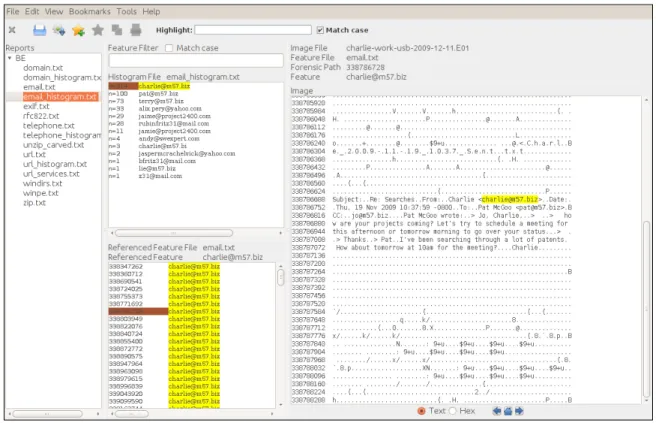
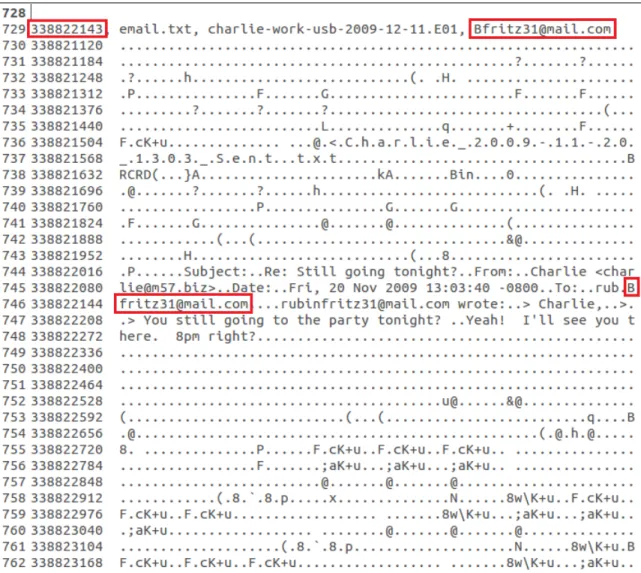
Figure 3: BEViewer. Partial view of an email histogram containing 214 instances of [email protected] and the context of the selected instance.
To execute the first process in the workflow, bulk_extractor was selected to query
the disk image to identify target data to redact because of its execution speed and
easy-to-use BEViewer easy-to-user interface.151 Once the target data was identified, it was selected using
the bookmark function in bulk_extractor. The bookmark function is used to document
interesting features to the forensic examiner or archive professional. It also allows the
150 Lee, "Automated Redaction of Private,” 299.
151 “Using Bulk Extractor Viewer to Find Potentially Sensitive Information on a Disk Image,” BitCurator,
last modified March 9, 2014,
BEViewer user to export the bookmarked features to a text file. The export file contains
the starting offset and length of each bookmarked target data.152
Figure 4: Partial view of a bulk_extractor bookmark file. Note the boxes drawn around the feature and corresponding offset.
To execute the second process of the workflow, the disk image files were
converted to the RAW file format. Because all selected NPS Corpora disk images were in
the EWF packaged disk image format and contained forensic metadata like examiner
name, evidence number, acquisition date, etc., the forensic metadata had to be retained
152
during the redaction process and inserted back into the redacted packaged disk image.
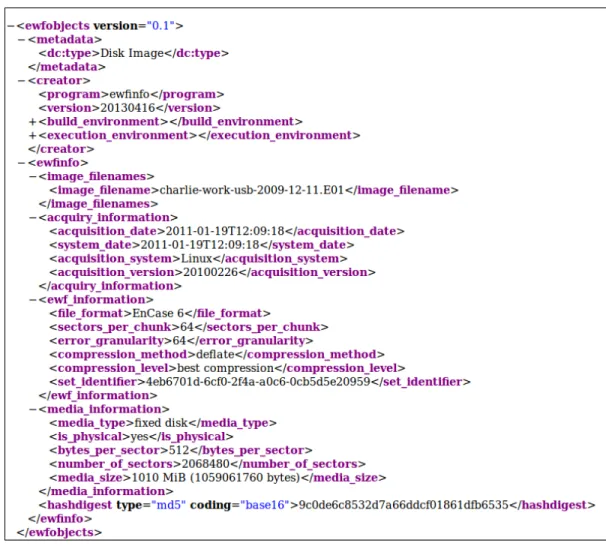
The ewfexport and the ewfinfo functions within libewf were used to convert EWF format
disk images into RAW disk images and save the forensic metadata.153 To make parsing
the forensic metadata easier, it was exported as DFXML instead of into the default flat
text file. The following DFXML objects were used: examiner name, case number,
evidence number, description, notes, media size, media type, file format, bytes per sector,
sectors per chunk, error granularity, and segment file size. These options were chosen
because they are needed to import a RAW disk image into EWF.
Figure 5: GHex view before redaction. Note the box drawn around the bytes representing the feature (on left) and the feature in its context (on right).
Once the disk images were converted to the RAW format, the bookmark file was
reviewed to determine the disk offsets and the number of bytes to be redacted. GHex, an
open-source hex editor, was used to open the RAW disk image, locate the starting offset
of the first redaction target, and then overwrite the target data.154 Overwriting the data
153
“Libewf and Tooling to Access the Expert Witness Compression Format (EWF),” Google Project Hosting, last modified April 3, 2014, http://code.google.com/p/libewf/.
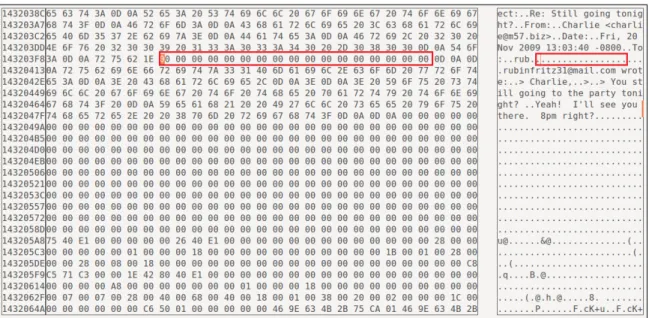
involved manually locating the starting offset and then changing all hex values from the
starting offset to the ending offset. The hex value for each byte within the data string was
changed to the NULL ‘x00’ value. After each redaction, a note was added to the end of
the DFXML notes object describing the starting offset, the value used to overwrite the
data, and the length of the redacted data. This redaction process was manually repeated
for all data targeted for redaction. Depending on the number of redaction targets and their
length, this activity proved to be the most labor-intensive process in the workflow.
Performing this manual process on several offsets is manageable; however, performing
this process on hundreds or thousands of offsets in a single disk image is not realistic.
Figure 6: GHex view after redaction. Note the box drawn around the bytes representing the redacted feature (on left) and the redacted feature in its context (on right).
The third process in the workflow was to convert the redacted RAW disk image
back into the original EWF packaged format. The ewfacquire function from libewf was
used for this process. The redacted RAW file and forensic metadata stored as DFXML
was entered into the ewfacquire function which produced a redacted disk image. The
and searching for the original target data. If the data was not found, it was assumed that
the workflow was performed correctly. However, if targeted data was found, the
workflow was repeated on the redacted disk image.
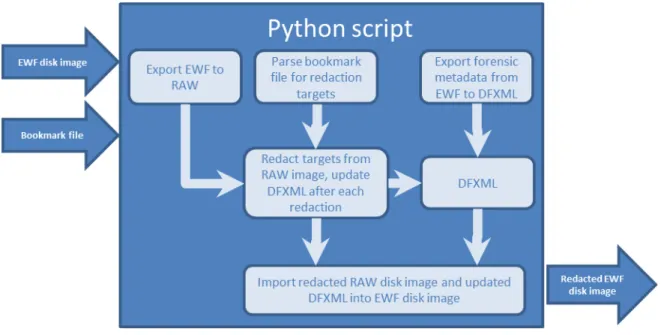
Automated Redaction
After I established the manual workflow and performed it several times, I
developed a Python script to automate the process. The workflow of the script is detailed
in Figure 6 below. The Python programming language was chosen to automate the
redaction workflow over Java, C, and C++ because of its ease of use and ability to
integrate into existing forensic tools, including pyewf and pyflag.155 If the program were
to be written in C or C++, it could potentially execute faster and run in different
environments.
Figure 7: Python script workflow.
When the Python script is run from the command line, the user is prompted for
the location of the bookmark file created in bulk_extractor, the location of the disk image,
and the image format, e.g., RAW, EWF, AFF, ISO, etc. If the disk image format is
anything but RAW, the appropriate conversion function is called to convert the disk
image to the RAW format. If forensic metadata is included in the packaged disk image, it
is saved as DFXML in an array within the Python script while the redaction function
executes.
Figure 8: Partial view of DFXML from the charlie-work-usb-2009-12-11.E01 disk image.
Once the disk image has been converted to the RAW format, the redaction
process begins. The Python script parses the bookmark file created by bulk_extractor and
stores the starting offset and length of each target into an array. Based on this
image is opened and the NULL character ‘x00’ is written to each targeted byte offset,
beginning with the starting offset through the ending offset of the target data. Each time
target data is redacted, the byte offset and length is appended to the notes section of the
DFXML. The redaction process is repeated until all targeted byte offsets have been
redacted. After all target data has been redacted, the script either converts the RAW disk
image back to its original format or saves the redacted RAW image file. When exporting
the RAW disk image back to EWF, the stored DFXML is parsed and inserted as
command arguments into the ewfacquire function. This allows most of the original
forensic metadata to be retained in the redacted EWF disk image. I will discuss metadata
that is not retained in this process in the Limitations section below.
To maintain the provenance of the disk image, each transformation performed on
the disk image is documented in the notes section of the DFXML when the Python script
executes. The Python script can add three different changes: conversion to RAW image,
conversion to packaged image, and redaction. All changes start on a new line with a time
stamp and are followed by the type of change made. Every time a target offset is
redacted, the starting offset and ending offset of the target data, as well as the character
used to overwrite the offsets, are documented in the DFXML. It is important to note that
only the redacted disk offsets are written into the DFXML and not the actual redacted
data itself. After all redactions are complete, the content of the temporary DFXML file is
either imported into a forensically packaged image when the RAW disk image is
converted back into the packaged image format or saved as a separate XML file in the
Evaluation
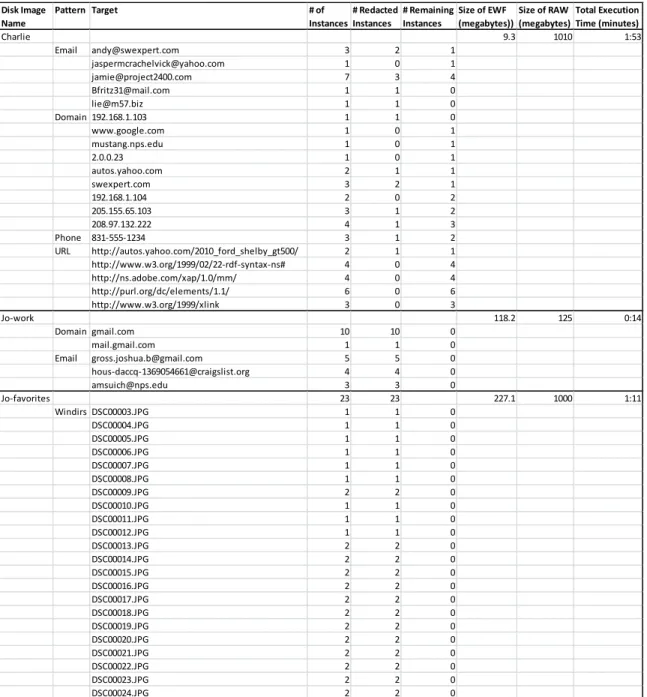
Table 2: Redaction results. Note all remaining instances in the Charlie disk image are located in compressed files, which the Python script cannot process.
The effectiveness of the automated disk image redaction script was evaluated
using three disk images from the NPS Corpora that had not been previously examined.
Using bulk_extractor, several targets from within each disk image were identified and
marked for redaction. The Python script then attempted to redact the targets from each
Disk Image Name
Pattern Target # of Instances
# Redacted Instances
# Remaining Instances
Size of EWF (megabytes))
Size of RAW (megabytes)
Total Execution Time (minutes)
Charlie 9.3 1010 1:53
Email [email protected] 3 2 1
[email protected] 1 0 1
[email protected] 7 3 4
[email protected] 1 1 0
[email protected] 1 1 0
Domain 192.168.1.103 1 1 0
www.google.com 1 0 1
mustang.nps.edu 1 0 1
2.0.0.23 1 0 1
autos.yahoo.com 2 1 1
swexpert.com 3 2 1
192.168.1.104 2 0 2
205.155.65.103 3 1 2
208.97.132.222 4 1 3
Phone 831-555-1234 3 1 2
URL http://autos.yahoo.com/2010_ford_shelby_gt500/ 2 1 1
http://www.w3.org/1999/02/22-rdf-syntax-ns# 4 0 4
http://ns.adobe.com/xap/1.0/mm/ 4 0 4
http://purl.org/dc/elements/1.1/ 6 0 6
http://www.w3.org/1999/xlink 3 0 3
Jo-work 118.2 125 0:14
Domain gmail.com 10 10 0
mail.gmail.com 1 1 0
Email [email protected] 5 5 0
[email protected] 4 4 0
[email protected] 3 3 0
Jo-favorites 23 23 227.1 1000 1:11
Windirs DSC00003.JPG 1 1 0
DSC00004.JPG 1 1 0
DSC00005.JPG 1 1 0
DSC00006.JPG 1 1 0
DSC00007.JPG 1 1 0
DSC00008.JPG 1 1 0
DSC00009.JPG 2 2 0
DSC00010.JPG 1 1 0
DSC00011.JPG 1 1 0
DSC00012.JPG 1 1 0
DSC00013.JPG 2 2 0
DSC00014.JPG 2 2 0
DSC00015.JPG 2 2 0
DSC00016.JPG 2 2 0
DSC00017.JPG 2 2 0
DSC00018.JPG 2 2 0
DSC00019.JPG 2 2 0
DSC00020.JPG 2 2 0
DSC00021.JPG 2 2 0
DSC00022.JPG 2 2 0
DSC00023.JPG 2 2 0
disk image. To measure the efficacy of the Python script, each redacted disk image
produced by the Python script was searched for remaining target data. The redacted disk
images were opened in bulk_extractor and queried for target data. The presence of target
data after the redaction indicated a failure in the redaction process.
The disk images used to evaluate the Python script were
“charlie-work-usb-2009-12-11.E01”, “jo-work-usb-2009-“charlie-work-usb-2009-12-11.E01”, and “jo-favorites-usb-2009-12-11.E01.”156
Within these disk images, several bulk_extractor pattern types were selected for
redaction: email addresses, domains, Uniform Resource Locators (URL), phone numbers,
and Windirs. The number of features from each pattern varied based on the number of
features available on each disk image. Several data targets within a given pattern
appeared in multiple locations on the disk. To simplify the evaluation, all recurrences of a
data target were marked for redaction, including targets in compressed files.
In the first evaluation disk image, charlie-work-usb-2009-12-11.E01, fifty-three
instances from four pattern types was marked for redaction. The Python script processed
the disk image in one minute and fifty-three seconds. The first one minute and
twenty-two seconds was spent converting the disk image from EWF to RAW. The actual
redaction of target data took less than one second to complete.157 The remaining
thirty-one seconds was spent converting the RAW image back to EWF. The original EWF
image was 9.8 megabytes, but the RAW image expanded to 1,010 megabytes during the
redaction process. The EWF image was compressed one hundred and three times smaller
than the RAW image file. Of the fifty-three instances, thirteen instances were from five
156 “Index of /corp/nps/scenarios/2009-m57-patents/usb.” 157
email addresses, eighteen instances were from nine domains, three instances were from
one phone number, and nineteen instances were from five URLs. Of the thirteen email
instances, seven were successfully redacted. Of the eighteen domain instances, six were
successfully redacted. Of the three phone number instances, one was successfully
redacted. The initial accuracy of the Python script redacting data targets from the
charlie-work-usb-2009-12-11.E01 disk image is 38 percent.
In the second evaluation disk image, jo-work-usb-2009-12-11.E01, twenty-three
instances from two pattern types was marked for redaction. The Python script processed
the disk image in fourteen seconds. Three seconds was spent converting the disk image
from EWF to RAW. The actual redaction of target data took less than one second to
complete.158 The remaining ten seconds was spent converting the RAW image back to
EWF. The original EWF image was 118.2 megabytes, but the RAW image expanded to
125 megabytes during the redaction process. The EWF image was barely compressed
1.05 times smaller than the RAW image file. Of the twenty-three instances, twelve
instances were from three email addresses and eleven instances were from two domains.
All twelve email instances and eleven domain instances were successfully redacted. The
initial accuracy of the Python script redacting data targets from the
jo-work-usb-2009-12-11.E01 disk image is 100 percent.
In the third evaluation disk image, jo-favorites-usb-2009-12-11.E01, thirty-five
instances from the Windirs pattern type was marked for redaction. The Python script
processed the disk image in one minute and eleven seconds. The first twenty-three
seconds was spent converting the disk image from EWF to RAW. The actual redaction of
158