Framework 8.1
Genesys Administrator
Extension
The information contained herein is proprietary and confidential and cannot be disclosed or duplicated without the prior written consent of Genesys Telecommunications Laboratories, Inc.
Copyright © 2011–2013 Genesys Telecommunications Laboratories, Inc. All rights reserved. About Genesys
Genesys is the world's leading provider of customer service and contact center software - with more than 4,000 customers in 80 countries. Drawing on its more than 20 years of customer service innovation and experience, Genesys is uniquely positioned to help companies bring their people, insights and customer channels together to effectively drive today's customer conversation. Genesys software directs more than 100 million interactions every day, maximizing the value of customer engagement and differentiating the experience by driving personalization and multi-channel customer service - and extending customer service across the enterprise to optimize processes and the performance of customer-facing employees. Go to www.genesyslab.com for more information.
Each product has its own documentation for online viewing at the Genesys Technical Support website or on the Documentation Library DVD, which is available from Genesys upon request. For more information, contact your sales representative.
Notice
Although reasonable effort is made to ensure that the information in this document is complete and accurate at the time of release, Genesys Telecommunications Laboratories, Inc., cannot assume responsibility for any existing errors. Changes and/or corrections to the information contained in this document may be incorporated in future versions. Your Responsibility for Your System’s Security
You are responsible for the security of your system. Product administration to prevent unauthorized use is your responsibility. Your system administrator should read all documents provided with this product to fully understand the features available that reduce your risk of incurring charges for unlicensed use of Genesys products.
Trademarks
Genesys and the Genesys logo are registered trademarks of Genesys Telecommunications Laboratories, Inc. All other company names and logos may be trademarks or registered trademarks of their respective holders. © 2012 Genesys Telecommunications Laboratories, Inc. All rights reserved.
The Crystal monospace font is used by permission of Software Renovation Corporation,
www.SoftwareRenovation.com. Technical Support from VARs
If you have purchased support from a value-added reseller (VAR), please contact the VAR for technical support. Technical Support from Genesys
If you have purchased support directly from Genesys, please contact Genesys Technical Support. Before contacting technical support, please refer to the Genesys Care Program Guide for complete contact information and
procedures.
Ordering and Licensing Information
Complete information on ordering and licensing Genesys products can be found in the Genesys Licensing Guide.
Released by
Genesys Telecommunications Laboratories, Inc. www.genesyslab.com
Table of Contents
List of
Procedures ... 7
Preface ... 9
About Genesys Administrator Extension ... 9
Intended Audience... 10
Making Comments on This Document ... 10
Contacting Genesys Technical Support... 10
Document Change History ... 10
Document Version 8.1.302.00 ... 11
Document Version 8.1.301.00 ... 11
Document Version 8.1.201.00 ... 12
Document Version 8.1.101.00 ... 14
Chapter 1 Genesys Administrator Extension Overview... 15
Genesys Administrator Extension ... 15
Solution Deployment... 17
Operational Parameter Management ... 19
Audio Resource Management ... 20
License Usage Reporting ... 21
Account Management... 21
Auditing... 23
Architecture ... 24
User Interface Layer ... 24
Configurations... 26
Database Size Requirements... 28
New in Genesys Administrator Extension ... 30
Genesys Administrator Extension 8.1.310.00... 30
Genesys Administrator Extension 8.1.301.00... 30
Chapter 2 Setting Up Genesys Administrator Extension... 35
Overview... 35
Deploying Genesys Administrator Extension ... 39
Table of Contents
Prerequisites for Genesys Administrator Extension Modules... 63
Solution Deployment... 64
Operational Parameter Management ... 67
Audio Resource Management ... 68
License Usage Reporting ... 71
Configuring System Security ... 72
Default Account Support... 72
Transport Layer Security (TLS)... 73
Cross-site Scripting and Cookies... 79
Securing Server-side Cookies ... 79
Setup ... 80
Inactivity Timeout ... 81
Configuring the Auditing Feature... 81
Managing GAX Compatible Plug-ins ... 83
Using GAX to Manage Plug-ins ... 84
Upgrading GAX ... 90
Upgrading from 8.1.x to 8.1.3 ... 90
Customizing the GAX Homepage... 96
Cleaning the GAX Database After a Tenant is Deleted ... 96
Chapter 3 Accessing Genesys Administrator Extension... 99
Logging In... 99
Logging In to Genesys Administrator from GAX... 101
Logging Out ... 102
Preferences ... 102
User Preferences... 103
System Preferences ... 104
Genesys Administrator ... 105
Chapter 4 Troubleshooting Genesys Administrator Extension ... 107
Required Permissions ... 107
Running Out of Memory ... 108
Tomcat Issues... 108
Ports in Use ... 109
Browser Issues ... 109
Internet Explorer ... 109
License Usage Reporting Report Download Issues with Internet Explorer 9 ... 112
Audio Resource File Playback Issue in Internet Explorer 8.x ... 112
Table of Contents
Appendix A Genesys Administrator Extension Role Privileges ... 115
General... 116
GA Direct Login Integration ... 116
Operational Parameter Management ... 116
Solution Deployment ... 117
Account Management... 118
Audio Resources Management—Tenant... 120
Audio Resources Management—System... 120
License Usage Reporting ... 121
Appendix B Configuration Options ... 123
Setting Configuration Options... 123
Mandatory Options ... 124
general Section... 124
asd Section... 127
arm Section ... 128
ga Section... 130
log Section... 131
opm Section... 133
Supplements Related Documentation Resources ... 135
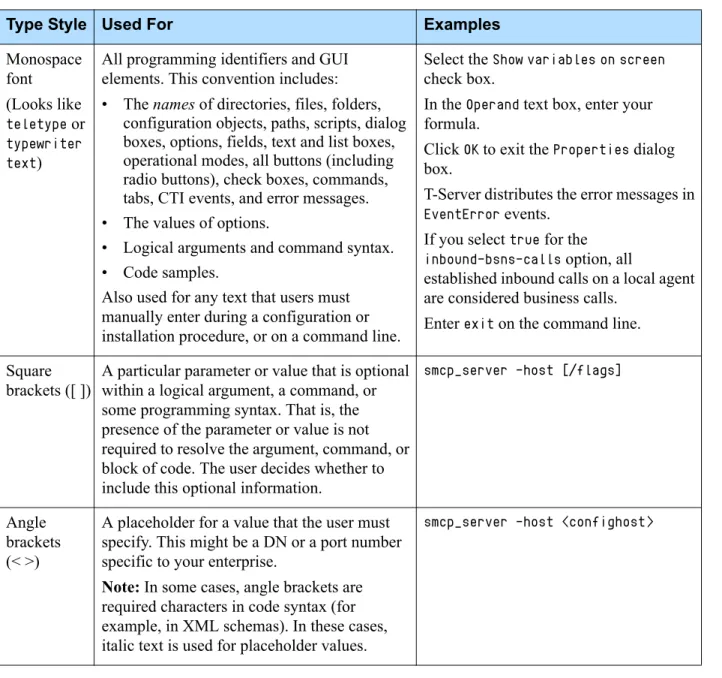
Document Conventions ... 137
List of Procedures
Creating the necessary configuration objects for GenesysAdministrator Extension . . . 40
Setting up the host for Genesys Administrator Extension server . . . 47
Installing Tomcat . . . 48
Configuring Tomcat to enable HTTPS-Only mode . . . 51
Installing Genesys Administrator Extension server on a Linux host. . . . 55
Installing Genesys Administrator Extension server on a Windows Server 2008 host. . . 56
Choosing which GAX functionality is available on the host . . . 57
Setting up the Genesys Administrator database (for Oracle) . . . 59
Setting up the Genesys Administrator database (for Microsoft SQL Server) . . . 60
Setting up the Genesys Administrator database (for PostgreSQL) . . . . 61
Configuring Genesys Administrator Extension . . . 63
Installing Samba . . . 65
Creating a shared IP repository . . . 66
Installing SQL*Plus. . . 66
Installing SoX . . . 69
Setting up ARM Runtime Web Server . . . 69
Configuring a Database Access Point for the LRM database . . . 72
Creating a keystore and managing the trust store . . . 74
Configuring the GAX Database for TLS (Oracle) . . . 77
Configuring the GAX Database for TLS (Microsoft SQL Server 2008). . 78
Configuring the GAX Database for TLS (PostgreSQL) . . . 79
Installing a GAX compatible plug-in by using the Software Import Wizard . . . 85
Installing a GAX compatible plug-in by using the command line . . . 87
Modifying plug-in settings . . . 88
Enabling or disabling a plug-in in GAX . . . 89
List of Procedures
Upgrading to the latest Genesys Administrator Extension for
Management Framework 8.1.1 or higher . . . 90 Upgrading to the latest Genesys Administrator Extension for
Management Framework 8.1.0 or lower . . . 93 Logging in to Genesys Administrator Extension. . . 100 Logging out of Genesys Administrator Extension. . . 102 Configuring Internet Explorer to allow all downloads
without warnings. . . 110 Configuring Internet Explorer to allow GAX downloads
without warnings. . . 110 Enabling download of License Usage Reporting reports from
Preface
Welcome to the Framework 8.1 Genesys Administrator Extension Deployment Guide. This document describes the deployment, starting and stopping, and troubleshooting procedures that are relevant to Genesys Administrator Extension.
This document is valid only for the 8.1 releases of this product, starting with 8.1.2. Earlier releases are not supported.
This preface contains the following sections:
About Genesys Administrator Extension, page 9 Intended Audience, page 10
Making Comments on This Document, page 10 Contacting Genesys Technical Support, page 10 Document Change History, page 10
For information about related resources and about the conventions that are used in this document, see the supplementary material starting on page 135.
About Genesys Administrator Extension
Genesys Administrator Extension, part of the Genesys Framework, is a web-based graphical user interface (GUI) that provides advanced
administrative and operational functionality that is targeted to Hosted Service Providers as well as Enterprise customers.
In brief, you will find the following information in this guide:
• How to deploy Genesys Administrator Extension.
• How to access Genesys Administrator Extension.
• Suggestions for troubleshooting your Genesys Administrator Extension installation.
Preface Intended Audience
Intended Audience
This document is intended primarily for system integrators, system
administrators, contact center managers, and operations personnel. It has been written with the assumption that you have a basic understanding of:
• Computer-telephony integration (CTI) concepts, processes, terminology, and applications
• Network design and operation
• Your own network configurations
You should also be familiar with Genesys Framework architecture and functions, as described in the Framework Deployment Guide.
Making Comments on This Document
If you especially like or dislike anything about this document, feel free to e-mail your comments to [email protected].
You can comment on what you regard as specific errors or omissions, and on the accuracy, organization, subject matter, or completeness of this document. Please limit your comments to the scope of this document only and to the way in which the information is presented. Contact your Genesys Account
Representative or Genesys Technical Support if you have suggestions about the product itself.
When you send us comments, you grant Genesys a nonexclusive right to use or distribute your comments in any way it believes appropriate, without incurring any obligation to you.
Contacting Genesys Technical Support
If you have purchased support directly from Genesys, please contact Genesys Technical Support.
Before contacting technical support, please refer to the Genesys Care Program Guide for complete contact information and procedures.
Document Change History
This section lists topics that are new or that have changed significantly since the first release of the Framework 8.1 Genesys Administrator Extension Deployment Guide.
Preface Document Change History
Document Version 8.1.302.00
The following topics have been added or have changed significantly since the 8.1.301.00 release:
• Notes have been added throughout this document to indicate that License Usage Reporting functionality is now provided by the License Reporting Manager plug-in for GAX. This change applies to GAX 8.1.310 releases or higher.
• Chapter 1, “Genesys Administrator Extension Overview,” on page 15: The section “New in Genesys Administrator Extension” on page 30
was modified.
• Chapter 2, “Setting Up Genesys Administrator Extension,” on page 35: “Browser Requirements” on page 37 was modified.
“Required Permissions and Role Privileges” on page 37 was modified. Step 6 in Procedure: Installing Tomcat, on page 48 was modified to
indicate that users of GAX 8.1.3 releases and higher are not required to download ODBC drivers from Oracle. These drivers are now included with the GAX installation package.
A warning was added to Procedure: Setting up the Genesys
Administrator database (for Microsoft SQL Server), on page 60. Procedure: Setting up the Genesys Administrator database (for
PostgreSQL), on page 61 was added.
A note was added to “Installing Samba” on page 65.
Procedure: Configuring the GAX Database for TLS (PostgreSQL), on
page 79 was added.
Step 3 of Procedure: Upgrading to the latest Genesys Administrator
Extension for Management Framework 8.1.1 or higher, on page 90 was modified to indicate that this step applies only to instances that use GAX Application object of type Genesys Generic Server.
Procedure: Upgrading to the latest Genesys Administrator Extension
for Management Framework 8.1.1 or higher, on page 90 was updated. Procedure: Upgrading to the latest Genesys Administrator Extension
for Management Framework 8.1.0 or lower, on page 93 was updated.
Document Version 8.1.301.00
The following topics have been added or have changed significantly since the 8.1.201.00 release:
• Chapter 1, “Genesys Administrator Extension Overview,” on page 15: “Genesys Administrator Extension” on page 15 was modified to
include information about language packs.
“Solution Deployment” on page 17 was modified. “Account Management” on page 21 was added.
Preface Document Change History
“New in Genesys Administrator Extension” on page 30 was modified. • Chapter 2, “Setting Up Genesys Administrator Extension,” on page 35:
“Browser Requirements” on page 37 was modified. Procedure: Installing Tomcat, on page 48 was modified.
Procedure: Enabling UTF-8 character encoding (for Oracle), on
page 62 was added.
“Managing GAX Compatible Plug-ins” on page 83 was added. Procedure: Upgrading to the latest Genesys Administrator Extension
for Management Framework 8.1.1 or higher, on page 90 was updated. Procedure: Upgrading to the latest Genesys Administrator Extension
for Management Framework 8.1.0 or lower, on page 93 was updated.
• Chapter 3, “Accessing Genesys Administrator Extension,” on page 99: “Preferences” on page 102 was added.
• Chapter 4, “Troubleshooting Genesys Administrator Extension,” on
page 107:
“Tomcat Issues” on page 108 was updated. “Browser Issues” on page 109 was updated.
• Appendix A, “Genesys Administrator Extension Role Privileges,” on
page 115 was updated throughout.
• Appendix B, “Configuration Options,” on page 123:
New configuration options were added to the following sections: “general Section” on page 124
“asd Section” on page 127 “log Section” on page 131
Document Version 8.1.201.00
The following topics have been added or have changed significantly since the 8.1.101.00 release:
• Chapter 1, “Genesys Administrator Extension Overview,” on page 15: “Genesys Administrator Extension” This section summarizes the
features of GAX.
“New in Genesys Administrator Extension” This section summarizes the new features of the latest release of GAX.
• Chapter 2, “Setting Up Genesys Administrator Extension,” on page 35: “Prerequisites” on page 36 was updated.
“Browser Requirements” on page 37 was updated.
“Deploying Multiple Instances of GAX with Shared Resources” on
page 38 was added.
Preface Document Change History
“Minimum Required File System Permissions and Settings for GAX Deployment” on page 38 was added.
The prerequisites and content of the Procedure: Creating the necessary
configuration objects for Genesys Administrator Extension, on page 40
were extensively updated.
The following deployment procedures were added or extensively modified:
Procedure: Setting up the host for Genesys Administrator Extension
server, on page 47
Procedure: Installing Tomcat, on page 48
Procedure: Installing Genesys Administrator Extension server on a
Windows Server 2008 host, on page 56
Procedure: Choosing which GAX functionality is available on the
host, on page 57
Procedure: Setting up the Genesys Administrator database (for
Oracle), on page 59
Procedure: Setting up the Genesys Administrator database (for
Microsoft SQL Server), on page 60
Procedure: Installing SQL*Plus, on page 66 Procedure: Installing SoX, on page 69
Procedure: Setting up ARM Runtime Web Server, on page 69 “Operational Parameter Management” on page 67 was modified. “Audio Resource Management” on page 68 was extensively modified. “Configuring System Security” on page 72 was added. This section
includes information and procedures about the following: “Default Account Support”
“Transport Layer Security (TLS)” “Cross-site Scripting and Cookies” “Securing Server-side Cookies” “Setup”
“Inactivity Timeout”
“Configuring the Auditing Feature” on page 81 was added. “Managing GAX Compatible Plug-ins” on page 83 was added. “Upgrading GAX” on page 90 was added.
“Customizing the GAX Homepage” on page 96 was added.
“Cleaning the GAX Database After a Tenant is Deleted” on page 96 was added.
• Chapter 3, “Accessing Genesys Administrator Extension,” on page 99: The Procedure: Logging in to Genesys Administrator Extension, on
page 100 was modified.
“Logging In to Genesys Administrator from GAX” on page 101 was added.
Preface Document Change History
• Chapter 4, “Troubleshooting Genesys Administrator Extension,” on
page 107:
“Running Out of Memory” on page 108 was updated. “Tomcat Issues” on page 108 was updated.
The Procedure: Configuring Internet Explorer to allow GAX
downloads without warnings, on page 110 was modified.
• Appendix A, “Genesys Administrator Extension Role Privileges,” on
page 115:
Role Privileges were added to “Solution Deployment” on page 117. • Appendix B, “Configuration Options,” on page 123:
New configuration options were added to the following sections: “general Section” on page 124
“ga Section” on page 130 “log Section” on page 131 “opm Section” on page 133
Document Version 8.1.101.00
The following topics have been added or have changed significantly since the 8.1.001.00 release:
• Information about exporting files for auditing purposes has been added to “Solution Deployment” on page 17.
• “Database Size Requirements” on page 28 has been added to Chapter 1.
• Information about configuring Internet Explorer to enable GAX files to be downloaded without the information warning bar blocking the download has been added to the “Browser Requirements” section of Chapter 2 and the “Browser Issues” section of Chapter 4.
• Information about deploying GAX in a load-balanced environment has been added to the Procedure: Creating the necessary configuration objects for Genesys Administrator Extension, on page 40.
• The Procedure: Configuring Tomcat to enable HTTPS-Only mode, on
page 51, has been added to Chapter 2.
• A note about handling error messages during installation has been added to the Procedure: Installing Genesys Administrator Extension server on a Linux host, on page 55.
• The “Configuring System Security” section has been added to Chapter 2.
• The “Logging In” section in Chapter 3 has been modified.
• The procedures “Configuring Internet Explorer to allow all downloads without warnings” and “Configuring Internet Explorer to allow GAX downloads without warnings” have been added to Chapter 4.
Chapter
1
Genesys Administrator
Extension Overview
This chapter provides a brief description of Genesys Administrator Extension and its architecture.
This chapter contains the following sections: Genesys Administrator Extension, page 15 Architecture, page 24
Database Size Requirements, page 28
New in Genesys Administrator Extension, page 30
Genesys Administrator Extension
Genesys Administrator Extension (GAX) is an application that provides additional administrative capabilities to both technical and business users of Genesys Administrator. Currently, the following GAX core modules are supported:
• Solution Deployment (also referred to as Automated Solution Deployment in GAX 8.1.2 releases)
• Operational Parameter Management
• Audio Resource Management
• License Usage Reporting (for GAX 8.1.301 releases or lower)
• Account Management (available in releases 8.1.3 and higher)
• GAX/Genesys Administrator Single-Sign-on
Genesys Administrator Extension also supports plug-in resources from other Genesys products, such as EZPulse. Refer to “Managing GAX Compatible Plug-ins” on page 83 for more information.
Chapter 1: Genesys Administrator Extension Overview Genesys Administrator Extension
Genesys Administrator is unaffected by Genesys Administrator Extension. It provides the interface to configure, monitor, and control the management environment.
The following subsections describe some of the features of the GAX interface.
Tenant Filtering
GAX comprises a set of modules that are selected and viewed in a browser interface. Each of the modules enables you to filter the information that you view about the applications that you have configured and deployed in the Genesys environment.
In a multi-tenant environment, GAX enables you to filter your views by a single tenant or by multiple tenants. By default, when you log in the view is of your default tenant. You can use the tenant selector to change the view so that you can view by one or more tenants.
Filtering and Sorting Lists and Tables
All lists and tables in the GAX interface can be sorted by clicking on the column headings. Tables and list can also be filtered by appropriate criteria, for example:
• Tenant
• Date
• Date range
• Name
• Deployed by
• Deployed date
Field Auto-completion
All fields in the GAX interface that have predefined values support
auto-completion. When you start to enter a value in the field, GAX searches for an existing value in the database and completes the entry. You can override auto-completion by continuing to enter the value. You can accept the
auto-completion value by pressing Enter.
Localization
GAX supports the installation of multiple language packs for the user interface. You can choose to configure one default language across all GAX instances, while each user can select a different language. Default and
Chapter 1: Genesys Administrator Extension Overview Genesys Administrator Extension
You can install language packs by using the plug-in installation procedure. See “Installing a GAX compatible plug-in by using the Software Import Wizard” on page 85 for more information, or refer to the Help pages by clicking the Help button in GAX.
Solution Deployment
Solution Deployment enables you to fully deploy Solution Definitions and Installation Packages (IPs) to remote locations. This includes installation and configuration of all of the necessary Applications and updates to existing multi-tenant Applications, where appropriate.
A Solution Definition consists of none, one, or multiple IPs for Genesys components. For Hosted Provider Edition, the IPs to be deployed must be primarily related to Tenant objects, and should contain object definitions, access permissions, and role privileges.
A Solution Definition consists of an XML file that defines the steps to install, upgrade, or configure IPs and system configurations to successfully deploy a solution. For information about authoring Solution Definition files, see the Genesys Administrator wiki at
http://docs.genesyslab.com/wiki/index.php?title=Genesys_Administrator. Solution Deployment can make changes to tenant objects in Configuration Server, perform installations of IPs, or execute external scripts, such as database scripts.
For each Deployed Solution, from the Deployed Solutions window you can export a file that contains the properties, summary, and actions for auditing purposes (this functionality is available in releases after 8.1.200.30).
Defined Privileges
Roles and their privileges define what you can do in a given application. In Genesys Administrator Extension, roles and their privileges are controlled by the use of Role objects, which are assigned to Users (including Agents) and Access Groups.
Note: Genesys Deployment Agent (GDA) does not support multiple concurrent deployments on the same host. Therefore, multiple users cannot deploy a solution by using GAX on the same host at the same time that GDA is deploying. This limitation has always existed for GDA.
Note: Not all browsers enable you to use filenames that are not US-ASCII compatible; therefore, Genesys recommends that you use only filenames that are US-ASCII compatible.
Chapter 1: Genesys Administrator Extension Overview Genesys Administrator Extension
Privileges are imported into GAX during the upload of an Installation Package (IP). All privileges that are defined in the metadata of the IP are imported into the GAX database. Privileges are defined as "task" elements in the metadata XML of the IP.
Solution Package Definition File Version Tracking
During normal use, Solution Package Definition files (also called SPDs or just Solution Definitions) are added, upgraded, revised, and removed. Solution Deployment supports versioning, auditing, and tracking of changes of SPDs from within the GAX interface. The tracking report can be exported to a CSV file for use outside of GAX (this functionality is available in releases after 8.1.200.30).
Solution Deployment enables you to view and access past versions of SPDs. You can also add custom comments and notes to any version.
You can filter and sort the SPD history by one or more of the following criteria:
• Solution—Group results by deployed solutions.
• Tenant—Group results by tenant and select a subset of a tenant or tenants by Solution and version.
• Date—Group results by date range.
• Result—Group by successful and failed deployments.
You can generate reports for both individual Solutions as well as for individual tenants.
You can configure the reports by specific criteria, including the following parameters:
• Solution Definition name
• Solution Definition version
• Tenant name
• Profile
• Date deployed
• Deployed by (name of the individual who performed the deployment)
• Result of deployment (Success, Fail, Unknown)
• Latest (true or false)
• Application name (IP Xref)
Chapter 1: Genesys Administrator Extension Overview Genesys Administrator Extension
External Script Support
Solution Deployment passes arguments to external scripts when executing them, and can receive back results from the execution of a script. For example, if you have a script to create a new virtual host by using the VMware API, you can specify a name or naming convention from within an SPD. You will then receive confirmation that the creation was successful and the name of the new host that was created.
Operational Parameter Management
Operational Parameter Management enables the creation of parameters that can be used in parameterized Routing Strategies, in which the values of the parameters are defined at runtime and integrated into the call flow.
In most cases, parameter creation and assignment proceeds as follows:
1. The Solution Provider defines the parameters by specifying the type of parameter and a name that can be referenced in a strategy.
2. The Solution Provider groups parameters into a Parameter Group Template. A parameter can be associated with one or more templates.
3. The Solution Provider deploys Parameter Group Templates to one or more Tenants.
4. The tenant administrator, or a user with the appropriate roles and
permissions, then enters values for the parameters in the Parameter Group, enabling control of active strategies. Genesys Administrator Extension stores those values in the Configuration Database as part of a Transaction object.
5. The Universal Routing Server Application object (or any other interaction routing application such as GVP) executes a Routing Strategy to read those values and integrate them into the call flow. Orchestration Server and GVP Media Server Application objects are also supported.
In select cases, a Tenant may create its own Routing Strategy. The Solution Provider then grants the Tenant permission to define parameters and create the Group templates. Provide a tenant all the required privileges to create
parameters, group templates, and deploy groups (refer to Appendix A, “Genesys Administrator Extension Role Privileges,” on page 115).
Operational Parameter Management can be used to deploy parameters that can be used by Genesys Voice Platform (GVP) and other VXML applications. You can use Operational Parameter Management to deploy a set of parameters to create a new Configuration Layer object that is associated with a specified VXML application that is used by GVP.
Operational Parameter Management can also be used to deploy parameters that can be used by Orchestration Applications (SCXML).
Chapter 1: Genesys Administrator Extension Overview Genesys Administrator Extension
Operational Parameter Management can be used to update a parameter group after it has been deployed. You can add, remove, re-order, and modify parameters that have already been deployed to a parameter group. All modifications are tracked as part of the audit trail.
Objects and strategies can be associated with specific Parameter Group Templates to ensure that they are not deployed with the incorrect objects or strategies. Operational Parameter Management provides a view of all of the objects and strategies that are associated with a specific Parameter Group so that you know where the objects are used, including information about Tenant ownership and associated applications and scripts.
You can specify the application type or the specific application object for which the Parameter Group Template is compatible. If the type is set, it becomes a permanent attribute of the application. If there are multiple
simple-routing-type routing scripts in the system, you can specify that only one matches the Parameter Group Template and is therefore compatible, rather than all scripts of a type.
When you create the Parameter Group Template, you can select an existing application of a particular type to associate the Parameter Group Template with the application. This ensures that the correct applications are deployed at deployment time.
Audio Resource Management
Genesys Administrator Extension provides an interface for Audio Resource Management. This enables you to manage audio resources for both
announcements and music files. This module also enables the conversion of audio files (.wav using PCM encoding), and the deployment of audio files to Media Servers throughout the network.
Generally, audio resources are handled as follows:
1. The Solution Provider maintains Audio Resources. Each Audio Resource contains one or more Audio Resource Files. Each Audio Resource File is associated with one Personality.
In select cases, Tenants may also create their own Audio Resource Files, Personalities, and Audio Resources. To create Audio Resources as a tenant, provide the corresponding role privilege to the tenant user.
2. The Solution Provider deploys Audio Resources to Tenants.
If a Tenant has created its own Audio Resource Files and Personalities,
Note: Audio Resource Management supports only WAV files that have a PCM encoding. If you use non-PCM encoded files, there might be conversion artifacts, or the conversion might fail completely.
Chapter 1: Genesys Administrator Extension Overview Genesys Administrator Extension
3. A Routing Strategy that is executed by the Tenant selects an Audio Resource and a Personality. The Routing Strategy might use Operational Parameter Management to make the selection.
Audio Resource Management supports deployment of multiple audio resources to multiple tenants in a single step. You can select multiple audio resources from the tenant list and execute the deployment to several tenants
simultaneously.
License Usage Reporting
License Usage Reporting is a Graphical User Interface (GUI) application that is provided by Genesys Administrator Extension. It accesses data from a central License Reporting Manager (LRM) database to provide on-demand license utilization reporting to Solution Providers and tenant administrators. The central LRM database contains data that is collected from all local LRM databases.The data collection is done by the LRM system by using automated nightly processes. If the data is not collected, contact the LRM Administrator. See “License Usage Reports Not Available” on page 113.
The License Usage Reporting module also enables you to define provisioned counts for each tenant. Here you can select sellable items as well as the provisioned quantity and the start date.
LRM maintains a full history of Provisioned Counts in the system database in the LRM_PROVISIONED_COUNT table. This table keeps one Provisioned Count value for each unique triple: TENANT_ID, SELLABLE_ITEM_TYPE, EFFECTIVE_DATE. The lrm-provisioned-counts configuration layer object might have as many records as is required by the GAX application.
Account Management
Account Management enables the general management of configuration objects, such as:
• Users
• Agent Groups
Note: All Audio Resources are treated as system announcements—even when they are created by a tenant user. This means that a routing block must address the audio resource as resources of type System Announcement, not Tenant Announcement.
Note: This section only applies to GAX 8.1.301 releases or lower. In GAX 8.1.310 releases or higher, License Usage Reporting functionality is provided by the License Reporting Manager (LRM) plug-in for GAX.
Chapter 1: Genesys Administrator Extension Overview Genesys Administrator Extension
• Skills
• Access Groups
• Roles
• Capacity Rules
In addition, Account Management enables you to create, edit, and manage these objects one at a time or in bulk.
Users
The User Accounts panel is a central location for creating, provisioning, and managing user accounts.
Users are the contact center personnel, including Agents, who need access to Genesys applications. Agents are Users who handle customer interactions directly.
Agent Groups
The Agent Group panel lists the Agent Groups in your environment.
An Agent Group is a logical grouping of Agents. Agent Groups are typically set up to provide particular sets of contact center services.
Skills
The Agent Skills panel provides a streamlined interface for the creation and management of Agent Skills.
Skills are qualities or abilities that Agents possess and that affect the placement of each Agent in a contact center hierarchy. Common Skills include abilities in different languages, particular categories of product knowledge, or ability in particular types of sales.
Agents can be associated with a set of Skills. For each Skill, the Agent is also given a Skill level, or level of competency with this skill.
Access Groups
The User Access Group panel lists the User Access Groups in your environment.
Access Groups are groups of Users who have the same set of permissions for Configuration Database objects.
In many cases, users fall into a small number of categories with similar access needs. A team of agents all performing the same tasks often has identical access needs. Two or three people who are responsible for maintaining a
Chapter 1: Genesys Administrator Extension Overview Genesys Administrator Extension
can greatly simplify access control by adding individuals to Access Groups and then setting permissions for those groups.
Roles
The Roles panel lists the roles in your environment.
Roles define what you can do in a given application. In Genesys Administrator Extension, roles and their privileges are controlled by the use of Role objects, which are assigned to Users (including Agents) and Access Groups.
Roles are Application-specific, and must be defined for each Application that supports them.
Role management allows GAX users to configure and distribute roles by tenant. Role management provides the following features:
• A single-click model for adding a role privilege to a role
• Define which role privileges can be modified by tenant administrator users, enabling tenant administrators to manage their user accounts and create new roles as necessary
The privileges available to each Role are determined by the settings in the Solution Deployment module.
A Default Role is created during the Installation Package (IP) process.
Typically, the Default Role is an administrator or Super User. The default role contains a user name and a list of privileges. You can recreate the Default Role if a required role is unavailable.
Capacity Rules
The Capacity Rules panel enables you to set capacity rules for various
operations in your environment. For example, you might choose to set capacity rules for the number of voice interactions or e-mail interactions, or a
combination of both, that can be processed at one time.
Auditing
The auditing feature writes data to Message Server about activities in Operational Parameter Management and Audio Resource Management, and Message Server writes the data to the Genesys Log database. Auditing data is made available to the GAX user by selecting the History option in the Related menu in the panel of certain items in the GAX user interface. The auditing feature reads the information from the Log database and enables you to view the change history of objects such as Personalities and Parameter Groups.
Chapter 1: Genesys Administrator Extension Overview Architecture
Architecture
This section describes the architecture of Genesys Administrator Extension as it resides in the User Interface Layer of the Genesys Framework, and the architecture and connections within a Genesys Administrator Extension configuration.
User Interface Layer
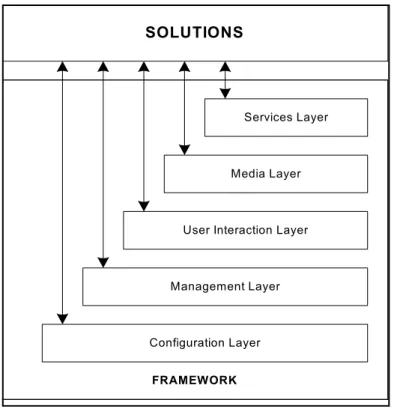
Genesys Administrator Extension resides in the User Interaction Layer of the Genesys Framework. This Layer provides comprehensive user interfaces to:
• Configure, monitor, and control the management environment.
• Perform specific tasks related to Solution Deployment, Operational Parameter Management, Audio Resource Management, Account
Management, and License Usage Reporting (in GAX 8.1.301 releases or lower).
Figure 1 illustrates how the User Interaction Layer is positioned within the Framework architecture.
Figure 1: Framework Architecture
Refer to the Framework 8.x Deployment Guide or Framework 8.x Architecture Help for more information about Framework architecture as a whole.
SOLUTIONS
Services Layer
Media Layer
Management Layer
Configuration Layer
FRAMEWORK
Chapter 1: Genesys Administrator Extension Overview Architecture
Functions
The User Interaction Layer provides centralized web-based functionality and interfaces for the following:
• Remote deployment of Genesys components by using the Genesys Deployment Agent (a Management Layer component).
• Configuration, monitoring, and control of applications and solutions.
Architecture
Figure 2 shows the structure of the User Interaction Layer. Other components with which it interacts are not shown here; see Figure 3 on page 27 for a more detailed diagram of the architecture of Genesys Administrator Extension.
Figure 2: User Interaction Layer Architecture
• The browser-based Genesys Administrator Extension includes a
comprehensive user interface to perform tasks that are related to Solution Deployment, Operational Parameter Management, Audio Resource Management, Account Management, and License Usage Reporting (for GAX 8.1.301 releases or lower).
Chapter 1: Genesys Administrator Extension Overview Architecture
• Currently, Genesys Administrator and Genesys Administrator Extension are the only components in the User Interaction Layer.
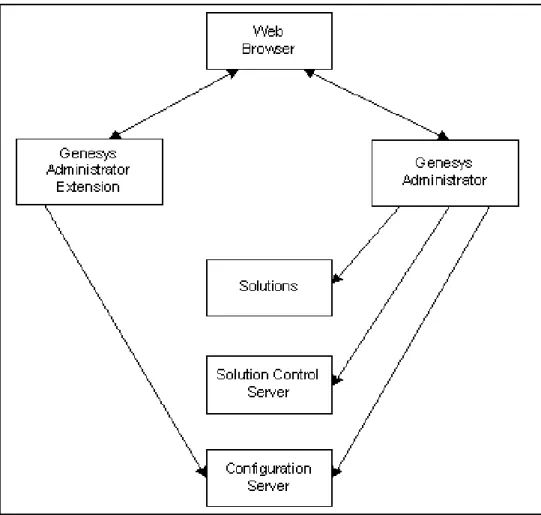
• Genesys Administrator Extension:
Communicates with the Configuration Server (a Configuration Layer component) to exchange configuration data.
Uses the GAX Database to store non-configuration information, such as operational parameter templates and audio resource metadata. Reads license utilization information from the LRM Database to
generate License Usage reports (in GAX 8.1.301 releases or lower). Uses Sound eXchange (SoX) to encode audio files.
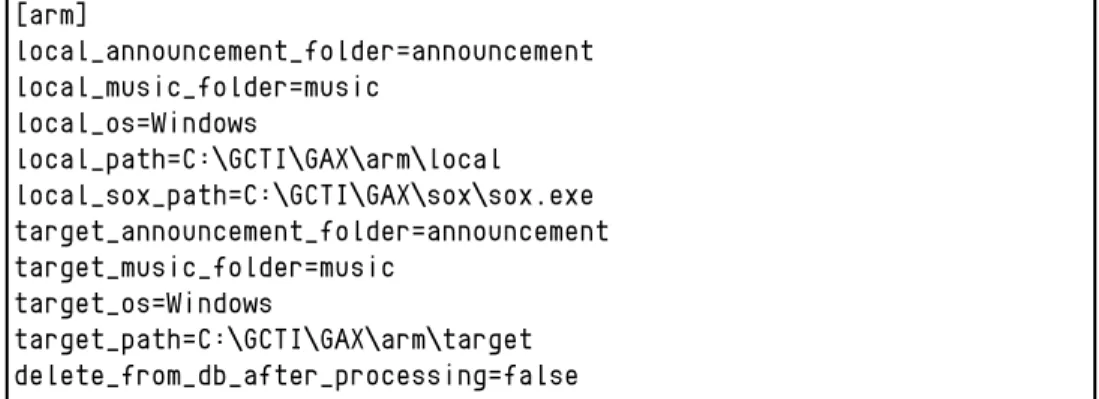
Sends encoded audio files to the Audio Resource Manager (ARM) Storage. From the ARM storage, the ARM Web Server distributes them to GVP Media Servers.
Reads the Genesys IPs in Solution Deployment (ASD) storage to remotely deploy solutions to Hosts on which Local Control Agent is installed, and the Genesys Deployment Agent is running.
• Genesys Administrator:
Communicates with the Configuration Server (a Configuration Layer component) to exchange configuration information.
Communicates with the Solution Control Server (a Management Layer component) to exchange status, operations, and control information. Reads logs from the Centralized Log Database (a Management Layer
component).
Provides the web services for Genesys Administrator Extension. Uploads IPs to ASD storage for use by Genesys Administrator
Extension.
• Depending on the solutions that are deployed in the system, Genesys Administrator and Genesys Administrator Extension might also communicate with other back-end servers to retrieve solution-specific information.
Configurations
Genesys Administrator Extension can be deployed as a single instance or in a load-balanced environment. Figure 3 on page 27 shows how Genesys
Administrator Extension connects with its modular components. Figure 4 on
page 28 shows the connections that Genesys Administrator Extension makes to other components in a load-balanced environment. When deployed in a
Note: Both TCP/IP v4 and TCP/IP v6 communications are supported between GAX and other Genesys components.
Chapter 1: Genesys Administrator Extension Overview Architecture
Chapter 1: Genesys Administrator Extension Overview Database Size Requirements
Figure 4: Genesys Administrator Extension Architecture in a Load-Balanced Hosted Provider Edition environment
Database Size Requirements
To help you plan to manage your space requirements for audio resources, this section provides information about space allocation for a 100-tenant system with an average of 100 announcement files per segment, including
personalities.
The space required for the original audio resource files that are uploaded by tenants can be calculated as:
Chapter 1: Genesys Administrator Extension Overview Database Size Requirements
For example, if you have 100 tenants with 100 audio files of an average size of 3 MB you would have to calculate 30 GB of space for just the original audio files:
Original Files Storage Requirements = 100 x 100 x 3 MB =
30,000 MB = 30 GB
The original files are stored both in the database and on the disk (unless database storage is turned off by using the configuration options). The processed files are located only on the disk. Therefore, the raw storage that is required on the disk can be calculated as:
Processed Files Storage Requirements = ((<# of tenants> x <# of
announcement files> x <avg file size>) / <compression factor>) x (<# of conversion formats>)
In the example with 100 tenants, the requirement for Processed files is also 30 GB:
Processed Files Storage Requirements = ((100 x 100 x 3 MB) / 3) x (3) =
30,000 MB = 30 GB
For the database, which holds only the original files, additional space should be reserved to allow for short time peaks and better database performance. Genesys recommends that 50% (1.5 times) of additional space should be reserved for this purpose:
Database Size Requirements = <Original Files Storage Requirements> x <reserve percentage>
In this example, the suggested database space requirement is: Database Size Requirements =
30 GB x 1.5 = 45 GB
Your disk space requirement should also include reserved space to prevent degraded performance, which can occur if drives become too full.
Genesys recommends that the reserved space allocation is 25% (1.25) of the actual raw requirements:
Disk Size Requirements = (<Original Files Storage Requirements> + <Processed Files Storage Requirements>) x <reserve percentage> Therefore, in total, for the original files, the converted files, and reserved space, 75 GB are required:
Disk Size Requirements =
Chapter 1: Genesys Administrator Extension Overview New in Genesys Administrator Extension
New in Genesys Administrator Extension
Refer to “Document Change History” on page 10 for a detailed list of changes to this document for various releases. Many privileges, configuration options, and procedures change between releases. Be sure to use the privileges, configuration options, and procedures that apply to the release that you are deploying.For users of earlier releases of GAX, upgrade procedures can be found in the section “Upgrading GAX” on page 90 of Chapter 2, “Setting Up Genesys Administrator Extension,” on page 35.
Genesys Administrator Extension 8.1.310.00
The following new feature is available in this release:1. Support for PostgreSQL databases. For information on how to use GAX with a PostgreSQL database, see Procedure: Setting up the Genesys Administrator database (for PostgreSQL), on page 61.
Genesys Administrator Extension 8.1.301.00
The following new features and configuration options are available in the initial 8.1.3 release or have been modified since the most recent 8.1.2 Restricted Release:
1. The following core features have been added to GAX:
a. Improved user interface for managing and authorizing plug-ins
b. Throttling of bulk updates to Configuration Server
c. Ability to set User Preferences and System Preferences (User
Preferences take precedence) for settings such as Language and Time Zone
2. Account Management (refer to “Account Management” on page 21) is a new plug-in that offers the following features:
a. Templates for creating Agents or User Accounts
b. Set or reset passwords for single or multiple users
c. Improved user interface for managing User Accounts and Skills
d. Multiple supervisors can be added to each Agent Group
e. Improved role management
f. Improved Capacity Rules
g. Improved permissions management
h. Creation of Bulk Change Sets for manipulating several Configuration Objects simultaneously
Chapter 1: Genesys Administrator Extension Overview New in Genesys Administrator Extension
3. The user interface has been redesigned to provide a more natural layout and better visibility of related tasks and items. The improvements include:
a. Resizeable, collapsible, and expandable panels
b. Current panels that are maintained when switching between objects
c. Improved user interface for managing modules and plug-ins
d. Additional icons to identify objects in lists
4. Operational Parameter Management (refer to “Operational Parameter Management” on page 19) has been improved to support the following capabilities:
a. Multiple configuration object types can be selected simultaneously
b. Selection of list objects to use multiple Parameter Groups with a single strategy
c. Add Sections to aid in visually identifying Parameters within a Parameter Group
d. Control access to Parameter Groups by tenant
e. Use Schedule as a Parameter type
f. Optional Parameters that do not require values to be set
g. Synchronize Parameter Groups after a change to the Parameter Group Template
h. Restrict access to Parameter Groups based on the access control settings of the Configuration Transaction object
Use the configuration options in the “opm Section” on page 133 to control how Operational Parameter Management works. Operational Parameter Management role privileges are described in the section “Operational Parameter Management” on page 116.
5. Solution Deployment (refer to “Solution Deployment” on page 17) has been improved to support the following capabilities:
a. Deploy Genesys components that support silent installs
b. Upgrade, rollback or uninstall deployed components
c. Addition of a software repository
d. Use Defined Privileges to manage access to components
Use the configuration options in the “asd Section” on page 127 to control how Solution Deployment works. Role privileges are described in the section “Solution Deployment” on page 117.
New and Changed Privileges
The following privileges were added or changed in this release (refer to Appendix A, “Genesys Administrator Extension Role Privileges,” on
Chapter 1: Genesys Administrator Extension Overview New in Genesys Administrator Extension
Group: Genesys Administrator Extension - General
New privileges
• Read Plug-ins—Enables users to read nodes and plug-ins.
• Write Plug-ins—Enables users to enable or disable plug-ins, and also enables users to modify plug-in options.
Group: Genesys Administrator Extension - Solution Deployment
Changed privileges
• Deploy IPs—Enables the user to deploy an IP or perform any supported profile, such as a rollback or upgrade;.
Group: Genesys Administrator Extension - Account Management
New privileges
• Administer Users—Allows a user to read and update the Force Password Reset on Next Login option in the User Accounts section. It also allows access to the User Options, Access Control, and Accessible Objects panels. Prerequisite: Write Users.
• Read Agent Information—Allows a user to access the Agent Information function and to view agent information in the User Accounts section. Prerequisites: None.
• Read Users—Allows a user to access the User Accounts details pane, except for Force Password Reset on Next Login, User Options, Access Control, Accessible Objects, and Agent Information. Prerequisites: None.
• Write Agent Information—Allows a user to create and update all values on the User Accounts details pane for agents. Prerequisite: Read Agent Information.
• Write Users—Allows a user to create and update all values on the User Accounts details pane except for Force Password Reset on Next Login, User Options, Access Control, Accessible Objects, and Agent
Notes: • The Force Password Reset on Next Login option displays only if Genesys Administrator Extension connects to Management Framework version 8.1.1 and higher.
• For more information about resetting passwords, please see the
Chapter 1: Genesys Administrator Extension Overview New in Genesys Administrator Extension
• Administer Roles—Allows a user to access the User Options and Access Control buttons. Prerequisite: Write Roles.
• Read Roles—Allows a user only to read Roles. The User Options and Access Control buttons are not displayed. Prerequisite: None.
• Write Roles—Allows a user to create, update, and delete Roles. The User Options and Access Control buttons are not displayed. Prerequisite: Read Roles.
• Administer Skills—Allows a user to access the User Options and Access Control buttons. Prerequisite: Write Skills.
• Read Skills—Allows a user only to read Skills. The User Options and Access Control buttons are not displayed. Prerequisite: None.
• Write Skills—Allows a user to create, update, and delete Skills. The User Options and Access Control buttons are not displayed. Prerequisite: Read Skills.
• Administer Agent Groups—Allows a user to access the User Options and Access Control buttons. Prerequisite: Write Agent Groups.
• Read Agent Groups—Allows a user only to read Agent Groups. The User Options and Access Control buttons are not displayed. Prerequisite: None.
• Write Agent Groups—Allows a user to create, update, and delete Agent Groups. The User Options and Access Control buttons are not displayed. Prerequisite: Read Agent Groups.
• Administer Access Groups—Allows a user to access the User Options and Access Control buttons. Prerequisite: Write Access Groups.
• Read Access Groups—Allows a user only to read Access Groups. The User Options and Access Control buttons are not displayed. Prerequisite: None.
• Write Access Groups—Allows a user to create, update, and delete Access Groups. The User Options and Access Control buttons are not displayed. Prerequisite: Read Access Groups.
• Administer Capacity Rules—Allows a user to access the User Options and Access Control buttons. Prerequisite: Write Capacity Rules.
• Read Capacity Rules—Allows a user only to read Capacity Rules. The User Options and Access Control buttons are not displayed. Prerequisite: None.
• Write Capacity Rules—Allows a user to create, update, and delete Capacity Rules. The User Options and Access Control buttons are not displayed. Prerequisite: Read Capacity Rules.
New and Changed Configuration Options
The following configuration options were added or changed in this release (refer to Appendix B, “Configuration Options,” on page 123:
Chapter 1: Genesys Administrator Extension Overview New in Genesys Administrator Extension
Section: general
This section contains general options for GAX (refer to “general Section” on
page 124).
New option
• confserv_timeout—Specifies the timeout value for connections to Configuration Server.
Section: asd
The following option has been added in the asd section (refer to “asd Section” on page 127).
New option
• local_ip_cache_dir—Specifies the local directory where the IP used for the deployment is cached. Caching the IP reduces deployment time if the IP is reused This option must be set to a UNC path or a local path that points to a directory that can be accessed (with read\write permissions) from the machine that is running the Genesys Administrator Extension server.
Section: log
The following options have been added in the log section (refer to “log Section” on page 131).
New options
• expire—Specifies the maximum number of log files to be kept. • log—Determines whether a log output is created.
• log-cache-size—Specifies the maximum number of logs in the log message queue.
Chapter
2
Setting Up Genesys
Administrator Extension
This chapter describes how to install and configure Genesys Administrator Extension. It also describes the prerequisites and other information for setting up Genesys Administrator Extension to perform the tasks that are described in Chapter 1 on page 15.
This chapter contains the following sections: Overview, page 35
Deploying Genesys Administrator Extension, page 39
Prerequisites for Genesys Administrator Extension Modules, page 63 Configuring System Security, page 72
Configuring the Auditing Feature, page 81 Managing GAX Compatible Plug-ins, page 83 Upgrading GAX, page 90
Customizing the GAX Homepage, page 96
Cleaning the GAX Database After a Tenant is Deleted, page 96
Overview
Genesys Administrator Extension is deployed on a web application server, and can be accessed by using a web browser. It does not have to be deployed in the same environment with Genesys Administrator, and nothing needs to be installed on client machines.
Note: GAX is normally deployed in a multiple tenant environment; however, single-tenant environment deployment is supported as of version 8.1.2. If you deploy GAX in a single-tenant environment, the Tenant Management features and filtering are not applicable.
Chapter 2: Setting Up Genesys Administrator Extension Overview
Prerequisites
Before you deploy Genesys Administrator Extension, you should review the planning information in the Framework 8.x Deployment Guide. This will help you to deploy Genesys Administrator and other components of the Framework in a manner that is most appropriate to your situation.
Genesys Administrator Extension requires Management Framework. To use the Role-based Access Control feature, Configuration Server 8.1.x is required.
The computer on which you install Genesys Administrator Extension must be capable of acting as a web application server, and must be running the
following:
• Red Hat Enterprise Linux 5.5 (64-bit) - Enterprise Edition, with Updates from RHN enabled;
Or,
Windows Server 2008 R2, with 64-bit applications running natively on a 64-bit OS.
• Java 6 Runtime (JRE) from Oracle. See the Procedure: Setting up the host for Genesys Administrator Extension server, on page 47 for information about obtaining and installing Java, if necessary.
• Tomcat 6.0.20 from Apache. When setting up Tomcat, Genesys strongly recommends that you enable gzip compression for responses. Follow the procedure “Installing Tomcat” on page 48.
In addition, each module of Genesys Administrator Extension might have additional prerequisites. Refer to “Prerequisites for Genesys Administrator Extension Modules” on page 63 for more information.
Note: A new application type, Genesys Administrator Server, was
introduced in Genesys Framework release 8.1.1 for use with Genesys Administrator Extension release 8.1.2 or higher. Previous versions of GAX do not support this new application type and must use the Genesys Generic Server application type.
To avoid issues with role assignments, you should upgrade the
application, metadata, and the roles to the new type when you migrate to GAX 8.1.2 or perform a fresh install (see Procedure: Upgrading to the latest Genesys Administrator Extension for Management
Chapter 2: Setting Up Genesys Administrator Extension Overview
Browser Requirements
Genesys Administrator Extension includes a web-based GUI with which you can manage Genesys applications and solutions. It is compatible with the following browsers:
• Microsoft Internet Explorer 8.x or 9.x
• Mozilla Firefox 5 or higher
• Safari 5 or higher
• Chrome 8 or higher
Genesys Administrator Extension is designed to be viewed at a minimum screen resolution of 1024x768, although higher resolutions are recommended. If you are working in 1024x768 mode, maximize your browser to ensure that you can see all of the interface. In addition, all windows of the browser must be set to a resolution of 1024x768 or greater.
Required Permissions and Role Privileges
Genesys Administrator Extension uses a permission-based mechanism and a role-based access control system to protect your data. Before installing and using Genesys Administrator Extension, ensure that all users have the necessary access permissions and role privileges to do their work. The following are examples of scenarios that require permissions:
• A tenant user must have write (Update) permission on his or her User object to set and save his or her user preferences in Genesys Administrator Extension.
• To log in to Genesys Administrator Extension, a user must have Read permission on his or her User object, Read and Execute permissions on his or her Tenant object, and Read and Execute permissions on the Genesys Administrator Extension client Application object. These permissions are usually assigned by adding the users to access groups.
Note: Genesys Administrator Extension supports all major browsers, but it is optimized for Chrome. Users of Internet Explorer 7.x might experience rendering issues in the user interface.
Note: If the download of Audio Resource Files, Encoded Files, and other GAX downloads are blocked by the Microsoft Internet Explorer 8 or 9 information bar and, after you confirm the download, you are
redirected to the main page and you must repeat the download request, you can adjust your browser settings to prevent this scenario
Chapter 2: Setting Up Genesys Administrator Extension Overview
There are no role privileges required to log in to GAX. However,
GAX-specific functions might require additional role privileges to be enabled. Refer to Appendix A on page 115 for more information about role privileges.
Deploying Multiple Instances of GAX with Shared
Resources
You can install multiple instances of GAX to support both High Availability (HA) and load balancing. You can also install multiple instances of GAX to take advantage of the GAX plug-in architecture. Each instance of GAX can be deployed with a different combination of plug-ins.
In either scenario the multiple instances of GAX share the same data resources, such as Configuration Server, the GAX database, and audio resources but are executed independently by different users on different hosts.
Minimum Required Firewall Permissions and Settings
for GAX Deployment
Your firewall must allow incoming connections on the Tomcat http and https ports. (for example 8080, 80, 433, and so on, based on your setup). Tomcat can listen on more than one port at once.
You must allow outgoing connections to allow GAX to establish connections; however, you can restrict the connections to networks that contain the
following components:
• GDA hosts
• Databases
• Genesys configuration layer servers: Configuration Server, Message Server, and Solution Control Server
Minimum Required File System Permissions and
Settings for GAX Deployment
The GAX operating system user is the user that runs the GAX process. The GAX operating system user must be the owner of the Tomcat folder and have the following permissions:
• Write permission on the log file folder
• Read/write access to the folder configured for ARM
Note: If Tomcat was extracted from the .tar file, the operating system user would already have these permissions.
Chapter 2: Setting Up Genesys Administrator Extension Deploying Genesys Administrator Extension
• For Genesys Administrator Extension 8.1.2 users only: Read access to the folder that is configured for the IP repository in the Solution Deployment plug-in.
Deploying Genesys Administrator
Extension
The following table summarizes the steps necessary to perform the basic deployment of Genesys Administrator Extension. Before beginning your installation, make sure that you have met the prerequisites listed in “Prerequisites” on page 36. If you plan to install any of the modules in Genesys Administrator Extension, refer to “Prerequisites for Genesys Administrator Extension Modules” on page 63 before using them.
Note: Unless specified otherwise, all commands that are entered on a command-line in this section should be issued as a root user
(command prompt of #) or as a regular user (command prompt of $).
Task Summary: Deploying Genesys Administrator Extension
Task Related Procedures and Information
1. Create and configure the configuration objects required for Genesys
Administrator Extension.
Use Genesys Administrator or a similar configuration utility to create the necessary configuration objects in the
Configuration Database.
Use the procedure “Creating the necessary configuration objects for Genesys Administrator Extension” on page 40. 2. Set up the user on the Host machine. Refer to the Genesys Administrator 8.1 Help for information
about creating a new group and a new user. 3. Set up the host on which Genesys
Administrator Extension server will run.
“Setting up the host for Genesys Administrator Extension server” on page 47.
4. Install Tomcat. Use the procedure “Installing Tomcat” on page 48 to download and install Tomcat.
5. Install Genesys Administrator Extension server.
“Installing Genesys Administrator Extension server on a Linux host” on page 55.
Chapter 2: Setting Up Genesys Administrator Extension Deploying Genesys Administrator Extension
Procedure:
Creating the necessary configuration objects for
Genesys Administrator Extension
Purpose: To create the following configuration objects required by Genesys
Administrator Extension:
• Host object for the computer on which Genesys Administrator Extension is to be installed (Step 1)
• Host object for the computer on which the database to be used by Genesys Administrator Extension will be located (Step 2 on page 41)
• Database Access Point to provide database access to the database used by Genesys Administrator Extension (Step 3 on page 42)
• Application object for Genesys Administrator Extension with a connection to Configuration Layer to retrieve configuration information (Step 4 on
page 42)
6. Set up the Database. Use Oracle product documentation, and the procedure “Setting up the Genesys Administrator database (for Oracle)” on page 59.
OR
Use Microsoft SQL Server 2008 R2 product documentation, and the procedure “Setting up the Genesys Administrator database (for Microsoft SQL Server)” on page 60.
OR
Use PostgreSQL product documentation, and the procedure “Setting up the Genesys Administrator database (for PostgreSQL)” on page 61.
7. (Optional) Enable UTF-8 character encoding for Oracle databases
Refer to “Enabling UTF-8 character encoding (for Oracle)” on page 62.
8. Configure Genesys Administrator Extension.
Use the procedure “Configuring Genesys Administrator Extension” on page 63.
9. Start Genesys Administrator Extension.
Use the procedure “Logging in to Genesys Administrator Extension” on page 100.
Task Summary: Deploying Genesys Administrator Extension (Continued)
Chapter 2: Setting Up Genesys Administrator Extension Deploying Genesys Administrator Extension
• Application object to provide the capability to log in to Genesys Administrator Extension (Step 5 on page 45)
Prerequisites
• Management Framework 8.0.0 or higher is installed and running. You must have Configuration Server 8.0.300.42 or higher.
• If you are using Configuration Server 8.1.1 or higher, you must use Genesys Administrator 8.1.2 or higher, as previous versions do not support the GAX application type for configuring role privileges.
• Genesys Administrator 8.1 or higher is installed and running.
Start of procedure
1. Create and configure a Host object for the computer on which Genesys Administrator Extension will be installed, as follows:
a. Use the instructions in Genesys Administrator Help or the Framework 8.x Deployment Guide to create and configure a Host object.
b. On the Configuration tab, specify a Solution Control Server Application object.
c. Click Save & Close to save the new object and its configuration.
2. Use the instructions in Genesys Administrator Help or the Framework 8.x Deployment Guide to create and configure a Host object for the computer on which the Oracle or Microsoft SQL Server 2008 R2 database to be used by Genesys Administrator Extension will be installed.
Notes: • All tasks in this procedure are completed by using Genesys Administrator or a similar configuration utility to create the necessary configuration objects in the Configuration Database. This procedure assumes that you are using Genesys Administrator. • In this procedure, use the instructions that are provided in Genesys
Administrator Help or the Framework 8.x Deployment Guide, and add the object-specific configuration requirements listed here.
Note: When using Genesys Administrator in a load-balanced
environment, make sure that all nodes have shared-access to the application metadata. See the Genesys Administrator Deployment Guide for details about how to set this up.